

Ok, there are actually more questions here, starting with “what’s the nicest way to have composite glyphs?”
Say, I have a data source with two columns - one contains the time of an intermediate event and one - the time of the final event. I want to show these as, say, diamond glyphs, but I thought that it would be better if it would have like a comet tail-style like this:
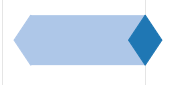
The easiest way I can think of is to just compile it out of separate glyphs, say, like this:
p = figure()
p.diamond(x=1,y=1,size=50,color=col[1])
p.line(x=[1, 5],y=[1,1],line_width=50,color=col[1])
p.diamond(x=5,y=1,size=50,color=col[0])
But now if I add a hovertool to all the glyphs, it kind of anchors to either of the elements - would be cool if there’d been a way to have all three glyphs to act as one instead…
And back to the question from the title - if I apply the jitter transformation to y coordinate, the glyphs all have their own offsets. How do I deal with that? I remember sometime during the beta we could do some easy transformations, but all I found in the current docs is JS-style functions and pre-defined transforms, like Jitter:
p.diamond(x=1,y={'value':1,'transform':bkm.Jitter(width=0.4)},size=50,color=col[1])