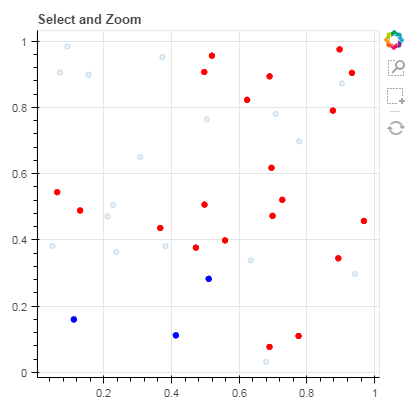
I’m not sure the title of this post explains the problem, but I was trying to use interactive legends in a plot, and because the notes say that “Interactive legend features currently work on per-glyph legends” (Interactive legends — Bokeh 3.3.2 Documentation), I generated separate circle glyphs for each class of my data, instead of using the class column. The problem is that now when I try to select the data, if I only select data from one class, the other classes are not also hidden (which I would have expected since they were not explicitly selected).
The following code and attached image should hopefully show the issue. If you try and select just one of the blue circles, it will be selected and all the other blue circles hidden (deselected?), but all of the red circles stay visible. Is there an easy way to fix this?
import numpy as np
from bokeh.plotting import figure, output_file, showoutput_file(“styling_tool_overlays.html”)
plot = figure(plot_width=400, plot_height=400, title=‘Select and Zoom’,
tools=“box_select,box_zoom,reset”)
plot.circle(np.random.random(size=20), np.random.random(size=20), size=5, color=‘blue’)
plot.circle(np.random.random(size=20), np.random.random(size=20), size=5, color=‘red’)
show(plot)
Thanks!
Charles