☰Read-only archive⌕
Looking for help with Bokeh?

This is a read-only archive. Ask questions and join the conversation on GitHub.

Visit Community Support on GitHub →
Archived discussions · Captured October 28, 2026

Bokeh 0.12 - Anyone having problem with output_notebook()

Community Support
Will_Zhang
Will_Zhang

I upgraded to Bokeh 0.12 and ran into issues with showing plots in jupyter notebook.

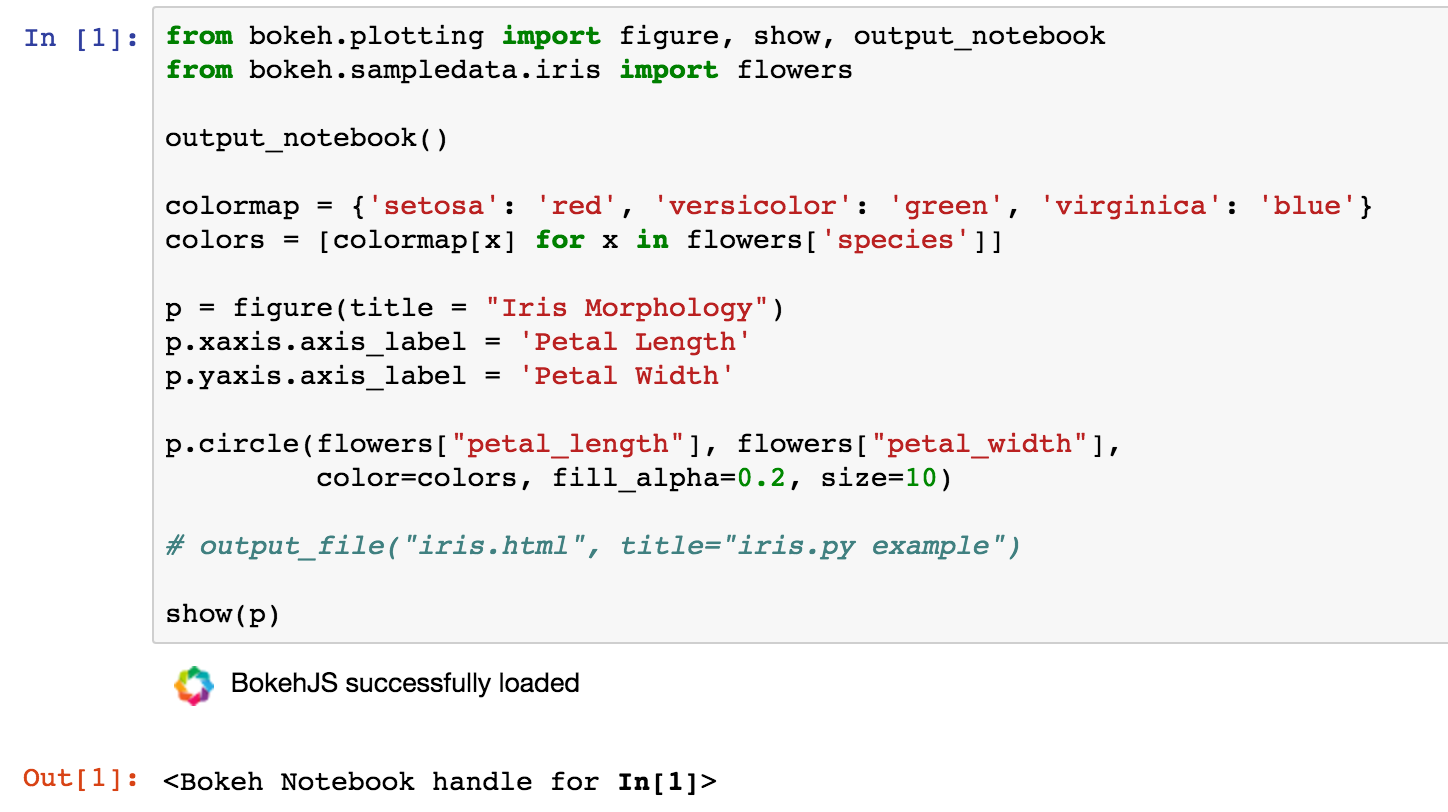
Tried the following but notebook is not showing the figure even after calling output_notebook() and show(). See attached picture.

Any ideas?

Environment: Mac, Anaconda 4.1

⌁   Link to post
Bryan
Bryan

THere's an open issues about problems in the notebook. It's been extremely difficult to reproduce reliably and run down. If you are seeing this reliably, perhaps there is another cause. One thing I would suggest, is always putting output_notebook in its own cell. It loads BokehJS frok CDN and uses the notebook cell output machinery to "publish" those JS and CSS resources. But show() also uses the same cell output functions. If BokehJS does not finished loading from CDN by the time show runs, that would certainly result in no output.

Bryan

···

On Jun 30, 2016, at 6:15 PM, Will Zhang <weiliang.zhang@gmail.com> wrote:

I upgraded to Bokeh 0.12 and ran into issues with showing plots in jupyter notebook.

Tried the following but notebook is not showing the figure even after calling output_notebook() and show(). See attached picture.

Any ideas?

Environment: Mac, Anaconda 4.1

--
You received this message because you are subscribed to the Google Groups "Bokeh Discussion - Public" group.
To unsubscribe from this group and stop receiving emails from it, send an email to bokeh+unsubscribe@continuum.io.
To post to this group, send email to bokeh@continuum.io.
To view this discussion on the web visit https://groups.google.com/a/continuum.io/d/msgid/bokeh/b2c9fb08-73f3-41a3-9f88-ff933d7873f3%40continuum.io\.
For more options, visit https://groups.google.com/a/continuum.io/d/optout\.
<Screen Shot 2016-06-30 at 23.33.58.png>

⌁   Link to post
Will_Zhang
Will_Zhang

Thanks Bryan. Will try the single cell one later at home. But I did try lots of ways so think that included this.

I saw the thread on the issue you mentioned. Can't remember if it's related to 0.12 specifically?

One thing that is very strange, is that if I plot and save the notebook (the figure still doesn't show), when i close the notebook and reopen it, the figure shows up embedded in the notebook... This happened when I plot it with one of the functions I wrote that uses bikes, but not when I tried the example online in a cell. Will revert if I find more.

⌁   Link to post
Chris_Coutinho
Chris_Coutinho

FWIW: I’ve been having the same issue with output_notebook() since the switch to 0.12.0, although it isn’t consistent so I haven’t reported it yet. I always put the output_notebook() statement along with my imports, at the beginning of the document. The only solution I’ve found is to shutdown notebook and restart it using the jupyter dashboard - sometimes restarting the kernel helps as well.

Just to add to the issue, if output_notebook() doesn’t work, neither does output_file(‘test.html’).

Cheers,

Chris

···

On Fri, Jul 1, 2016 at 4:05 PM, Will Zhang weiliang.zhang@gmail.com wrote:

Thanks Bryan. Will try the single cell one later at home. But I did try lots of ways so think that included this.

I saw the thread on the issue you mentioned. Can’t remember if it’s related to 0.12 specifically?

One thing that is very strange, is that if I plot and save the notebook (the figure still doesn’t show), when i close the notebook and reopen it, the figure shows up embedded in the notebook… This happened when I plot it with one of the functions I wrote that uses bikes, but not when I tried the example online in a cell. Will revert if I find more.

–

You received this message because you are subscribed to the Google Groups “Bokeh Discussion - Public” group.

To unsubscribe from this group and stop receiving emails from it, send an email to bokeh+unsubscribe@continuum.io.

To post to this group, send email to bokeh@continuum.io.

To view this discussion on the web visit https://groups.google.com/a/continuum.io/d/msgid/bokeh/358b965b-2ad2-4950-87d7-ea46750e321b%40continuum.io.
For more options, visit https://groups.google.com/a/continuum.io/d/optout.

⌁   Link to post
Bryan
Bryan

I believe this issue predates 0.12, but perhaps it has gotten worse since 0.12 though. As an example of the difficulty with this issue, I was just trying to engage with some of the Jupyter folks on gitter to try and get help, and so far have been unable to reproduce the problem despite trying for some time.

If anyone can supply a reliable way to reproduce this problem, that would be an immense help.

Bryan

···

On Jul 1, 2016, at 9:26 AM, Chris Coutinho <chrisbcoutinho@gmail.com> wrote:

FWIW: I've been having the same issue with output_notebook() since the switch to 0.12.0, although it isn't consistent so I haven't reported it yet. I always put the output_notebook() statement along with my imports, at the beginning of the document. The only solution I've found is to shutdown notebook and restart it using the jupyter dashboard - sometimes restarting the kernel helps as well.

Just to add to the issue, if output_notebook() doesn't work, neither does output_file('test.html').

Cheers,
Chris

On Fri, Jul 1, 2016 at 4:05 PM, Will Zhang <weiliang.zhang@gmail.com> wrote:
Thanks Bryan. Will try the single cell one later at home. But I did try lots of ways so think that included this.

I saw the thread on the issue you mentioned. Can't remember if it's related to 0.12 specifically?

One thing that is very strange, is that if I plot and save the notebook (the figure still doesn't show), when i close the notebook and reopen it, the figure shows up embedded in the notebook... This happened when I plot it with one of the functions I wrote that uses bikes, but not when I tried the example online in a cell. Will revert if I find more.

--
You received this message because you are subscribed to the Google Groups "Bokeh Discussion - Public" group.
To unsubscribe from this group and stop receiving emails from it, send an email to bokeh+unsubscribe@continuum.io.
To post to this group, send email to bokeh@continuum.io.
To view this discussion on the web visit https://groups.google.com/a/continuum.io/d/msgid/bokeh/358b965b-2ad2-4950-87d7-ea46750e321b%40continuum.io\.
For more options, visit https://groups.google.com/a/continuum.io/d/optout\.

--
You received this message because you are subscribed to the Google Groups "Bokeh Discussion - Public" group.
To unsubscribe from this group and stop receiving emails from it, send an email to bokeh+unsubscribe@continuum.io.
To post to this group, send email to bokeh@continuum.io.
To view this discussion on the web visit https://groups.google.com/a/continuum.io/d/msgid/bokeh/CAG%2BYirTXRbOdWRcbOiZT7ZYuvE2%3DGABrh3vuPYK5uwrnTYEmZw%40mail.gmail.com\.
For more options, visit https://groups.google.com/a/continuum.io/d/optout\.

⌁   Link to post
Will_Zhang
Will_Zhang

So, keeping output_notebook() in separate cells was what I did. I usually keep them at the top of the notebook anyway.

Just for background. I've been a Bokeh user since 0.9, and every version since then, 0.10, 0.11, 0.12, etc. I have used them with various versions of Anaconda distributions, both on Windows and Mac, Bokeh has always worked fine in notebooks. Never have had any problem with figures not showing up. And I used these notebooks almost everyday at work, they were super reliable. (Btw, nice job, Bryan!)

0.12 is the first time when I am seeing this issue. For me, it's 100% consistently failing. I had a look at issue #3639 on GitHub. It doesn't seem be exactly what I am getting. Do you know how I can check the JavaScript console mentioned in this issue? I would like to check if I get any kind of error message at all when I call show()...

Thanks guys.

⌁   Link to post
Bryan
Bryan

Will if you are experiencing 100% failure I would be very interested to know the details of your platform and environment. Perhaps it can help reproduce. Certainly we will get to the bottom of things eventually.

Bryan

···

On Jul 1, 2016, at 5:18 PM, Will Zhang <weiliang.zhang@gmail.com> wrote:

So, keeping output_notebook() in separate cells was what I did. I usually keep them at the top of the notebook anyway.

Just for background. I've been a Bokeh user since 0.9, and every version since then, 0.10, 0.11, 0.12, etc. I have used them with various versions of Anaconda distributions, both on Windows and Mac, Bokeh has always worked fine in notebooks. Never have had any problem with figures not showing up. And I used these notebooks almost everyday at work, they were super reliable. (Btw, nice job, Bryan!)

0.12 is the first time when I am seeing this issue. For me, it's 100% consistently failing. I had a look at issue #3639 on GitHub. It doesn't seem be exactly what I am getting. Do you know how I can check the JavaScript console mentioned in this issue? I would like to check if I get any kind of error message at all when I call show()...

Thanks guys.

--
You received this message because you are subscribed to the Google Groups "Bokeh Discussion - Public" group.
To unsubscribe from this group and stop receiving emails from it, send an email to bokeh+unsubscribe@continuum.io.
To post to this group, send email to bokeh@continuum.io.
To view this discussion on the web visit https://groups.google.com/a/continuum.io/d/msgid/bokeh/5513e758-b0e9-408a-8acb-66942f9aec61%40continuum.io\.
For more options, visit https://groups.google.com/a/continuum.io/d/optout\.

⌁   Link to post
Bryan
Bryan

Will, here is something you might try: In your installation, find this line in io.py:

  https://github.com/bokeh/bokeh/blob/master/bokeh/io.py#L335

and put a time.sleep(1) right after the "publish_display_data" and before the "_CommsHandle" and see if that has any effect.

Bryan

···

On Jul 1, 2016, at 5:18 PM, Will Zhang <weiliang.zhang@gmail.com> wrote:

So, keeping output_notebook() in separate cells was what I did. I usually keep them at the top of the notebook anyway.

Just for background. I've been a Bokeh user since 0.9, and every version since then, 0.10, 0.11, 0.12, etc. I have used them with various versions of Anaconda distributions, both on Windows and Mac, Bokeh has always worked fine in notebooks. Never have had any problem with figures not showing up. And I used these notebooks almost everyday at work, they were super reliable. (Btw, nice job, Bryan!)

0.12 is the first time when I am seeing this issue. For me, it's 100% consistently failing. I had a look at issue #3639 on GitHub. It doesn't seem be exactly what I am getting. Do you know how I can check the JavaScript console mentioned in this issue? I would like to check if I get any kind of error message at all when I call show()...

Thanks guys.

--
You received this message because you are subscribed to the Google Groups "Bokeh Discussion - Public" group.
To unsubscribe from this group and stop receiving emails from it, send an email to bokeh+unsubscribe@continuum.io.
To post to this group, send email to bokeh@continuum.io.
To view this discussion on the web visit https://groups.google.com/a/continuum.io/d/msgid/bokeh/5513e758-b0e9-408a-8acb-66942f9aec61%40continuum.io\.
For more options, visit https://groups.google.com/a/continuum.io/d/optout\.

⌁   Link to post
Will_Zhang
Will_Zhang

So, I tried your suggestion below, Bryan. Inserting time.sleep(1) did not really help.

However, I then found something strange…

I created a new notebook to start from scratch, with the same simple example code, everything worked just fine! Also, this is without the time.sleep(1) line.

What I have right now is:

  1. with my old notebook, it’s 100% not showing the figure after calling show(). After a halt and close, relaunching the notebook will bring up the figure…

  2. with the new notebook I created, it 100% works after calling show().

The code and cell organization in the two notebooks are exactly the same, I even moved the section in the old notebook to the top of the book. Unlike in issue #3639, I don’t see any error message in jupyter’s console output.

Here’s my environment, let me know if you need anything else here.

Model Name: MacBook Pro

OS: OS X El Capital, version 10.11.5

Model Identifier: MacBookPro11,2

Processor Name: Intel Core i7

Processor Speed: 2.3 GHz

Number of Processors: 1

Total Number of Cores: 4

L2 Cache (per Core): 256 KB

L3 Cache: 6 MB

Memory: 16 GB

Python 3.5.1 :: Anaconda custom (x86_64)

(upgraded to custom from Anaconda 4.1 after upgrading dask)

ipython --version

4.2.0

jupyter-notebook --version

4.2.1

jupyter --version

4.1.0

$conda list | grep jupyter

jupyter 1.0.0 py35_3

jupyter_client 4.2.2 py35_0

jupyter_console 4.1.1 py35_0

jupyter_core 4.1.0 py35_0

Chrome

Version 51.0.2704.103 (64-bit)

···

On Jul 2, 2016, at 08:47, Bryan Van de Ven bryan@bokeh.org wrote:

Will, here is something you might try: In your installation, find this line in io.py:

https://github.com/bokeh/bokeh/blob/master/bokeh/io.py#L335

and put a time.sleep(1) right after the “publish_display_data” and before the “_CommsHandle” and see if that has any effect.

Bryan

On Jul 1, 2016, at 5:18 PM, Will Zhang weiliang.zhang@gmail.com wrote:

So, keeping output_notebook() in separate cells was what I did. I usually keep them at the top of the notebook anyway.

Just for background. I’ve been a Bokeh user since 0.9, and every version since then, 0.10, 0.11, 0.12, etc. I have used them with various versions of Anaconda distributions, both on Windows and Mac, Bokeh has always worked fine in notebooks. Never have had any problem with figures not showing up. And I used these notebooks almost everyday at work, they were super reliable. (Btw, nice job, Bryan!)

0.12 is the first time when I am seeing this issue. For me, it’s 100% consistently failing. I had a look at issue #3639 on GitHub. It doesn’t seem be exactly what I am getting. Do you know how I can check the JavaScript console mentioned in this issue? I would like to check if I get any kind of error message at all when I call show()…

Thanks guys.

–
You received this message because you are subscribed to the Google Groups “Bokeh Discussion - Public” group.
To unsubscribe from this group and stop receiving emails from it, send an email to bokeh+unsubscribe@continuum.io.
To post to this group, send email to bokeh@continuum.io.
To view this discussion on the web visit https://groups.google.com/a/continuum.io/d/msgid/bokeh/5513e758-b0e9-408a-8acb-66942f9aec61%40continuum.io.
For more options, visit https://groups.google.com/a/continuum.io/d/optout.

–
You received this message because you are subscribed to the Google Groups “Bokeh Discussion - Public” group.
To unsubscribe from this group and stop receiving emails from it, send an email to bokeh+unsubscribe@continuum.io.
To post to this group, send email to bokeh@continuum.io.
To view this discussion on the web visit https://groups.google.com/a/continuum.io/d/msgid/bokeh/0642EAA8-AFE9-4F9D-8251-2768336C9C8A%40continuum.io.
For more options, visit https://groups.google.com/a/continuum.io/d/optout.

⌁   Link to post
Gabriel_Diaz
Gabriel_Diaz

Hi folks! I’m having the same problem, and have been forced to retrograde. Any updates? Can someone point me towards the open issue on the github? I can’t seem to find it. Thanks!

···

On Sat, Jul 2, 2016 at 3:29 PM, Will Zhang weiliang.zhang@gmail.com wrote:

Forgot to mention, the old notebook also has other stuff, so it’s longer than the new one I created obviously. But the first few cells are the same, which contain the same code for testing this issue.

For convenience, I attache the new notebook I created that worked…

–

You received this message because you are subscribed to the Google Groups “Bokeh Discussion - Public” group.

To unsubscribe from this group and stop receiving emails from it, send an email to bokeh+unsubscribe@continuum.io.

To post to this group, send email to bokeh@continuum.io.

To view this discussion on the web visit https://groups.google.com/a/continuum.io/d/msgid/bokeh/0ED52BCB-ABE3-4FD7-AB4F-13DDF5210D5F%40gmail.com.

For more options, visit https://groups.google.com/a/continuum.io/d/optout.

On Jul 2, 2016, at 21:26, Will Zhang weiliang.zhang@gmail.com wrote:

So, I tried your suggestion below, Bryan. Inserting time.sleep(1) did not really help.

However, I then found something strange…

I created a new notebook to start from scratch, with the same simple example code, everything worked just fine! Also, this is without the time.sleep(1) line.

What I have right now is:

  1. with my old notebook, it’s 100% not showing the figure after calling show(). After a halt and close, relaunching the notebook will bring up the figure…
  1. with the new notebook I created, it 100% works after calling show().

The code and cell organization in the two notebooks are exactly the same, I even moved the section in the old notebook to the top of the book. Unlike in issue #3639, I don’t see any error message in jupyter’s console output.

Here’s my environment, let me know if you need anything else here.

Model Name: MacBook Pro

OS: OS X El Capital, version 10.11.5

Model Identifier: MacBookPro11,2

Processor Name: Intel Core i7

Processor Speed: 2.3 GHz

Number of Processors: 1

Total Number of Cores: 4

L2 Cache (per Core): 256 KB

L3 Cache: 6 MB

Memory: 16 GB

Python 3.5.1 :: Anaconda custom (x86_64)

(upgraded to custom from Anaconda 4.1 after upgrading dask)

ipython --version

4.2.0

jupyter-notebook --version

4.2.1

jupyter --version

4.1.0

$conda list | grep jupyter

jupyter 1.0.0 py35_3

jupyter_client 4.2.2 py35_0

jupyter_console 4.1.1 py35_0

jupyter_core 4.1.0 py35_0

Chrome

Version 51.0.2704.103 (64-bit)

On Jul 2, 2016, at 08:47, Bryan Van de Ven bryanv@continuum.io wrote:

Will, here is something you might try: In your installation, find this line in io.py:

[https://github.com/bokeh/bokeh/blob/master/bokeh/io.py#L335](https://github.com/bokeh/bokeh/blob/master/bokeh/io.py#L335)

and put a time.sleep(1) right after the “publish_display_data” and before the “_CommsHandle” and see if that has any effect.

Bryan

On Jul 1, 2016, at 5:18 PM, Will Zhang weiliang.zhang@gmail.com wrote:

So, keeping output_notebook() in separate cells was what I did. I usually keep them at the top of the notebook anyway.

Just for background. I’ve been a Bokeh user since 0.9, and every version since then, 0.10, 0.11, 0.12, etc. I have used them with various versions of Anaconda distributions, both on Windows and Mac, Bokeh has always worked fine in notebooks. Never have had any problem with figures not showing up. And I used these notebooks almost everyday at work, they were super reliable. (Btw, nice job, Bryan!)

0.12 is the first time when I am seeing this issue. For me, it’s 100% consistently failing. I had a look at issue #3639 on GitHub. It doesn’t seem be exactly what I am getting. Do you know how I can check the JavaScript console mentioned in this issue? I would like to check if I get any kind of error message at all when I call show()…

Thanks guys.

–
You received this message because you are subscribed to the Google Groups “Bokeh Discussion - Public” group.
To unsubscribe from this group and stop receiving emails from it, send an email to bokeh+unsubscribe@continuum.io.
To post to this group, send email to bokeh@continuum.io.
To view this discussion on the web visit https://groups.google.com/a/continuum.io/d/msgid/bokeh/5513e758-b0e9-408a-8acb-66942f9aec61%40continuum.io.
For more options, visit https://groups.google.com/a/continuum.io/d/optout.

–
You received this message because you are subscribed to the Google Groups “Bokeh Discussion - Public” group.
To unsubscribe from this group and stop receiving emails from it, send an email to bokeh+unsubscribe@continuum.io.
To post to this group, send email to bokeh@continuum.io.
To view this discussion on the web visit https://groups.google.com/a/continuum.io/d/msgid/bokeh/0642EAA8-AFE9-4F9D-8251-2768336C9C8A%40continuum.io.
For more options, visit https://groups.google.com/a/continuum.io/d/optout.

–

You received this message because you are subscribed to the Google Groups “Bokeh Discussion - Public” group.

To unsubscribe from this group and stop receiving emails from it, send an email to bokeh+unsubscribe@continuum.io.

To post to this group, send email to bokeh@continuum.io.

To view this discussion on the web visit https://groups.google.com/a/continuum.io/d/msgid/bokeh/0ED52BCB-ABE3-4FD7-AB4F-13DDF5210D5F%40gmail.com.

For more options, visit https://groups.google.com/a/continuum.io/d/optout.


Gabriel J. Diaz, Ph.D.

Assistant Professor

Rochester Institute of Technology

Chester F. Carlson Center for Imaging Science

Founder of PerForM Labs

Click for demos.

Office 2108, Building #76

Rochester, NY 14623

Office: (585) 475-6215

gabriel.diaz@rit.edu

⌁   Link to post
Bryan
Bryan

Can you try the latest dev build?

···

On Jul 19, 2016, at 8:15 AM, Gabriel Diaz <gabriel.diaz@rit.edu> wrote:

Hi folks! I'm having the same problem, and have been forced to retrograde. Any updates? Can someone point me towards the open issue on the github? I can't seem to find it. Thanks!

----------------------

Gabriel J. Diaz, Ph.D.
Assistant Professor
Rochester Institute of Technology
Chester F. Carlson Center for Imaging Science

Founder of PerForM Labs
Click for demos.

Office 2108, Building #76
Rochester, NY 14623
Office: (585) 475-6215
gabriel.diaz@rit.edu

On Sat, Jul 2, 2016 at 3:29 PM, Will Zhang <weiliang.zhang@gmail.com> wrote:
Forgot to mention, the old notebook also has other stuff, so it’s longer than the new one I created obviously. But the first few cells are the same, which contain the same code for testing this issue.

For convenience, I attache the new notebook I created that worked...

--
You received this message because you are subscribed to the Google Groups "Bokeh Discussion - Public" group.
To unsubscribe from this group and stop receiving emails from it, send an email to bokeh+unsubscribe@continuum.io.
To post to this group, send email to bokeh@continuum.io.
To view this discussion on the web visit https://groups.google.com/a/continuum.io/d/msgid/bokeh/0ED52BCB-ABE3-4FD7-AB4F-13DDF5210D5F%40gmail.com\.

For more options, visit https://groups.google.com/a/continuum.io/d/optout\.

On Jul 2, 2016, at 21:26, Will Zhang <weiliang.zhang@gmail.com> wrote:

So, I tried your suggestion below, Bryan. Inserting time.sleep(1) did not really help.

However, I then found something strange…

I created a new notebook to start from scratch, with the same simple example code, everything worked just fine! Also, this is without the time.sleep(1) line.

What I have right now is:
1) with my old notebook, it’s 100% *not* showing the figure after calling show(). After a halt and close, relaunching the notebook will bring up the figure...
2) with the new notebook I created, it 100% works after calling show().

The code and cell organization in the two notebooks are exactly the same, I even moved the section in the old notebook to the top of the book. Unlike in issue #3639, I don’t see any error message in jupyter’s console output.

Here’s my environment, let me know if you need anything else here.

Model Name: MacBook Pro
OS: OS X El Capital, version 10.11.5
  Model Identifier: MacBookPro11,2
  Processor Name: Intel Core i7
  Processor Speed: 2.3 GHz
  Number of Processors: 1
  Total Number of Cores: 4
  L2 Cache (per Core): 256 KB
  L3 Cache: 6 MB
  Memory: 16 GB

Python 3.5.1 :: Anaconda custom (x86_64)
(upgraded to custom from Anaconda 4.1 after upgrading dask)

ipython --version
4.2.0

jupyter-notebook --version
4.2.1

jupyter --version
4.1.0

$conda list | grep jupyter
jupyter 1.0.0 py35_3
jupyter_client 4.2.2 py35_0
jupyter_console 4.1.1 py35_0
jupyter_core 4.1.0 py35_0

Chrome
Version 51.0.2704.103 (64-bit)

On Jul 2, 2016, at 08:47, Bryan Van de Ven <bryan@bokeh.org> wrote:

Will, here is something you might try: In your installation, find this line in io.py:

  https://github.com/bokeh/bokeh/blob/master/bokeh/io.py#L335

and put a time.sleep(1) right after the "publish_display_data" and before the "_CommsHandle" and see if that has any effect.

Bryan

On Jul 1, 2016, at 5:18 PM, Will Zhang <weiliang.zhang@gmail.com> wrote:

So, keeping output_notebook() in separate cells was what I did. I usually keep them at the top of the notebook anyway.

Just for background. I've been a Bokeh user since 0.9, and every version since then, 0.10, 0.11, 0.12, etc. I have used them with various versions of Anaconda distributions, both on Windows and Mac, Bokeh has always worked fine in notebooks. Never have had any problem with figures not showing up. And I used these notebooks almost everyday at work, they were super reliable. (Btw, nice job, Bryan!)

0.12 is the first time when I am seeing this issue. For me, it's 100% consistently failing. I had a look at issue #3639 on GitHub. It doesn't seem be exactly what I am getting. Do you know how I can check the JavaScript console mentioned in this issue? I would like to check if I get any kind of error message at all when I call show()...

Thanks guys.

--
You received this message because you are subscribed to the Google Groups "Bokeh Discussion - Public" group.
To unsubscribe from this group and stop receiving emails from it, send an email to bokeh+unsubscribe@continuum.io.
To post to this group, send email to bokeh@continuum.io.
To view this discussion on the web visit https://groups.google.com/a/continuum.io/d/msgid/bokeh/5513e758-b0e9-408a-8acb-66942f9aec61%40continuum.io\.
For more options, visit https://groups.google.com/a/continuum.io/d/optout\.

--
You received this message because you are subscribed to the Google Groups "Bokeh Discussion - Public" group.
To unsubscribe from this group and stop receiving emails from it, send an email to bokeh+unsubscribe@continuum.io.
To post to this group, send email to bokeh@continuum.io.
To view this discussion on the web visit https://groups.google.com/a/continuum.io/d/msgid/bokeh/0642EAA8-AFE9-4F9D-8251-2768336C9C8A%40continuum.io\.
For more options, visit https://groups.google.com/a/continuum.io/d/optout\.

--
You received this message because you are subscribed to the Google Groups "Bokeh Discussion - Public" group.
To unsubscribe from this group and stop receiving emails from it, send an email to bokeh+unsubscribe@continuum.io.
To post to this group, send email to bokeh@continuum.io.
To view this discussion on the web visit https://groups.google.com/a/continuum.io/d/msgid/bokeh/0ED52BCB-ABE3-4FD7-AB4F-13DDF5210D5F%40gmail.com\.
For more options, visit https://groups.google.com/a/continuum.io/d/optout\.

--
You received this message because you are subscribed to the Google Groups "Bokeh Discussion - Public" group.
To unsubscribe from this group and stop receiving emails from it, send an email to bokeh+unsubscribe@continuum.io.
To post to this group, send email to bokeh@continuum.io.
To view this discussion on the web visit https://groups.google.com/a/continuum.io/d/msgid/bokeh/CAFvLWO3QM0XcZb0vjt3gjHtV8Fd67-4jsvnzm82sANQSy0v_wQ%40mail.gmail.com\.
For more options, visit https://groups.google.com/a/continuum.io/d/optout\.


⌁   Link to post
Gabriel_Diaz
Gabriel_Diaz

I can do this tomorrow.

···

On Tue, Jul 19, 2016 at 9:19 AM, Bryan Van de Ven bryan@bokeh.org wrote:

Can you try the latest dev build?

On Jul 19, 2016, at 8:15 AM, Gabriel Diaz gabriel.diaz@rit.edu wrote:

Hi folks! I’m having the same problem, and have been forced to retrograde. Any updates? Can someone point me towards the open issue on the github? I can’t seem to find it. Thanks!


Gabriel J. Diaz, Ph.D.

Assistant Professor

Rochester Institute of Technology

Chester F. Carlson Center for Imaging Science

Founder of PerForM Labs

Click for demos.

Office 2108, Building #76

Rochester, NY 14623

Office: (585) 475-6215

gabriel.diaz@rit.edu

On Sat, Jul 2, 2016 at 3:29 PM, Will Zhang weiliang.zhang@gmail.com wrote:

Forgot to mention, the old notebook also has other stuff, so it’s longer than the new one I created obviously. But the first few cells are the same, which contain the same code for testing this issue.

For convenience, I attache the new notebook I created that worked…

–

You received this message because you are subscribed to the Google Groups “Bokeh Discussion - Public” group.

To unsubscribe from this group and stop receiving emails from it, send an email to bokeh+unsubscribe@continuum.io.

To post to this group, send email to bokeh@continuum.io.

To view this discussion on the web visit https://groups.google.com/a/continuum.io/d/msgid/bokeh/0ED52BCB-ABE3-4FD7-AB4F-13DDF5210D5F%40gmail.com.

For more options, visit https://groups.google.com/a/continuum.io/d/optout.

On Jul 2, 2016, at 21:26, Will Zhang weiliang.zhang@gmail.com wrote:

So, I tried your suggestion below, Bryan. Inserting time.sleep(1) did not really help.

However, I then found something strange…

I created a new notebook to start from scratch, with the same simple example code, everything worked just fine! Also, this is without the time.sleep(1) line.

What I have right now is:

  1. with my old notebook, it’s 100% not showing the figure after calling show(). After a halt and close, relaunching the notebook will bring up the figure…
  1. with the new notebook I created, it 100% works after calling show().

The code and cell organization in the two notebooks are exactly the same, I even moved the section in the old notebook to the top of the book. Unlike in issue #3639, I don’t see any error message in jupyter’s console output.

Here’s my environment, let me know if you need anything else here.

Model Name: MacBook Pro

OS: OS X El Capital, version 10.11.5

Model Identifier: MacBookPro11,2

Processor Name: Intel Core i7

Processor Speed: 2.3 GHz

Number of Processors: 1

Total Number of Cores: 4

L2 Cache (per Core): 256 KB

L3 Cache: 6 MB

Memory: 16 GB

Python 3.5.1 :: Anaconda custom (x86_64)

(upgraded to custom from Anaconda 4.1 after upgrading dask)

ipython --version

4.2.0

jupyter-notebook --version

4.2.1

jupyter --version

4.1.0

$conda list | grep jupyter

jupyter 1.0.0 py35_3

jupyter_client 4.2.2 py35_0

jupyter_console 4.1.1 py35_0

jupyter_core 4.1.0 py35_0

Chrome

Version 51.0.2704.103 (64-bit)

On Jul 2, 2016, at 08:47, Bryan Van de Ven bryan@bokeh.org wrote:

Will, here is something you might try: In your installation, find this line in io.py:

[https://github.com/bokeh/bokeh/blob/master/bokeh/io.py#L335](https://github.com/bokeh/bokeh/blob/master/bokeh/io.py#L335)

and put a time.sleep(1) right after the “publish_display_data” and before the “_CommsHandle” and see if that has any effect.

Bryan

On Jul 1, 2016, at 5:18 PM, Will Zhang weiliang.zhang@gmail.com wrote:

So, keeping output_notebook() in separate cells was what I did. I usually keep them at the top of the notebook anyway.

Just for background. I’ve been a Bokeh user since 0.9, and every version since then, 0.10, 0.11, 0.12, etc. I have used them with various versions of Anaconda distributions, both on Windows and Mac, Bokeh has always worked fine in notebooks. Never have had any problem with figures not showing up. And I used these notebooks almost everyday at work, they were super reliable. (Btw, nice job, Bryan!)

0.12 is the first time when I am seeing this issue. For me, it’s 100% consistently failing. I had a look at issue #3639 on GitHub. It doesn’t seem be exactly what I am getting. Do you know how I can check the JavaScript console mentioned in this issue? I would like to check if I get any kind of error message at all when I call show()…

Thanks guys.

–

You received this message because you are subscribed to the Google Groups “Bokeh Discussion - Public” group.

To unsubscribe from this group and stop receiving emails from it, send an email to bokeh+unsubscribe@continuum.io.

To post to this group, send email to bokeh@continuum.io.

To view this discussion on the web visit https://groups.google.com/a/continuum.io/d/msgid/bokeh/5513e758-b0e9-408a-8acb-66942f9aec61%40continuum.io.

For more options, visit https://groups.google.com/a/continuum.io/d/optout.

–

You received this message because you are subscribed to the Google Groups “Bokeh Discussion - Public” group.

To unsubscribe from this group and stop receiving emails from it, send an email to bokeh+unsubscribe@continuum.io.

To post to this group, send email to bokeh@continuum.io.

To view this discussion on the web visit https://groups.google.com/a/continuum.io/d/msgid/bokeh/0642EAA8-AFE9-4F9D-8251-2768336C9C8A%40continuum.io.

For more options, visit https://groups.google.com/a/continuum.io/d/optout.

–

You received this message because you are subscribed to the Google Groups “Bokeh Discussion - Public” group.

To unsubscribe from this group and stop receiving emails from it, send an email to bokeh+unsubscribe@continuum.io.

To post to this group, send email to bokeh@continuum.io.

To view this discussion on the web visit https://groups.google.com/a/continuum.io/d/msgid/bokeh/0ED52BCB-ABE3-4FD7-AB4F-13DDF5210D5F%40gmail.com.

For more options, visit https://groups.google.com/a/continuum.io/d/optout.

–

You received this message because you are subscribed to the Google Groups “Bokeh Discussion - Public” group.

To unsubscribe from this group and stop receiving emails from it, send an email to bokeh+unsubscribe@continuum.io.

To post to this group, send email to bokeh@continuum.io.

To view this discussion on the web visit https://groups.google.com/a/continuum.io/d/msgid/bokeh/CAFvLWO3QM0XcZb0vjt3gjHtV8Fd67-4jsvnzm82sANQSy0v_wQ%40mail.gmail.com.

For more options, visit https://groups.google.com/a/continuum.io/d/optout.

–

You received this message because you are subscribed to the Google Groups “Bokeh Discussion - Public” group.

To unsubscribe from this group and stop receiving emails from it, send an email to bokeh+unsubscribe@continuum.io.

To post to this group, send email to bokeh@continuum.io.

To view this discussion on the web visit https://groups.google.com/a/continuum.io/d/msgid/bokeh/8735B9D3-B20C-4E19-93FF-C4F9CF321902%40continuum.io.
For more options, visit https://groups.google.com/a/continuum.io/d/optout.


Gabriel J. Diaz, Ph.D.

Assistant Professor

Rochester Institute of Technology

Chester F. Carlson Center for Imaging Science

Founder of PerForM Labs

Click for demos.

Office 2108, Building #76

Rochester, NY 14623

Office: (585) 475-6215

gabriel.diaz@rit.edu

⌁   Link to post
Will_Zhang
Will_Zhang

The latest dev build solved this issue for me.

···

On Tue, Jul 19, 2016 at 9:19 AM, Bryan Van de Ven bryan@bokeh.org wrote:

Can you try the latest dev build?

On Jul 19, 2016, at 8:15 AM, Gabriel Diaz gabriel.diaz@rit.edu wrote:

Hi folks! I’m having the same problem, and have been forced to retrograde. Any updates? Can someone point me towards the open issue on the github? I can’t seem to find it. Thanks!


Gabriel J. Diaz, Ph.D.

Assistant Professor

Rochester Institute of Technology

Chester F. Carlson Center for Imaging Science

Founder of PerForM Labs

Click for demos.

Office 2108, Building #76

Rochester, NY 14623

Office: (585) 475-6215

gabriel.diaz@rit.edu

On Sat, Jul 2, 2016 at 3:29 PM, Will Zhang weiliang.zhang@gmail.com wrote:

Forgot to mention, the old notebook also has other stuff, so it’s longer than the new one I created obviously. But the first few cells are the same, which contain the same code for testing this issue.

For convenience, I attache the new notebook I created that worked…

–

You received this message because you are subscribed to the Google Groups “Bokeh Discussion - Public” group.

To unsubscribe from this group and stop receiving emails from it, send an email to bokeh+unsubscribe@continuum.io.

To post to this group, send email to bokeh@continuum.io.

To view this discussion on the web visit https://groups.google.com/a/continuum.io/d/msgid/bokeh/0ED52BCB-ABE3-4FD7-AB4F-13DDF5210D5F%40gmail.com.

For more options, visit https://groups.google.com/a/continuum.io/d/optout.

On Jul 2, 2016, at 21:26, Will Zhang weiliang.zhang@gmail.com wrote:

So, I tried your suggestion below, Bryan. Inserting time.sleep(1) did not really help.

However, I then found something strange…

I created a new notebook to start from scratch, with the same simple example code, everything worked just fine! Also, this is without the time.sleep(1) line.

What I have right now is:

  1. with my old notebook, it’s 100% not showing the figure after calling show(). After a halt and close, relaunching the notebook will bring up the figure…
  1. with the new notebook I created, it 100% works after calling show().

The code and cell organization in the two notebooks are exactly the same, I even moved the section in the old notebook to the top of the book. Unlike in issue #3639, I don’t see any error message in jupyter’s console output.

Here’s my environment, let me know if you need anything else here.

Model Name: MacBook Pro

OS: OS X El Capital, version 10.11.5

Model Identifier: MacBookPro11,2

Processor Name: Intel Core i7

Processor Speed: 2.3 GHz

Number of Processors: 1

Total Number of Cores: 4

L2 Cache (per Core): 256 KB

L3 Cache: 6 MB

Memory: 16 GB

Python 3.5.1 :: Anaconda custom (x86_64)

(upgraded to custom from Anaconda 4.1 after upgrading dask)

ipython --version

4.2.0

jupyter-notebook --version

4.2.1

jupyter --version

4.1.0

$conda list | grep jupyter

jupyter 1.0.0 py35_3

jupyter_client 4.2.2 py35_0

jupyter_console 4.1.1 py35_0

jupyter_core 4.1.0 py35_0

Chrome

Version 51.0.2704.103 (64-bit)

On Jul 2, 2016, at 08:47, Bryan Van de Ven bryan@bokeh.org wrote:

Will, here is something you might try: In your installation, find this line in io.py:

[https://github.com/bokeh/bokeh/blob/master/bokeh/io.py#L335](https://github.com/bokeh/bokeh/blob/master/bokeh/io.py#L335)

and put a time.sleep(1) right after the “publish_display_data” and before the “_CommsHandle” and see if that has any effect.

Bryan

On Jul 1, 2016, at 5:18 PM, Will Zhang weiliang.zhang@gmail.com wrote:

So, keeping output_notebook() in separate cells was what I did. I usually keep them at the top of the notebook anyway.

Just for background. I’ve been a Bokeh user since 0.9, and every version since then, 0.10, 0.11, 0.12, etc. I have used them with various versions of Anaconda distributions, both on Windows and Mac, Bokeh has always worked fine in notebooks. Never have had any problem with figures not showing up. And I used these notebooks almost everyday at work, they were super reliable. (Btw, nice job, Bryan!)

0.12 is the first time when I am seeing this issue. For me, it’s 100% consistently failing. I had a look at issue #3639 on GitHub. It doesn’t seem be exactly what I am getting. Do you know how I can check the JavaScript console mentioned in this issue? I would like to check if I get any kind of error message at all when I call show()…

Thanks guys.

–

You received this message because you are subscribed to the Google Groups “Bokeh Discussion - Public” group.

To unsubscribe from this group and stop receiving emails from it, send an email to bokeh+unsubscribe@continuum.io.

To post to this group, send email to bokeh@continuum.io.

To view this discussion on the web visit https://groups.google.com/a/continuum.io/d/msgid/bokeh/5513e758-b0e9-408a-8acb-66942f9aec61%40continuum.io.

For more options, visit https://groups.google.com/a/continuum.io/d/optout.

–

You received this message because you are subscribed to the Google Groups “Bokeh Discussion - Public” group.

To unsubscribe from this group and stop receiving emails from it, send an email to bokeh+unsubscribe@continuum.io.

To post to this group, send email to bokeh@continuum.io.

To view this discussion on the web visit https://groups.google.com/a/continuum.io/d/msgid/bokeh/0642EAA8-AFE9-4F9D-8251-2768336C9C8A%40continuum.io.

For more options, visit https://groups.google.com/a/continuum.io/d/optout.

–

You received this message because you are subscribed to the Google Groups “Bokeh Discussion - Public” group.

To unsubscribe from this group and stop receiving emails from it, send an email to bokeh+unsubscribe@continuum.io.

To post to this group, send email to bokeh@continuum.io.

To view this discussion on the web visit https://groups.google.com/a/continuum.io/d/msgid/bokeh/0ED52BCB-ABE3-4FD7-AB4F-13DDF5210D5F%40gmail.com.

For more options, visit https://groups.google.com/a/continuum.io/d/optout.

–

You received this message because you are subscribed to the Google Groups “Bokeh Discussion - Public” group.

To unsubscribe from this group and stop receiving emails from it, send an email to bokeh+unsubscribe@continuum.io.

To post to this group, send email to bokeh@continuum.io.

To view this discussion on the web visit https://groups.google.com/a/continuum.io/d/msgid/bokeh/CAFvLWO3QM0XcZb0vjt3gjHtV8Fd67-4jsvnzm82sANQSy0v_wQ%40mail.gmail.com.

For more options, visit https://groups.google.com/a/continuum.io/d/optout.

–

You received this message because you are subscribed to the Google Groups “Bokeh Discussion - Public” group.

To unsubscribe from this group and stop receiving emails from it, send an email to bokeh+unsubscribe@continuum.io.

To post to this group, send email to bokeh@continuum.io.

To view this discussion on the web visit https://groups.google.com/a/continuum.io/d/msgid/bokeh/8735B9D3-B20C-4E19-93FF-C4F9CF321902%40continuum.io.
For more options, visit https://groups.google.com/a/continuum.io/d/optout.


Gabriel J. Diaz, Ph.D.

Assistant Professor

Rochester Institute of Technology

Chester F. Carlson Center for Imaging Science

Founder of PerForM Labs

Click for demos.

Office 2108, Building #76

Rochester, NY 14623

Office: (585) 475-6215

gabriel.diaz@rit.edu

⌁   Link to post
Gabriel_Diaz
Gabriel_Diaz

Latest dev also solved the issue for me. Nice work, guys!

For those using conda, get the dev build with the command…

conda install -c bokeh/channel/dev bokeh
···

On Tue, Jul 19, 2016 at 9:52 AM, Will Zhang weiliang.zhang@gmail.com wrote:

The latest dev build solved this issue for me.

Sent from my iPhone

On 19 Jul 2016, at 14:37, Gabriel Diaz gabriel.diaz@rit.edu wrote:

I can do this tomorrow.

–

You received this message because you are subscribed to the Google Groups “Bokeh Discussion - Public” group.

To unsubscribe from this group and stop receiving emails from it, send an email to bokeh+unsubscribe@continuum.io.

To post to this group, send email to bokeh@continuum.io.

To view this discussion on the web visit https://groups.google.com/a/continuum.io/d/msgid/bokeh/CAFvLWO3NwbP4pW364uEhBPF%2BEXVkRPBgNgkQG4T97guB8_m-Pg%40mail.gmail.com.

For more options, visit https://groups.google.com/a/continuum.io/d/optout.

–

You received this message because you are subscribed to the Google Groups “Bokeh Discussion - Public” group.

To unsubscribe from this group and stop receiving emails from it, send an email to bokeh+unsubscribe@continuum.io.

To post to this group, send email to bokeh@continuum.io.

To view this discussion on the web visit https://groups.google.com/a/continuum.io/d/msgid/bokeh/6C433F71-3A4C-4B1F-9AEB-148A91264339%40gmail.com.

For more options, visit https://groups.google.com/a/continuum.io/d/optout.


Gabriel J. Diaz, Ph.D.

Assistant Professor

Rochester Institute of Technology

Chester F. Carlson Center for Imaging Science

Founder of PerForM Labs

Click for demos.

Office 2108, Building #76

Rochester, NY 14623

Office: (585) 475-6215

gabriel.diaz@rit.edu


Gabriel J. Diaz, Ph.D.

Assistant Professor

Rochester Institute of Technology

Chester F. Carlson Center for Imaging Science

Founder of PerForM Labs

Click for demos.

Office 2108, Building #76

Rochester, NY 14623

Office: (585) 475-6215

gabriel.diaz@rit.edu

On Tue, Jul 19, 2016 at 9:19 AM, Bryan Van de Ven bryan@bokeh.org wrote:

Can you try the latest dev build?

On Jul 19, 2016, at 8:15 AM, Gabriel Diaz gabriel.diaz@rit.edu wrote:

Hi folks! I’m having the same problem, and have been forced to retrograde. Any updates? Can someone point me towards the open issue on the github? I can’t seem to find it. Thanks!


Gabriel J. Diaz, Ph.D.

Assistant Professor

Rochester Institute of Technology

Chester F. Carlson Center for Imaging Science

Founder of PerForM Labs

Click for demos.

Office 2108, Building #76

Rochester, NY 14623

Office: (585) 475-6215

gabriel.diaz@rit.edu

On Sat, Jul 2, 2016 at 3:29 PM, Will Zhang weiliang.zhang@gmail.com wrote:

Forgot to mention, the old notebook also has other stuff, so it’s longer than the new one I created obviously. But the first few cells are the same, which contain the same code for testing this issue.

For convenience, I attache the new notebook I created that worked…

–

You received this message because you are subscribed to the Google Groups “Bokeh Discussion - Public” group.

To unsubscribe from this group and stop receiving emails from it, send an email to bokeh+unsubscribe@continuum.io.

To post to this group, send email to bokeh@continuum.io.

To view this discussion on the web visit https://groups.google.com/a/continuum.io/d/msgid/bokeh/0ED52BCB-ABE3-4FD7-AB4F-13DDF5210D5F%40gmail.com.

For more options, visit https://groups.google.com/a/continuum.io/d/optout.

On Jul 2, 2016, at 21:26, Will Zhang weiliang.zhang@gmail.com wrote:

So, I tried your suggestion below, Bryan. Inserting time.sleep(1) did not really help.

However, I then found something strange…

I created a new notebook to start from scratch, with the same simple example code, everything worked just fine! Also, this is without the time.sleep(1) line.

What I have right now is:

  1. with my old notebook, it’s 100% not showing the figure after calling show(). After a halt and close, relaunching the notebook will bring up the figure…
  1. with the new notebook I created, it 100% works after calling show().

The code and cell organization in the two notebooks are exactly the same, I even moved the section in the old notebook to the top of the book. Unlike in issue #3639, I don’t see any error message in jupyter’s console output.

Here’s my environment, let me know if you need anything else here.

Model Name: MacBook Pro

OS: OS X El Capital, version 10.11.5

Model Identifier: MacBookPro11,2

Processor Name: Intel Core i7

Processor Speed: 2.3 GHz

Number of Processors: 1

Total Number of Cores: 4

L2 Cache (per Core): 256 KB

L3 Cache: 6 MB

Memory: 16 GB

Python 3.5.1 :: Anaconda custom (x86_64)

(upgraded to custom from Anaconda 4.1 after upgrading dask)

ipython --version

4.2.0

jupyter-notebook --version

4.2.1

jupyter --version

4.1.0

$conda list | grep jupyter

jupyter 1.0.0 py35_3

jupyter_client 4.2.2 py35_0

jupyter_console 4.1.1 py35_0

jupyter_core 4.1.0 py35_0

Chrome

Version 51.0.2704.103 (64-bit)

On Jul 2, 2016, at 08:47, Bryan Van de Ven bryan@bokeh.org wrote:

Will, here is something you might try: In your installation, find this line in io.py:

[https://github.com/bokeh/bokeh/blob/master/bokeh/io.py#L335](https://github.com/bokeh/bokeh/blob/master/bokeh/io.py#L335)

and put a time.sleep(1) right after the “publish_display_data” and before the “_CommsHandle” and see if that has any effect.

Bryan

On Jul 1, 2016, at 5:18 PM, Will Zhang weiliang.zhang@gmail.com wrote:

So, keeping output_notebook() in separate cells was what I did. I usually keep them at the top of the notebook anyway.

Just for background. I’ve been a Bokeh user since 0.9, and every version since then, 0.10, 0.11, 0.12, etc. I have used them with various versions of Anaconda distributions, both on Windows and Mac, Bokeh has always worked fine in notebooks. Never have had any problem with figures not showing up. And I used these notebooks almost everyday at work, they were super reliable. (Btw, nice job, Bryan!)

0.12 is the first time when I am seeing this issue. For me, it’s 100% consistently failing. I had a look at issue #3639 on GitHub. It doesn’t seem be exactly what I am getting. Do you know how I can check the JavaScript console mentioned in this issue? I would like to check if I get any kind of error message at all when I call show()…

Thanks guys.

–

You received this message because you are subscribed to the Google Groups “Bokeh Discussion - Public” group.

To unsubscribe from this group and stop receiving emails from it, send an email to bokeh+unsubscribe@continuum.io.

To post to this group, send email to bokeh@continuum.io.

To view this discussion on the web visit https://groups.google.com/a/continuum.io/d/msgid/bokeh/5513e758-b0e9-408a-8acb-66942f9aec61%40continuum.io.

For more options, visit https://groups.google.com/a/continuum.io/d/optout.

–

You received this message because you are subscribed to the Google Groups “Bokeh Discussion - Public” group.

To unsubscribe from this group and stop receiving emails from it, send an email to bokeh+unsubscribe@continuum.io.

To post to this group, send email to bokeh@continuum.io.

To view this discussion on the web visit https://groups.google.com/a/continuum.io/d/msgid/bokeh/0642EAA8-AFE9-4F9D-8251-2768336C9C8A%40continuum.io.

For more options, visit https://groups.google.com/a/continuum.io/d/optout.

–

You received this message because you are subscribed to the Google Groups “Bokeh Discussion - Public” group.

To unsubscribe from this group and stop receiving emails from it, send an email to bokeh+unsubscribe@continuum.io.

To post to this group, send email to bokeh@continuum.io.

To view this discussion on the web visit https://groups.google.com/a/continuum.io/d/msgid/bokeh/0ED52BCB-ABE3-4FD7-AB4F-13DDF5210D5F%40gmail.com.

For more options, visit https://groups.google.com/a/continuum.io/d/optout.

–

You received this message because you are subscribed to the Google Groups “Bokeh Discussion - Public” group.

To unsubscribe from this group and stop receiving emails from it, send an email to bokeh+unsubscribe@continuum.io.

To post to this group, send email to bokeh@continuum.io.

To view this discussion on the web visit https://groups.google.com/a/continuum.io/d/msgid/bokeh/CAFvLWO3QM0XcZb0vjt3gjHtV8Fd67-4jsvnzm82sANQSy0v_wQ%40mail.gmail.com.

For more options, visit https://groups.google.com/a/continuum.io/d/optout.

–

You received this message because you are subscribed to the Google Groups “Bokeh Discussion - Public” group.

To unsubscribe from this group and stop receiving emails from it, send an email to bokeh+unsubscribe@continuum.io.

To post to this group, send email to bokeh@continuum.io.

To view this discussion on the web visit https://groups.google.com/a/continuum.io/d/msgid/bokeh/8735B9D3-B20C-4E19-93FF-C4F9CF321902%40continuum.io.
For more options, visit https://groups.google.com/a/continuum.io/d/optout.

⌁   Link to post

End of archived discussion · Replies are disabled