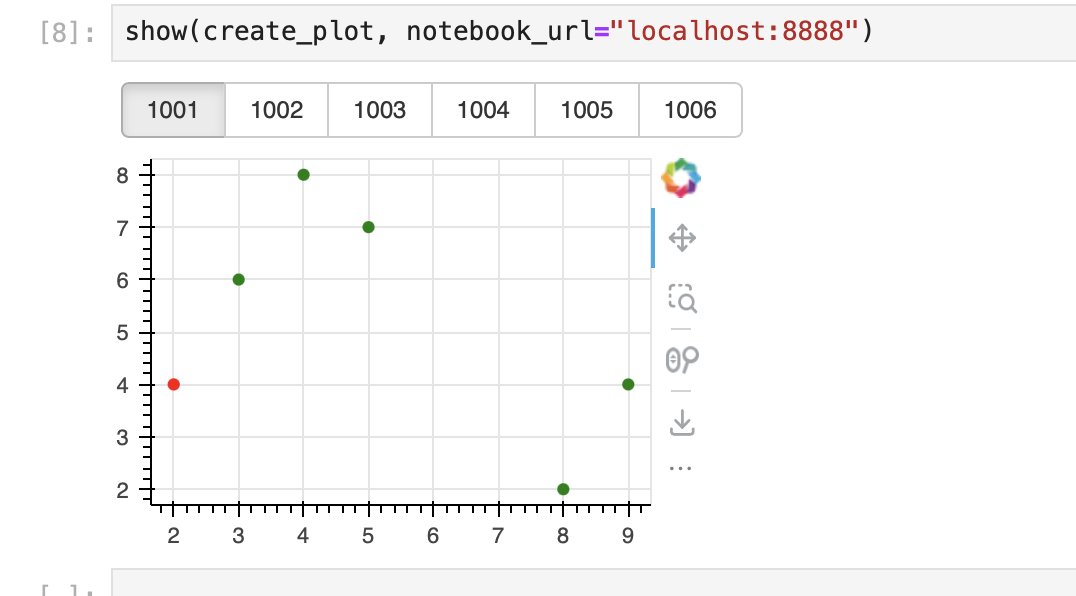
I have the following example application, and when I try to run it inside a jupyter notebook, I’m getting a massive error.
from bokeh.layouts import column
from bokeh.models import ColumnDataSource, CheckboxButtonGroup, CustomJS
from bokeh.plotting import show, figure, output_notebook
import pandas as pd
output_notebook()

def create_plot(doc):

    # create fake data
    x = [2, 4, 8, 5, 9, 3]
    y = [4, 8, 2, 7, 4, 6]
    id_ = ['1001', '1002', '1003', '1004', '1005', '1006']
    color = ['red'] + ['green']*5
    df = pd.DataFrame({'x': x, 'y': y, 'ids': id_, 'color': color})

    # create column data source
    cds = ColumnDataSource(data=df)

    # create figure
    p = figure(width=300, height=200)
    p.circle(x='x', y='y', size=5, source=cds, color='color')

    # Create widget (checkbox button)
    checkbox_button_group = CheckboxButtonGroup(labels=id_, active=[0])

    # Update the colors after a click on an id
    checkbox_button_group.js_on_click(CustomJS(code="""
        console.log('checkbox_button_group: active=' + this.active, this.toString())
        """))

    def set_col(row, red_ids):
        color = 'red' if row in red_ids else 'green'
        return color

    def update_data(df, red_ids=None):
        if red_ids is None:
            red_ids = []

        df['color'] = df['ids'].apply(lambda x: set_col(x, red_ids))
        cds.data = df

    def update(attr, old, new):
        red_ids = [checkbox_button_group.labels[i] for i in checkbox_button_group.active]
        update_data(df, red_ids)

    checkbox_button_group.on_change('active', update)

    # display button & plot in a column
    doc.add_root(column(checkbox_button_group, p))

show(create_plot)
The error I’m getting is:
ERROR:tornado.application:Uncaught exception GET /autoload.js?bokeh-autoload-element=p1001&bokeh-absolute-url=[http://localhost:58198&resources=none](http://localhost:58198&resources=none/) (::1)

HTTPServerRequest(protocol='http', host='localhost:58198', method='GET', uri='/autoload.js?bokeh-autoload-element=p1001&bokeh-absolute-url=[http://localhost:58198&resources=none](http://localhost:58198&resources=none/)', version='HTTP/1.1', remote_ip='::1')

Traceback (most recent call last):

File "/Users/me/miniconda3/envs/myproject/lib/python3.9/site-packages/tornado/web.py", line 1713, in _execute

result = await result

File "/Users/me/miniconda3/envs/myproject/lib/python3.9/site-packages/bokeh/server/views/autoload_js_handler.py", line 62, in get

session = await self.get_session()

File "/Users/me/miniconda3/envs/myproject/lib/python3.9/site-packages/bokeh/server/views/session_handler.py", line 145, in get_session

session = await self.application_context.create_session_if_needed(session_id, self.request, token)

File "/Users/me/ERROR:tornado.application:Uncaught exception GET /autoload.js?bokeh-autoload-element=p1001&bokeh-absolute-url=[http://localhost:58198&resources=none](http://localhost:58198&resources=none/) (::1)

HTTPServerRequest(protocol='http', host='localhost:58198', method='GET', uri='/autoload.js?bokeh-autoload-element=p1001&bokeh-absolute-url=[http://localhost:58198&resources=none](http://localhost:58198&resources=none/)', version='HTTP/1.1', remote_ip='::1')

Traceback (most recent call last):

File "/Users/me/miniconda3/envs/myproject/lib/python3.9/site-packages/tornado/web.py", line 1713, in _execute

result = await result

File "/Users/me/miniconda3/envs/myproject/lib/python3.9/site-packages/bokeh/server/views/autoload_js_handler.py", line 62, in get

session = await self.get_session()

File "/Users/me/miniconda3/envs/myproject/lib/python3.9/site-packages/bokeh/server/views/session_handler.py", line 145, in get_session

session = await self.application_context.create_session_if_needed(session_id, self.request, token)

File "/Users/me/miniconda3/envs/myproject/lib/python3.9/site-packages/bokeh/server/contexts.py", line 240, in create_session_if_needed

self._application.initialize_document(doc)

File "/Users/me/miniconda3/envs/myproject/lib/python3.9/site-packages/bokeh/application/application.py", line 190, in initialize_document

h.modify_document(doc)

File "/Users/me/miniconda3/envs/myproject/lib/python3.9/site-packages/bokeh/application/handlers/function.py", line 140, in modify_document

self._func(doc)

File "/Users/me/.tmp/ipykernel_18885/1564001177.py", line 27, in create_plot

checkbox_button_group.js_on_click(CustomJS(code="""

File "/Users/me/miniconda3/envs/myproject/lib/python3.9/site-packages/bokeh/core/has_props.py", line 360, in __getattr__

self._raise_attribute_error_with_matches(name, properties)

File "/Users/me/miniconda3/envs/myproject/lib/python3.9/site-packages/bokeh/core/has_props.py", line 368, in _raise_attribute_error_with_matches

raise AttributeError(f"unexpected attribute {name!r} to {self.__class__.__name__}, {text} attributes are {nice_join(matches)}")

AttributeError: unexpected attribute 'js_on_click' to CheckboxButtonGroup, similar attributes are js_event_callbacks

miniconda3/envs/myproject/lib/python3.9/site-packages/bokeh/server/contexts.py", line 240, in create_session_if_needed

self._application.initialize_document(doc)

File "/Users/me/miniconda3/envs/myproject/lib/python3.9/site-packages/bokeh/application/application.py", line 190, in initialize_document

h.modify_document(doc)

File "/Users/me/miniconda3/envs/myproject/lib/python3.9/site-packages/bokeh/application/handlers/function.py", line 140, in modify_document

self._func(doc)

File "/Users/me/.tmp/ipykernel_18885/1564001177.py", line 27, in create_plot

checkbox_button_group.js_on_click(CustomJS(code="""

File "/Users/me/miniconda3/envs/myproject/lib/python3.9/site-packages/bokeh/core/has_props.py", line 360, in __getattr__

self._raise_attribute_error_with_matches(name, properties)

File "/Users/me/miniconda3/envs/myproject/lib/python3.9/site-packages/bokeh/core/has_props.py", line 368, in _raise_attribute_error_with_matches

ERROR:tornado.access:500 GET /autoload.js?bokeh-autoload-element=p1001&bokeh-absolute-url=[http://localhost:58198&resources=none](http://localhost:58198&resources=none/) (::1) 59.34ms

raise AttributeError(f"unexpected attribute {name!r} to {self.__class__.__name__}, {text} attributes are {nice_join(matches)}")

AttributeError: unexpected attribute 'js_on_click' to CheckboxButtonGroup, similar attributes are js_event_callbacks

ERROR:tornado.access:500 GET /autoload.js?bokeh-autoload-element=p1001&bokeh-absolute-url=[http://localhost:58198&resources=none](http://localhost:58198&resources=none/) (::1) 59.34ms