☰Read-only archive⌕
Looking for help with Bokeh?

This is a read-only archive. Ask questions and join the conversation on GitHub.

Visit Community Support on GitHub →
Archived discussions · Captured October 28, 2026

[Bokeh] Bug in annular wedge/wedge hover tooltip

Community Support
David_Laguardia
David_Laguardia

Hi everyone,
I don’t know if I state the obvious but I have a strange behavior in the annular wedge plot:

Let’s take a piece of the cake in an annular wedge. In some part of the wedge piece, the hover display correctly the tooltip :

In some other part of the same “piece” the tooltip is not displayed (I put a black x where the mouse is because you cannot see it):

Well, in both cases I should see the same tooltip, but is not the case (the piece of the wedge is the same). There is actually a way to fix this? I notice the same problem in the basic wedge plot.

Hope to be clear in explain myself,

thank you,

⌁   Link to post
Bryan
Bryan

This is probably this known bug:

  Correctly showing Wedge Hover Tooltips with "clock" orient · Issue #7428 · bokeh/bokeh · GitHub

There is a possible workaround to try in that issue as well.

Thanks,

Bryan

···

On Feb 26, 2018, at 07:43, David Laguardia <davidjohnlaguardia@gmail.com> wrote:

Hi everyone,
I don't know if I state the obvious but I have a strange behavior in the annular wedge plot:

Let's take a piece of the cake in an annular wedge. In some part of the wedge piece, the hover display correctly the tooltip :

In some other part of the same "piece" the tooltip is not displayed (I put a black x where the mouse is because you cannot see it):

Well, in both cases I should see the same tooltip, but is not the case (the piece of the wedge is the same). There is actually a way to fix this? I notice the same problem in the basic wedge plot.

Hope to be clear in explain myself,
thank you,

--
You received this message because you are subscribed to the Google Groups "Bokeh Discussion - Public" group.
To unsubscribe from this group and stop receiving emails from it, send an email to bokeh+unsubscribe@continuum.io.
To post to this group, send email to bokeh@continuum.io.
To view this discussion on the web visit https://groups.google.com/a/continuum.io/d/msgid/bokeh/011dc9b6-89bf-4ff4-a39c-5ba570fa5885%40continuum.io\.
For more options, visit https://groups.google.com/a/continuum.io/d/optout\.

⌁   Link to post
David_Laguardia
David_Laguardia

Hello Bryan,

the bug you said was a bit different, it was related to a multiple hover for a given portion. In my case the hover does not appear in a uniform way (sometimes pop out, sometimes not), given a single portion. Anyway I tried the workaround inside the issue, without success. Do you suggest another workaround?

Thank you,

David

···

2018-02-26 20:37 GMT+01:00 Bryan Van de ven bryan@bokeh.org:

This is probably this known bug:

    [https://github.com/bokeh/bokeh/issues/7428](https://github.com/bokeh/bokeh/issues/7428)

There is a possible workaround to try in that issue as well.

Thanks,

Bryan

On Feb 26, 2018, at 07:43, David Laguardia davidjohnlaguardia@gmail.com wrote:

Hi everyone,

I don’t know if I state the obvious but I have a strange behavior in the annular wedge plot:

Let’s take a piece of the cake in an annular wedge. In some part of the wedge piece, the hover display correctly the tooltip :

In some other part of the same “piece” the tooltip is not displayed (I put a black x where the mouse is because you cannot see it):

Well, in both cases I should see the same tooltip, but is not the case (the piece of the wedge is the same). There is actually a way to fix this? I notice the same problem in the basic wedge plot.

Hope to be clear in explain myself,

thank you,

–

You received this message because you are subscribed to the Google Groups “Bokeh Discussion - Public” group.

To unsubscribe from this group and stop receiving emails from it, send an email to bokeh+unsubscribe@continuum.io.

To post to this group, send email to bokeh@continuum.io.

To view this discussion on the web visit https://groups.google.com/a/continuum.io/d/msgid/bokeh/011dc9b6-89bf-4ff4-a39c-5ba570fa5885%40continuum.io.

For more options, visit https://groups.google.com/a/continuum.io/d/optout.

–

You received this message because you are subscribed to the Google Groups “Bokeh Discussion - Public” group.

To unsubscribe from this group and stop receiving emails from it, send an email to bokeh+unsubscribe@continuum.io.

To post to this group, send email to bokeh@continuum.io.

To view this discussion on the web visit https://groups.google.com/a/continuum.io/d/msgid/bokeh/A2CEF211-AAE8-43A0-A8EE-5AF96B3409D7%40anaconda.com.
For more options, visit https://groups.google.com/a/continuum.io/d/optout.

David Laguardia

⌁   Link to post
Bryan
Bryan

Hi,

I'm sorry, I can't really say much of anything with so little information. If you can post a complete code sample, I can try to run it and comment more.

Thanks,

Bryan

⌁   Link to post
mhlearn
mhlearn

Hi,
Searching this strange behaviour and landed to this post.
I got this strange behaviour several times. 2 things i noticed,

  1. it is due to legend overlay on top of plot. In the case even legend.visible is set to False, but it blocks the hover tool display properly.

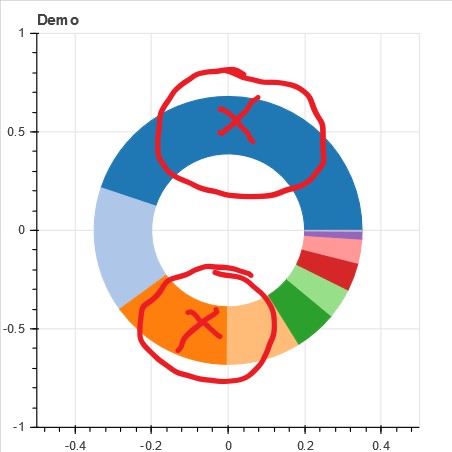
  2. unknown reason. annular wedge from following code gives the issue.

import pandas as pd
import numpy as np
from bokeh.plotting import figure
from bokeh.io import show
from bokeh.models import HoverTool, ColumnDataSource
from bokeh.palettes import Category20
from bokeh.transform import cumsum


###->data
data = {"Code": [11,8,4,2,6,1,13,10,5,9],
        "Count": [820,277,272,164,94,67,62,53,17,2],
        "Rate": [0.4486,0.1515,0.1488,0.0897,0.0514,0.0367,0.0339,0.0290,0.0093,0.0011]}

hover_issue_demo_df = pd.DataFrame(data)
hover_issue_demo_df["Colour"] = Category20[len(hover_issue_demo_df["Code"])]
hover_issue_demo_df["cum_s"] = (hover_issue_demo_df["Rate"].cumsum().shift(1).fillna(0))*2*np.pi
hover_issue_demo_df["cum"] = (hover_issue_demo_df["Rate"].cumsum())*2*np.pi

###->CDS source
CDS_hover_issue_demo_df = ColumnDataSource(hover_issue_demo_df)

##->figure
p_hover_issue_demo_df = figure(plot_width=400, plot_height=400, title="Demo", x_range=(-0.5, 0.5), y_range=(-1, 1))

p_hover_issue_demo_df.annular_wedge(x=0, y=0, 
                                    inner_radius=0.2, outer_radius=0.35,
                                    source=CDS_hover_issue_demo_df,
                                    start_angle="cum_s", end_angle="cum", 
                                    color="Colour"
                                    )

###->add hovertool
hover = HoverTool(tooltips=[("Count", "@Count{0,0}"), ("Percentage", "@Rate{0.0000%}")], mode="mouse", point_policy="follow_mouse")
p_hover_issue_demo_df.add_tools(hover)

show(p_hover_issue_demo_df)

On the result plot, these areas are blind spot, hover does not display.
bokeh_plot_hover%20issue

Regards
mhLearn

⌁   Link to post

End of archived discussion · Replies are disabled