
☰Read-only archive⌕
Looking for help with Bokeh?

This is a read-only archive. Ask questions and join the conversation on GitHub.

Visit Community Support on GitHub →
Archived discussions · Captured October 28, 2026

Bokeh Button Call-Back Question

Community Support
Griffith_Chen
Griffith_Chen

Hi All,

I’m new in Bokeh and I make some project with node analyzer for interesting. And I find this functionality as below,
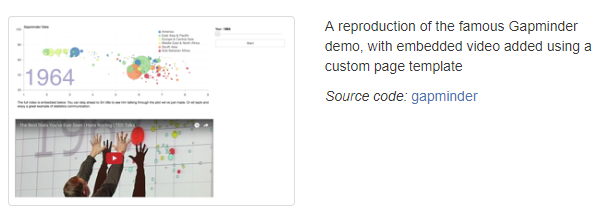
https://demo.bokehplots.com/

I think that the slider with play button could make my project more easily to use, from slider side is work fine,

but when implement the play button function, I meet some trouble with call back function. I try some test,

found that there has no call-back trigger when I click the button, any wrong with my code as below?

Thank you very much.

Python 2.7.12

Bokeh Version: 0.12.14

----------- Testing Code-------------

button = Button(label=‘press me’)

def update():

global button

button.label = “Good”

print “Hi”

button.on_click(update)

show(widgetbox(button))
⌁   Link to post
Bryan
Bryan

By calling show, you are creating a standalone HTML/JS document that is not connected to any persistent python process. So there is nothing to run your Python callback. Use of real python callbacks requires running on the Bokeh server (that is the purpose of the Bokeh server, to be the thing that runs real Python callbacks). You can find more information about the bokeh server here:

  Bokeh server — Bokeh 3.3.2 Documentation

Thanks,

Bryan

···

On Jul 28, 2018, at 23:15, Griffith Chen <visittruth@gmail.com> wrote:

Hi All,

I'm new in Bokeh and I make some project with node analyzer for interesting. And I find this functionality as below,
https://demo.bokehplots.com/

I think that the slider with play button could make my project more easily to use, from slider side is work fine,
but when implement the play button function, I meet some trouble with call back function. I try some test,
found that there has no call-back trigger when I click the button, any wrong with my code as below?
Thank you very much.

Python 2.7.12
Bokeh Version: 0.12.14
----------- Testing Code---------- ---
button = Button(label='press me')
def update():
    global button
    button.label = "Good"
    print "Hi"
button.on_click(update)
show(widgetbox(button))

--
You received this message because you are subscribed to the Google Groups "Bokeh Discussion - Public" group.
To unsubscribe from this group and stop receiving emails from it, send an email to bokeh+unsubscribe@continuum.io.
To post to this group, send email to bokeh@continuum.io.
To view this discussion on the web visit https://groups.google.com/a/continuum.io/d/msgid/bokeh/6321f41d-f0a4-4279-92b3-2b22aa567899%40continuum.io\.
For more options, visit https://groups.google.com/a/continuum.io/d/optout\.

⌁   Link to post
Griffith_Chen
Griffith_Chen

Thanks Bryan, I will check the ref. which you provided, thank you so much.

Griffith Chen於 2018年7月29日星期日 UTC+8下午2時15分04秒寫道:

···

Hi All,

I’m new in Bokeh and I make some project with node analyzer for interesting. And I find this functionality as below,

https://demo.bokehplots.com/

I think that the slider with play button could make my project more easily to use, from slider side is work fine,

but when implement the play button function, I meet some trouble with call back function. I try some test,

found that there has no call-back trigger when I click the button, any wrong with my code as below?

Thank you very much.

Python 2.7.12

Bokeh Version: 0.12.14

----------- Testing Code-------------

button = Button(label=‘press me’)

def update():

global button

button.label = “Good”

print “Hi”

button.on_click(update)

show(widgetbox(button))

⌁   Link to post

End of archived discussion · Replies are disabled