
☰Read-only archive⌕
Looking for help with Bokeh?

This is a read-only archive. Ask questions and join the conversation on GitHub.

Visit Community Support on GitHub →
Archived discussions · Captured October 28, 2026

Bokeh DataTable Columns width changing

Community Support
eds_ober
eds_ober

I have a customjs callback that assigns width to each table column of the data table, but every time the callback is called, the sizes are either reducing or incrementing. It seems like the DataTable is adjusting itself so that the width size of all columns will be equal. If I set the fit_columns to false, all widths are reducing!! Very weird behavior. Do you know what might caused this?

js callback function

def column_sizing_js_callback(self):
    js_code = """
        var dictWithForConsole = {};
        var element;
        var elementList = document.querySelectorAll('.slick-header-column');
        tableColumns.forEach(function(col){
            elementList.forEach(function(element){
                var elementId = element.id;
                var child = document.getElementById(elementId).childNodes;
                var spanInnerText = child[0].innerText;
                elementWidth = document.getElementById(elementId).style.width;
                if(col.title==spanInnerText){
                    dictWithForConsole[spanInnerText] = elementWidth;
                    col.width = parseInt(elementWidth);
                }
            });
        });
        console.log(dictWithForConsole);
    """
    custom_js = CustomJS(args=dict(tableColumns=tableColumns), code=js_code)

    return custom_js

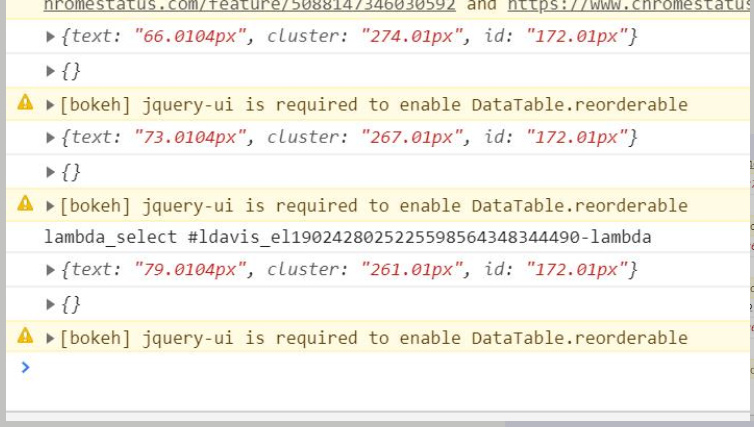
In the console, you will see the values of the column width:
after how many callbacks, the sizes are changing…

⌁   Link to post
p-himik
p-himik

For future reference, please include a runnable code example. If I didn’t notice any issues with your code right away, I would have to create such an example myself while risking missing something that you have done. Such approach is not scalable and is error prone.

As for your question - don’t change HTML entities attributes where Bokeh has some internal state for them. Each table column is an instance of the TableColumn class, and it has the width property - change that instead. If that doesn’t work, you might need to call data_table.change.emit() in JS.

⌁   Link to post
eds_ober
eds_ober

Thank you for your response. The table columns width size are actually changing in the line col.width = parseInt(elementWidth); but what’s weird about this is that every callback, the size are either reducing or incrementing as you can see on my screenshot of the console log. FIrst call back the text column is 66, next 73, then 79. It seems like the DataTable is adjusting the size of the columns so all column widths should be the same.

⌁   Link to post
p-himik
p-himik

Ah, right, I missed that.
Looking at the piece of code that you provided more carefully, I’m now even more confused. What do you want to achieve with it? It seems as if it’s just setting TableColumn.width to the width of the corresponding HTML element. Why?

⌁   Link to post
eds_ober
eds_ober

Thanks. My goal is actually to get the updated size of a certain column when the user adjusted it by using the slick header resize… I don’t think the TableColumn.width was updated at the backend after the user manually changed it.

⌁   Link to post
p-himik
p-himik

Do I understand it correctly that you just want to know the columns’ width changes on the backend side, right when they happen? Is that the end goal or is there something else for which, you think, knowing the widths on the backend is required?

⌁   Link to post
p-himik
p-himik

As far as I can tell, the easiest way to achieve this would be to create subclasses of DataTable and DataTableView and attach some Bokeh event to the onColumnsResized event of DataTableView.grid. This way, the change should be propagated to the backend.

⌁   Link to post

End of archived discussion · Replies are disabled

