☰Read-only archive⌕
Looking for help with Bokeh?

This is a read-only archive. Ask questions and join the conversation on GitHub.

Visit Community Support on GitHub →
Archived discussions · Captured October 28, 2026

Bokeh HTML Output

Community Support
ben_hastings
ben_hastings

I would like to directly customize the css styles of some Bokeh elements individually. This could be done easily if the Bokeh HTML output contained all of the objects, but it doesn’t seem to do that. Does anyone know if it is possible to make Bokeh produce this output?

Thanks,
Ben

⌁   Link to post
Bryan
Bryan

@ben_hastings This question is to vague to know what it is you are actually wanting to accomplish. Do you mean you want to style the elements inside a plot via CSS? If so, that’s not possible at all. Bokeh plots are draw on an opaque raster or webgl canvas. There is no connection between anything inside the canvas, and CSS.

If that’s not what you mean, please elaborate on your ask.

⌁   Link to post
Bryan
Bryan

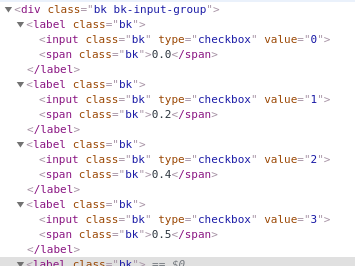
It’s probably not impossible, but also not trivial or simple, I suspect. There is currently nothing that distinguish the individual buttons in the DOM:

So I think any ad-hoc solution would involve JavaScript to find the DOM elements and style them manually based on their order or contents.

There are no built-in properties for configuring this dir`ectly from the Python API, or for applying a custom CSS class per-button. (No one has ever asked for either before.) It seems like a reasonable ask, if you want to file a feature request issue on GitHub.

⌁   Link to post
p-himik
p-himik

You can apply CSS selectors like :nth-child to select different radio buttons.

But you mentioned that your Bokeh HTML output doesn’t contain all the objects. What do you mean? You added some radio buttons and they’re not on the page at all?

⌁   Link to post
ben_hastings
ben_hastings

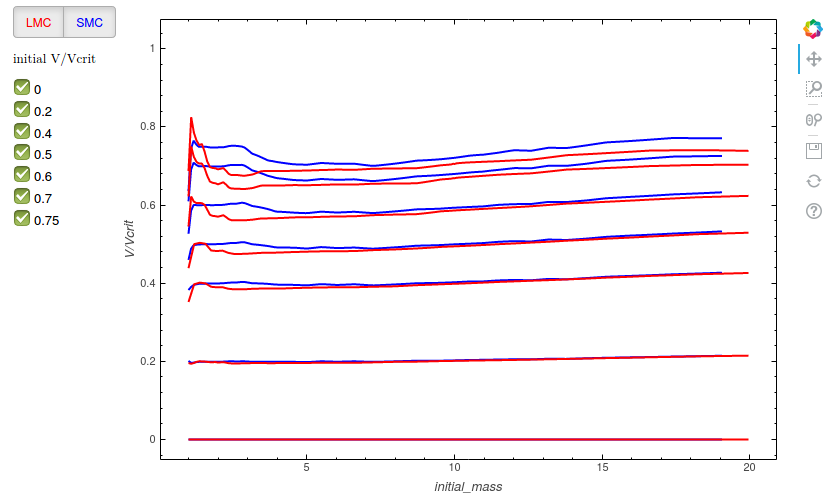
My working example is here :

https://astro.uni-bonn.de/~bhastings/isochrones/testing/evo.html

When you look at the html code for this page, you see that there is no code like

<div class = 'bk bk-btn bk-btn-default'> option 1 <\div>

<\div>

as in Bryan’s post. What I would ideally like to to is match the color of the radio buttons to the colors of the lines in the plot. I thought that this would be easiest to do if one can dig into the guts of the html and manually change the colors

⌁   Link to post
ben_hastings
ben_hastings

Sorry I meant checkBoxbuttongroup, the two buttons with labels ‘SMC’ and ‘LMC’ in the top left corner.

When I look at the html of my example, what I see is that some JavaScript is being called that will ultimately produce the webpage, in html. I do not see directly the html describing the buttons.

I was wondering whether it is possible to capture directly the output of these JavaScript scripts so that I can manually change properties of individual objects on the plot.

⌁   Link to post
p-himik
p-himik

But why? Yes, you’re correct - the HTML is not there when you just save a Bokeh document. But it’s there when you open it - which means that the embedded CSS, if you add it, will work just fine. CSS does not care where the HTML has come from.
Don’t look at the saved HTML, look at the HTML in the browser when you open the generated HTML.

⌁   Link to post
ben_hastings
ben_hastings

Because if I can get a file that contains only html, it would be relatively easy to have total control over all the elements in the page. One could then for example easily change the colors on the different buttons in a checkboxbuttongroup.

⌁   Link to post

End of archived discussion · Replies are disabled