☰Read-only archive⌕
Looking for help with Bokeh?

This is a read-only archive. Ask questions and join the conversation on GitHub.

Visit Community Support on GitHub →
Archived discussions · Captured October 28, 2026

Bokeh is not picking modified version of bokeh-widget-2.2.1.js

Community Supportbokehjs
mukeshkdangi
mukeshkdangi

**Bokeh auto complete is not showing results for sub string. It only shows when we type string from start. tried using modified version of bokeh-widget-2.2.1.js but for some reason bokeh is still able acess bokeh-widget.min.js

2.1. Sub String search is not working which very essential thing when we talk about search.
2,2 I added bokeh-widgets-2.1.1.js JS file in my code as :

 <script src="/bokeh_app/static/js/jquery.min.js"></script>
    **<script src="/bokeh_app/static/js/bokeh-widgets-2.1.1.js"></script>**
    <script src="/bokeh_app/static/js/jquery-ui.min.js"></script>
<script src="/bokeh_app/static/js/bokeh-2.1.1.js"></script>
<script src="/bokeh_app/static/js/bokeh-api.min.js"></script>
<script src="/bokeh_app/static/js/bokeh-gl.min.js"></script>
<script src="/bokeh_app/static/js/bokeh-tables.min.js"></script>

H owever Bokeh is accessing bokeh-widgets.min.js instead of modified **<script src="/bokeh_app/static/js/bokeh-widgets-2.1.1.js"></script>** which is not there in my project structure at all.

⌁   Link to post
Bryan
Bryan

By default, the Bokeh server loads BokehJS resource files from inside the Python package itself, under the bokeh/server/static directory. You would need to change the relevant files inside the Python package installation.

⌁   Link to post
Bryan
Bryan

do we have any documentation for this ?

@mukeshkdangi I linked to the developers guide in the issue when I referred you here:

However, if you just want to hand-edit files to use in your own template, you can just copy them out of the package intallation, or download them from CDN, and then make your changes. You’ll just have to host them somewhere they can be accessed.

⌁   Link to post
mukeshkdangi
mukeshkdangi

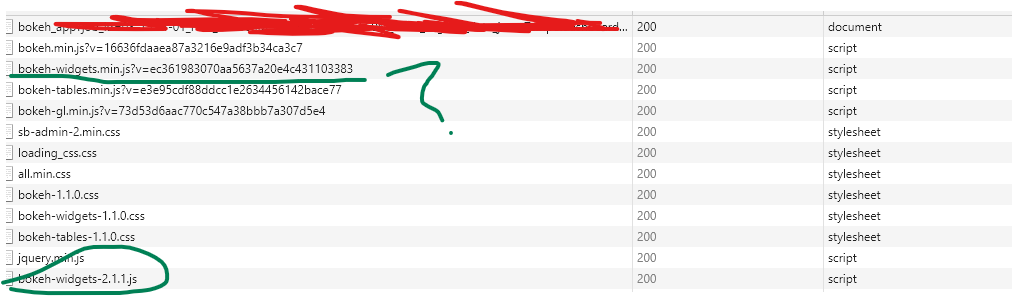
Sorry answer is bit confusing. In my question i’ve downloaded bokeh-widget.js from CDN, modified it and then added it in the jinja template file however not sure why bokeh is still using bokeh-widget.min.js instead of what i mentioned in the template file. it supposed to use bokeh-widget-2.1.1.js. i’ve attached a screenshot of network calls as well.

⌁   Link to post
mukeshkdangi
mukeshkdangi
<!-- Bootstrap core JavaScript-->
<script src="/static/vendor/jquery/jquery.min.js"></script>
<script src="/static/vendor/bootstrap/js/bootstrap.bundle.min.js"></script>

<!-- Core plugin JavaScript-->
<script src="/static/js/bokeh-2.1.1.js"></script>
<script src="/static/js/bokeh-api.min.js"></script>
<script src="/static/js/bokeh-gl.min.js"></script>
<script src="/static/js/bokeh-tables.min.js"></script>
**<script src="/static/js/bokeh-widgets-2.1.1.js"></script>**
<script src="/static/js/popper.min.js"></script>
<script src="/static/js/bootstrap.min.js"></script>

<script src="/static/vendor/jquery-easing/jquery.easing.min.js"></script>

This is what i’ve in my template. /static/js/bokeh-widgets-2.1.1.js is loaded as per network call screenshot attached in the question but not used.

⌁   Link to post
Bryan
Bryan

@mukeshkdangi That’s still not really enough information. If you are inheriting from the default template without overriding the default resources (or copy pasting from it without removing those parts) that could explain things. Otherwise I don’t know. What is really needed (and is always advised and best) is a Minimal Reproducing Example e.g. a repo we could clone to run a minimal test case ourselves.

⌁   Link to post
mukeshkdangi
mukeshkdangi

Unable to bring added JS to build folder after running build js command

:~/bokeh$ python setup.py develop --build-js
Building BokehJS… Success!

Build output:

[22:27:27] Starting ‘styles:compile’…
[22:27:27] Finished ‘styles:compile’ after 325 ms
[22:27:27] Starting ‘scripts:styles’…
[22:27:27] Finished ‘scripts:styles’ after 4 ms
[22:27:27] Starting ‘scripts:version’…
[22:27:27] Finished ‘scripts:version’ after 0 ms
[22:27:27] Starting ‘scripts:compile’…
[22:27:40] Finished ‘scripts:compile’ after 12.75 s
[22:27:40] Starting ‘scripts:bundle’…
[22:27:41] Finished ‘scripts:bundle’ after 548 ms
[22:27:41] Finished ‘lib:build’
[22:27:41] Starting ‘scripts:bundle-legacy’…
[22:27:41] Finished ‘scripts:bundle-legacy’ after 609 ms
[22:27:41] Finished ‘scripts:build’
[22:27:41] Starting ‘compiler:ts’…
[22:27:43] Finished ‘compiler:ts’ after 1.31 s
[22:27:43] Starting ‘compiler:build’…
[22:27:46] Finished ‘compiler:build’ after 2.89 s
[22:27:46] Finished ‘build’
[22:27:46] Finished ‘top-level’

Build time: 21.6 seconds

Build artifact sizes:

  • bokeh.js : 1719.0 KB
  • bokeh.min.js : 740.3 KB
  • bokeh-widgets.js : 647.9 KB
  • bokeh-widgets.min.js : 253.0 KB
  • bokeh-tables.js : 894.1 KB
  • bokeh-tables.min.js : 289.3 KB

:~/bokeh/bokehjs/build/js$ ls bokeh-api.js bokeh-api.legacy.js.map bokeh-tables.js bokeh-tables.legacy.js.map bokeh-widgets.js bokeh-widgets.legacy.js.map bokeh.js bokeh.legacy.js bokeh.legacy.min.js compiler.js lib bokeh-api.js.map bokeh-api.legacy.min.js bokeh-tables.js.map bokeh-tables.legacy.min.js bokeh-widgets.js.map bokeh-widgets.legacy.min.js bokeh.js.map bokeh.legacy.js.map bokeh.min.js compiler.js.map types bokeh-api.legacy.js bokeh-api.min.js bokeh-tables.legacy.js bokeh-tables.min.js bokeh-widgets.legacy.js bokeh-widgets.min.js bokeh.json bokeh.legacy.json compiler compiler.json

I was unable to get my new added js file to build/js. when i run either of following lines the dic /home/ubuntu/bokeh/bokeh/server/static/js gets refreshed the fresh default js files.

  • python setup.py develop --build-js
  • python setup.py develop --install-js

⌁   Link to post
Bryan
Bryan

I was unable to get my new added js file to build/js. when i run either of following lines the dic /home/ubuntu/bokeh/bokeh/server/static/js gets refreshed the fresh default js files.

If you run --build-js that builds BokehJS resources from the TypeScript sources in bokehjs/src/lib replacing whatever is in the build dir. That’s exactly what is supposed to happen. If you want to modify BokehJS then you need to edit the actual TypeScript source files.

⌁   Link to post

End of archived discussion · Replies are disabled