
☰Read-only archive⌕
Looking for help with Bokeh?

This is a read-only archive. Ask questions and join the conversation on GitHub.

Visit Community Support on GitHub →
Archived discussions · Captured October 28, 2026

Bokeh+jupyter(lab): squished output

Community Support
johank
johank

Hi all,

Strange issue that just started today, for unknown reasons:

A plot in jupyterlab notebook I use ~daily now appears… squished, as if condensed into a few lines. See pic.
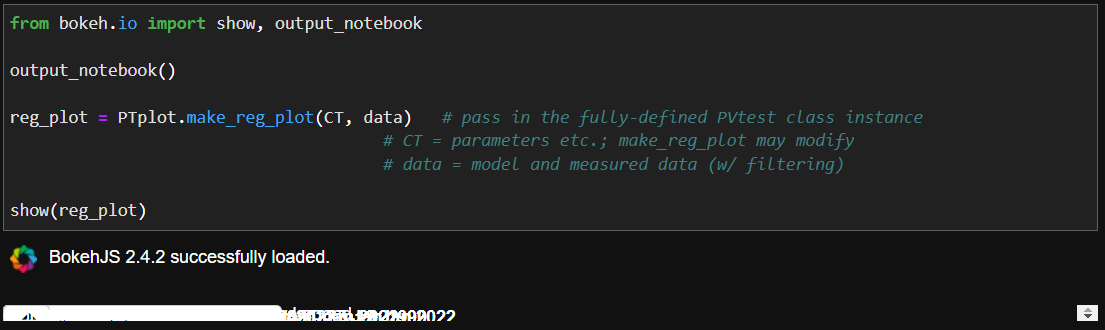
I’m not even sure where to start troubleshooting this. I still had bokeh 2.3.3 when this started.

I’ve tried:

  • send output of cell to “new view” and “disable scrolling for outputs” in jupyter lab
  • update to latest bokeh and jupyter lab (3.2.1)
  • fresh conda env with just the required dependencies
  • clear browser cache
  • change to output_notebook(INLINE)

… all to no avail.

Default browser for jupyter lab: MS Edge 97.0.1072.55
Also tried Chrome 97.0.4692.71, same result

Any suggestions greatly appreciated - many thanks!

⌁   Link to post
johank
johank

Found the issue. The shape of the data caused my code to create a LinearColorMapper with an empty palette:

color_mapper = LinearColorMapper(palette=[], low=0, high=1)

Possible to have LinearColorMapper raise an Exception / issue warning in such case? Thanks!

⌁   Link to post
Bryan
Bryan

There’s a decent chance there was an exception or error — in the browser’s JavaScript console. The fact of the matter is that the vast majority of actual work in Bokeh is not done in Python, it is done by the BokehJS JavaScript library.

We can’t issue an error for simply creating a LinearColorMapper with initial empty palette, because it’s not actually an error until it hits BokehJS, and a user could update the value between creating and calling “show”. There is a validation mechanism that can catch things at serialization (“show”) time, but it’s clunky and adds expense, so we try to avoid it except for very common problems (and this is the first time this has been raised on a help forum in ~10 years).

It’d probably be more fruitful to find a way to surface BokehJS errors more visibly than just the browser console, which not all users know to check. Please feel free to open a GitHub development discussion about this topic.

⌁   Link to post
johank
johank

Good point, thanks Bryan. What’s this JavaScript thing I keep hearing about?

But yes, for folks like me who are blissfully ignorant of what’s happening under bokeh’s magic hood - and forget that browsers have consoles! - having some way to make errors on the JS side more visible sounds like it would be helpful. Realize this is probably rare, though.

I will attempt to open a GitHub request and probably garble it. Will edit this post with link.

⌁   Link to post

End of archived discussion · Replies are disabled
