☰Read-only archive⌕
Looking for help with Bokeh?

This is a read-only archive. Ask questions and join the conversation on GitHub.

Visit Community Support on GitHub →
Archived discussions · Captured October 28, 2026

Bokeh Server Error with Flask on AWS EC2 instance

Community Support
Waleed
Waleed

We made a new section on our website regarding plot data and display and we decided to go with bokeh. The architecture we choose is the flask embed option and the good news is the app works perfectly when running on our computers. Once we moved to AWS the apps refuses to work the error we get is

Screen Shot 2019-04-26 at 8.03.26 PM.png

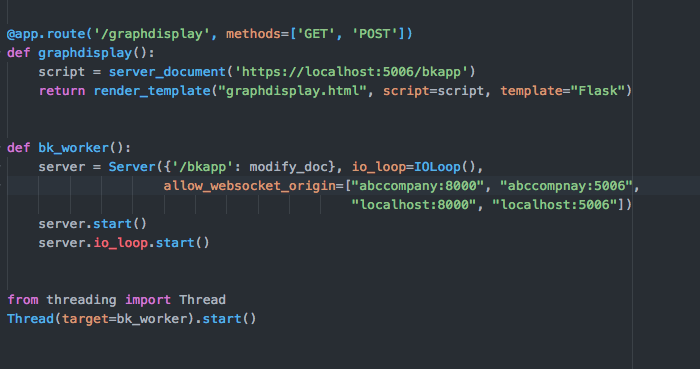
We suspect that the error happens because of nginx, AWS or letsEncrypt certificate however we made the correct changes however we are still not able to open the connection our flask code

Screen Shot 2019-04-26 at 8.19.06 PM.png

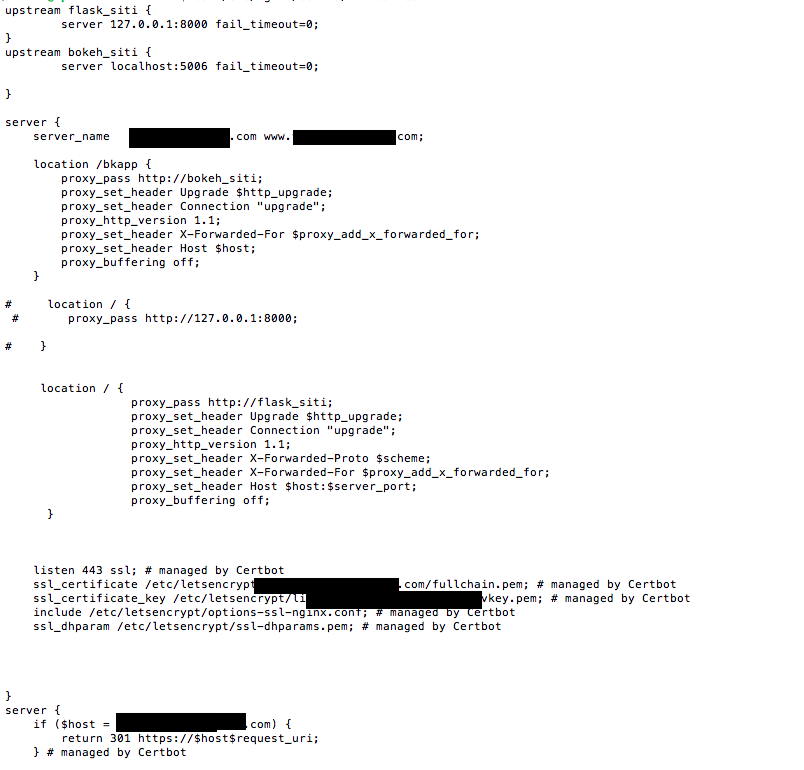
Our nginx configuration

Screen Shot 2019-04-26 at 8.38.09 PM.png

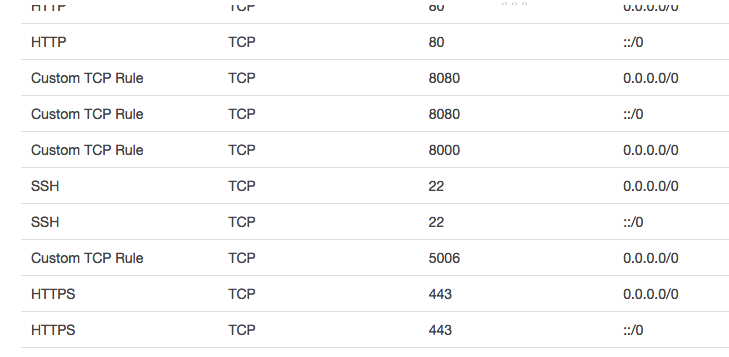
Finally our AWS security group inbound traffic is as follow

Screen Shot 2019-04-26 at 8.54.16 PM.png

as you can see we open the custom TCP rule for port 5006 and also we opened port 8000 any help is appreciated

⌁   Link to post
Bryan
Bryan

Connection refused typically means allow_websocket_origin is not set correctly. In this case I might suspect that the ultimate end viewers are not actually navigating to port 8000. The allowed origin list needs to include what the &actual viewer’s browser will report as the origin, and typically this is “what is in the URL bar”.

⌁   Link to post
Bryan
Bryan

Perhaps it’s Nginx refusing the connection then? Hard to say much without logs. The first question to answer is: who/where is rejecting the connection.

BTW, if you are just using Nginx in order to terminal SSL, know that as of Bokeh 1.4 the Bokeh server can terminate HTTPS connections directly.

⌁   Link to post
andrew.waites
andrew.waites

@Bryan I think it is nginx. This is all behind an AWS classic load balancer but I have tracked this down to the websocket reverse proxy and have tried adding this block to nginx configuration:

        location /ceoperformance {
            proxy_pass            http://127.0.0.1:5006;
            proxy_set_header Upgrade $http_upgrade;
            proxy_set_header Connection "upgrade";
            proxy_http_version 1.1;
            proxy_set_header X-Forwarded-For $proxy_add_x_forwarded_for;
            proxy_set_header Host $host:$server_port;
            proxy_buffering off;
        }

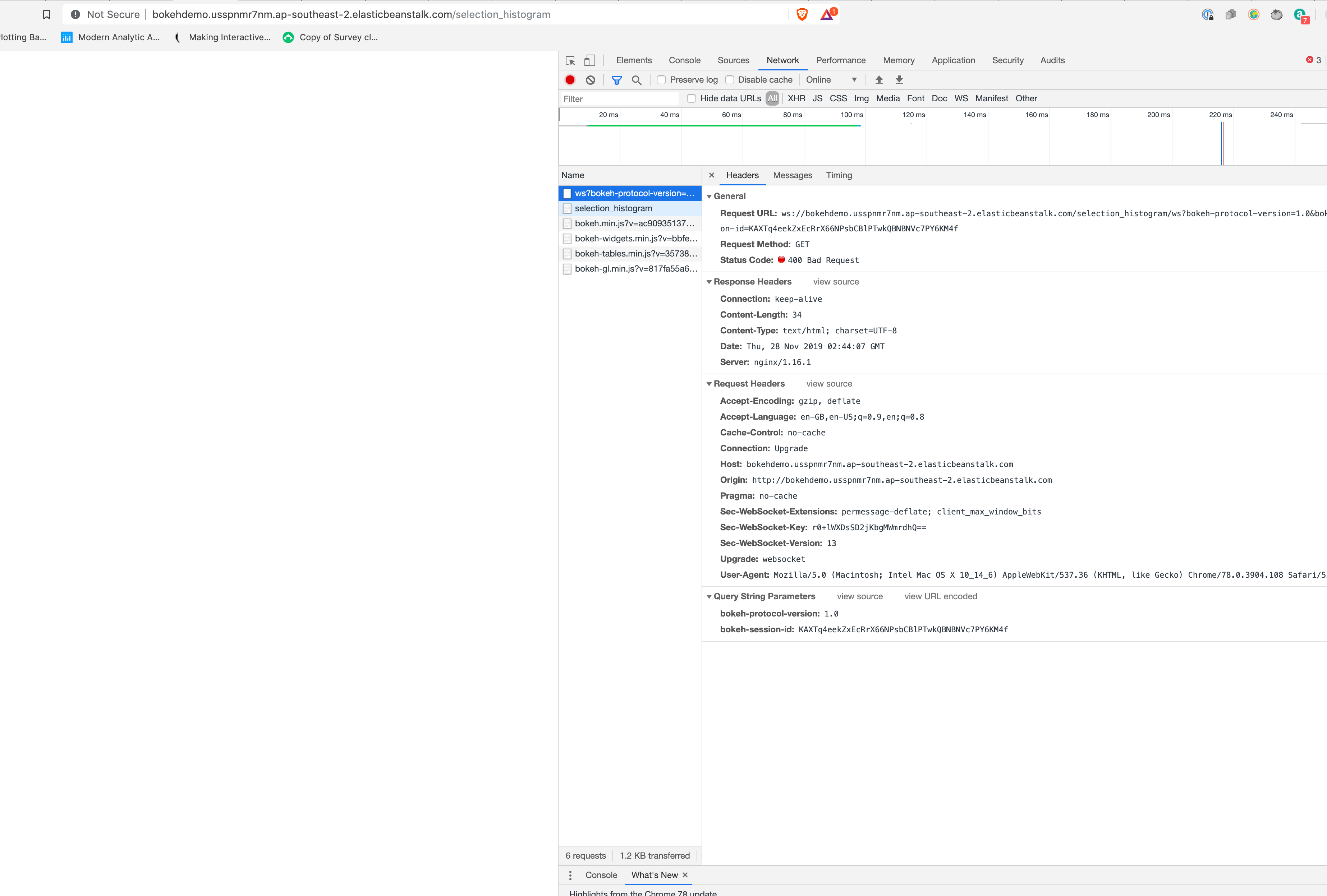
The result is a shift from a 400 error to a 502 error which, being a change, is as good as a holiday I suppose. I amthinking perhaps I should try something other than 127.0.0.1 (maybe localhost although not sure what difference that would make).

2019/11/26 21:54:39 [error] 15735#0: *2 connect() failed (111: Connection refused) 
while connecting to upstream, client: 172.31.30.233, server: , 
request: "GET /ceoperformance HTTP/1.1", 
upstream: "http://127.0.0.1:5006/ceoperformance", host: "apps.amalfiblue.com", 
referrer: "http://apps.amalfiblue.com/" 

I’m not sure what the existing nginx proxy_pass / → http://docker is all about so am a bit gunshy about playing with that.

⌁   Link to post
Bryan
Bryan

I guess it’s worth verifying: Are nginx and the Bokeh server running on the same instance?

Also does your security group allow TCP (websocket) connections in and out of the instance?

⌁   Link to post
andrew.waites
andrew.waites

Bryan - both on same instance. Pretty sure I have managed to allow the TCP on the security group as when I changed the nginx config adding:

        location /ceoperformance {
            proxy_pass            http://localhost:5006;
            proxy_set_header Upgrade $http_upgrade;
            proxy_set_header Connection "upgrade";
            proxy_http_version 1.1;
            proxy_set_header X-Forwarded-For $proxy_add_x_forwarded_for;
            proxy_set_header Host $host:$server_port;
            proxy_buffering off;
        }

The nginx error log gave a 502 error which was not there before - I suspect that means the packet got to the server.

⌁   Link to post
Bryan
Bryan

I’m afraid I don’t know what else to suggest at this point. Are you able to retrieve the Bokeh server logs? If the server is intentionally rejecting the connection that will show up. Another possibility is if the app code is raising an exception, that would probably also result in a 502 in fact that seem more likely. But if the app code is blowing up that would also show up in the logs.

⌁   Link to post
andrew.waites
andrew.waites

Bryan - appreciate the help - driving me a bit mad and having to learn way to many things for this old dog.

The code runs fine in a local standalone docker container, also fine on EB is there is no load balancer

Can you provide some clarity as to what happens with that webserver call. The JS on client is initiating a call to /ceoperformance/ws?.. I am guessing the bokeh server should be interpreting the /ws as a web service call (as opposed to some for of page load) so the client is sending a request (TCP port 5006?) which is somehow seen as malformed (400) - the load balancer is mapping 5006 to 5006 (is that right) - and is it coming in on 5006 from the client?

I am pretty confused (clearly) because I can’t directly address 5006 from my client unless it is running locally.

On your demo setup did you have to do anything with nginx (default docker EB web server) config? What did you map 5006 to on the EB load balancer?

There seem to have been a few questions along these lines in the past.

⌁   Link to post
andrew.waites
andrew.waites

Ok this is a problem on the ws: call which (when successful) returns a 101 (protocol change). I gather that this is some form of client side swap from http to tcp (guessing) and it may (somewhere) swap to using the bokeh port (here 5006).

I have 5006 mapped to 5006 on the ELB as HTTP on both sides but I wonder if one or both sides of that should be TCP.

I would REALLY LOVE to know how you have you AWS LB configured.

⌁   Link to post
Bryan
Bryan

@andrew.waites If you can tell me what to look for, I am happy to report it back. Failing that, could potentially do a screen share to look over the config together. FYI ours is a classic ELB, I am not sure the “new” ELB supports websockets, just in case that is the issue.

⌁   Link to post
andrew.waites
andrew.waites

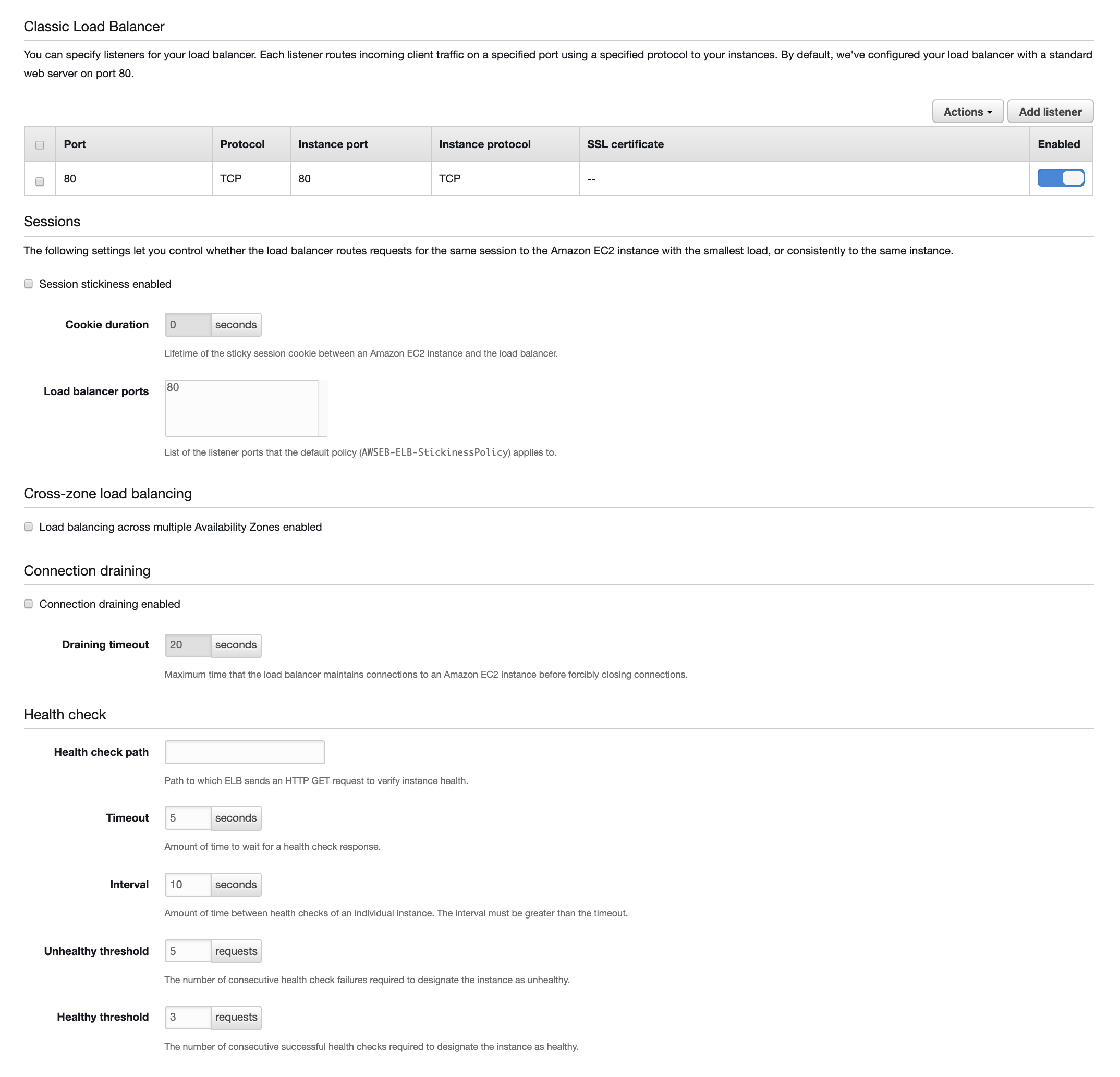
@Bryan if you look at your EB application → configuration → load balancer

There should be a table of listener mappings at the top:

Port 80 HTTP → 80 HTTP etc - I’d like to know what it says for other ports (5006) or whatever.

I have an application LB in front of this but I am currently testing the classic load balancer directly.

⌁   Link to post
andrew.waites
andrew.waites

Bryan - does handled at the docker level mean nginx config?

I know the Dockerfile has EXPOSE 5006 and the default nginx config seems to map everything to http://docker - is that what you mean?

Not really sure what that actually means in practice

HAve removed my 5006 mapping and no difference

⌁   Link to post
Bryan
Bryan

@andrew.waites I have have mis-spoke, I mean here:

which is actually an AWS config. Note that we currently use this config and pull images from docker hub, but we didn’t always. It’s also possible to just upload docker files directly to EB. But you might start just duplicating everything, including the dockerhub image we publish.

EDIT: Note, when we did just upload the Docker file directly, we had this in it:

EXPOSE 5006
EXPOSE 80

But I’m not actually sure that’s correct… I don’t recall where the container/host port mapping was configured when the docker file was uploaded.

⌁   Link to post
andrew.waites
andrew.waites

Bryan I just tried using the Dockerfile on GitHub - bokeh/demo.bokeh.org: Hosted Bokeh App Demos loading it into a standard docker AWS EB instance. Works fine without load balancing. As soon as I set up load balancing I get exactly the error I have been seeing all week. I didn’t touch the ELB defaults so they are the same as you indicated.

Also, based on your previous response I tried adding a listener 5006 → 80 on the AWS ELB (for my instance) still no joy. Am thinking that config though might be telling docker something rather than AWS which “might” be reflected in your nginx config (/etc/nginx/sites-available/something)

Okay I found that I had that dockerfile.aws.json in the demo folder so I checked the EB setup and that seems to have added an an upstream conf file to nginx (in /etc/conf.d) which implies that docker should (perhaps) be handling all this hence no need for AWS ELB configuration changes.

Still doesn’t work though.

⌁   Link to post
Bryan
Bryan

@andrew.waites I’m not sure I will have to try to reproduce things step by step from scratch this weekend after the holiday. We definitely have two instances running behind a classic ELB. I still think if you can obtain the Bokeh server console logs that will be very helpful. (I know AWS does not make it simple)

⌁   Link to post
Bryan
Bryan

@andrew.waites I don’t know the log file name, it’s whichever has the bokeh server output that starts like

2019-11-29 08:31:42,921 Starting Bokeh server version 2.0.0dev4-71-g752e1471a (running on Tornado 6.0.3)
2019-11-29 08:31:42,925 User authentication hooks NOT provided (default user enabled)
2019-11-29 08:31:42,927 Bokeh app running at: http://localhost:5006/selection_histogram
2019-11-29 08:31:42,927 Starting Bokeh server with process id: 16698

FYI if you add --log-level=debug to the server start it will output some additional information.

⌁   Link to post
andrew.waites
andrew.waites

2019-12-01 18:50:44,004 Starting Bokeh server version 1.4.0 (running on Tornado 6.0.3)
2019-12-01 18:50:44,007 Host wildcard ‘’ will allow connections originating from multiple (or possibly all) hostnames or IPs. Use non-wildcard values to restrict access explicitly
2019-12-01 18:50:44,007 User authentication hooks NOT provided (default user enabled)
2019-12-01 18:50:44,007 These host origins can connect to the websocket: [’
’]
2019-12-01 18:50:44,007 Patterns are:
2019-12-01 18:50:44,009 [(’/ceoperformance/?’,
2019-12-01 18:50:44,009 <class ‘bokeh.server.views.doc_handler.DocHandler’>,
2019-12-01 18:50:44,009 {‘application_context’: <bokeh.server.contexts.ApplicationContext object at 0x7ff2cadbf950>,
2019-12-01 18:50:44,009 ‘bokeh_websocket_path’: ‘/ceoperformance/ws’}),
2019-12-01 18:50:44,009 (’/ceoperformance/ws’,
2019-12-01 18:50:44,010 <class ‘bokeh.server.views.ws.WSHandler’>,
2019-12-01 18:50:44,010 {‘application_context’: <bokeh.server.contexts.ApplicationContext object at 0x7ff2cadbf950>,
2019-12-01 18:50:44,010 ‘bokeh_websocket_path’: ‘/ceoperformance/ws’}),
2019-12-01 18:50:44,010 (’/ceoperformance/metadata’,
2019-12-01 18:50:44,010 <class ‘bokeh.server.views.metadata_handler.MetadataHandler’>,
2019-12-01 18:50:44,010 {‘application_context’: <bokeh.server.contexts.ApplicationContext object at 0x7ff2cadbf950>,
2019-12-01 18:50:44,011 ‘bokeh_websocket_path’: ‘/ceoperformance/ws’}),
2019-12-01 18:50:44,011 (’/ceoperformance/autoload.js’,
2019-12-01 18:50:44,011 <class ‘bokeh.server.views.autoload_js_handler.AutoloadJsHandler’>,
2019-12-01 18:50:44,011 {‘application_context’: <bokeh.server.contexts.ApplicationContext object at 0x7ff2cadbf950>,
2019-12-01 18:50:44,011 ‘bokeh_websocket_path’: ‘/ceoperformance/ws’}),
2019-12-01 18:50:44,012 (’/electoralmaths/?’,
2019-12-01 18:50:44,012 <class ‘bokeh.server.views.doc_handler.DocHandler’>,
2019-12-01 18:50:44,012 {‘application_context’: <bokeh.server.contexts.ApplicationContext object at 0x7ff2cadbf910>,
2019-12-01 18:50:44,012 ‘bokeh_websocket_path’: ‘/electoralmaths/ws’}),
2019-12-01 18:50:44,012 (’/electoralmaths/ws’,
2019-12-01 18:50:44,012 <class ‘bokeh.server.views.ws.WSHandler’>,
2019-12-01 18:50:44,013 {‘application_context’: <bokeh.server.contexts.ApplicationContext object at 0x7ff2cadbf910>,
2019-12-01 18:50:44,013 ‘bokeh_websocket_path’: ‘/electoralmaths/ws’}),
2019-12-01 18:50:44,013 (’/electoralmaths/metadata’,
2019-12-01 18:50:44,013 <class ‘bokeh.server.views.metadata_handler.MetadataHandler’>,
2019-12-01 18:50:44,013 {‘application_context’: <bokeh.server.contexts.ApplicationContext object at 0x7ff2cadbf910>,
2019-12-01 18:50:44,013 ‘bokeh_websocket_path’: ‘/electoralmaths/ws’}),
2019-12-01 18:50:44,014 (’/electoralmaths/autoload.js’,
2019-12-01 18:50:44,014 <class ‘bokeh.server.views.autoload_js_handler.AutoloadJsHandler’>,
2019-12-01 18:50:44,014 {‘application_context’: <bokeh.server.contexts.ApplicationContext object at 0x7ff2cadbf910>,
2019-12-01 18:50:44,014 ‘bokeh_websocket_path’: ‘/electoralmaths/ws’}),
2019-12-01 18:50:44,014 (’/?’,
2019-12-01 18:50:44,014 <class ‘bokeh.server.views.root_handler.RootHandler’>,
2019-12-01 18:50:44,015 {‘applications’: {’/ceoperformance’: <bokeh.server.contexts.ApplicationContext object at 0x7ff2cadbf950>,
2019-12-01 18:50:44,015 ‘/electoralmaths’: <bokeh.server.contexts.ApplicationContext object at 0x7ff2cadbf910>},
2019-12-01 18:50:44,015 ‘index’: ‘/index.html’,
2019-12-01 18:50:44,015 ‘prefix’: ‘’,
2019-12-01 18:50:44,015 ‘use_redirect’: True}),
2019-12-01 18:50:44,015 (’/static/(.*)’,
2019-12-01 18:50:44,016 <class ‘bokeh.server.views.static_handler.StaticHandler’>)]
2019-12-01 18:50:44,026 Bokeh app running at: http://localhost:5006/ceoperformance
2019-12-01 18:50:44,028 Bokeh app running at: http://localhost:5006/ceoperformance
2019-12-01 18:50:44,028 Bokeh app running at: http://localhost:5006/electoralmaths
2019-12-01 18:50:44,028 Starting Bokeh server with process id: 8
2019-12-01 18:50:44,028 Starting Bokeh server with process id: 7
2019-12-01 18:50:59,045 [pid 8] 0 clients connected
2019-12-01 18:50:59,045 [pid 8] /ceoperformance has 0 sessions with 0 unused
2019-12-01 18:50:59,045 [pid 8] /electoralmaths has 0 sessions with 0 unused
2019-12-01 18:50:59,045 [pid 7] 0 clients connected
2019-12-01 18:50:59,045 [pid 7] /ceoperformance has 0 sessions with 0 unused
2019-12-01 18:50:59,045 [pid 7] /electoralmaths has 0 sessions with 0 unused
.
.
.
2019-12-01 18:52:14,034 [pid 7] 0 clients connected
2019-12-01 18:52:14,035 [pid 7] /ceoperformance has 0 sessions with 0 unused
2019-12-01 18:52:14,035 [pid 7] /electoralmaths has 0 sessions with 0 unused
2019-12-01 18:52:23,771 400 GET /ceoperformance/ws?bokeh-protocol-version=1.0&bokeh-session-id=NbCHWHwCBqx9ASz0yGqtOYJfoI9L3gH7eHZCDfhhYGZF (172.17.0.1) 0.66ms
2019-12-01 18:52:29,032 [pid 8] 0 clients connected
2019-12-01 18:52:29,032 [pid 8] /ceoperformance has 0 sessions with 0 unused
2019-12-01 18:52:29,033 [pid 8] /electoralmaths has 0 sessions with 0 unused
2019-12-01 18:52:29,033 [pid 7] 0 clients connected
2019-12-01 18:52:29,034 [pid 7] /ceoperformance has 1 sessions with 1 unused
2019-12-01 18:52:29,034 [pid 7] /electoralmaths has 0 sessions with 0 unused
2019-12-01 18:52:43,037 Scheduling 1 sessions to discard
2019-12-01 18:52:43,037 Discarding session ‘NbCHWHwCBqx9ASz0yGqtOYJfoI9L3gH7eHZCDfhhYGZF’ last in use 19427.084345042706 milliseconds ago
2019-12-01 18:52:43,037 Deleting 1 modules for <bokeh.document.document.Document object at 0x7ff2caef8c10>

⌁   Link to post
andrew.waites
andrew.waites

And the relevent lines in nginx/access.log

172.31.2.113 - - [01/Dec/2019:18:52:23 +0000] “GET /ceoperformance HTTP/1.1” 200 2699 “http://apps.amalfiblue.com/” “Mozilla/5.0 (Macintosh; Intel Mac OS X 10_14_6) AppleWebKit/537.36 (KHTML, like Gecko) Chrome/78.0.3904.108 Safari/537.36”

172.31.2.113 - - [01/Dec/2019:18:52:23 +0000] “GET /ceoperformance/ws?bokeh-protocol-version=1.0&bokeh-session-id=NbCHWHwCBqx9ASz0yGqtOYJfoI9L3gH7eHZCDfhhYGZF HTTP/1.1” 400 34 “-” “Mozilla/5.0 (Macintosh; Intel Mac OS X 10_14_6) AppleWebKit/537.36 (KHTML, like Gecko) Chrome/78.0.3904.108 Safari/537.36”

⌁   Link to post
Bryan
Bryan

@andrew.waites Do you not have outbound TCP traffic opened up, by chance? It looks from the log like the websocket connection request is making it in to the server and then a reply is never making it out. For the demo site we have the same config for outbound as inbound.

⌁   Link to post
andrew.waites
andrew.waites

Bryan - outbound is wide open - everything on every security group I can find - am looking for AWS traffic logs/denials now

Out of interest, do you have a step-by-step on how you set up the EB - perhaps because I started with the demo docker environment then just deployed the new dockerfile ++ perhaps there is a difference there

⌁   Link to post
Bryan
Bryan

I notice that you don’t have

proxy_set_header X-Forwarded-Proto $scheme;

in your nginx config, which is included in the sample nginx conf in the docs. Does this help?

I don’t have that yet, I was hoping to be able to work on this this weekend but it did not work out.

⌁   Link to post
andrew.waites
andrew.waites

Bryan CloudWatch logs picked up this reject which is strange as am operating on 5006

version account-id interface-id srcaddr dstaddr srcport dstport protocol packets bytes start end action log-status
2 630057245058 eni-064f582960f584470 51.158.25.170 172.31.5.72 4040 5005 17 1 476 1575270531 1575270587 REJECT OK
⌁   Link to post
Bryan
Bryan

@andrew.waites The demo site does not use Nginx it’s just a Bokeh server with an index.html specified. I’ve never personally run a Bokeh server on AWS behind Nginx. I’m not familiar with the other config file either, or if there even is one in our case, but if you tell me where to look I will see if I can find it.

⌁   Link to post
andrew.waites
andrew.waites

Bryan

I didn’t set nginx up - EB/Docker demo (I guess) uses it but if you have an index.html something must be serving it. If you do have nginx you will have /etc/nginx/nginx.conf and /etc/nginx/sites-available/elasticbeanstalk-nginx-docker-proxy.conf

Strange because the Dockerfile doesnt seem to ask for nginx yet it is there - makes me think maybe it is an AWS/EB thing.

⌁   Link to post
Bryan
Bryan

I am not sure how to get on the instance. I did not have a key pair set up initially, and these were two reserved instances that EB grabbed when Application started. I am not averse to shutting down/restarting the EB for the demo site, but I would need guidance on how to make sure the instances are ssh-able afterwards.

Edit: Looking at “download logs” there are definitely nginx logs present. So, this seems to be something AWS sets up by default. We have not modified whatever the default nginx config AWS provides is. As an example, the nginx logs show 200 entries:

172.31.90.24 - - [02/Dec/2019:21:47:12 +0000] “GET /movies/ws?bokeh-protocol-version=1.0&bokeh-session-id=TDnvXkeKrDwY4QKRUV6Mrrqua6nd36beekkiytDHiRkp HTTP/1.1” 101 1866229 “-” “Mozilla/5.0 (X11; Linux x86_64) AppleWebKit/537.36 (KHTML, like Gecko) Chrome/73.0.3683.103 Safari/537.36”

⌁   Link to post
andrew.waites
andrew.waites

Bryan - thanks - that 101 is what I see when I run it all locally (protocol upgrade).

My thinking is that perhaps the difference is that I set the application up using the AWS docker demo container then replaced it with my (and later I tried your) dockerfile. Perhaps it is something in the AWS demo setup that is lingering. Certainly seem to be many related problems scattered throughout SO. I might try setting up the bokeh demo from a straight upload and see if that makes a difference - if I can get it going and ssh in then I will see what the difference is.

From memory, to set up ssh if you have the eb command line tool and try eb ssh it should automatically work on setting one up but yes the process would involve a restart of the demo site so I will ponder. Setting up for ssh for the first time in AWS will also ask you to set up a key pair (once you have one you can reuse it on other instances).

Also - do you know who wrote the README.md on the bokeh demo deployment as it references websocket setup but is a bit vague on detail.

⌁   Link to post
andrew.waites
andrew.waites

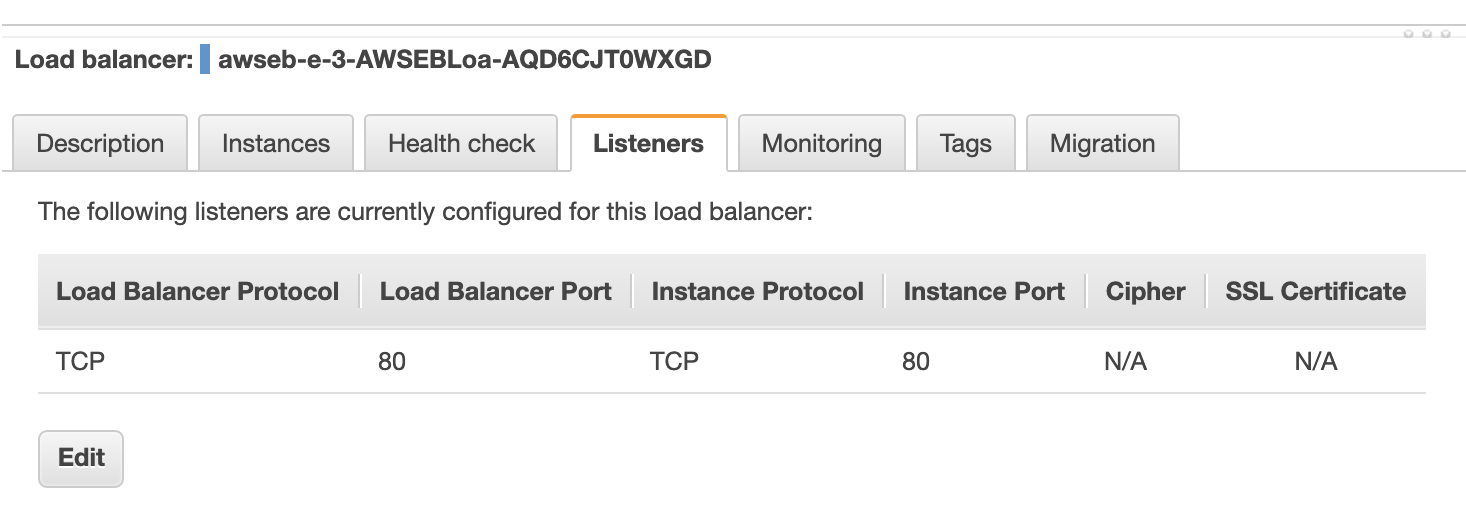
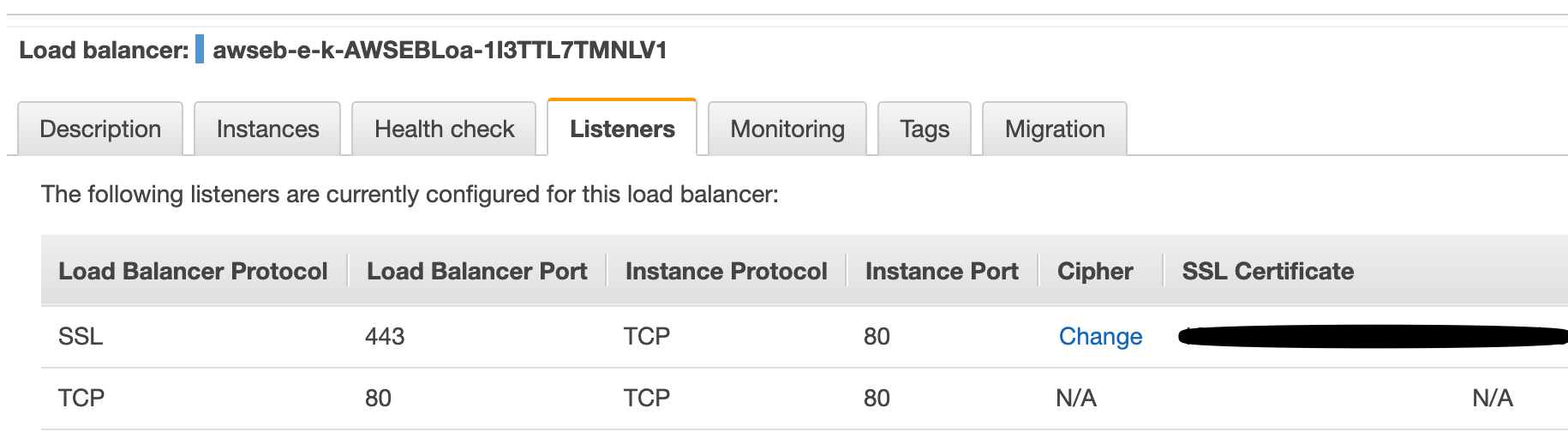
Bryan - that would be it, now to validate with HTTPS but I basically rolled back to the standard nginx config (yes EB does use it), left the 5006 inbound port mapping on (not sure if that is required but working) and went to the load balancer (i.e. nowhere near EB) and just had that line and TCP 443 to TCP 80 with a certificate.

Actually just checked and HTTPS works too:

I will add a final reply with the steps but bottom line is:

  • don’t play with nginx config
  • just set up as classic and key is to change the load balancer from HTTP to TCP

Many many thanks

⌁   Link to post
Bryan
Bryan

@andrew.waites :tada::tada::tada::tada::tada: Thank you for your perseverance! I definitely want to distill want to distill this in to some resources for users, e.g maybe (one of a set of?) sample projects that users can refer to. If you have time to give any thoughts on how best to make this simpler (or at least better demonstrated) please do let me know!

⌁   Link to post

End of archived discussion · Replies are disabled