
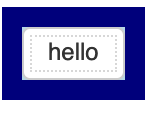
This seems to add formatting around the button, but not to the button itself. How do I change the colour of the button?
Thanks
 Read-only archive⌕
This seems to add formatting around the button, but not to the button itself. How do I change the colour of the button?
Thanks

Please provide an actual complete Minimal Reproducible Example of the code you are trying that is not working how you expect.
the screenshot is produced by the code provided in the answer by @mateusz that I referenced.
from bokeh.layouts import layout
from bokeh.io import show
from bokeh.models import Button, InlineStyleSheet

style = InlineStyleSheet(css="""
:host(.custom_button_1) {
    background-color: lightblue;
    font-weight: bold;
    color:navy;
    border-style:solid;
    border-width: 10px;
    border-color:navy;
}
""")

button = Button(label = 'hello', stylesheets = [style], css_classes = ['custom_button_1'])

main = layout(button)
show(main)
I was asking how to format the white box around ‘hello’

I don’t know much about how CSS works, but using .bk-btn seems to fix it:
from bokeh.layouts import layout
from bokeh.io import show
from bokeh.models import Button, InlineStyleSheet

style = InlineStyleSheet(css="""
.bk-btn {
    background-color: lightblue;
    font-weight: bold;
    color:navy;
    border-style:solid;
    border-width: 10px;
    border-color:navy;
}
""")

button = Button(label = 'hello', stylesheets = [style])

main = layout(button)
show(main)
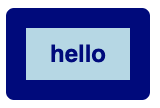
@mateusz is it a regression or an intended change that the css_classes approach does not seem to work as it did earlier?

This topic was automatically closed 90 days after the last reply. New replies are no longer allowed.
End of archived discussion · Replies are disabled