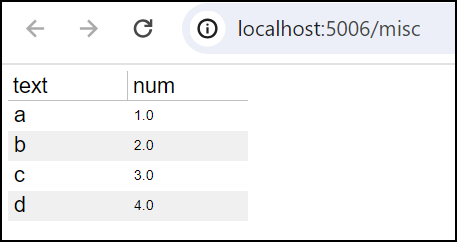
The objective is to create a DataTable with numeric and text columns and be able to set a consistent (larger) font size in all columns. This previous PR describes a CompositeFormatter object that would enable a list of formatters, eg a HTMLTemplateFormatter and a NumberFormatter, however I’m not finding the CompositeFormatter object anywhere currently (bokeh 3.4.0). A minimal example and app screenshot are below, you can see the issue is the different column font sizes. As a related issue, is my code in the minimal example to set the column title font size the cleanest way to do that? Thanks again for the excellent support here!
from bokeh.io import curdoc
from bokeh.models import DataTable, TableColumn, HTMLTemplateFormatter, NumberFormatter, ColumnDataSource

c1 = TableColumn(width=100, field='text',
    formatter=HTMLTemplateFormatter(template=f"""<div style="font-size:18px;"><%=value%></div>"""),
    title=f"""<div style="font-size:18px;">text</div>""")

c2 = TableColumn(width=100, field='num',
    formatter=NumberFormatter(format=f'0,0.0'),
    title=f"""<div style="font-size:18px;">num</div>""")

cds = ColumnDataSource({
    'text': ['a','b','c','d'],
    'num': [1,2,3,4]})

table = DataTable(width=200, height=200, index_position=None, columns=[c1, c2], sortable=True, source=cds)

curdoc().add_root(table)
app screenshot