

☰Read-only archive⌕
Looking for help with Bokeh?

This is a read-only archive. Ask questions and join the conversation on GitHub.

Visit Community Support on GitHub →
Archived discussions · Captured October 28, 2026

conflicts between served bokeh 0.12 app and bootstrap css

Community Support
tumlinson
tumlinson

Hi,

    I’ve been running bokeh server apps under 0.11 for a while now, embedded via autoload scripts within webpages formatted by bootstrap css. When this works, it looks like the attached clean plot and sliders to the left. After upgrade to bokeh 0.12 (via

conda), and only small changes to the source python (namely, HBox—>Row). After that, the bokeh app looks like the gobbledygook in the second attachment - with sliders that look like boxes, etc. When I open the bokeh app running on 0.12 in a browser by itself
and not embedded in the web page, it’s fine. So, I suspect some conflict between layouts in bokeh 0.12 and the bootstrap template. For reference I’m including the entire python and html source below.

I’m not much of a guru with css or javascript, so the fix may be obvious. But since this was triggered by an update from bokeh 0.11 to 0.12, I thought I should raise the issue.

Thanks,

JT
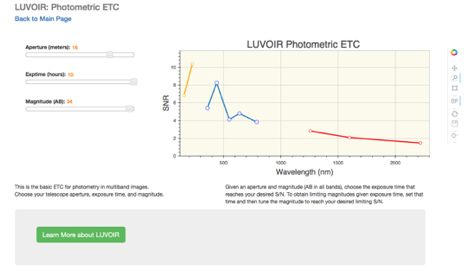
‘

phot_etc.html (3.21 KB)

phot_etc.py (7.33 KB)

PastedGraphic-4.tiff (140 KB)

⌁   Link to post
Bryan
Bryan

Jason,

This was a bug with the autoload_server template introduced in 0.12 accidentally. There is a workaround on the related GH issue, but it's already been fixed in master, so my suggestion is just to grab the latest dev build, which has the fix included:

  http://bokeh.pydata.org/en/dev/docs/installation.html#developer-builds

Alternatively 0.12.1 should be coming next week.

Thanks,

Bryan

···

On Jul 14, 2016, at 1:12 PM, Jason Tumlinson <tumlinson@stsci.edu> wrote:

Hi,
        I’ve been running bokeh server apps under 0.11 for a while now, embedded via autoload scripts within webpages formatted by bootstrap css. When this works, it looks like the attached clean plot and sliders to the left. After upgrade to bokeh 0.12 (via conda), and only small changes to the source python (namely, HBox—>Row). After that, the bokeh app looks like the gobbledygook in the second attachment - with sliders that look like boxes, etc. When I open the bokeh app running on 0.12 in a browser by itself and not embedded in the web page, it’s fine. So, I suspect some conflict between layouts in bokeh 0.12 and the bootstrap template. For reference I’m including the entire python and html source below.

I’m not much of a guru with css or javascript, so the fix may be obvious. But since this was triggered by an update from bokeh 0.11 to 0.12, I thought I should raise the issue.

Thanks,
JT

<PastedGraphic-5.png>

‘

--
You received this message because you are subscribed to the Google Groups "Bokeh Discussion - Public" group.
To unsubscribe from this group and stop receiving emails from it, send an email to bokeh+unsubscribe@continuum.io.
To post to this group, send email to bokeh@continuum.io.
To view this discussion on the web visit https://groups.google.com/a/continuum.io/d/msgid/bokeh/626B22CC-8ADC-42CE-A094-91BCFBC7B094%40stsci.edu\.
For more options, visit https://groups.google.com/a/continuum.io/d/optout\.
<phot_etc.html><phot_etc.py><PastedGraphic-4.tiff>

⌁   Link to post

End of archived discussion · Replies are disabled
