☰Read-only archive⌕
Looking for help with Bokeh?

This is a read-only archive. Ask questions and join the conversation on GitHub.

Visit Community Support on GitHub →
Archived discussions · Captured October 28, 2026

Custom CSS in Jupyter (Lab) Notebook

Community Supportjupyterbokeh
johank
johank

Hi,

I’m trying to apply custom CSS to bokeh widgets displayed in a jupyter(lab) notebook. Motivation: Since bokeh ~3.4ish, widget font colors have not played nice with the jupyterlab dark theme - text often renders white on white background.

I’ve added a custom.css in the ~/.jupyter/config/custom directory:

bokeh_widget {
    font-weight: bold;
    color: black;
}

Example ipynb with Widget:

import pandas as pd

from bokeh.layouts import row 
from bokeh.models.widgets import Select
from bokeh.io import show, output_notebook

output_notebook()

months = list(pd.date_range(start='2024-01-01', periods=12, 
                                            freq='ME').strftime('%b'))

sel_month = Select(title='Select Month:', value='All', 
                      options=['All']+months, css_classes=['bokeh_widget'])


def pl(doc):

    doc.add_root(
            row(sel_month)
            )
        
    return pl


show(pl)

Output with jupyterlab 4.3.5 & dark theme:
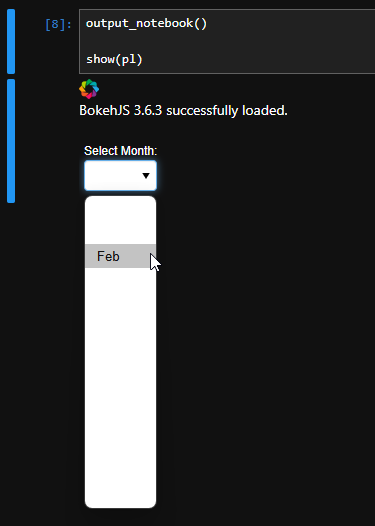
Unfortunately I know next to nothing about HTML & CSS - problem #1. Suspect/hope there’s an easy solution - patient guidance much appreciated :slightly_smiling_face:

Thanks!

⌁   Link to post
johank
johank

Thank you very much Bryan! Took a minute to try this, but it ~worked with an InlineStyleSheet as in the example.

Just one followup question: which CSS property modifies the text color of the items in the widget (e.g. the Select in the example above)? color changes the text color of the Title, but not the items.

For a Select, I assume there are two properties; one for the default, one for when an item has mouse focus/is hovered over.

⌁   Link to post
johank
johank

Got it, thanks -

This ended up working for me:

months = list(pd.date_range(start='2024-01-01', periods=12, 
                                            freq='ME').strftime('%b'))

sel_month = Select(title='Select Month:', value='All', 
                      options=['All']+months, css_classes=['bokeh_widget'])

stylesheet = InlineStyleSheet(css='''
:host(.custom) {
    .bk-input {
        color: black;
        };
''')

sel_month.css_classes = ['custom']
sel_month.stylesheets = [stylesheet]

layout = row(sel_month)

Output now:

Yay!

Is there an easy way to add this custom CSS to all input widgets, or must that be done one-by-one?

Thanks!

⌁   Link to post
johank
johank

Thanks Bryan - that seems like it’s exactly what I’d want, but I could not get it to work.

Based on this post, it sounds like GlobalInlineStyleSheet may not work…

Best workaround I’ve been able to come up with is to define a collection of widgets and then loop through those with a function that sets the stylesheets and css_classes properties of each widget. Bit clunky, but does the trick…

(I also again tried to define something in jupyter’s custom_css, but that also didn’t work - probably because of the :host thingy :man_shrugging:)

Thanks again for all your help!

⌁   Link to post
Bryan
Bryan

Based on this post, it sounds like GlobalInlineStyleSheet may not work…

Well, GlobalInlineStyleSheet normally appends to <head> I can imagine there could be some problem in the context of a Jupyter notebook, specifically. I’d suggest trying things outside the notebook with plain HTML (i.e. output_file) output. Then submitting a GitHub Issue with details.

⌁   Link to post

End of archived discussion · Replies are disabled