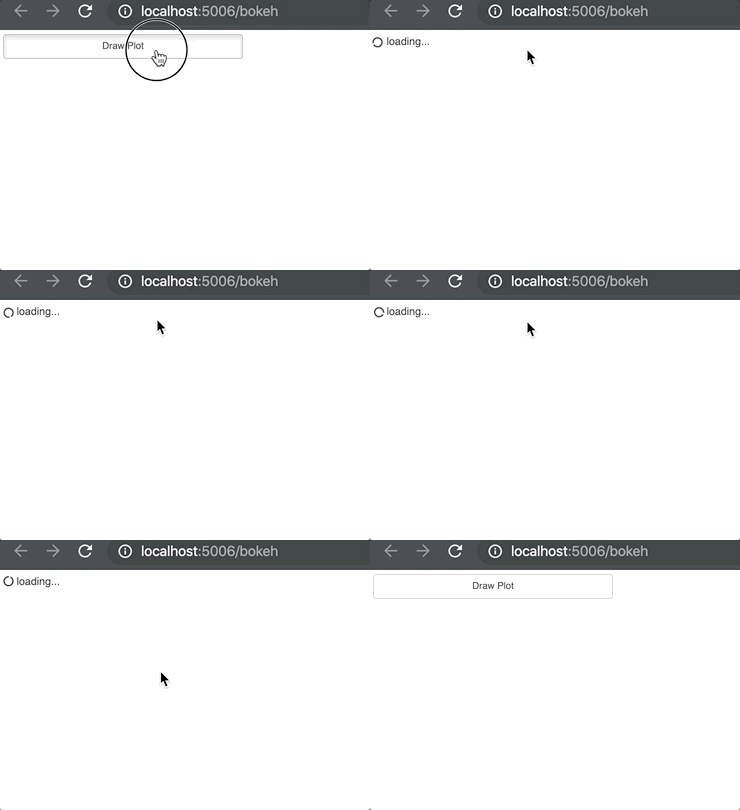
Hi,
I’m not highly familiar with JS. I’m trying to make a button loader (button shows loading when clicked) based on this: https://stackoverflow.com/a/48240134/9683621.
Is this possible on bokeh buttons? This is my sample .py file and .html file.
from bokeh.io import curdoc
from bokeh.models.widgets import Button
from bokeh.layouts import layout, column
from bokeh.models.callbacks import CustomJS


button_plot = Button(label="Draw Plot")
callback_button = CustomJS(args={},code="""
                $(document).ready(function() {
                $('.bk-btn').on('click', function() {
                    var $this = $(this);
                    var loadingText = '<i class="fa fa-circle-o-notch fa-spin"></i> loading...';
                    if ($(this).html() !== loadingText) {
                    $this.data('original-text', $(this).html());
                    $this.html(loadingText);
                    }
                    setTimeout(function() {
                    $this.html($this.data('original-text'));
                    }, 2000);
                });
                })""")
button_plot.js_on_click( callback_button)

curdoc().title = "Loading Button"
doc_layout = layout(column(button_plot))
curdoc().add_root(doc_layout)
HTML:
<!DOCTYPE html>
<html lang="en">
    <head>
        <link rel="stylesheet" href="https://maxcdn.bootstrapcdn.com/font-awesome/4.7.0/css/font-awesome.min.css">
        <link rel="stylesheet" href="https://maxcdn.bootstrapcdn.com/bootstrap/4.0.0-beta.3/css/bootstrap.min.css" integrity="sha384-Zug+QiDoJOrZ5t4lssLdxGhVrurbmBWopoEl+M6BdEfwnCJZtKxi1KgxUyJq13dy" crossorigin="anonymous">
        <script src="https://code.jquery.com/jquery-3.2.1.slim.min.js" integrity="sha384-KJ3o2DKtIkvYIK3UENzmM7KCkRr/rE9/Qpg6aAZGJwFDMVNA/GpGFF93hXpG5KkN" crossorigin="anonymous"></script>
        <script src="https://cdnjs.cloudflare.com/ajax/libs/popper.js/1.12.9/umd/popper.min.js" integrity="sha384-ApNbgh9B+Y1QKtv3Rn7W3mgPxhU9K/ScQsAP7hUibX39j7fakFPskvXusvfa0b4Q" crossorigin="anonymous"></script>
        <script src="https://maxcdn.bootstrapcdn.com/bootstrap/4.0.0-beta.3/js/bootstrap.min.js" integrity="sha384-a5N7Y/aK3qNeh15eJKGWxsqtnX/wWdSZSKp+81YjTmS15nvnvxKHuzaWwXHDli+4" crossorigin="anonymous"></script>

        <style>
            body { background: white; }
        </style>
        <meta charset="utf-8">
        {{ bokeh_css }}
        {{ bokeh_js }}
        <style>
            {% include "styles.css" %}
        </style>
    </head>
    <body class="centered">
        {{ plot_div|indent(8) }}
        {{ plot_script|indent(8) }}
    </body>

</html>
Am I doing this in the right way? Any feedback would be helpful.
Thanks.