
I just started playing with the DataTable in bokeh. Very cool!
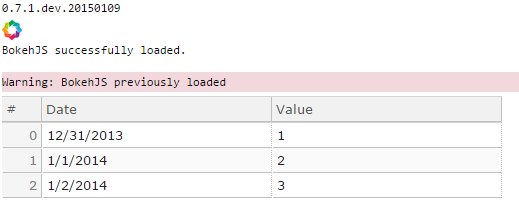
One thing I found that didn’t work or I didn’t know how to do was trying to display dates. A simple example is below. I looked for a DateFormatter but didn’t see one in widgets although I saw various other Date related classes.
from bokeh import plotting
from bokeh import models
from bokeh.models import widgets
import pandas, datetime
plotting.output_notebook()
df = pandas.DataFrame(dict(Date = [datetime.date(2014, 1,1), datetime.date(2014, 1,2), datetime.date(2014, 1,3)], Value = [1,2,3]))
source = models.ColumnDataSource(df)
columns = [
widgets.TableColumn(field=c, title=c) for c in df.columns
]
data_table = widgets.DataTable(source=source, columns=columns, editable=True, width = 500)
plotting.show(data_table)
If anyone knows how to do this please let me know. If the functionality doesn’t exist and it requires python work and someone can point me to where to get started i’d be happy to give it a try. I’m pretty weak on javascript so if that’s needed I might bow out.
–Tom