If you have the professionnal version of pycharm you can use this
If you want a free solution, in an IDE, you can use eclipse&pydev and use pydevd Remote Debugger
Or visual code with ptvsd GitHub - microsoft/ptvsd: Python debugger package for use with Visual Studio and Visual Studio Code.
For example I work with eclipse:
So I launch eclispe with the a pydev debug server, then if I want to debug the slider app I launch this command line (to not modify the slider.py script, else I just add from pydevd import settrace; settrace(suspend=False); at the top of my script and run normal bokeh command):
python -c "import sys; from pydevd import settrace; settrace(suspend=False); from bokeh.command.bootstrap import main; main(sys.argv[1:])" bokeh serve C:\Data\PythonWorkspace\modules\bokeh\examples\app\sliders.py --show
In eclipse IDE you can see the thread is attached to the debug server

Then we can add break points in function we want. Here I added a breakpoint line 50 to stop when the title is changed.
Next I go in the slider app and change the title by removing a letter:
“my sine wave” → “my sine wav”
and you can see in eclipse:
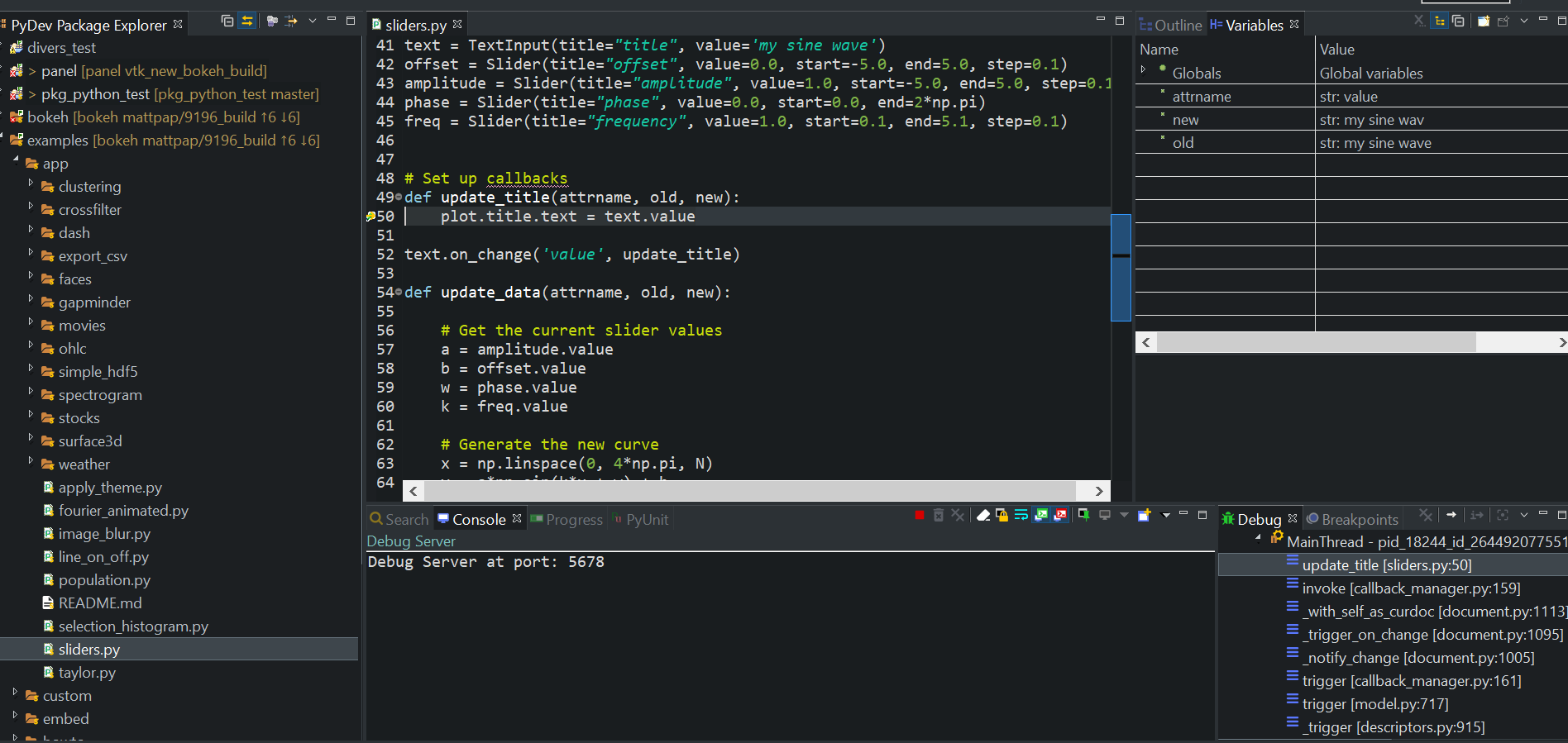
we stopped to the line 50, in the variable panel we have our variable attr, new old and their respective values, and in the debug panel all the stacktrace
Then it is possible to open a python console to edit your variable and do various tests
I don’t know pycharm but I think it’s use pydev too so It should not be very deifferent