☰Read-only archive⌕
Looking for help with Bokeh?

This is a read-only archive. Ask questions and join the conversation on GitHub.

Visit Community Support on GitHub →
Archived discussions · Captured October 28, 2026

Debugging Bokeh serve application using PyCharm

Community Support
Yogesh_Kulkarni
Yogesh_Kulkarni

I am using Pycharm IDE for developing python-bokeh application.
As long as I was doing client-html only scripting, running and debugging of the application worked fine, from Pycharm itself.

I am now developing bokeh serve based script. I don’t know how to run and debug it using Pycharm. What do I need to add to Configurations?

When I run the script from command line as “bokeh serve --show script.py” it runs fine. But I don’t know how to debug it by setting breakpoints in Pycharm.

⌁   Link to post
Bryan
Bryan

This is not possible. Bokeh server apps that run like "bokeh serve app.py" are run *by* the Bokeh server, *in* the Bokeh server. There is no way to extricate them out of the server.

Bryan

···

On Sep 7, 2016, at 10:56 PM, Yogesh Kulkarni <kulkarniay@gmail.com> wrote:

I am using Pycharm IDE for developing python-bokeh application.
As long as I was doing client-html only scripting, running and debugging of the application worked fine, from Pycharm itself.

I am now developing bokeh serve based script. I don't know how to run and debug it using Pycharm. What do I need to add to Configurations?

When I run the script from command line as "bokeh serve --show script.py" it runs fine. But I don't know how to debug it by setting breakpoints in Pycharm.

--
You received this message because you are subscribed to the Google Groups "Bokeh Discussion - Public" group.
To unsubscribe from this group and stop receiving emails from it, send an email to bokeh+unsubscribe@continuum.io.
To post to this group, send email to bokeh@continuum.io.
To view this discussion on the web visit https://groups.google.com/a/continuum.io/d/msgid/bokeh/da7ffc1f-7b6c-41f2-8785-5bc61616fbb9%40continuum.io\.
For more options, visit https://groups.google.com/a/continuum.io/d/optout\.

⌁   Link to post
Bryan
Bryan

For debugging, I often add:

  import pdb; pdb.set_trace()

on the line that I'd like to stop at. This will work when using "bokeh serve app.py"

Thanks,

Bryan

···

On Sep 7, 2016, at 11:49 PM, Bryan Van de Ven <bryan@bokeh.org> wrote:

This is not possible. Bokeh server apps that run like "bokeh serve app.py" are run *by* the Bokeh server, *in* the Bokeh server. There is no way to extricate them out of the server.

Bryan

On Sep 7, 2016, at 10:56 PM, Yogesh Kulkarni <kulkarniay@gmail.com> wrote:

I am using Pycharm IDE for developing python-bokeh application.
As long as I was doing client-html only scripting, running and debugging of the application worked fine, from Pycharm itself.

I am now developing bokeh serve based script. I don't know how to run and debug it using Pycharm. What do I need to add to Configurations?

When I run the script from command line as "bokeh serve --show script.py" it runs fine. But I don't know how to debug it by setting breakpoints in Pycharm.

--
You received this message because you are subscribed to the Google Groups "Bokeh Discussion - Public" group.
To unsubscribe from this group and stop receiving emails from it, send an email to bokeh+unsubscribe@continuum.io.
To post to this group, send email to bokeh@continuum.io.
To view this discussion on the web visit https://groups.google.com/a/continuum.io/d/msgid/bokeh/da7ffc1f-7b6c-41f2-8785-5bc61616fbb9%40continuum.io\.
For more options, visit https://groups.google.com/a/continuum.io/d/optout\.

⌁   Link to post
Yogesh_Kulkarni
Yogesh_Kulkarni

Thanks Bryan. I will give it a shot.

···

On Thursday, September 8, 2016 at 10:20:19 AM UTC+5:30, Bryan Van de ven wrote:

For debugging, I often add:

    import pdb; pdb.set_trace()

on the line that I’d like to stop at. This will work when using “bokeh serve app.py”

Thanks,

Bryan

On Sep 7, 2016, at 11:49 PM, Bryan Van de Ven bry...@continuum.io wrote:

This is not possible. Bokeh server apps that run like “bokeh serve app.py” are run by the Bokeh server, in the Bokeh server. There is no way to extricate them out of the server.

Bryan

On Sep 7, 2016, at 10:56 PM, Yogesh Kulkarni kulka...@gmail.com wrote:

I am using Pycharm IDE for developing python-bokeh application.

As long as I was doing client-html only scripting, running and debugging of the application worked fine, from Pycharm itself.

I am now developing bokeh serve based script. I don’t know how to run and debug it using Pycharm. What do I need to add to Configurations?

When I run the script from command line as “bokeh serve --show script.py” it runs fine. But I don’t know how to debug it by setting breakpoints in Pycharm.

–
You received this message because you are subscribed to the Google Groups “Bokeh Discussion - Public” group.

To unsubscribe from this group and stop receiving emails from it, send an email to bokeh+un...@continuum.io.

To post to this group, send email to bo...@continuum.io.

To view this discussion on the web visit https://groups.google.com/a/continuum.io/d/msgid/bokeh/da7ffc1f-7b6c-41f2-8785-5bc61616fbb9%40continuum.io.

For more options, visit https://groups.google.com/a/continuum.io/d/optout.

⌁   Link to post
send2jmuller
send2jmuller

Another possible option for debugging is to start the server with
bokeh serve

and arrange your app so that you can run it in the debugger.

I have done this very sucessfuly with the WindIDE so I assume it can work with PyCharm as well.

What I do not fully understand is whether it is possible to structure my app so that I can use it either way, that is either

bokeh serve --show myapp.py

or

bokeh serve

and run mypapp wither from python or in the debugger.

Any help on this would be greatly appreciated.

Best regards,

  • john muller
···

On Thursday, September 8, 2016 at 12:49:14 AM UTC-4, Bryan Van de ven wrote:

This is not possible. Bokeh server apps that run like “bokeh serve app.py” are run by the Bokeh server, in the Bokeh server. There is no way to extricate them out of the server.

Bryan

On Sep 7, 2016, at 10:56 PM, Yogesh Kulkarni kulka...@gmail.com wrote:

I am using Pycharm IDE for developing python-bokeh application.

As long as I was doing client-html only scripting, running and debugging of the application worked fine, from Pycharm itself.

I am now developing bokeh serve based script. I don’t know how to run and debug it using Pycharm. What do I need to add to Configurations?

When I run the script from command line as “bokeh serve --show script.py” it runs fine. But I don’t know how to debug it by setting breakpoints in Pycharm.

–
You received this message because you are subscribed to the Google Groups “Bokeh Discussion - Public” group.

To unsubscribe from this group and stop receiving emails from it, send an email to bokeh+un...@continuum.io.

To post to this group, send email to bo...@continuum.io.

To view this discussion on the web visit https://groups.google.com/a/continuum.io/d/msgid/bokeh/da7ffc1f-7b6c-41f2-8785-5bc61616fbb9%40continuum.io.

For more options, visit https://groups.google.com/a/continuum.io/d/optout.

⌁   Link to post
Xavier_Artusi
Xavier_Artusi

If you have the professionnal version of pycharm you can use this

If you want a free solution, in an IDE, you can use eclipse&pydev and use pydevd Remote Debugger
Or visual code with ptvsd GitHub - microsoft/ptvsd: Python debugger package for use with Visual Studio and Visual Studio Code.

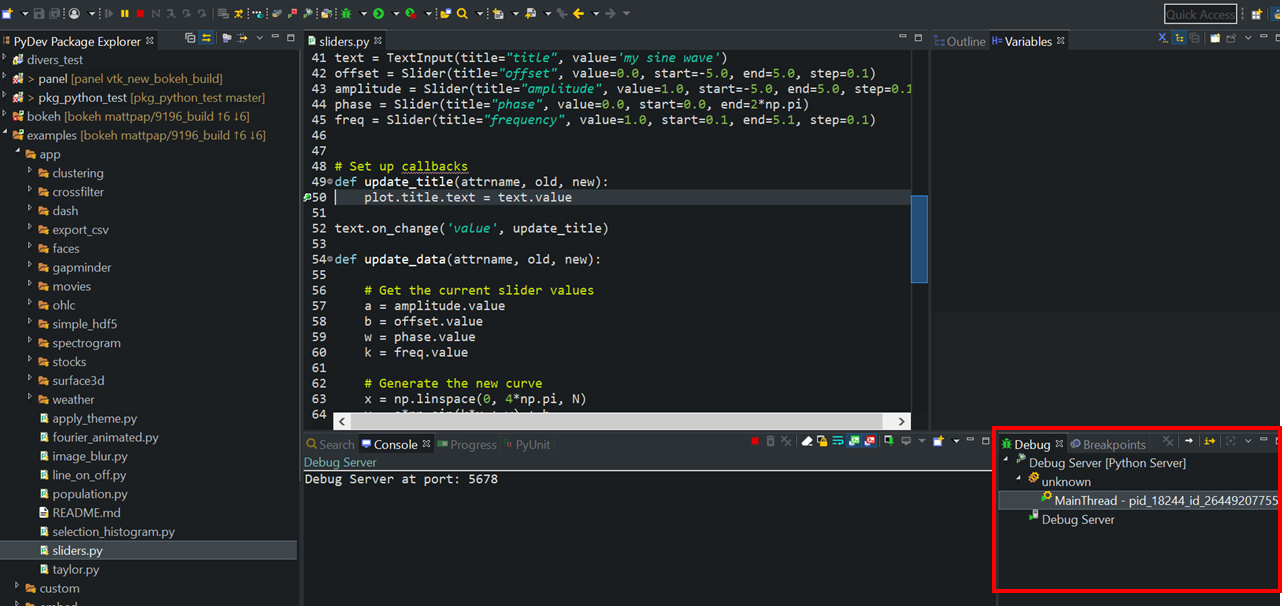
For example I work with eclipse:
So I launch eclispe with the a pydev debug server, then if I want to debug the slider app I launch this command line (to not modify the slider.py script, else I just add from pydevd import settrace; settrace(suspend=False); at the top of my script and run normal bokeh command):

python -c "import sys; from pydevd import settrace; settrace(suspend=False); from bokeh.command.bootstrap import main; main(sys.argv[1:])" bokeh serve C:\Data\PythonWorkspace\modules\bokeh\examples\app\sliders.py --show

In eclipse IDE you can see the thread is attached to the debug server

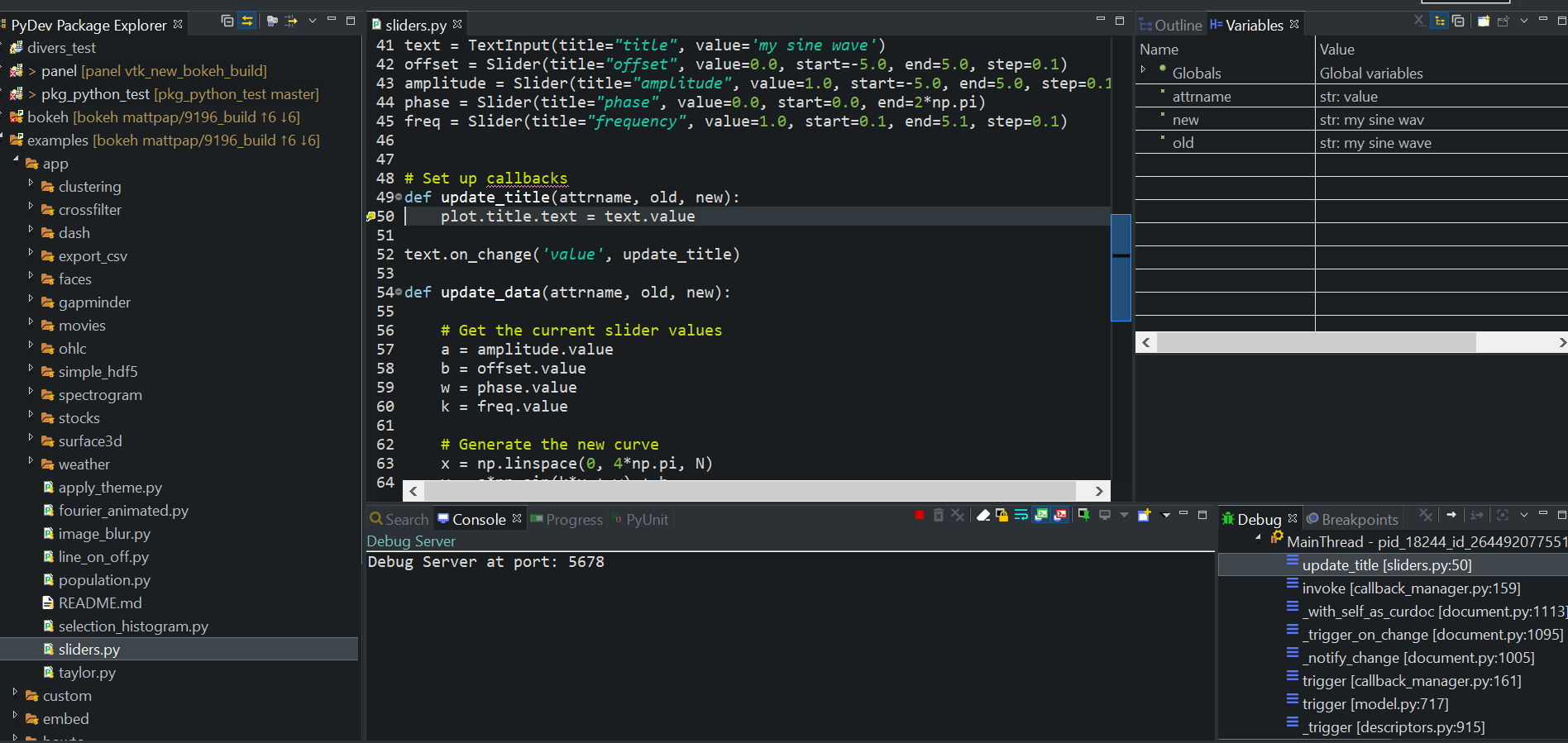
Then we can add break points in function we want. Here I added a breakpoint line 50 to stop when the title is changed.

Next I go in the slider app and change the title by removing a letter:
“my sine wave” → “my sine wav”

and you can see in eclipse:


we stopped to the line 50, in the variable panel we have our variable attr, new old and their respective values, and in the debug panel all the stacktrace

Then it is possible to open a python console to edit your variable and do various tests

I don’t know pycharm but I think it’s use pydev too so It should not be very deifferent

⌁   Link to post

End of archived discussion · Replies are disabled