☰Read-only archive⌕
Looking for help with Bokeh?

This is a read-only archive. Ask questions and join the conversation on GitHub.

Visit Community Support on GitHub →
Archived discussions · Captured October 28, 2026

Defined gradient fill color on varea/patches

Community Support
gmerritt123
gmerritt123

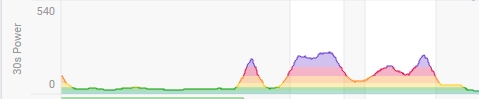
Wondering if there’s a means of making an area plot along the lines of this:

image

The color scale would be predefined by me → if y value below 100 use green, if between 100 and 200 use yellow, etc.

I don’t think this is supported but wanted to make sure. Any ideas for workarounds would be appreciated as well.

⌁   Link to post
Bryan
Bryan

Unfortunately, not really. It is possible to use custom patterns or even images for fill hatching, but those “repeat” in a way that I don’t think would be useful for what you describe. I think that kind of programmatic pixel-shading is probably out-of-scope for Bokeh. But cc @Ian_Thomas in case he has any thoughts to add.

The only sort of workaround I can think of might be to add the gradient image as an underlay to the entire plot, then add a “negative” opaque varea glyph to mask out the top part of the image. But I think that might run into issue with obscuring any grid lines, though from your example maybe you don’t have any (or alternatively maybe the render level of the varea can also be adjusted to sit “in between” the image underlay and the grids, etc.)


⌁   Link to post
Ian_Thomas
Ian_Thomas

I can’t think of any simple workaround.

If you wanted to do a real implementation in Bokeh then it would be quite straightforward in the WebGL backend. For the HTML Canvas backend you could dynamically create an RGBA image with width=1 and use that as a CanvasPattern as the fillStyle (CanvasRenderingContext2D: fillStyle property - Web APIs | MDN). You’d have to scale it carefully, and I think the API isn’t straightforward as to support this in the general case you’d need both x and y directions, and allow the user to specify if the colouring is per glyph (e.g. each scatter marker) or over the whole set of glyphs, and how this changes with zooming (i.e. is the colouring in data space or in screen space).

Having said that I am not sure there would be an appetite in Bokeh to include this functionality.

⌁   Link to post
gmerritt123
gmerritt123

Thanks for weighing in guys. It’s 100% a nice to have for a project I’m working on… if I have time I’ll probably work in @Jonas_Grave_Kristens 's idea, thinking I’ll do it completely python side using shapely/geopandas:

  • turn varea into a shapely polygon/geodataframe
  • get the x bounds, construct a stack of rectangle polygons across that bounds, with each dim being my color bins
  • overlay those two and transform back to bokeh-patch glyph ready output
  • probably structure the function to do so to be able to do it for either x/y dims

A full blown bokeh - fill-color implementation of the kind @Ian_Thomas speaks of would be super cool of course but (like my use case), I’d file it under “nice to have”.

Thanks again all three of you!

⌁   Link to post

End of archived discussion · Replies are disabled