I did run into problems by upgrading bokeh 2.4.3 to 3.0.3 by running pip install bokeh -U.
After the latest version of bokeh is installed and I open a Jupyter Notebook with very basic imports like
from bokeh.plotting import figure, show, output_notebook
the output shows that the loading process was successful.

But when I create a new figure and want to display it, there is no output. In the browser console there is an error that the bokeh-js version does not match the bokeh version.

The strange thing is, that the correct version of bokeh-js does exist, but is not loaded. For some reason not the latest nor a version based on the python version is loaded.
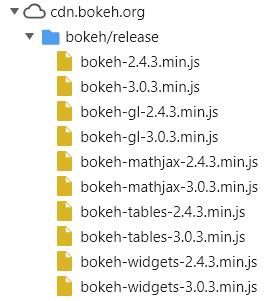
I did not install bokeh-js by any commands and I don’t know how to remove the old files. I tried to delete it without a positiv result.
At the moment my workaround is to create a new, empty environment, and install the latest version. This is working but not perfect. In fact I can reproduce this by downgrading from 3.0.3 to 2.4.3. With 2.4.3 it is working. If I upgrade again, the problem appears again.
I am working on an jupyter server with several environments and some of them I can’t easily remove and build again.
Is there a better way to make upgrading work?