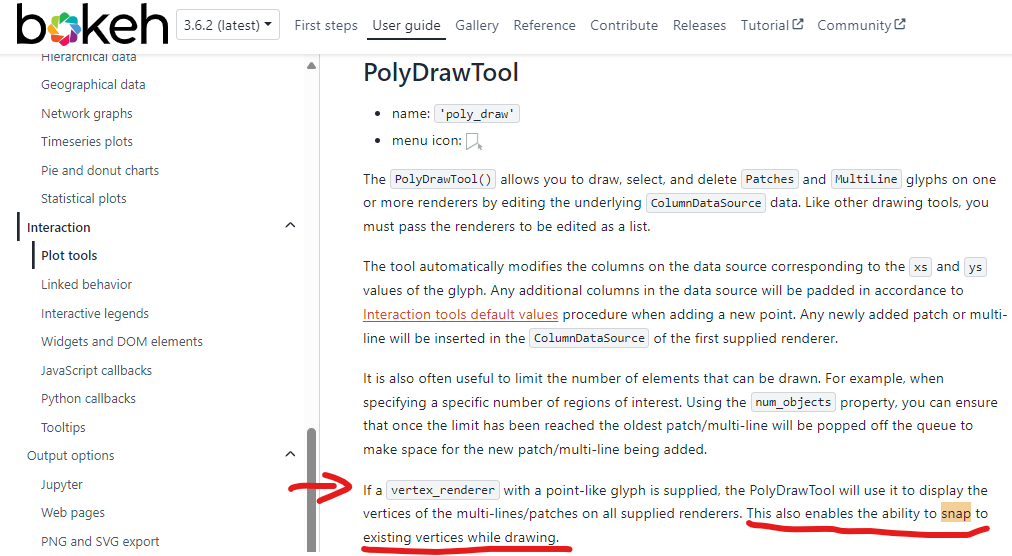
I am trying add and edit lines. This funtionality works (see code below). According to the online reference (see image below), the ability to snap to vettices is enabled by the use of a vertex renderer.
ISSUE: I cannot get snapping working
Any ideas? Thanks
T
from bokeh.io import curdoc
from bokeh.models import ColumnDataSource, PolyEditTool, PolyDrawTool
from bokeh.plotting import figure
from bokeh.layouts import column

# Initial data for two lines
line_data = {
    'xs': [[10, 20], [6, 15]],
    'ys': [[1, 4], [6, 9]],
    'colors': ['blue', 'green']
}

# Create ColumnDataSource
source = ColumnDataSource(data=line_data)

# Create a plot
plot = figure(title="Editable Lines", x_axis_label='X', y_axis_label='Y', width=600, height=500)

# Add the line to the plot using MultiLine
lines = plot.multi_line(xs='xs', ys='ys', source=source, line_width=2, line_color='colors')
#lines = plot.multi_line(xs='xs', ys='ys', source=source, line_width=2)

# Create a vertex renderer for snapping
vr = plot.scatter([], [], size=10, marker='circle_dot', line_color='navy', fill_color='orange', alpha=0.5)

# Add PolyEditTool for editing lines with snapping to vertices
poly_edit_tool = PolyEditTool(renderers=[lines], vertex_renderer=vr)
plot.add_tools(poly_edit_tool)

# Add PolyDrawTool for adding new lines
poly_draw_tool = PolyDrawTool(renderers=[lines], default_overrides = {'colors': 'orange'})
plot.add_tools(poly_draw_tool)

# Layout of the application
layout = column(plot)

# Add the layout to the current document
curdoc().add_root(layout)