☰Read-only archive⌕
Looking for help with Bokeh?

This is a read-only archive. Ask questions and join the conversation on GitHub.

Visit Community Support on GitHub →
Archived discussions · Captured October 28, 2026

Drawing a unit circle

Community Support
vectortronic
vectortronic

Pardon the noob question, but all I want to do is draw a unit circle with aspect ratio = 1 (so it looks like a circle and not an ellipse). I’ve been thwarted at every turn.

I’ve tried two basic strategies. First is to create a single point at (0,0) and then specify a radius of 1. Unfortunately, this gives me something that looks circular but doesn’t actually reach all the way up and down to y = +/-1. Second strategy is to plot the points (cos(th), sin(th) ) where th is 0 to 360 degrees. The resulting plot looks elliptical because I can’t get the aspect ratio right.

I don’t know if this is a confounding factor, but I’m including a slider (for something I’ll be doing later) and I don’t know if that’s what’s screwing things up.

The code and results for both strategies are here:

https://vectortronic.github.io/bokeh_scripts

Can anyone advise? Thanks.

⌁   Link to post
Bryan
Bryan

Hi,

As described in the docs:

  https://bokeh.pydata.org/en/dev/docs/reference/models/plots.html#bokeh.models.plots.Plot.match_aspect

The match_aspect flag only has effect with the ranges are "auto" DataRange1d ranges. These are the default. In that case Bokeh will adjust the data space range boundaries as necessary to maintain aspect that matches the pixel aspect. However, if you explicitly provide range boundaries, as you have done in your code, Bokeh will not override them.

Thanks

Bryan

···

On Nov 14, 2017, at 12:36, vectortronic <iobeid@gmail.com> wrote:

Pardon the noob question, but all I want to do is draw a unit circle with aspect ratio = 1 (so it looks like a circle and not an ellipse). I've been thwarted at every turn.

I've tried two basic strategies. First is to create a single point at (0,0) and then specify a radius of 1. Unfortunately, this gives me something that looks circular but doesn't actually reach all the way up and down to y = +/-1. Second strategy is to plot the points (cos(th), sin(th) ) where th is 0 to 360 degrees. The resulting plot looks elliptical because I can't get the aspect ratio right.

I don't know if this is a confounding factor, but I'm including a slider (for something I'll be doing later) and I don't know if that's what's screwing things up.

The code and results for both strategies are here:
https://vectortronic.github.io/bokeh_scripts

Can anyone advise? Thanks.

--
You received this message because you are subscribed to the Google Groups "Bokeh Discussion - Public" group.
To unsubscribe from this group and stop receiving emails from it, send an email to bokeh+unsubscribe@continuum.io.
To post to this group, send email to bokeh@continuum.io.
To view this discussion on the web visit https://groups.google.com/a/continuum.io/d/msgid/bokeh/77daa78c-6774-4d93-b063-1316814c363d%40continuum.io\.
For more options, visit https://groups.google.com/a/continuum.io/d/optout\.

⌁   Link to post
Bryan
Bryan

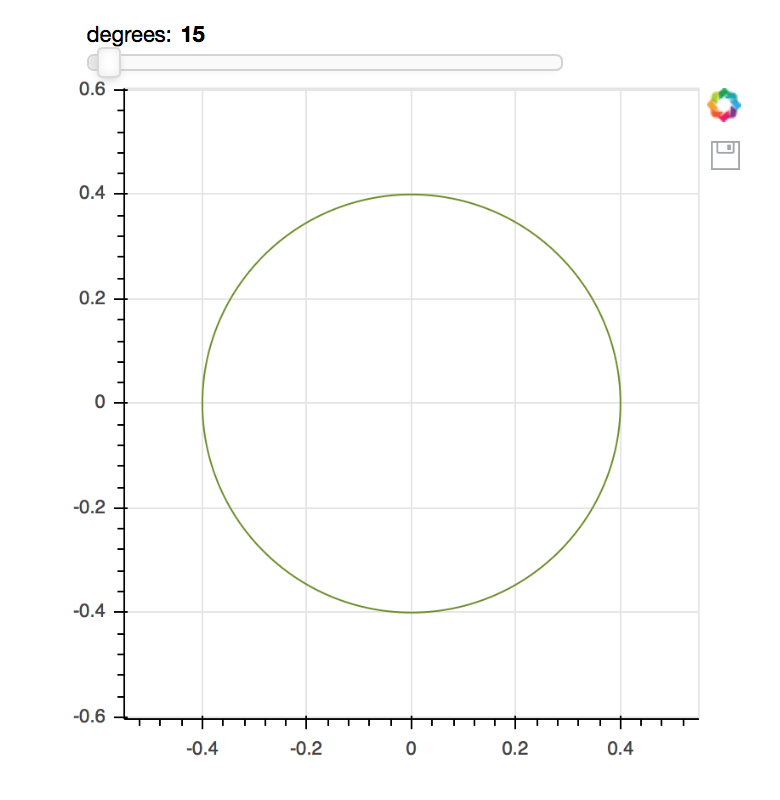
With these changes:

plot = figure(plot_width=400, plot_height=400, match_aspect=True, tools='save') 

plot.circle(0,0,radius=0.4,fill_color=None,line_color='OliveDrab')

We get the following (matched aspect) circle:

That said with larger radius values it did not seem to auto-range well. (The circle was outside and surrounding the visible view area.) I’d suggest making a GH issue about improving auto-ranging for circles with radius specified:

[https://github.com/bokeh/bokeh/issues](https://github.com/bokeh/bokeh/issues)

Thanks,

Bryan

···

On Nov 14, 2017, at 12:51, Bryan Van de ven bryan@bokeh.org wrote:

Hi,

As described in the docs:

https://bokeh.pydata.org/en/dev/docs/reference/models/plots.html#bokeh.models.plots.Plot.match_aspect

The match_aspect flag only has effect with the ranges are “auto” DataRange1d ranges. These are the default. In that case Bokeh will adjust the data space range boundaries as necessary to maintain aspect that matches the pixel aspect. However, if you explicitly provide range boundaries, as you have done in your code, Bokeh will not override them.

Thanks

Bryan

On Nov 14, 2017, at 12:36, vectortronic iobeid@gmail.com wrote:

Pardon the noob question, but all I want to do is draw a unit circle with aspect ratio = 1 (so it looks like a circle and not an ellipse). I’ve been thwarted at every turn.

I’ve tried two basic strategies. First is to create a single point at (0,0) and then specify a radius of 1. Unfortunately, this gives me something that looks circular but doesn’t actually reach all the way up and down to y = +/-1. Second strategy is to plot the points (cos(th), sin(th) ) where th is 0 to 360 degrees. The resulting plot looks elliptical because I can’t get the aspect ratio right.

I don’t know if this is a confounding factor, but I’m including a slider (for something I’ll be doing later) and I don’t know if that’s what’s screwing things up.

The code and results for both strategies are here:
https://vectortronic.github.io/bokeh_scripts

Can anyone advise? Thanks.

–
You received this message because you are subscribed to the Google Groups “Bokeh Discussion - Public” group.
To unsubscribe from this group and stop receiving emails from it, send an email to bokeh+unsubscribe@continuum.io.
To post to this group, send email to bokeh@continuum.io.
To view this discussion on the web visit https://groups.google.com/a/continuum.io/d/msgid/bokeh/77daa78c-6774-4d93-b063-1316814c363d%40continuum.io.
For more options, visit https://groups.google.com/a/continuum.io/d/optout.

⌁   Link to post
vectortronic
vectortronic

Ah, great catch. Thanks!

My v2 (where I draw all 360 points) renders perfectly now. Thanks.

···

On Tuesday, November 14, 2017 at 12:58:37 PM UTC-5, Bryan Van de ven wrote:

With these changes:

plot = figure(plot_width=400, plot_height=400, match_aspect=True, tools=‘save’)

plot.circle(0,0,radius=0.4,fill_color=None,line_color=‘OliveDrab’)

We get the following (matched aspect) circle:

That said with larger radius values it did not seem to auto-range well. (The circle was outside and surrounding the visible view area.) I’d suggest making a GH issue about improving auto-ranging for circles with radius specified:

https://github.com/bokeh/bokeh/issues

Thanks,

Bryan

On Nov 14, 2017, at 12:51, Bryan Van de ven bry...@anaconda.com wrote:

Hi,

As described in the docs:

[https://bokeh.pydata.org/en/dev/docs/reference/models/plots.html#bokeh.models.plots.Plot.match_as](https://bokeh.pydata.org/en/dev/docs/reference/models/plots.html#bokeh.models.plots.Plot.match_as)pect

The match_aspect flag only has effect with the ranges are “auto” DataRange1d ranges. These are the default. In that case Bokeh will adjust the data space range boundaries as necessary to maintain aspect that matches the pixel aspect. However, if you explicitly provide range boundaries, as you have done in your code, Bokeh will not override them.

Thanks

Bryan

On Nov 14, 2017, at 12:36, vectortronic iob...@gmail.com wrote:

Pardon the noob question, but all I want to do is draw a unit circle with aspect ratio = 1 (so it looks like a circle and not an ellipse). I’ve been thwarted at every turn.

I’ve tried two basic strategies. First is to create a single point at (0,0) and then specify a radius of 1. Unfortunately, this gives me something that looks circular but doesn’t actually reach all the way up and down to y = +/-1. Second strategy is to plot the points (cos(th), sin(th) ) where th is 0 to 360 degrees. The resulting plot looks elliptical because I can’t get the aspect ratio right.

I don’t know if this is a confounding factor, but I’m including a slider (for something I’ll be doing later) and I don’t know if that’s what’s screwing things up.

The code and results for both strategies are here:
https://vectortronic.github.io/bokeh_scripts

Can anyone advise? Thanks.

–
You received this message because you are subscribed to the Google Groups “Bokeh Discussion - Public” group.
To unsubscribe from this group and stop receiving emails from it, send an email to bokeh+un...@continuum.io.
To post to this group, send email to bo...@continuum.io.
To view this discussion on the web visit https://groups.google.com/a/continuum.io/d/msgid/bokeh/77daa78c-6774-4d93-b063-1316814c363d%40continuum.io.
For more options, visit https://groups.google.com/a/continuum.io/d/optout.

⌁   Link to post
Travis_N_Vaught
Travis_N_Vaught

I’m seeing the same problems (strangely, I was trying to get a unit circle drawn today as well). This is what I get:

···

On Tuesday, November 14, 2017 at 11:58:37 AM UTC-6, Bryan Van de ven wrote:

With these changes:

plot = figure(plot_width=400, plot_height=400, match_aspect=True, tools=‘save’)

plot.circle(0,0,radius=0.4,fill_color=None,line_color=‘OliveDrab’)

We get the following (matched aspect) circle:

That said with larger radius values it did not seem to auto-range well. (The circle was outside and surrounding the visible view area.) I’d suggest making a GH issue about improving auto-ranging for circles with radius specified:

https://github.com/bokeh/bokeh/issues

Thanks,

Bryan

On Nov 14, 2017, at 12:51, Bryan Van de ven bry...@anaconda.com wrote:

Hi,

As described in the docs:

[https://bokeh.pydata.org/en/dev/docs/reference/models/plots.html#bokeh.models.plots.Plot.match_as](https://bokeh.pydata.org/en/dev/docs/reference/models/plots.html#bokeh.models.plots.Plot.match_as)pect

The match_aspect flag only has effect with the ranges are “auto” DataRange1d ranges. These are the default. In that case Bokeh will adjust the data space range boundaries as necessary to maintain aspect that matches the pixel aspect. However, if you explicitly provide range boundaries, as you have done in your code, Bokeh will not override them.

Thanks

Bryan

On Nov 14, 2017, at 12:36, vectortronic iob...@gmail.com wrote:

Pardon the noob question, but all I want to do is draw a unit circle with aspect ratio = 1 (so it looks like a circle and not an ellipse). I’ve been thwarted at every turn.

I’ve tried two basic strategies. First is to create a single point at (0,0) and then specify a radius of 1. Unfortunately, this gives me something that looks circular but doesn’t actually reach all the way up and down to y = +/-1. Second strategy is to plot the points (cos(th), sin(th) ) where th is 0 to 360 degrees. The resulting plot looks elliptical because I can’t get the aspect ratio right.

I don’t know if this is a confounding factor, but I’m including a slider (for something I’ll be doing later) and I don’t know if that’s what’s screwing things up.

The code and results for both strategies are here:
https://vectortronic.github.io/bokeh_scripts

Can anyone advise? Thanks.

–
You received this message because you are subscribed to the Google Groups “Bokeh Discussion - Public” group.
To unsubscribe from this group and stop receiving emails from it, send an email to bokeh+un...@continuum.io.
To post to this group, send email to bo...@continuum.io.
To view this discussion on the web visit https://groups.google.com/a/continuum.io/d/msgid/bokeh/77daa78c-6774-4d93-b063-1316814c363d%40continuum.io.
For more options, visit https://groups.google.com/a/continuum.io/d/optout.

⌁   Link to post
Bryan
Bryan

Travis,

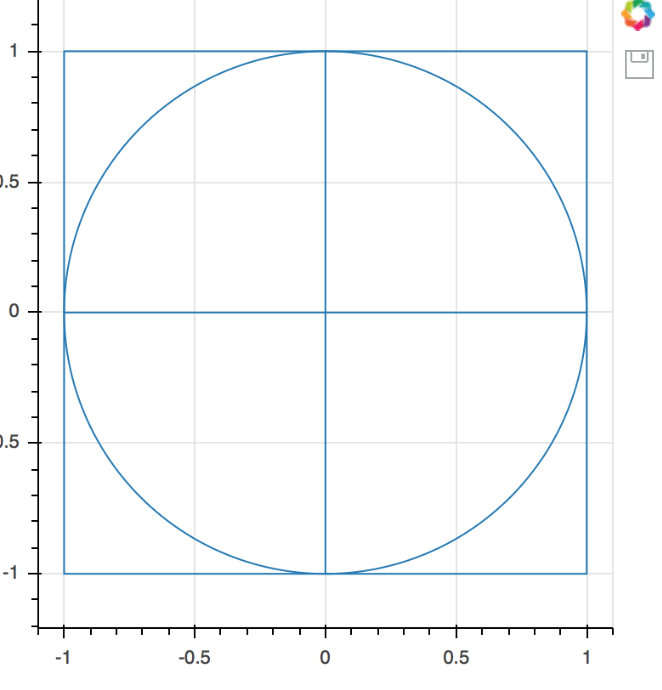
If I add a rect:

from bokeh.plotting import figure, output_file, show

output_file("circle_v1.html")

p = figure(plot_width=400, plot_height=400, match_aspect=True, tools='save')
p.circle(0, 0, radius=1.0, fill_alpha=0)
p.line((0, 1), (0, 0))
p.line((0, -1), (0, 0))
p.line((0, 0), (0, 1))
p.line((0, 0), (0, -1))
p.rect(0, 0, 2, 2, fill_alpha=0)

show(p)

then things work as expected:

However, without the rect, I see a result similar to yours. This seems like a bug so I’d suggest a GH issue with details.

Thanks,

Bryan

···

On Nov 14, 2017, at 16:15, vaught.travis@gmail.com wrote:

I’m seeing the same problems (strangely, I was trying to get a unit circle drawn today as well). This is what I get:

On Tuesday, November 14, 2017 at 11:58:37 AM UTC-6, Bryan Van de ven wrote:
With these changes:

plot = figure(plot_width=400, plot_height=400, match_aspect=True, tools=‘save’)
plot.circle(0,0,radius=0.4,fill_color=None,line_color=‘OliveDrab’)

We get the following (matched aspect) circle:

That said with larger radius values it did not seem to auto-range well. (The circle was outside and surrounding the visible view area.) I’d suggest making a GH issue about improving auto-ranging for circles with radius specified:

https://github.com/bokeh/bokeh/issues

Thanks,

Bryan

On Nov 14, 2017, at 12:51, Bryan Van de ven bry...@anaconda.com wrote:

Hi,

As described in the docs:

https://bokeh.pydata.org/en/dev/docs/reference/models/plots.html#bokeh.models.plots.Plot.match_aspect

The match_aspect flag only has effect with the ranges are “auto” DataRange1d ranges. These are the default. In that case Bokeh will adjust the data space range boundaries as necessary to maintain aspect that matches the pixel aspect. However, if you explicitly provide range boundaries, as you have done in your code, Bokeh will not override them.

Thanks

Bryan

On Nov 14, 2017, at 12:36, vectortronic iob...@gmail.com wrote:

Pardon the noob question, but all I want to do is draw a unit circle with aspect ratio = 1 (so it looks like a circle and not an ellipse). I’ve been thwarted at every turn.

I’ve tried two basic strategies. First is to create a single point at (0,0) and then specify a radius of 1. Unfortunately, this gives me something that looks circular but doesn’t actually reach all the way up and down to y = +/-1. Second strategy is to plot the points (cos(th), sin(th) ) where th is 0 to 360 degrees. The resulting plot looks elliptical because I can’t get the aspect ratio right.

I don’t know if this is a confounding factor, but I’m including a slider (for something I’ll be doing later) and I don’t know if that’s what’s screwing things up.

The code and results for both strategies are here:
https://vectortronic.github.io/bokeh_scripts

Can anyone advise? Thanks.

–
You received this message because you are subscribed to the Google Groups “Bokeh Discussion - Public” group.
To unsubscribe from this group and stop receiving emails from it, send an email to bokeh+un...@continuum.io.
To post to this group, send email to bo...@continuum.io.
To view this discussion on the web visit https://groups.google.com/a/continuum.io/d/msgid/bokeh/77daa78c-6774-4d93-b063-1316814c363d%40continuum.io.
For more options, visit https://groups.google.com/a/continuum.io/d/optout.

–
You received this message because you are subscribed to the Google Groups “Bokeh Discussion - Public” group.
To unsubscribe from this group and stop receiving emails from it, send an email to bokeh+unsubscribe@continuum.io.
To post to this group, send email to bokeh@continuum.io.
To view this discussion on the web visit https://groups.google.com/a/continuum.io/d/msgid/bokeh/3de804db-9a2a-4d4b-b3f3-95e490fab31b%40continuum.io.
For more options, visit https://groups.google.com/a/continuum.io/d/optout.

⌁   Link to post
Travis_N_Vaught
Travis_N_Vaught

Travis,

If I add a rect:

from bokeh.plotting import figure, output_file, show

output_file("circle_v1.html")

p = figure(plot_width=400, plot_height=400, match_aspect=True, tools='save')
p.circle(0, 0, radius=1.0, fill_alpha=0)
p.line((0, 1), (0, 0))
p.line((0, -1), (0, 0))
p.line((0, 0), (0, 1))
p.line((0, 0), (0, -1))
p.rect(0, 0, 2, 2, fill_alpha=0)

show(p)

then things work as expected:

<Screen Shot 2017-11-14 at 19.34.46.png>

However, without the rect, I see a result similar to yours. This seems like a bug so I’d suggest a GH issue with details.

I’ll file the issue. Thank you very much for the sanity check!

Best,

Travis

···

On Nov 14, 2017, at 7:36 PM, Bryan Van de ven bryanv@anaconda.com wrote:

Thanks,

Bryan

On Nov 14, 2017, at 16:15, vaught.travis@gmail.com wrote:

I’m seeing the same problems (strangely, I was trying to get a unit circle drawn today as well). This is what I get:

On Tuesday, November 14, 2017 at 11:58:37 AM UTC-6, Bryan Van de ven wrote:
With these changes:

plot = figure(plot_width=400, plot_height=400, match_aspect=True, tools='save') 
plot.circle(0,0,radius=0.4,fill_color=None,line_color='OliveDrab')

We get the following (matched aspect) circle:

That said with larger radius values it did not seem to auto-range well. (The circle was outside and surrounding the visible view area.) I’d suggest making a GH issue about improving auto-ranging for circles with radius specified:

[https://github.com/bokeh/](https://github.com/bokeh/)bokeh/issues

Thanks,

Bryan

On Nov 14, 2017, at 12:51, Bryan Van de ven <bry…@anaconda.com> wrote:

Hi,

As described in the docs:

[https://bokeh.pydata.org/en/dev/docs/reference/models/plots.html#bokeh.models.plots.Plot.match_aspect](https://bokeh.pydata.org/en/dev/docs/reference/models/plots.html#bokeh.models.plots.Plot.match_aspect)

The match_aspect flag only has effect with the ranges are “auto” DataRange1d ranges. These are the default. In that case Bokeh will adjust the data space range boundaries as necessary to maintain aspect that matches the pixel aspect. However, if you explicitly provide range boundaries, as you have done in your code, Bokeh will not override them.

Thanks

Bryan

On Nov 14, 2017, at 12:36, vectortronic <iob…@gmail.com> wrote:

Pardon the noob question, but all I want to do is draw a unit circle with aspect ratio = 1 (so it looks like a circle and not an ellipse). I’ve been thwarted at every turn.

I’ve tried two basic strategies. First is to create a single point at (0,0) and then specify a radius of 1. Unfortunately, this gives me something that looks circular but doesn’t actually reach all the way up and down to y = +/-1. Second strategy is to plot the points (cos(th), sin(th) ) where th is 0 to 360 degrees. The resulting plot looks elliptical because I can’t get the aspect ratio right.

I don’t know if this is a confounding factor, but I’m including a slider (for something I’ll be doing later) and I don’t know if that’s what’s screwing things up.

The code and results for both strategies are here:
https://vectortronic.github.io/bokeh_scripts

Can anyone advise? Thanks.

–
You received this message because you are subscribed to the Google Groups “Bokeh Discussion - Public” group.
To unsubscribe from this group and stop receiving emails from it, send an email to bokeh+un…@continuum.io.
To post to this group, send email to bo…@continuum.io.
To view this discussion on the web visit https://groups.google.com/a/continuum.io/d/msgid/bokeh/77daa78c-6774-4d93-b063-1316814c363d%40continuum.io.
For more options, visit https://groups.google.com/a/continuum.io/d/optout.

–
You received this message because you are subscribed to the Google Groups “Bokeh Discussion - Public” group.
To unsubscribe from this group and stop receiving emails from it, send an email to bokeh+unsubscribe@continuum.io.
To post to this group, send email to bokeh@continuum.io.
To view this discussion on the web visit https://groups.google.com/a/continuum.io/d/msgid/bokeh/3de804db-9a2a-4d4b-b3f3-95e490fab31b%40continuum.io.
For more options, visit https://groups.google.com/a/continuum.io/d/optout.

–

You received this message because you are subscribed to a topic in the Google Groups “Bokeh Discussion - Public” group.

To unsubscribe from this topic, visit https://groups.google.com/a/continuum.io/d/topic/bokeh/g_U27pxtF80/unsubscribe.

To unsubscribe from this group and all its topics, send an email to bokeh+unsubscribe@continuum.io.

To post to this group, send email to bokeh@continuum.io.

To view this discussion on the web visit https://groups.google.com/a/continuum.io/d/msgid/bokeh/9187DEC2-7B62-4790-A282-26A2547E5C81%40anaconda.com.

For more options, visit https://groups.google.com/a/continuum.io/d/optout.
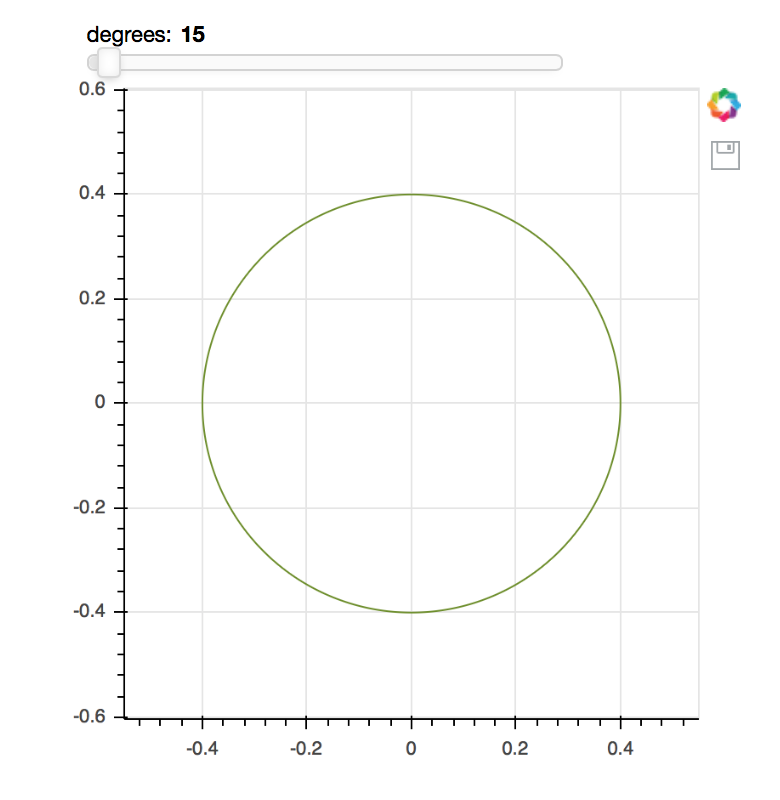
⌁   Link to post

End of archived discussion · Replies are disabled