
Hi,
I’m trying to host the px4 flight review tool on my system and I am able to view all the contents except the graphs and plots. On trying to see the browser console, I found this error:
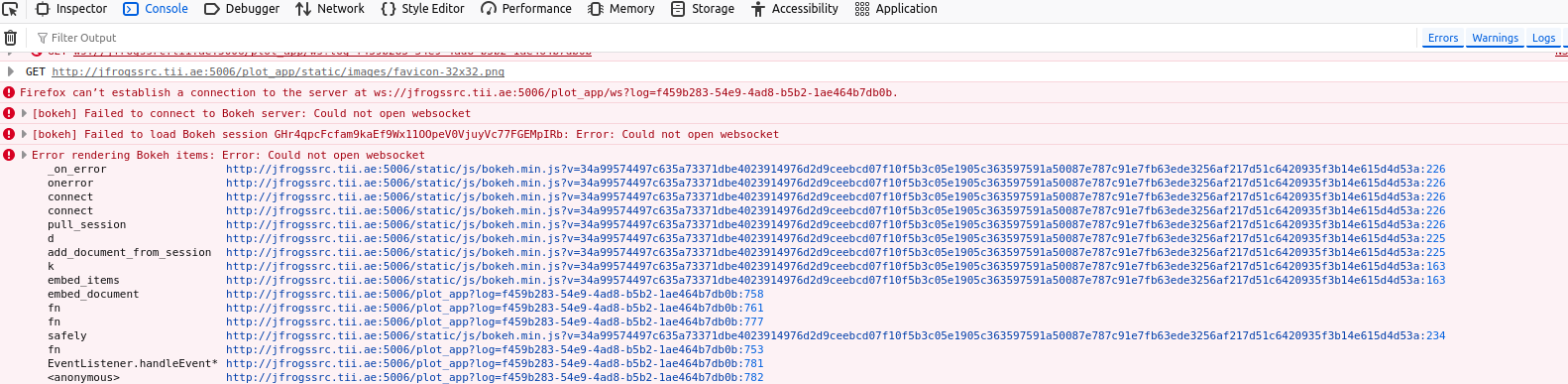
Could you please help let me know where I’m going wrong?
 Read-only archive⌕
Hi,
I’m trying to host the px4 flight review tool on my system and I am able to view all the contents except the graphs and plots. On trying to see the browser console, I found this error:
Could you please help let me know where I’m going wrong?

If the websocket connection fails, that means something in between the user and the Bokeh server blocked it. That could be a proxy (e.g. nginx) or firewall or something else. There is not nearly enough information here to begin to speculate beyond that. You’ll need to describe your network setup and configuration in some detail. Otherwise, all I can do is point to the documentation which provides configuration guidance for some common cases.
Hi Bryan,
Could you let me know what information about the config do you need? I can provide that for further debugging
Unfortunately, no. There are lots of possibilities and I’m only actually passingly familiar with a handful. If you describe what comprises your end to end setup I might have pointers, but no guarantee. Generally speaking: you need to look at everything that runs in-between your Bokeh server and the user’s browser, and investigate whether it requires some explicit configuration to enable websocket connections (e.g. by web or docs searching, and looking in logs for relevant warnings or errors). For example, of the top of my head: nginx, AWS load balancers, and Apache proxies all require some configuration to handle websockets.
I tried all different combinations.
These are the commands I used to run the script.
Could you please let me know other possibilities which could be checked?
If you have set --allow-websocket-origin=‘*’ then Bokeh itself will not reject any websocket connections. You should be able to look at the Bokeh server logs and confirm there are no messages about rejected connections. My expectation is that the websocket connection is not even reaching the Bokeh server at all, i.e. the problem is upstream “in front” of the Bokeh server. You’re going to have to look at every log you can find for clues, I can’t help with specifics of that because I know literally nothing about your end to end setup.
where can we find the bokeh server logs? Could you point me to the location ?
Bokeh just outputs it’s log to console by default. If you are running the Bokeh server on some cloud platform or something, you’ll have to ask their support people where they save “stdout” process logs off to. That’s not a Bokeh question.
Hi Bryan,
ssrc-malavika@t01pjfssrc01:~/flight_review_tool/app$ sudo python3 serve.py --port=5006 --address=0.0.0.0 --allow-websocket-origin=‘’ --use-xheaders
WARNING:bokeh.server.util:Host wildcard '’ will allow connections originating from multiple (or possibly all) hostnames or IPs. Use non-wildcard values to restrict access explicitly
It is stuck here. I dont see any logs.
It’s not stuck, it’s waiting for something to happen. Nothing else will show up until a connection request comes in because a browser tried to load the page.
I just noticed you are not running bokeh serve ? What is serve.py ? My answer only refers to running the Bokeh server directly with bokeh serve I have no idea what serve.py is or does. If you are using the Bokeh server API programmatically you’ll need to set up the Python logger yourself (that’s one of the things bokeh serve does for you).
Again you have provided no information about: what exactly you are running (code? What is serve.py?) How the app is being used (Are users hitting the app directly? Are you trying to embed the app in another page?), where you are running it (locally? on AWS or GCP or Azure? Some other cloud host?) Where are users connecting from and what the network infrastructure is like (are there proxies involved? load balancers? firewalls?)
ssrc-malavika@t01pjfssrc01:~/flight_review_tool/app$ bokeh serve --show --allow-websocket-origin=‘’&
[1] 2405901
ssrc-malavika@t01pjfssrc01:~/flight_review_tool/app$ 2024-09-20 16:34:11,904 Starting Bokeh server version 3.1.0 (running on Tornado 6.4.1)
2024-09-20 16:34:12,110 Host wildcard '‘’’ will allow connections originating from multiple (or possibly all) hostnames or IPs. Use non-wildcard values to restrict access explicitly
2024-09-20 16:34:12,110 User authentication hooks NOT provided (default user enabled)
2024-09-20 16:34:12,113 Bokeh app running at: http://localhost:5006/
2024-09-20 16:34:12,113 Starting Bokeh server with process id: 2405901
With bokeh serve too, it is the same output
I’m trying to run the PX4 flight review tool for which, bokeh is needed. I try to access the application hosted on port 5006, and thats when I face this error.
With bokeh serve too, it is the same output
That is the standard starting log. As I already stated, at this point the server is waiting for connections and there will be no other output until a connection request comes in (i.e. when a browser tries to load the app page). There are two options:
A browser tries to connect, and the log updates with more output ==> post that ouput here
A browser tries to connect, and the log does not update with more output ==> something else is blocking the connection, and this is not a Bokeh issue
Hi Bryan,
The browser tried to connect but I couldnt see the output. So, is it that something else is blocking the connection ? How do we find this ? The port is open and there is no firewall that is blocking the connection.
And, I want to access it on another domain name, but it is hosted on localhost… How do i change it ?
This isn’t something I can help with because I simply have no information about your network infrastructure at all to go on, or even what kind of environment you are trying to run things on, and subsequently access things from. If you have network administrators for your business or university or wherever it is that you are running things, you will need to engage them for assistance. If you are running on a cloud provider, you will need to check with their docs or support.
And, I want to access it on another domain name, but it is hosted on localhost… How do i change it
You can run the Bokeh server on a server on that network, or you can run a proxy like nginx on the desired network that forwards to the Bokeh server on a different network, or you can serve a page on the desired network that embeds the Bokeh server content from a different network…
I’m not sure how else to convey this: it’s not possible to offer specific guidance without actual details of your situation, and what precisely it is you want to accomplish.
It might actually also be a good idea to engage with the makers of this application to ask for their help, since they should have some idea how they intended it to be deployed. I assume this is their GitHub?
Hi Bryan,
Yes. It is their GitHub. I am able to host the app except the fact that the bokeh plots are displayed blank.
We are clearly not communicating effectively, and you do not seem able to provide any information about the details of your situation. I am not able to assist further, but I wish you the best of luck. I would still recommend reaching out to the actual project with your issues.
Please let me know if you are free for debugging the setup… I can schedule a zoom call for the same.
Not at all. Bokeh support and development is currently just something I volunteer some free personal time to when I can. I do not engage in actual consulting activities.

not sure if my advice might be useful but my suggeestion is to skip Bokeh server altogether and host your Bokeh embedded into an html page and saved on a public AWS S3 bucket. I do this with Pyscript
see my post at

This topic was automatically closed 90 days after the last reply. New replies are no longer allowed.
End of archived discussion · Replies are disabled