☰Read-only archive⌕
Looking for help with Bokeh?

This is a read-only archive. Ask questions and join the conversation on GitHub.

Visit Community Support on GitHub →
Archived discussions · Captured October 28, 2026

Gapminder Notebook for Bokeh 0.12.3

Community Support
Em_Em
Em_Em

Hello there!

Today is my first day playing with Bokeh and I am having a difficult time running the scripts available because it does not appear there is a complete script available for 0.12.3.

I have been playing around with it all day, and it’s time that this beginner in python (v 3.5.2) asks for help.

Thank you so much!

⌁   Link to post
birdsarah_continuum
birdsarah_continuum

Hi Emily,

        Can you provide more context. What did you try and

what happened? Where did you
get the script from?

            The gapminder script is working for me, so we'll

need more information to be sure about what went wrong.

Best,

Bird

···

On 11/30/16 8:33 PM, Em Em wrote:

Hello there!

        Today is my

first day playing with Bokeh and I am having a difficult
time running the scripts available because it does not
appear there is a complete script available for 0.12.3.

        I have been

playing around with it all day, and it’s time that this
beginner in python (v 3.5.2) asks for help.

        Thank you so

much!

–

  You received this message because you are subscribed to the Google

Groups “Bokeh Discussion - Public” group.

  To unsubscribe from this group and stop receiving emails from it,

send an email to bokeh+unsubscribe@continuum.io.

  To post to this group, send email to bokeh@continuum.io.

  To view this discussion on the web visit [https://groups.google.com/a/continuum.io/d/msgid/bokeh/9c3e81a8-fb61-44e6-900c-80d3d74b1f87%40continuum.io](https://groups.google.com/a/continuum.io/d/msgid/bokeh/9c3e81a8-fb61-44e6-900c-80d3d74b1f87%40continuum.io?utm_medium=email&utm_source=footer).

  For more options, visit [https://groups.google.com/a/continuum.io/d/optout](https://groups.google.com/a/continuum.io/d/optout).

–
Sarah Bird
Developer, Bokeh

    [
      ![Continuum Analytics](http://docs.continuum.io/_static/img/ContinuumWordmark.png)
    ](http://continuum.io)
⌁   Link to post
Em_Em
Em_Em

Yes, the source of the script is: https://github.com/bokeh/bokeh/blob/master/examples/howto/interactive_bubble/gapminder.py

I ran the script, and the first error is: ImportError: No module named ‘data’

···

On Wednesday, November 30, 2016 at 9:37:36 PM UTC-5, Sarah Bird wrote:

Hi Emily,

        Can you provide more context. What did you try and

what happened? Where did you
get the script from?

            The gapminder script is working for me, so we'll

need more information to be sure about what went wrong.

Best,

Bird

On 11/30/16 8:33 PM, Em Em wrote:

Hello there!

        Today is my

first day playing with Bokeh and I am having a difficult
time running the scripts available because it does not
appear there is a complete script available for 0.12.3.

        I have been

playing around with it all day, and it’s time that this
beginner in python (v 3.5.2) asks for help.

        Thank you so

much!

–

  You received this message because you are subscribed to the Google

Groups “Bokeh Discussion - Public” group.

  To unsubscribe from this group and stop receiving emails from it,

send an email to bokeh+un...@continuum.io.

  To post to this group, send email to bo...@continuum.io.

  To view this discussion on the web visit [https://groups.google.com/a/continuum.io/d/msgid/bokeh/9c3e81a8-fb61-44e6-900c-80d3d74b1f87%40continuum.io](https://groups.google.com/a/continuum.io/d/msgid/bokeh/9c3e81a8-fb61-44e6-900c-80d3d74b1f87%40continuum.io?utm_medium=email&utm_source=footer).

  For more options, visit [https://groups.google.com/a/continuum.io/d/optout](https://groups.google.com/a/continuum.io/d/optout).

–
Sarah Bird
Developer, Bokeh

    [
      <img alt="Continuum Analytics" src="https://lh6.googleusercontent.com/proxy/VYgVjggTk1hCXSN9wFkffE3I6kxTvJ51tT4KvDXOuKbs1WyFG66k7kt2-vkDimbyxfWtP-d1paJmstMYhPPnDYSUF4rLPoYM2GM2QFM=w5000-h5000" height="30px" width="150px">
    ](http://continuum.io)
⌁   Link to post
Em_Em
Em_Em

Sarah, after the first error, i thought it was because i needed to give it the exact path. I gave it the exact path, but, then i realized that Bokeh 0.12.3 does not come with a “process_data” file. These are the files that comes with Bokeh 0.12.3:

  1. gapminder_fertility.csv

  2. gapminder_population.csv

3. gapminder_life_expectancy.csv
4. gapminder_regions.csv

Yes, it's the different file names that lead me to believe that the script is not updated to reflect the newest version of Bokeh.

I then tried http://nbviewer.jupyter.org/github/birdsarah/bokeh-miscellany/blob/master/gapminder-nc/Linear%20Interpolator.ipynb. it works great, but it appears to be an incomplete script without guidance as to what to do next. And, being new to all this, i don't know where/how to pick up from where the script ends. Please assist.
···

On Wednesday, November 30, 2016 at 9:49:02 PM UTC-5, Em Em wrote:

Yes, the source of the script is: https://github.com/bokeh/bokeh/blob/master/examples/howto/interactive_bubble/gapminder.py

I ran the script, and the first error is: ImportError: No module named ‘data’

On Wednesday, November 30, 2016 at 9:37:36 PM UTC-5, Sarah Bird wrote:

Hi Emily,

        Can you provide more context. What did you try and

what happened? Where did you
get the script from?

            The gapminder script is working for me, so we'll

need more information to be sure about what went wrong.

Best,

Bird

On 11/30/16 8:33 PM, Em Em wrote:

Hello there!

        Today is my

first day playing with Bokeh and I am having a difficult
time running the scripts available because it does not
appear there is a complete script available for 0.12.3.

        I have been

playing around with it all day, and it’s time that this
beginner in python (v 3.5.2) asks for help.

        Thank you so

much!

–

  You received this message because you are subscribed to the Google

Groups “Bokeh Discussion - Public” group.

  To unsubscribe from this group and stop receiving emails from it,

send an email to bokeh+un...@continuum.io.

  To post to this group, send email to bo...@continuum.io.

  To view this discussion on the web visit [https://groups.google.com/a/continuum.io/d/msgid/bokeh/9c3e81a8-fb61-44e6-900c-80d3d74b1f87%40continuum.io](https://groups.google.com/a/continuum.io/d/msgid/bokeh/9c3e81a8-fb61-44e6-900c-80d3d74b1f87%40continuum.io?utm_medium=email&utm_source=footer).

  For more options, visit [https://groups.google.com/a/continuum.io/d/optout](https://groups.google.com/a/continuum.io/d/optout).

–
Sarah Bird
Developer, Bokeh

    [
      <img alt="Continuum Analytics" src="https://lh6.googleusercontent.com/proxy/VYgVjggTk1hCXSN9wFkffE3I6kxTvJ51tT4KvDXOuKbs1WyFG66k7kt2-vkDimbyxfWtP-d1paJmstMYhPPnDYSUF4rLPoYM2GM2QFM=w5000-h5000" height="30px" width="150px">
    ](http://continuum.io)
⌁   Link to post
Bryan
Bryan

Hi Emily,

In the GitHub repo, the data.py module is in the same directory as gapminder.py:

  https://github.com/bokeh/bokeh/tree/master/examples/howto/interactive_bubble

It's also showing up for me in the bundled bconda Examples under the same dir:

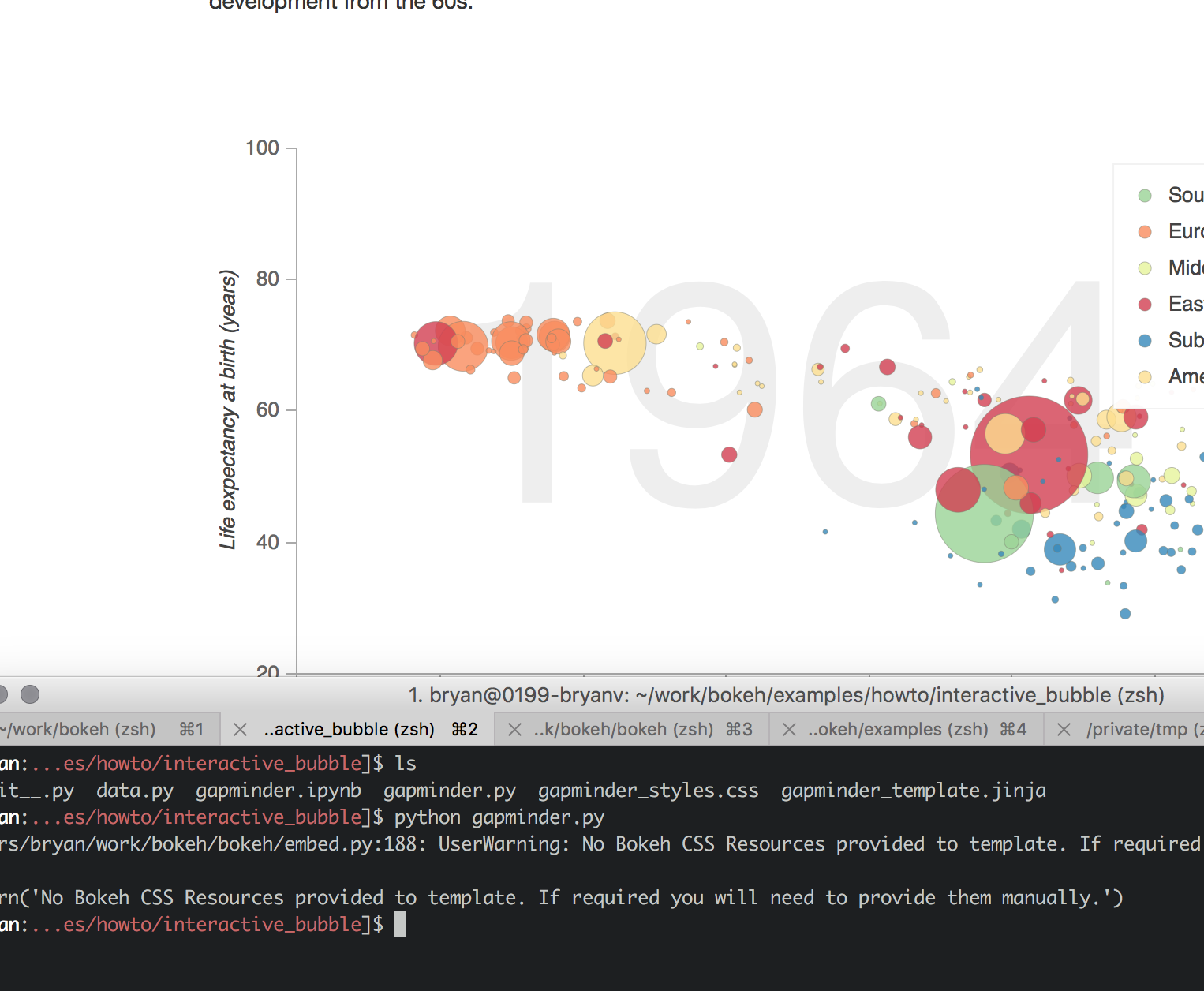
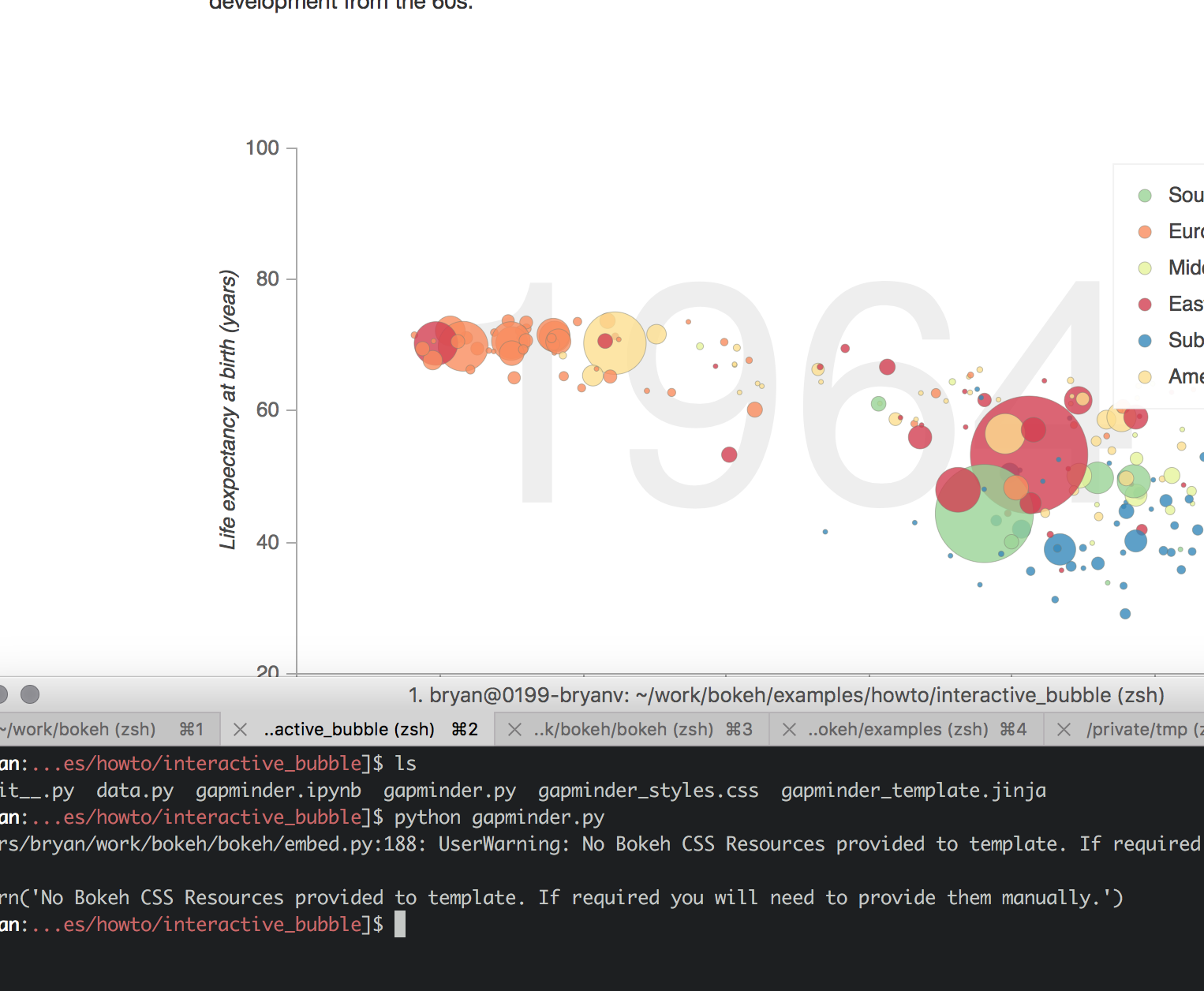
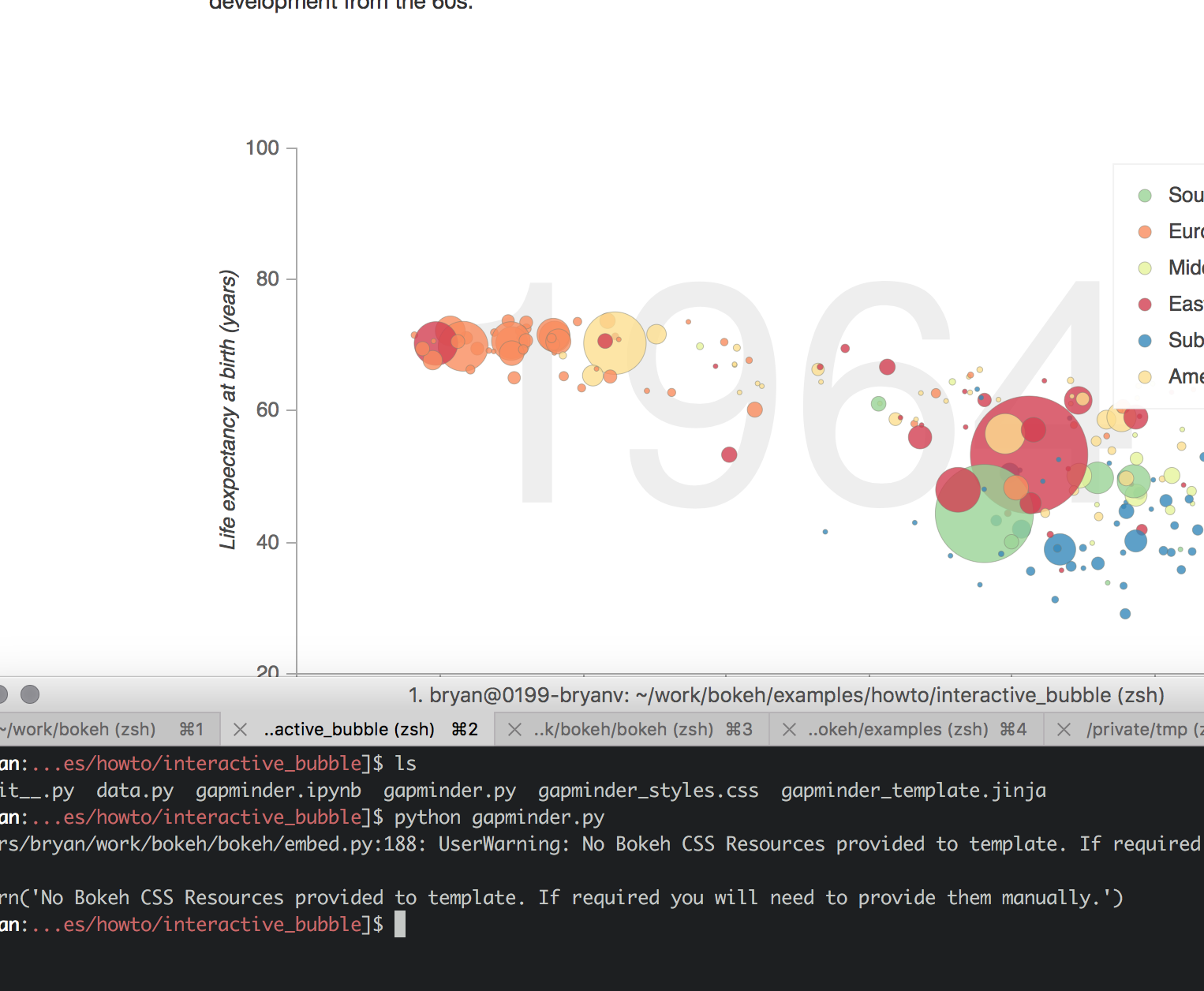
  $ ls ~/anaconda/envs/bk123/Examples/bokeh/howto/interactive_bubble
  __init__.py data.py gapminder.ipynb gapminder.py gapminder_styles.css gapminder_template.jinja

Can you describe how you obtained the example code?

In any case for now you can download data.py from the link above.

Thanks,

Bryan

···

On Nov 30, 2016, at 8:49 PM, Em Em <lilieslilacs@gmail.com> wrote:

Yes, the source of the script is: https://github.com/bokeh/bokeh/blob/master/examples/howto/interactive_bubble/gapminder.py

I ran the script, and the first error is: ImportError: No module named 'data'

On Wednesday, November 30, 2016 at 9:37:36 PM UTC-5, Sarah Bird wrote:
Hi Emily,

Can you provide more context. What did you try and what happened? Where did you get the script from?

The gapminder script is working for me, so we'll need more information to be sure about what went wrong.

Best,

Bird

On 11/30/16 8:33 PM, Em Em wrote:

Hello there!

Today is my first day playing with Bokeh and I am having a difficult time running the scripts available because it does not appear there is a complete script available for 0.12.3.

I have been playing around with it all day, and it's time that this beginner in python (v 3.5.2) asks for help.

Thank you so much!
--
You received this message because you are subscribed to the Google Groups "Bokeh Discussion - Public" group.
To unsubscribe from this group and stop receiving emails from it, send an email to bokeh+un...@continuum.io.
To post to this group, send email to bo...@continuum.io.
To view this discussion on the web visit https://groups.google.com/a/continuum.io/d/msgid/bokeh/9c3e81a8-fb61-44e6-900c-80d3d74b1f87%40continuum.io\.
For more options, visit https://groups.google.com/a/continuum.io/d/optout\.

--
Sarah Bird
Developer, Bokeh

--
You received this message because you are subscribed to the Google Groups "Bokeh Discussion - Public" group.
To unsubscribe from this group and stop receiving emails from it, send an email to bokeh+unsubscribe@continuum.io.
To post to this group, send email to bokeh@continuum.io.
To view this discussion on the web visit https://groups.google.com/a/continuum.io/d/msgid/bokeh/43c1eea7-d7c4-4260-875e-00913598ccd7%40continuum.io\.
For more options, visit https://groups.google.com/a/continuum.io/d/optout\.

⌁   Link to post
Em_Em
Em_Em

Hello Brian, I tried the data.py file and it does not appear that the data was processed properly because I received the following error when i tried to call ‘fertility’. :

As for getting the example code, I googled “gapminder bokeh”

···

On Wednesday, November 30, 2016 at 10:44:41 PM UTC-5, Bryan Van de ven wrote:

Hi Emily,

In the GitHub repo, the data.py module is in the same directory as gapminder.py:

    [https://github.com/bokeh/bokeh/tree/master/examples/howto/interactive_bubble](https://github.com/bokeh/bokeh/tree/master/examples/howto/interactive_bubble)

It’s also showing up for me in the bundled bconda Examples under the same dir:

    $ ls ~/anaconda/envs/bk123/Examples/bokeh/howto/interactive_bubble
    __init__.py data.py  gapminder.ipynb gapminder.py gapminder_styles.css gapminder_template.jinja

Can you describe how you obtained the example code?

In any case for now you can download data.py from the link above.

Thanks,

Bryan

On Nov 30, 2016, at 8:49 PM, Em Em lilies...@gmail.com wrote:

Yes, the source of the script is: https://github.com/bokeh/bokeh/blob/master/examples/howto/interactive_bubble/gapminder.py

I ran the script, and the first error is: ImportError: No module named ‘data’

On Wednesday, November 30, 2016 at 9:37:36 PM UTC-5, Sarah Bird wrote:

Hi Emily,

Can you provide more context. What did you try and what happened? Where did you get the script from?

The gapminder script is working for me, so we’ll need more information to be sure about what went wrong.

Best,

Bird

On 11/30/16 8:33 PM, Em Em wrote:

Hello there!

Today is my first day playing with Bokeh and I am having a difficult time running the scripts available because it does not appear there is a complete script available for 0.12.3.

I have been playing around with it all day, and it’s time that this beginner in python (v 3.5.2) asks for help.

Thank you so much!

–
You received this message because you are subscribed to the Google Groups “Bokeh Discussion - Public” group.

To unsubscribe from this group and stop receiving emails from it, send an email to bokeh+un...@continuum.io.

To post to this group, send email to bo...@continuum.io.

To view this discussion on the web visit https://groups.google.com/a/continuum.io/d/msgid/bokeh/9c3e81a8-fb61-44e6-900c-80d3d74b1f87%40continuum.io.

For more options, visit https://groups.google.com/a/continuum.io/d/optout.

–
Sarah Bird

Developer, Bokeh

–
You received this message because you are subscribed to the Google Groups “Bokeh Discussion - Public” group.

To unsubscribe from this group and stop receiving emails from it, send an email to bokeh+un...@continuum.io.

To post to this group, send email to bo...@continuum.io.

To view this discussion on the web visit https://groups.google.com/a/continuum.io/d/msgid/bokeh/43c1eea7-d7c4-4260-875e-00913598ccd7%40continuum.io.

For more options, visit https://groups.google.com/a/continuum.io/d/optout.

⌁   Link to post
Bryan
Bryan

Hi,

It looks like you need to install the sample data, which is distributed separately:

http://bokeh.pydata.org/en/latest/docs/installation.html#sample-data

Thanks,

Bryan

···

On Nov 30, 2016, at 21:54, Em Em lilieslilacs@gmail.com wrote:

Hello Brian, I tried the data.py file and it does not appear that the data was processed properly because I received the following error when i tried to call ‘fertility’. :

As for getting the example code, I googled “gapminder bokeh”

On Wednesday, November 30, 2016 at 10:44:41 PM UTC-5, Bryan Van de ven wrote:

Hi Emily,

In the GitHub repo, the data.py module is in the same directory as gapminder.py:

    [https://github.com/bokeh/bokeh/tree/master/examples/howto/interactive_bubble](https://github.com/bokeh/bokeh/tree/master/examples/howto/interactive_bubble)

It’s also showing up for me in the bundled bconda Examples under the same dir:

    $ ls ~/anaconda/envs/bk123/Examples/bokeh/howto/interactive_bubble
    __init__.py data.py  gapminder.ipynb gapminder.py gapminder_styles.css gapminder_template.jinja

Can you describe how you obtained the example code?

In any case for now you can download data.py from the link above.

Thanks,

Bryan

On Nov 30, 2016, at 8:49 PM, Em Em lilies...@gmail.com wrote:

Yes, the source of the script is: https://github.com/bokeh/bokeh/blob/master/examples/howto/interactive_bubble/gapminder.py

I ran the script, and the first error is: ImportError: No module named ‘data’

On Wednesday, November 30, 2016 at 9:37:36 PM UTC-5, Sarah Bird wrote:

Hi Emily,

Can you provide more context. What did you try and what happened? Where did you get the script from?

The gapminder script is working for me, so we’ll need more information to be sure about what went wrong.

Best,

Bird

On 11/30/16 8:33 PM, Em Em wrote:

Hello there!

Today is my first day playing with Bokeh and I am having a difficult time running the scripts available because it does not appear there is a complete script available for 0.12.3.

I have been playing around with it all day, and it’s time that this beginner in python (v 3.5.2) asks for help.

Thank you so much!

–
You received this message because you are subscribed to the Google Groups “Bokeh Discussion - Public” group.

To unsubscribe from this group and stop receiving emails from it, send an email to bokeh+un...@continuum.io.

To post to this group, send email to bo...@continuum.io.

To view this discussion on the web visit https://groups.google.com/a/continuum.io/d/msgid/bokeh/9c3e81a8-fb61-44e6-900c-80d3d74b1f87%40continuum.io.

For more options, visit https://groups.google.com/a/continuum.io/d/optout.

–
Sarah Bird

Developer, Bokeh

–
You received this message because you are subscribed to the Google Groups “Bokeh Discussion - Public” group.

To unsubscribe from this group and stop receiving emails from it, send an email to bokeh+un...@continuum.io.

To post to this group, send email to bo...@continuum.io.

To view this discussion on the web visit https://groups.google.com/a/continuum.io/d/msgid/bokeh/43c1eea7-d7c4-4260-875e-00913598ccd7%40continuum.io.

For more options, visit https://groups.google.com/a/continuum.io/d/optout.

–

You received this message because you are subscribed to the Google Groups “Bokeh Discussion - Public” group.

To unsubscribe from this group and stop receiving emails from it, send an email to bokeh+unsubscribe@continuum.io.

To post to this group, send email to bokeh@continuum.io.

To view this discussion on the web visit https://groups.google.com/a/continuum.io/d/msgid/bokeh/d0b76843-5d9f-416b-9576-3001738a7228%40continuum.io.

For more options, visit https://groups.google.com/a/continuum.io/d/optout.

⌁   Link to post
Em_Em
Em_Em

The error is still there, even after the install of the sample data, Bryan.

···

On Thursday, December 1, 2016 at 1:26:10 AM UTC-5, Bryan Van de ven wrote:

Hi,

It looks like you need to install the sample data, which is distributed separately:

http://bokeh.pydata.org/en/latest/docs/installation.html#sample-data

Thanks,

Bryan

On Nov 30, 2016, at 21:54, Em Em lilies...@gmail.com wrote:

Hello Brian, I tried the data.py file and it does not appear that the data was processed properly because I received the following error when i tried to call ‘fertility’. :

As for getting the example code, I googled “gapminder bokeh”

On Wednesday, November 30, 2016 at 10:44:41 PM UTC-5, Bryan Van de ven wrote:

Hi Emily,

In the GitHub repo, the data.py module is in the same directory as gapminder.py:

    [https://github.com/bokeh/bokeh/tree/master/examples/howto/interactive_bubble](https://github.com/bokeh/bokeh/tree/master/examples/howto/interactive_bubble)

It’s also showing up for me in the bundled bconda Examples under the same dir:

    $ ls ~/anaconda/envs/bk123/Examples/bokeh/howto/interactive_bubble
    __init__.py data.py  gapminder.ipynb gapminder.py gapminder_styles.css gapminder_template.jinja

Can you describe how you obtained the example code?

In any case for now you can download data.py from the link above.

Thanks,

Bryan

On Nov 30, 2016, at 8:49 PM, Em Em lilies...@gmail.com wrote:

Yes, the source of the script is: https://github.com/bokeh/bokeh/blob/master/examples/howto/interactive_bubble/gapminder.py

I ran the script, and the first error is: ImportError: No module named ‘data’

On Wednesday, November 30, 2016 at 9:37:36 PM UTC-5, Sarah Bird wrote:

Hi Emily,

Can you provide more context. What did you try and what happened? Where did you get the script from?

The gapminder script is working for me, so we’ll need more information to be sure about what went wrong.

Best,

Bird

On 11/30/16 8:33 PM, Em Em wrote:

Hello there!

Today is my first day playing with Bokeh and I am having a difficult time running the scripts available because it does not appear there is a complete script available for 0.12.3.

I have been playing around with it all day, and it’s time that this beginner in python (v 3.5.2) asks for help.

Thank you so much!

–
You received this message because you are subscribed to the Google Groups “Bokeh Discussion - Public” group.

To unsubscribe from this group and stop receiving emails from it, send an email to bokeh+un...@continuum.io.

To post to this group, send email to bo...@continuum.io.

To view this discussion on the web visit https://groups.google.com/a/continuum.io/d/msgid/bokeh/9c3e81a8-fb61-44e6-900c-80d3d74b1f87%40continuum.io.

For more options, visit https://groups.google.com/a/continuum.io/d/optout.

–
Sarah Bird

Developer, Bokeh

–
You received this message because you are subscribed to the Google Groups “Bokeh Discussion - Public” group.

To unsubscribe from this group and stop receiving emails from it, send an email to bokeh+un...@continuum.io.

To post to this group, send email to bo...@continuum.io.

To view this discussion on the web visit https://groups.google.com/a/continuum.io/d/msgid/bokeh/43c1eea7-d7c4-4260-875e-00913598ccd7%40continuum.io.

For more options, visit https://groups.google.com/a/continuum.io/d/optout.

–

You received this message because you are subscribed to the Google Groups “Bokeh Discussion - Public” group.

To unsubscribe from this group and stop receiving emails from it, send an email to bokeh+un...@continuum.io.

To post to this group, send email to bo...@continuum.io.

To view this discussion on the web visit https://groups.google.com/a/continuum.io/d/msgid/bokeh/d0b76843-5d9f-416b-9576-3001738a7228%40continuum.io.

For more options, visit https://groups.google.com/a/continuum.io/d/optout.

⌁   Link to post
Bryan
Bryan

Hi Emily,

That's a different error, that's back to python not being able to find the data.py module to import. Can you verify that data.py and gapminder.py are in the same directory, and you are running the script from that same directory? That is, that you are just running

  python gapminder.py

in that directory, and not something like

  python /full/path/to/gapminder.py

from some other directory? Apart from some special known locations, the python interpreter only searches for modules to import in the same directory that you ran python in.

Beyond that, sometimes it's good to step back and check assumptions. If you run this example:

  https://github.com/bokeh/bokeh/blob/master/examples/plotting/file/color_scatter.py

That will conform that Bokeh itself is installed and working correctly (requires NumPy be installed as well), and if you run this example:

  https://github.com/bokeh/bokeh/blob/master/examples/plotting/file/texas.py

That will confirm that the sample data is downloaded and available properly.

Thanks,

Bryan

···

On Dec 1, 2016, at 4:03 AM, Em Em <lilieslilacs@gmail.com> wrote:

The error is still there, even after the install of the sample data, Bryan.

On Thursday, December 1, 2016 at 1:26:10 AM UTC-5, Bryan Van de ven wrote:
Hi,

It looks like you need to install the sample data, which is distributed separately:

        <no title> — Bokeh 3.3.2 Documentation

Thanks,

Bryan

On Nov 30, 2016, at 21:54, Em Em <lilies...@gmail.com> wrote:

Hello Brian, I tried the data.py file and it does not appear that the data was processed properly because I received the following error when i tried to call 'fertility'. :

As for getting the example code, I googled "gapminder bokeh"

On Wednesday, November 30, 2016 at 10:44:41 PM UTC-5, Bryan Van de ven wrote:
Hi Emily,

In the GitHub repo, the data.py module is in the same directory as gapminder.py:

        https://github.com/bokeh/bokeh/tree/master/examples/howto/interactive_bubble

It's also showing up for me in the bundled bconda Examples under the same dir:

        $ ls ~/anaconda/envs/bk123/Examples/bokeh/howto/interactive_bubble
        __init__.py data.py gapminder.ipynb gapminder.py gapminder_styles.css gapminder_template.jinja

Can you describe how you obtained the example code?

In any case for now you can download data.py from the link above.

Thanks,

Bryan

> On Nov 30, 2016, at 8:49 PM, Em Em <lilies...@gmail.com> wrote:
>
> Yes, the source of the script is: https://github.com/bokeh/bokeh/blob/master/examples/howto/interactive_bubble/gapminder.py
>
> I ran the script, and the first error is: ImportError: No module named 'data'
>
>
>
> On Wednesday, November 30, 2016 at 9:37:36 PM UTC-5, Sarah Bird wrote:
> Hi Emily,
>
> Can you provide more context. What did you try and what happened? Where did you get the script from?
>
> The gapminder script is working for me, so we'll need more information to be sure about what went wrong.
>
> Best,
>
> Bird
>
> On 11/30/16 8:33 PM, Em Em wrote:
>> Hello there!
>>
>> Today is my first day playing with Bokeh and I am having a difficult time running the scripts available because it does not appear there is a complete script available for 0.12.3.
>>
>> I have been playing around with it all day, and it's time that this beginner in python (v 3.5.2) asks for help.
>>
>> Thank you so much!
>> --
>> You received this message because you are subscribed to the Google Groups "Bokeh Discussion - Public" group.
>> To unsubscribe from this group and stop receiving emails from it, send an email to bokeh+un...@continuum.io.
>> To post to this group, send email to bo...@continuum.io.
>> To view this discussion on the web visit https://groups.google.com/a/continuum.io/d/msgid/bokeh/9c3e81a8-fb61-44e6-900c-80d3d74b1f87%40continuum.io\.
>> For more options, visit https://groups.google.com/a/continuum.io/d/optout\.
>
> --
> Sarah Bird
> Developer, Bokeh
>
>
>
>
> --
> You received this message because you are subscribed to the Google Groups "Bokeh Discussion - Public" group.
> To unsubscribe from this group and stop receiving emails from it, send an email to bokeh+un...@continuum.io.
> To post to this group, send email to bo...@continuum.io.
> To view this discussion on the web visit https://groups.google.com/a/continuum.io/d/msgid/bokeh/43c1eea7-d7c4-4260-875e-00913598ccd7%40continuum.io\.
> For more options, visit https://groups.google.com/a/continuum.io/d/optout\.

--
You received this message because you are subscribed to the Google Groups "Bokeh Discussion - Public" group.
To unsubscribe from this group and stop receiving emails from it, send an email to bokeh+un...@continuum.io.
To post to this group, send email to bo...@continuum.io.
To view this discussion on the web visit https://groups.google.com/a/continuum.io/d/msgid/bokeh/d0b76843-5d9f-416b-9576-3001738a7228%40continuum.io\.
For more options, visit https://groups.google.com/a/continuum.io/d/optout\.

--
You received this message because you are subscribed to the Google Groups "Bokeh Discussion - Public" group.
To unsubscribe from this group and stop receiving emails from it, send an email to bokeh+unsubscribe@continuum.io.
To post to this group, send email to bokeh@continuum.io.
To view this discussion on the web visit https://groups.google.com/a/continuum.io/d/msgid/bokeh/4991e47c-74ef-4a2a-981a-979c0e41f24a%40continuum.io\.
For more options, visit https://groups.google.com/a/continuum.io/d/optout\.

⌁   Link to post
Em_Em
Em_Em

Taking a step back, I ran the examples, and it ran properly. Confirming that that the sample data is downloaded and available properly. What’s next, Bryan?

···

On Thursday, December 1, 2016 at 10:08:00 AM UTC-5, Bryan Van de ven wrote:

Hi Emily,

That’s a different error, that’s back to python not being able to find the data.py module to import. Can you verify that data.py and gapminder.py are in the same directory, and you are running the script from that same directory? That is, that you are just running

    python gapminder.py

in that directory, and not something like

    python /full/path/to/gapminder.py

from some other directory? Apart from some special known locations, the python interpreter only searches for modules to import in the same directory that you ran python in.

Beyond that, sometimes it’s good to step back and check assumptions. If you run this example:

    [https://github.com/bokeh/bokeh/blob/master/examples/plotting/file/color_scatter.py](https://github.com/bokeh/bokeh/blob/master/examples/plotting/file/color_scatter.py)

That will conform that Bokeh itself is installed and working correctly (requires NumPy be installed as well), and if you run this example:

    [https://github.com/bokeh/bokeh/blob/master/examples/plotting/file/texas.py](https://github.com/bokeh/bokeh/blob/master/examples/plotting/file/texas.py)

That will confirm that the sample data is downloaded and available properly.

Thanks,

Bryan

On Dec 1, 2016, at 4:03 AM, Em Em lilies...@gmail.com wrote:

The error is still there, even after the install of the sample data, Bryan.

On Thursday, December 1, 2016 at 1:26:10 AM UTC-5, Bryan Van de ven wrote:

Hi,

It looks like you need to install the sample data, which is distributed separately:

    [http://bokeh.pydata.org/en/latest/docs/installation.html#sample-data](http://bokeh.pydata.org/en/latest/docs/installation.html#sample-data)

Thanks,

Bryan

On Nov 30, 2016, at 21:54, Em Em lilies...@gmail.com wrote:

Hello Brian, I tried the data.py file and it does not appear that the data was processed properly because I received the following error when i tried to call ‘fertility’. :

As for getting the example code, I googled “gapminder bokeh”

On Wednesday, November 30, 2016 at 10:44:41 PM UTC-5, Bryan Van de ven wrote:

Hi Emily,

In the GitHub repo, the data.py module is in the same directory as gapminder.py:

    [https://github.com/bokeh/bokeh/tree/master/examples/howto/interactive_bubble](https://github.com/bokeh/bokeh/tree/master/examples/howto/interactive_bubble)

It’s also showing up for me in the bundled bconda Examples under the same dir:

    $ ls ~/anaconda/envs/bk123/Examples/bokeh/howto/interactive_bubble
    __init__.py data.py  gapminder.ipynb gapminder.py gapminder_styles.css gapminder_template.jinja

Can you describe how you obtained the example code?

In any case for now you can download data.py from the link above.

Thanks,

Bryan

On Nov 30, 2016, at 8:49 PM, Em Em lilies...@gmail.com wrote:

Yes, the source of the script is: https://github.com/bokeh/bokeh/blob/master/examples/howto/interactive_bubble/gapminder.py

I ran the script, and the first error is: ImportError: No module named ‘data’

On Wednesday, November 30, 2016 at 9:37:36 PM UTC-5, Sarah Bird wrote:
Hi Emily,

Can you provide more context. What did you try and what happened? Where did you get the script from?

The gapminder script is working for me, so we’ll need more information to be sure about what went wrong.

Best,

Bird

On 11/30/16 8:33 PM, Em Em wrote:

Hello there!

Today is my first day playing with Bokeh and I am having a difficult time running the scripts available because it does not appear there is a complete script available for 0.12.3.

I have been playing around with it all day, and it’s time that this beginner in python (v 3.5.2) asks for help.

Thank you so much!

You received this message because you are subscribed to the Google Groups “Bokeh Discussion - Public” group.
To unsubscribe from this group and stop receiving emails from it, send an email to bokeh+un...@continuum.io.
To post to this group, send email to bo...@continuum.io.
To view this discussion on the web visit https://groups.google.com/a/continuum.io/d/msgid/bokeh/9c3e81a8-fb61-44e6-900c-80d3d74b1f87%40continuum.io.
For more options, visit https://groups.google.com/a/continuum.io/d/optout.

–
Sarah Bird
Developer, Bokeh

–
You received this message because you are subscribed to the Google Groups “Bokeh Discussion - Public” group.
To unsubscribe from this group and stop receiving emails from it, send an email to bokeh+un...@continuum.io.
To post to this group, send email to bo...@continuum.io.
To view this discussion on the web visit https://groups.google.com/a/continuum.io/d/msgid/bokeh/43c1eea7-d7c4-4260-875e-00913598ccd7%40continuum.io.
For more options, visit https://groups.google.com/a/continuum.io/d/optout.

–
You received this message because you are subscribed to the Google Groups “Bokeh Discussion - Public” group.

To unsubscribe from this group and stop receiving emails from it, send an email to bokeh+un...@continuum.io.

To post to this group, send email to bo...@continuum.io.

To view this discussion on the web visit https://groups.google.com/a/continuum.io/d/msgid/bokeh/d0b76843-5d9f-416b-9576-3001738a7228%40continuum.io.

For more options, visit https://groups.google.com/a/continuum.io/d/optout.

–
You received this message because you are subscribed to the Google Groups “Bokeh Discussion - Public” group.

To unsubscribe from this group and stop receiving emails from it, send an email to bokeh+un...@continuum.io.

To post to this group, send email to bo...@continuum.io.

To view this discussion on the web visit https://groups.google.com/a/continuum.io/d/msgid/bokeh/4991e47c-74ef-4a2a-981a-979c0e41f24a%40continuum.io.

For more options, visit https://groups.google.com/a/continuum.io/d/optout.

⌁   Link to post
Bryan
Bryan

I’d suggest trying to to run gapminder.py from the command line (rather than in the notebook), in the same directory that it is in, and making sure that data.py is also in that same directory:

Thanks,

Bryan

···

On Dec 1, 2016, at 9:25 AM, Em Em lilieslilacs@gmail.com wrote:

Taking a step back, I ran the examples, and it ran properly. Confirming that that the sample data is downloaded and available properly. What’s next, Bryan?

On Thursday, December 1, 2016 at 10:08:00 AM UTC-5, Bryan Van de ven wrote:
Hi Emily,

That’s a different error, that’s back to python not being able to find the data.py module to import. Can you verify that data.py and gapminder.py are in the same directory, and you are running the script from that same directory? That is, that you are just running

    python gapminder.py 

in that directory, and not something like

    python /full/path/to/gapminder.py 

from some other directory? Apart from some special known locations, the python interpreter only searches for modules to import in the same directory that you ran python in.

Beyond that, sometimes it’s good to step back and check assumptions. If you run this example:

    [https://github.com/](https://github.com/)bokeh/bokeh/blob/master/examples/plotting/file/color_scatter.py 

That will conform that Bokeh itself is installed and working correctly (requires NumPy be installed as well), and if you run this example:

    https://github.com/bokeh/bokeh/blob/master/examples/plotting/file/texas.py 

That will confirm that the sample data is downloaded and available properly.

Thanks,

Bryan

On Dec 1, 2016, at 4:03 AM, Em Em lilies...@gmail.com wrote:

The error is still there, even after the install of the sample data, Bryan.

On Thursday, December 1, 2016 at 1:26:10 AM UTC-5, Bryan Van de ven wrote:
Hi,

It looks like you need to install the sample data, which is distributed separately:

    http://bokeh.pydata.org/en/latest/docs/installation.html#sample-data 

Thanks,

Bryan

On Nov 30, 2016, at 21:54, Em Em lilies...@gmail.com wrote:

Hello Brian, I tried the data.py file and it does not appear that the data was processed properly because I received the following error when i tried to call ‘fertility’. :

As for getting the example code, I googled “gapminder bokeh”

On Wednesday, November 30, 2016 at 10:44:41 PM UTC-5, Bryan Van de ven wrote:
Hi Emily,

In the GitHub repo, the data.py module is in the same directory as gapminder.py:

    https://github.com/bokeh/bokeh/tree/master/examples/howto/interactive_bubble 

It’s also showing up for me in the bundled bconda Examples under the same dir:

    $ ls ~/anaconda/envs/bk123/Examples/bokeh/howto/interactive_bubble 
    __init__.py data.py  gapminder.ipynb gapminder.py gapminder_styles.css gapminder_template.jinja 

Can you describe how you obtained the example code?

In any case for now you can download data.py from the link above.

Thanks,

Bryan

On Nov 30, 2016, at 8:49 PM, Em Em lilies...@gmail.com wrote:

Yes, the source of the script is: https://github.com/bokeh/bokeh/blob/master/examples/howto/interactive_bubble/gapminder.py

I ran the script, and the first error is: ImportError: No module named ‘data’

On Wednesday, November 30, 2016 at 9:37:36 PM UTC-5, Sarah Bird wrote:
Hi Emily,

Can you provide more context. What did you try and what happened? Where did you get the script from?

The gapminder script is working for me, so we’ll need more information to be sure about what went wrong.

Best,

Bird

On 11/30/16 8:33 PM, Em Em wrote:

Hello there!

Today is my first day playing with Bokeh and I am having a difficult time running the scripts available because it does not appear there is a complete script available for 0.12.3.

I have been playing around with it all day, and it’s time that this beginner in python (v 3.5.2) asks for help.

Thank you so much!

You received this message because you are subscribed to the Google Groups “Bokeh Discussion - Public” group.
To unsubscribe from this group and stop receiving emails from it, send an email to bokeh+un...@continuum.io.
To post to this group, send email to bo...@continuum.io.
To view this discussion on the web visit https://groups.google.com/a/continuum.io/d/msgid/bokeh/9c3e81a8-fb61-44e6-900c-80d3d74b1f87%40continuum.io.
For more options, visit https://groups.google.com/a/continuum.io/d/optout.

–
Sarah Bird
Developer, Bokeh

–
You received this message because you are subscribed to the Google Groups “Bokeh Discussion - Public” group.
To unsubscribe from this group and stop receiving emails from it, send an email to bokeh+un...@continuum.io.
To post to this group, send email to bo...@continuum.io.
To view this discussion on the web visit https://groups.google.com/a/continuum.io/d/msgid/bokeh/43c1eea7-d7c4-4260-875e-00913598ccd7%40continuum.io.
For more options, visit https://groups.google.com/a/continuum.io/d/optout.

–
You received this message because you are subscribed to the Google Groups “Bokeh Discussion - Public” group.
To unsubscribe from this group and stop receiving emails from it, send an email to bokeh+un...@continuum.io.
To post to this group, send email to bo...@continuum.io.
To view this discussion on the web visit https://groups.google.com/a/continuum.io/d/msgid/bokeh/d0b76843-5d9f-416b-9576-3001738a7228%40continuum.io.
For more options, visit https://groups.google.com/a/continuum.io/d/optout.

–
You received this message because you are subscribed to the Google Groups “Bokeh Discussion - Public” group.
To unsubscribe from this group and stop receiving emails from it, send an email to bokeh+un...@continuum.io.
To post to this group, send email to bo...@continuum.io.
To view this discussion on the web visit https://groups.google.com/a/continuum.io/d/msgid/bokeh/4991e47c-74ef-4a2a-981a-979c0e41f24a%40continuum.io.
For more options, visit https://groups.google.com/a/continuum.io/d/optout.

–
You received this message because you are subscribed to the Google Groups “Bokeh Discussion - Public” group.
To unsubscribe from this group and stop receiving emails from it, send an email to bokeh+unsubscribe@continuum.io.
To post to this group, send email to bokeh@continuum.io.
To view this discussion on the web visit https://groups.google.com/a/continuum.io/d/msgid/bokeh/fd49943b-669f-4f18-9c0f-5ab939761b91%40continuum.io.
For more options, visit https://groups.google.com/a/continuum.io/d/optout.

⌁   Link to post
Em_Em
Em_Em

Yay, it works!! Here’s my next error, Bryan.

···

On Thursday, December 1, 2016 at 10:29:57 AM UTC-5, Bryan Van de ven wrote:

I’d suggest trying to to run gapminder.py from the command line (rather than in the notebook), in the same directory that it is in, and making sure that data.py is also in that same directory:

Thanks,

Bryan

On Dec 1, 2016, at 9:25 AM, Em Em lilies...@gmail.com wrote:

Taking a step back, I ran the examples, and it ran properly. Confirming that that the sample data is downloaded and available properly. What’s next, Bryan?

On Thursday, December 1, 2016 at 10:08:00 AM UTC-5, Bryan Van de ven wrote:
Hi Emily,

That’s a different error, that’s back to python not being able to find the data.py module to import. Can you verify that data.py and gapminder.py are in the same directory, and you are running the script from that same directory? That is, that you are just running

    python gapminder.py 

in that directory, and not something like

    python /full/path/to/gapminder.py 

from some other directory? Apart from some special known locations, the python interpreter only searches for modules to import in the same directory that you ran python in.

Beyond that, sometimes it’s good to step back and check assumptions. If you run this example:

    [https://github.com/](https://github.com/)bokeh/bokeh/blob/master/examples/plotting/file/color_scatter.py 

That will conform that Bokeh itself is installed and working correctly (requires NumPy be installed as well), and if you run this example:

    [https://github.com/bokeh/bokeh/blob/master/examples/plotting/file/texas.py](https://github.com/bokeh/bokeh/blob/master/examples/plotting/file/texas.py) 

That will confirm that the sample data is downloaded and available properly.

Thanks,

Bryan

On Dec 1, 2016, at 4:03 AM, Em Em lilies...@gmail.com wrote:

The error is still there, even after the install of the sample data, Bryan.

On Thursday, December 1, 2016 at 1:26:10 AM UTC-5, Bryan Van de ven wrote:
Hi,

It looks like you need to install the sample data, which is distributed separately:

    [http://bokeh.pydata.org/en/latest/docs/installation.html#sample-data](http://bokeh.pydata.org/en/latest/docs/installation.html#sample-data) 

Thanks,

Bryan

On Nov 30, 2016, at 21:54, Em Em lilies...@gmail.com wrote:

Hello Brian, I tried the data.py file and it does not appear that the data was processed properly because I received the following error when i tried to call ‘fertility’. :

As for getting the example code, I googled “gapminder bokeh”

On Wednesday, November 30, 2016 at 10:44:41 PM UTC-5, Bryan Van de ven wrote:
Hi Emily,

In the GitHub repo, the data.py module is in the same directory as gapminder.py:

    [https://github.com/bokeh/bokeh/tree/master/examples/howto/interactive_bubble](https://github.com/bokeh/bokeh/tree/master/examples/howto/interactive_bubble) 

It’s also showing up for me in the bundled bconda Examples under the same dir:

    $ ls ~/anaconda/envs/bk123/Examples/bokeh/howto/interactive_bubble 
    __init__.py data.py  gapminder.ipynb gapminder.py gapminder_styles.css gapminder_template.jinja 

Can you describe how you obtained the example code?

In any case for now you can download data.py from the link above.

Thanks,

Bryan

On Nov 30, 2016, at 8:49 PM, Em Em lilies...@gmail.com wrote:

Yes, the source of the script is: https://github.com/bokeh/bokeh/blob/master/examples/howto/interactive_bubble/gapminder.py

I ran the script, and the first error is: ImportError: No module named ‘data’

On Wednesday, November 30, 2016 at 9:37:36 PM UTC-5, Sarah Bird wrote:
Hi Emily,

Can you provide more context. What did you try and what happened? Where did you get the script from?

The gapminder script is working for me, so we’ll need more information to be sure about what went wrong.

Best,

Bird

On 11/30/16 8:33 PM, Em Em wrote:

Hello there!

Today is my first day playing with Bokeh and I am having a difficult time running the scripts available because it does not appear there is a complete script available for 0.12.3.

I have been playing around with it all day, and it’s time that this beginner in python (v 3.5.2) asks for help.

Thank you so much!

You received this message because you are subscribed to the Google Groups “Bokeh Discussion - Public” group.
To unsubscribe from this group and stop receiving emails from it, send an email to bokeh+un...@continuum.io.
To post to this group, send email to bo...@continuum.io.
To view this discussion on the web visit https://groups.google.com/a/continuum.io/d/msgid/bokeh/9c3e81a8-fb61-44e6-900c-80d3d74b1f87%40continuum.io.
For more options, visit https://groups.google.com/a/continuum.io/d/optout.

–
Sarah Bird
Developer, Bokeh

–
You received this message because you are subscribed to the Google Groups “Bokeh Discussion - Public” group.
To unsubscribe from this group and stop receiving emails from it, send an email to bokeh+un...@continuum.io.
To post to this group, send email to bo...@continuum.io.
To view this discussion on the web visit https://groups.google.com/a/continuum.io/d/msgid/bokeh/43c1eea7-d7c4-4260-875e-00913598ccd7%40continuum.io.
For more options, visit https://groups.google.com/a/continuum.io/d/optout.

–
You received this message because you are subscribed to the Google Groups “Bokeh Discussion - Public” group.
To unsubscribe from this group and stop receiving emails from it, send an email to bokeh+un...@continuum.io.
To post to this group, send email to bo...@continuum.io.
To view this discussion on the web visit https://groups.google.com/a/continuum.io/d/msgid/bokeh/d0b76843-5d9f-416b-9576-3001738a7228%40continuum.io.
For more options, visit https://groups.google.com/a/continuum.io/d/optout.

–
You received this message because you are subscribed to the Google Groups “Bokeh Discussion - Public” group.
To unsubscribe from this group and stop receiving emails from it, send an email to bokeh+un...@continuum.io.
To post to this group, send email to bo...@continuum.io.
To view this discussion on the web visit https://groups.google.com/a/continuum.io/d/msgid/bokeh/4991e47c-74ef-4a2a-981a-979c0e41f24a%40continuum.io.
For more options, visit https://groups.google.com/a/continuum.io/d/optout.

–
You received this message because you are subscribed to the Google Groups “Bokeh Discussion - Public” group.
To unsubscribe from this group and stop receiving emails from it, send an email to bokeh+un...@continuum.io.
To post to this group, send email to bo...@continuum.io.
To view this discussion on the web visit https://groups.google.com/a/continuum.io/d/msgid/bokeh/fd49943b-669f-4f18-9c0f-5ab939761b91%40continuum.io.
For more options, visit https://groups.google.com/a/continuum.io/d/optout.

⌁   Link to post
Em_Em
Em_Em

oops, clarification, i was able to move pass the data error. Now, am stumbling with a new error. Please see below for the error.

Regarding trying it on command prompt suggestion, umm…am very new to Python, and would not know where to start.

I appreciate all the help!

···

On Thursday, December 1, 2016 at 10:50:03 AM UTC-5, Em Em wrote:

Yay, it works!! Here’s my next error, Bryan.

On Thursday, December 1, 2016 at 10:29:57 AM UTC-5, Bryan Van de ven wrote:

I’d suggest trying to to run gapminder.py from the command line (rather than in the notebook), in the same directory that it is in, and making sure that data.py is also in that same directory:

Thanks,

Bryan

On Dec 1, 2016, at 9:25 AM, Em Em lilies...@gmail.com wrote:

Taking a step back, I ran the examples, and it ran properly. Confirming that that the sample data is downloaded and available properly. What’s next, Bryan?

On Thursday, December 1, 2016 at 10:08:00 AM UTC-5, Bryan Van de ven wrote:
Hi Emily,

That’s a different error, that’s back to python not being able to find the data.py module to import. Can you verify that data.py and gapminder.py are in the same directory, and you are running the script from that same directory? That is, that you are just running

    python gapminder.py 

in that directory, and not something like

    python /full/path/to/gapminder.py 

from some other directory? Apart from some special known locations, the python interpreter only searches for modules to import in the same directory that you ran python in.

Beyond that, sometimes it’s good to step back and check assumptions. If you run this example:

    [https://github.com/](https://github.com/)bokeh/bokeh/blob/master/examples/plotting/file/color_scatter.py 

That will conform that Bokeh itself is installed and working correctly (requires NumPy be installed as well), and if you run this example:

    [https://github.com/bokeh/bokeh/blob/master/examples/plotting/file/texas.py](https://github.com/bokeh/bokeh/blob/master/examples/plotting/file/texas.py) 

That will confirm that the sample data is downloaded and available properly.

Thanks,

Bryan

On Dec 1, 2016, at 4:03 AM, Em Em lilies...@gmail.com wrote:

The error is still there, even after the install of the sample data, Bryan.

On Thursday, December 1, 2016 at 1:26:10 AM UTC-5, Bryan Van de ven wrote:
Hi,

It looks like you need to install the sample data, which is distributed separately:

    [http://bokeh.pydata.org/en/latest/docs/installation.html#sample-data](http://bokeh.pydata.org/en/latest/docs/installation.html#sample-data) 

Thanks,

Bryan

On Nov 30, 2016, at 21:54, Em Em lilies...@gmail.com wrote:

Hello Brian, I tried the data.py file and it does not appear that the data was processed properly because I received the following error when i tried to call ‘fertility’. :

As for getting the example code, I googled “gapminder bokeh”

On Wednesday, November 30, 2016 at 10:44:41 PM UTC-5, Bryan Van de ven wrote:
Hi Emily,

In the GitHub repo, the data.py module is in the same directory as gapminder.py:

    [https://github.com/bokeh/bokeh/tree/master/examples/howto/interactive_bubble](https://github.com/bokeh/bokeh/tree/master/examples/howto/interactive_bubble) 

It’s also showing up for me in the bundled bconda Examples under the same dir:

    $ ls ~/anaconda/envs/bk123/Examples/bokeh/howto/interactive_bubble 
    __init__.py data.py  gapminder.ipynb gapminder.py gapminder_styles.css gapminder_template.jinja 

Can you describe how you obtained the example code?

In any case for now you can download data.py from the link above.

Thanks,

Bryan

On Nov 30, 2016, at 8:49 PM, Em Em lilies...@gmail.com wrote:

Yes, the source of the script is: https://github.com/bokeh/bokeh/blob/master/examples/howto/interactive_bubble/gapminder.py

I ran the script, and the first error is: ImportError: No module named ‘data’

On Wednesday, November 30, 2016 at 9:37:36 PM UTC-5, Sarah Bird wrote:
Hi Emily,

Can you provide more context. What did you try and what happened? Where did you get the script from?

The gapminder script is working for me, so we’ll need more information to be sure about what went wrong.

Best,

Bird

On 11/30/16 8:33 PM, Em Em wrote:

Hello there!

Today is my first day playing with Bokeh and I am having a difficult time running the scripts available because it does not appear there is a complete script available for 0.12.3.

I have been playing around with it all day, and it’s time that this beginner in python (v 3.5.2) asks for help.

Thank you so much!

You received this message because you are subscribed to the Google Groups “Bokeh Discussion - Public” group.
To unsubscribe from this group and stop receiving emails from it, send an email to bokeh+un...@continuum.io.
To post to this group, send email to bo...@continuum.io.
To view this discussion on the web visit https://groups.google.com/a/continuum.io/d/msgid/bokeh/9c3e81a8-fb61-44e6-900c-80d3d74b1f87%40continuum.io.
For more options, visit https://groups.google.com/a/continuum.io/d/optout.

–
Sarah Bird
Developer, Bokeh

–
You received this message because you are subscribed to the Google Groups “Bokeh Discussion - Public” group.
To unsubscribe from this group and stop receiving emails from it, send an email to bokeh+un...@continuum.io.
To post to this group, send email to bo...@continuum.io.
To view this discussion on the web visit https://groups.google.com/a/continuum.io/d/msgid/bokeh/43c1eea7-d7c4-4260-875e-00913598ccd7%40continuum.io.
For more options, visit https://groups.google.com/a/continuum.io/d/optout.

–
You received this message because you are subscribed to the Google Groups “Bokeh Discussion - Public” group.
To unsubscribe from this group and stop receiving emails from it, send an email to bokeh+un...@continuum.io.
To post to this group, send email to bo...@continuum.io.
To view this discussion on the web visit https://groups.google.com/a/continuum.io/d/msgid/bokeh/d0b76843-5d9f-416b-9576-3001738a7228%40continuum.io.
For more options, visit https://groups.google.com/a/continuum.io/d/optout.

–
You received this message because you are subscribed to the Google Groups “Bokeh Discussion - Public” group.
To unsubscribe from this group and stop receiving emails from it, send an email to bokeh+un...@continuum.io.
To post to this group, send email to bo...@continuum.io.
To view this discussion on the web visit https://groups.google.com/a/continuum.io/d/msgid/bokeh/4991e47c-74ef-4a2a-981a-979c0e41f24a%40continuum.io.
For more options, visit https://groups.google.com/a/continuum.io/d/optout.

–
You received this message because you are subscribed to the Google Groups “Bokeh Discussion - Public” group.
To unsubscribe from this group and stop receiving emails from it, send an email to bokeh+un...@continuum.io.
To post to this group, send email to bo...@continuum.io.
To view this discussion on the web visit https://groups.google.com/a/continuum.io/d/msgid/bokeh/fd49943b-669f-4f18-9c0f-5ab939761b91%40continuum.io.
For more options, visit https://groups.google.com/a/continuum.io/d/optout.

⌁   Link to post
Em_Em
Em_Em

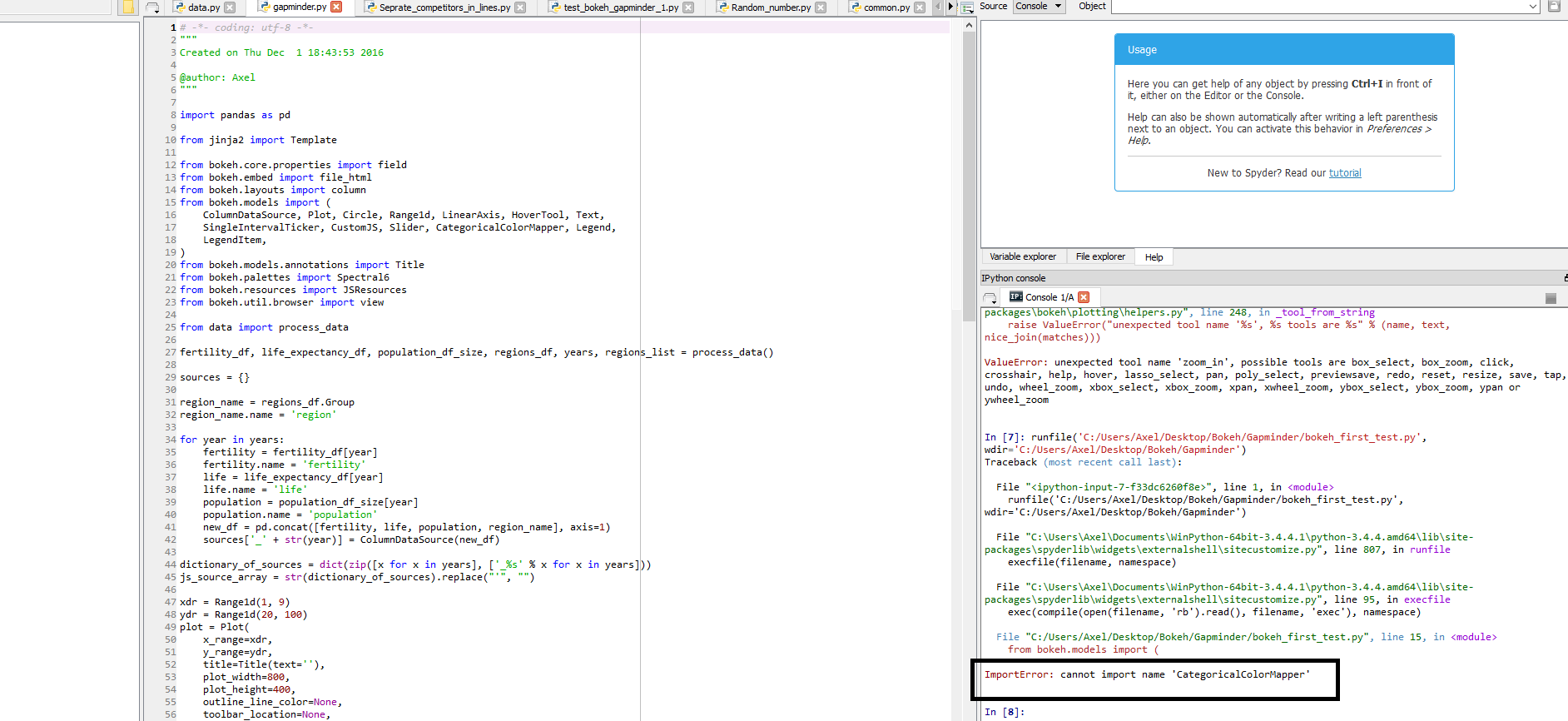
alright, with some intellectual efforts on my part (duh!), i’ve been OK with the majority of the code…until this message:

···

On Thursday, December 1, 2016 at 11:10:41 AM UTC-5, Em Em wrote:

oops, clarification, i was able to move pass the data error. Now, am stumbling with a new error. Please see below for the error.

Regarding trying it on command prompt suggestion, umm…am very new to Python, and would not know where to start.

I appreciate all the help!

On Thursday, December 1, 2016 at 10:50:03 AM UTC-5, Em Em wrote:

Yay, it works!! Here’s my next error, Bryan.

On Thursday, December 1, 2016 at 10:29:57 AM UTC-5, Bryan Van de ven wrote:

I’d suggest trying to to run gapminder.py from the command line (rather than in the notebook), in the same directory that it is in, and making sure that data.py is also in that same directory:

Thanks,

Bryan

On Dec 1, 2016, at 9:25 AM, Em Em lilies...@gmail.com wrote:

Taking a step back, I ran the examples, and it ran properly. Confirming that that the sample data is downloaded and available properly. What’s next, Bryan?

On Thursday, December 1, 2016 at 10:08:00 AM UTC-5, Bryan Van de ven wrote:
Hi Emily,

That’s a different error, that’s back to python not being able to find the data.py module to import. Can you verify that data.py and gapminder.py are in the same directory, and you are running the script from that same directory? That is, that you are just running

    python gapminder.py 

in that directory, and not something like

    python /full/path/to/gapminder.py 

from some other directory? Apart from some special known locations, the python interpreter only searches for modules to import in the same directory that you ran python in.

Beyond that, sometimes it’s good to step back and check assumptions. If you run this example:

    [https://github.com/](https://github.com/)bokeh/bokeh/blob/master/examples/plotting/file/color_scatter.py 

That will conform that Bokeh itself is installed and working correctly (requires NumPy be installed as well), and if you run this example:

    [https://github.com/bokeh/bokeh/blob/master/examples/plotting/file/texas.py](https://github.com/bokeh/bokeh/blob/master/examples/plotting/file/texas.py) 

That will confirm that the sample data is downloaded and available properly.

Thanks,

Bryan

On Dec 1, 2016, at 4:03 AM, Em Em lilies...@gmail.com wrote:

The error is still there, even after the install of the sample data, Bryan.

On Thursday, December 1, 2016 at 1:26:10 AM UTC-5, Bryan Van de ven wrote:
Hi,

It looks like you need to install the sample data, which is distributed separately:

    [http://bokeh.pydata.org/en/latest/docs/installation.html#sample-data](http://bokeh.pydata.org/en/latest/docs/installation.html#sample-data) 

Thanks,

Bryan

On Nov 30, 2016, at 21:54, Em Em lilies...@gmail.com wrote:

Hello Brian, I tried the data.py file and it does not appear that the data was processed properly because I received the following error when i tried to call ‘fertility’. :

As for getting the example code, I googled “gapminder bokeh”

On Wednesday, November 30, 2016 at 10:44:41 PM UTC-5, Bryan Van de ven wrote:
Hi Emily,

In the GitHub repo, the data.py module is in the same directory as gapminder.py:

    [https://github.com/bokeh/bokeh/tree/master/examples/howto/interactive_bubble](https://github.com/bokeh/bokeh/tree/master/examples/howto/interactive_bubble) 

It’s also showing up for me in the bundled bconda Examples under the same dir:

    $ ls ~/anaconda/envs/bk123/Examples/bokeh/howto/interactive_bubble 
    __init__.py data.py  gapminder.ipynb gapminder.py gapminder_styles.css gapminder_template.jinja 

Can you describe how you obtained the example code?

In any case for now you can download data.py from the link above.

Thanks,

Bryan

On Nov 30, 2016, at 8:49 PM, Em Em lilies...@gmail.com wrote:

Yes, the source of the script is: https://github.com/bokeh/bokeh/blob/master/examples/howto/interactive_bubble/gapminder.py

I ran the script, and the first error is: ImportError: No module named ‘data’

On Wednesday, November 30, 2016 at 9:37:36 PM UTC-5, Sarah Bird wrote:
Hi Emily,

Can you provide more context. What did you try and what happened? Where did you get the script from?

The gapminder script is working for me, so we’ll need more information to be sure about what went wrong.

Best,

Bird

On 11/30/16 8:33 PM, Em Em wrote:

Hello there!

Today is my first day playing with Bokeh and I am having a difficult time running the scripts available because it does not appear there is a complete script available for 0.12.3.

I have been playing around with it all day, and it’s time that this beginner in python (v 3.5.2) asks for help.

Thank you so much!

You received this message because you are subscribed to the Google Groups “Bokeh Discussion - Public” group.
To unsubscribe from this group and stop receiving emails from it, send an email to bokeh+un...@continuum.io.
To post to this group, send email to bo...@continuum.io.
To view this discussion on the web visit https://groups.google.com/a/continuum.io/d/msgid/bokeh/9c3e81a8-fb61-44e6-900c-80d3d74b1f87%40continuum.io.
For more options, visit https://groups.google.com/a/continuum.io/d/optout.

–
Sarah Bird
Developer, Bokeh

–
You received this message because you are subscribed to the Google Groups “Bokeh Discussion - Public” group.
To unsubscribe from this group and stop receiving emails from it, send an email to bokeh+un...@continuum.io.
To post to this group, send email to bo...@continuum.io.
To view this discussion on the web visit https://groups.google.com/a/continuum.io/d/msgid/bokeh/43c1eea7-d7c4-4260-875e-00913598ccd7%40continuum.io.
For more options, visit https://groups.google.com/a/continuum.io/d/optout.

–
You received this message because you are subscribed to the Google Groups “Bokeh Discussion - Public” group.
To unsubscribe from this group and stop receiving emails from it, send an email to bokeh+un...@continuum.io.
To post to this group, send email to bo...@continuum.io.
To view this discussion on the web visit https://groups.google.com/a/continuum.io/d/msgid/bokeh/d0b76843-5d9f-416b-9576-3001738a7228%40continuum.io.
For more options, visit https://groups.google.com/a/continuum.io/d/optout.

–
You received this message because you are subscribed to the Google Groups “Bokeh Discussion - Public” group.
To unsubscribe from this group and stop receiving emails from it, send an email to bokeh+un...@continuum.io.
To post to this group, send email to bo...@continuum.io.
To view this discussion on the web visit https://groups.google.com/a/continuum.io/d/msgid/bokeh/4991e47c-74ef-4a2a-981a-979c0e41f24a%40continuum.io.
For more options, visit https://groups.google.com/a/continuum.io/d/optout.

–
You received this message because you are subscribed to the Google Groups “Bokeh Discussion - Public” group.
To unsubscribe from this group and stop receiving emails from it, send an email to bokeh+un...@continuum.io.
To post to this group, send email to bo...@continuum.io.
To view this discussion on the web visit https://groups.google.com/a/continuum.io/d/msgid/bokeh/fd49943b-669f-4f18-9c0f-5ab939761b91%40continuum.io.
For more options, visit https://groups.google.com/a/continuum.io/d/optout.

⌁   Link to post
Bryan
Bryan

Hi Emily,

You've changed the definition of process_data by removing the import from inside the function, and this is causing your problems. By removing the import from inside the function, it makes the variables such as "fertility" get used as both local and global variables at different times, and this is causing python to raise an error.

Thanks,

Bryan

···

On Dec 1, 2016, at 10:10 AM, Em Em <lilieslilacs@gmail.com> wrote:

oops, clarification, i was able to move pass the data error. Now, am stumbling with a new error. Please see below for the error.

Regarding trying it on command prompt suggestion, umm...am very new to Python, and would not know where to start.

I appreciate all the help!

On Thursday, December 1, 2016 at 10:50:03 AM UTC-5, Em Em wrote:
Yay, it works!! Here's my next error, Bryan.

On Thursday, December 1, 2016 at 10:29:57 AM UTC-5, Bryan Van de ven wrote:
I'd suggest trying to to run gapminder.py from the command line (rather than in the notebook), in the same directory that it is in, and making sure that data.py is also in that same directory:

Thanks,

Bryan

On Dec 1, 2016, at 9:25 AM, Em Em <lilies...@gmail.com> wrote:

Taking a step back, I ran the examples, and it ran properly. Confirming that that the sample data is downloaded and available properly. What's next, Bryan?

On Thursday, December 1, 2016 at 10:08:00 AM UTC-5, Bryan Van de ven wrote:
Hi Emily,

That's a different error, that's back to python not being able to find the data.py module to import. Can you verify that data.py and gapminder.py are in the same directory, and you are running the script from that same directory? That is, that you are just running

        python gapminder.py

in that directory, and not something like

        python /full/path/to/gapminder.py

from some other directory? Apart from some special known locations, the python interpreter only searches for modules to import in the same directory that you ran python in.

Beyond that, sometimes it's good to step back and check assumptions. If you run this example:

        https://github.com/bokeh/bokeh/blob/master/examples/plotting/file/color_scatter.py

That will conform that Bokeh itself is installed and working correctly (requires NumPy be installed as well), and if you run this example:

        https://github.com/bokeh/bokeh/blob/master/examples/plotting/file/texas.py

That will confirm that the sample data is downloaded and available properly.

Thanks,

Bryan

> On Dec 1, 2016, at 4:03 AM, Em Em <lilies...@gmail.com> wrote:
>
> The error is still there, even after the install of the sample data, Bryan.
>
>
>
>
>
> On Thursday, December 1, 2016 at 1:26:10 AM UTC-5, Bryan Van de ven wrote:
> Hi,
>
> It looks like you need to install the sample data, which is distributed separately:
>
> <no title> — Bokeh 3.3.2 Documentation
>
> Thanks,
>
> Bryan
>
> On Nov 30, 2016, at 21:54, Em Em <lilies...@gmail.com> wrote:
>
>> Hello Brian, I tried the data.py file and it does not appear that the data was processed properly because I received the following error when i tried to call 'fertility'. :
>>
>>
>>
>>
>> As for getting the example code, I googled "gapminder bokeh"
>>
>>
>> On Wednesday, November 30, 2016 at 10:44:41 PM UTC-5, Bryan Van de ven wrote:
>> Hi Emily,
>>
>> In the GitHub repo, the data.py module is in the same directory as gapminder.py:
>>
>> https://github.com/bokeh/bokeh/tree/master/examples/howto/interactive_bubble
>>
>> It's also showing up for me in the bundled bconda Examples under the same dir:
>>
>> $ ls ~/anaconda/envs/bk123/Examples/bokeh/howto/interactive_bubble
>> __init__.py data.py gapminder.ipynb gapminder.py gapminder_styles.css gapminder_template.jinja
>>
>> Can you describe how you obtained the example code?
>>
>> In any case for now you can download data.py from the link above.
>>
>> Thanks,
>>
>> Bryan
>>
>> > On Nov 30, 2016, at 8:49 PM, Em Em <lilies...@gmail.com> wrote:
>> >
>> > Yes, the source of the script is: https://github.com/bokeh/bokeh/blob/master/examples/howto/interactive_bubble/gapminder.py
>> >
>> > I ran the script, and the first error is: ImportError: No module named 'data'
>> >
>> >
>> >
>> > On Wednesday, November 30, 2016 at 9:37:36 PM UTC-5, Sarah Bird wrote:
>> > Hi Emily,
>> >
>> > Can you provide more context. What did you try and what happened? Where did you get the script from?
>> >
>> > The gapminder script is working for me, so we'll need more information to be sure about what went wrong.
>> >
>> > Best,
>> >
>> > Bird
>> >
>> > On 11/30/16 8:33 PM, Em Em wrote:
>> >> Hello there!
>> >>
>> >> Today is my first day playing with Bokeh and I am having a difficult time running the scripts available because it does not appear there is a complete script available for 0.12.3.
>> >>
>> >> I have been playing around with it all day, and it's time that this beginner in python (v 3.5.2) asks for help.
>> >>
>> >> Thank you so much!
>> >> --
>> >> You received this message because you are subscribed to the Google Groups "Bokeh Discussion - Public" group.
>> >> To unsubscribe from this group and stop receiving emails from it, send an email to bokeh+un...@continuum.io.
>> >> To post to this group, send email to bo...@continuum.io.
>> >> To view this discussion on the web visit https://groups.google.com/a/continuum.io/d/msgid/bokeh/9c3e81a8-fb61-44e6-900c-80d3d74b1f87%40continuum.io\.
>> >> For more options, visit https://groups.google.com/a/continuum.io/d/optout\.
>> >
>> > --
>> > Sarah Bird
>> > Developer, Bokeh
>> >
>> >
>> >
>> >
>> > --
>> > You received this message because you are subscribed to the Google Groups "Bokeh Discussion - Public" group.
>> > To unsubscribe from this group and stop receiving emails from it, send an email to bokeh+un...@continuum.io.
>> > To post to this group, send email to bo...@continuum.io.
>> > To view this discussion on the web visit https://groups.google.com/a/continuum.io/d/msgid/bokeh/43c1eea7-d7c4-4260-875e-00913598ccd7%40continuum.io\.
>> > For more options, visit https://groups.google.com/a/continuum.io/d/optout\.
>>
>>
>> --
>> You received this message because you are subscribed to the Google Groups "Bokeh Discussion - Public" group.
>> To unsubscribe from this group and stop receiving emails from it, send an email to bokeh+un...@continuum.io.
>> To post to this group, send email to bo...@continuum.io.
>> To view this discussion on the web visit https://groups.google.com/a/continuum.io/d/msgid/bokeh/d0b76843-5d9f-416b-9576-3001738a7228%40continuum.io\.
>> For more options, visit https://groups.google.com/a/continuum.io/d/optout\.
>
> --
> You received this message because you are subscribed to the Google Groups "Bokeh Discussion - Public" group.
> To unsubscribe from this group and stop receiving emails from it, send an email to bokeh+un...@continuum.io.
> To post to this group, send email to bo...@continuum.io.
> To view this discussion on the web visit https://groups.google.com/a/continuum.io/d/msgid/bokeh/4991e47c-74ef-4a2a-981a-979c0e41f24a%40continuum.io\.
> For more options, visit https://groups.google.com/a/continuum.io/d/optout\.

--
You received this message because you are subscribed to the Google Groups "Bokeh Discussion - Public" group.
To unsubscribe from this group and stop receiving emails from it, send an email to bokeh+un...@continuum.io.
To post to this group, send email to bo...@continuum.io.
To view this discussion on the web visit https://groups.google.com/a/continuum.io/d/msgid/bokeh/fd49943b-669f-4f18-9c0f-5ab939761b91%40continuum.io\.
For more options, visit https://groups.google.com/a/continuum.io/d/optout\.

--
You received this message because you are subscribed to the Google Groups "Bokeh Discussion - Public" group.
To unsubscribe from this group and stop receiving emails from it, send an email to bokeh+unsubscribe@continuum.io.
To post to this group, send email to bokeh@continuum.io.
To view this discussion on the web visit https://groups.google.com/a/continuum.io/d/msgid/bokeh/0feadd03-785d-4221-92ba-1516b02fcc84%40continuum.io\.
For more options, visit https://groups.google.com/a/continuum.io/d/optout\.

⌁   Link to post
Bryan
Bryan

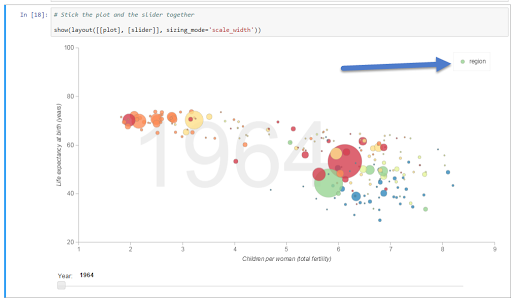
That's a warning, but it is a harmless one and should not prevent things from working in this case (i.e. it can be ignored)

Thanks,

Bryan

···

On Dec 1, 2016, at 10:33 AM, Em Em <lilieslilacs@gmail.com> wrote:

alright, with some intellectual efforts on my part (duh!), i've been OK with the majority of the code...until this message:

On Thursday, December 1, 2016 at 11:10:41 AM UTC-5, Em Em wrote:
oops, clarification, i was able to move pass the data error. Now, am stumbling with a new error. Please see below for the error.

Regarding trying it on command prompt suggestion, umm...am very new to Python, and would not know where to start.

I appreciate all the help!

On Thursday, December 1, 2016 at 10:50:03 AM UTC-5, Em Em wrote:
Yay, it works!! Here's my next error, Bryan.

On Thursday, December 1, 2016 at 10:29:57 AM UTC-5, Bryan Van de ven wrote:
I'd suggest trying to to run gapminder.py from the command line (rather than in the notebook), in the same directory that it is in, and making sure that data.py is also in that same directory:

Thanks,

Bryan

On Dec 1, 2016, at 9:25 AM, Em Em <lilies...@gmail.com> wrote:

Taking a step back, I ran the examples, and it ran properly. Confirming that that the sample data is downloaded and available properly. What's next, Bryan?

On Thursday, December 1, 2016 at 10:08:00 AM UTC-5, Bryan Van de ven wrote:
Hi Emily,

That's a different error, that's back to python not being able to find the data.py module to import. Can you verify that data.py and gapminder.py are in the same directory, and you are running the script from that same directory? That is, that you are just running

        python gapminder.py

in that directory, and not something like

        python /full/path/to/gapminder.py

from some other directory? Apart from some special known locations, the python interpreter only searches for modules to import in the same directory that you ran python in.

Beyond that, sometimes it's good to step back and check assumptions. If you run this example:

        https://github.com/bokeh/bokeh/blob/master/examples/plotting/file/color_scatter.py

That will conform that Bokeh itself is installed and working correctly (requires NumPy be installed as well), and if you run this example:

        https://github.com/bokeh/bokeh/blob/master/examples/plotting/file/texas.py

That will confirm that the sample data is downloaded and available properly.

Thanks,

Bryan

> On Dec 1, 2016, at 4:03 AM, Em Em <lilies...@gmail.com> wrote:
>
> The error is still there, even after the install of the sample data, Bryan.
>
>
>
>
>
> On Thursday, December 1, 2016 at 1:26:10 AM UTC-5, Bryan Van de ven wrote:
> Hi,
>
> It looks like you need to install the sample data, which is distributed separately:
>
> <no title> — Bokeh 3.3.2 Documentation
>
> Thanks,
>
> Bryan
>
> On Nov 30, 2016, at 21:54, Em Em <lilies...@gmail.com> wrote:
>
>> Hello Brian, I tried the data.py file and it does not appear that the data was processed properly because I received the following error when i tried to call 'fertility'. :
>>
>>
>>
>>
>> As for getting the example code, I googled "gapminder bokeh"
>>
>>
>> On Wednesday, November 30, 2016 at 10:44:41 PM UTC-5, Bryan Van de ven wrote:
>> Hi Emily,
>>
>> In the GitHub repo, the data.py module is in the same directory as gapminder.py:
>>
>> https://github.com/bokeh/bokeh/tree/master/examples/howto/interactive_bubble
>>
>> It's also showing up for me in the bundled bconda Examples under the same dir:
>>
>> $ ls ~/anaconda/envs/bk123/Examples/bokeh/howto/interactive_bubble
>> __init__.py data.py gapminder.ipynb gapminder.py gapminder_styles.css gapminder_template.jinja
>>
>> Can you describe how you obtained the example code?
>>
>> In any case for now you can download data.py from the link above.
>>
>> Thanks,
>>
>> Bryan
>>
>> > On Nov 30, 2016, at 8:49 PM, Em Em <lilies...@gmail.com> wrote:
>> >
>> > Yes, the source of the script is: https://github.com/bokeh/bokeh/blob/master/examples/howto/interactive_bubble/gapminder.py
>> >
>> > I ran the script, and the first error is: ImportError: No module named 'data'
>> >
>> >
>> >
>> > On Wednesday, November 30, 2016 at 9:37:36 PM UTC-5, Sarah Bird wrote:
>> > Hi Emily,
>> >
>> > Can you provide more context. What did you try and what happened? Where did you get the script from?
>> >
>> > The gapminder script is working for me, so we'll need more information to be sure about what went wrong.
>> >
>> > Best,
>> >
>> > Bird
>> >
>> > On 11/30/16 8:33 PM, Em Em wrote:
>> >> Hello there!
>> >>
>> >> Today is my first day playing with Bokeh and I am having a difficult time running the scripts available because it does not appear there is a complete script available for 0.12.3.
>> >>
>> >> I have been playing around with it all day, and it's time that this beginner in python (v 3.5.2) asks for help.
>> >>
>> >> Thank you so much!
>> >> --
>> >> You received this message because you are subscribed to the Google Groups "Bokeh Discussion - Public" group.
>> >> To unsubscribe from this group and stop receiving emails from it, send an email to bokeh+un...@continuum.io.
>> >> To post to this group, send email to bo...@continuum.io.
>> >> To view this discussion on the web visit https://groups.google.com/a/continuum.io/d/msgid/bokeh/9c3e81a8-fb61-44e6-900c-80d3d74b1f87%40continuum.io\.
>> >> For more options, visit https://groups.google.com/a/continuum.io/d/optout\.
>> >
>> > --
>> > Sarah Bird
>> > Developer, Bokeh
>> >
>> >
>> >
>> >
>> > --
>> > You received this message because you are subscribed to the Google Groups "Bokeh Discussion - Public" group.
>> > To unsubscribe from this group and stop receiving emails from it, send an email to bokeh+un...@continuum.io.
>> > To post to this group, send email to bo...@continuum.io.
>> > To view this discussion on the web visit https://groups.google.com/a/continuum.io/d/msgid/bokeh/43c1eea7-d7c4-4260-875e-00913598ccd7%40continuum.io\.
>> > For more options, visit https://groups.google.com/a/continuum.io/d/optout\.
>>
>>
>> --
>> You received this message because you are subscribed to the Google Groups "Bokeh Discussion - Public" group.
>> To unsubscribe from this group and stop receiving emails from it, send an email to bokeh+un...@continuum.io.
>> To post to this group, send email to bo...@continuum.io.
>> To view this discussion on the web visit https://groups.google.com/a/continuum.io/d/msgid/bokeh/d0b76843-5d9f-416b-9576-3001738a7228%40continuum.io\.
>> For more options, visit https://groups.google.com/a/continuum.io/d/optout\.
>
> --
> You received this message because you are subscribed to the Google Groups "Bokeh Discussion - Public" group.
> To unsubscribe from this group and stop receiving emails from it, send an email to bokeh+un...@continuum.io.
> To post to this group, send email to bo...@continuum.io.
> To view this discussion on the web visit https://groups.google.com/a/continuum.io/d/msgid/bokeh/4991e47c-74ef-4a2a-981a-979c0e41f24a%40continuum.io\.
> For more options, visit https://groups.google.com/a/continuum.io/d/optout\.

--
You received this message because you are subscribed to the Google Groups "Bokeh Discussion - Public" group.
To unsubscribe from this group and stop receiving emails from it, send an email to bokeh+un...@continuum.io.
To post to this group, send email to bo...@continuum.io.
To view this discussion on the web visit https://groups.google.com/a/continuum.io/d/msgid/bokeh/fd49943b-669f-4f18-9c0f-5ab939761b91%40continuum.io\.
For more options, visit https://groups.google.com/a/continuum.io/d/optout\.

--
You received this message because you are subscribed to the Google Groups "Bokeh Discussion - Public" group.
To unsubscribe from this group and stop receiving emails from it, send an email to bokeh+unsubscribe@continuum.io.
To post to this group, send email to bokeh@continuum.io.
To view this discussion on the web visit https://groups.google.com/a/continuum.io/d/msgid/bokeh/c397c23e-578d-446c-8b6f-095bf72ec1f1%40continuum.io\.
For more options, visit https://groups.google.com/a/continuum.io/d/optout\.

⌁   Link to post
Sachin_Hegdekudgi
Sachin_Hegdekudgi

Hello Bryan,

A quick question on running Bokeh server through spyder. When I tried to run the bokeh server the following error poped up.

Please suggest me the right syntax. I am pretty new to Python 3 and Bokeh!

Cheers

Sachin

···

On Thu, Dec 1, 2016 at 5:35 PM, Bryan Van de Ven bryan@bokeh.org wrote:

That’s a warning, but it is a harmless one and should not prevent things from working in this case (i.e. it can be ignored)

Thanks,

Bryan

On Dec 1, 2016, at 10:33 AM, Em Em lilieslilacs@gmail.com wrote:

alright, with some intellectual efforts on my part (duh!), i’ve been OK with the majority of the code…until this message:

On Thursday, December 1, 2016 at 11:10:41 AM UTC-5, Em Em wrote:

oops, clarification, i was able to move pass the data error. Now, am stumbling with a new error. Please see below for the error.

Regarding trying it on command prompt suggestion, umm…am very new to Python, and would not know where to start.

I appreciate all the help!

On Thursday, December 1, 2016 at 10:50:03 AM UTC-5, Em Em wrote:

Yay, it works!! Here’s my next error, Bryan.

On Thursday, December 1, 2016 at 10:29:57 AM UTC-5, Bryan Van de ven wrote:

I’d suggest trying to to run gapminder.py from the command line (rather than in the notebook), in the same directory that it is in, and making sure that data.py is also in that same directory:

Thanks,

Bryan

On Dec 1, 2016, at 9:25 AM, Em Em lilies...@gmail.com wrote:

Taking a step back, I ran the examples, and it ran properly. Confirming that that the sample data is downloaded and available properly. What’s next, Bryan?

On Thursday, December 1, 2016 at 10:08:00 AM UTC-5, Bryan Van de ven wrote:

Hi Emily,

That’s a different error, that’s back to python not being able to find the data.py module to import. Can you verify that data.py and gapminder.py are in the same directory, and you are running the script from that same directory? That is, that you are just running

    python gapminder.py

in that directory, and not something like

    python /full/path/to/gapminder.py

from some other directory? Apart from some special known locations, the python interpreter only searches for modules to import in the same directory that you ran python in.

Beyond that, sometimes it’s good to step back and check assumptions. If you run this example:

    [https://github.com/bokeh/bokeh/blob/master/examples/plotting/file/color_scatter.py](https://github.com/bokeh/bokeh/blob/master/examples/plotting/file/color_scatter.py)

That will conform that Bokeh itself is installed and working correctly (requires NumPy be installed as well), and if you run this example:

    [https://github.com/bokeh/bokeh/blob/master/examples/plotting/file/texas.py](https://github.com/bokeh/bokeh/blob/master/examples/plotting/file/texas.py)

That will confirm that the sample data is downloaded and available properly.

Thanks,

Bryan

On Dec 1, 2016, at 4:03 AM, Em Em lilies...@gmail.com wrote:

The error is still there, even after the install of the sample data, Bryan.

On Thursday, December 1, 2016 at 1:26:10 AM UTC-5, Bryan Van de ven wrote:

Hi,

It looks like you need to install the sample data, which is distributed separately:

    [http://bokeh.pydata.org/en/latest/docs/installation.html#sample-data](http://bokeh.pydata.org/en/latest/docs/installation.html#sample-data)

Thanks,

Bryan

On Nov 30, 2016, at 21:54, Em Em lilies...@gmail.com wrote:

Hello Brian, I tried the data.py file and it does not appear that the data was processed properly because I received the following error when i tried to call ‘fertility’. :

As for getting the example code, I googled “gapminder bokeh”

On Wednesday, November 30, 2016 at 10:44:41 PM UTC-5, Bryan Van de ven wrote:

Hi Emily,

In the GitHub repo, the data.py module is in the same directory as gapminder.py:

    [https://github.com/bokeh/bokeh/tree/master/examples/howto/interactive_bubble](https://github.com/bokeh/bokeh/tree/master/examples/howto/interactive_bubble)

It’s also showing up for me in the bundled bconda Examples under the same dir:

    $ ls ~/anaconda/envs/bk123/Examples/bokeh/howto/interactive_bubble
    __init__.py data.py  gapminder.ipynb gapminder.py gapminder_styles.css gapminder_template.jinja

Can you describe how you obtained the example code?

In any case for now you can download data.py from the link above.

Thanks,

Bryan

On Nov 30, 2016, at 8:49 PM, Em Em lilies...@gmail.com wrote:

Yes, the source of the script is: https://github.com/bokeh/bokeh/blob/master/examples/howto/interactive_bubble/gapminder.py

I ran the script, and the first error is: ImportError: No module named ‘data’

On Wednesday, November 30, 2016 at 9:37:36 PM UTC-5, Sarah Bird wrote:

Hi Emily,

Can you provide more context. What did you try and what happened? Where did you get the script from?

The gapminder script is working for me, so we’ll need more information to be sure about what went wrong.

Best,

Bird

On 11/30/16 8:33 PM, Em Em wrote:

Hello there!

Today is my first day playing with Bokeh and I am having a difficult time running the scripts available because it does not appear there is a complete script available for 0.12.3.

I have been playing around with it all day, and it’s time that this beginner in python (v 3.5.2) asks for help.

Thank you so much!

–

You received this message because you are subscribed to the Google Groups “Bokeh Discussion - Public” group.

To unsubscribe from this group and stop receiving emails from it, send an email to bokeh+un...@continuum.io.

To post to this group, send email to bo...@continuum.io.

To view this discussion on the web visit https://groups.google.com/a/continuum.io/d/msgid/bokeh/9c3e81a8-fb61-44e6-900c-80d3d74b1f87%40continuum.io.

For more options, visit https://groups.google.com/a/continuum.io/d/optout.

–

Sarah Bird

Developer, Bokeh

–

You received this message because you are subscribed to the Google Groups “Bokeh Discussion - Public” group.

To unsubscribe from this group and stop receiving emails from it, send an email to bokeh+un...@continuum.io.

To post to this group, send email to bo...@continuum.io.

To view this discussion on the web visit https://groups.google.com/a/continuum.io/d/msgid/bokeh/43c1eea7-d7c4-4260-875e-00913598ccd7%40continuum.io.

For more options, visit https://groups.google.com/a/continuum.io/d/optout.

–

You received this message because you are subscribed to the Google Groups “Bokeh Discussion - Public” group.

To unsubscribe from this group and stop receiving emails from it, send an email to bokeh+un...@continuum.io.

To post to this group, send email to bo...@continuum.io.

To view this discussion on the web visit https://groups.google.com/a/continuum.io/d/msgid/bokeh/d0b76843-5d9f-416b-9576-3001738a7228%40continuum.io.

For more options, visit https://groups.google.com/a/continuum.io/d/optout.

–

You received this message because you are subscribed to the Google Groups “Bokeh Discussion - Public” group.

To unsubscribe from this group and stop receiving emails from it, send an email to bokeh+un...@continuum.io.

To post to this group, send email to bo...@continuum.io.

To view this discussion on the web visit https://groups.google.com/a/continuum.io/d/msgid/bokeh/4991e47c-74ef-4a2a-981a-979c0e41f24a%40continuum.io.

For more options, visit https://groups.google.com/a/continuum.io/d/optout.

–

You received this message because you are subscribed to the Google Groups “Bokeh Discussion - Public” group.

To unsubscribe from this group and stop receiving emails from it, send an email to bokeh+un...@continuum.io.

To post to this group, send email to bo...@continuum.io.

To view this discussion on the web visit https://groups.google.com/a/continuum.io/d/msgid/bokeh/fd49943b-669f-4f18-9c0f-5ab939761b91%40continuum.io.

For more options, visit https://groups.google.com/a/continuum.io/d/optout.

–

You received this message because you are subscribed to the Google Groups “Bokeh Discussion - Public” group.

To unsubscribe from this group and stop receiving emails from it, send an email to bokeh+unsubscribe@continuum.io.

To post to this group, send email to bokeh@continuum.io.

To view this discussion on the web visit https://groups.google.com/a/continuum.io/d/msgid/bokeh/c397c23e-578d-446c-8b6f-095bf72ec1f1%40continuum.io.

For more options, visit https://groups.google.com/a/continuum.io/d/optout.

–

You received this message because you are subscribed to the Google Groups “Bokeh Discussion - Public” group.

To unsubscribe from this group and stop receiving emails from it, send an email to bokeh+unsubscribe@continuum.io.

To post to this group, send email to bokeh@continuum.io.

To view this discussion on the web visit https://groups.google.com/a/continuum.io/d/msgid/bokeh/36DF3199-50D0-4F5B-A545-2DD271A4C4B5%40continuum.io.
For more options, visit https://groups.google.com/a/continuum.io/d/optout.

⌁   Link to post
Bryan
Bryan

Hi,

"bokeh serve" is a command line program, not python code. You have to run it from the command line, not from inside python. Probably a Bash shell terminal prompt on OSX or Linux, or a cmd.exe or Powershell prompt on windows.

There are some "programmatic" ways to start a bokeh server inside a python process, but they are somewhat more advanced. I would suggest starting with learning the standard command line usage first.

Thanks,

Bryan

···

On Dec 1, 2016, at 11:20 AM, Sachin Hegdekudgi <hdsachin@gmail.com> wrote:

Hello Bryan,

A quick question on running Bokeh server through spyder. When I tried to run the bokeh server the following error poped up.

<Error_for_bokeh_server.png>

Please suggest me the right syntax. I am pretty new to Python 3 and Bokeh!

Cheers
Sachin

On Thu, Dec 1, 2016 at 5:35 PM, Bryan Van de Ven <bryan@bokeh.org> wrote:
That's a warning, but it is a harmless one and should not prevent things from working in this case (i.e. it can be ignored)

Thanks,

Bryan

> On Dec 1, 2016, at 10:33 AM, Em Em <lilieslilacs@gmail.com> wrote:
>
> alright, with some intellectual efforts on my part (duh!), i've been OK with the majority of the code...until this message:
>
>
>
>
>
> On Thursday, December 1, 2016 at 11:10:41 AM UTC-5, Em Em wrote:
> oops, clarification, i was able to move pass the data error. Now, am stumbling with a new error. Please see below for the error.
>
> Regarding trying it on command prompt suggestion, umm...am very new to Python, and would not know where to start.
>
> I appreciate all the help!
>
>
>
>
>
> On Thursday, December 1, 2016 at 10:50:03 AM UTC-5, Em Em wrote:
> Yay, it works!! Here's my next error, Bryan.
>
>
>
>
>
> On Thursday, December 1, 2016 at 10:29:57 AM UTC-5, Bryan Van de ven wrote:
> I'd suggest trying to to run gapminder.py from the command line (rather than in the notebook), in the same directory that it is in, and making sure that data.py is also in that same directory:
>
>
>
> Thanks,
>
> Bryan
>
>
>> On Dec 1, 2016, at 9:25 AM, Em Em <lilies...@gmail.com> wrote:
>>
>> Taking a step back, I ran the examples, and it ran properly. Confirming that that the sample data is downloaded and available properly. What's next, Bryan?
>>
>>
>>
>>
>> On Thursday, December 1, 2016 at 10:08:00 AM UTC-5, Bryan Van de ven wrote:
>> Hi Emily,
>>
>> That's a different error, that's back to python not being able to find the data.py module to import. Can you verify that data.py and gapminder.py are in the same directory, and you are running the script from that same directory? That is, that you are just running
>>
>> python gapminder.py
>>
>> in that directory, and not something like
>>
>> python /full/path/to/gapminder.py
>>
>> from some other directory? Apart from some special known locations, the python interpreter only searches for modules to import in the same directory that you ran python in.
>>
>> Beyond that, sometimes it's good to step back and check assumptions. If you run this example:
>>
>> https://github.com/bokeh/bokeh/blob/master/examples/plotting/file/color_scatter.py
>>
>> That will conform that Bokeh itself is installed and working correctly (requires NumPy be installed as well), and if you run this example:
>>
>> https://github.com/bokeh/bokeh/blob/master/examples/plotting/file/texas.py
>>
>> That will confirm that the sample data is downloaded and available properly.
>>
>> Thanks,
>>
>> Bryan
>>
>>
>> > On Dec 1, 2016, at 4:03 AM, Em Em <lilies...@gmail.com> wrote:
>> >
>> > The error is still there, even after the install of the sample data, Bryan.
>> >
>> >
>> >
>> >
>> >
>> > On Thursday, December 1, 2016 at 1:26:10 AM UTC-5, Bryan Van de ven wrote:
>> > Hi,
>> >
>> > It looks like you need to install the sample data, which is distributed separately:
>> >
>> > <no title> — Bokeh 3.3.2 Documentation
>> >
>> > Thanks,
>> >
>> > Bryan
>> >
>> > On Nov 30, 2016, at 21:54, Em Em <lilies...@gmail.com> wrote:
>> >
>> >> Hello Brian, I tried the data.py file and it does not appear that the data was processed properly because I received the following error when i tried to call 'fertility'. :
>> >>
>> >>
>> >>
>> >>
>> >> As for getting the example code, I googled "gapminder bokeh"
>> >>
>> >>
>> >> On Wednesday, November 30, 2016 at 10:44:41 PM UTC-5, Bryan Van de ven wrote:
>> >> Hi Emily,
>> >>
>> >> In the GitHub repo, the data.py module is in the same directory as gapminder.py:
>> >>
>> >> https://github.com/bokeh/bokeh/tree/master/examples/howto/interactive_bubble
>> >>
>> >> It's also showing up for me in the bundled bconda Examples under the same dir:
>> >>
>> >> $ ls ~/anaconda/envs/bk123/Examples/bokeh/howto/interactive_bubble
>> >> __init__.py data.py gapminder.ipynb gapminder.py gapminder_styles.css gapminder_template.jinja
>> >>
>> >> Can you describe how you obtained the example code?
>> >>
>> >> In any case for now you can download data.py from the link above.
>> >>
>> >> Thanks,
>> >>
>> >> Bryan
>> >>
>> >> > On Nov 30, 2016, at 8:49 PM, Em Em <lilies...@gmail.com> wrote:
>> >> >
>> >> > Yes, the source of the script is: https://github.com/bokeh/bokeh/blob/master/examples/howto/interactive_bubble/gapminder.py
>> >> >
>> >> > I ran the script, and the first error is: ImportError: No module named 'data'
>> >> >
>> >> >
>> >> >
>> >> > On Wednesday, November 30, 2016 at 9:37:36 PM UTC-5, Sarah Bird wrote:
>> >> > Hi Emily,
>> >> >
>> >> > Can you provide more context. What did you try and what happened? Where did you get the script from?
>> >> >
>> >> > The gapminder script is working for me, so we'll need more information to be sure about what went wrong.
>> >> >
>> >> > Best,
>> >> >
>> >> > Bird
>> >> >
>> >> > On 11/30/16 8:33 PM, Em Em wrote:
>> >> >> Hello there!
>> >> >>
>> >> >> Today is my first day playing with Bokeh and I am having a difficult time running the scripts available because it does not appear there is a complete script available for 0.12.3.
>> >> >>
>> >> >> I have been playing around with it all day, and it's time that this beginner in python (v 3.5.2) asks for help.
>> >> >>
>> >> >> Thank you so much!
>> >> >> --
>> >> >> You received this message because you are subscribed to the Google Groups "Bokeh Discussion - Public" group.
>> >> >> To unsubscribe from this group and stop receiving emails from it, send an email to bokeh+un...@continuum.io.
>> >> >> To post to this group, send email to bo...@continuum.io.
>> >> >> To view this discussion on the web visit https://groups.google.com/a/continuum.io/d/msgid/bokeh/9c3e81a8-fb61-44e6-900c-80d3d74b1f87%40continuum.io\.
>> >> >> For more options, visit https://groups.google.com/a/continuum.io/d/optout\.
>> >> >
>> >> > --
>> >> > Sarah Bird
>> >> > Developer, Bokeh
>> >> >
>> >> >
>> >> >
>> >> >
>> >> > --
>> >> > You received this message because you are subscribed to the Google Groups "Bokeh Discussion - Public" group.
>> >> > To unsubscribe from this group and stop receiving emails from it, send an email to bokeh+un...@continuum.io.
>> >> > To post to this group, send email to bo...@continuum.io.
>> >> > To view this discussion on the web visit https://groups.google.com/a/continuum.io/d/msgid/bokeh/43c1eea7-d7c4-4260-875e-00913598ccd7%40continuum.io\.
>> >> > For more options, visit https://groups.google.com/a/continuum.io/d/optout\.
>> >>
>> >>
>> >> --
>> >> You received this message because you are subscribed to the Google Groups "Bokeh Discussion - Public" group.
>> >> To unsubscribe from this group and stop receiving emails from it, send an email to bokeh+un...@continuum.io.
>> >> To post to this group, send email to bo...@continuum.io.
>> >> To view this discussion on the web visit https://groups.google.com/a/continuum.io/d/msgid/bokeh/d0b76843-5d9f-416b-9576-3001738a7228%40continuum.io\.
>> >> For more options, visit https://groups.google.com/a/continuum.io/d/optout\.
>> >
>> > --
>> > You received this message because you are subscribed to the Google Groups "Bokeh Discussion - Public" group.
>> > To unsubscribe from this group and stop receiving emails from it, send an email to bokeh+un...@continuum.io.
>> > To post to this group, send email to bo...@continuum.io.
>> > To view this discussion on the web visit https://groups.google.com/a/continuum.io/d/msgid/bokeh/4991e47c-74ef-4a2a-981a-979c0e41f24a%40continuum.io\.
>> > For more options, visit https://groups.google.com/a/continuum.io/d/optout\.
>>
>>
>> --
>> You received this message because you are subscribed to the Google Groups "Bokeh Discussion - Public" group.
>> To unsubscribe from this group and stop receiving emails from it, send an email to bokeh+un...@continuum.io.
>> To post to this group, send email to bo...@continuum.io.
>> To view this discussion on the web visit https://groups.google.com/a/continuum.io/d/msgid/bokeh/fd49943b-669f-4f18-9c0f-5ab939761b91%40continuum.io\.
>> For more options, visit https://groups.google.com/a/continuum.io/d/optout\.
>
>
> --
> You received this message because you are subscribed to the Google Groups "Bokeh Discussion - Public" group.
> To unsubscribe from this group and stop receiving emails from it, send an email to bokeh+unsubscribe@continuum.io.
> To post to this group, send email to bokeh@continuum.io.
> To view this discussion on the web visit https://groups.google.com/a/continuum.io/d/msgid/bokeh/c397c23e-578d-446c-8b6f-095bf72ec1f1%40continuum.io\.
> For more options, visit https://groups.google.com/a/continuum.io/d/optout\.

--
You received this message because you are subscribed to the Google Groups "Bokeh Discussion - Public" group.
To unsubscribe from this group and stop receiving emails from it, send an email to bokeh+unsubscribe@continuum.io.
To post to this group, send email to bokeh@continuum.io.
To view this discussion on the web visit https://groups.google.com/a/continuum.io/d/msgid/bokeh/36DF3199-50D0-4F5B-A545-2DD271A4C4B5%40continuum.io\.
For more options, visit https://groups.google.com/a/continuum.io/d/optout\.

--
You received this message because you are subscribed to the Google Groups "Bokeh Discussion - Public" group.
To unsubscribe from this group and stop receiving emails from it, send an email to bokeh+unsubscribe@continuum.io.
To post to this group, send email to bokeh@continuum.io.
To view this discussion on the web visit https://groups.google.com/a/continuum.io/d/msgid/bokeh/CALq%2BX02VrX-vp-isdBe7sDiVoqHS42jMiHNyuHoHe-vWX-R_DA%40mail.gmail.com\.
For more options, visit https://groups.google.com/a/continuum.io/d/optout\.

⌁   Link to post
Em_Em
Em_Em

Thank you, Bryan!

I am on to a new error now. (sorry, i am so new to all this!) Attached is a copy of the script that i ran, and i am noticing a few things: 1) I am getting NameError for fertility, life_expectancy…etc; and 2) the bubble chart appears to be lacking a lot of details.

···

On Thursday, December 1, 2016 at 11:35:43 AM UTC-5, Bryan Van de ven wrote:

That’s a warning, but it is a harmless one and should not prevent things from working in this case (i.e. it can be ignored)

Thanks,

Bryan

On Dec 1, 2016, at 10:33 AM, Em Em lilies...@gmail.com wrote:

alright, with some intellectual efforts on my part (duh!), i’ve been OK with the majority of the code…until this message:

On Thursday, December 1, 2016 at 11:10:41 AM UTC-5, Em Em wrote:

oops, clarification, i was able to move pass the data error. Now, am stumbling with a new error. Please see below for the error.

Regarding trying it on command prompt suggestion, umm…am very new to Python, and would not know where to start.

I appreciate all the help!

On Thursday, December 1, 2016 at 10:50:03 AM UTC-5, Em Em wrote:

Yay, it works!! Here’s my next error, Bryan.

On Thursday, December 1, 2016 at 10:29:57 AM UTC-5, Bryan Van de ven wrote:

I’d suggest trying to to run gapminder.py from the command line (rather than in the notebook), in the same directory that it is in, and making sure that data.py is also in that same directory:

Thanks,

Bryan

On Dec 1, 2016, at 9:25 AM, Em Em lilies...@gmail.com wrote:

Taking a step back, I ran the examples, and it ran properly. Confirming that that the sample data is downloaded and available properly. What’s next, Bryan?

On Thursday, December 1, 2016 at 10:08:00 AM UTC-5, Bryan Van de ven wrote:

Hi Emily,

That’s a different error, that’s back to python not being able to find the data.py module to import. Can you verify that data.py and gapminder.py are in the same directory, and you are running the script from that same directory? That is, that you are just running

    python gapminder.py

in that directory, and not something like

    python /full/path/to/gapminder.py

from some other directory? Apart from some special known locations, the python interpreter only searches for modules to import in the same directory that you ran python in.

Beyond that, sometimes it’s good to step back and check assumptions. If you run this example:

    [https://github.com/bokeh/bokeh/blob/master/examples/plotting/file/color_scatter.py](https://github.com/bokeh/bokeh/blob/master/examples/plotting/file/color_scatter.py)

That will conform that Bokeh itself is installed and working correctly (requires NumPy be installed as well), and if you run this example:

    [https://github.com/bokeh/bokeh/blob/master/examples/plotting/file/texas.py](https://github.com/bokeh/bokeh/blob/master/examples/plotting/file/texas.py)

That will confirm that the sample data is downloaded and available properly.

Thanks,

Bryan

On Dec 1, 2016, at 4:03 AM, Em Em lilies...@gmail.com wrote:

The error is still there, even after the install of the sample data, Bryan.

On Thursday, December 1, 2016 at 1:26:10 AM UTC-5, Bryan Van de ven wrote:
Hi,

It looks like you need to install the sample data, which is distributed separately:

    [http://bokeh.pydata.org/en/latest/docs/installation.html#sample-data](http://bokeh.pydata.org/en/latest/docs/installation.html#sample-data)

Thanks,

Bryan

On Nov 30, 2016, at 21:54, Em Em lilies...@gmail.com wrote:

Hello Brian, I tried the data.py file and it does not appear that the data was processed properly because I received the following error when i tried to call ‘fertility’. :

As for getting the example code, I googled “gapminder bokeh”

On Wednesday, November 30, 2016 at 10:44:41 PM UTC-5, Bryan Van de ven wrote:
Hi Emily,

In the GitHub repo, the data.py module is in the same directory as gapminder.py:

    [https://github.com/bokeh/bokeh/tree/master/examples/howto/interactive_bubble](https://github.com/bokeh/bokeh/tree/master/examples/howto/interactive_bubble)

It’s also showing up for me in the bundled bconda Examples under the same dir:

    $ ls ~/anaconda/envs/bk123/Examples/bokeh/howto/interactive_bubble
    __init__.py data.py  gapminder.ipynb gapminder.py gapminder_styles.css gapminder_template.jinja

Can you describe how you obtained the example code?

In any case for now you can download data.py from the link above.

Thanks,

Bryan

On Nov 30, 2016, at 8:49 PM, Em Em lilies...@gmail.com wrote:

Yes, the source of the script is: https://github.com/bokeh/bokeh/blob/master/examples/howto/interactive_bubble/gapminder.py

I ran the script, and the first error is: ImportError: No module named ‘data’

On Wednesday, November 30, 2016 at 9:37:36 PM UTC-5, Sarah Bird wrote:
Hi Emily,

Can you provide more context. What did you try and what happened? Where did you get the script from?

The gapminder script is working for me, so we’ll need more information to be sure about what went wrong.

Best,

Bird

On 11/30/16 8:33 PM, Em Em wrote:

Hello there!

Today is my first day playing with Bokeh and I am having a difficult time running the scripts available because it does not appear there is a complete script available for 0.12.3.

I have been playing around with it all day, and it’s time that this beginner in python (v 3.5.2) asks for help.

Thank you so much!

You received this message because you are subscribed to the Google Groups “Bokeh Discussion - Public” group.
To unsubscribe from this group and stop receiving emails from it, send an email to bokeh+un...@continuum.io.
To post to this group, send email to bo...@continuum.io.
To view this discussion on the web visit https://groups.google.com/a/continuum.io/d/msgid/bokeh/9c3e81a8-fb61-44e6-900c-80d3d74b1f87%40continuum.io.
For more options, visit https://groups.google.com/a/continuum.io/d/optout.

–
Sarah Bird
Developer, Bokeh

–
You received this message because you are subscribed to the Google Groups “Bokeh Discussion - Public” group.
To unsubscribe from this group and stop receiving emails from it, send an email to bokeh+un...@continuum.io.
To post to this group, send email to bo...@continuum.io.
To view this discussion on the web visit https://groups.google.com/a/continuum.io/d/msgid/bokeh/43c1eea7-d7c4-4260-875e-00913598ccd7%40continuum.io.
For more options, visit https://groups.google.com/a/continuum.io/d/optout.

–
You received this message because you are subscribed to the Google Groups “Bokeh Discussion - Public” group.
To unsubscribe from this group and stop receiving emails from it, send an email to bokeh+un...@continuum.io.
To post to this group, send email to bo...@continuum.io.
To view this discussion on the web visit https://groups.google.com/a/continuum.io/d/msgid/bokeh/d0b76843-5d9f-416b-9576-3001738a7228%40continuum.io.
For more options, visit https://groups.google.com/a/continuum.io/d/optout.

–
You received this message because you are subscribed to the Google Groups “Bokeh Discussion - Public” group.
To unsubscribe from this group and stop receiving emails from it, send an email to bokeh+un...@continuum.io.
To post to this group, send email to bo...@continuum.io.
To view this discussion on the web visit https://groups.google.com/a/continuum.io/d/msgid/bokeh/4991e47c-74ef-4a2a-981a-979c0e41f24a%40continuum.io.
For more options, visit https://groups.google.com/a/continuum.io/d/optout.

–
You received this message because you are subscribed to the Google Groups “Bokeh Discussion - Public” group.

To unsubscribe from this group and stop receiving emails from it, send an email to bokeh+un...@continuum.io.

To post to this group, send email to bo...@continuum.io.

To view this discussion on the web visit https://groups.google.com/a/continuum.io/d/msgid/bokeh/fd49943b-669f-4f18-9c0f-5ab939761b91%40continuum.io.

For more options, visit https://groups.google.com/a/continuum.io/d/optout.

–
You received this message because you are subscribed to the Google Groups “Bokeh Discussion - Public” group.

To unsubscribe from this group and stop receiving emails from it, send an email to bokeh+un...@continuum.io.

To post to this group, send email to bo...@continuum.io.

To view this discussion on the web visit https://groups.google.com/a/continuum.io/d/msgid/bokeh/c397c23e-578d-446c-8b6f-095bf72ec1f1%40continuum.io.

For more options, visit https://groups.google.com/a/continuum.io/d/optout.

⌁   Link to post
Bryan
Bryan

Hi Emily,

That's because with the import *only* in the function, those names are *only* local variables (i.e., are only available *inside* the function). It's possible to have the import both inside the function, and at the top level, and in fact that is what you'd want to do in this case. If you put the import in the first cell, the entire notebook is runnable.

Since there are now not really Bokeh-related questions, it's probably a good time to mention some resources for general python learning:

  Python For Beginners | Python.org
  https://www.edx.org/course/introduction-computer-science-mitx-6-00-1x-9

I wish I had the bandwidth to continue to help with general (non-Bokeh) python questions, but it's simply not the case, and there are better resources available for general python learning in any case.

Thanks,

Bryan

···

On Dec 1, 2016, at 2:47 PM, Em Em <lilieslilacs@gmail.com> wrote:

Thank you, Bryan!

I am on to a new error now. (sorry, i am so new to all this!) Attached is a copy of the script that i ran, and i am noticing a few things: 1) I am getting NameError for fertility, life_expectancy..etc; and 2) the bubble chart appears to be lacking a lot of details.

https://drive.google.com/open?id=0B0fkCABeRGjfSWRkYzZSMk5KcWM

On Thursday, December 1, 2016 at 11:35:43 AM UTC-5, Bryan Van de ven wrote:
That's a warning, but it is a harmless one and should not prevent things from working in this case (i.e. it can be ignored)

Thanks,

Bryan

> On Dec 1, 2016, at 10:33 AM, Em Em <lilies...@gmail.com> wrote:
>
> alright, with some intellectual efforts on my part (duh!), i've been OK with the majority of the code...until this message:
>
>
>
>
>
> On Thursday, December 1, 2016 at 11:10:41 AM UTC-5, Em Em wrote:
> oops, clarification, i was able to move pass the data error. Now, am stumbling with a new error. Please see below for the error.
>
> Regarding trying it on command prompt suggestion, umm...am very new to Python, and would not know where to start.
>
> I appreciate all the help!
>
>
>
>
>
> On Thursday, December 1, 2016 at 10:50:03 AM UTC-5, Em Em wrote:
> Yay, it works!! Here's my next error, Bryan.
>
>
>
>
>
> On Thursday, December 1, 2016 at 10:29:57 AM UTC-5, Bryan Van de ven wrote:
> I'd suggest trying to to run gapminder.py from the command line (rather than in the notebook), in the same directory that it is in, and making sure that data.py is also in that same directory:
>
>
>
> Thanks,
>
> Bryan
>
>
>> On Dec 1, 2016, at 9:25 AM, Em Em <lilies...@gmail.com> wrote:
>>
>> Taking a step back, I ran the examples, and it ran properly. Confirming that that the sample data is downloaded and available properly. What's next, Bryan?
>>
>>
>>
>>
>> On Thursday, December 1, 2016 at 10:08:00 AM UTC-5, Bryan Van de ven wrote:
>> Hi Emily,
>>
>> That's a different error, that's back to python not being able to find the data.py module to import. Can you verify that data.py and gapminder.py are in the same directory, and you are running the script from that same directory? That is, that you are just running
>>
>> python gapminder.py
>>
>> in that directory, and not something like
>>
>> python /full/path/to/gapminder.py
>>
>> from some other directory? Apart from some special known locations, the python interpreter only searches for modules to import in the same directory that you ran python in.
>>
>> Beyond that, sometimes it's good to step back and check assumptions. If you run this example:
>>
>> https://github.com/bokeh/bokeh/blob/master/examples/plotting/file/color_scatter.py
>>
>> That will conform that Bokeh itself is installed and working correctly (requires NumPy be installed as well), and if you run this example:
>>
>> https://github.com/bokeh/bokeh/blob/master/examples/plotting/file/texas.py
>>
>> That will confirm that the sample data is downloaded and available properly.
>>
>> Thanks,
>>
>> Bryan
>>
>>
>> > On Dec 1, 2016, at 4:03 AM, Em Em <lilies...@gmail.com> wrote:
>> >
>> > The error is still there, even after the install of the sample data, Bryan.
>> >
>> >
>> >
>> >
>> >
>> > On Thursday, December 1, 2016 at 1:26:10 AM UTC-5, Bryan Van de ven wrote:
>> > Hi,
>> >
>> > It looks like you need to install the sample data, which is distributed separately:
>> >
>> > <no title> — Bokeh 3.3.2 Documentation
>> >
>> > Thanks,
>> >
>> > Bryan
>> >
>> > On Nov 30, 2016, at 21:54, Em Em <lilies...@gmail.com> wrote:
>> >
>> >> Hello Brian, I tried the data.py file and it does not appear that the data was processed properly because I received the following error when i tried to call 'fertility'. :
>> >>
>> >>
>> >>
>> >>
>> >> As for getting the example code, I googled "gapminder bokeh"
>> >>
>> >>
>> >> On Wednesday, November 30, 2016 at 10:44:41 PM UTC-5, Bryan Van de ven wrote:
>> >> Hi Emily,
>> >>
>> >> In the GitHub repo, the data.py module is in the same directory as gapminder.py:
>> >>
>> >> https://github.com/bokeh/bokeh/tree/master/examples/howto/interactive_bubble
>> >>
>> >> It's also showing up for me in the bundled bconda Examples under the same dir:
>> >>
>> >> $ ls ~/anaconda/envs/bk123/Examples/bokeh/howto/interactive_bubble
>> >> __init__.py data.py gapminder.ipynb gapminder.py gapminder_styles.css gapminder_template.jinja
>> >>
>> >> Can you describe how you obtained the example code?
>> >>
>> >> In any case for now you can download data.py from the link above.
>> >>
>> >> Thanks,
>> >>
>> >> Bryan
>> >>
>> >> > On Nov 30, 2016, at 8:49 PM, Em Em <lilies...@gmail.com> wrote:
>> >> >
>> >> > Yes, the source of the script is: https://github.com/bokeh/bokeh/blob/master/examples/howto/interactive_bubble/gapminder.py
>> >> >
>> >> > I ran the script, and the first error is: ImportError: No module named 'data'
>> >> >
>> >> >
>> >> >
>> >> > On Wednesday, November 30, 2016 at 9:37:36 PM UTC-5, Sarah Bird wrote:
>> >> > Hi Emily,
>> >> >
>> >> > Can you provide more context. What did you try and what happened? Where did you get the script from?
>> >> >
>> >> > The gapminder script is working for me, so we'll need more information to be sure about what went wrong.
>> >> >
>> >> > Best,
>> >> >
>> >> > Bird
>> >> >
>> >> > On 11/30/16 8:33 PM, Em Em wrote:
>> >> >> Hello there!
>> >> >>
>> >> >> Today is my first day playing with Bokeh and I am having a difficult time running the scripts available because it does not appear there is a complete script available for 0.12.3.
>> >> >>
>> >> >> I have been playing around with it all day, and it's time that this beginner in python (v 3.5.2) asks for help.
>> >> >>
>> >> >> Thank you so much!
>> >> >> --
>> >> >> You received this message because you are subscribed to the Google Groups "Bokeh Discussion - Public" group.
>> >> >> To unsubscribe from this group and stop receiving emails from it, send an email to bokeh+un...@continuum.io.
>> >> >> To post to this group, send email to bo...@continuum.io.
>> >> >> To view this discussion on the web visit https://groups.google.com/a/continuum.io/d/msgid/bokeh/9c3e81a8-fb61-44e6-900c-80d3d74b1f87%40continuum.io\.
>> >> >> For more options, visit https://groups.google.com/a/continuum.io/d/optout\.
>> >> >
>> >> > --
>> >> > Sarah Bird
>> >> > Developer, Bokeh
>> >> >
>> >> >
>> >> >
>> >> >
>> >> > --
>> >> > You received this message because you are subscribed to the Google Groups "Bokeh Discussion - Public" group.
>> >> > To unsubscribe from this group and stop receiving emails from it, send an email to bokeh+un...@continuum.io.
>> >> > To post to this group, send email to bo...@continuum.io.
>> >> > To view this discussion on the web visit https://groups.google.com/a/continuum.io/d/msgid/bokeh/43c1eea7-d7c4-4260-875e-00913598ccd7%40continuum.io\.
>> >> > For more options, visit https://groups.google.com/a/continuum.io/d/optout\.
>> >>
>> >>
>> >> --
>> >> You received this message because you are subscribed to the Google Groups "Bokeh Discussion - Public" group.
>> >> To unsubscribe from this group and stop receiving emails from it, send an email to bokeh+un...@continuum.io.
>> >> To post to this group, send email to bo...@continuum.io.
>> >> To view this discussion on the web visit https://groups.google.com/a/continuum.io/d/msgid/bokeh/d0b76843-5d9f-416b-9576-3001738a7228%40continuum.io\.
>> >> For more options, visit https://groups.google.com/a/continuum.io/d/optout\.
>> >
>> > --
>> > You received this message because you are subscribed to the Google Groups "Bokeh Discussion - Public" group.
>> > To unsubscribe from this group and stop receiving emails from it, send an email to bokeh+un...@continuum.io.
>> > To post to this group, send email to bo...@continuum.io.
>> > To view this discussion on the web visit https://groups.google.com/a/continuum.io/d/msgid/bokeh/4991e47c-74ef-4a2a-981a-979c0e41f24a%40continuum.io\.
>> > For more options, visit https://groups.google.com/a/continuum.io/d/optout\.
>>
>>
>> --
>> You received this message because you are subscribed to the Google Groups "Bokeh Discussion - Public" group.
>> To unsubscribe from this group and stop receiving emails from it, send an email to bokeh+un...@continuum.io.
>> To post to this group, send email to bo...@continuum.io.
>> To view this discussion on the web visit https://groups.google.com/a/continuum.io/d/msgid/bokeh/fd49943b-669f-4f18-9c0f-5ab939761b91%40continuum.io\.
>> For more options, visit https://groups.google.com/a/continuum.io/d/optout\.
>
>
> --
> You received this message because you are subscribed to the Google Groups "Bokeh Discussion - Public" group.
> To unsubscribe from this group and stop receiving emails from it, send an email to bokeh+un...@continuum.io.
> To post to this group, send email to bo...@continuum.io.
> To view this discussion on the web visit https://groups.google.com/a/continuum.io/d/msgid/bokeh/c397c23e-578d-446c-8b6f-095bf72ec1f1%40continuum.io\.
> For more options, visit https://groups.google.com/a/continuum.io/d/optout\.

--
You received this message because you are subscribed to the Google Groups "Bokeh Discussion - Public" group.
To unsubscribe from this group and stop receiving emails from it, send an email to bokeh+unsubscribe@continuum.io.
To post to this group, send email to bokeh@continuum.io.
To view this discussion on the web visit https://groups.google.com/a/continuum.io/d/msgid/bokeh/262114fa-2fcf-47e1-abc1-da3e62fa3960%40continuum.io\.
For more options, visit https://groups.google.com/a/continuum.io/d/optout\.

⌁   Link to post
Em_Em
Em_Em

Hi Bryan, I am sooo sorry to be bombarding you with python questions!

I’ve placed the import in the first cell, and it ran BEAUTIFULLY!! I wish you could hear the victory cheer! :slight_smile:

…there is one more Bokeh related question though. I cannot get the legend to show all regions. Instead, it says “region” only. Please see below.

···

On Thursday, December 1, 2016 at 4:21:15 PM UTC-5, Bryan Van de ven wrote:

Hi Emily,

That’s because with the import only in the function, those names are only local variables (i.e., are only available inside the function). It’s possible to have the import both inside the function, and at the top level, and in fact that is what you’d want to do in this case. If you put the import in the first cell, the entire notebook is runnable.

Since there are now not really Bokeh-related questions, it’s probably a good time to mention some resources for general python learning:

    [https://www.python.org/about/gettingstarted/](https://www.python.org/about/gettingstarted/)

    [https://www.edx.org/course/introduction-computer-science-mitx-6-00-1x-9](https://www.edx.org/course/introduction-computer-science-mitx-6-00-1x-9)

I wish I had the bandwidth to continue to help with general (non-Bokeh) python questions, but it’s simply not the case, and there are better resources available for general python learning in any case.

Thanks,

Bryan

On Dec 1, 2016, at 2:47 PM, Em Em lilies...@gmail.com wrote:

Thank you, Bryan!

I am on to a new error now. (sorry, i am so new to all this!) Attached is a copy of the script that i ran, and i am noticing a few things: 1) I am getting NameError for fertility, life_expectancy…etc; and 2) the bubble chart appears to be lacking a lot of details.

https://drive.google.com/open?id=0B0fkCABeRGjfSWRkYzZSMk5KcWM

On Thursday, December 1, 2016 at 11:35:43 AM UTC-5, Bryan Van de ven wrote:

That’s a warning, but it is a harmless one and should not prevent things from working in this case (i.e. it can be ignored)

Thanks,

Bryan

On Dec 1, 2016, at 10:33 AM, Em Em lilies...@gmail.com wrote:

alright, with some intellectual efforts on my part (duh!), i’ve been OK with the majority of the code…until this message:

On Thursday, December 1, 2016 at 11:10:41 AM UTC-5, Em Em wrote:
oops, clarification, i was able to move pass the data error. Now, am stumbling with a new error. Please see below for the error.

Regarding trying it on command prompt suggestion, umm…am very new to Python, and would not know where to start.

I appreciate all the help!

On Thursday, December 1, 2016 at 10:50:03 AM UTC-5, Em Em wrote:
Yay, it works!! Here’s my next error, Bryan.

On Thursday, December 1, 2016 at 10:29:57 AM UTC-5, Bryan Van de ven wrote:
I’d suggest trying to to run gapminder.py from the command line (rather than in the notebook), in the same directory that it is in, and making sure that data.py is also in that same directory:

Thanks,

Bryan

On Dec 1, 2016, at 9:25 AM, Em Em lilies...@gmail.com wrote:

Taking a step back, I ran the examples, and it ran properly. Confirming that that the sample data is downloaded and available properly. What’s next, Bryan?

On Thursday, December 1, 2016 at 10:08:00 AM UTC-5, Bryan Van de ven wrote:
Hi Emily,

That’s a different error, that’s back to python not being able to find the data.py module to import. Can you verify that data.py and gapminder.py are in the same directory, and you are running the script from that same directory? That is, that you are just running

    python gapminder.py

in that directory, and not something like

    python /full/path/to/gapminder.py

from some other directory? Apart from some special known locations, the python interpreter only searches for modules to import in the same directory that you ran python in.

Beyond that, sometimes it’s good to step back and check assumptions. If you run this example:

    [https://github.com/bokeh/bokeh/blob/master/examples/plotting/file/color_scatter.py](https://github.com/bokeh/bokeh/blob/master/examples/plotting/file/color_scatter.py)

That will conform that Bokeh itself is installed and working correctly (requires NumPy be installed as well), and if you run this example:

    [https://github.com/bokeh/bokeh/blob/master/examples/plotting/file/texas.py](https://github.com/bokeh/bokeh/blob/master/examples/plotting/file/texas.py)

That will confirm that the sample data is downloaded and available properly.

Thanks,

Bryan

On Dec 1, 2016, at 4:03 AM, Em Em lilies...@gmail.com wrote:

The error is still there, even after the install of the sample data, Bryan.

On Thursday, December 1, 2016 at 1:26:10 AM UTC-5, Bryan Van de ven wrote:
Hi,

It looks like you need to install the sample data, which is distributed separately:

    [http://bokeh.pydata.org/en/latest/docs/installation.html#sample-data](http://bokeh.pydata.org/en/latest/docs/installation.html#sample-data)

Thanks,

Bryan

On Nov 30, 2016, at 21:54, Em Em lilies...@gmail.com wrote:

Hello Brian, I tried the data.py file and it does not appear that the data was processed properly because I received the following error when i tried to call ‘fertility’. :

As for getting the example code, I googled “gapminder bokeh”

On Wednesday, November 30, 2016 at 10:44:41 PM UTC-5, Bryan Van de ven wrote:
Hi Emily,

In the GitHub repo, the data.py module is in the same directory as gapminder.py:

    [https://github.com/bokeh/bokeh/tree/master/examples/howto/interactive_bubble](https://github.com/bokeh/bokeh/tree/master/examples/howto/interactive_bubble)

It’s also showing up for me in the bundled bconda Examples under the same dir:

    $ ls ~/anaconda/envs/bk123/Examples/bokeh/howto/interactive_bubble
    __init__.py data.py  gapminder.ipynb gapminder.py gapminder_styles.css gapminder_template.jinja

Can you describe how you obtained the example code?

In any case for now you can download data.py from the link above.

Thanks,

Bryan

On Nov 30, 2016, at 8:49 PM, Em Em lilies...@gmail.com wrote:

Yes, the source of the script is: https://github.com/bokeh/bokeh/blob/master/examples/howto/interactive_bubble/gapminder.py

I ran the script, and the first error is: ImportError: No module named ‘data’

On Wednesday, November 30, 2016 at 9:37:36 PM UTC-5, Sarah Bird wrote:
Hi Emily,

Can you provide more context. What did you try and what happened? Where did you get the script from?

The gapminder script is working for me, so we’ll need more information to be sure about what went wrong.

Best,

Bird

On 11/30/16 8:33 PM, Em Em wrote:

Hello there!

Today is my first day playing with Bokeh and I am having a difficult time running the scripts available because it does not appear there is a complete script available for 0.12.3.

I have been playing around with it all day, and it’s time that this beginner in python (v 3.5.2) asks for help.

Thank you so much!

You received this message because you are subscribed to the Google Groups “Bokeh Discussion - Public” group.
To unsubscribe from this group and stop receiving emails from it, send an email to bokeh+un...@continuum.io.
To post to this group, send email to bo...@continuum.io.
To view this discussion on the web visit https://groups.google.com/a/continuum.io/d/msgid/bokeh/9c3e81a8-fb61-44e6-900c-80d3d74b1f87%40continuum.io.
For more options, visit https://groups.google.com/a/continuum.io/d/optout.

–
Sarah Bird
Developer, Bokeh

–
You received this message because you are subscribed to the Google Groups “Bokeh Discussion - Public” group.

To unsubscribe from this group and stop receiving emails from it, send an email to bokeh+un...@continuum.io.

To post to this group, send email to bo...@continuum.io.
To view this discussion on the web visit https://groups.google.com/a/continuum.io/d/msgid/bokeh/43c1eea7-d7c4-4260-875e-00913598ccd7%40continuum.io.
For more options, visit https://groups.google.com/a/continuum.io/d/optout.

–
You received this message because you are subscribed to the Google Groups “Bokeh Discussion - Public” group.
To unsubscribe from this group and stop receiving emails from it, send an email to bokeh+un...@continuum.io.
To post to this group, send email to bo...@continuum.io.
To view this discussion on the web visit https://groups.google.com/a/continuum.io/d/msgid/bokeh/d0b76843-5d9f-416b-9576-3001738a7228%40continuum.io.
For more options, visit https://groups.google.com/a/continuum.io/d/optout.

–
You received this message because you are subscribed to the Google Groups “Bokeh Discussion - Public” group.
To unsubscribe from this group and stop receiving emails from it, send an email to bokeh+un...@continuum.io.
To post to this group, send email to bo...@continuum.io.
To view this discussion on the web visit https://groups.google.com/a/continuum.io/d/msgid/bokeh/4991e47c-74ef-4a2a-981a-979c0e41f24a%40continuum.io.
For more options, visit https://groups.google.com/a/continuum.io/d/optout.

–
You received this message because you are subscribed to the Google Groups “Bokeh Discussion - Public” group.
To unsubscribe from this group and stop receiving emails from it, send an email to bokeh+un...@continuum.io.
To post to this group, send email to bo...@continuum.io.
To view this discussion on the web visit https://groups.google.com/a/continuum.io/d/msgid/bokeh/fd49943b-669f-4f18-9c0f-5ab939761b91%40continuum.io.
For more options, visit https://groups.google.com/a/continuum.io/d/optout.

–
You received this message because you are subscribed to the Google Groups “Bokeh Discussion - Public” group.
To unsubscribe from this group and stop receiving emails from it, send an email to bokeh+un...@continuum.io.
To post to this group, send email to bo...@continuum.io.
To view this discussion on the web visit https://groups.google.com/a/continuum.io/d/msgid/bokeh/c397c23e-578d-446c-8b6f-095bf72ec1f1%40continuum.io.
For more options, visit https://groups.google.com/a/continuum.io/d/optout.

–
You received this message because you are subscribed to the Google Groups “Bokeh Discussion - Public” group.

To unsubscribe from this group and stop receiving emails from it, send an email to bokeh+un...@continuum.io.

To post to this group, send email to bo...@continuum.io.

To view this discussion on the web visit https://groups.google.com/a/continuum.io/d/msgid/bokeh/262114fa-2fcf-47e1-abc1-da3e62fa3960%40continuum.io.

For more options, visit https://groups.google.com/a/continuum.io/d/optout.

⌁   Link to post
Sachin_Hegdekudgi
Sachin_Hegdekudgi

Hi,

Thanks to both of you for having a conversation.

A quick question to Bryan, I am getting categorical color map error. Attached is the occured error.

Looking forward!

Cheers

Sachin

···

On Fri, Dec 2, 2016 at 3:16 AM, Em Em lilieslilacs@gmail.com wrote:

Hi Bryan, I am sooo sorry to be bombarding you with python questions!

I’ve placed the import in the first cell, and it ran BEAUTIFULLY!! I wish you could hear the victory cheer! :slight_smile:

…there is one more Bokeh related question though. I cannot get the legend to show all regions. Instead, it says “region” only. Please see below.

On Thursday, December 1, 2016 at 4:21:15 PM UTC-5, Bryan Van de ven wrote:

Hi Emily,

That’s because with the import only in the function, those names are only local variables (i.e., are only available inside the function). It’s possible to have the import both inside the function, and at the top level, and in fact that is what you’d want to do in this case. If you put the import in the first cell, the entire notebook is runnable.

Since there are now not really Bokeh-related questions, it’s probably a good time to mention some resources for general python learning:

    [https://www.python.org/about/gettingstarted/](https://www.python.org/about/gettingstarted/)

    [https://www.edx.org/course/introduction-computer-science-mitx-6-00-1x-9](https://www.edx.org/course/introduction-computer-science-mitx-6-00-1x-9)

I wish I had the bandwidth to continue to help with general (non-Bokeh) python questions, but it’s simply not the case, and there are better resources available for general python learning in any case.

Thanks,

Bryan

On Dec 1, 2016, at 2:47 PM, Em Em lilies...@gmail.com wrote:

Thank you, Bryan!

I am on to a new error now. (sorry, i am so new to all this!) Attached is a copy of the script that i ran, and i am noticing a few things: 1) I am getting NameError for fertility, life_expectancy…etc; and 2) the bubble chart appears to be lacking a lot of details.

https://drive.google.com/open?id=0B0fkCABeRGjfSWRkYzZSMk5KcWM

On Thursday, December 1, 2016 at 11:35:43 AM UTC-5, Bryan Van de ven wrote:

That’s a warning, but it is a harmless one and should not prevent things from working in this case (i.e. it can be ignored)

Thanks,

Bryan

On Dec 1, 2016, at 10:33 AM, Em Em lilies...@gmail.com wrote:

alright, with some intellectual efforts on my part (duh!), i’ve been OK with the majority of the code…until this message:

On Thursday, December 1, 2016 at 11:10:41 AM UTC-5, Em Em wrote:
oops, clarification, i was able to move pass the data error. Now, am stumbling with a new error. Please see below for the error.

Regarding trying it on command prompt suggestion, umm…am very new to Python, and would not know where to start.

I appreciate all the help!

On Thursday, December 1, 2016 at 10:50:03 AM UTC-5, Em Em wrote:
Yay, it works!! Here’s my next error, Bryan.

On Thursday, December 1, 2016 at 10:29:57 AM UTC-5, Bryan Van de ven wrote:
I’d suggest trying to to run gapminder.py from the command line (rather than in the notebook), in the same directory that it is in, and making sure that data.py is also in that same directory:

Thanks,

Bryan

On Dec 1, 2016, at 9:25 AM, Em Em lilies...@gmail.com wrote:

Taking a step back, I ran the examples, and it ran properly. Confirming that that the sample data is downloaded and available properly. What’s next, Bryan?

On Thursday, December 1, 2016 at 10:08:00 AM UTC-5, Bryan Van de ven wrote:
Hi Emily,

That’s a different error, that’s back to python not being able to find the data.py module to import. Can you verify that data.py and gapminder.py are in the same directory, and you are running the script from that same directory? That is, that you are just running

    python gapminder.py

in that directory, and not something like

    python /full/path/to/gapminder.py

from some other directory? Apart from some special known locations, the python interpreter only searches for modules to import in the same directory that you ran python in.

Beyond that, sometimes it’s good to step back and check assumptions. If you run this example:

    [https://github.com/bokeh/bokeh/blob/master/examples/plotting/file/color_scatter.py](https://github.com/bokeh/bokeh/blob/master/examples/plotting/file/color_scatter.py)

That will conform that Bokeh itself is installed and working correctly (requires NumPy be installed as well), and if you run this example:

    [https://github.com/bokeh/bokeh/blob/master/examples/plotting/file/texas.py](https://github.com/bokeh/bokeh/blob/master/examples/plotting/file/texas.py)

That will confirm that the sample data is downloaded and available properly.

Thanks,

Bryan

On Dec 1, 2016, at 4:03 AM, Em Em lilies...@gmail.com wrote:

The error is still there, even after the install of the sample data, Bryan.

On Thursday, December 1, 2016 at 1:26:10 AM UTC-5, Bryan Van de ven wrote:
Hi,

It looks like you need to install the sample data, which is distributed separately:

    [http://bokeh.pydata.org/en/latest/docs/installation.html#sample-data](http://bokeh.pydata.org/en/latest/docs/installation.html#sample-data)

Thanks,

Bryan

On Nov 30, 2016, at 21:54, Em Em lilies...@gmail.com wrote:

Hello Brian, I tried the data.py file and it does not appear that the data was processed properly because I received the following error when i tried to call ‘fertility’. :

As for getting the example code, I googled “gapminder bokeh”

On Wednesday, November 30, 2016 at 10:44:41 PM UTC-5, Bryan Van de ven wrote:
Hi Emily,

In the GitHub repo, the data.py module is in the same directory as gapminder.py:

    [https://github.com/bokeh/bokeh/tree/master/examples/howto/interactive_bubble](https://github.com/bokeh/bokeh/tree/master/examples/howto/interactive_bubble)

It’s also showing up for me in the bundled bconda Examples under the same dir:

    $ ls ~/anaconda/envs/bk123/Examples/bokeh/howto/interactive_bubble
    __init__.py data.py  gapminder.ipynb gapminder.py gapminder_styles.css gapminder_template.jinja

Can you describe how you obtained the example code?

In any case for now you can download data.py from the link above.

Thanks,

Bryan

On Nov 30, 2016, at 8:49 PM, Em Em lilies...@gmail.com wrote:

Yes, the source of the script is: https://github.com/bokeh/bokeh/blob/master/examples/howto/interactive_bubble/gapminder.py

I ran the script, and the first error is: ImportError: No module named ‘data’

On Wednesday, November 30, 2016 at 9:37:36 PM UTC-5, Sarah Bird wrote:
Hi Emily,

Can you provide more context. What did you try and what happened? Where did you get the script from?

The gapminder script is working for me, so we’ll need more information to be sure about what went wrong.

Best,

Bird

On 11/30/16 8:33 PM, Em Em wrote:

Hello there!

Today is my first day playing with Bokeh and I am having a difficult time running the scripts available because it does not appear there is a complete script available for 0.12.3.

I have been playing around with it all day, and it’s time that this beginner in python (v 3.5.2) asks for help.

Thank you so much!

You received this message because you are subscribed to the Google Groups “Bokeh Discussion - Public” group.
To unsubscribe from this group and stop receiving emails from it, send an email to bokeh+un...@continuum.io.
To post to this group, send email to bo...@continuum.io.
To view this discussion on the web visit https://groups.google.com/a/continuum.io/d/msgid/bokeh/9c3e81a8-fb61-44e6-900c-80d3d74b1f87%40continuum.io.
For more options, visit https://groups.google.com/a/continuum.io/d/optout.

–
Sarah Bird
Developer, Bokeh

–
You received this message because you are subscribed to the Google Groups “Bokeh Discussion - Public” group.

To unsubscribe from this group and stop receiving emails from it, send an email to bokeh+un...@continuum.io.

To post to this group, send email to bo...@continuum.io.
To view this discussion on the web visit https://groups.google.com/a/continuum.io/d/msgid/bokeh/43c1eea7-d7c4-4260-875e-00913598ccd7%40continuum.io.
For more options, visit https://groups.google.com/a/continuum.io/d/optout.

–
You received this message because you are subscribed to the Google Groups “Bokeh Discussion - Public” group.
To unsubscribe from this group and stop receiving emails from it, send an email to bokeh+un...@continuum.io.
To post to this group, send email to bo...@continuum.io.
To view this discussion on the web visit https://groups.google.com/a/continuum.io/d/msgid/bokeh/d0b76843-5d9f-416b-9576-3001738a7228%40continuum.io.
For more options, visit https://groups.google.com/a/continuum.io/d/optout.

–
You received this message because you are subscribed to the Google Groups “Bokeh Discussion - Public” group.
To unsubscribe from this group and stop receiving emails from it, send an email to bokeh+un...@continuum.io.
To post to this group, send email to bo...@continuum.io.
To view this discussion on the web visit https://groups.google.com/a/continuum.io/d/msgid/bokeh/4991e47c-74ef-4a2a-981a-979c0e41f24a%40continuum.io.
For more options, visit https://groups.google.com/a/continuum.io/d/optout.

–
You received this message because you are subscribed to the Google Groups “Bokeh Discussion - Public” group.
To unsubscribe from this group and stop receiving emails from it, send an email to bokeh+un...@continuum.io.
To post to this group, send email to bo...@continuum.io.
To view this discussion on the web visit https://groups.google.com/a/continuum.io/d/msgid/bokeh/fd49943b-669f-4f18-9c0f-5ab939761b91%40continuum.io.
For more options, visit https://groups.google.com/a/continuum.io/d/optout.

–
You received this message because you are subscribed to the Google Groups “Bokeh Discussion - Public” group.
To unsubscribe from this group and stop receiving emails from it, send an email to bokeh+un...@continuum.io.
To post to this group, send email to bo...@continuum.io.
To view this discussion on the web visit https://groups.google.com/a/continuum.io/d/msgid/bokeh/c397c23e-578d-446c-8b6f-095bf72ec1f1%40continuum.io.
For more options, visit https://groups.google.com/a/continuum.io/d/optout.

–
You received this message because you are subscribed to the Google Groups “Bokeh Discussion - Public” group.

To unsubscribe from this group and stop receiving emails from it, send an email to bokeh+un...@continuum.io.

To post to this group, send email to bo...@continuum.io.

To view this discussion on the web visit https://groups.google.com/a/continuum.io/d/msgid/bokeh/262114fa-2fcf-47e1-abc1-da3e62fa3960%40continuum.io.

For more options, visit https://groups.google.com/a/continuum.io/d/optout.

–

You received this message because you are subscribed to the Google Groups “Bokeh Discussion - Public” group.

To unsubscribe from this group and stop receiving emails from it, send an email to bokeh+unsubscribe@continuum.io.

To post to this group, send email to bokeh@continuum.io.

To view this discussion on the web visit https://groups.google.com/a/continuum.io/d/msgid/bokeh/52eb90ab-ada5-4efe-8d81-3632a2a98e18%40continuum.io.

For more options, visit https://groups.google.com/a/continuum.io/d/optout.

⌁   Link to post
Bryan
Bryan

Hi,

CategoricalColorMapper is a recent feature. My first thought is that you have an older version of Bokeh installed. You can check the actual version of bokeh you are using by executing

  import bokeh; bokeh.__version__

Thanks,

Bryan

···

On Dec 2, 2016, at 9:45 AM, Sachin Hegdekudgi <hdsachin@gmail.com> wrote:

Hi,

Thanks to both of you for having a conversation.

A quick question to Bryan, I am getting categorical color map error. Attached is the occured error.

<Error_with_categoricalcolormapper.png>

Looking forward!

Cheers
Sachin

On Fri, Dec 2, 2016 at 3:16 AM, Em Em <lilieslilacs@gmail.com> wrote:
Hi Bryan, I am sooo sorry to be bombarding you with python questions!

I've placed the import in the first cell, and it ran BEAUTIFULLY!! I wish you could hear the victory cheer! :slight_smile:

...there is one more Bokeh related question though. I cannot get the legend to show all regions. Instead, it says "region" only. Please see below.

On Thursday, December 1, 2016 at 4:21:15 PM UTC-5, Bryan Van de ven wrote:
Hi Emily,

That's because with the import *only* in the function, those names are *only* local variables (i.e., are only available *inside* the function). It's possible to have the import both inside the function, and at the top level, and in fact that is what you'd want to do in this case. If you put the import in the first cell, the entire notebook is runnable.

Since there are now not really Bokeh-related questions, it's probably a good time to mention some resources for general python learning:

        Python For Beginners | Python.org
        https://www.edx.org/course/introduction-computer-science-mitx-6-00-1x-9

I wish I had the bandwidth to continue to help with general (non-Bokeh) python questions, but it's simply not the case, and there are better resources available for general python learning in any case.

Thanks,

Bryan

> On Dec 1, 2016, at 2:47 PM, Em Em <lilies...@gmail.com> wrote:
>
> Thank you, Bryan!
>
> I am on to a new error now. (sorry, i am so new to all this!) Attached is a copy of the script that i ran, and i am noticing a few things: 1) I am getting NameError for fertility, life_expectancy..etc; and 2) the bubble chart appears to be lacking a lot of details.
>
> https://drive.google.com/open?id=0B0fkCABeRGjfSWRkYzZSMk5KcWM
>
>
> On Thursday, December 1, 2016 at 11:35:43 AM UTC-5, Bryan Van de ven wrote:
> That's a warning, but it is a harmless one and should not prevent things from working in this case (i.e. it can be ignored)
>
> Thanks,
>
> Bryan
>
> > On Dec 1, 2016, at 10:33 AM, Em Em <lilies...@gmail.com> wrote:
> >
> > alright, with some intellectual efforts on my part (duh!), i've been OK with the majority of the code...until this message:
> >
> >
> >
> >
> >
> > On Thursday, December 1, 2016 at 11:10:41 AM UTC-5, Em Em wrote:
> > oops, clarification, i was able to move pass the data error. Now, am stumbling with a new error. Please see below for the error.
> >
> > Regarding trying it on command prompt suggestion, umm...am very new to Python, and would not know where to start.
> >
> > I appreciate all the help!
> >
> >
> >
> >
> >
> > On Thursday, December 1, 2016 at 10:50:03 AM UTC-5, Em Em wrote:
> > Yay, it works!! Here's my next error, Bryan.
> >
> >
> >
> >
> >
> > On Thursday, December 1, 2016 at 10:29:57 AM UTC-5, Bryan Van de ven wrote:
> > I'd suggest trying to to run gapminder.py from the command line (rather than in the notebook), in the same directory that it is in, and making sure that data.py is also in that same directory:
> >
> >
> >
> > Thanks,
> >
> > Bryan
> >
> >
> >> On Dec 1, 2016, at 9:25 AM, Em Em <lilies...@gmail.com> wrote:
> >>
> >> Taking a step back, I ran the examples, and it ran properly. Confirming that that the sample data is downloaded and available properly. What's next, Bryan?
> >>
> >>
> >>
> >>
> >> On Thursday, December 1, 2016 at 10:08:00 AM UTC-5, Bryan Van de ven wrote:
> >> Hi Emily,
> >>
> >> That's a different error, that's back to python not being able to find the data.py module to import. Can you verify that data.py and gapminder.py are in the same directory, and you are running the script from that same directory? That is, that you are just running
> >>
> >> python gapminder.py
> >>
> >> in that directory, and not something like
> >>
> >> python /full/path/to/gapminder.py
> >>
> >> from some other directory? Apart from some special known locations, the python interpreter only searches for modules to import in the same directory that you ran python in.
> >>
> >> Beyond that, sometimes it's good to step back and check assumptions. If you run this example:
> >>
> >> https://github.com/bokeh/bokeh/blob/master/examples/plotting/file/color_scatter.py
> >>
> >> That will conform that Bokeh itself is installed and working correctly (requires NumPy be installed as well), and if you run this example:
> >>
> >> https://github.com/bokeh/bokeh/blob/master/examples/plotting/file/texas.py
> >>
> >> That will confirm that the sample data is downloaded and available properly.
> >>
> >> Thanks,
> >>
> >> Bryan
> >>
> >>
> >> > On Dec 1, 2016, at 4:03 AM, Em Em <lilies...@gmail.com> wrote:
> >> >
> >> > The error is still there, even after the install of the sample data, Bryan.
> >> >
> >> >
> >> >
> >> >
> >> >
> >> > On Thursday, December 1, 2016 at 1:26:10 AM UTC-5, Bryan Van de ven wrote:
> >> > Hi,
> >> >
> >> > It looks like you need to install the sample data, which is distributed separately:
> >> >
> >> > <no title> — Bokeh 3.3.2 Documentation
> >> >
> >> > Thanks,
> >> >
> >> > Bryan
> >> >
> >> > On Nov 30, 2016, at 21:54, Em Em <lilies...@gmail.com> wrote:
> >> >
> >> >> Hello Brian, I tried the data.py file and it does not appear that the data was processed properly because I received the following error when i tried to call 'fertility'. :
> >> >>
> >> >>
> >> >>
> >> >>
> >> >> As for getting the example code, I googled "gapminder bokeh"
> >> >>
> >> >>
> >> >> On Wednesday, November 30, 2016 at 10:44:41 PM UTC-5, Bryan Van de ven wrote:
> >> >> Hi Emily,
> >> >>
> >> >> In the GitHub repo, the data.py module is in the same directory as gapminder.py:
> >> >>
> >> >> https://github.com/bokeh/bokeh/tree/master/examples/howto/interactive_bubble
> >> >>
> >> >> It's also showing up for me in the bundled bconda Examples under the same dir:
> >> >>
> >> >> $ ls ~/anaconda/envs/bk123/Examples/bokeh/howto/interactive_bubble
> >> >> __init__.py data.py gapminder.ipynb gapminder.py gapminder_styles.css gapminder_template.jinja
> >> >>
> >> >> Can you describe how you obtained the example code?
> >> >>
> >> >> In any case for now you can download data.py from the link above.
> >> >>
> >> >> Thanks,
> >> >>
> >> >> Bryan
> >> >>
> >> >> > On Nov 30, 2016, at 8:49 PM, Em Em <lilies...@gmail.com> wrote:
> >> >> >
> >> >> > Yes, the source of the script is: https://github.com/bokeh/bokeh/blob/master/examples/howto/interactive_bubble/gapminder.py
> >> >> >
> >> >> > I ran the script, and the first error is: ImportError: No module named 'data'
> >> >> >
> >> >> >
> >> >> >
> >> >> > On Wednesday, November 30, 2016 at 9:37:36 PM UTC-5, Sarah Bird wrote:
> >> >> > Hi Emily,
> >> >> >
> >> >> > Can you provide more context. What did you try and what happened? Where did you get the script from?
> >> >> >
> >> >> > The gapminder script is working for me, so we'll need more information to be sure about what went wrong.
> >> >> >
> >> >> > Best,
> >> >> >
> >> >> > Bird
> >> >> >
> >> >> > On 11/30/16 8:33 PM, Em Em wrote:
> >> >> >> Hello there!
> >> >> >>
> >> >> >> Today is my first day playing with Bokeh and I am having a difficult time running the scripts available because it does not appear there is a complete script available for 0.12.3.
> >> >> >>
> >> >> >> I have been playing around with it all day, and it's time that this beginner in python (v 3.5.2) asks for help.
> >> >> >>
> >> >> >> Thank you so much!
> >> >> >> --
> >> >> >> You received this message because you are subscribed to the Google Groups "Bokeh Discussion - Public" group.
> >> >> >> To unsubscribe from this group and stop receiving emails from it, send an email to bokeh+un...@continuum.io.
> >> >> >> To post to this group, send email to bo...@continuum.io.
> >> >> >> To view this discussion on the web visit https://groups.google.com/a/continuum.io/d/msgid/bokeh/9c3e81a8-fb61-44e6-900c-80d3d74b1f87%40continuum.io\.
> >> >> >> For more options, visit https://groups.google.com/a/continuum.io/d/optout\.
> >> >> >
> >> >> > --
> >> >> > Sarah Bird
> >> >> > Developer, Bokeh
> >> >> >
> >> >> >
> >> >> >
> >> >> >
> >> >> > --
> >> >> > You received this message because you are subscribed to the Google Groups "Bokeh Discussion - Public" group.
> >> >> > To unsubscribe from this group and stop receiving emails from it, send an email to bokeh+un...@continuum.io.
> >> >> > To post to this group, send email to bo...@continuum.io.
> >> >> > To view this discussion on the web visit https://groups.google.com/a/continuum.io/d/msgid/bokeh/43c1eea7-d7c4-4260-875e-00913598ccd7%40continuum.io\.
> >> >> > For more options, visit https://groups.google.com/a/continuum.io/d/optout\.
> >> >>
> >> >>
> >> >> --
> >> >> You received this message because you are subscribed to the Google Groups "Bokeh Discussion - Public" group.
> >> >> To unsubscribe from this group and stop receiving emails from it, send an email to bokeh+un...@continuum.io.
> >> >> To post to this group, send email to bo...@continuum.io.
> >> >> To view this discussion on the web visit https://groups.google.com/a/continuum.io/d/msgid/bokeh/d0b76843-5d9f-416b-9576-3001738a7228%40continuum.io\.
> >> >> For more options, visit https://groups.google.com/a/continuum.io/d/optout\.
> >> >
> >> > --
> >> > You received this message because you are subscribed to the Google Groups "Bokeh Discussion - Public" group.
> >> > To unsubscribe from this group and stop receiving emails from it, send an email to bokeh+un...@continuum.io.
> >> > To post to this group, send email to bo...@continuum.io.
> >> > To view this discussion on the web visit https://groups.google.com/a/continuum.io/d/msgid/bokeh/4991e47c-74ef-4a2a-981a-979c0e41f24a%40continuum.io\.
> >> > For more options, visit https://groups.google.com/a/continuum.io/d/optout\.
> >>
> >>
> >> --
> >> You received this message because you are subscribed to the Google Groups "Bokeh Discussion - Public" group.
> >> To unsubscribe from this group and stop receiving emails from it, send an email to bokeh+un...@continuum.io.
> >> To post to this group, send email to bo...@continuum.io.
> >> To view this discussion on the web visit https://groups.google.com/a/continuum.io/d/msgid/bokeh/fd49943b-669f-4f18-9c0f-5ab939761b91%40continuum.io\.
> >> For more options, visit https://groups.google.com/a/continuum.io/d/optout\.
> >
> >
> > --
> > You received this message because you are subscribed to the Google Groups "Bokeh Discussion - Public" group.
> > To unsubscribe from this group and stop receiving emails from it, send an email to bokeh+un...@continuum.io.
> > To post to this group, send email to bo...@continuum.io.
> > To view this discussion on the web visit https://groups.google.com/a/continuum.io/d/msgid/bokeh/c397c23e-578d-446c-8b6f-095bf72ec1f1%40continuum.io\.
> > For more options, visit https://groups.google.com/a/continuum.io/d/optout\.
>
>
> --
> You received this message because you are subscribed to the Google Groups "Bokeh Discussion - Public" group.
> To unsubscribe from this group and stop receiving emails from it, send an email to bokeh+un...@continuum.io.
> To post to this group, send email to bo...@continuum.io.
> To view this discussion on the web visit https://groups.google.com/a/continuum.io/d/msgid/bokeh/262114fa-2fcf-47e1-abc1-da3e62fa3960%40continuum.io\.
> For more options, visit https://groups.google.com/a/continuum.io/d/optout\.

--
You received this message because you are subscribed to the Google Groups "Bokeh Discussion - Public" group.
To unsubscribe from this group and stop receiving emails from it, send an email to bokeh+unsubscribe@continuum.io.
To post to this group, send email to bokeh@continuum.io.
To view this discussion on the web visit https://groups.google.com/a/continuum.io/d/msgid/bokeh/52eb90ab-ada5-4efe-8d81-3632a2a98e18%40continuum.io\.

For more options, visit https://groups.google.com/a/continuum.io/d/optout\.

--
You received this message because you are subscribed to the Google Groups "Bokeh Discussion - Public" group.
To unsubscribe from this group and stop receiving emails from it, send an email to bokeh+unsubscribe@continuum.io.
To post to this group, send email to bokeh@continuum.io.
To view this discussion on the web visit https://groups.google.com/a/continuum.io/d/msgid/bokeh/CALq%2BX03ZdaXOqA-YLJNkuZoKfDU69xBspLTLN%2BsMFNNOaWYuXQ%40mail.gmail.com\.
For more options, visit https://groups.google.com/a/continuum.io/d/optout\.

⌁   Link to post
Bryan
Bryan

Hi,

There was a recent feature that changed how legends were handled in some cases. My first thought is that you have a different version of the example code, from a different. You should make sure to look at example code corresponding to your actual installed Bokeh version. For instance, the examples for 0.12.3 can be found at:

  https://github.com/bokeh/bokeh/tree/0.12.3/examples/howto

Thanks,

Bryan

···

On Dec 1, 2016, at 8:16 PM, Em Em <lilieslilacs@gmail.com> wrote:

Hi Bryan, I am sooo sorry to be bombarding you with python questions!

I've placed the import in the first cell, and it ran BEAUTIFULLY!! I wish you could hear the victory cheer! :slight_smile:

...there is one more Bokeh related question though. I cannot get the legend to show all regions. Instead, it says "region" only. Please see below.

On Thursday, December 1, 2016 at 4:21:15 PM UTC-5, Bryan Van de ven wrote:
Hi Emily,

That's because with the import *only* in the function, those names are *only* local variables (i.e., are only available *inside* the function). It's possible to have the import both inside the function, and at the top level, and in fact that is what you'd want to do in this case. If you put the import in the first cell, the entire notebook is runnable.

Since there are now not really Bokeh-related questions, it's probably a good time to mention some resources for general python learning:

        Python For Beginners | Python.org
        https://www.edx.org/course/introduction-computer-science-mitx-6-00-1x-9

I wish I had the bandwidth to continue to help with general (non-Bokeh) python questions, but it's simply not the case, and there are better resources available for general python learning in any case.

Thanks,

Bryan

> On Dec 1, 2016, at 2:47 PM, Em Em <lilies...@gmail.com> wrote:
>
> Thank you, Bryan!
>
> I am on to a new error now. (sorry, i am so new to all this!) Attached is a copy of the script that i ran, and i am noticing a few things: 1) I am getting NameError for fertility, life_expectancy..etc; and 2) the bubble chart appears to be lacking a lot of details.
>
> https://drive.google.com/open?id=0B0fkCABeRGjfSWRkYzZSMk5KcWM
>
>
> On Thursday, December 1, 2016 at 11:35:43 AM UTC-5, Bryan Van de ven wrote:
> That's a warning, but it is a harmless one and should not prevent things from working in this case (i.e. it can be ignored)
>
> Thanks,
>
> Bryan
>
> > On Dec 1, 2016, at 10:33 AM, Em Em <lilies...@gmail.com> wrote:
> >
> > alright, with some intellectual efforts on my part (duh!), i've been OK with the majority of the code...until this message:
> >
> >
> >
> >
> >
> > On Thursday, December 1, 2016 at 11:10:41 AM UTC-5, Em Em wrote:
> > oops, clarification, i was able to move pass the data error. Now, am stumbling with a new error. Please see below for the error.
> >
> > Regarding trying it on command prompt suggestion, umm...am very new to Python, and would not know where to start.
> >
> > I appreciate all the help!
> >
> >
> >
> >
> >
> > On Thursday, December 1, 2016 at 10:50:03 AM UTC-5, Em Em wrote:
> > Yay, it works!! Here's my next error, Bryan.
> >
> >
> >
> >
> >
> > On Thursday, December 1, 2016 at 10:29:57 AM UTC-5, Bryan Van de ven wrote:
> > I'd suggest trying to to run gapminder.py from the command line (rather than in the notebook), in the same directory that it is in, and making sure that data.py is also in that same directory:
> >
> >
> >
> > Thanks,
> >
> > Bryan
> >
> >
> >> On Dec 1, 2016, at 9:25 AM, Em Em <lilies...@gmail.com> wrote:
> >>
> >> Taking a step back, I ran the examples, and it ran properly. Confirming that that the sample data is downloaded and available properly. What's next, Bryan?
> >>
> >>
> >>
> >>
> >> On Thursday, December 1, 2016 at 10:08:00 AM UTC-5, Bryan Van de ven wrote:
> >> Hi Emily,
> >>
> >> That's a different error, that's back to python not being able to find the data.py module to import. Can you verify that data.py and gapminder.py are in the same directory, and you are running the script from that same directory? That is, that you are just running
> >>
> >> python gapminder.py
> >>
> >> in that directory, and not something like
> >>
> >> python /full/path/to/gapminder.py
> >>
> >> from some other directory? Apart from some special known locations, the python interpreter only searches for modules to import in the same directory that you ran python in.
> >>
> >> Beyond that, sometimes it's good to step back and check assumptions. If you run this example:
> >>
> >> https://github.com/bokeh/bokeh/blob/master/examples/plotting/file/color_scatter.py
> >>
> >> That will conform that Bokeh itself is installed and working correctly (requires NumPy be installed as well), and if you run this example:
> >>
> >> https://github.com/bokeh/bokeh/blob/master/examples/plotting/file/texas.py
> >>
> >> That will confirm that the sample data is downloaded and available properly.
> >>
> >> Thanks,
> >>
> >> Bryan
> >>
> >>
> >> > On Dec 1, 2016, at 4:03 AM, Em Em <lilies...@gmail.com> wrote:
> >> >
> >> > The error is still there, even after the install of the sample data, Bryan.
> >> >
> >> >
> >> >
> >> >
> >> >
> >> > On Thursday, December 1, 2016 at 1:26:10 AM UTC-5, Bryan Van de ven wrote:
> >> > Hi,
> >> >
> >> > It looks like you need to install the sample data, which is distributed separately:
> >> >
> >> > <no title> — Bokeh 3.3.2 Documentation
> >> >
> >> > Thanks,
> >> >
> >> > Bryan
> >> >
> >> > On Nov 30, 2016, at 21:54, Em Em <lilies...@gmail.com> wrote:
> >> >
> >> >> Hello Brian, I tried the data.py file and it does not appear that the data was processed properly because I received the following error when i tried to call 'fertility'. :
> >> >>
> >> >>
> >> >>
> >> >>
> >> >> As for getting the example code, I googled "gapminder bokeh"
> >> >>
> >> >>
> >> >> On Wednesday, November 30, 2016 at 10:44:41 PM UTC-5, Bryan Van de ven wrote:
> >> >> Hi Emily,
> >> >>
> >> >> In the GitHub repo, the data.py module is in the same directory as gapminder.py:
> >> >>
> >> >> https://github.com/bokeh/bokeh/tree/master/examples/howto/interactive_bubble
> >> >>
> >> >> It's also showing up for me in the bundled bconda Examples under the same dir:
> >> >>
> >> >> $ ls ~/anaconda/envs/bk123/Examples/bokeh/howto/interactive_bubble
> >> >> __init__.py data.py gapminder.ipynb gapminder.py gapminder_styles.css gapminder_template.jinja
> >> >>
> >> >> Can you describe how you obtained the example code?
> >> >>
> >> >> In any case for now you can download data.py from the link above.
> >> >>
> >> >> Thanks,
> >> >>
> >> >> Bryan
> >> >>
> >> >> > On Nov 30, 2016, at 8:49 PM, Em Em <lilies...@gmail.com> wrote:
> >> >> >
> >> >> > Yes, the source of the script is: https://github.com/bokeh/bokeh/blob/master/examples/howto/interactive_bubble/gapminder.py
> >> >> >
> >> >> > I ran the script, and the first error is: ImportError: No module named 'data'
> >> >> >
> >> >> >
> >> >> >
> >> >> > On Wednesday, November 30, 2016 at 9:37:36 PM UTC-5, Sarah Bird wrote:
> >> >> > Hi Emily,
> >> >> >
> >> >> > Can you provide more context. What did you try and what happened? Where did you get the script from?
> >> >> >
> >> >> > The gapminder script is working for me, so we'll need more information to be sure about what went wrong.
> >> >> >
> >> >> > Best,
> >> >> >
> >> >> > Bird
> >> >> >
> >> >> > On 11/30/16 8:33 PM, Em Em wrote:
> >> >> >> Hello there!
> >> >> >>
> >> >> >> Today is my first day playing with Bokeh and I am having a difficult time running the scripts available because it does not appear there is a complete script available for 0.12.3.
> >> >> >>
> >> >> >> I have been playing around with it all day, and it's time that this beginner in python (v 3.5.2) asks for help.
> >> >> >>
> >> >> >> Thank you so much!
> >> >> >> --
> >> >> >> You received this message because you are subscribed to the Google Groups "Bokeh Discussion - Public" group.
> >> >> >> To unsubscribe from this group and stop receiving emails from it, send an email to bokeh+un...@continuum.io.
> >> >> >> To post to this group, send email to bo...@continuum.io.
> >> >> >> To view this discussion on the web visit https://groups.google.com/a/continuum.io/d/msgid/bokeh/9c3e81a8-fb61-44e6-900c-80d3d74b1f87%40continuum.io\.
> >> >> >> For more options, visit https://groups.google.com/a/continuum.io/d/optout\.
> >> >> >
> >> >> > --
> >> >> > Sarah Bird
> >> >> > Developer, Bokeh
> >> >> >
> >> >> >
> >> >> >
> >> >> >
> >> >> > --
> >> >> > You received this message because you are subscribed to the Google Groups "Bokeh Discussion - Public" group.
> >> >> > To unsubscribe from this group and stop receiving emails from it, send an email to bokeh+un...@continuum.io.
> >> >> > To post to this group, send email to bo...@continuum.io.
> >> >> > To view this discussion on the web visit https://groups.google.com/a/continuum.io/d/msgid/bokeh/43c1eea7-d7c4-4260-875e-00913598ccd7%40continuum.io\.
> >> >> > For more options, visit https://groups.google.com/a/continuum.io/d/optout\.
> >> >>
> >> >>
> >> >> --
> >> >> You received this message because you are subscribed to the Google Groups "Bokeh Discussion - Public" group.
> >> >> To unsubscribe from this group and stop receiving emails from it, send an email to bokeh+un...@continuum.io.
> >> >> To post to this group, send email to bo...@continuum.io.
> >> >> To view this discussion on the web visit https://groups.google.com/a/continuum.io/d/msgid/bokeh/d0b76843-5d9f-416b-9576-3001738a7228%40continuum.io\.
> >> >> For more options, visit https://groups.google.com/a/continuum.io/d/optout\.
> >> >
> >> > --
> >> > You received this message because you are subscribed to the Google Groups "Bokeh Discussion - Public" group.
> >> > To unsubscribe from this group and stop receiving emails from it, send an email to bokeh+un...@continuum.io.
> >> > To post to this group, send email to bo...@continuum.io.
> >> > To view this discussion on the web visit https://groups.google.com/a/continuum.io/d/msgid/bokeh/4991e47c-74ef-4a2a-981a-979c0e41f24a%40continuum.io\.
> >> > For more options, visit https://groups.google.com/a/continuum.io/d/optout\.
> >>
> >>
> >> --
> >> You received this message because you are subscribed to the Google Groups "Bokeh Discussion - Public" group.
> >> To unsubscribe from this group and stop receiving emails from it, send an email to bokeh+un...@continuum.io.
> >> To post to this group, send email to bo...@continuum.io.
> >> To view this discussion on the web visit https://groups.google.com/a/continuum.io/d/msgid/bokeh/fd49943b-669f-4f18-9c0f-5ab939761b91%40continuum.io\.
> >> For more options, visit https://groups.google.com/a/continuum.io/d/optout\.
> >
> >
> > --
> > You received this message because you are subscribed to the Google Groups "Bokeh Discussion - Public" group.
> > To unsubscribe from this group and stop receiving emails from it, send an email to bokeh+un...@continuum.io.
> > To post to this group, send email to bo...@continuum.io.
> > To view this discussion on the web visit https://groups.google.com/a/continuum.io/d/msgid/bokeh/c397c23e-578d-446c-8b6f-095bf72ec1f1%40continuum.io\.
> > For more options, visit https://groups.google.com/a/continuum.io/d/optout\.
>
>
> --
> You received this message because you are subscribed to the Google Groups "Bokeh Discussion - Public" group.
> To unsubscribe from this group and stop receiving emails from it, send an email to bokeh+un...@continuum.io.
> To post to this group, send email to bo...@continuum.io.
> To view this discussion on the web visit https://groups.google.com/a/continuum.io/d/msgid/bokeh/262114fa-2fcf-47e1-abc1-da3e62fa3960%40continuum.io\.
> For more options, visit https://groups.google.com/a/continuum.io/d/optout\.

--
You received this message because you are subscribed to the Google Groups "Bokeh Discussion - Public" group.
To unsubscribe from this group and stop receiving emails from it, send an email to bokeh+unsubscribe@continuum.io.
To post to this group, send email to bokeh@continuum.io.
To view this discussion on the web visit https://groups.google.com/a/continuum.io/d/msgid/bokeh/52eb90ab-ada5-4efe-8d81-3632a2a98e18%40continuum.io\.
For more options, visit https://groups.google.com/a/continuum.io/d/optout\.

⌁   Link to post
Sachin_Hegdekudgi
Sachin_Hegdekudgi

Hi Bryan,

Thanks for the contious support!

Two quick questions,

  1. Got a file not found error. I am not pretty sure which file to put in the directory.

  1. This is very basic one, from here https://github.com/bokeh/bokeh/tree/0.12.3/examples/howto

how to get the actual gapminder python code to run?

Again I thank you, Bryan for what you guys are doing. How can I also help or value add?

Best regards

Sachin

···

On Fri, Dec 2, 2016 at 5:36 PM, Bryan Van de Ven bryan@bokeh.org wrote:

Hi,

There was a recent feature that changed how legends were handled in some cases. My first thought is that you have a different version of the example code, from a different. You should make sure to look at example code corresponding to your actual installed Bokeh version. For instance, the examples for 0.12.3 can be found at:

    [https://github.com/bokeh/bokeh/tree/0.12.3/examples/howto](https://github.com/bokeh/bokeh/tree/0.12.3/examples/howto)

Thanks,

Bryan

On Dec 1, 2016, at 8:16 PM, Em Em lilieslilacs@gmail.com wrote:

Hi Bryan, I am sooo sorry to be bombarding you with python questions!

I’ve placed the import in the first cell, and it ran BEAUTIFULLY!! I wish you could hear the victory cheer! :slight_smile:

…there is one more Bokeh related question though. I cannot get the legend to show all regions. Instead, it says “region” only. Please see below.

On Thursday, December 1, 2016 at 4:21:15 PM UTC-5, Bryan Van de ven wrote:

Hi Emily,

That’s because with the import only in the function, those names are only local variables (i.e., are only available inside the function). It’s possible to have the import both inside the function, and at the top level, and in fact that is what you’d want to do in this case. If you put the import in the first cell, the entire notebook is runnable.

Since there are now not really Bokeh-related questions, it’s probably a good time to mention some resources for general python learning:

    [https://www.python.org/about/gettingstarted/](https://www.python.org/about/gettingstarted/)
    [https://www.edx.org/course/introduction-computer-science-mitx-6-00-1x-9](https://www.edx.org/course/introduction-computer-science-mitx-6-00-1x-9)

I wish I had the bandwidth to continue to help with general (non-Bokeh) python questions, but it’s simply not the case, and there are better resources available for general python learning in any case.

Thanks,

Bryan

On Dec 1, 2016, at 2:47 PM, Em Em lilies...@gmail.com wrote:

Thank you, Bryan!

I am on to a new error now. (sorry, i am so new to all this!) Attached is a copy of the script that i ran, and i am noticing a few things: 1) I am getting NameError for fertility, life_expectancy…etc; and 2) the bubble chart appears to be lacking a lot of details.

https://drive.google.com/open?id=0B0fkCABeRGjfSWRkYzZSMk5KcWM

On Thursday, December 1, 2016 at 11:35:43 AM UTC-5, Bryan Van de ven wrote:

That’s a warning, but it is a harmless one and should not prevent things from working in this case (i.e. it can be ignored)

Thanks,

Bryan

On Dec 1, 2016, at 10:33 AM, Em Em lilies...@gmail.com wrote:

alright, with some intellectual efforts on my part (duh!), i’ve been OK with the majority of the code…until this message:

On Thursday, December 1, 2016 at 11:10:41 AM UTC-5, Em Em wrote:

oops, clarification, i was able to move pass the data error. Now, am stumbling with a new error. Please see below for the error.

Regarding trying it on command prompt suggestion, umm…am very new to Python, and would not know where to start.

I appreciate all the help!

On Thursday, December 1, 2016 at 10:50:03 AM UTC-5, Em Em wrote:

Yay, it works!! Here’s my next error, Bryan.

On Thursday, December 1, 2016 at 10:29:57 AM UTC-5, Bryan Van de ven wrote:

I’d suggest trying to to run gapminder.py from the command line (rather than in the notebook), in the same directory that it is in, and making sure that data.py is also in that same directory:

Thanks,

Bryan

On Dec 1, 2016, at 9:25 AM, Em Em lilies...@gmail.com wrote:

Taking a step back, I ran the examples, and it ran properly. Confirming that that the sample data is downloaded and available properly. What’s next, Bryan?

On Thursday, December 1, 2016 at 10:08:00 AM UTC-5, Bryan Van de ven wrote:

Hi Emily,

That’s a different error, that’s back to python not being able to find the data.py module to import. Can you verify that data.py and gapminder.py are in the same directory, and you are running the script from that same directory? That is, that you are just running

    python gapminder.py

in that directory, and not something like

    python /full/path/to/gapminder.py

from some other directory? Apart from some special known locations, the python interpreter only searches for modules to import in the same directory that you ran python in.

Beyond that, sometimes it’s good to step back and check assumptions. If you run this example:

    [https://github.com/bokeh/bokeh/blob/master/examples/plotting/file/color_scatter.py](https://github.com/bokeh/bokeh/blob/master/examples/plotting/file/color_scatter.py)

That will conform that Bokeh itself is installed and working correctly (requires NumPy be installed as well), and if you run this example:

    [https://github.com/bokeh/bokeh/blob/master/examples/plotting/file/texas.py](https://github.com/bokeh/bokeh/blob/master/examples/plotting/file/texas.py)

That will confirm that the sample data is downloaded and available properly.

Thanks,

Bryan

On Dec 1, 2016, at 4:03 AM, Em Em lilies...@gmail.com wrote:

The error is still there, even after the install of the sample data, Bryan.

On Thursday, December 1, 2016 at 1:26:10 AM UTC-5, Bryan Van de ven wrote:

Hi,

It looks like you need to install the sample data, which is distributed separately:

    [http://bokeh.pydata.org/en/latest/docs/installation.html#sample-data](http://bokeh.pydata.org/en/latest/docs/installation.html#sample-data)

Thanks,

Bryan

On Nov 30, 2016, at 21:54, Em Em lilies...@gmail.com wrote:

Hello Brian, I tried the data.py file and it does not appear that the data was processed properly because I received the following error when i tried to call ‘fertility’. :

As for getting the example code, I googled “gapminder bokeh”

On Wednesday, November 30, 2016 at 10:44:41 PM UTC-5, Bryan Van de ven wrote:

Hi Emily,

In the GitHub repo, the data.py module is in the same directory as gapminder.py:

    [https://github.com/bokeh/bokeh/tree/master/examples/howto/interactive_bubble](https://github.com/bokeh/bokeh/tree/master/examples/howto/interactive_bubble)

It’s also showing up for me in the bundled bconda Examples under the same dir:

    $ ls ~/anaconda/envs/bk123/Examples/bokeh/howto/interactive_bubble
    __init__.py data.py  gapminder.ipynb gapminder.py gapminder_styles.css gapminder_template.jinja

Can you describe how you obtained the example code?

In any case for now you can download data.py from the link above.

Thanks,

Bryan

On Nov 30, 2016, at 8:49 PM, Em Em lilies...@gmail.com wrote:

Yes, the source of the script is: https://github.com/bokeh/bokeh/blob/master/examples/howto/interactive_bubble/gapminder.py

I ran the script, and the first error is: ImportError: No module named ‘data’

On Wednesday, November 30, 2016 at 9:37:36 PM UTC-5, Sarah Bird wrote:

Hi Emily,

Can you provide more context. What did you try and what happened? Where did you get the script from?

The gapminder script is working for me, so we’ll need more information to be sure about what went wrong.

Best,

Bird

On 11/30/16 8:33 PM, Em Em wrote:

Hello there!

Today is my first day playing with Bokeh and I am having a difficult time running the scripts available because it does not appear there is a complete script available for 0.12.3.

I have been playing around with it all day, and it’s time that this beginner in python (v 3.5.2) asks for help.

Thank you so much!

–

You received this message because you are subscribed to the Google Groups “Bokeh Discussion - Public” group.

To unsubscribe from this group and stop receiving emails from it, send an email to bokeh+un...@continuum.io.

To post to this group, send email to bo...@continuum.io.

To view this discussion on the web visit https://groups.google.com/a/continuum.io/d/msgid/bokeh/9c3e81a8-fb61-44e6-900c-80d3d74b1f87%40continuum.io.

For more options, visit https://groups.google.com/a/continuum.io/d/optout.

–

Sarah Bird

Developer, Bokeh

–

You received this message because you are subscribed to the Google Groups “Bokeh Discussion - Public” group.

To unsubscribe from this group and stop receiving emails from it, send an email to bokeh+un...@continuum.io.

To post to this group, send email to bo...@continuum.io.

To view this discussion on the web visit https://groups.google.com/a/continuum.io/d/msgid/bokeh/43c1eea7-d7c4-4260-875e-00913598ccd7%40continuum.io.

For more options, visit https://groups.google.com/a/continuum.io/d/optout.

–

You received this message because you are subscribed to the Google Groups “Bokeh Discussion - Public” group.

To unsubscribe from this group and stop receiving emails from it, send an email to bokeh+un...@continuum.io.

To post to this group, send email to bo...@continuum.io.

To view this discussion on the web visit https://groups.google.com/a/continuum.io/d/msgid/bokeh/d0b76843-5d9f-416b-9576-3001738a7228%40continuum.io.

For more options, visit https://groups.google.com/a/continuum.io/d/optout.

–

You received this message because you are subscribed to the Google Groups “Bokeh Discussion - Public” group.

To unsubscribe from this group and stop receiving emails from it, send an email to bokeh+un...@continuum.io.

To post to this group, send email to bo...@continuum.io.

To view this discussion on the web visit https://groups.google.com/a/continuum.io/d/msgid/bokeh/4991e47c-74ef-4a2a-981a-979c0e41f24a%40continuum.io.

For more options, visit https://groups.google.com/a/continuum.io/d/optout.

–

You received this message because you are subscribed to the Google Groups “Bokeh Discussion - Public” group.

To unsubscribe from this group and stop receiving emails from it, send an email to bokeh+un...@continuum.io.

To post to this group, send email to bo...@continuum.io.

To view this discussion on the web visit https://groups.google.com/a/continuum.io/d/msgid/bokeh/fd49943b-669f-4f18-9c0f-5ab939761b91%40continuum.io.

For more options, visit https://groups.google.com/a/continuum.io/d/optout.

–

You received this message because you are subscribed to the Google Groups “Bokeh Discussion - Public” group.

To unsubscribe from this group and stop receiving emails from it, send an email to bokeh+un...@continuum.io.

To post to this group, send email to bo...@continuum.io.

To view this discussion on the web visit https://groups.google.com/a/continuum.io/d/msgid/bokeh/c397c23e-578d-446c-8b6f-095bf72ec1f1%40continuum.io.

For more options, visit https://groups.google.com/a/continuum.io/d/optout.

–

You received this message because you are subscribed to the Google Groups “Bokeh Discussion - Public” group.

To unsubscribe from this group and stop receiving emails from it, send an email to bokeh+un...@continuum.io.

To post to this group, send email to bo...@continuum.io.

To view this discussion on the web visit https://groups.google.com/a/continuum.io/d/msgid/bokeh/262114fa-2fcf-47e1-abc1-da3e62fa3960%40continuum.io.

For more options, visit https://groups.google.com/a/continuum.io/d/optout.

–

You received this message because you are subscribed to the Google Groups “Bokeh Discussion - Public” group.

To unsubscribe from this group and stop receiving emails from it, send an email to bokeh+unsubscribe@continuum.io.

To post to this group, send email to bokeh@continuum.io.

To view this discussion on the web visit https://groups.google.com/a/continuum.io/d/msgid/bokeh/52eb90ab-ada5-4efe-8d81-3632a2a98e18%40continuum.io.

For more options, visit https://groups.google.com/a/continuum.io/d/optout.

–

You received this message because you are subscribed to the Google Groups “Bokeh Discussion - Public” group.

To unsubscribe from this group and stop receiving emails from it, send an email to bokeh+unsubscribe@continuum.io.

To post to this group, send email to bokeh@continuum.io.

To view this discussion on the web visit https://groups.google.com/a/continuum.io/d/msgid/bokeh/58B46324-1AA3-495B-8168-052755EA4380%40continuum.io.
For more options, visit https://groups.google.com/a/continuum.io/d/optout.

⌁   Link to post
Bryan
Bryan

Hi Sachin,

I apologize but I am simply overwhelmed with work, and cannot provide support to general (non bokeh-specific) python questions (e.g how to import, where modules should go, how to run scripts, etc.) I left some links to resources for learning python in an earlier message that are hopefully helpful, or possibly other people on the list can chime in with more detailed assistance about general python questions.

Thanks,

Bryan

···

On Dec 2, 2016, at 11:14 AM, Sachin Hegdekudgi <hdsachin@gmail.com> wrote:

Hi Bryan,

Thanks for the contious support!

Two quick questions,

1. Got a file not found error. I am not pretty sure which file to put in the directory.

<gapminder_template_error.png>

2. This is very basic one, from here https://github.com/bokeh/bokeh/tree/0.12.3/examples/howto

how to get the actual gapminder python code to run?

Again I thank you, Bryan for what you guys are doing. How can I also help or value add?

Best regards
Sachin

On Fri, Dec 2, 2016 at 5:36 PM, Bryan Van de Ven <bryan@bokeh.org> wrote:
Hi,

There was a recent feature that changed how legends were handled in some cases. My first thought is that you have a different version of the example code, from a different. You should make sure to look at example code corresponding to your actual installed Bokeh version. For instance, the examples for 0.12.3 can be found at:

        https://github.com/bokeh/bokeh/tree/0.12.3/examples/howto

Thanks,

Bryan

> On Dec 1, 2016, at 8:16 PM, Em Em <lilieslilacs@gmail.com> wrote:
>
> Hi Bryan, I am sooo sorry to be bombarding you with python questions!
>
> I've placed the import in the first cell, and it ran BEAUTIFULLY!! I wish you could hear the victory cheer! :slight_smile:
>
>
>
> ...there is one more Bokeh related question though. I cannot get the legend to show all regions. Instead, it says "region" only. Please see below.
>
>
>
> On Thursday, December 1, 2016 at 4:21:15 PM UTC-5, Bryan Van de ven wrote:
> Hi Emily,
>
> That's because with the import *only* in the function, those names are *only* local variables (i.e., are only available *inside* the function). It's possible to have the import both inside the function, and at the top level, and in fact that is what you'd want to do in this case. If you put the import in the first cell, the entire notebook is runnable.
>
> Since there are now not really Bokeh-related questions, it's probably a good time to mention some resources for general python learning:
>
> Python For Beginners | Python.org
> https://www.edx.org/course/introduction-computer-science-mitx-6-00-1x-9
>
> I wish I had the bandwidth to continue to help with general (non-Bokeh) python questions, but it's simply not the case, and there are better resources available for general python learning in any case.
>
> Thanks,
>
> Bryan
>
>
> > On Dec 1, 2016, at 2:47 PM, Em Em <lilies...@gmail.com> wrote:
> >
> > Thank you, Bryan!
> >
> > I am on to a new error now. (sorry, i am so new to all this!) Attached is a copy of the script that i ran, and i am noticing a few things: 1) I am getting NameError for fertility, life_expectancy..etc; and 2) the bubble chart appears to be lacking a lot of details.
> >
> > https://drive.google.com/open?id=0B0fkCABeRGjfSWRkYzZSMk5KcWM
> >
> >
> > On Thursday, December 1, 2016 at 11:35:43 AM UTC-5, Bryan Van de ven wrote:
> > That's a warning, but it is a harmless one and should not prevent things from working in this case (i.e. it can be ignored)
> >
> > Thanks,
> >
> > Bryan
> >
> > > On Dec 1, 2016, at 10:33 AM, Em Em <lilies...@gmail.com> wrote:
> > >
> > > alright, with some intellectual efforts on my part (duh!), i've been OK with the majority of the code...until this message:
> > >
> > >
> > >
> > >
> > >
> > > On Thursday, December 1, 2016 at 11:10:41 AM UTC-5, Em Em wrote:
> > > oops, clarification, i was able to move pass the data error. Now, am stumbling with a new error. Please see below for the error.
> > >
> > > Regarding trying it on command prompt suggestion, umm...am very new to Python, and would not know where to start.
> > >
> > > I appreciate all the help!
> > >
> > >
> > >
> > >
> > >
> > > On Thursday, December 1, 2016 at 10:50:03 AM UTC-5, Em Em wrote:
> > > Yay, it works!! Here's my next error, Bryan.
> > >
> > >
> > >
> > >
> > >
> > > On Thursday, December 1, 2016 at 10:29:57 AM UTC-5, Bryan Van de ven wrote:
> > > I'd suggest trying to to run gapminder.py from the command line (rather than in the notebook), in the same directory that it is in, and making sure that data.py is also in that same directory:
> > >
> > >
> > >
> > > Thanks,
> > >
> > > Bryan
> > >
> > >
> > >> On Dec 1, 2016, at 9:25 AM, Em Em <lilies...@gmail.com> wrote:
> > >>
> > >> Taking a step back, I ran the examples, and it ran properly. Confirming that that the sample data is downloaded and available properly. What's next, Bryan?
> > >>
> > >>
> > >>
> > >>
> > >> On Thursday, December 1, 2016 at 10:08:00 AM UTC-5, Bryan Van de ven wrote:
> > >> Hi Emily,
> > >>
> > >> That's a different error, that's back to python not being able to find the data.py module to import. Can you verify that data.py and gapminder.py are in the same directory, and you are running the script from that same directory? That is, that you are just running
> > >>
> > >> python gapminder.py
> > >>
> > >> in that directory, and not something like
> > >>
> > >> python /full/path/to/gapminder.py
> > >>
> > >> from some other directory? Apart from some special known locations, the python interpreter only searches for modules to import in the same directory that you ran python in.
> > >>
> > >> Beyond that, sometimes it's good to step back and check assumptions. If you run this example:
> > >>
> > >> https://github.com/bokeh/bokeh/blob/master/examples/plotting/file/color_scatter.py
> > >>
> > >> That will conform that Bokeh itself is installed and working correctly (requires NumPy be installed as well), and if you run this example:
> > >>
> > >> https://github.com/bokeh/bokeh/blob/master/examples/plotting/file/texas.py
> > >>
> > >> That will confirm that the sample data is downloaded and available properly.
> > >>
> > >> Thanks,
> > >>
> > >> Bryan
> > >>
> > >>
> > >> > On Dec 1, 2016, at 4:03 AM, Em Em <lilies...@gmail.com> wrote:
> > >> >
> > >> > The error is still there, even after the install of the sample data, Bryan.
> > >> >
> > >> >
> > >> >
> > >> >
> > >> >
> > >> > On Thursday, December 1, 2016 at 1:26:10 AM UTC-5, Bryan Van de ven wrote:
> > >> > Hi,
> > >> >
> > >> > It looks like you need to install the sample data, which is distributed separately:
> > >> >
> > >> > <no title> — Bokeh 3.3.2 Documentation
> > >> >
> > >> > Thanks,
> > >> >
> > >> > Bryan
> > >> >
> > >> > On Nov 30, 2016, at 21:54, Em Em <lilies...@gmail.com> wrote:
> > >> >
> > >> >> Hello Brian, I tried the data.py file and it does not appear that the data was processed properly because I received the following error when i tried to call 'fertility'. :
> > >> >>
> > >> >>
> > >> >>
> > >> >>
> > >> >> As for getting the example code, I googled "gapminder bokeh"
> > >> >>
> > >> >>
> > >> >> On Wednesday, November 30, 2016 at 10:44:41 PM UTC-5, Bryan Van de ven wrote:
> > >> >> Hi Emily,
> > >> >>
> > >> >> In the GitHub repo, the data.py module is in the same directory as gapminder.py:
> > >> >>
> > >> >> https://github.com/bokeh/bokeh/tree/master/examples/howto/interactive_bubble
> > >> >>
> > >> >> It's also showing up for me in the bundled bconda Examples under the same dir:
> > >> >>
> > >> >> $ ls ~/anaconda/envs/bk123/Examples/bokeh/howto/interactive_bubble
> > >> >> __init__.py data.py gapminder.ipynb gapminder.py gapminder_styles.css gapminder_template.jinja
> > >> >>
> > >> >> Can you describe how you obtained the example code?
> > >> >>
> > >> >> In any case for now you can download data.py from the link above.
> > >> >>
> > >> >> Thanks,
> > >> >>
> > >> >> Bryan
> > >> >>
> > >> >> > On Nov 30, 2016, at 8:49 PM, Em Em <lilies...@gmail.com> wrote:
> > >> >> >
> > >> >> > Yes, the source of the script is: https://github.com/bokeh/bokeh/blob/master/examples/howto/interactive_bubble/gapminder.py
> > >> >> >
> > >> >> > I ran the script, and the first error is: ImportError: No module named 'data'
> > >> >> >
> > >> >> >
> > >> >> >
> > >> >> > On Wednesday, November 30, 2016 at 9:37:36 PM UTC-5, Sarah Bird wrote:
> > >> >> > Hi Emily,
> > >> >> >
> > >> >> > Can you provide more context. What did you try and what happened? Where did you get the script from?
> > >> >> >
> > >> >> > The gapminder script is working for me, so we'll need more information to be sure about what went wrong.
> > >> >> >
> > >> >> > Best,
> > >> >> >
> > >> >> > Bird
> > >> >> >
> > >> >> > On 11/30/16 8:33 PM, Em Em wrote:
> > >> >> >> Hello there!
> > >> >> >>
> > >> >> >> Today is my first day playing with Bokeh and I am having a difficult time running the scripts available because it does not appear there is a complete script available for 0.12.3.
> > >> >> >>
> > >> >> >> I have been playing around with it all day, and it's time that this beginner in python (v 3.5.2) asks for help.
> > >> >> >>
> > >> >> >> Thank you so much!
> > >> >> >> --
> > >> >> >> You received this message because you are subscribed to the Google Groups "Bokeh Discussion - Public" group.
> > >> >> >> To unsubscribe from this group and stop receiving emails from it, send an email to bokeh+un...@continuum.io.
> > >> >> >> To post to this group, send email to bo...@continuum.io.
> > >> >> >> To view this discussion on the web visit https://groups.google.com/a/continuum.io/d/msgid/bokeh/9c3e81a8-fb61-44e6-900c-80d3d74b1f87%40continuum.io\.
> > >> >> >> For more options, visit https://groups.google.com/a/continuum.io/d/optout\.
> > >> >> >
> > >> >> > --
> > >> >> > Sarah Bird
> > >> >> > Developer, Bokeh
> > >> >> >
> > >> >> >
> > >> >> >
> > >> >> >
> > >> >> > --
> > >> >> > You received this message because you are subscribed to the Google Groups "Bokeh Discussion - Public" group.
> > >> >> > To unsubscribe from this group and stop receiving emails from it, send an email to bokeh+un...@continuum.io.
> > >> >> > To post to this group, send email to bo...@continuum.io.
> > >> >> > To view this discussion on the web visit https://groups.google.com/a/continuum.io/d/msgid/bokeh/43c1eea7-d7c4-4260-875e-00913598ccd7%40continuum.io\.
> > >> >> > For more options, visit https://groups.google.com/a/continuum.io/d/optout\.
> > >> >>
> > >> >>
> > >> >> --
> > >> >> You received this message because you are subscribed to the Google Groups "Bokeh Discussion - Public" group.
> > >> >> To unsubscribe from this group and stop receiving emails from it, send an email to bokeh+un...@continuum.io.
> > >> >> To post to this group, send email to bo...@continuum.io.
> > >> >> To view this discussion on the web visit https://groups.google.com/a/continuum.io/d/msgid/bokeh/d0b76843-5d9f-416b-9576-3001738a7228%40continuum.io\.
> > >> >> For more options, visit https://groups.google.com/a/continuum.io/d/optout\.
> > >> >
> > >> > --
> > >> > You received this message because you are subscribed to the Google Groups "Bokeh Discussion - Public" group.
> > >> > To unsubscribe from this group and stop receiving emails from it, send an email to bokeh+un...@continuum.io.
> > >> > To post to this group, send email to bo...@continuum.io.
> > >> > To view this discussion on the web visit https://groups.google.com/a/continuum.io/d/msgid/bokeh/4991e47c-74ef-4a2a-981a-979c0e41f24a%40continuum.io\.
> > >> > For more options, visit https://groups.google.com/a/continuum.io/d/optout\.
> > >>
> > >>
> > >> --
> > >> You received this message because you are subscribed to the Google Groups "Bokeh Discussion - Public" group.
> > >> To unsubscribe from this group and stop receiving emails from it, send an email to bokeh+un...@continuum.io.
> > >> To post to this group, send email to bo...@continuum.io.
> > >> To view this discussion on the web visit https://groups.google.com/a/continuum.io/d/msgid/bokeh/fd49943b-669f-4f18-9c0f-5ab939761b91%40continuum.io\.
> > >> For more options, visit https://groups.google.com/a/continuum.io/d/optout\.
> > >
> > >
> > > --
> > > You received this message because you are subscribed to the Google Groups "Bokeh Discussion - Public" group.
> > > To unsubscribe from this group and stop receiving emails from it, send an email to bokeh+un...@continuum.io.
> > > To post to this group, send email to bo...@continuum.io.
> > > To view this discussion on the web visit https://groups.google.com/a/continuum.io/d/msgid/bokeh/c397c23e-578d-446c-8b6f-095bf72ec1f1%40continuum.io\.
> > > For more options, visit https://groups.google.com/a/continuum.io/d/optout\.
> >
> >
> > --
> > You received this message because you are subscribed to the Google Groups "Bokeh Discussion - Public" group.
> > To unsubscribe from this group and stop receiving emails from it, send an email to bokeh+un...@continuum.io.
> > To post to this group, send email to bo...@continuum.io.
> > To view this discussion on the web visit https://groups.google.com/a/continuum.io/d/msgid/bokeh/262114fa-2fcf-47e1-abc1-da3e62fa3960%40continuum.io\.
> > For more options, visit https://groups.google.com/a/continuum.io/d/optout\.
>
>
> --
> You received this message because you are subscribed to the Google Groups "Bokeh Discussion - Public" group.
> To unsubscribe from this group and stop receiving emails from it, send an email to bokeh+unsubscribe@continuum.io.
> To post to this group, send email to bokeh@continuum.io.
> To view this discussion on the web visit https://groups.google.com/a/continuum.io/d/msgid/bokeh/52eb90ab-ada5-4efe-8d81-3632a2a98e18%40continuum.io\.
> For more options, visit https://groups.google.com/a/continuum.io/d/optout\.

--
You received this message because you are subscribed to the Google Groups "Bokeh Discussion - Public" group.
To unsubscribe from this group and stop receiving emails from it, send an email to bokeh+unsubscribe@continuum.io.
To post to this group, send email to bokeh@continuum.io.
To view this discussion on the web visit https://groups.google.com/a/continuum.io/d/msgid/bokeh/58B46324-1AA3-495B-8168-052755EA4380%40continuum.io\.
For more options, visit https://groups.google.com/a/continuum.io/d/optout\.

--
You received this message because you are subscribed to the Google Groups "Bokeh Discussion - Public" group.
To unsubscribe from this group and stop receiving emails from it, send an email to bokeh+unsubscribe@continuum.io.
To post to this group, send email to bokeh@continuum.io.
To view this discussion on the web visit https://groups.google.com/a/continuum.io/d/msgid/bokeh/CALq%2BX02H3%3DHo4gWX_ci8LMHQaT3_Nt%2BXKsiNiMjNNVBdkA3wVg%40mail.gmail.com\.
For more options, visit https://groups.google.com/a/continuum.io/d/optout\.

⌁   Link to post
Sachin_Hegdekudgi
Sachin_Hegdekudgi

Thanks anyway! I was trying to find a easy way out I guess, sorry.

All the best.

Cheers

Sachin

···

On Fri, Dec 2, 2016 at 6:25 PM, Bryan Van de Ven bryan@bokeh.org wrote:

Hi Sachin,

I apologize but I am simply overwhelmed with work, and cannot provide support to general (non bokeh-specific) python questions (e.g how to import, where modules should go, how to run scripts, etc.) I left some links to resources for learning python in an earlier message that are hopefully helpful, or possibly other people on the list can chime in with more detailed assistance about general python questions.

Thanks,

Bryan

On Dec 2, 2016, at 11:14 AM, Sachin Hegdekudgi hdsachin@gmail.com wrote:

Hi Bryan,

Thanks for the contious support!

Two quick questions,

  1. Got a file not found error. I am not pretty sure which file to put in the directory.

<gapminder_template_error.png>

  1. This is very basic one, from here https://github.com/bokeh/bokeh/tree/0.12.3/examples/howto

how to get the actual gapminder python code to run?

Again I thank you, Bryan for what you guys are doing. How can I also help or value add?

Best regards

Sachin

On Fri, Dec 2, 2016 at 5:36 PM, Bryan Van de Ven bryan@bokeh.org wrote:

Hi,

There was a recent feature that changed how legends were handled in some cases. My first thought is that you have a different version of the example code, from a different. You should make sure to look at example code corresponding to your actual installed Bokeh version. For instance, the examples for 0.12.3 can be found at:

    [https://github.com/bokeh/bokeh/tree/0.12.3/examples/howto](https://github.com/bokeh/bokeh/tree/0.12.3/examples/howto)

Thanks,

Bryan

On Dec 1, 2016, at 8:16 PM, Em Em lilieslilacs@gmail.com wrote:

Hi Bryan, I am sooo sorry to be bombarding you with python questions!

I’ve placed the import in the first cell, and it ran BEAUTIFULLY!! I wish you could hear the victory cheer! :slight_smile:

…there is one more Bokeh related question though. I cannot get the legend to show all regions. Instead, it says “region” only. Please see below.

On Thursday, December 1, 2016 at 4:21:15 PM UTC-5, Bryan Van de ven wrote:

Hi Emily,

That’s because with the import only in the function, those names are only local variables (i.e., are only available inside the function). It’s possible to have the import both inside the function, and at the top level, and in fact that is what you’d want to do in this case. If you put the import in the first cell, the entire notebook is runnable.

Since there are now not really Bokeh-related questions, it’s probably a good time to mention some resources for general python learning:

    [https://www.python.org/about/gettingstarted/](https://www.python.org/about/gettingstarted/)
    [https://www.edx.org/course/introduction-computer-science-mitx-6-00-1x-9](https://www.edx.org/course/introduction-computer-science-mitx-6-00-1x-9)

I wish I had the bandwidth to continue to help with general (non-Bokeh) python questions, but it’s simply not the case, and there are better resources available for general python learning in any case.

Thanks,

Bryan

On Dec 1, 2016, at 2:47 PM, Em Em lilies...@gmail.com wrote:

Thank you, Bryan!

I am on to a new error now. (sorry, i am so new to all this!) Attached is a copy of the script that i ran, and i am noticing a few things: 1) I am getting NameError for fertility, life_expectancy…etc; and 2) the bubble chart appears to be lacking a lot of details.

https://drive.google.com/open?id=0B0fkCABeRGjfSWRkYzZSMk5KcWM

On Thursday, December 1, 2016 at 11:35:43 AM UTC-5, Bryan Van de ven wrote:

That’s a warning, but it is a harmless one and should not prevent things from working in this case (i.e. it can be ignored)

Thanks,

Bryan

On Dec 1, 2016, at 10:33 AM, Em Em lilies...@gmail.com wrote:

alright, with some intellectual efforts on my part (duh!), i’ve been OK with the majority of the code…until this message:

On Thursday, December 1, 2016 at 11:10:41 AM UTC-5, Em Em wrote:

oops, clarification, i was able to move pass the data error. Now, am stumbling with a new error. Please see below for the error.

Regarding trying it on command prompt suggestion, umm…am very new to Python, and would not know where to start.

I appreciate all the help!

On Thursday, December 1, 2016 at 10:50:03 AM UTC-5, Em Em wrote:

Yay, it works!! Here’s my next error, Bryan.

On Thursday, December 1, 2016 at 10:29:57 AM UTC-5, Bryan Van de ven wrote:

I’d suggest trying to to run gapminder.py from the command line (rather than in the notebook), in the same directory that it is in, and making sure that data.py is also in that same directory:

Thanks,

Bryan

On Dec 1, 2016, at 9:25 AM, Em Em lilies...@gmail.com wrote:

Taking a step back, I ran the examples, and it ran properly. Confirming that that the sample data is downloaded and available properly. What’s next, Bryan?

On Thursday, December 1, 2016 at 10:08:00 AM UTC-5, Bryan Van de ven wrote:

Hi Emily,

That’s a different error, that’s back to python not being able to find the data.py module to import. Can you verify that data.py and gapminder.py are in the same directory, and you are running the script from that same directory? That is, that you are just running

    python gapminder.py

in that directory, and not something like

    python /full/path/to/gapminder.py

from some other directory? Apart from some special known locations, the python interpreter only searches for modules to import in the same directory that you ran python in.

Beyond that, sometimes it’s good to step back and check assumptions. If you run this example:

    [https://github.com/bokeh/bokeh/blob/master/examples/plotting/file/color_scatter.py](https://github.com/bokeh/bokeh/blob/master/examples/plotting/file/color_scatter.py)

That will conform that Bokeh itself is installed and working correctly (requires NumPy be installed as well), and if you run this example:

    [https://github.com/bokeh/bokeh/blob/master/examples/plotting/file/texas.py](https://github.com/bokeh/bokeh/blob/master/examples/plotting/file/texas.py)

That will confirm that the sample data is downloaded and available properly.

Thanks,

Bryan

On Dec 1, 2016, at 4:03 AM, Em Em lilies...@gmail.com wrote:

The error is still there, even after the install of the sample data, Bryan.

On Thursday, December 1, 2016 at 1:26:10 AM UTC-5, Bryan Van de ven wrote:

Hi,

It looks like you need to install the sample data, which is distributed separately:

    [http://bokeh.pydata.org/en/latest/docs/installation.html#sample-data](http://bokeh.pydata.org/en/latest/docs/installation.html#sample-data)

Thanks,

Bryan

On Nov 30, 2016, at 21:54, Em Em lilies...@gmail.com wrote:

Hello Brian, I tried the data.py file and it does not appear that the data was processed properly because I received the following error when i tried to call ‘fertility’. :

As for getting the example code, I googled “gapminder bokeh”

On Wednesday, November 30, 2016 at 10:44:41 PM UTC-5, Bryan Van de ven wrote:

Hi Emily,

In the GitHub repo, the data.py module is in the same directory as gapminder.py:

    [https://github.com/bokeh/bokeh/tree/master/examples/howto/interactive_bubble](https://github.com/bokeh/bokeh/tree/master/examples/howto/interactive_bubble)

It’s also showing up for me in the bundled bconda Examples under the same dir:

    $ ls ~/anaconda/envs/bk123/Examples/bokeh/howto/interactive_bubble
    __init__.py data.py  gapminder.ipynb gapminder.py gapminder_styles.css gapminder_template.jinja

Can you describe how you obtained the example code?

In any case for now you can download data.py from the link above.

Thanks,

Bryan

On Nov 30, 2016, at 8:49 PM, Em Em lilies...@gmail.com wrote:

Yes, the source of the script is: https://github.com/bokeh/bokeh/blob/master/examples/howto/interactive_bubble/gapminder.py

I ran the script, and the first error is: ImportError: No module named ‘data’

On Wednesday, November 30, 2016 at 9:37:36 PM UTC-5, Sarah Bird wrote:

Hi Emily,

Can you provide more context. What did you try and what happened? Where did you get the script from?

The gapminder script is working for me, so we’ll need more information to be sure about what went wrong.

Best,

Bird

On 11/30/16 8:33 PM, Em Em wrote:

Hello there!

Today is my first day playing with Bokeh and I am having a difficult time running the scripts available because it does not appear there is a complete script available for 0.12.3.

I have been playing around with it all day, and it’s time that this beginner in python (v 3.5.2) asks for help.

Thank you so much!

–

You received this message because you are subscribed to the Google Groups “Bokeh Discussion - Public” group.

To unsubscribe from this group and stop receiving emails from it, send an email to bokeh+un...@continuum.io.

To post to this group, send email to bo...@continuum.io.

To view this discussion on the web visit https://groups.google.com/a/continuum.io/d/msgid/bokeh/9c3e81a8-fb61-44e6-900c-80d3d74b1f87%40continuum.io.

For more options, visit https://groups.google.com/a/continuum.io/d/optout.

–

Sarah Bird

Developer, Bokeh

–

You received this message because you are subscribed to the Google Groups “Bokeh Discussion - Public” group.

To unsubscribe from this group and stop receiving emails from it, send an email to bokeh+un...@continuum.io.

To post to this group, send email to bo...@continuum.io.

To view this discussion on the web visit https://groups.google.com/a/continuum.io/d/msgid/bokeh/43c1eea7-d7c4-4260-875e-00913598ccd7%40continuum.io.

For more options, visit https://groups.google.com/a/continuum.io/d/optout.

–

You received this message because you are subscribed to the Google Groups “Bokeh Discussion - Public” group.

To unsubscribe from this group and stop receiving emails from it, send an email to bokeh+un...@continuum.io.

To post to this group, send email to bo...@continuum.io.

To view this discussion on the web visit https://groups.google.com/a/continuum.io/d/msgid/bokeh/d0b76843-5d9f-416b-9576-3001738a7228%40continuum.io.

For more options, visit https://groups.google.com/a/continuum.io/d/optout.

–

You received this message because you are subscribed to the Google Groups “Bokeh Discussion - Public” group.

To unsubscribe from this group and stop receiving emails from it, send an email to bokeh+un...@continuum.io.

To post to this group, send email to bo...@continuum.io.

To view this discussion on the web visit https://groups.google.com/a/continuum.io/d/msgid/bokeh/4991e47c-74ef-4a2a-981a-979c0e41f24a%40continuum.io.

For more options, visit https://groups.google.com/a/continuum.io/d/optout.

–

You received this message because you are subscribed to the Google Groups “Bokeh Discussion - Public” group.

To unsubscribe from this group and stop receiving emails from it, send an email to bokeh+un...@continuum.io.

To post to this group, send email to bo...@continuum.io.

To view this discussion on the web visit https://groups.google.com/a/continuum.io/d/msgid/bokeh/fd49943b-669f-4f18-9c0f-5ab939761b91%40continuum.io.

For more options, visit https://groups.google.com/a/continuum.io/d/optout.

–

You received this message because you are subscribed to the Google Groups “Bokeh Discussion - Public” group.

To unsubscribe from this group and stop receiving emails from it, send an email to bokeh+un...@continuum.io.

To post to this group, send email to bo...@continuum.io.

To view this discussion on the web visit https://groups.google.com/a/continuum.io/d/msgid/bokeh/c397c23e-578d-446c-8b6f-095bf72ec1f1%40continuum.io.

For more options, visit https://groups.google.com/a/continuum.io/d/optout.

–

You received this message because you are subscribed to the Google Groups “Bokeh Discussion - Public” group.

To unsubscribe from this group and stop receiving emails from it, send an email to bokeh+un...@continuum.io.

To post to this group, send email to bo...@continuum.io.

To view this discussion on the web visit https://groups.google.com/a/continuum.io/d/msgid/bokeh/262114fa-2fcf-47e1-abc1-da3e62fa3960%40continuum.io.

For more options, visit https://groups.google.com/a/continuum.io/d/optout.

–

You received this message because you are subscribed to the Google Groups “Bokeh Discussion - Public” group.

To unsubscribe from this group and stop receiving emails from it, send an email to bokeh+unsubscribe@continuum.io.

To post to this group, send email to bokeh@continuum.io.

To view this discussion on the web visit https://groups.google.com/a/continuum.io/d/msgid/bokeh/52eb90ab-ada5-4efe-8d81-3632a2a98e18%40continuum.io.

For more options, visit https://groups.google.com/a/continuum.io/d/optout.

–

You received this message because you are subscribed to the Google Groups “Bokeh Discussion - Public” group.

To unsubscribe from this group and stop receiving emails from it, send an email to bokeh+unsubscribe@continuum.io.

To post to this group, send email to bokeh@continuum.io.

To view this discussion on the web visit https://groups.google.com/a/continuum.io/d/msgid/bokeh/58B46324-1AA3-495B-8168-052755EA4380%40continuum.io.

For more options, visit https://groups.google.com/a/continuum.io/d/optout.

–

You received this message because you are subscribed to the Google Groups “Bokeh Discussion - Public” group.

To unsubscribe from this group and stop receiving emails from it, send an email to bokeh+unsubscribe@continuum.io.

To post to this group, send email to bokeh@continuum.io.

To view this discussion on the web visit https://groups.google.com/a/continuum.io/d/msgid/bokeh/CALq%2BX02H3%3DHo4gWX_ci8LMHQaT3_Nt%2BXKsiNiMjNNVBdkA3wVg%40mail.gmail.com.

For more options, visit https://groups.google.com/a/continuum.io/d/optout.

–

You received this message because you are subscribed to the Google Groups “Bokeh Discussion - Public” group.

To unsubscribe from this group and stop receiving emails from it, send an email to bokeh+unsubscribe@continuum.io.

To post to this group, send email to bokeh@continuum.io.

To view this discussion on the web visit https://groups.google.com/a/continuum.io/d/msgid/bokeh/30300008-0DEC-470E-97F7-D38C7AFF41DA%40continuum.io.
For more options, visit https://groups.google.com/a/continuum.io/d/optout.

⌁   Link to post
Bryan
Bryan

No apologies necessary. I wish I had infinite time, but I just don't. In addition to this mailing list, StackOverflow is a great resource for programming related questions, as it has a very large community of askers and answerers:

  http://stackoverflow.com/

Thanks,

Bryan

···

On Dec 2, 2016, at 11:28 AM, Sachin Hegdekudgi <hdsachin@gmail.com> wrote:

Thanks anyway! I was trying to find a easy way out I guess, sorry.

All the best.

Cheers
Sachin

On Fri, Dec 2, 2016 at 6:25 PM, Bryan Van de Ven <bryan@bokeh.org> wrote:
Hi Sachin,

I apologize but I am simply overwhelmed with work, and cannot provide support to general (non bokeh-specific) python questions (e.g how to import, where modules should go, how to run scripts, etc.) I left some links to resources for learning python in an earlier message that are hopefully helpful, or possibly other people on the list can chime in with more detailed assistance about general python questions.

Thanks,

Bryan

> On Dec 2, 2016, at 11:14 AM, Sachin Hegdekudgi <hdsachin@gmail.com> wrote:
>
> Hi Bryan,
>
> Thanks for the contious support!
>
> Two quick questions,
>
> 1. Got a file not found error. I am not pretty sure which file to put in the directory.
>
>
> <gapminder_template_error.png>
>
> 2. This is very basic one, from here https://github.com/bokeh/bokeh/tree/0.12.3/examples/howto
>
> how to get the actual gapminder python code to run?
>
> Again I thank you, Bryan for what you guys are doing. How can I also help or value add?
>
> Best regards
> Sachin
>
>
>
> On Fri, Dec 2, 2016 at 5:36 PM, Bryan Van de Ven <bryan@bokeh.org> wrote:
> Hi,
>
> There was a recent feature that changed how legends were handled in some cases. My first thought is that you have a different version of the example code, from a different. You should make sure to look at example code corresponding to your actual installed Bokeh version. For instance, the examples for 0.12.3 can be found at:
>
> https://github.com/bokeh/bokeh/tree/0.12.3/examples/howto
>
> Thanks,
>
> Bryan
>
>
> > On Dec 1, 2016, at 8:16 PM, Em Em <lilieslilacs@gmail.com> wrote:
> >
> > Hi Bryan, I am sooo sorry to be bombarding you with python questions!
> >
> > I've placed the import in the first cell, and it ran BEAUTIFULLY!! I wish you could hear the victory cheer! :slight_smile:
> >
> >
> >
> > ...there is one more Bokeh related question though. I cannot get the legend to show all regions. Instead, it says "region" only. Please see below.
> >
> >
> >
> > On Thursday, December 1, 2016 at 4:21:15 PM UTC-5, Bryan Van de ven wrote:
> > Hi Emily,
> >
> > That's because with the import *only* in the function, those names are *only* local variables (i.e., are only available *inside* the function). It's possible to have the import both inside the function, and at the top level, and in fact that is what you'd want to do in this case. If you put the import in the first cell, the entire notebook is runnable.
> >
> > Since there are now not really Bokeh-related questions, it's probably a good time to mention some resources for general python learning:
> >
> > Python For Beginners | Python.org
> > https://www.edx.org/course/introduction-computer-science-mitx-6-00-1x-9
> >
> > I wish I had the bandwidth to continue to help with general (non-Bokeh) python questions, but it's simply not the case, and there are better resources available for general python learning in any case.
> >
> > Thanks,
> >
> > Bryan
> >
> >
> > > On Dec 1, 2016, at 2:47 PM, Em Em <lilies...@gmail.com> wrote:
> > >
> > > Thank you, Bryan!
> > >
> > > I am on to a new error now. (sorry, i am so new to all this!) Attached is a copy of the script that i ran, and i am noticing a few things: 1) I am getting NameError for fertility, life_expectancy..etc; and 2) the bubble chart appears to be lacking a lot of details.
> > >
> > > https://drive.google.com/open?id=0B0fkCABeRGjfSWRkYzZSMk5KcWM
> > >
> > >
> > > On Thursday, December 1, 2016 at 11:35:43 AM UTC-5, Bryan Van de ven wrote:
> > > That's a warning, but it is a harmless one and should not prevent things from working in this case (i.e. it can be ignored)
> > >
> > > Thanks,
> > >
> > > Bryan
> > >
> > > > On Dec 1, 2016, at 10:33 AM, Em Em <lilies...@gmail.com> wrote:
> > > >
> > > > alright, with some intellectual efforts on my part (duh!), i've been OK with the majority of the code...until this message:
> > > >
> > > >
> > > >
> > > >
> > > >
> > > > On Thursday, December 1, 2016 at 11:10:41 AM UTC-5, Em Em wrote:
> > > > oops, clarification, i was able to move pass the data error. Now, am stumbling with a new error. Please see below for the error.
> > > >
> > > > Regarding trying it on command prompt suggestion, umm...am very new to Python, and would not know where to start.
> > > >
> > > > I appreciate all the help!
> > > >
> > > >
> > > >
> > > >
> > > >
> > > > On Thursday, December 1, 2016 at 10:50:03 AM UTC-5, Em Em wrote:
> > > > Yay, it works!! Here's my next error, Bryan.
> > > >
> > > >
> > > >
> > > >
> > > >
> > > > On Thursday, December 1, 2016 at 10:29:57 AM UTC-5, Bryan Van de ven wrote:
> > > > I'd suggest trying to to run gapminder.py from the command line (rather than in the notebook), in the same directory that it is in, and making sure that data.py is also in that same directory:
> > > >
> > > >
> > > >
> > > > Thanks,
> > > >
> > > > Bryan
> > > >
> > > >
> > > >> On Dec 1, 2016, at 9:25 AM, Em Em <lilies...@gmail.com> wrote:
> > > >>
> > > >> Taking a step back, I ran the examples, and it ran properly. Confirming that that the sample data is downloaded and available properly. What's next, Bryan?
> > > >>
> > > >>
> > > >>
> > > >>
> > > >> On Thursday, December 1, 2016 at 10:08:00 AM UTC-5, Bryan Van de ven wrote:
> > > >> Hi Emily,
> > > >>
> > > >> That's a different error, that's back to python not being able to find the data.py module to import. Can you verify that data.py and gapminder.py are in the same directory, and you are running the script from that same directory? That is, that you are just running
> > > >>
> > > >> python gapminder.py
> > > >>
> > > >> in that directory, and not something like
> > > >>
> > > >> python /full/path/to/gapminder.py
> > > >>
> > > >> from some other directory? Apart from some special known locations, the python interpreter only searches for modules to import in the same directory that you ran python in.
> > > >>
> > > >> Beyond that, sometimes it's good to step back and check assumptions. If you run this example:
> > > >>
> > > >> https://github.com/bokeh/bokeh/blob/master/examples/plotting/file/color_scatter.py
> > > >>
> > > >> That will conform that Bokeh itself is installed and working correctly (requires NumPy be installed as well), and if you run this example:
> > > >>
> > > >> https://github.com/bokeh/bokeh/blob/master/examples/plotting/file/texas.py
> > > >>
> > > >> That will confirm that the sample data is downloaded and available properly.
> > > >>
> > > >> Thanks,
> > > >>
> > > >> Bryan
> > > >>
> > > >>
> > > >> > On Dec 1, 2016, at 4:03 AM, Em Em <lilies...@gmail.com> wrote:
> > > >> >
> > > >> > The error is still there, even after the install of the sample data, Bryan.
> > > >> >
> > > >> >
> > > >> >
> > > >> >
> > > >> >
> > > >> > On Thursday, December 1, 2016 at 1:26:10 AM UTC-5, Bryan Van de ven wrote:
> > > >> > Hi,
> > > >> >
> > > >> > It looks like you need to install the sample data, which is distributed separately:
> > > >> >
> > > >> > <no title> — Bokeh 3.3.2 Documentation
> > > >> >
> > > >> > Thanks,
> > > >> >
> > > >> > Bryan
> > > >> >
> > > >> > On Nov 30, 2016, at 21:54, Em Em <lilies...@gmail.com> wrote:
> > > >> >
> > > >> >> Hello Brian, I tried the data.py file and it does not appear that the data was processed properly because I received the following error when i tried to call 'fertility'. :
> > > >> >>
> > > >> >>
> > > >> >>
> > > >> >>
> > > >> >> As for getting the example code, I googled "gapminder bokeh"
> > > >> >>
> > > >> >>
> > > >> >> On Wednesday, November 30, 2016 at 10:44:41 PM UTC-5, Bryan Van de ven wrote:
> > > >> >> Hi Emily,
> > > >> >>
> > > >> >> In the GitHub repo, the data.py module is in the same directory as gapminder.py:
> > > >> >>
> > > >> >> https://github.com/bokeh/bokeh/tree/master/examples/howto/interactive_bubble
> > > >> >>
> > > >> >> It's also showing up for me in the bundled bconda Examples under the same dir:
> > > >> >>
> > > >> >> $ ls ~/anaconda/envs/bk123/Examples/bokeh/howto/interactive_bubble
> > > >> >> __init__.py data.py gapminder.ipynb gapminder.py gapminder_styles.css gapminder_template.jinja
> > > >> >>
> > > >> >> Can you describe how you obtained the example code?
> > > >> >>
> > > >> >> In any case for now you can download data.py from the link above.
> > > >> >>
> > > >> >> Thanks,
> > > >> >>
> > > >> >> Bryan
> > > >> >>
> > > >> >> > On Nov 30, 2016, at 8:49 PM, Em Em <lilies...@gmail.com> wrote:
> > > >> >> >
> > > >> >> > Yes, the source of the script is: https://github.com/bokeh/bokeh/blob/master/examples/howto/interactive_bubble/gapminder.py
> > > >> >> >
> > > >> >> > I ran the script, and the first error is: ImportError: No module named 'data'
> > > >> >> >
> > > >> >> >
> > > >> >> >
> > > >> >> > On Wednesday, November 30, 2016 at 9:37:36 PM UTC-5, Sarah Bird wrote:
> > > >> >> > Hi Emily,
> > > >> >> >
> > > >> >> > Can you provide more context. What did you try and what happened? Where did you get the script from?
> > > >> >> >
> > > >> >> > The gapminder script is working for me, so we'll need more information to be sure about what went wrong.
> > > >> >> >
> > > >> >> > Best,
> > > >> >> >
> > > >> >> > Bird
> > > >> >> >
> > > >> >> > On 11/30/16 8:33 PM, Em Em wrote:
> > > >> >> >> Hello there!
> > > >> >> >>
> > > >> >> >> Today is my first day playing with Bokeh and I am having a difficult time running the scripts available because it does not appear there is a complete script available for 0.12.3.
> > > >> >> >>
> > > >> >> >> I have been playing around with it all day, and it's time that this beginner in python (v 3.5.2) asks for help.
> > > >> >> >>
> > > >> >> >> Thank you so much!
> > > >> >> >> --
> > > >> >> >> You received this message because you are subscribed to the Google Groups "Bokeh Discussion - Public" group.
> > > >> >> >> To unsubscribe from this group and stop receiving emails from it, send an email to bokeh+un...@continuum.io.
> > > >> >> >> To post to this group, send email to bo...@continuum.io.
> > > >> >> >> To view this discussion on the web visit https://groups.google.com/a/continuum.io/d/msgid/bokeh/9c3e81a8-fb61-44e6-900c-80d3d74b1f87%40continuum.io\.
> > > >> >> >> For more options, visit https://groups.google.com/a/continuum.io/d/optout\.
> > > >> >> >
> > > >> >> > --
> > > >> >> > Sarah Bird
> > > >> >> > Developer, Bokeh
> > > >> >> >
> > > >> >> >
> > > >> >> >
> > > >> >> >
> > > >> >> > --
> > > >> >> > You received this message because you are subscribed to the Google Groups "Bokeh Discussion - Public" group.
> > > >> >> > To unsubscribe from this group and stop receiving emails from it, send an email to bokeh+un...@continuum.io.
> > > >> >> > To post to this group, send email to bo...@continuum.io.
> > > >> >> > To view this discussion on the web visit https://groups.google.com/a/continuum.io/d/msgid/bokeh/43c1eea7-d7c4-4260-875e-00913598ccd7%40continuum.io\.
> > > >> >> > For more options, visit https://groups.google.com/a/continuum.io/d/optout\.
> > > >> >>
> > > >> >>
> > > >> >> --
> > > >> >> You received this message because you are subscribed to the Google Groups "Bokeh Discussion - Public" group.
> > > >> >> To unsubscribe from this group and stop receiving emails from it, send an email to bokeh+un...@continuum.io.
> > > >> >> To post to this group, send email to bo...@continuum.io.
> > > >> >> To view this discussion on the web visit https://groups.google.com/a/continuum.io/d/msgid/bokeh/d0b76843-5d9f-416b-9576-3001738a7228%40continuum.io\.
> > > >> >> For more options, visit https://groups.google.com/a/continuum.io/d/optout\.
> > > >> >
> > > >> > --
> > > >> > You received this message because you are subscribed to the Google Groups "Bokeh Discussion - Public" group.
> > > >> > To unsubscribe from this group and stop receiving emails from it, send an email to bokeh+un...@continuum.io.
> > > >> > To post to this group, send email to bo...@continuum.io.
> > > >> > To view this discussion on the web visit https://groups.google.com/a/continuum.io/d/msgid/bokeh/4991e47c-74ef-4a2a-981a-979c0e41f24a%40continuum.io\.
> > > >> > For more options, visit https://groups.google.com/a/continuum.io/d/optout\.
> > > >>
> > > >>
> > > >> --
> > > >> You received this message because you are subscribed to the Google Groups "Bokeh Discussion - Public" group.
> > > >> To unsubscribe from this group and stop receiving emails from it, send an email to bokeh+un...@continuum.io.
> > > >> To post to this group, send email to bo...@continuum.io.
> > > >> To view this discussion on the web visit https://groups.google.com/a/continuum.io/d/msgid/bokeh/fd49943b-669f-4f18-9c0f-5ab939761b91%40continuum.io\.
> > > >> For more options, visit https://groups.google.com/a/continuum.io/d/optout\.
> > > >
> > > >
> > > > --
> > > > You received this message because you are subscribed to the Google Groups "Bokeh Discussion - Public" group.
> > > > To unsubscribe from this group and stop receiving emails from it, send an email to bokeh+un...@continuum.io.
> > > > To post to this group, send email to bo...@continuum.io.
> > > > To view this discussion on the web visit https://groups.google.com/a/continuum.io/d/msgid/bokeh/c397c23e-578d-446c-8b6f-095bf72ec1f1%40continuum.io\.
> > > > For more options, visit https://groups.google.com/a/continuum.io/d/optout\.
> > >
> > >
> > > --
> > > You received this message because you are subscribed to the Google Groups "Bokeh Discussion - Public" group.
> > > To unsubscribe from this group and stop receiving emails from it, send an email to bokeh+un...@continuum.io.
> > > To post to this group, send email to bo...@continuum.io.
> > > To view this discussion on the web visit https://groups.google.com/a/continuum.io/d/msgid/bokeh/262114fa-2fcf-47e1-abc1-da3e62fa3960%40continuum.io\.
> > > For more options, visit https://groups.google.com/a/continuum.io/d/optout\.
> >
> >
> > --
> > You received this message because you are subscribed to the Google Groups "Bokeh Discussion - Public" group.
> > To unsubscribe from this group and stop receiving emails from it, send an email to bokeh+unsubscribe@continuum.io.
> > To post to this group, send email to bokeh@continuum.io.
> > To view this discussion on the web visit https://groups.google.com/a/continuum.io/d/msgid/bokeh/52eb90ab-ada5-4efe-8d81-3632a2a98e18%40continuum.io\.
> > For more options, visit https://groups.google.com/a/continuum.io/d/optout\.
>
> --
> You received this message because you are subscribed to the Google Groups "Bokeh Discussion - Public" group.
> To unsubscribe from this group and stop receiving emails from it, send an email to bokeh+unsubscribe@continuum.io.
> To post to this group, send email to bokeh@continuum.io.
> To view this discussion on the web visit https://groups.google.com/a/continuum.io/d/msgid/bokeh/58B46324-1AA3-495B-8168-052755EA4380%40continuum.io\.
> For more options, visit https://groups.google.com/a/continuum.io/d/optout\.
>
>
> --
> You received this message because you are subscribed to the Google Groups "Bokeh Discussion - Public" group.
> To unsubscribe from this group and stop receiving emails from it, send an email to bokeh+unsubscribe@continuum.io.
> To post to this group, send email to bokeh@continuum.io.
> To view this discussion on the web visit https://groups.google.com/a/continuum.io/d/msgid/bokeh/CALq%2BX02H3%3DHo4gWX_ci8LMHQaT3_Nt%2BXKsiNiMjNNVBdkA3wVg%40mail.gmail.com\.
> For more options, visit https://groups.google.com/a/continuum.io/d/optout\.

--
You received this message because you are subscribed to the Google Groups "Bokeh Discussion - Public" group.
To unsubscribe from this group and stop receiving emails from it, send an email to bokeh+unsubscribe@continuum.io.
To post to this group, send email to bokeh@continuum.io.
To view this discussion on the web visit https://groups.google.com/a/continuum.io/d/msgid/bokeh/30300008-0DEC-470E-97F7-D38C7AFF41DA%40continuum.io\.
For more options, visit https://groups.google.com/a/continuum.io/d/optout\.

--
You received this message because you are subscribed to the Google Groups "Bokeh Discussion - Public" group.
To unsubscribe from this group and stop receiving emails from it, send an email to bokeh+unsubscribe@continuum.io.
To post to this group, send email to bokeh@continuum.io.
To view this discussion on the web visit https://groups.google.com/a/continuum.io/d/msgid/bokeh/CALq%2BX03dEwXWCNiNFrvuP_%2B%2BE74wf3QHE4XbaDt%2Badf%3DDhkWbA%40mail.gmail.com\.
For more options, visit https://groups.google.com/a/continuum.io/d/optout\.

⌁   Link to post
Sachin_Hegdekudgi
Sachin_Hegdekudgi

Hi Bryan,

Thanks.

This time something specific to Bokeh.

How to upload the jinga template? The code and error provided below-**

Open our custom template

with open(‘gapminder_template.jinja’, ‘r’) as f:
template = Template(f.read())**

Becasue I am getting the the file not found error

Cheers

Sachin

···

On Fri, Dec 2, 2016 at 6:56 PM, Bryan Van de Ven bryan@bokeh.org wrote:

No apologies necessary. I wish I had infinite time, but I just don’t. In addition to this mailing list, StackOverflow is a great resource for programming related questions, as it has a very large community of askers and answerers:

    [http://stackoverflow.com/](http://stackoverflow.com/)

Thanks,

Bryan

On Dec 2, 2016, at 11:28 AM, Sachin Hegdekudgi hdsachin@gmail.com wrote:

Thanks anyway! I was trying to find a easy way out I guess, sorry.

All the best.

Cheers

Sachin

On Fri, Dec 2, 2016 at 6:25 PM, Bryan Van de Ven bryan@bokeh.org wrote:

Hi Sachin,

I apologize but I am simply overwhelmed with work, and cannot provide support to general (non bokeh-specific) python questions (e.g how to import, where modules should go, how to run scripts, etc.) I left some links to resources for learning python in an earlier message that are hopefully helpful, or possibly other people on the list can chime in with more detailed assistance about general python questions.

Thanks,

Bryan

On Dec 2, 2016, at 11:14 AM, Sachin Hegdekudgi hdsachin@gmail.com wrote:

Hi Bryan,

Thanks for the contious support!

Two quick questions,

  1. Got a file not found error. I am not pretty sure which file to put in the directory.

<gapminder_template_error.png>

  1. This is very basic one, from here https://github.com/bokeh/bokeh/tree/0.12.3/examples/howto

how to get the actual gapminder python code to run?

Again I thank you, Bryan for what you guys are doing. How can I also help or value add?

Best regards

Sachin

On Fri, Dec 2, 2016 at 5:36 PM, Bryan Van de Ven bryan@bokeh.org wrote:

Hi,

There was a recent feature that changed how legends were handled in some cases. My first thought is that you have a different version of the example code, from a different. You should make sure to look at example code corresponding to your actual installed Bokeh version. For instance, the examples for 0.12.3 can be found at:

    [https://github.com/bokeh/bokeh/tree/0.12.3/examples/howto](https://github.com/bokeh/bokeh/tree/0.12.3/examples/howto)

Thanks,

Bryan

On Dec 1, 2016, at 8:16 PM, Em Em lilieslilacs@gmail.com wrote:

Hi Bryan, I am sooo sorry to be bombarding you with python questions!

I’ve placed the import in the first cell, and it ran BEAUTIFULLY!! I wish you could hear the victory cheer! :slight_smile:

…there is one more Bokeh related question though. I cannot get the legend to show all regions. Instead, it says “region” only. Please see below.

On Thursday, December 1, 2016 at 4:21:15 PM UTC-5, Bryan Van de ven wrote:

Hi Emily,

That’s because with the import only in the function, those names are only local variables (i.e., are only available inside the function). It’s possible to have the import both inside the function, and at the top level, and in fact that is what you’d want to do in this case. If you put the import in the first cell, the entire notebook is runnable.

Since there are now not really Bokeh-related questions, it’s probably a good time to mention some resources for general python learning:

    [https://www.python.org/about/gettingstarted/](https://www.python.org/about/gettingstarted/)
    [https://www.edx.org/course/introduction-computer-science-mitx-6-00-1x-9](https://www.edx.org/course/introduction-computer-science-mitx-6-00-1x-9)

I wish I had the bandwidth to continue to help with general (non-Bokeh) python questions, but it’s simply not the case, and there are better resources available for general python learning in any case.

Thanks,

Bryan

On Dec 1, 2016, at 2:47 PM, Em Em lilies...@gmail.com wrote:

Thank you, Bryan!

I am on to a new error now. (sorry, i am so new to all this!) Attached is a copy of the script that i ran, and i am noticing a few things: 1) I am getting NameError for fertility, life_expectancy..etc; and 2) the bubble chart appears to be lacking a lot of details.

https://drive.google.com/open?id=0B0fkCABeRGjfSWRkYzZSMk5KcWM

On Thursday, December 1, 2016 at 11:35:43 AM UTC-5, Bryan Van de ven wrote:

That’s a warning, but it is a harmless one and should not prevent things from working in this case (i.e. it can be ignored)

Thanks,

Bryan

On Dec 1, 2016, at 10:33 AM, Em Em lilies...@gmail.com wrote:

alright, with some intellectual efforts on my part (duh!), i’ve been OK with the majority of the code…until this message:

On Thursday, December 1, 2016 at 11:10:41 AM UTC-5, Em Em wrote:

oops, clarification, i was able to move pass the data error. Now, am stumbling with a new error. Please see below for the error.

Regarding trying it on command prompt suggestion, umm…am very new to Python, and would not know where to start.

I appreciate all the help!

On Thursday, December 1, 2016 at 10:50:03 AM UTC-5, Em Em wrote:

Yay, it works!! Here’s my next error, Bryan.

On Thursday, December 1, 2016 at 10:29:57 AM UTC-5, Bryan Van de ven wrote:

I’d suggest trying to to run gapminder.py from the command line (rather than in the notebook), in the same directory that it is in, and making sure that data.py is also in that same directory:

Thanks,

Bryan

On Dec 1, 2016, at 9:25 AM, Em Em lilies...@gmail.com wrote:

Taking a step back, I ran the examples, and it ran properly. Confirming that that the sample data is downloaded and available properly. What’s next, Bryan?

On Thursday, December 1, 2016 at 10:08:00 AM UTC-5, Bryan Van de ven wrote:

Hi Emily,

That’s a different error, that’s back to python not being able to find the data.py module to import. Can you verify that data.py and gapminder.py are in the same directory, and you are running the script from that same directory? That is, that you are just running

    python gapminder.py

in that directory, and not something like

    python /full/path/to/gapminder.py

from some other directory? Apart from some special known locations, the python interpreter only searches for modules to import in the same directory that you ran python in.

Beyond that, sometimes it’s good to step back and check assumptions. If you run this example:

    [https://github.com/bokeh/bokeh/blob/master/examples/plotting/file/color_scatter.py](https://github.com/bokeh/bokeh/blob/master/examples/plotting/file/color_scatter.py)

That will conform that Bokeh itself is installed and working correctly (requires NumPy be installed as well), and if you run this example:

    [https://github.com/bokeh/bokeh/blob/master/examples/plotting/file/texas.py](https://github.com/bokeh/bokeh/blob/master/examples/plotting/file/texas.py)

That will confirm that the sample data is downloaded and available properly.

Thanks,

Bryan

On Dec 1, 2016, at 4:03 AM, Em Em lilies...@gmail.com wrote:

The error is still there, even after the install of the sample data, Bryan.

On Thursday, December 1, 2016 at 1:26:10 AM UTC-5, Bryan Van de ven wrote:

Hi,

It looks like you need to install the sample data, which is distributed separately:

    [http://bokeh.pydata.org/en/latest/docs/installation.html#sample-data](http://bokeh.pydata.org/en/latest/docs/installation.html#sample-data)

Thanks,

Bryan

On Nov 30, 2016, at 21:54, Em Em lilies...@gmail.com wrote:

Hello Brian, I tried the data.py file and it does not appear that the data was processed properly because I received the following error when i tried to call ‘fertility’. :

As for getting the example code, I googled “gapminder bokeh”

On Wednesday, November 30, 2016 at 10:44:41 PM UTC-5, Bryan Van de ven wrote:

Hi Emily,

In the GitHub repo, the data.py module is in the same directory as gapminder.py:

    [https://github.com/bokeh/bokeh/tree/master/examples/howto/interactive_bubble](https://github.com/bokeh/bokeh/tree/master/examples/howto/interactive_bubble)

It’s also showing up for me in the bundled bconda Examples under the same dir:

    $ ls ~/anaconda/envs/bk123/Examples/bokeh/howto/interactive_bubble
    __init__.py data.py  gapminder.ipynb gapminder.py gapminder_styles.css gapminder_template.jinja

Can you describe how you obtained the example code?

In any case for now you can download data.py from the link above.

Thanks,

Bryan

On Nov 30, 2016, at 8:49 PM, Em Em lilies...@gmail.com wrote:

Yes, the source of the script is: https://github.com/bokeh/bokeh/blob/master/examples/howto/interactive_bubble/gapminder.py

I ran the script, and the first error is: ImportError: No module named ‘data’

On Wednesday, November 30, 2016 at 9:37:36 PM UTC-5, Sarah Bird wrote:

Hi Emily,

Can you provide more context. What did you try and what happened? Where did you get the script from?

The gapminder script is working for me, so we’ll need more information to be sure about what went wrong.

Best,

Bird

On 11/30/16 8:33 PM, Em Em wrote:

Hello there!

Today is my first day playing with Bokeh and I am having a difficult time running the scripts available because it does not appear there is a complete script available for 0.12.3.

I have been playing around with it all day, and it’s time that this beginner in python (v 3.5.2) asks for help.

Thank you so much!

–

You received this message because you are subscribed to the Google Groups “Bokeh Discussion - Public” group.

To unsubscribe from this group and stop receiving emails from it, send an email to bokeh+un...@continuum.io.

To post to this group, send email to bo...@continuum.io.

To view this discussion on the web visit https://groups.google.com/a/continuum.io/d/msgid/bokeh/9c3e81a8-fb61-44e6-900c-80d3d74b1f87%40continuum.io.

For more options, visit https://groups.google.com/a/continuum.io/d/optout.

–

Sarah Bird

Developer, Bokeh

–

You received this message because you are subscribed to the Google Groups “Bokeh Discussion - Public” group.

To unsubscribe from this group and stop receiving emails from it, send an email to bokeh+un...@continuum.io.

To post to this group, send email to bo...@continuum.io.

To view this discussion on the web visit https://groups.google.com/a/continuum.io/d/msgid/bokeh/43c1eea7-d7c4-4260-875e-00913598ccd7%40continuum.io.

For more options, visit https://groups.google.com/a/continuum.io/d/optout.

–

You received this message because you are subscribed to the Google Groups “Bokeh Discussion - Public” group.

To unsubscribe from this group and stop receiving emails from it, send an email to bokeh+un...@continuum.io.

To post to this group, send email to bo...@continuum.io.

To view this discussion on the web visit https://groups.google.com/a/continuum.io/d/msgid/bokeh/d0b76843-5d9f-416b-9576-3001738a7228%40continuum.io.

For more options, visit https://groups.google.com/a/continuum.io/d/optout.

–

You received this message because you are subscribed to the Google Groups “Bokeh Discussion - Public” group.

To unsubscribe from this group and stop receiving emails from it, send an email to bokeh+un...@continuum.io.

To post to this group, send email to bo...@continuum.io.

To view this discussion on the web visit https://groups.google.com/a/continuum.io/d/msgid/bokeh/4991e47c-74ef-4a2a-981a-979c0e41f24a%40continuum.io.

For more options, visit https://groups.google.com/a/continuum.io/d/optout.

–

You received this message because you are subscribed to the Google Groups “Bokeh Discussion - Public” group.

To unsubscribe from this group and stop receiving emails from it, send an email to bokeh+un...@continuum.io.

To post to this group, send email to bo...@continuum.io.

To view this discussion on the web visit https://groups.google.com/a/continuum.io/d/msgid/bokeh/fd49943b-669f-4f18-9c0f-5ab939761b91%40continuum.io.

For more options, visit https://groups.google.com/a/continuum.io/d/optout.

–

You received this message because you are subscribed to the Google Groups “Bokeh Discussion - Public” group.

To unsubscribe from this group and stop receiving emails from it, send an email to bokeh+un...@continuum.io.

To post to this group, send email to bo...@continuum.io.

To view this discussion on the web visit https://groups.google.com/a/continuum.io/d/msgid/bokeh/c397c23e-578d-446c-8b6f-095bf72ec1f1%40continuum.io.

For more options, visit https://groups.google.com/a/continuum.io/d/optout.

–

You received this message because you are subscribed to the Google Groups “Bokeh Discussion - Public” group.

To unsubscribe from this group and stop receiving emails from it, send an email to bokeh+un...@continuum.io.

To post to this group, send email to bo...@continuum.io.

To view this discussion on the web visit https://groups.google.com/a/continuum.io/d/msgid/bokeh/262114fa-2fcf-47e1-abc1-da3e62fa3960%40continuum.io.

For more options, visit https://groups.google.com/a/continuum.io/d/optout.

–

You received this message because you are subscribed to the Google Groups “Bokeh Discussion - Public” group.

To unsubscribe from this group and stop receiving emails from it, send an email to bokeh+unsubscribe@continuum.io.

To post to this group, send email to bokeh@continuum.io.

To view this discussion on the web visit https://groups.google.com/a/continuum.io/d/msgid/bokeh/52eb90ab-ada5-4efe-8d81-3632a2a98e18%40continuum.io.

For more options, visit https://groups.google.com/a/continuum.io/d/optout.

–

You received this message because you are subscribed to the Google Groups “Bokeh Discussion - Public” group.

To unsubscribe from this group and stop receiving emails from it, send an email to bokeh+unsubscribe@continuum.io.

To post to this group, send email to bokeh@continuum.io.

To view this discussion on the web visit https://groups.google.com/a/continuum.io/d/msgid/bokeh/58B46324-1AA3-495B-8168-052755EA4380%40continuum.io.

For more options, visit https://groups.google.com/a/continuum.io/d/optout.

–

You received this message because you are subscribed to the Google Groups “Bokeh Discussion - Public” group.

To unsubscribe from this group and stop receiving emails from it, send an email to bokeh+unsubscribe@continuum.io.

To post to this group, send email to bokeh@continuum.io.

To view this discussion on the web visit https://groups.google.com/a/continuum.io/d/msgid/bokeh/CALq%2BX02H3%3DHo4gWX_ci8LMHQaT3_Nt%2BXKsiNiMjNNVBdkA3wVg%40mail.gmail.com.

For more options, visit https://groups.google.com/a/continuum.io/d/optout.

–

You received this message because you are subscribed to the Google Groups “Bokeh Discussion - Public” group.

To unsubscribe from this group and stop receiving emails from it, send an email to bokeh+unsubscribe@continuum.io.

To post to this group, send email to bokeh@continuum.io.

To view this discussion on the web visit https://groups.google.com/a/continuum.io/d/msgid/bokeh/30300008-0DEC-470E-97F7-D38C7AFF41DA%40continuum.io.

For more options, visit https://groups.google.com/a/continuum.io/d/optout.

–

You received this message because you are subscribed to the Google Groups “Bokeh Discussion - Public” group.

To unsubscribe from this group and stop receiving emails from it, send an email to bokeh+unsubscribe@continuum.io.

To post to this group, send email to bokeh@continuum.io.

To view this discussion on the web visit https://groups.google.com/a/continuum.io/d/msgid/bokeh/CALq%2BX03dEwXWCNiNFrvuP_%2B%2BE74wf3QHE4XbaDt%2Badf%3DDhkWbA%40mail.gmail.com.

For more options, visit https://groups.google.com/a/continuum.io/d/optout.

–

You received this message because you are subscribed to the Google Groups “Bokeh Discussion - Public” group.

To unsubscribe from this group and stop receiving emails from it, send an email to bokeh+unsubscribe@continuum.io.

To post to this group, send email to bokeh@continuum.io.

To view this discussion on the web visit https://groups.google.com/a/continuum.io/d/msgid/bokeh/3B1A6466-3799-42EE-83F0-80259BEB11BD%40continuum.io.
For more options, visit https://groups.google.com/a/continuum.io/d/optout.

⌁   Link to post
Bryan
Bryan

Hi,

I'm not sure what you mean by upload, but that template is available here:

  https://github.com/bokeh/bokeh/tree/master/examples/howto/interactive_bubble

You can download it from that directory.

Thanks,

Bryan

···

On Dec 2, 2016, at 12:21 PM, Sachin Hegdekudgi <hdsachin@gmail.com> wrote:

Hi Bryan,

Thanks.

This time something specific to Bokeh.

How to upload the jinga template? The code and error provided below-

# Open our custom template
   with open('gapminder_template.jinja', 'r') as f:
   template = Template(f.read())

Becasue I am getting the the file not found error

<gapminder_template_error.png>

Cheers
Sachin

On Fri, Dec 2, 2016 at 6:56 PM, Bryan Van de Ven <bryan@bokeh.org> wrote:
No apologies necessary. I wish I had infinite time, but I just don't. In addition to this mailing list, StackOverflow is a great resource for programming related questions, as it has a very large community of askers and answerers:

        http://stackoverflow.com/

Thanks,

Bryan

> On Dec 2, 2016, at 11:28 AM, Sachin Hegdekudgi <hdsachin@gmail.com> wrote:
>
> Thanks anyway! I was trying to find a easy way out I guess, sorry.
>
> All the best.
>
> Cheers
> Sachin
>
>
>
> On Fri, Dec 2, 2016 at 6:25 PM, Bryan Van de Ven <bryan@bokeh.org> wrote:
> Hi Sachin,
>
> I apologize but I am simply overwhelmed with work, and cannot provide support to general (non bokeh-specific) python questions (e.g how to import, where modules should go, how to run scripts, etc.) I left some links to resources for learning python in an earlier message that are hopefully helpful, or possibly other people on the list can chime in with more detailed assistance about general python questions.
>
> Thanks,
>
> Bryan
>
>
> > On Dec 2, 2016, at 11:14 AM, Sachin Hegdekudgi <hdsachin@gmail.com> wrote:
> >
> > Hi Bryan,
> >
> > Thanks for the contious support!
> >
> > Two quick questions,
> >
> > 1. Got a file not found error. I am not pretty sure which file to put in the directory.
> >
> >
> > <gapminder_template_error.png>
> >
> > 2. This is very basic one, from here https://github.com/bokeh/bokeh/tree/0.12.3/examples/howto
> >
> > how to get the actual gapminder python code to run?
> >
> > Again I thank you, Bryan for what you guys are doing. How can I also help or value add?
> >
> > Best regards
> > Sachin
> >
> >
> >
> > On Fri, Dec 2, 2016 at 5:36 PM, Bryan Van de Ven <bryan@bokeh.org> wrote:
> > Hi,
> >
> > There was a recent feature that changed how legends were handled in some cases. My first thought is that you have a different version of the example code, from a different. You should make sure to look at example code corresponding to your actual installed Bokeh version. For instance, the examples for 0.12.3 can be found at:
> >
> > https://github.com/bokeh/bokeh/tree/0.12.3/examples/howto
> >
> > Thanks,
> >
> > Bryan
> >
> >
> > > On Dec 1, 2016, at 8:16 PM, Em Em <lilieslilacs@gmail.com> wrote:
> > >
> > > Hi Bryan, I am sooo sorry to be bombarding you with python questions!
> > >
> > > I've placed the import in the first cell, and it ran BEAUTIFULLY!! I wish you could hear the victory cheer! :slight_smile:
> > >
> > >
> > >
> > > ...there is one more Bokeh related question though. I cannot get the legend to show all regions. Instead, it says "region" only. Please see below.
> > >
> > >
> > >
> > > On Thursday, December 1, 2016 at 4:21:15 PM UTC-5, Bryan Van de ven wrote:
> > > Hi Emily,
> > >
> > > That's because with the import *only* in the function, those names are *only* local variables (i.e., are only available *inside* the function). It's possible to have the import both inside the function, and at the top level, and in fact that is what you'd want to do in this case. If you put the import in the first cell, the entire notebook is runnable.
> > >
> > > Since there are now not really Bokeh-related questions, it's probably a good time to mention some resources for general python learning:
> > >
> > > Python For Beginners | Python.org
> > > https://www.edx.org/course/introduction-computer-science-mitx-6-00-1x-9
> > >
> > > I wish I had the bandwidth to continue to help with general (non-Bokeh) python questions, but it's simply not the case, and there are better resources available for general python learning in any case.
> > >
> > > Thanks,
> > >
> > > Bryan
> > >
> > >
> > > > On Dec 1, 2016, at 2:47 PM, Em Em <lilies...@gmail.com> wrote:
> > > >
> > > > Thank you, Bryan!
> > > >
> > > > I am on to a new error now. (sorry, i am so new to all this!) Attached is a copy of the script that i ran, and i am noticing a few things: 1) I am getting NameError for fertility, life_expectancy..etc; and 2) the bubble chart appears to be lacking a lot of details.
> > > >
> > > > https://drive.google.com/open?id=0B0fkCABeRGjfSWRkYzZSMk5KcWM
> > > >
> > > >
> > > > On Thursday, December 1, 2016 at 11:35:43 AM UTC-5, Bryan Van de ven wrote:
> > > > That's a warning, but it is a harmless one and should not prevent things from working in this case (i.e. it can be ignored)
> > > >
> > > > Thanks,
> > > >
> > > > Bryan
> > > >
> > > > > On Dec 1, 2016, at 10:33 AM, Em Em <lilies...@gmail.com> wrote:
> > > > >
> > > > > alright, with some intellectual efforts on my part (duh!), i've been OK with the majority of the code...until this message:
> > > > >
> > > > >
> > > > >
> > > > >
> > > > >
> > > > > On Thursday, December 1, 2016 at 11:10:41 AM UTC-5, Em Em wrote:
> > > > > oops, clarification, i was able to move pass the data error. Now, am stumbling with a new error. Please see below for the error.
> > > > >
> > > > > Regarding trying it on command prompt suggestion, umm...am very new to Python, and would not know where to start.
> > > > >
> > > > > I appreciate all the help!
> > > > >
> > > > >
> > > > >
> > > > >
> > > > >
> > > > > On Thursday, December 1, 2016 at 10:50:03 AM UTC-5, Em Em wrote:
> > > > > Yay, it works!! Here's my next error, Bryan.
> > > > >
> > > > >
> > > > >
> > > > >
> > > > >
> > > > > On Thursday, December 1, 2016 at 10:29:57 AM UTC-5, Bryan Van de ven wrote:
> > > > > I'd suggest trying to to run gapminder.py from the command line (rather than in the notebook), in the same directory that it is in, and making sure that data.py is also in that same directory:
> > > > >
> > > > >
> > > > >
> > > > > Thanks,
> > > > >
> > > > > Bryan
> > > > >
> > > > >
> > > > >> On Dec 1, 2016, at 9:25 AM, Em Em <lilies...@gmail.com> wrote:
> > > > >>
> > > > >> Taking a step back, I ran the examples, and it ran properly. Confirming that that the sample data is downloaded and available properly. What's next, Bryan?
> > > > >>
> > > > >>
> > > > >>
> > > > >>
> > > > >> On Thursday, December 1, 2016 at 10:08:00 AM UTC-5, Bryan Van de ven wrote:
> > > > >> Hi Emily,
> > > > >>
> > > > >> That's a different error, that's back to python not being able to find the data.py module to import. Can you verify that data.py and gapminder.py are in the same directory, and you are running the script from that same directory? That is, that you are just running
> > > > >>
> > > > >> python gapminder.py
> > > > >>
> > > > >> in that directory, and not something like
> > > > >>
> > > > >> python /full/path/to/gapminder.py
> > > > >>
> > > > >> from some other directory? Apart from some special known locations, the python interpreter only searches for modules to import in the same directory that you ran python in.
> > > > >>
> > > > >> Beyond that, sometimes it's good to step back and check assumptions. If you run this example:
> > > > >>
> > > > >> https://github.com/bokeh/bokeh/blob/master/examples/plotting/file/color_scatter.py
> > > > >>
> > > > >> That will conform that Bokeh itself is installed and working correctly (requires NumPy be installed as well), and if you run this example:
> > > > >>
> > > > >> https://github.com/bokeh/bokeh/blob/master/examples/plotting/file/texas.py
> > > > >>
> > > > >> That will confirm that the sample data is downloaded and available properly.
> > > > >>
> > > > >> Thanks,
> > > > >>
> > > > >> Bryan
> > > > >>
> > > > >>
> > > > >> > On Dec 1, 2016, at 4:03 AM, Em Em <lilies...@gmail.com> wrote:
> > > > >> >
> > > > >> > The error is still there, even after the install of the sample data, Bryan.
> > > > >> >
> > > > >> >
> > > > >> >
> > > > >> >
> > > > >> >
> > > > >> > On Thursday, December 1, 2016 at 1:26:10 AM UTC-5, Bryan Van de ven wrote:
> > > > >> > Hi,
> > > > >> >
> > > > >> > It looks like you need to install the sample data, which is distributed separately:
> > > > >> >
> > > > >> > <no title> — Bokeh 3.3.2 Documentation
> > > > >> >
> > > > >> > Thanks,
> > > > >> >
> > > > >> > Bryan
> > > > >> >
> > > > >> > On Nov 30, 2016, at 21:54, Em Em <lilies...@gmail.com> wrote:
> > > > >> >
> > > > >> >> Hello Brian, I tried the data.py file and it does not appear that the data was processed properly because I received the following error when i tried to call 'fertility'. :
> > > > >> >>
> > > > >> >>
> > > > >> >>
> > > > >> >>
> > > > >> >> As for getting the example code, I googled "gapminder bokeh"
> > > > >> >>
> > > > >> >>
> > > > >> >> On Wednesday, November 30, 2016 at 10:44:41 PM UTC-5, Bryan Van de ven wrote:
> > > > >> >> Hi Emily,
> > > > >> >>
> > > > >> >> In the GitHub repo, the data.py module is in the same directory as gapminder.py:
> > > > >> >>
> > > > >> >> https://github.com/bokeh/bokeh/tree/master/examples/howto/interactive_bubble
> > > > >> >>
> > > > >> >> It's also showing up for me in the bundled bconda Examples under the same dir:
> > > > >> >>
> > > > >> >> $ ls ~/anaconda/envs/bk123/Examples/bokeh/howto/interactive_bubble
> > > > >> >> __init__.py data.py gapminder.ipynb gapminder.py gapminder_styles.css gapminder_template.jinja
> > > > >> >>
> > > > >> >> Can you describe how you obtained the example code?
> > > > >> >>
> > > > >> >> In any case for now you can download data.py from the link above.
> > > > >> >>
> > > > >> >> Thanks,
> > > > >> >>
> > > > >> >> Bryan
> > > > >> >>
> > > > >> >> > On Nov 30, 2016, at 8:49 PM, Em Em <lilies...@gmail.com> wrote:
> > > > >> >> >
> > > > >> >> > Yes, the source of the script is: https://github.com/bokeh/bokeh/blob/master/examples/howto/interactive_bubble/gapminder.py
> > > > >> >> >
> > > > >> >> > I ran the script, and the first error is: ImportError: No module named 'data'
> > > > >> >> >
> > > > >> >> >
> > > > >> >> >
> > > > >> >> > On Wednesday, November 30, 2016 at 9:37:36 PM UTC-5, Sarah Bird wrote:
> > > > >> >> > Hi Emily,
> > > > >> >> >
> > > > >> >> > Can you provide more context. What did you try and what happened? Where did you get the script from?
> > > > >> >> >
> > > > >> >> > The gapminder script is working for me, so we'll need more information to be sure about what went wrong.
> > > > >> >> >
> > > > >> >> > Best,
> > > > >> >> >
> > > > >> >> > Bird
> > > > >> >> >
> > > > >> >> > On 11/30/16 8:33 PM, Em Em wrote:
> > > > >> >> >> Hello there!
> > > > >> >> >>
> > > > >> >> >> Today is my first day playing with Bokeh and I am having a difficult time running the scripts available because it does not appear there is a complete script available for 0.12.3.
> > > > >> >> >>
> > > > >> >> >> I have been playing around with it all day, and it's time that this beginner in python (v 3.5.2) asks for help.
> > > > >> >> >>
> > > > >> >> >> Thank you so much!
> > > > >> >> >> --
> > > > >> >> >> You received this message because you are subscribed to the Google Groups "Bokeh Discussion - Public" group.
> > > > >> >> >> To unsubscribe from this group and stop receiving emails from it, send an email to bokeh+un...@continuum.io.
> > > > >> >> >> To post to this group, send email to bo...@continuum.io.
> > > > >> >> >> To view this discussion on the web visit https://groups.google.com/a/continuum.io/d/msgid/bokeh/9c3e81a8-fb61-44e6-900c-80d3d74b1f87%40continuum.io\.
> > > > >> >> >> For more options, visit https://groups.google.com/a/continuum.io/d/optout\.
> > > > >> >> >
> > > > >> >> > --
> > > > >> >> > Sarah Bird
> > > > >> >> > Developer, Bokeh
> > > > >> >> >
> > > > >> >> >
> > > > >> >> >
> > > > >> >> >
> > > > >> >> > --
> > > > >> >> > You received this message because you are subscribed to the Google Groups "Bokeh Discussion - Public" group.
> > > > >> >> > To unsubscribe from this group and stop receiving emails from it, send an email to bokeh+un...@continuum.io.
> > > > >> >> > To post to this group, send email to bo...@continuum.io.
> > > > >> >> > To view this discussion on the web visit https://groups.google.com/a/continuum.io/d/msgid/bokeh/43c1eea7-d7c4-4260-875e-00913598ccd7%40continuum.io\.
> > > > >> >> > For more options, visit https://groups.google.com/a/continuum.io/d/optout\.
> > > > >> >>
> > > > >> >>
> > > > >> >> --
> > > > >> >> You received this message because you are subscribed to the Google Groups "Bokeh Discussion - Public" group.
> > > > >> >> To unsubscribe from this group and stop receiving emails from it, send an email to bokeh+un...@continuum.io.
> > > > >> >> To post to this group, send email to bo...@continuum.io.
> > > > >> >> To view this discussion on the web visit https://groups.google.com/a/continuum.io/d/msgid/bokeh/d0b76843-5d9f-416b-9576-3001738a7228%40continuum.io\.
> > > > >> >> For more options, visit https://groups.google.com/a/continuum.io/d/optout\.
> > > > >> >
> > > > >> > --
> > > > >> > You received this message because you are subscribed to the Google Groups "Bokeh Discussion - Public" group.
> > > > >> > To unsubscribe from this group and stop receiving emails from it, send an email to bokeh+un...@continuum.io.
> > > > >> > To post to this group, send email to bo...@continuum.io.
> > > > >> > To view this discussion on the web visit https://groups.google.com/a/continuum.io/d/msgid/bokeh/4991e47c-74ef-4a2a-981a-979c0e41f24a%40continuum.io\.
> > > > >> > For more options, visit https://groups.google.com/a/continuum.io/d/optout\.
> > > > >>
> > > > >>
> > > > >> --
> > > > >> You received this message because you are subscribed to the Google Groups "Bokeh Discussion - Public" group.
> > > > >> To unsubscribe from this group and stop receiving emails from it, send an email to bokeh+un...@continuum.io.
> > > > >> To post to this group, send email to bo...@continuum.io.
> > > > >> To view this discussion on the web visit https://groups.google.com/a/continuum.io/d/msgid/bokeh/fd49943b-669f-4f18-9c0f-5ab939761b91%40continuum.io\.
> > > > >> For more options, visit https://groups.google.com/a/continuum.io/d/optout\.
> > > > >
> > > > >
> > > > > --
> > > > > You received this message because you are subscribed to the Google Groups "Bokeh Discussion - Public" group.
> > > > > To unsubscribe from this group and stop receiving emails from it, send an email to bokeh+un...@continuum.io.
> > > > > To post to this group, send email to bo...@continuum.io.
> > > > > To view this discussion on the web visit https://groups.google.com/a/continuum.io/d/msgid/bokeh/c397c23e-578d-446c-8b6f-095bf72ec1f1%40continuum.io\.
> > > > > For more options, visit https://groups.google.com/a/continuum.io/d/optout\.
> > > >
> > > >
> > > > --
> > > > You received this message because you are subscribed to the Google Groups "Bokeh Discussion - Public" group.
> > > > To unsubscribe from this group and stop receiving emails from it, send an email to bokeh+un...@continuum.io.
> > > > To post to this group, send email to bo...@continuum.io.
> > > > To view this discussion on the web visit https://groups.google.com/a/continuum.io/d/msgid/bokeh/262114fa-2fcf-47e1-abc1-da3e62fa3960%40continuum.io\.
> > > > For more options, visit https://groups.google.com/a/continuum.io/d/optout\.
> > >
> > >
> > > --
> > > You received this message because you are subscribed to the Google Groups "Bokeh Discussion - Public" group.
> > > To unsubscribe from this group and stop receiving emails from it, send an email to bokeh+unsubscribe@continuum.io.
> > > To post to this group, send email to bokeh@continuum.io.
> > > To view this discussion on the web visit https://groups.google.com/a/continuum.io/d/msgid/bokeh/52eb90ab-ada5-4efe-8d81-3632a2a98e18%40continuum.io\.
> > > For more options, visit https://groups.google.com/a/continuum.io/d/optout\.
> >
> > --
> > You received this message because you are subscribed to the Google Groups "Bokeh Discussion - Public" group.
> > To unsubscribe from this group and stop receiving emails from it, send an email to bokeh+unsubscribe@continuum.io.
> > To post to this group, send email to bokeh@continuum.io.
> > To view this discussion on the web visit https://groups.google.com/a/continuum.io/d/msgid/bokeh/58B46324-1AA3-495B-8168-052755EA4380%40continuum.io\.
> > For more options, visit https://groups.google.com/a/continuum.io/d/optout\.
> >
> >
> > --
> > You received this message because you are subscribed to the Google Groups "Bokeh Discussion - Public" group.
> > To unsubscribe from this group and stop receiving emails from it, send an email to bokeh+unsubscribe@continuum.io.
> > To post to this group, send email to bokeh@continuum.io.
> > To view this discussion on the web visit https://groups.google.com/a/continuum.io/d/msgid/bokeh/CALq%2BX02H3%3DHo4gWX_ci8LMHQaT3_Nt%2BXKsiNiMjNNVBdkA3wVg%40mail.gmail.com\.
> > For more options, visit https://groups.google.com/a/continuum.io/d/optout\.
>
> --
> You received this message because you are subscribed to the Google Groups "Bokeh Discussion - Public" group.
> To unsubscribe from this group and stop receiving emails from it, send an email to bokeh+unsubscribe@continuum.io.
> To post to this group, send email to bokeh@continuum.io.
> To view this discussion on the web visit https://groups.google.com/a/continuum.io/d/msgid/bokeh/30300008-0DEC-470E-97F7-D38C7AFF41DA%40continuum.io\.
> For more options, visit https://groups.google.com/a/continuum.io/d/optout\.
>
>
> --
> You received this message because you are subscribed to the Google Groups "Bokeh Discussion - Public" group.
> To unsubscribe from this group and stop receiving emails from it, send an email to bokeh+unsubscribe@continuum.io.
> To post to this group, send email to bokeh@continuum.io.
> To view this discussion on the web visit https://groups.google.com/a/continuum.io/d/msgid/bokeh/CALq%2BX03dEwXWCNiNFrvuP_%2B%2BE74wf3QHE4XbaDt%2Badf%3DDhkWbA%40mail.gmail.com\.
> For more options, visit https://groups.google.com/a/continuum.io/d/optout\.

--
You received this message because you are subscribed to the Google Groups "Bokeh Discussion - Public" group.
To unsubscribe from this group and stop receiving emails from it, send an email to bokeh+unsubscribe@continuum.io.
To post to this group, send email to bokeh@continuum.io.
To view this discussion on the web visit https://groups.google.com/a/continuum.io/d/msgid/bokeh/3B1A6466-3799-42EE-83F0-80259BEB11BD%40continuum.io\.
For more options, visit https://groups.google.com/a/continuum.io/d/optout\.

--
You received this message because you are subscribed to the Google Groups "Bokeh Discussion - Public" group.
To unsubscribe from this group and stop receiving emails from it, send an email to bokeh+unsubscribe@continuum.io.
To post to this group, send email to bokeh@continuum.io.
To view this discussion on the web visit https://groups.google.com/a/continuum.io/d/msgid/bokeh/CALq%2BX00mbfjOF_AJ2Gvh7Zyv-8eTmGW55Tq6Aq7%2BA2Y-VCkO_g%40mail.gmail.com\.
For more options, visit https://groups.google.com/a/continuum.io/d/optout\.

⌁   Link to post
birdsarah_continuum
birdsarah_continuum

Sachin, Emily,

Some general python learning resources:

!

Everything on pyvideo :) Best,

Bird

···

https://www.amazon.com/Python-Hours-Sams-Teach-Yourself/dp/0672336871https://www.edx.org/course/introduction-computer-science-mitx-6-00-1x-9#
http://pyvideo.org/index.html

  On 12/2/16 12:25 PM, Bryan Van de Ven

wrote:


Hi,
I'm not sure what you mean by upload, but that template is available here:
You can download it from that directory.
Thanks,
Bryan

On Dec 2, 2016, at 12:21 PM, Sachin Hegdekudgi wrote:
Hi Bryan, Thanks. This time something specific to Bokeh. How to upload the jinga template? The code and error provided below-
# Open our custom template with open('gapminder_template.jinja', 'r') as f:
template = Template(f.read())
Becasue I am getting the the file not found error
<gapminder_template_error.png>
Cheers Sachin
On Fri, Dec 2, 2016 at 6:56 PM, Bryan Van de Ven wrote:
No apologies necessary. I wish I had infinite time, but I just don't. In addition to this mailing list, StackOverflow is a great resource for programming related questions, as it has a very large community of askers and answerers:
Thanks,
Bryan

On Dec 2, 2016, at 11:28 AM, Sachin Hegdekudgi wrote:
Thanks anyway! I was trying to find a easy way out I guess, sorry.
All the best.
Cheers
Sachin
On Fri, Dec 2, 2016 at 6:25 PM, Bryan Van de Ven wrote:
Hi Sachin,
I apologize but I am simply overwhelmed with work, and cannot provide support to general (non bokeh-specific) python questions (e.g how to import, where modules should go, how to run scripts, etc.) I left some links to resources for learning python in an earlier message that are hopefully helpful, or possibly other people on the list can chime in with more detailed assistance about general python questions.
Thanks,
Bryan

On Dec 2, 2016, at 11:14 AM, Sachin Hegdekudgi wrote:
Hi Bryan,
Thanks for the contious support!
Two quick questions,
1. Got a file not found error. I am not pretty sure which file to put in the directory.
<gapminder_template_error.png>
2. This is very basic one, from here how to get the actual gapminder python code to run?
Again I thank you, Bryan for what you guys are doing. How can I also help or value add?
Best regards
Sachin
On Fri, Dec 2, 2016 at 5:36 PM, Bryan Van de Ven wrote:
Hi,
There was a recent feature that changed how legends were handled in some cases. My first thought is that you have a different version of the example code, from a different. You should make sure to look at example code corresponding to your actual installed Bokeh version. For instance, the examples for 0.12.3 can be found at:
Thanks,
Bryan

On Dec 1, 2016, at 8:16 PM, Em Em wrote:
Hi Bryan, I am sooo sorry to be bombarding you with python questions!
I've placed the import in the first cell, and it ran BEAUTIFULLY!! I wish you could hear the victory cheer! :)
...there is one more Bokeh related question though. I cannot get the legend to show all regions. Instead, it says "region" only. Please see below.
On Thursday, December 1, 2016 at 4:21:15 PM UTC-5, Bryan Van de ven wrote:
Hi Emily,
That's because with the import *only* in the function, those names are *only* local variables (i.e., are only available *inside* the function). It's possible to have the import both inside the function, and at the top level, and in fact that is what you'd want to do in this case. If you put the import in the first cell, the entire notebook is runnable.
Since there are now not really Bokeh-related questions, it's probably a good time to mention some resources for general python learning:
I wish I had the bandwidth to continue to help with general (non-Bokeh) python questions, but it's simply not the case, and there are better resources available for general python learning in any case.
Thanks,
Bryan

On Dec 1, 2016, at 2:47 PM, Em Em wrote:
Thank you, Bryan!
I am on to a new error now. (sorry, i am so new to all this!) Attached is a copy of the script that i ran, and i am noticing a few things: 1) I am getting NameError for fertility, life_expectancy..etc; and 2) the bubble chart appears to be lacking a lot of details.
On Thursday, December 1, 2016 at 11:35:43 AM UTC-5, Bryan Van de ven wrote:
That's a warning, but it is a harmless one and should not prevent things from working in this case (i.e. it can be ignored)
Thanks,
Bryan

On Dec 1, 2016, at 10:33 AM, Em Em wrote:
alright, with some intellectual efforts on my part (duh!), i've been OK with the majority of the code...until this message:
On Thursday, December 1, 2016 at 11:10:41 AM UTC-5, Em Em wrote:
oops, clarification, i was able to move pass the data error. Now, am stumbling with a new error. Please see below for the error.
Regarding trying it on command prompt suggestion, umm...am very new to Python, and would not know where to start.
I appreciate all the help!
On Thursday, December 1, 2016 at 10:50:03 AM UTC-5, Em Em wrote:
Yay, it works!! Here's my next error, Bryan.
On Thursday, December 1, 2016 at 10:29:57 AM UTC-5, Bryan Van de ven wrote:
I'd suggest trying to to run gapminder.py from the command line (rather than in the notebook), in the same directory that it is in, and making sure that data.py is also in that same directory:
Thanks,
Bryan

On Dec 1, 2016, at 9:25 AM, Em Em wrote:
Taking a step back, I ran the examples, and it ran properly. Confirming that that the sample data is downloaded and available properly. What's next, Bryan?
On Thursday, December 1, 2016 at 10:08:00 AM UTC-5, Bryan Van de ven wrote:
Hi Emily,
That's a different error, that's back to python not being able to find the data.py module to import. Can you verify that data.py and gapminder.py are in the same directory, and you are running the script from that same directory? That is, that you are just running
python gapminder.py
in that directory, and not something like
python /full/path/to/gapminder.py
from some other directory? Apart from some special known locations, the python interpreter only searches for modules to import in the same directory that you ran python in.
Beyond that, sometimes it's good to step back and check assumptions. If you run this example:
That will conform that Bokeh itself is installed and working correctly (requires NumPy be installed as well), and if you run this example:
That will confirm that the sample data is downloaded and available properly.
Thanks,
Bryan

On Dec 1, 2016, at 4:03 AM, Em Em wrote:
The error is still there, even after the install of the sample data, Bryan.
On Thursday, December 1, 2016 at 1:26:10 AM UTC-5, Bryan Van de ven wrote:
Hi,
It looks like you need to install the sample data, which is distributed separately:
Thanks,
Bryan
On Nov 30, 2016, at 21:54, Em Em wrote:


Hello Brian, I tried the data.py file and it does not appear that the data was processed properly because I received the following error when i tried to call 'fertility'. :
As for getting the example code, I googled "gapminder bokeh"
On Wednesday, November 30, 2016 at 10:44:41 PM UTC-5, Bryan Van de ven wrote:
Hi Emily,
In the GitHub repo, the data.py module is in the same directory as gapminder.py:
It's also showing up for me in the bundled bconda Examples under the same dir:
$ ls ~/anaconda/envs/bk123/Examples/bokeh/howto/interactive_bubble
__init__.py data.py gapminder.ipynb gapminder.py gapminder_styles.css gapminder_template.jinja
Can you describe how you obtained the example code?
In any case for now you can download data.py from the link above.
Thanks,
Bryan

On Nov 30, 2016, at 8:49 PM, Em Em wrote:
Yes, the source of the script is: I ran the script, and the first error is: ImportError: No module named 'data'
On Wednesday, November 30, 2016 at 9:37:36 PM UTC-5, Sarah Bird wrote:
Hi Emily,
Can you provide more context. What did you try and what happened? Where did you get the script from?
The gapminder script is working for me, so we'll need more information to be sure about what went wrong.
Best,
Bird
On 11/30/16 8:33 PM, Em Em wrote:

Hello there!
Today is my first day playing with Bokeh and I am having a difficult time running the scripts available because it does not appear there is a complete script available for 0.12.3.
I have been playing around with it all day, and it's time that this beginner in python (v 3.5.2) asks for help.
Thank you so much!
--
You received this message because you are subscribed to the Google Groups "Bokeh Discussion - Public" group.
To unsubscribe from this group and stop receiving emails from it, send an email to .
To post to this group, send email to .
To view this discussion on the web visit .
For more options, visit .


--
Sarah Bird
Developer, Bokeh
--
You received this message because you are subscribed to the Google Groups "Bokeh Discussion - Public" group.
To unsubscribe from this group and stop receiving emails from it, send an email to .
To post to this group, send email to .
To view this discussion on the web visit .
For more options, visit .
--
You received this message because you are subscribed to the Google Groups "Bokeh Discussion - Public" group.
To unsubscribe from this group and stop receiving emails from it, send an email to .
To post to this group, send email to .
To view this discussion on the web visit .
For more options, visit .
--
You received this message because you are subscribed to the Google Groups "Bokeh Discussion - Public" group.
To unsubscribe from this group and stop receiving emails from it, send an email to .
To post to this group, send email to .
To view this discussion on the web visit .
For more options, visit .
--
You received this message because you are subscribed to the Google Groups "Bokeh Discussion - Public" group.
To unsubscribe from this group and stop receiving emails from it, send an email to .
To post to this group, send email to .
To view this discussion on the web visit .
For more options, visit .
--
You received this message because you are subscribed to the Google Groups "Bokeh Discussion - Public" group.
To unsubscribe from this group and stop receiving emails from it, send an email to .
To post to this group, send email to .
To view this discussion on the web visit .
For more options, visit .
--
You received this message because you are subscribed to the Google Groups "Bokeh Discussion - Public" group.
To unsubscribe from this group and stop receiving emails from it, send an email to .
To post to this group, send email to .
To view this discussion on the web visit .
For more options, visit .
--
You received this message because you are subscribed to the Google Groups "Bokeh Discussion - Public" group.
To unsubscribe from this group and stop receiving emails from it, send an email to .
To post to this group, send email to .
To view this discussion on the web visit .
For more options, visit .


--
You received this message because you are subscribed to the Google Groups "Bokeh Discussion - Public" group.
To unsubscribe from this group and stop receiving emails from it, send an email to .
To post to this group, send email to .
To view this discussion on the web visit .
For more options, visit .
--
You received this message because you are subscribed to the Google Groups "Bokeh Discussion - Public" group.
To unsubscribe from this group and stop receiving emails from it, send an email to .
To post to this group, send email to .
To view this discussion on the web visit .
For more options, visit .


--
You received this message because you are subscribed to the Google Groups "Bokeh Discussion - Public" group.
To unsubscribe from this group and stop receiving emails from it, send an email to .
To post to this group, send email to .
To view this discussion on the web visit .
For more options, visit .
--
You received this message because you are subscribed to the Google Groups "Bokeh Discussion - Public" group.
To unsubscribe from this group and stop receiving emails from it, send an email to .
To post to this group, send email to .
To view this discussion on the web visit .
For more options, visit .


--
You received this message because you are subscribed to the Google Groups "Bokeh Discussion - Public" group.
To unsubscribe from this group and stop receiving emails from it, send an email to .
To post to this group, send email to .
To view this discussion on the web visit .
For more options, visit .
-- You received this message because you are subscribed to the Google Groups "Bokeh Discussion - Public" group.
To unsubscribe from this group and stop receiving emails from it, send an email to .
To post to this group, send email to .
To view this discussion on the web visit .
For more options, visit .

–
Sarah Bird
Developer, Bokeh

    [
      ![Continuum Analytics](http://docs.continuum.io/_static/img/ContinuumWordmark.png)
    ](http://continuum.io)

https://github.com/bokeh/bokeh/tree/master/examples/howto/interactive_bubblehdsachin@gmail.combryan@bokeh.orghttp://stackoverflow.com/hdsachin@gmail.combryan@bokeh.orghdsachin@gmail.comhttps://github.com/bokeh/bokeh/tree/0.12.3/examples/howtobryan@bokeh.orghttps://github.com/bokeh/bokeh/tree/0.12.3/examples/howtolilieslilacs@gmail.comhttps://www.python.org/about/gettingstarted/https://www.edx.org/course/introduction-computer-science-mitx-6-00-1x-9lilies...@gmail.comhttps://drive.google.com/open?id=0B0fkCABeRGjfSWRkYzZSMk5KcWMlilies...@gmail.comlilies...@gmail.comhttps://github.com/bokeh/bokeh/blob/master/examples/plotting/file/color_scatter.pyhttps://github.com/bokeh/bokeh/blob/master/examples/plotting/file/texas.pylilies...@gmail.comhttp://bokeh.pydata.org/en/latest/docs/installation.html#sample-datalilies...@gmail.comhttps://github.com/bokeh/bokeh/tree/master/examples/howto/interactive_bubblelilies...@gmail.comhttps://github.com/bokeh/bokeh/blob/master/examples/howto/interactive_bubble/gapminder.pybokeh+un…@continuum.iobo…@continuum.iohttps://groups.google.com/a/continuum.io/d/msgid/bokeh/9c3e81a8-fb61-44e6-900c-80d3d74b1f87%40continuum.iohttps://groups.google.com/a/continuum.io/d/optoutbokeh+un…@continuum.iobo…@continuum.iohttps://groups.google.com/a/continuum.io/d/msgid/bokeh/43c1eea7-d7c4-4260-875e-00913598ccd7%40continuum.iohttps://groups.google.com/a/continuum.io/d/optoutbokeh+un…@continuum.iobo…@continuum.iohttps://groups.google.com/a/continuum.io/d/msgid/bokeh/d0b76843-5d9f-416b-9576-3001738a7228%40continuum.iohttps://groups.google.com/a/continuum.io/d/optoutbokeh+un…@continuum.iobo…@continuum.iohttps://groups.google.com/a/continuum.io/d/msgid/bokeh/4991e47c-74ef-4a2a-981a-979c0e41f24a%40continuum.iohttps://groups.google.com/a/continuum.io/d/optoutbokeh+un…@continuum.iobo…@continuum.iohttps://groups.google.com/a/continuum.io/d/msgid/bokeh/fd49943b-669f-4f18-9c0f-5ab939761b91%40continuum.iohttps://groups.google.com/a/continuum.io/d/optoutbokeh+un…@continuum.iobo…@continuum.iohttps://groups.google.com/a/continuum.io/d/msgid/bokeh/c397c23e-578d-446c-8b6f-095bf72ec1f1%40continuum.iohttps://groups.google.com/a/continuum.io/d/optoutbokeh+un…@continuum.iobo…@continuum.iohttps://groups.google.com/a/continuum.io/d/msgid/bokeh/262114fa-2fcf-47e1-abc1-da3e62fa3960%40continuum.iohttps://groups.google.com/a/continuum.io/d/optoutbokeh+unsubscribe@continuum.iobokeh@continuum.iohttps://groups.google.com/a/continuum.io/d/msgid/bokeh/52eb90ab-ada5-4efe-8d81-3632a2a98e18%40continuum.iohttps://groups.google.com/a/continuum.io/d/optoutbokeh+unsubscribe@continuum.iobokeh@continuum.iohttps://groups.google.com/a/continuum.io/d/msgid/bokeh/58B46324-1AA3-495B-8168-052755EA4380%40continuum.iohttps://groups.google.com/a/continuum.io/d/optoutbokeh+unsubscribe@continuum.iobokeh@continuum.iohttps://groups.google.com/a/continuum.io/d/msgid/bokeh/CALq%2BX02H3%3DHo4gWX_ci8LMHQaT3_Nt%2BXKsiNiMjNNVBdkA3wVg%40mail.gmail.comhttps://groups.google.com/a/continuum.io/d/optoutbokeh+unsubscribe@continuum.iobokeh@continuum.iohttps://groups.google.com/a/continuum.io/d/msgid/bokeh/30300008-0DEC-470E-97F7-D38C7AFF41DA%40continuum.iohttps://groups.google.com/a/continuum.io/d/optoutbokeh+unsubscribe@continuum.iobokeh@continuum.iohttps://groups.google.com/a/continuum.io/d/msgid/bokeh/CALq%2BX03dEwXWCNiNFrvuP_%2B%2BE74wf3QHE4XbaDt%2Badf%3DDhkWbA%40mail.gmail.comhttps://groups.google.com/a/continuum.io/d/optoutbokeh+unsubscribe@continuum.iobokeh@continuum.iohttps://groups.google.com/a/continuum.io/d/msgid/bokeh/3B1A6466-3799-42EE-83F0-80259BEB11BD%40continuum.iohttps://groups.google.com/a/continuum.io/d/optoutbokeh+unsubscribe@continuum.iobokeh@continuum.iohttps://groups.google.com/a/continuum.io/d/msgid/bokeh/CALq%2BX00mbfjOF_AJ2Gvh7Zyv-8eTmGW55Tq6Aq7%2BA2Y-VCkO_g%40mail.gmail.comhttps://groups.google.com/a/continuum.io/d/optout

⌁   Link to post
Em_Em
Em_Em

Sarah and Bryan, thank u thank u thank u thank u!! I one-clicked the book, enrolled in the course yesterday (after Bryan shared the link), and bookmarked the pyvideo. …am an optimist!

Thank u!!

···

On Friday, December 2, 2016 at 1:33:29 PM UTC-5, Sarah Bird wrote:

Sachin, Emily,

Some general python learning resources:

https://www.amazon.com/Python-Hours-Sams-Teach-Yourself/dp/0672336871

https://www.edx.org/course/introduction-computer-science-mitx-6-00-1x-9#!

Everything on pyvideo :slight_smile: http://pyvideo.org/index.html

Best,


Bird


  On 12/2/16 12:25 PM, Bryan Van de Ven > wrote:

Hi,
I'm not sure what you mean by upload, but that template is available here:
[https://github.com/bokeh/bokeh/tree/master/examples/howto/interactive_bubble](https://github.com/bokeh/bokeh/tree/master/examples/howto/interactive_bubble)

You can download it from that directory.
Thanks,
Bryan
On Dec 2, 2016, at 12:21 PM, Sachin Hegdekudgi <hds...@gmail.com> wrote:
Hi Bryan, Thanks. This time something specific to Bokeh. How to upload the jinga template? The code and error provided below-
# Open our custom template with open('gapminder_template.   jinja', 'r') as f:
template = Template(f.read())
Becasue I am getting the the file not found error
<gapminder_template_error.png>
Cheers Sachin
On Fri, Dec 2, 2016 at 6:56 PM, Bryan Van de Ven <br...@continuum.io> wrote:
No apologies necessary. I wish I had infinite time, but I just don't. In addition to this mailing list, StackOverflow is a great resource for programming related questions, as it has a very large community of askers and answerers:
[http://stackoverflow.com/](http://stackoverflow.com/)

Thanks,
Bryan

On Dec 2, 2016, at 11:28 AM, Sachin Hegdekudgi <hds...@gmail.com> wrote:
Thanks anyway! I was trying to find a easy way out I guess, sorry.
All the best.
Cheers
Sachin
On Fri, Dec 2, 2016 at 6:25 PM, Bryan Van de Ven <br...@continuum.io> wrote:
Hi Sachin,
I apologize but I am simply overwhelmed with work, and cannot provide support to general (non bokeh-specific) python questions (e.g how to import, where modules should go, how to run scripts, etc.) I left some links to resources for learning python in an earlier message that are hopefully helpful, or possibly other people on the list can chime in with more detailed assistance about general python questions.
Thanks,
Bryan
On Dec 2, 2016, at 11:14 AM, Sachin Hegdekudgi <hds...@gmail.com> wrote:
Hi Bryan,
Thanks for the contious support!
Two quick questions,
1. Got a file not found error. I am not pretty sure which file to put in the directory.
<gapminder_template_error.png>
2. This is very basic one, from here [https://github.com/bokeh/bokeh/tree/0.12.3/examples/howto](https://github.com/bokeh/bokeh/tree/0.12.3/examples/howto)

how to get the actual gapminder python code to run?
Again I thank you, Bryan for what you guys are doing. How can I also help or value add?
Best regards
Sachin
On Fri, Dec 2, 2016 at 5:36 PM, Bryan Van de Ven <br...@continuum.io> wrote:
Hi,
There was a recent feature that changed how legends were handled in some cases. My first thought is that you have a different version of the example code, from a different. You should make sure to look at example code corresponding to your actual installed Bokeh version. For instance, the examples for 0.12.3 can be found at:
[https://github.com/bokeh/bokeh/tree/0.12.3/examples/howto](https://github.com/bokeh/bokeh/tree/0.12.3/examples/howto)

Thanks,
Bryan
On Dec 1, 2016, at 8:16 PM, Em Em <lilie...@gmail.com> wrote:
Hi Bryan, I am sooo sorry to be bombarding you with python questions!
I've placed the import in the first cell, and it ran BEAUTIFULLY!! I wish you could hear the victory cheer! :)
...there is one more Bokeh related question though. I cannot get the legend to show all regions. Instead, it says "region" only. Please see below.
On Thursday, December 1, 2016 at 4:21:15 PM UTC-5, Bryan Van de ven wrote:
Hi Emily,
That's because with the import *only* in the function, those names are *only* local variables (i.e., are only available *inside* the function). It's possible to have the import both inside the function, and at the top level, and in fact that is what you'd want to do in this case. If you put the import in the first cell, the entire notebook is runnable.
Since there are now not really Bokeh-related questions, it's probably a good time to mention some resources for general python learning:
[https://www.python.org/about/gettingstarted/](https://www.python.org/about/gettingstarted/)
        [https://www.edx.org/course/introduction-computer-science-mitx-6-00-1x-9](https://www.edx.org/course/introduction-computer-science-mitx-6-00-1x-9)

I wish I had the bandwidth to continue to help with general (non-Bokeh) python questions, but it's simply not the case, and there are better resources available for general python learning in any case.
Thanks,
Bryan
On Dec 1, 2016, at 2:47 PM, Em Em <lilies...@gmail.com> wrote:
Thank you, Bryan!
I am on to a new error now. (sorry, i am so new to all this!) Attached is a copy of the script that i ran, and i am noticing a few things: 1) I am getting NameError for fertility, life_expectancy..etc; and 2) the bubble chart appears to be lacking a lot of details.
[https://drive.google.com/open?id=0B0fkCABeRGjfSWRkYzZSMk5KcWM](https://drive.google.com/open?id=0B0fkCABeRGjfSWRkYzZSMk5KcWM)


On Thursday, December 1, 2016 at 11:35:43 AM UTC-5, Bryan Van de ven wrote:
That's a warning, but it is a harmless one and should not prevent things from working in this case (i.e. it can be ignored)
Thanks,
Bryan
On Dec 1, 2016, at 10:33 AM, Em Em <lilies...@gmail.com> wrote:
alright, with some intellectual efforts on my part (duh!), i've been OK with the majority of the code...until this message:
On Thursday, December 1, 2016 at 11:10:41 AM UTC-5, Em Em wrote:
oops, clarification, i was able to move pass the data error. Now, am stumbling with a new error. Please see below for the error.
Regarding trying it on command prompt suggestion, umm...am very new to Python, and would not know where to start.
I appreciate all the help!
On Thursday, December 1, 2016 at 10:50:03 AM UTC-5, Em Em wrote:
Yay, it works!! Here's my next error, Bryan.
On Thursday, December 1, 2016 at 10:29:57 AM UTC-5, Bryan Van de ven wrote:
I'd suggest trying to to run gapminder.py from the command line (rather than in the notebook), in the same directory that it is in, and making sure that data.py is also in that same directory:
Thanks,
Bryan
On Dec 1, 2016, at 9:25 AM, Em Em <lilies...@gmail.com> wrote:
Taking a step back, I ran the examples, and it ran properly. Confirming that that the sample data is downloaded and available properly. What's next, Bryan?
On Thursday, December 1, 2016 at 10:08:00 AM UTC-5, Bryan Van de ven wrote:
Hi Emily,
That's a different error, that's back to python not being able to find the data.py module to import. Can you verify that data.py and gapminder.py are in the same directory, and you are running the script from that same directory? That is, that you are just running
python gapminder.py
in that directory, and not something like
python /full/path/to/gapminder.py
from some other directory? Apart from some special known locations, the python interpreter only searches for modules to import in the same directory that you ran python in.
Beyond that, sometimes it's good to step back and check assumptions. If you run this example:
[https://github.com/bokeh/bokeh/blob/master/examples/plotting/file/color_scatter.py](https://github.com/bokeh/bokeh/blob/master/examples/plotting/file/color_scatter.py)

That will conform that Bokeh itself is installed and working correctly (requires NumPy be installed as well), and if you run this example:
[https://github.com/bokeh/bokeh/blob/master/examples/plotting/file/texas.py](https://github.com/bokeh/bokeh/blob/master/examples/plotting/file/texas.py)

That will confirm that the sample data is downloaded and available properly.
Thanks,
Bryan
On Dec 1, 2016, at 4:03 AM, Em Em <lilies...@gmail.com> wrote:
The error is still there, even after the install of the sample data, Bryan.
On Thursday, December 1, 2016 at 1:26:10 AM UTC-5, Bryan Van de ven wrote:
Hi,
It looks like you need to install the sample data, which is distributed separately:
[http://bokeh.pydata.org/en/latest/docs/installation.html#sample-data](http://bokeh.pydata.org/en/latest/docs/installation.html#sample-data)

Thanks,
Bryan
On Nov 30, 2016, at 21:54, Em Em <lilies...@gmail.com> wrote:


Hello Brian, I tried the data.py file and it does not appear that the data was processed properly because I received the following error when i tried to call 'fertility'. :
As for getting the example code, I googled "gapminder bokeh"
On Wednesday, November 30, 2016 at 10:44:41 PM UTC-5, Bryan Van de ven wrote:
Hi Emily,
In the GitHub repo, the data.py module is in the same directory as gapminder.py:
[https://github.com/bokeh/bokeh/tree/master/examples/howto/interactive_bubble](https://github.com/bokeh/bokeh/tree/master/examples/howto/interactive_bubble)

It's also showing up for me in the bundled bconda Examples under the same dir:
$ ls ~/anaconda/envs/bk123/Examples/bokeh/howto/        interactive_bubble
__init__.py data.py gapminder.ipynb gapminder.py gapminder_styles.css gapminder_template.jinja
Can you describe how you obtained the example code?
In any case for now you can download data.py from the link above.
Thanks,
Bryan

On Nov 30, 2016, at 8:49 PM, Em Em <lilies...@gmail.com> wrote:
Yes, the source of the script is: [https://github.com/bokeh/bokeh/blob/master/examples/howto/interactive_bubble/gapminder.py](https://github.com/bokeh/bokeh/blob/master/examples/howto/interactive_bubble/gapminder.py)

I ran the script, and the first error is: ImportError: No module named 'data'
On Wednesday, November 30, 2016 at 9:37:36 PM UTC-5, Sarah Bird wrote:
Hi Emily,
Can you provide more context. What did you try and what happened? Where did you get the script from?
The gapminder script is working for me, so we'll need more information to be sure about what went wrong.
Best,
Bird
On 11/30/16 8:33 PM, Em Em wrote:

Hello there!
Today is my first day playing with Bokeh and I am having a difficult time running the scripts available because it does not appear there is a complete script available for 0.12.3.
I have been playing around with it all day, and it's time that this beginner in python (v 3.5.2) asks for help.
Thank you so much!
--
You received this message because you are subscribed to the Google Groups "Bokeh Discussion - Public" group.
To unsubscribe from this group and stop receiving emails from it, send an email to bokeh+un...@continuum.io.
To post to this group, send email to bo...@continuum.io.
To view this discussion on the web visit [https://groups.google.com/a/continuum.io/d/msgid/bokeh/9c3e81a8-fb61-44e6-900c-80d3d74b1f87%40continuum.io](https://groups.google.com/a/continuum.io/d/msgid/bokeh/9c3e81a8-fb61-44e6-900c-80d3d74b1f87%40continuum.io).
For more options, visit [https://groups.google.com/a/continuum.io/d/optout](https://groups.google.com/a/continuum.io/d/optout).


--
Sarah Bird
Developer, Bokeh
--
You received this message because you are subscribed to the Google Groups "Bokeh Discussion - Public" group.
To unsubscribe from this group and stop receiving emails from it, send an email to bokeh+un...@continuum.io.
To post to this group, send email to bo...@continuum.io.
To view this discussion on the web visit [https://groups.google.com/a/continuum.io/d/msgid/bokeh/43c1eea7-d7c4-4260-875e-00913598ccd7%40continuum.io](https://groups.google.com/a/continuum.io/d/msgid/bokeh/43c1eea7-d7c4-4260-875e-00913598ccd7%40continuum.io).
For more options, visit [https://groups.google.com/a/continuum.io/d/optout](https://groups.google.com/a/continuum.io/d/optout).
--
You received this message because you are subscribed to the Google Groups "Bokeh Discussion - Public" group.
To unsubscribe from this group and stop receiving emails from it, send an email to bokeh+un...@continuum.io.
To post to this group, send email to bo...@continuum.io.
To view this discussion on the web visit [https://groups.google.com/a/continuum.io/d/msgid/bokeh/d0b76843-5d9f-416b-9576-3001738a7228%40continuum.io](https://groups.google.com/a/continuum.io/d/msgid/bokeh/d0b76843-5d9f-416b-9576-3001738a7228%40continuum.io).
For more options, visit [https://groups.google.com/a/continuum.io/d/optout](https://groups.google.com/a/continuum.io/d/optout).
--
You received this message because you are subscribed to the Google Groups "Bokeh Discussion - Public" group.
To unsubscribe from this group and stop receiving emails from it, send an email to bokeh+un...@continuum.io.
To post to this group, send email to bo...@continuum.io.
To view this discussion on the web visit [https://groups.google.com/a/continuum.io/d/msgid/bokeh/4991e47c-74ef-4a2a-981a-979c0e41f24a%40continuum.io](https://groups.google.com/a/continuum.io/d/msgid/bokeh/4991e47c-74ef-4a2a-981a-979c0e41f24a%40continuum.io).
For more options, visit [https://groups.google.com/a/continuum.io/d/optout](https://groups.google.com/a/continuum.io/d/optout).
--
You received this message because you are subscribed to the Google Groups "Bokeh Discussion - Public" group.
To unsubscribe from this group and stop receiving emails from it, send an email to bokeh+un...@continuum.io.
To post to this group, send email to bo...@continuum.io.
To view this discussion on the web visit [https://groups.google.com/a/continuum.io/d/msgid/bokeh/fd49943b-669f-4f18-9c0f-5ab939761b91%40continuum.io](https://groups.google.com/a/continuum.io/d/msgid/bokeh/fd49943b-669f-4f18-9c0f-5ab939761b91%40continuum.io).
For more options, visit [https://groups.google.com/a/continuum.io/d/optout](https://groups.google.com/a/continuum.io/d/optout).
--
You received this message because you are subscribed to the Google Groups "Bokeh Discussion - Public" group.
To unsubscribe from this group and stop receiving emails from it, send an email to bokeh+un...@continuum.io.
To post to this group, send email to bo...@continuum.io.
To view this discussion on the web visit [https://groups.google.com/a/continuum.io/d/msgid/bokeh/c397c23e-578d-446c-8b6f-095bf72ec1f1%40continuum.io](https://groups.google.com/a/continuum.io/d/msgid/bokeh/c397c23e-578d-446c-8b6f-095bf72ec1f1%40continuum.io).
For more options, visit [https://groups.google.com/a/continuum.io/d/optout](https://groups.google.com/a/continuum.io/d/optout).
--
You received this message because you are subscribed to the Google Groups "Bokeh Discussion - Public" group.
To unsubscribe from this group and stop receiving emails from it, send an email to bokeh+un...@continuum.io.
To post to this group, send email to bo...@continuum.io.
To view this discussion on the web visit [https://groups.google.com/a/continuum.io/d/msgid/bokeh/262114fa-2fcf-47e1-abc1-da3e62fa3960%40continuum.io](https://groups.google.com/a/continuum.io/d/msgid/bokeh/262114fa-2fcf-47e1-abc1-da3e62fa3960%40continuum.io).
For more options, visit [https://groups.google.com/a/continuum.io/d/optout](https://groups.google.com/a/continuum.io/d/optout).
--
You received this message because you are subscribed to the Google Groups "Bokeh Discussion - Public" group.
To unsubscribe from this group and stop receiving emails from it, send an email to bokeh+un...@continuum.io.
To post to this group, send email to bo...@continuum.io.
To view this discussion on the web visit [https://groups.google.com/a/continuum.io/d/msgid/bokeh/52eb90ab-ada5-4efe-8d81-3632a2a98e18%40continuum.io](https://groups.google.com/a/continuum.io/d/msgid/bokeh/52eb90ab-ada5-4efe-8d81-3632a2a98e18%40continuum.io).
For more options, visit [https://groups.google.com/a/continuum.io/d/optout](https://groups.google.com/a/continuum.io/d/optout).

--
You received this message because you are subscribed to the Google Groups "Bokeh Discussion - Public" group.
To unsubscribe from this group and stop receiving emails from it, send an email to bokeh+un...@continuum.io.
To post to this group, send email to bo...@continuum.io.
To view this discussion on the web visit [https://groups.google.com/a/continuum.io/d/msgid/bokeh/58B46324-1AA3-495B-8168-052755EA4380%40continuum.io](https://groups.google.com/a/continuum.io/d/msgid/bokeh/58B46324-1AA3-495B-8168-052755EA4380%40continuum.io).
For more options, visit [https://groups.google.com/a/continuum.io/d/optout](https://groups.google.com/a/continuum.io/d/optout)

.
--
You received this message because you are subscribed to the Google Groups "Bokeh Discussion - Public" group.
To unsubscribe from this group and stop receiving emails from it, send an email to bokeh+un...@continuum.io.
To post to this group, send email to bo...@continuum.io.
To view this discussion on the web visit [https://groups.google.com/a/continuum.io/d/msgid/bokeh/CALq%2BX02H3%3DHo4gWX_ci8LMHQaT3_Nt%2BXKsiNiMjNNVBdkA3wVg%40mail.gmail.com](https://groups.google.com/a/continuum.io/d/msgid/bokeh/CALq%2BX02H3%3DHo4gWX_ci8LMHQaT3_Nt%2BXKsiNiMjNNVBdkA3wVg%40mail.gmail.com).
For more options, visit [https://groups.google.com/a/continuum.io/d/optout](https://groups.google.com/a/continuum.io/d/optout).

--
You received this message because you are subscribed to the Google Groups "Bokeh Discussion - Public" group.
To unsubscribe from this group and stop receiving emails from it, send an email to bokeh+un...@continuum.io.
To post to this group, send email to bo...@continuum.io.
To view this discussion on the web visit [https://groups.google.com/a/continuum.io/d/msgid/bokeh/30300008-0DEC-470E-97F7-D38C7AFF41DA%40continuum.io](https://groups.google.com/a/continuum.io/d/msgid/bokeh/30300008-0DEC-470E-97F7-D38C7AFF41DA%40continuum.io).
For more options, visit [https://groups.google.com/a/continuum.io/d/optout](https://groups.google.com/a/continuum.io/d/optout)

.
--
You received this message because you are subscribed to the Google Groups "Bokeh Discussion - Public" group.
To unsubscribe from this group and stop receiving emails from it, send an email to bokeh+un...@continuum.io.
To post to this group, send email to bo...@continuum.io.
To view this discussion on the web visit [https://groups.google.com/a/continuum.io/d/msgid/bokeh/CALq%2BX03dEwXWCNiNFrvuP_%2B%2BE74wf3QHE4XbaDt%2Badf%3DDhkWbA%40mail.gmail.com](https://groups.google.com/a/continuum.io/d/msgid/bokeh/CALq%2BX03dEwXWCNiNFrvuP_%2B%2BE74wf3QHE4XbaDt%2Badf%3DDhkWbA%40mail.gmail.com).
For more options, visit [https://groups.google.com/a/continuum.io/d/optout](https://groups.google.com/a/continuum.io/d/optout).

--
You received this message because you are subscribed to the Google Groups "Bokeh Discussion - Public" group.
To unsubscribe from this group and stop receiving emails from it, send an email to bokeh+un...@continuum.io.
To post to this group, send email to bo...@continuum.io.
To view this discussion on the web visit [https://groups.google.com/a/continuum.io/d/msgid/bokeh/3B1A6466-3799-42EE-83F0-80259BEB11BD%40continuum.io](https://groups.google.com/a/continuum.io/d/msgid/bokeh/3B1A6466-3799-42EE-83F0-80259BEB11BD%40continuum.io).
For more options, visit [https://groups.google.com/a/continuum.io/d/optout](https://groups.google.com/a/continuum.io/d/optout)

.
-- You received this message because you are subscribed to the Google Groups "Bokeh Discussion - Public" group.
To unsubscribe from this group and stop receiving emails from it, send an email to bokeh+un...@continuum.io.
To post to this group, send email to bo...@continuum.io.
To view this discussion on the web visit [https://groups.google.com/a/continuum.io/d/msgid/bokeh/CALq%2BX00mbfjOF_AJ2Gvh7Zyv-8eTmGW55Tq6Aq7%2BA2Y-VCkO_g%40mail.gmail.com](https://groups.google.com/a/continuum.io/d/msgid/bokeh/CALq%2BX00mbfjOF_AJ2Gvh7Zyv-8eTmGW55Tq6Aq7%2BA2Y-VCkO_g%40mail.gmail.com).
For more options, visit [https://groups.google.com/a/continuum.io/d/optout](https://groups.google.com/a/continuum.io/d/optout).


–
Sarah Bird
Developer, Bokeh

    [
      <img alt="Continuum Analytics" src="https://lh6.googleusercontent.com/proxy/VYgVjggTk1hCXSN9wFkffE3I6kxTvJ51tT4KvDXOuKbs1WyFG66k7kt2-vkDimbyxfWtP-d1paJmstMYhPPnDYSUF4rLPoYM2GM2QFM=w5000-h5000" style="width:150px;min-height:30px" height="30" width="150">
    ](http://continuum.io)
⌁   Link to post
Sachin_Hegdekudgi
Sachin_Hegdekudgi

Hi Bryan,

Thanks. I got a new warning with not an expected result. Could you guide, please?

Cheers

Sachin

···

On Fri, Dec 2, 2016 at 7:25 PM, Bryan Van de Ven bryan@bokeh.org wrote:

Hi,

I’m not sure what you mean by upload, but that template is available here:

    [https://github.com/bokeh/bokeh/tree/master/examples/howto/interactive_bubble](https://github.com/bokeh/bokeh/tree/master/examples/howto/interactive_bubble)

You can download it from that directory.

Thanks,

Bryan

On Dec 2, 2016, at 12:21 PM, Sachin Hegdekudgi hdsachin@gmail.com wrote:

Hi Bryan,

Thanks.

This time something specific to Bokeh.

How to upload the jinga template? The code and error provided below-

Open our custom template

with open(‘gapminder_template.jinja’, ‘r’) as f:

template = Template(f.read())

Becasue I am getting the the file not found error

<gapminder_template_error.png>

Cheers

Sachin

On Fri, Dec 2, 2016 at 6:56 PM, Bryan Van de Ven bryan@bokeh.org wrote:

No apologies necessary. I wish I had infinite time, but I just don’t. In addition to this mailing list, StackOverflow is a great resource for programming related questions, as it has a very large community of askers and answerers:

    [http://stackoverflow.com/](http://stackoverflow.com/)

Thanks,

Bryan

On Dec 2, 2016, at 11:28 AM, Sachin Hegdekudgi hdsachin@gmail.com wrote:

Thanks anyway! I was trying to find a easy way out I guess, sorry.

All the best.

Cheers

Sachin

On Fri, Dec 2, 2016 at 6:25 PM, Bryan Van de Ven bryan@bokeh.org wrote:

Hi Sachin,

I apologize but I am simply overwhelmed with work, and cannot provide support to general (non bokeh-specific) python questions (e.g how to import, where modules should go, how to run scripts, etc.) I left some links to resources for learning python in an earlier message that are hopefully helpful, or possibly other people on the list can chime in with more detailed assistance about general python questions.

Thanks,

Bryan

On Dec 2, 2016, at 11:14 AM, Sachin Hegdekudgi hdsachin@gmail.com wrote:

Hi Bryan,

Thanks for the contious support!

Two quick questions,

  1. Got a file not found error. I am not pretty sure which file to put in the directory.

<gapminder_template_error.png>

  1. This is very basic one, from here https://github.com/bokeh/bokeh/tree/0.12.3/examples/howto

how to get the actual gapminder python code to run?

Again I thank you, Bryan for what you guys are doing. How can I also help or value add?

Best regards

Sachin

On Fri, Dec 2, 2016 at 5:36 PM, Bryan Van de Ven bryan@bokeh.org wrote:

Hi,

There was a recent feature that changed how legends were handled in some cases. My first thought is that you have a different version of the example code, from a different. You should make sure to look at example code corresponding to your actual installed Bokeh version. For instance, the examples for 0.12.3 can be found at:

    [https://github.com/bokeh/bokeh/tree/0.12.3/examples/howto](https://github.com/bokeh/bokeh/tree/0.12.3/examples/howto)

Thanks,

Bryan

On Dec 1, 2016, at 8:16 PM, Em Em lilieslilacs@gmail.com wrote:

Hi Bryan, I am sooo sorry to be bombarding you with python questions!

I’ve placed the import in the first cell, and it ran BEAUTIFULLY!! I wish you could hear the victory cheer! :slight_smile:

…there is one more Bokeh related question though. I cannot get the legend to show all regions. Instead, it says “region” only. Please see below.

On Thursday, December 1, 2016 at 4:21:15 PM UTC-5, Bryan Van de ven wrote:

Hi Emily,

That’s because with the import only in the function, those names are only local variables (i.e., are only available inside the function). It’s possible to have the import both inside the function, and at the top level, and in fact that is what you’d want to do in this case. If you put the import in the first cell, the entire notebook is runnable.

Since there are now not really Bokeh-related questions, it’s probably a good time to mention some resources for general python learning:

    [https://www.python.org/about/gettingstarted/](https://www.python.org/about/gettingstarted/)
    [https://www.edx.org/course/introduction-computer-science-mitx-6-00-1x-9](https://www.edx.org/course/introduction-computer-science-mitx-6-00-1x-9)

I wish I had the bandwidth to continue to help with general (non-Bokeh) python questions, but it’s simply not the case, and there are better resources available for general python learning in any case.

Thanks,

Bryan

On Dec 1, 2016, at 2:47 PM, Em Em lilies...@gmail.com wrote:

Thank you, Bryan!

I am on to a new error now. (sorry, i am so new to all this!) Attached is a copy of the script that i ran, and i am noticing a few things: 1) I am getting NameError for fertility, life_expectancy…etc; and 2) the bubble chart appears to be lacking a lot of details.

https://drive.google.com/open?id=0B0fkCABeRGjfSWRkYzZSMk5KcWM

On Thursday, December 1, 2016 at 11:35:43 AM UTC-5, Bryan Van de ven wrote:

That’s a warning, but it is a harmless one and should not prevent things from working in this case (i.e. it can be ignored)

Thanks,

Bryan

On Dec 1, 2016, at 10:33 AM, Em Em lilies...@gmail.com wrote:

alright, with some intellectual efforts on my part (duh!), i’ve been OK with the majority of the code…until this message:

On Thursday, December 1, 2016 at 11:10:41 AM UTC-5, Em Em wrote:

oops, clarification, i was able to move pass the data error. Now, am stumbling with a new error. Please see below for the error.

Regarding trying it on command prompt suggestion, umm…am very new to Python, and would not know where to start.

I appreciate all the help!

On Thursday, December 1, 2016 at 10:50:03 AM UTC-5, Em Em wrote:

Yay, it works!! Here’s my next error, Bryan.

On Thursday, December 1, 2016 at 10:29:57 AM UTC-5, Bryan Van de ven wrote:

I’d suggest trying to to run gapminder.py from the command line (rather than in the notebook), in the same directory that it is in, and making sure that data.py is also in that same directory:

Thanks,

Bryan

On Dec 1, 2016, at 9:25 AM, Em Em lilies...@gmail.com wrote:

Taking a step back, I ran the examples, and it ran properly. Confirming that that the sample data is downloaded and available properly. What’s next, Bryan?

On Thursday, December 1, 2016 at 10:08:00 AM UTC-5, Bryan Van de ven wrote:

Hi Emily,

That’s a different error, that’s back to python not being able to find the data.py module to import. Can you verify that data.py and gapminder.py are in the same directory, and you are running the script from that same directory? That is, that you are just running

    python gapminder.py

in that directory, and not something like

    python /full/path/to/gapminder.py

from some other directory? Apart from some special known locations, the python interpreter only searches for modules to import in the same directory that you ran python in.

Beyond that, sometimes it’s good to step back and check assumptions. If you run this example:

    [https://github.com/bokeh/bokeh/blob/master/examples/plotting/file/color_scatter.py](https://github.com/bokeh/bokeh/blob/master/examples/plotting/file/color_scatter.py)

That will conform that Bokeh itself is installed and working correctly (requires NumPy be installed as well), and if you run this example:

    [https://github.com/bokeh/bokeh/blob/master/examples/plotting/file/texas.py](https://github.com/bokeh/bokeh/blob/master/examples/plotting/file/texas.py)

That will confirm that the sample data is downloaded and available properly.

Thanks,

Bryan

On Dec 1, 2016, at 4:03 AM, Em Em lilies...@gmail.com wrote:

The error is still there, even after the install of the sample data, Bryan.

On Thursday, December 1, 2016 at 1:26:10 AM UTC-5, Bryan Van de ven wrote:

Hi,

It looks like you need to install the sample data, which is distributed separately:

    [http://bokeh.pydata.org/en/latest/docs/installation.html#sample-data](http://bokeh.pydata.org/en/latest/docs/installation.html#sample-data)

Thanks,

Bryan

On Nov 30, 2016, at 21:54, Em Em lilies...@gmail.com wrote:

Hello Brian, I tried the data.py file and it does not appear that the data was processed properly because I received the following error when i tried to call ‘fertility’. :

As for getting the example code, I googled “gapminder bokeh”

On Wednesday, November 30, 2016 at 10:44:41 PM UTC-5, Bryan Van de ven wrote:

Hi Emily,

In the GitHub repo, the data.py module is in the same directory as gapminder.py:

    [https://github.com/bokeh/bokeh/tree/master/examples/howto/interactive_bubble](https://github.com/bokeh/bokeh/tree/master/examples/howto/interactive_bubble)

It’s also showing up for me in the bundled bconda Examples under the same dir:

    $ ls ~/anaconda/envs/bk123/Examples/bokeh/howto/interactive_bubble
    __init__.py data.py  gapminder.ipynb gapminder.py gapminder_styles.css gapminder_template.jinja

Can you describe how you obtained the example code?

In any case for now you can download data.py from the link above.

Thanks,

Bryan

On Nov 30, 2016, at 8:49 PM, Em Em lilies...@gmail.com wrote:

Yes, the source of the script is: https://github.com/bokeh/bokeh/blob/master/examples/howto/interactive_bubble/gapminder.py

I ran the script, and the first error is: ImportError: No module named ‘data’

On Wednesday, November 30, 2016 at 9:37:36 PM UTC-5, Sarah Bird wrote:

Hi Emily,

Can you provide more context. What did you try and what happened? Where did you get the script from?

The gapminder script is working for me, so we’ll need more information to be sure about what went wrong.

Best,

Bird

On 11/30/16 8:33 PM, Em Em wrote:

Hello there!

Today is my first day playing with Bokeh and I am having a difficult time running the scripts available because it does not appear there is a complete script available for 0.12.3.

I have been playing around with it all day, and it’s time that this beginner in python (v 3.5.2) asks for help.

Thank you so much!

–

You received this message because you are subscribed to the Google Groups “Bokeh Discussion - Public” group.

To unsubscribe from this group and stop receiving emails from it, send an email to bokeh+un...@continuum.io.

To post to this group, send email to bo...@continuum.io.

To view this discussion on the web visit https://groups.google.com/a/continuum.io/d/msgid/bokeh/9c3e81a8-fb61-44e6-900c-80d3d74b1f87%40continuum.io.

For more options, visit https://groups.google.com/a/continuum.io/d/optout.

–

Sarah Bird

Developer, Bokeh

–

You received this message because you are subscribed to the Google Groups “Bokeh Discussion - Public” group.

To unsubscribe from this group and stop receiving emails from it, send an email to bokeh+un...@continuum.io.

To post to this group, send email to bo...@continuum.io.

To view this discussion on the web visit https://groups.google.com/a/continuum.io/d/msgid/bokeh/43c1eea7-d7c4-4260-875e-00913598ccd7%40continuum.io.

For more options, visit https://groups.google.com/a/continuum.io/d/optout.

–

You received this message because you are subscribed to the Google Groups “Bokeh Discussion - Public” group.

To unsubscribe from this group and stop receiving emails from it, send an email to bokeh+un...@continuum.io.

To post to this group, send email to bo...@continuum.io.

To view this discussion on the web visit https://groups.google.com/a/continuum.io/d/msgid/bokeh/d0b76843-5d9f-416b-9576-3001738a7228%40continuum.io.

For more options, visit https://groups.google.com/a/continuum.io/d/optout.

–

You received this message because you are subscribed to the Google Groups “Bokeh Discussion - Public” group.

To unsubscribe from this group and stop receiving emails from it, send an email to bokeh+un...@continuum.io.

To post to this group, send email to bo...@continuum.io.

To view this discussion on the web visit https://groups.google.com/a/continuum.io/d/msgid/bokeh/4991e47c-74ef-4a2a-981a-979c0e41f24a%40continuum.io.

For more options, visit https://groups.google.com/a/continuum.io/d/optout.

–

You received this message because you are subscribed to the Google Groups “Bokeh Discussion - Public” group.

To unsubscribe from this group and stop receiving emails from it, send an email to bokeh+un...@continuum.io.

To post to this group, send email to bo...@continuum.io.

To view this discussion on the web visit https://groups.google.com/a/continuum.io/d/msgid/bokeh/fd49943b-669f-4f18-9c0f-5ab939761b91%40continuum.io.

For more options, visit https://groups.google.com/a/continuum.io/d/optout.

–

You received this message because you are subscribed to the Google Groups “Bokeh Discussion - Public” group.

To unsubscribe from this group and stop receiving emails from it, send an email to bokeh+un...@continuum.io.

To post to this group, send email to bo...@continuum.io.

To view this discussion on the web visit https://groups.google.com/a/continuum.io/d/msgid/bokeh/c397c23e-578d-446c-8b6f-095bf72ec1f1%40continuum.io.

For more options, visit https://groups.google.com/a/continuum.io/d/optout.

–

You received this message because you are subscribed to the Google Groups “Bokeh Discussion - Public” group.

To unsubscribe from this group and stop receiving emails from it, send an email to bokeh+un...@continuum.io.

To post to this group, send email to bo...@continuum.io.

To view this discussion on the web visit https://groups.google.com/a/continuum.io/d/msgid/bokeh/262114fa-2fcf-47e1-abc1-da3e62fa3960%40continuum.io.

For more options, visit https://groups.google.com/a/continuum.io/d/optout.

–

You received this message because you are subscribed to the Google Groups “Bokeh Discussion - Public” group.

To unsubscribe from this group and stop receiving emails from it, send an email to bokeh+unsubscribe@continuum.io.

To post to this group, send email to bokeh@continuum.io.

To view this discussion on the web visit https://groups.google.com/a/continuum.io/d/msgid/bokeh/52eb90ab-ada5-4efe-8d81-3632a2a98e18%40continuum.io.

For more options, visit https://groups.google.com/a/continuum.io/d/optout.

–

You received this message because you are subscribed to the Google Groups “Bokeh Discussion - Public” group.

To unsubscribe from this group and stop receiving emails from it, send an email to bokeh+unsubscribe@continuum.io.

To post to this group, send email to bokeh@continuum.io.

To view this discussion on the web visit https://groups.google.com/a/continuum.io/d/msgid/bokeh/58B46324-1AA3-495B-8168-052755EA4380%40continuum.io.

For more options, visit https://groups.google.com/a/continuum.io/d/optout.

–

You received this message because you are subscribed to the Google Groups “Bokeh Discussion - Public” group.

To unsubscribe from this group and stop receiving emails from it, send an email to bokeh+unsubscribe@continuum.io.

To post to this group, send email to bokeh@continuum.io.

To view this discussion on the web visit https://groups.google.com/a/continuum.io/d/msgid/bokeh/CALq%2BX02H3%3DHo4gWX_ci8LMHQaT3_Nt%2BXKsiNiMjNNVBdkA3wVg%40mail.gmail.com.

For more options, visit https://groups.google.com/a/continuum.io/d/optout.

–

You received this message because you are subscribed to the Google Groups “Bokeh Discussion - Public” group.

To unsubscribe from this group and stop receiving emails from it, send an email to bokeh+unsubscribe@continuum.io.

To post to this group, send email to bokeh@continuum.io.

To view this discussion on the web visit https://groups.google.com/a/continuum.io/d/msgid/bokeh/30300008-0DEC-470E-97F7-D38C7AFF41DA%40continuum.io.

For more options, visit https://groups.google.com/a/continuum.io/d/optout.

–

You received this message because you are subscribed to the Google Groups “Bokeh Discussion - Public” group.

To unsubscribe from this group and stop receiving emails from it, send an email to bokeh+unsubscribe@continuum.io.

To post to this group, send email to bokeh@continuum.io.

To view this discussion on the web visit https://groups.google.com/a/continuum.io/d/msgid/bokeh/CALq%2BX03dEwXWCNiNFrvuP_%2B%2BE74wf3QHE4XbaDt%2Badf%3DDhkWbA%40mail.gmail.com.

For more options, visit https://groups.google.com/a/continuum.io/d/optout.

–

You received this message because you are subscribed to the Google Groups “Bokeh Discussion - Public” group.

To unsubscribe from this group and stop receiving emails from it, send an email to bokeh+unsubscribe@continuum.io.

To post to this group, send email to bokeh@continuum.io.

To view this discussion on the web visit https://groups.google.com/a/continuum.io/d/msgid/bokeh/3B1A6466-3799-42EE-83F0-80259BEB11BD%40continuum.io.

For more options, visit https://groups.google.com/a/continuum.io/d/optout.

–

You received this message because you are subscribed to the Google Groups “Bokeh Discussion - Public” group.

To unsubscribe from this group and stop receiving emails from it, send an email to bokeh+unsubscribe@continuum.io.

To post to this group, send email to bokeh@continuum.io.

To view this discussion on the web visit https://groups.google.com/a/continuum.io/d/msgid/bokeh/CALq%2BX00mbfjOF_AJ2Gvh7Zyv-8eTmGW55Tq6Aq7%2BA2Y-VCkO_g%40mail.gmail.com.

For more options, visit https://groups.google.com/a/continuum.io/d/optout.

–

You received this message because you are subscribed to the Google Groups “Bokeh Discussion - Public” group.

To unsubscribe from this group and stop receiving emails from it, send an email to bokeh+unsubscribe@continuum.io.

To post to this group, send email to bokeh@continuum.io.

To view this discussion on the web visit https://groups.google.com/a/continuum.io/d/msgid/bokeh/05BE4D0E-1D70-4AF1-9DB3-F8FE3D6B3B4C%40continuum.io.
For more options, visit https://groups.google.com/a/continuum.io/d/optout.

⌁   Link to post
Bryan
Bryan

That warning is harmless and can be ignored,

Thanks,

Bryan

···

On Dec 2, 2016, at 12:42 PM, Sachin Hegdekudgi <hdsachin@gmail.com> wrote:

Hi Bryan,

Thanks. I got a new warning with not an expected result. Could you guide, please?

<css_error.png>

Cheers
Sachin

On Fri, Dec 2, 2016 at 7:25 PM, Bryan Van de Ven <bryan@bokeh.org> wrote:
Hi,

I'm not sure what you mean by upload, but that template is available here:

        https://github.com/bokeh/bokeh/tree/master/examples/howto/interactive_bubble

You can download it from that directory.

Thanks,

Bryan

> On Dec 2, 2016, at 12:21 PM, Sachin Hegdekudgi <hdsachin@gmail.com> wrote:
>
> Hi Bryan,
>
> Thanks.
>
> This time something specific to Bokeh.
>
> How to upload the jinga template? The code and error provided below-
>
>
> # Open our custom template
> with open('gapminder_template.jinja', 'r') as f:
> template = Template(f.read())
>
> Becasue I am getting the the file not found error
>
> <gapminder_template_error.png>
>
> Cheers
> Sachin
>
> On Fri, Dec 2, 2016 at 6:56 PM, Bryan Van de Ven <bryan@bokeh.org> wrote:
> No apologies necessary. I wish I had infinite time, but I just don't. In addition to this mailing list, StackOverflow is a great resource for programming related questions, as it has a very large community of askers and answerers:
>
> http://stackoverflow.com/
>
> Thanks,
>
> Bryan
>
>
> > On Dec 2, 2016, at 11:28 AM, Sachin Hegdekudgi <hdsachin@gmail.com> wrote:
> >
> > Thanks anyway! I was trying to find a easy way out I guess, sorry.
> >
> > All the best.
> >
> > Cheers
> > Sachin
> >
> >
> >
> > On Fri, Dec 2, 2016 at 6:25 PM, Bryan Van de Ven <bryan@bokeh.org> wrote:
> > Hi Sachin,
> >
> > I apologize but I am simply overwhelmed with work, and cannot provide support to general (non bokeh-specific) python questions (e.g how to import, where modules should go, how to run scripts, etc.) I left some links to resources for learning python in an earlier message that are hopefully helpful, or possibly other people on the list can chime in with more detailed assistance about general python questions.
> >
> > Thanks,
> >
> > Bryan
> >
> >
> > > On Dec 2, 2016, at 11:14 AM, Sachin Hegdekudgi <hdsachin@gmail.com> wrote:
> > >
> > > Hi Bryan,
> > >
> > > Thanks for the contious support!
> > >
> > > Two quick questions,
> > >
> > > 1. Got a file not found error. I am not pretty sure which file to put in the directory.
> > >
> > >
> > > <gapminder_template_error.png>
> > >
> > > 2. This is very basic one, from here https://github.com/bokeh/bokeh/tree/0.12.3/examples/howto
> > >
> > > how to get the actual gapminder python code to run?
> > >
> > > Again I thank you, Bryan for what you guys are doing. How can I also help or value add?
> > >
> > > Best regards
> > > Sachin
> > >
> > >
> > >
> > > On Fri, Dec 2, 2016 at 5:36 PM, Bryan Van de Ven <bryanv@continuum.io> wrote:
> > > Hi,
> > >
> > > There was a recent feature that changed how legends were handled in some cases. My first thought is that you have a different version of the example code, from a different. You should make sure to look at example code corresponding to your actual installed Bokeh version. For instance, the examples for 0.12.3 can be found at:
> > >
> > > https://github.com/bokeh/bokeh/tree/0.12.3/examples/howto
> > >
> > > Thanks,
> > >
> > > Bryan
> > >
> > >
> > > > On Dec 1, 2016, at 8:16 PM, Em Em <lilieslilacs@gmail.com> wrote:
> > > >
> > > > Hi Bryan, I am sooo sorry to be bombarding you with python questions!
> > > >
> > > > I've placed the import in the first cell, and it ran BEAUTIFULLY!! I wish you could hear the victory cheer! :slight_smile:
> > > >
> > > >
> > > >
> > > > ...there is one more Bokeh related question though. I cannot get the legend to show all regions. Instead, it says "region" only. Please see below.
> > > >
> > > >
> > > >
> > > > On Thursday, December 1, 2016 at 4:21:15 PM UTC-5, Bryan Van de ven wrote:
> > > > Hi Emily,
> > > >
> > > > That's because with the import *only* in the function, those names are *only* local variables (i.e., are only available *inside* the function). It's possible to have the import both inside the function, and at the top level, and in fact that is what you'd want to do in this case. If you put the import in the first cell, the entire notebook is runnable.
> > > >
> > > > Since there are now not really Bokeh-related questions, it's probably a good time to mention some resources for general python learning:
> > > >
> > > > Python For Beginners | Python.org
> > > > https://www.edx.org/course/introduction-computer-science-mitx-6-00-1x-9
> > > >
> > > > I wish I had the bandwidth to continue to help with general (non-Bokeh) python questions, but it's simply not the case, and there are better resources available for general python learning in any case.
> > > >
> > > > Thanks,
> > > >
> > > > Bryan
> > > >
> > > >
> > > > > On Dec 1, 2016, at 2:47 PM, Em Em <lilies...@gmail.com> wrote:
> > > > >
> > > > > Thank you, Bryan!
> > > > >
> > > > > I am on to a new error now. (sorry, i am so new to all this!) Attached is a copy of the script that i ran, and i am noticing a few things: 1) I am getting NameError for fertility, life_expectancy..etc; and 2) the bubble chart appears to be lacking a lot of details.
> > > > >
> > > > > https://drive.google.com/open?id=0B0fkCABeRGjfSWRkYzZSMk5KcWM
> > > > >
> > > > >
> > > > > On Thursday, December 1, 2016 at 11:35:43 AM UTC-5, Bryan Van de ven wrote:
> > > > > That's a warning, but it is a harmless one and should not prevent things from working in this case (i.e. it can be ignored)
> > > > >
> > > > > Thanks,
> > > > >
> > > > > Bryan
> > > > >
> > > > > > On Dec 1, 2016, at 10:33 AM, Em Em <lilies...@gmail.com> wrote:
> > > > > >
> > > > > > alright, with some intellectual efforts on my part (duh!), i've been OK with the majority of the code...until this message:
> > > > > >
> > > > > >
> > > > > >
> > > > > >
> > > > > >
> > > > > > On Thursday, December 1, 2016 at 11:10:41 AM UTC-5, Em Em wrote:
> > > > > > oops, clarification, i was able to move pass the data error. Now, am stumbling with a new error. Please see below for the error.
> > > > > >
> > > > > > Regarding trying it on command prompt suggestion, umm...am very new to Python, and would not know where to start.
> > > > > >
> > > > > > I appreciate all the help!
> > > > > >
> > > > > >
> > > > > >
> > > > > >
> > > > > >
> > > > > > On Thursday, December 1, 2016 at 10:50:03 AM UTC-5, Em Em wrote:
> > > > > > Yay, it works!! Here's my next error, Bryan.
> > > > > >
> > > > > >
> > > > > >
> > > > > >
> > > > > >
> > > > > > On Thursday, December 1, 2016 at 10:29:57 AM UTC-5, Bryan Van de ven wrote:
> > > > > > I'd suggest trying to to run gapminder.py from the command line (rather than in the notebook), in the same directory that it is in, and making sure that data.py is also in that same directory:
> > > > > >
> > > > > >
> > > > > >
> > > > > > Thanks,
> > > > > >
> > > > > > Bryan
> > > > > >
> > > > > >
> > > > > >> On Dec 1, 2016, at 9:25 AM, Em Em <lilies...@gmail.com> wrote:
> > > > > >>
> > > > > >> Taking a step back, I ran the examples, and it ran properly. Confirming that that the sample data is downloaded and available properly. What's next, Bryan?
> > > > > >>
> > > > > >>
> > > > > >>
> > > > > >>
> > > > > >> On Thursday, December 1, 2016 at 10:08:00 AM UTC-5, Bryan Van de ven wrote:
> > > > > >> Hi Emily,
> > > > > >>
> > > > > >> That's a different error, that's back to python not being able to find the data.py module to import. Can you verify that data.py and gapminder.py are in the same directory, and you are running the script from that same directory? That is, that you are just running
> > > > > >>
> > > > > >> python gapminder.py
> > > > > >>
> > > > > >> in that directory, and not something like
> > > > > >>
> > > > > >> python /full/path/to/gapminder.py
> > > > > >>
> > > > > >> from some other directory? Apart from some special known locations, the python interpreter only searches for modules to import in the same directory that you ran python in.
> > > > > >>
> > > > > >> Beyond that, sometimes it's good to step back and check assumptions. If you run this example:
> > > > > >>
> > > > > >> https://github.com/bokeh/bokeh/blob/master/examples/plotting/file/color_scatter.py
> > > > > >>
> > > > > >> That will conform that Bokeh itself is installed and working correctly (requires NumPy be installed as well), and if you run this example:
> > > > > >>
> > > > > >> https://github.com/bokeh/bokeh/blob/master/examples/plotting/file/texas.py
> > > > > >>
> > > > > >> That will confirm that the sample data is downloaded and available properly.
> > > > > >>
> > > > > >> Thanks,
> > > > > >>
> > > > > >> Bryan
> > > > > >>
> > > > > >>
> > > > > >> > On Dec 1, 2016, at 4:03 AM, Em Em <lilies...@gmail.com> wrote:
> > > > > >> >
> > > > > >> > The error is still there, even after the install of the sample data, Bryan.
> > > > > >> >
> > > > > >> >
> > > > > >> >
> > > > > >> >
> > > > > >> >
> > > > > >> > On Thursday, December 1, 2016 at 1:26:10 AM UTC-5, Bryan Van de ven wrote:
> > > > > >> > Hi,
> > > > > >> >
> > > > > >> > It looks like you need to install the sample data, which is distributed separately:
> > > > > >> >
> > > > > >> > <no title> — Bokeh 3.3.2 Documentation
> > > > > >> >
> > > > > >> > Thanks,
> > > > > >> >
> > > > > >> > Bryan
> > > > > >> >
> > > > > >> > On Nov 30, 2016, at 21:54, Em Em <lilies...@gmail.com> wrote:
> > > > > >> >
> > > > > >> >> Hello Brian, I tried the data.py file and it does not appear that the data was processed properly because I received the following error when i tried to call 'fertility'. :
> > > > > >> >>
> > > > > >> >>
> > > > > >> >>
> > > > > >> >>
> > > > > >> >> As for getting the example code, I googled "gapminder bokeh"
> > > > > >> >>
> > > > > >> >>
> > > > > >> >> On Wednesday, November 30, 2016 at 10:44:41 PM UTC-5, Bryan Van de ven wrote:
> > > > > >> >> Hi Emily,
> > > > > >> >>
> > > > > >> >> In the GitHub repo, the data.py module is in the same directory as gapminder.py:
> > > > > >> >>
> > > > > >> >> https://github.com/bokeh/bokeh/tree/master/examples/howto/interactive_bubble
> > > > > >> >>
> > > > > >> >> It's also showing up for me in the bundled bconda Examples under the same dir:
> > > > > >> >>
> > > > > >> >> $ ls ~/anaconda/envs/bk123/Examples/bokeh/howto/interactive_bubble
> > > > > >> >> __init__.py data.py gapminder.ipynb gapminder.py gapminder_styles.css gapminder_template.jinja
> > > > > >> >>
> > > > > >> >> Can you describe how you obtained the example code?
> > > > > >> >>
> > > > > >> >> In any case for now you can download data.py from the link above.
> > > > > >> >>
> > > > > >> >> Thanks,
> > > > > >> >>
> > > > > >> >> Bryan
> > > > > >> >>
> > > > > >> >> > On Nov 30, 2016, at 8:49 PM, Em Em <lilies...@gmail.com> wrote:
> > > > > >> >> >
> > > > > >> >> > Yes, the source of the script is: https://github.com/bokeh/bokeh/blob/master/examples/howto/interactive_bubble/gapminder.py
> > > > > >> >> >
> > > > > >> >> > I ran the script, and the first error is: ImportError: No module named 'data'
> > > > > >> >> >
> > > > > >> >> >
> > > > > >> >> >
> > > > > >> >> > On Wednesday, November 30, 2016 at 9:37:36 PM UTC-5, Sarah Bird wrote:
> > > > > >> >> > Hi Emily,
> > > > > >> >> >
> > > > > >> >> > Can you provide more context. What did you try and what happened? Where did you get the script from?
> > > > > >> >> >
> > > > > >> >> > The gapminder script is working for me, so we'll need more information to be sure about what went wrong.
> > > > > >> >> >
> > > > > >> >> > Best,
> > > > > >> >> >
> > > > > >> >> > Bird
> > > > > >> >> >
> > > > > >> >> > On 11/30/16 8:33 PM, Em Em wrote:
> > > > > >> >> >> Hello there!
> > > > > >> >> >>
> > > > > >> >> >> Today is my first day playing with Bokeh and I am having a difficult time running the scripts available because it does not appear there is a complete script available for 0.12.3.
> > > > > >> >> >>
> > > > > >> >> >> I have been playing around with it all day, and it's time that this beginner in python (v 3.5.2) asks for help.
> > > > > >> >> >>
> > > > > >> >> >> Thank you so much!
> > > > > >> >> >> --
> > > > > >> >> >> You received this message because you are subscribed to the Google Groups "Bokeh Discussion - Public" group.
> > > > > >> >> >> To unsubscribe from this group and stop receiving emails from it, send an email to bokeh+un...@continuum.io.
> > > > > >> >> >> To post to this group, send email to bo...@continuum.io.
> > > > > >> >> >> To view this discussion on the web visit https://groups.google.com/a/continuum.io/d/msgid/bokeh/9c3e81a8-fb61-44e6-900c-80d3d74b1f87%40continuum.io\.
> > > > > >> >> >> For more options, visit https://groups.google.com/a/continuum.io/d/optout\.
> > > > > >> >> >
> > > > > >> >> > --
> > > > > >> >> > Sarah Bird
> > > > > >> >> > Developer, Bokeh
> > > > > >> >> >
> > > > > >> >> >
> > > > > >> >> >
> > > > > >> >> >
> > > > > >> >> > --
> > > > > >> >> > You received this message because you are subscribed to the Google Groups "Bokeh Discussion - Public" group.
> > > > > >> >> > To unsubscribe from this group and stop receiving emails from it, send an email to bokeh+un...@continuum.io.
> > > > > >> >> > To post to this group, send email to bo...@continuum.io.
> > > > > >> >> > To view this discussion on the web visit https://groups.google.com/a/continuum.io/d/msgid/bokeh/43c1eea7-d7c4-4260-875e-00913598ccd7%40continuum.io\.
> > > > > >> >> > For more options, visit https://groups.google.com/a/continuum.io/d/optout\.
> > > > > >> >>
> > > > > >> >>
> > > > > >> >> --
> > > > > >> >> You received this message because you are subscribed to the Google Groups "Bokeh Discussion - Public" group.
> > > > > >> >> To unsubscribe from this group and stop receiving emails from it, send an email to bokeh+un...@continuum.io.
> > > > > >> >> To post to this group, send email to bo...@continuum.io.
> > > > > >> >> To view this discussion on the web visit https://groups.google.com/a/continuum.io/d/msgid/bokeh/d0b76843-5d9f-416b-9576-3001738a7228%40continuum.io\.
> > > > > >> >> For more options, visit https://groups.google.com/a/continuum.io/d/optout\.
> > > > > >> >
> > > > > >> > --
> > > > > >> > You received this message because you are subscribed to the Google Groups "Bokeh Discussion - Public" group.
> > > > > >> > To unsubscribe from this group and stop receiving emails from it, send an email to bokeh+un...@continuum.io.
> > > > > >> > To post to this group, send email to bo...@continuum.io.
> > > > > >> > To view this discussion on the web visit https://groups.google.com/a/continuum.io/d/msgid/bokeh/4991e47c-74ef-4a2a-981a-979c0e41f24a%40continuum.io\.
> > > > > >> > For more options, visit https://groups.google.com/a/continuum.io/d/optout\.
> > > > > >>
> > > > > >>
> > > > > >> --
> > > > > >> You received this message because you are subscribed to the Google Groups "Bokeh Discussion - Public" group.
> > > > > >> To unsubscribe from this group and stop receiving emails from it, send an email to bokeh+un...@continuum.io.
> > > > > >> To post to this group, send email to bo...@continuum.io.
> > > > > >> To view this discussion on the web visit https://groups.google.com/a/continuum.io/d/msgid/bokeh/fd49943b-669f-4f18-9c0f-5ab939761b91%40continuum.io\.
> > > > > >> For more options, visit https://groups.google.com/a/continuum.io/d/optout\.
> > > > > >
> > > > > >
> > > > > > --
> > > > > > You received this message because you are subscribed to the Google Groups "Bokeh Discussion - Public" group.
> > > > > > To unsubscribe from this group and stop receiving emails from it, send an email to bokeh+un...@continuum.io.
> > > > > > To post to this group, send email to bo...@continuum.io.
> > > > > > To view this discussion on the web visit https://groups.google.com/a/continuum.io/d/msgid/bokeh/c397c23e-578d-446c-8b6f-095bf72ec1f1%40continuum.io\.
> > > > > > For more options, visit https://groups.google.com/a/continuum.io/d/optout\.
> > > > >
> > > > >
> > > > > --
> > > > > You received this message because you are subscribed to the Google Groups "Bokeh Discussion - Public" group.
> > > > > To unsubscribe from this group and stop receiving emails from it, send an email to bokeh+un...@continuum.io.
> > > > > To post to this group, send email to bo...@continuum.io.
> > > > > To view this discussion on the web visit https://groups.google.com/a/continuum.io/d/msgid/bokeh/262114fa-2fcf-47e1-abc1-da3e62fa3960%40continuum.io\.
> > > > > For more options, visit https://groups.google.com/a/continuum.io/d/optout\.
> > > >
> > > >
> > > > --
> > > > You received this message because you are subscribed to the Google Groups "Bokeh Discussion - Public" group.
> > > > To unsubscribe from this group and stop receiving emails from it, send an email to bokeh+unsubscribe@continuum.io.
> > > > To post to this group, send email to bokeh@continuum.io.
> > > > To view this discussion on the web visit https://groups.google.com/a/continuum.io/d/msgid/bokeh/52eb90ab-ada5-4efe-8d81-3632a2a98e18%40continuum.io\.
> > > > For more options, visit https://groups.google.com/a/continuum.io/d/optout\.
> > >
> > > --
> > > You received this message because you are subscribed to the Google Groups "Bokeh Discussion - Public" group.
> > > To unsubscribe from this group and stop receiving emails from it, send an email to bokeh+unsubscribe@continuum.io.
> > > To post to this group, send email to bokeh@continuum.io.
> > > To view this discussion on the web visit https://groups.google.com/a/continuum.io/d/msgid/bokeh/58B46324-1AA3-495B-8168-052755EA4380%40continuum.io\.
> > > For more options, visit https://groups.google.com/a/continuum.io/d/optout\.
> > >
> > >
> > > --
> > > You received this message because you are subscribed to the Google Groups "Bokeh Discussion - Public" group.
> > > To unsubscribe from this group and stop receiving emails from it, send an email to bokeh+unsubscribe@continuum.io.
> > > To post to this group, send email to bokeh@continuum.io.
> > > To view this discussion on the web visit https://groups.google.com/a/continuum.io/d/msgid/bokeh/CALq%2BX02H3%3DHo4gWX_ci8LMHQaT3_Nt%2BXKsiNiMjNNVBdkA3wVg%40mail.gmail.com\.
> > > For more options, visit https://groups.google.com/a/continuum.io/d/optout\.
> >
> > --
> > You received this message because you are subscribed to the Google Groups "Bokeh Discussion - Public" group.
> > To unsubscribe from this group and stop receiving emails from it, send an email to bokeh+unsubscribe@continuum.io.
> > To post to this group, send email to bokeh@continuum.io.
> > To view this discussion on the web visit https://groups.google.com/a/continuum.io/d/msgid/bokeh/30300008-0DEC-470E-97F7-D38C7AFF41DA%40continuum.io\.
> > For more options, visit https://groups.google.com/a/continuum.io/d/optout\.
> >
> >
> > --
> > You received this message because you are subscribed to the Google Groups "Bokeh Discussion - Public" group.
> > To unsubscribe from this group and stop receiving emails from it, send an email to bokeh+unsubscribe@continuum.io.
> > To post to this group, send email to bokeh@continuum.io.
> > To view this discussion on the web visit https://groups.google.com/a/continuum.io/d/msgid/bokeh/CALq%2BX03dEwXWCNiNFrvuP_%2B%2BE74wf3QHE4XbaDt%2Badf%3DDhkWbA%40mail.gmail.com\.
> > For more options, visit https://groups.google.com/a/continuum.io/d/optout\.
>
> --
> You received this message because you are subscribed to the Google Groups "Bokeh Discussion - Public" group.
> To unsubscribe from this group and stop receiving emails from it, send an email to bokeh+unsubscribe@continuum.io.
> To post to this group, send email to bokeh@continuum.io.
> To view this discussion on the web visit https://groups.google.com/a/continuum.io/d/msgid/bokeh/3B1A6466-3799-42EE-83F0-80259BEB11BD%40continuum.io\.
> For more options, visit https://groups.google.com/a/continuum.io/d/optout\.
>
>
> --
> You received this message because you are subscribed to the Google Groups "Bokeh Discussion - Public" group.
> To unsubscribe from this group and stop receiving emails from it, send an email to bokeh+unsubscribe@continuum.io.
> To post to this group, send email to bokeh@continuum.io.
> To view this discussion on the web visit https://groups.google.com/a/continuum.io/d/msgid/bokeh/CALq%2BX00mbfjOF_AJ2Gvh7Zyv-8eTmGW55Tq6Aq7%2BA2Y-VCkO_g%40mail.gmail.com\.
> For more options, visit https://groups.google.com/a/continuum.io/d/optout\.

--
You received this message because you are subscribed to the Google Groups "Bokeh Discussion - Public" group.
To unsubscribe from this group and stop receiving emails from it, send an email to bokeh+unsubscribe@continuum.io.
To post to this group, send email to bokeh@continuum.io.
To view this discussion on the web visit https://groups.google.com/a/continuum.io/d/msgid/bokeh/05BE4D0E-1D70-4AF1-9DB3-F8FE3D6B3B4C%40continuum.io\.
For more options, visit https://groups.google.com/a/continuum.io/d/optout\.

--
You received this message because you are subscribed to the Google Groups "Bokeh Discussion - Public" group.
To unsubscribe from this group and stop receiving emails from it, send an email to bokeh+unsubscribe@continuum.io.
To post to this group, send email to bokeh@continuum.io.
To view this discussion on the web visit https://groups.google.com/a/continuum.io/d/msgid/bokeh/CALq%2BX00UuoxY2MFQiQTv7DCMr%2BkEq%2B6duDu%3D2SVGns872USQ_w%40mail.gmail.com\.
For more options, visit https://groups.google.com/a/continuum.io/d/optout\.

⌁   Link to post
Sachin_Hegdekudgi
Sachin_Hegdekudgi

Thank you both Bryan and Sarah!

Wish you guys the best.

Cheers

Sachin

···

On Fri, Dec 2, 2016 at 7:44 PM, Bryan Van de Ven bryan@bokeh.org wrote:

That warning is harmless and can be ignored,

Thanks,

Bryan

On Dec 2, 2016, at 12:42 PM, Sachin Hegdekudgi hdsachin@gmail.com wrote:

Hi Bryan,

Thanks. I got a new warning with not an expected result. Could you guide, please?

<css_error.png>

Cheers

Sachin

On Fri, Dec 2, 2016 at 7:25 PM, Bryan Van de Ven bryan@bokeh.org wrote:

Hi,

I’m not sure what you mean by upload, but that template is available here:

    [https://github.com/bokeh/bokeh/tree/master/examples/howto/interactive_bubble](https://github.com/bokeh/bokeh/tree/master/examples/howto/interactive_bubble)

You can download it from that directory.

Thanks,

Bryan

On Dec 2, 2016, at 12:21 PM, Sachin Hegdekudgi hdsachin@gmail.com wrote:

Hi Bryan,

Thanks.

This time something specific to Bokeh.

How to upload the jinga template? The code and error provided below-

Open our custom template

with open(‘gapminder_template.jinja’, ‘r’) as f:

template = Template(f.read())

Becasue I am getting the the file not found error

<gapminder_template_error.png>

Cheers

Sachin

On Fri, Dec 2, 2016 at 6:56 PM, Bryan Van de Ven bryan@bokeh.org wrote:

No apologies necessary. I wish I had infinite time, but I just don’t. In addition to this mailing list, StackOverflow is a great resource for programming related questions, as it has a very large community of askers and answerers:

    [http://stackoverflow.com/](http://stackoverflow.com/)

Thanks,

Bryan

On Dec 2, 2016, at 11:28 AM, Sachin Hegdekudgi hdsachin@gmail.com wrote:

Thanks anyway! I was trying to find a easy way out I guess, sorry.

All the best.

Cheers

Sachin

On Fri, Dec 2, 2016 at 6:25 PM, Bryan Van de Ven bryan@bokeh.org wrote:

Hi Sachin,

I apologize but I am simply overwhelmed with work, and cannot provide support to general (non bokeh-specific) python questions (e.g how to import, where modules should go, how to run scripts, etc.) I left some links to resources for learning python in an earlier message that are hopefully helpful, or possibly other people on the list can chime in with more detailed assistance about general python questions.

Thanks,

Bryan

On Dec 2, 2016, at 11:14 AM, Sachin Hegdekudgi hdsachin@gmail.com wrote:

Hi Bryan,

Thanks for the contious support!

Two quick questions,

  1. Got a file not found error. I am not pretty sure which file to put in the directory.

<gapminder_template_error.png>

  1. This is very basic one, from here https://github.com/bokeh/bokeh/tree/0.12.3/examples/howto

how to get the actual gapminder python code to run?

Again I thank you, Bryan for what you guys are doing. How can I also help or value add?

Best regards

Sachin

On Fri, Dec 2, 2016 at 5:36 PM, Bryan Van de Ven bryan@bokeh.org wrote:

Hi,

There was a recent feature that changed how legends were handled in some cases. My first thought is that you have a different version of the example code, from a different. You should make sure to look at example code corresponding to your actual installed Bokeh version. For instance, the examples for 0.12.3 can be found at:

    [https://github.com/bokeh/bokeh/tree/0.12.3/examples/howto](https://github.com/bokeh/bokeh/tree/0.12.3/examples/howto)

Thanks,

Bryan

On Dec 1, 2016, at 8:16 PM, Em Em lilieslilacs@gmail.com wrote:

Hi Bryan, I am sooo sorry to be bombarding you with python questions!

I’ve placed the import in the first cell, and it ran BEAUTIFULLY!! I wish you could hear the victory cheer! :slight_smile:

…there is one more Bokeh related question though. I cannot get the legend to show all regions. Instead, it says “region” only. Please see below.

On Thursday, December 1, 2016 at 4:21:15 PM UTC-5, Bryan Van de ven wrote:

Hi Emily,

That’s because with the import only in the function, those names are only local variables (i.e., are only available inside the function). It’s possible to have the import both inside the function, and at the top level, and in fact that is what you’d want to do in this case. If you put the import in the first cell, the entire notebook is runnable.

Since there are now not really Bokeh-related questions, it’s probably a good time to mention some resources for general python learning:

    [https://www.python.org/about/gettingstarted/](https://www.python.org/about/gettingstarted/)
    [https://www.edx.org/course/introduction-computer-science-mitx-6-00-1x-9](https://www.edx.org/course/introduction-computer-science-mitx-6-00-1x-9)

I wish I had the bandwidth to continue to help with general (non-Bokeh) python questions, but it’s simply not the case, and there are better resources available for general python learning in any case.

Thanks,

Bryan

On Dec 1, 2016, at 2:47 PM, Em Em lilies...@gmail.com wrote:

Thank you, Bryan!

I am on to a new error now. (sorry, i am so new to all this!) Attached is a copy of the script that i ran, and i am noticing a few things: 1) I am getting NameError for fertility, life_expectancy…etc; and 2) the bubble chart appears to be lacking a lot of details.

https://drive.google.com/open?id=0B0fkCABeRGjfSWRkYzZSMk5KcWM

On Thursday, December 1, 2016 at 11:35:43 AM UTC-5, Bryan Van de ven wrote:

That’s a warning, but it is a harmless one and should not prevent things from working in this case (i.e. it can be ignored)

Thanks,

Bryan

On Dec 1, 2016, at 10:33 AM, Em Em lilies...@gmail.com wrote:

alright, with some intellectual efforts on my part (duh!), i’ve been OK with the majority of the code…until this message:

On Thursday, December 1, 2016 at 11:10:41 AM UTC-5, Em Em wrote:

oops, clarification, i was able to move pass the data error. Now, am stumbling with a new error. Please see below for the error.

Regarding trying it on command prompt suggestion, umm…am very new to Python, and would not know where to start.

I appreciate all the help!

On Thursday, December 1, 2016 at 10:50:03 AM UTC-5, Em Em wrote:

Yay, it works!! Here’s my next error, Bryan.

On Thursday, December 1, 2016 at 10:29:57 AM UTC-5, Bryan Van de ven wrote:

I’d suggest trying to to run gapminder.py from the command line (rather than in the notebook), in the same directory that it is in, and making sure that data.py is also in that same directory:

Thanks,

Bryan

On Dec 1, 2016, at 9:25 AM, Em Em lilies...@gmail.com wrote:

Taking a step back, I ran the examples, and it ran properly. Confirming that that the sample data is downloaded and available properly. What’s next, Bryan?

On Thursday, December 1, 2016 at 10:08:00 AM UTC-5, Bryan Van de ven wrote:

Hi Emily,

That’s a different error, that’s back to python not being able to find the data.py module to import. Can you verify that data.py and gapminder.py are in the same directory, and you are running the script from that same directory? That is, that you are just running

    python gapminder.py

in that directory, and not something like

    python /full/path/to/gapminder.py

from some other directory? Apart from some special known locations, the python interpreter only searches for modules to import in the same directory that you ran python in.

Beyond that, sometimes it’s good to step back and check assumptions. If you run this example:

    [https://github.com/bokeh/bokeh/blob/master/examples/plotting/file/color_scatter.py](https://github.com/bokeh/bokeh/blob/master/examples/plotting/file/color_scatter.py)

That will conform that Bokeh itself is installed and working correctly (requires NumPy be installed as well), and if you run this example:

    [https://github.com/bokeh/bokeh/blob/master/examples/plotting/file/texas.py](https://github.com/bokeh/bokeh/blob/master/examples/plotting/file/texas.py)

That will confirm that the sample data is downloaded and available properly.

Thanks,

Bryan

On Dec 1, 2016, at 4:03 AM, Em Em lilies...@gmail.com wrote:

The error is still there, even after the install of the sample data, Bryan.

On Thursday, December 1, 2016 at 1:26:10 AM UTC-5, Bryan Van de ven wrote:

Hi,

It looks like you need to install the sample data, which is distributed separately:

    [http://bokeh.pydata.org/en/latest/docs/installation.html#sample-data](http://bokeh.pydata.org/en/latest/docs/installation.html#sample-data)

Thanks,

Bryan

On Nov 30, 2016, at 21:54, Em Em lilies...@gmail.com wrote:

Hello Brian, I tried the data.py file and it does not appear that the data was processed properly because I received the following error when i tried to call ‘fertility’. :

As for getting the example code, I googled “gapminder bokeh”

On Wednesday, November 30, 2016 at 10:44:41 PM UTC-5, Bryan Van de ven wrote:

Hi Emily,

In the GitHub repo, the data.py module is in the same directory as gapminder.py:

    [https://github.com/bokeh/bokeh/tree/master/examples/howto/interactive_bubble](https://github.com/bokeh/bokeh/tree/master/examples/howto/interactive_bubble)

It’s also showing up for me in the bundled bconda Examples under the same dir:

    $ ls ~/anaconda/envs/bk123/Examples/bokeh/howto/interactive_bubble
    __init__.py data.py  gapminder.ipynb gapminder.py gapminder_styles.css gapminder_template.jinja

Can you describe how you obtained the example code?

In any case for now you can download data.py from the link above.

Thanks,

Bryan

On Nov 30, 2016, at 8:49 PM, Em Em lilies...@gmail.com wrote:

Yes, the source of the script is: https://github.com/bokeh/bokeh/blob/master/examples/howto/interactive_bubble/gapminder.py

I ran the script, and the first error is: ImportError: No module named ‘data’

On Wednesday, November 30, 2016 at 9:37:36 PM UTC-5, Sarah Bird wrote:

Hi Emily,

Can you provide more context. What did you try and what happened? Where did you get the script from?

The gapminder script is working for me, so we’ll need more information to be sure about what went wrong.

Best,

Bird

On 11/30/16 8:33 PM, Em Em wrote:

Hello there!

Today is my first day playing with Bokeh and I am having a difficult time running the scripts available because it does not appear there is a complete script available for 0.12.3.

I have been playing around with it all day, and it’s time that this beginner in python (v 3.5.2) asks for help.

Thank you so much!

–

You received this message because you are subscribed to the Google Groups “Bokeh Discussion - Public” group.

To unsubscribe from this group and stop receiving emails from it, send an email to bokeh+un...@continuum.io.

To post to this group, send email to bo...@continuum.io.

To view this discussion on the web visit https://groups.google.com/a/continuum.io/d/msgid/bokeh/9c3e81a8-fb61-44e6-900c-80d3d74b1f87%40continuum.io.

For more options, visit https://groups.google.com/a/continuum.io/d/optout.

–

Sarah Bird

Developer, Bokeh

–

You received this message because you are subscribed to the Google Groups “Bokeh Discussion - Public” group.

To unsubscribe from this group and stop receiving emails from it, send an email to bokeh+un...@continuum.io.

To post to this group, send email to bo...@continuum.io.

To view this discussion on the web visit https://groups.google.com/a/continuum.io/d/msgid/bokeh/43c1eea7-d7c4-4260-875e-00913598ccd7%40continuum.io.

For more options, visit https://groups.google.com/a/continuum.io/d/optout.

–

You received this message because you are subscribed to the Google Groups “Bokeh Discussion - Public” group.

To unsubscribe from this group and stop receiving emails from it, send an email to bokeh+un...@continuum.io.

To post to this group, send email to bo...@continuum.io.

To view this discussion on the web visit https://groups.google.com/a/continuum.io/d/msgid/bokeh/d0b76843-5d9f-416b-9576-3001738a7228%40continuum.io.

For more options, visit https://groups.google.com/a/continuum.io/d/optout.

–

You received this message because you are subscribed to the Google Groups “Bokeh Discussion - Public” group.

To unsubscribe from this group and stop receiving emails from it, send an email to bokeh+un...@continuum.io.

To post to this group, send email to bo...@continuum.io.

To view this discussion on the web visit https://groups.google.com/a/continuum.io/d/msgid/bokeh/4991e47c-74ef-4a2a-981a-979c0e41f24a%40continuum.io.

For more options, visit https://groups.google.com/a/continuum.io/d/optout.

–

You received this message because you are subscribed to the Google Groups “Bokeh Discussion - Public” group.

To unsubscribe from this group and stop receiving emails from it, send an email to bokeh+un...@continuum.io.

To post to this group, send email to bo...@continuum.io.

To view this discussion on the web visit https://groups.google.com/a/continuum.io/d/msgid/bokeh/fd49943b-669f-4f18-9c0f-5ab939761b91%40continuum.io.

For more options, visit https://groups.google.com/a/continuum.io/d/optout.

–

You received this message because you are subscribed to the Google Groups “Bokeh Discussion - Public” group.

To unsubscribe from this group and stop receiving emails from it, send an email to bokeh+un...@continuum.io.

To post to this group, send email to bo...@continuum.io.

To view this discussion on the web visit https://groups.google.com/a/continuum.io/d/msgid/bokeh/c397c23e-578d-446c-8b6f-095bf72ec1f1%40continuum.io.

For more options, visit https://groups.google.com/a/continuum.io/d/optout.

–

You received this message because you are subscribed to the Google Groups “Bokeh Discussion - Public” group.

To unsubscribe from this group and stop receiving emails from it, send an email to bokeh+un...@continuum.io.

To post to this group, send email to bo...@continuum.io.

To view this discussion on the web visit https://groups.google.com/a/continuum.io/d/msgid/bokeh/262114fa-2fcf-47e1-abc1-da3e62fa3960%40continuum.io.

For more options, visit https://groups.google.com/a/continuum.io/d/optout.

–

You received this message because you are subscribed to the Google Groups “Bokeh Discussion - Public” group.

To unsubscribe from this group and stop receiving emails from it, send an email to bokeh+unsubscribe@continuum.io.

To post to this group, send email to bokeh@continuum.io.

To view this discussion on the web visit https://groups.google.com/a/continuum.io/d/msgid/bokeh/52eb90ab-ada5-4efe-8d81-3632a2a98e18%40continuum.io.

For more options, visit https://groups.google.com/a/continuum.io/d/optout.

–

You received this message because you are subscribed to the Google Groups “Bokeh Discussion - Public” group.

To unsubscribe from this group and stop receiving emails from it, send an email to bokeh+unsubscribe@continuum.io.

To post to this group, send email to bokeh@continuum.io.

To view this discussion on the web visit https://groups.google.com/a/continuum.io/d/msgid/bokeh/58B46324-1AA3-495B-8168-052755EA4380%40continuum.io.

For more options, visit https://groups.google.com/a/continuum.io/d/optout.

–

You received this message because you are subscribed to the Google Groups “Bokeh Discussion - Public” group.

To unsubscribe from this group and stop receiving emails from it, send an email to bokeh+unsubscribe@continuum.io.

To post to this group, send email to bokeh@continuum.io.

To view this discussion on the web visit https://groups.google.com/a/continuum.io/d/msgid/bokeh/CALq%2BX02H3%3DHo4gWX_ci8LMHQaT3_Nt%2BXKsiNiMjNNVBdkA3wVg%40mail.gmail.com.

For more options, visit https://groups.google.com/a/continuum.io/d/optout.

–

You received this message because you are subscribed to the Google Groups “Bokeh Discussion - Public” group.

To unsubscribe from this group and stop receiving emails from it, send an email to bokeh+unsubscribe@continuum.io.

To post to this group, send email to bokeh@continuum.io.

To view this discussion on the web visit https://groups.google.com/a/continuum.io/d/msgid/bokeh/30300008-0DEC-470E-97F7-D38C7AFF41DA%40continuum.io.

For more options, visit https://groups.google.com/a/continuum.io/d/optout.

–

You received this message because you are subscribed to the Google Groups “Bokeh Discussion - Public” group.

To unsubscribe from this group and stop receiving emails from it, send an email to bokeh+unsubscribe@continuum.io.

To post to this group, send email to bokeh@continuum.io.

To view this discussion on the web visit https://groups.google.com/a/continuum.io/d/msgid/bokeh/CALq%2BX03dEwXWCNiNFrvuP_%2B%2BE74wf3QHE4XbaDt%2Badf%3DDhkWbA%40mail.gmail.com.

For more options, visit https://groups.google.com/a/continuum.io/d/optout.

–

You received this message because you are subscribed to the Google Groups “Bokeh Discussion - Public” group.

To unsubscribe from this group and stop receiving emails from it, send an email to bokeh+unsubscribe@continuum.io.

To post to this group, send email to bokeh@continuum.io.

To view this discussion on the web visit https://groups.google.com/a/continuum.io/d/msgid/bokeh/3B1A6466-3799-42EE-83F0-80259BEB11BD%40continuum.io.

For more options, visit https://groups.google.com/a/continuum.io/d/optout.

–

You received this message because you are subscribed to the Google Groups “Bokeh Discussion - Public” group.

To unsubscribe from this group and stop receiving emails from it, send an email to bokeh+unsubscribe@continuum.io.

To post to this group, send email to bokeh@continuum.io.

To view this discussion on the web visit https://groups.google.com/a/continuum.io/d/msgid/bokeh/CALq%2BX00mbfjOF_AJ2Gvh7Zyv-8eTmGW55Tq6Aq7%2BA2Y-VCkO_g%40mail.gmail.com.

For more options, visit https://groups.google.com/a/continuum.io/d/optout.

–

You received this message because you are subscribed to the Google Groups “Bokeh Discussion - Public” group.

To unsubscribe from this group and stop receiving emails from it, send an email to bokeh+unsubscribe@continuum.io.

To post to this group, send email to bokeh@continuum.io.

To view this discussion on the web visit https://groups.google.com/a/continuum.io/d/msgid/bokeh/05BE4D0E-1D70-4AF1-9DB3-F8FE3D6B3B4C%40continuum.io.

For more options, visit https://groups.google.com/a/continuum.io/d/optout.

–

You received this message because you are subscribed to the Google Groups “Bokeh Discussion - Public” group.

To unsubscribe from this group and stop receiving emails from it, send an email to bokeh+unsubscribe@continuum.io.

To post to this group, send email to bokeh@continuum.io.

To view this discussion on the web visit https://groups.google.com/a/continuum.io/d/msgid/bokeh/CALq%2BX00UuoxY2MFQiQTv7DCMr%2BkEq%2B6duDu%3D2SVGns872USQ_w%40mail.gmail.com.

For more options, visit https://groups.google.com/a/continuum.io/d/optout.

–

You received this message because you are subscribed to the Google Groups “Bokeh Discussion - Public” group.

To unsubscribe from this group and stop receiving emails from it, send an email to bokeh+unsubscribe@continuum.io.

To post to this group, send email to bokeh@continuum.io.

To view this discussion on the web visit https://groups.google.com/a/continuum.io/d/msgid/bokeh/02A92D14-84D3-4400-965C-C7A10452F8B1%40continuum.io.
For more options, visit https://groups.google.com/a/continuum.io/d/optout.

⌁   Link to post
Em_Em
Em_Em

Hello Bryan, I am using the code that’s provided at Add LegendItem (#5229) · bokeh/bokeh@8df284b · GitHub, and the region is still not displaying properly.

plot.add_tools(HoverTool(tooltips=tooltips, renderers=[circle_renderer]))

···

On Friday, December 2, 2016 at 1:51:52 PM UTC-5, Sachin Hegdekudgi wrote:

Thank you both Bryan and Sarah!

Wish you guys the best.

Cheers

Sachin

On Fri, Dec 2, 2016 at 7:44 PM, Bryan Van de Ven bry...@continuum.io wrote:

That warning is harmless and can be ignored,

Thanks,

Bryan

On Dec 2, 2016, at 12:42 PM, Sachin Hegdekudgi hdsa...@gmail.com wrote:

Hi Bryan,

Thanks. I got a new warning with not an expected result. Could you guide, please?

<css_error.png>

Cheers

Sachin

On Fri, Dec 2, 2016 at 7:25 PM, Bryan Van de Ven bry...@continuum.io wrote:

Hi,

I’m not sure what you mean by upload, but that template is available here:

    [https://github.com/bokeh/bokeh/tree/master/examples/howto/interactive_bubble](https://github.com/bokeh/bokeh/tree/master/examples/howto/interactive_bubble)

You can download it from that directory.

Thanks,

Bryan

On Dec 2, 2016, at 12:21 PM, Sachin Hegdekudgi hdsa...@gmail.com wrote:

Hi Bryan,

Thanks.

This time something specific to Bokeh.

How to upload the jinga template? The code and error provided below-

Open our custom template

with open(‘gapminder_template.jinja’, ‘r’) as f:

template = Template(f.read())

Becasue I am getting the the file not found error

<gapminder_template_error.png>

Cheers

Sachin

On Fri, Dec 2, 2016 at 6:56 PM, Bryan Van de Ven bry...@continuum.io wrote:

No apologies necessary. I wish I had infinite time, but I just don’t. In addition to this mailing list, StackOverflow is a great resource for programming related questions, as it has a very large community of askers and answerers:

    [http://stackoverflow.com/](http://stackoverflow.com/)

Thanks,

Bryan

On Dec 2, 2016, at 11:28 AM, Sachin Hegdekudgi hdsa...@gmail.com wrote:

Thanks anyway! I was trying to find a easy way out I guess, sorry.

All the best.

Cheers

Sachin

On Fri, Dec 2, 2016 at 6:25 PM, Bryan Van de Ven bry...@continuum.io wrote:

Hi Sachin,

I apologize but I am simply overwhelmed with work, and cannot provide support to general (non bokeh-specific) python questions (e.g how to import, where modules should go, how to run scripts, etc.) I left some links to resources for learning python in an earlier message that are hopefully helpful, or possibly other people on the list can chime in with more detailed assistance about general python questions.

Thanks,

Bryan

On Dec 2, 2016, at 11:14 AM, Sachin Hegdekudgi hdsa...@gmail.com wrote:

Hi Bryan,

Thanks for the contious support!

Two quick questions,

  1. Got a file not found error. I am not pretty sure which file to put in the directory.

<gapminder_template_error.png>

  1. This is very basic one, from here https://github.com/bokeh/bokeh/tree/0.12.3/examples/howto

how to get the actual gapminder python code to run?

Again I thank you, Bryan for what you guys are doing. How can I also help or value add?

Best regards

Sachin

On Fri, Dec 2, 2016 at 5:36 PM, Bryan Van de Ven bry...@continuum.io wrote:

Hi,

There was a recent feature that changed how legends were handled in some cases. My first thought is that you have a different version of the example code, from a different. You should make sure to look at example code corresponding to your actual installed Bokeh version. For instance, the examples for 0.12.3 can be found at:

    [https://github.com/bokeh/bokeh/tree/0.12.3/examples/howto](https://github.com/bokeh/bokeh/tree/0.12.3/examples/howto)

Thanks,

Bryan

On Dec 1, 2016, at 8:16 PM, Em Em lilies...@gmail.com wrote:

Hi Bryan, I am sooo sorry to be bombarding you with python questions!

I’ve placed the import in the first cell, and it ran BEAUTIFULLY!! I wish you could hear the victory cheer! :slight_smile:

…there is one more Bokeh related question though. I cannot get the legend to show all regions. Instead, it says “region” only. Please see below.

On Thursday, December 1, 2016 at 4:21:15 PM UTC-5, Bryan Van de ven wrote:

Hi Emily,

That’s because with the import only in the function, those names are only local variables (i.e., are only available inside the function). It’s possible to have the import both inside the function, and at the top level, and in fact that is what you’d want to do in this case. If you put the import in the first cell, the entire notebook is runnable.

Since there are now not really Bokeh-related questions, it’s probably a good time to mention some resources for general python learning:

    [https://www.python.org/about/gettingstarted/](https://www.python.org/about/gettingstarted/)
    [https://www.edx.org/course/introduction-computer-science-mitx-6-00-1x-9](https://www.edx.org/course/introduction-computer-science-mitx-6-00-1x-9)

I wish I had the bandwidth to continue to help with general (non-Bokeh) python questions, but it’s simply not the case, and there are better resources available for general python learning in any case.

Thanks,

Bryan

On Dec 1, 2016, at 2:47 PM, Em Em lilies...@gmail.com wrote:

Thank you, Bryan!

I am on to a new error now. (sorry, i am so new to all this!) Attached is a copy of the script that i ran, and i am noticing a few things: 1) I am getting NameError for fertility, life_expectancy…etc; and 2) the bubble chart appears to be lacking a lot of details.

https://drive.google.com/open?id=0B0fkCABeRGjfSWRkYzZSMk5KcWM

On Thursday, December 1, 2016 at 11:35:43 AM UTC-5, Bryan Van de ven wrote:

That’s a warning, but it is a harmless one and should not prevent things from working in this case (i.e. it can be ignored)

Thanks,

Bryan

On Dec 1, 2016, at 10:33 AM, Em Em lilies...@gmail.com wrote:

alright, with some intellectual efforts on my part (duh!), i’ve been OK with the majority of the code…until this message:

On Thursday, December 1, 2016 at 11:10:41 AM UTC-5, Em Em wrote:

oops, clarification, i was able to move pass the data error. Now, am stumbling with a new error. Please see below for the error.

Regarding trying it on command prompt suggestion, umm…am very new to Python, and would not know where to start.

I appreciate all the help!

On Thursday, December 1, 2016 at 10:50:03 AM UTC-5, Em Em wrote:

Yay, it works!! Here’s my next error, Bryan.

On Thursday, December 1, 2016 at 10:29:57 AM UTC-5, Bryan Van de ven wrote:

I’d suggest trying to to run gapminder.py from the command line (rather than in the notebook), in the same directory that it is in, and making sure that data.py is also in that same directory:

Thanks,

Bryan

On Dec 1, 2016, at 9:25 AM, Em Em lilies...@gmail.com wrote:

Taking a step back, I ran the examples, and it ran properly. Confirming that that the sample data is downloaded and available properly. What’s next, Bryan?

On Thursday, December 1, 2016 at 10:08:00 AM UTC-5, Bryan Van de ven wrote:

Hi Emily,

That’s a different error, that’s back to python not being able to find the data.py module to import. Can you verify that data.py and gapminder.py are in the same directory, and you are running the script from that same directory? That is, that you are just running

    python gapminder.py

in that directory, and not something like

    python /full/path/to/gapminder.py

from some other directory? Apart from some special known locations, the python interpreter only searches for modules to import in the same directory that you ran python in.

Beyond that, sometimes it’s good to step back and check assumptions. If you run this example:

    [https://github.com/bokeh/bokeh/blob/master/examples/plotting/file/color_scatter.py](https://github.com/bokeh/bokeh/blob/master/examples/plotting/file/color_scatter.py)

That will conform that Bokeh itself is installed and working correctly (requires NumPy be installed as well), and if you run this example:

    [https://github.com/bokeh/bokeh/blob/master/examples/plotting/file/texas.py](https://github.com/bokeh/bokeh/blob/master/examples/plotting/file/texas.py)

That will confirm that the sample data is downloaded and available properly.

Thanks,

Bryan

On Dec 1, 2016, at 4:03 AM, Em Em lilies...@gmail.com wrote:

The error is still there, even after the install of the sample data, Bryan.

On Thursday, December 1, 2016 at 1:26:10 AM UTC-5, Bryan Van de ven wrote:

Hi,

It looks like you need to install the sample data, which is distributed separately:

    [http://bokeh.pydata.org/en/latest/docs/installation.html#sample-data](http://bokeh.pydata.org/en/latest/docs/installation.html#sample-data)

Thanks,

Bryan

On Nov 30, 2016, at 21:54, Em Em lilies...@gmail.com wrote:

Hello Brian, I tried the data.py file and it does not appear that the data was processed properly because I received the following error when i tried to call ‘fertility’. :

As for getting the example code, I googled “gapminder bokeh”

On Wednesday, November 30, 2016 at 10:44:41 PM UTC-5, Bryan Van de ven wrote:

Hi Emily,

In the GitHub repo, the data.py module is in the same directory as gapminder.py:

    [https://github.com/bokeh/bokeh/tree/master/examples/howto/interactive_bubble](https://github.com/bokeh/bokeh/tree/master/examples/howto/interactive_bubble)

It’s also showing up for me in the bundled bconda Examples under the same dir:

    $ ls ~/anaconda/envs/bk123/Examples/bokeh/howto/interactive_bubble
    __init__.py data.py  gapminder.ipynb gapminder.py gapminder_styles.css gapminder_template.jinja

Can you describe how you obtained the example code?

In any case for now you can download data.py from the link above.

Thanks,

Bryan

On Nov 30, 2016, at 8:49 PM, Em Em lilies...@gmail.com wrote:

Yes, the source of the script is: https://github.com/bokeh/bokeh/blob/master/examples/howto/interactive_bubble/gapminder.py

I ran the script, and the first error is: ImportError: No module named ‘data’

On Wednesday, November 30, 2016 at 9:37:36 PM UTC-5, Sarah Bird wrote:

Hi Emily,

Can you provide more context. What did you try and what happened? Where did you get the script from?

The gapminder script is working for me, so we’ll need more information to be sure about what went wrong.

Best,

Bird

On 11/30/16 8:33 PM, Em Em wrote:

Hello there!

Today is my first day playing with Bokeh and I am having a difficult time running the scripts available because it does not appear there is a complete script available for 0.12.3.

I have been playing around with it all day, and it’s time that this beginner in python (v 3.5.2) asks for help.

Thank you so much!

–

You received this message because you are subscribed to the Google Groups “Bokeh Discussion - Public” group.

To unsubscribe from this group and stop receiving emails from it, send an email to bokeh+un...@continuum.io.

To post to this group, send email to bo...@continuum.io.

To view this discussion on the web visit https://groups.google.com/a/continuum.io/d/msgid/bokeh/9c3e81a8-fb61-44e6-900c-80d3d74b1f87%40continuum.io.

For more options, visit https://groups.google.com/a/continuum.io/d/optout.

–

Sarah Bird

Developer, Bokeh

–

You received this message because you are subscribed to the Google Groups “Bokeh Discussion - Public” group.

To unsubscribe from this group and stop receiving emails from it, send an email to bokeh+un...@continuum.io.

To post to this group, send email to bo...@continuum.io.

To view this discussion on the web visit https://groups.google.com/a/continuum.io/d/msgid/bokeh/43c1eea7-d7c4-4260-875e-00913598ccd7%40continuum.io.

For more options, visit https://groups.google.com/a/continuum.io/d/optout.

–

You received this message because you are subscribed to the Google Groups “Bokeh Discussion - Public” group.

To unsubscribe from this group and stop receiving emails from it, send an email to bokeh+un...@continuum.io.

To post to this group, send email to bo...@continuum.io.

To view this discussion on the web visit https://groups.google.com/a/continuum.io/d/msgid/bokeh/d0b76843-5d9f-416b-9576-3001738a7228%40continuum.io.

For more options, visit https://groups.google.com/a/continuum.io/d/optout.

–

You received this message because you are subscribed to the Google Groups “Bokeh Discussion - Public” group.

To unsubscribe from this group and stop receiving emails from it, send an email to bokeh+un...@continuum.io.

To post to this group, send email to bo...@continuum.io.

To view this discussion on the web visit https://groups.google.com/a/continuum.io/d/msgid/bokeh/4991e47c-74ef-4a2a-981a-979c0e41f24a%40continuum.io.

For more options, visit https://groups.google.com/a/continuum.io/d/optout.

–

You received this message because you are subscribed to the Google Groups “Bokeh Discussion - Public” group.

To unsubscribe from this group and stop receiving emails from it, send an email to bokeh+un...@continuum.io.

To post to this group, send email to bo...@continuum.io.

To view this discussion on the web visit https://groups.google.com/a/continuum.io/d/msgid/bokeh/fd49943b-669f-4f18-9c0f-5ab939761b91%40continuum.io.

For more options, visit https://groups.google.com/a/continuum.io/d/optout.

–

You received this message because you are subscribed to the Google Groups “Bokeh Discussion - Public” group.

To unsubscribe from this group and stop receiving emails from it, send an email to bokeh+un...@continuum.io.

To post to this group, send email to bo...@continuum.io.

To view this discussion on the web visit https://groups.google.com/a/continuum.io/d/msgid/bokeh/c397c23e-578d-446c-8b6f-095bf72ec1f1%40continuum.io.

For more options, visit https://groups.google.com/a/continuum.io/d/optout.

–

You received this message because you are subscribed to the Google Groups “Bokeh Discussion - Public” group.

To unsubscribe from this group and stop receiving emails from it, send an email to bokeh+un...@continuum.io.

To post to this group, send email to bo...@continuum.io.

To view this discussion on the web visit https://groups.google.com/a/continuum.io/d/msgid/bokeh/262114fa-2fcf-47e1-abc1-da3e62fa3960%40continuum.io.

For more options, visit https://groups.google.com/a/continuum.io/d/optout.

–

You received this message because you are subscribed to the Google Groups “Bokeh Discussion - Public” group.

To unsubscribe from this group and stop receiving emails from it, send an email to bokeh+un...@continuum.io.

To post to this group, send email to bo...@continuum.io.

To view this discussion on the web visit https://groups.google.com/a/continuum.io/d/msgid/bokeh/52eb90ab-ada5-4efe-8d81-3632a2a98e18%40continuum.io.

For more options, visit https://groups.google.com/a/continuum.io/d/optout.

–

You received this message because you are subscribed to the Google Groups “Bokeh Discussion - Public” group.

To unsubscribe from this group and stop receiving emails from it, send an email to bokeh+un...@continuum.io.

To post to this group, send email to bo...@continuum.io.

To view this discussion on the web visit https://groups.google.com/a/continuum.io/d/msgid/bokeh/58B46324-1AA3-495B-8168-052755EA4380%40continuum.io.

For more options, visit https://groups.google.com/a/continuum.io/d/optout.

–

You received this message because you are subscribed to the Google Groups “Bokeh Discussion - Public” group.

To unsubscribe from this group and stop receiving emails from it, send an email to bokeh+un...@continuum.io.

To post to this group, send email to bo...@continuum.io.

To view this discussion on the web visit https://groups.google.com/a/continuum.io/d/msgid/bokeh/CALq%2BX02H3%3DHo4gWX_ci8LMHQaT3_Nt%2BXKsiNiMjNNVBdkA3wVg%40mail.gmail.com.

For more options, visit https://groups.google.com/a/continuum.io/d/optout.

–

You received this message because you are subscribed to the Google Groups “Bokeh Discussion - Public” group.

To unsubscribe from this group and stop receiving emails from it, send an email to bokeh+un...@continuum.io.

To post to this group, send email to bo...@continuum.io.

To view this discussion on the web visit https://groups.google.com/a/continuum.io/d/msgid/bokeh/30300008-0DEC-470E-97F7-D38C7AFF41DA%40continuum.io.

For more options, visit https://groups.google.com/a/continuum.io/d/optout.

–

You received this message because you are subscribed to the Google Groups “Bokeh Discussion - Public” group.

To unsubscribe from this group and stop receiving emails from it, send an email to bokeh+un...@continuum.io.

To post to this group, send email to bo...@continuum.io.

To view this discussion on the web visit https://groups.google.com/a/continuum.io/d/msgid/bokeh/CALq%2BX03dEwXWCNiNFrvuP_%2B%2BE74wf3QHE4XbaDt%2Badf%3DDhkWbA%40mail.gmail.com.

For more options, visit https://groups.google.com/a/continuum.io/d/optout.

–

You received this message because you are subscribed to the Google Groups “Bokeh Discussion - Public” group.

To unsubscribe from this group and stop receiving emails from it, send an email to bokeh+un...@continuum.io.

To post to this group, send email to bo...@continuum.io.

To view this discussion on the web visit https://groups.google.com/a/continuum.io/d/msgid/bokeh/3B1A6466-3799-42EE-83F0-80259BEB11BD%40continuum.io.

For more options, visit https://groups.google.com/a/continuum.io/d/optout.

–

You received this message because you are subscribed to the Google Groups “Bokeh Discussion - Public” group.

To unsubscribe from this group and stop receiving emails from it, send an email to bokeh+un...@continuum.io.

To post to this group, send email to bo...@continuum.io.

To view this discussion on the web visit https://groups.google.com/a/continuum.io/d/msgid/bokeh/CALq%2BX00mbfjOF_AJ2Gvh7Zyv-8eTmGW55Tq6Aq7%2BA2Y-VCkO_g%40mail.gmail.com.

For more options, visit https://groups.google.com/a/continuum.io/d/optout.

–

You received this message because you are subscribed to the Google Groups “Bokeh Discussion - Public” group.

To unsubscribe from this group and stop receiving emails from it, send an email to bokeh+un...@continuum.io.

To post to this group, send email to <a href="mailto:bokeh

⌁   Link to post
Bryan
Bryan

Hi Em,

Apologies but I can't tell from this description what exactly you've done or tried. The very best way to get help is to provide: a complete minimal code example, that can be run immediately without any modifications at all.

With code that can be copy and pasted and run immediately, it's often possible to diagnose problems and offer help quickly. If things need to be guessed or inferred or pieced together, there is a much lower chance that someone can help quickly or at all.

Thanks,

Bryan

···

On Dec 7, 2016, at 1:48 PM, Em Em <lilieslilacs@gmail.com> wrote:

Hello Bryan, I am using the code that's provided at Add LegendItem (#5229) · bokeh/bokeh@8df284b · GitHub, and the region is still not displaying properly.

plot.add_tools(HoverTool(tooltips=tooltips, renderers=[circle_renderer]))

On Friday, December 2, 2016 at 1:51:52 PM UTC-5, Sachin Hegdekudgi wrote:
Thank you both Bryan and Sarah!

Wish you guys the best.

Cheers
Sachin

On Fri, Dec 2, 2016 at 7:44 PM, Bryan Van de Ven <bry...@continuum.io> wrote:
That warning is harmless and can be ignored,

Thanks,

Bryan

> On Dec 2, 2016, at 12:42 PM, Sachin Hegdekudgi <hdsa...@gmail.com> wrote:
>
> Hi Bryan,
>
> Thanks. I got a new warning with not an expected result. Could you guide, please?
>
>
> <css_error.png>
>
> Cheers
> Sachin
>
> On Fri, Dec 2, 2016 at 7:25 PM, Bryan Van de Ven <bry...@continuum.io> wrote:
> Hi,
>
> I'm not sure what you mean by upload, but that template is available here:
>
> https://github.com/bokeh/bokeh/tree/master/examples/howto/interactive_bubble
>
> You can download it from that directory.
>
> Thanks,
>
> Bryan
>
> > On Dec 2, 2016, at 12:21 PM, Sachin Hegdekudgi <hdsa...@gmail.com> wrote:
> >
> > Hi Bryan,
> >
> > Thanks.
> >
> > This time something specific to Bokeh.
> >
> > How to upload the jinga template? The code and error provided below-
> >
> >
> > # Open our custom template
> > with open('gapminder_template.jinja', 'r') as f:
> > template = Template(f.read())
> >
> > Becasue I am getting the the file not found error
> >
> > <gapminder_template_error.png>
> >
> > Cheers
> > Sachin
> >
> > On Fri, Dec 2, 2016 at 6:56 PM, Bryan Van de Ven <bry...@continuum.io> wrote:
> > No apologies necessary. I wish I had infinite time, but I just don't. In addition to this mailing list, StackOverflow is a great resource for programming related questions, as it has a very large community of askers and answerers:
> >
> > http://stackoverflow.com/
> >
> > Thanks,
> >
> > Bryan
> >
> >
> > > On Dec 2, 2016, at 11:28 AM, Sachin Hegdekudgi <hdsa...@gmail.com> wrote:
> > >
> > > Thanks anyway! I was trying to find a easy way out I guess, sorry.
> > >
> > > All the best.
> > >
> > > Cheers
> > > Sachin
> > >
> > >
> > >
> > > On Fri, Dec 2, 2016 at 6:25 PM, Bryan Van de Ven <bry...@continuum.io> wrote:
> > > Hi Sachin,
> > >
> > > I apologize but I am simply overwhelmed with work, and cannot provide support to general (non bokeh-specific) python questions (e.g how to import, where modules should go, how to run scripts, etc.) I left some links to resources for learning python in an earlier message that are hopefully helpful, or possibly other people on the list can chime in with more detailed assistance about general python questions.
> > >
> > > Thanks,
> > >
> > > Bryan
> > >
> > >
> > > > On Dec 2, 2016, at 11:14 AM, Sachin Hegdekudgi <hdsa...@gmail.com> wrote:
> > > >
> > > > Hi Bryan,
> > > >
> > > > Thanks for the contious support!
> > > >
> > > > Two quick questions,
> > > >
> > > > 1. Got a file not found error. I am not pretty sure which file to put in the directory.
> > > >
> > > >
> > > > <gapminder_template_error.png>
> > > >
> > > > 2. This is very basic one, from here https://github.com/bokeh/bokeh/tree/0.12.3/examples/howto
> > > >
> > > > how to get the actual gapminder python code to run?
> > > >
> > > > Again I thank you, Bryan for what you guys are doing. How can I also help or value add?
> > > >
> > > > Best regards
> > > > Sachin
> > > >
> > > >
> > > >
> > > > On Fri, Dec 2, 2016 at 5:36 PM, Bryan Van de Ven <bry...@continuum.io> wrote:
> > > > Hi,
> > > >
> > > > There was a recent feature that changed how legends were handled in some cases. My first thought is that you have a different version of the example code, from a different. You should make sure to look at example code corresponding to your actual installed Bokeh version. For instance, the examples for 0.12.3 can be found at:
> > > >
> > > > https://github.com/bokeh/bokeh/tree/0.12.3/examples/howto
> > > >
> > > > Thanks,
> > > >
> > > > Bryan
> > > >
> > > >
> > > > > On Dec 1, 2016, at 8:16 PM, Em Em <lilies...@gmail.com> wrote:
> > > > >
> > > > > Hi Bryan, I am sooo sorry to be bombarding you with python questions!
> > > > >
> > > > > I've placed the import in the first cell, and it ran BEAUTIFULLY!! I wish you could hear the victory cheer! :slight_smile:
> > > > >
> > > > >
> > > > >
> > > > > ...there is one more Bokeh related question though. I cannot get the legend to show all regions. Instead, it says "region" only. Please see below.
> > > > >
> > > > >
> > > > >
> > > > > On Thursday, December 1, 2016 at 4:21:15 PM UTC-5, Bryan Van de ven wrote:
> > > > > Hi Emily,
> > > > >
> > > > > That's because with the import *only* in the function, those names are *only* local variables (i.e., are only available *inside* the function). It's possible to have the import both inside the function, and at the top level, and in fact that is what you'd want to do in this case. If you put the import in the first cell, the entire notebook is runnable.
> > > > >
> > > > > Since there are now not really Bokeh-related questions, it's probably a good time to mention some resources for general python learning:
> > > > >
> > > > > Python For Beginners | Python.org
> > > > > https://www.edx.org/course/introduction-computer-science-mitx-6-00-1x-9
> > > > >
> > > > > I wish I had the bandwidth to continue to help with general (non-Bokeh) python questions, but it's simply not the case, and there are better resources available for general python learning in any case.
> > > > >
> > > > > Thanks,
> > > > >
> > > > > Bryan
> > > > >
> > > > >
> > > > > > On Dec 1, 2016, at 2:47 PM, Em Em <lilies...@gmail.com> wrote:
> > > > > >
> > > > > > Thank you, Bryan!
> > > > > >
> > > > > > I am on to a new error now. (sorry, i am so new to all this!) Attached is a copy of the script that i ran, and i am noticing a few things: 1) I am getting NameError for fertility, life_expectancy..etc; and 2) the bubble chart appears to be lacking a lot of details.
> > > > > >
> > > > > > https://drive.google.com/open?id=0B0fkCABeRGjfSWRkYzZSMk5KcWM
> > > > > >
> > > > > >
> > > > > > On Thursday, December 1, 2016 at 11:35:43 AM UTC-5, Bryan Van de ven wrote:
> > > > > > That's a warning, but it is a harmless one and should not prevent things from working in this case (i.e. it can be ignored)
> > > > > >
> > > > > > Thanks,
> > > > > >
> > > > > > Bryan
> > > > > >
> > > > > > > On Dec 1, 2016, at 10:33 AM, Em Em <lilies...@gmail.com> wrote:
> > > > > > >
> > > > > > > alright, with some intellectual efforts on my part (duh!), i've been OK with the majority of the code...until this message:
> > > > > > >
> > > > > > >
> > > > > > >
> > > > > > >
> > > > > > >
> > > > > > > On Thursday, December 1, 2016 at 11:10:41 AM UTC-5, Em Em wrote:
> > > > > > > oops, clarification, i was able to move pass the data error. Now, am stumbling with a new error. Please see below for the error.
> > > > > > >
> > > > > > > Regarding trying it on command prompt suggestion, umm...am very new to Python, and would not know where to start.
> > > > > > >
> > > > > > > I appreciate all the help!
> > > > > > >
> > > > > > >
> > > > > > >
> > > > > > >
> > > > > > >
> > > > > > > On Thursday, December 1, 2016 at 10:50:03 AM UTC-5, Em Em wrote:
> > > > > > > Yay, it works!! Here's my next error, Bryan.
> > > > > > >
> > > > > > >
> > > > > > >
> > > > > > >
> > > > > > >
> > > > > > > On Thursday, December 1, 2016 at 10:29:57 AM UTC-5, Bryan Van de ven wrote:
> > > > > > > I'd suggest trying to to run gapminder.py from the command line (rather than in the notebook), in the same directory that it is in, and making sure that data.py is also in that same directory:
> > > > > > >
> > > > > > >
> > > > > > >
> > > > > > > Thanks,
> > > > > > >
> > > > > > > Bryan
> > > > > > >
> > > > > > >
> > > > > > >> On Dec 1, 2016, at 9:25 AM, Em Em <lilies...@gmail.com> wrote:
> > > > > > >>
> > > > > > >> Taking a step back, I ran the examples, and it ran properly. Confirming that that the sample data is downloaded and available properly. What's next, Bryan?
> > > > > > >>
> > > > > > >>
> > > > > > >>
> > > > > > >>
> > > > > > >> On Thursday, December 1, 2016 at 10:08:00 AM UTC-5, Bryan Van de ven wrote:
> > > > > > >> Hi Emily,
> > > > > > >>
> > > > > > >> That's a different error, that's back to python not being able to find the data.py module to import. Can you verify that data.py and gapminder.py are in the same directory, and you are running the script from that same directory? That is, that you are just running
> > > > > > >>
> > > > > > >> python gapminder.py
> > > > > > >>
> > > > > > >> in that directory, and not something like
> > > > > > >>
> > > > > > >> python /full/path/to/gapminder.py
> > > > > > >>
> > > > > > >> from some other directory? Apart from some special known locations, the python interpreter only searches for modules to import in the same directory that you ran python in.
> > > > > > >>
> > > > > > >> Beyond that, sometimes it's good to step back and check assumptions. If you run this example:
> > > > > > >>
> > > > > > >> https://github.com/bokeh/bokeh/blob/master/examples/plotting/file/color_scatter.py
> > > > > > >>
> > > > > > >> That will conform that Bokeh itself is installed and working correctly (requires NumPy be installed as well), and if you run this example:
> > > > > > >>
> > > > > > >> https://github.com/bokeh/bokeh/blob/master/examples/plotting/file/texas.py
> > > > > > >>
> > > > > > >> That will confirm that the sample data is downloaded and available properly.
> > > > > > >>
> > > > > > >> Thanks,
> > > > > > >>
> > > > > > >> Bryan
> > > > > > >>
> > > > > > >>
> > > > > > >> > On Dec 1, 2016, at 4:03 AM, Em Em <lilies...@gmail.com> wrote:
> > > > > > >> >
> > > > > > >> > The error is still there, even after the install of the sample data, Bryan.
> > > > > > >> >
> > > > > > >> >
> > > > > > >> >
> > > > > > >> >
> > > > > > >> >
> > > > > > >> > On Thursday, December 1, 2016 at 1:26:10 AM UTC-5, Bryan Van de ven wrote:
> > > > > > >> > Hi,
> > > > > > >> >
> > > > > > >> > It looks like you need to install the sample data, which is distributed separately:
> > > > > > >> >
> > > > > > >> > <no title> — Bokeh 3.3.2 Documentation
> > > > > > >> >
> > > > > > >> > Thanks,
> > > > > > >> >
> > > > > > >> > Bryan
> > > > > > >> >
> > > > > > >> > On Nov 30, 2016, at 21:54, Em Em <lilies...@gmail.com> wrote:
> > > > > > >> >
> > > > > > >> >> Hello Brian, I tried the data.py file and it does not appear that the data was processed properly because I received the following error when i tried to call 'fertility'. :
> > > > > > >> >>
> > > > > > >> >>
> > > > > > >> >>
> > > > > > >> >>
> > > > > > >> >> As for getting the example code, I googled "gapminder bokeh"
> > > > > > >> >>
> > > > > > >> >>
> > > > > > >> >> On Wednesday, November 30, 2016 at 10:44:41 PM UTC-5, Bryan Van de ven wrote:
> > > > > > >> >> Hi Emily,
> > > > > > >> >>
> > > > > > >> >> In the GitHub repo, the data.py module is in the same directory as gapminder.py:
> > > > > > >> >>
> > > > > > >> >> https://github.com/bokeh/bokeh/tree/master/examples/howto/interactive_bubble
> > > > > > >> >>
> > > > > > >> >> It's also showing up for me in the bundled bconda Examples under the same dir:
> > > > > > >> >>
> > > > > > >> >> $ ls ~/anaconda/envs/bk123/Examples/bokeh/howto/interactive_bubble
> > > > > > >> >> __init__.py data.py gapminder.ipynb gapminder.py gapminder_styles.css gapminder_template.jinja
> > > > > > >> >>
> > > > > > >> >> Can you describe how you obtained the example code?
> > > > > > >> >>
> > > > > > >> >> In any case for now you can download data.py from the link above.
> > > > > > >> >>
> > > > > > >> >> Thanks,
> > > > > > >> >>
> > > > > > >> >> Bryan
> > > > > > >> >>
> > > > > > >> >> > On Nov 30, 2016, at 8:49 PM, Em Em <lilies...@gmail.com> wrote:
> > > > > > >> >> >
> > > > > > >> >> > Yes, the source of the script is: https://github.com/bokeh/bokeh/blob/master/examples/howto/interactive_bubble/gapminder.py
> > > > > > >> >> >
> > > > > > >> >> > I ran the script, and the first error is: ImportError: No module named 'data'
> > > > > > >> >> >
> > > > > > >> >> >
> > > > > > >> >> >
> > > > > > >> >> > On Wednesday, November 30, 2016 at 9:37:36 PM UTC-5, Sarah Bird wrote:
> > > > > > >> >> > Hi Emily,
> > > > > > >> >> >
> > > > > > >> >> > Can you provide more context. What did you try and what happened? Where did you get the script from?
> > > > > > >> >> >
> > > > > > >> >> > The gapminder script is working for me, so we'll need more information to be sure about what went wrong.
> > > > > > >> >> >
> > > > > > >> >> > Best,
> > > > > > >> >> >
> > > > > > >> >> > Bird
> > > > > > >> >> >
> > > > > > >> >> > On 11/30/16 8:33 PM, Em Em wrote:
> > > > > > >> >> >> Hello there!
> > > > > > >> >> >>
> > > > > > >> >> >> Today is my first day playing with Bokeh and I am having a difficult time running the scripts available because it does not appear there is a complete script available for 0.12.3.
> > > > > > >> >> >>
> > > > > > >> >> >> I have been playing around with it all day, and it's time that this beginner in python (v 3.5.2) asks for help.
> > > > > > >> >> >>
> > > > > > >> >> >> Thank you so much!
> > > > > > >> >> >> --
> > > > > > >> >> >> You received this message because you are subscribed to the Google Groups "Bokeh Discussion - Public" group.
> > > > > > >> >> >> To unsubscribe from this group and stop receiving emails from it, send an email to bokeh+un...@continuum.io.
> > > > > > >> >> >> To post to this group, send email to bo...@continuum.io.
> > > > > > >> >> >> To view this discussion on the web visit https://groups.google.com/a/continuum.io/d/msgid/bokeh/9c3e81a8-fb61-44e6-900c-80d3d74b1f87%40continuum.io\.
> > > > > > >> >> >> For more options, visit https://groups.google.com/a/continuum.io/d/optout\.
> > > > > > >> >> >
> > > > > > >> >> > --
> > > > > > >> >> > Sarah Bird
> > > > > > >> >> > Developer, Bokeh
> > > > > > >> >> >
> > > > > > >> >> >
> > > > > > >> >> >
> > > > > > >> >> >
> > > > > > >> >> > --
> > > > > > >> >> > You received this message because you are subscribed to the Google Groups "Bokeh Discussion - Public" group.
> > > > > > >> >> > To unsubscribe from this group and stop receiving emails from it, send an email to bokeh+un...@continuum.io.
> > > > > > >> >> > To post to this group, send email to bo...@continuum.io.
> > > > > > >> >> > To view this discussion on the web visit https://groups.google.com/a/continuum.io/d/msgid/bokeh/43c1eea7-d7c4-4260-875e-00913598ccd7%40continuum.io\.
> > > > > > >> >> > For more options, visit https://groups.google.com/a/continuum.io/d/optout\.
> > > > > > >> >>
> > > > > > >> >>
> > > > > > >> >> --
> > > > > > >> >> You received this message because you are subscribed to the Google Groups "Bokeh Discussion - Public" group.
> > > > > > >> >> To unsubscribe from this group and stop receiving emails from it, send an email to bokeh+un...@continuum.io.
> > > > > > >> >> To post to this group, send email to bo...@continuum.io.
> > > > > > >> >> To view this discussion on the web visit https://groups.google.com/a/continuum.io/d/msgid/bokeh/d0b76843-5d9f-416b-9576-3001738a7228%40continuum.io\.
> > > > > > >> >> For more options, visit https://groups.google.com/a/continuum.io/d/optout\.
> > > > > > >> >
> > > > > > >> > --
> > > > > > >> > You received this message because you are subscribed to the Google Groups "Bokeh Discussion - Public" group.
> > > > > > >> > To unsubscribe from this group and stop receiving emails from it, send an email to bokeh+un...@continuum.io.
> > > > > > >> > To post to this group, send email to bo...@continuum.io.
> > > > > > >> > To view this discussion on the web visit https://groups.google.com/a/continuum.io/d/msgid/bokeh/4991e47c-74ef-4a2a-981a-979c0e41f24a%40continuum.io\.
> > > > > > >> > For more options, visit https://groups.google.com/a/continuum.io/d/optout\.
> > > > > > >>
> > > > > > >>
> > > > > > >> --
> > > > > > >> You received this message because you are subscribed to the Google Groups "Bokeh Discussion - Public" group.
> > > > > > >> To unsubscribe from this group and stop receiving emails from it, send an email to bokeh+un...@continuum.io.
> > > > > > >> To post to this group, send email to bo...@continuum.io.
> > > > > > >> To view this discussion on the web visit https://groups.google.com/a/continuum.io/d/msgid/bokeh/fd49943b-669f-4f18-9c0f-5ab939761b91%40continuum.io\.
> > > > > > >> For more options, visit https://groups.google.com/a/continuum.io/d/optout\.
> > > > > > >
> > > > > > >
> > > > > > > --
> > > > > > > You received this message because you are subscribed to the Google Groups "Bokeh Discussion - Public" group.
> > > > > > > To unsubscribe from this group and stop receiving emails from it, send an email to bokeh+un...@continuum.io.
> > > > > > > To post to this group, send email to bo...@continuum.io.
> > > > > > > To view this discussion on the web visit https://groups.google.com/a/continuum.io/d/msgid/bokeh/c397c23e-578d-446c-8b6f-095bf72ec1f1%40continuum.io\.
> > > > > > > For more options, visit https://groups.google.com/a/continuum.io/d/optout\.
> > > > > >
> > > > > >
> > > > > > --
> > > > > > You received this message because you are subscribed to the Google Groups "Bokeh Discussion - Public" group.
> > > > > > To unsubscribe from this group and stop receiving emails from it, send an email to bokeh+un...@continuum.io.
> > > > > > To post to this group, send email to bo...@continuum.io.
> > > > > > To view this discussion on the web visit https://groups.google.com/a/continuum.io/d/msgid/bokeh/262114fa-2fcf-47e1-abc1-da3e62fa3960%40continuum.io\.
> > > > > > For more options, visit https://groups.google.com/a/continuum.io/d/optout\.
> > > > >
> > > > >
> > > > > --
> > > > > You received this message because you are subscribed to the Google Groups "Bokeh Discussion - Public" group.
> > > > > To unsubscribe from this group and stop receiving emails from it, send an email to bokeh+un...@continuum.io.
> > > > > To post to this group, send email to bo...@continuum.io.
> > > > > To view this discussion on the web visit https://groups.google.com/a/continuum.io/d/msgid/bokeh/52eb90ab-ada5-4efe-8d81-3632a2a98e18%40continuum.io\.
> > > > > For more options, visit https://groups.google.com/a/continuum.io/d/optout\.
> > > >
> > > > --
> > > > You received this message because you are subscribed to the Google Groups "Bokeh Discussion - Public" group.
> > > > To unsubscribe from this group and stop receiving emails from it, send an email to bokeh+un...@continuum.io.
> > > > To post to this group, send email to bo...@continuum.io.
> > > > To view this discussion on the web visit https://groups.google.com/a/continuum.io/d/msgid/bokeh/58B46324-1AA3-495B-8168-052755EA4380%40continuum.io\.
> > > > For more options, visit https://groups.google.com/a/continuum.io/d/optout\.
> > > >
> > > >
> > > > --
> > > > You received this message because you are subscribed to the Google Groups "Bokeh Discussion - Public" group.
> > > > To unsubscribe from this group and stop receiving emails from it, send an email to bokeh+un...@continuum.io.
> > > > To post to this group, send email to bo...@continuum.io.
> > > > To view this discussion on the web visit https://groups.google.com/a/continuum.io/d/msgid/bokeh/CALq%2BX02H3%3DHo4gWX_ci8LMHQaT3_Nt%2BXKsiNiMjNNVBdkA3wVg%40mail.gmail.com\.
> > > > For more options, visit https://groups.google.com/a/continuum.io/d/optout\.
> > >
> > > --
> > > You received this message because you are subscribed to the Google Groups "Bokeh Discussion - Public" group.
> > > To unsubscribe from this group and stop receiving emails from it, send an email to bokeh+un...@continuum.io.
> > > To post to this group, send email to bo...@continuum.io.
> > > To view this discussion on the web visit https://groups.google.com/a/continuum.io/d/msgid/bokeh/30300008-0DEC-470E-97F7-D38C7AFF41DA%40continuum.io\.
> > > For more options, visit https://groups.google.com/a/continuum.io/d/optout\.
> > >
> > >
> > > --
> > > You received this message because you are subscribed to the Google Groups "Bokeh Discussion - Public" group.
> > > To unsubscribe from this group and stop receiving emails from it, send an email to bokeh+un...@continuum.io.
> > > To post to this group, send email to bo...@continuum.io.
> > > To view this discussion on the web visit https://groups.google.com/a/continuum.io/d/msgid/bokeh/CALq%2BX03dEwXWCNiNFrvuP_%2B%2BE74wf3QHE4XbaDt%2Badf%3DDhkWbA%40mail.gmail.com\.
> > > For more options, visit https://groups.google.com/a/continuum.io/d/optout\.
> >
> > --
> > You received this message because you are subscribed to the Google Groups "Bokeh Discussion - Public" group.
> > To unsubscribe from this group and stop receiving emails from it, send an email to bokeh+un...@continuum.io.
> > To post to this group, send email to bo...@continuum.io.
> > To view this discussion on the web visit https://groups.google.com/a/continuum.io/d/msgid/bokeh/3B1A6466-3799-42EE-83F0-80259BEB11BD%40continuum.io\.
> > For more options, visit https://groups.google.com/a/continuum.io/d/optout\.
> >
> >
> > --
> > You received this message because you are subscribed to the Google Groups "Bokeh Discussion - Public" group.
> > To unsubscribe from this group and stop receiving emails from it, send an email to bokeh+un...@continuum.io.
> > To post to this group, send email to bo...@continuum.io.
> > To view this discussion on the web visit https://groups.google.com/a/continuum.io/d/msgid/bokeh/CALq%2BX00mbfjOF_AJ2Gvh7Zyv-8eTmGW55Tq6Aq7%2BA2Y-VCkO_g%40mail.gmail.com\.
> > For more options, visit https://groups.google.com/a/continuum.io/d/optout\.
>
> --
> You received this message because you are subscribed to the Google Groups "Bokeh Discussion - Public" group.
> To unsubscribe from this group and stop receiving emails from it, send an email to bokeh+un...@continuum.io.
> To post to this group, send email to <a href="mailto:bokeh

--
You received this message because you are subscribed to the Google Groups "Bokeh Discussion - Public" group.
To unsubscribe from this group and stop receiving emails from it, send an email to bokeh+unsubscribe@continuum.io.
To post to this group, send email to bokeh@continuum.io.
To view this discussion on the web visit https://groups.google.com/a/continuum.io/d/msgid/bokeh/d98a27bb-50b2-4d94-ac3d-5c4a710811fb%40continuum.io\.
For more options, visit https://groups.google.com/a/continuum.io/d/optout\.

⌁   Link to post
Em_Em
Em_Em

My apologies, Bryan!

I was able to recreate the gapminder plot using the code provided at: https://github.com/bokeh/bokeh/blob/master/examples/howto/interactive_bubble/gapminder.py; however, i was not able to render the legend for the region properly.

Please see below for a photo of the region rendered…that is, there should have been more region listed in the region.

From your earlier post, you’ve noted that there was a recent feature that changed how legends were handled in some cases, and suggested that i visit https://github.com/bokeh/bokeh/tree/0.12.3/examples/howt to look at example code that correspond to Boken version 0.12.3. And, i’ve visted the site, and tried the example codes. None worked for me, and it looks like the most recent example code is the same one that is provided at https://github.com/bokeh/bokeh/blob/master/examples/howto/interactive_bubble/gapminder.py.

Please assist.

Em

···

On Wed, Dec 7, 2016 at 3:54 PM, Bryan Van de Ven bryanv@continuum.io wrote:

Hi Em,

Apologies but I can’t tell from this description what exactly you’ve done or tried. The very best way to get help is to provide: a complete minimal code example, that can be run immediately without any modifications at all.

With code that can be copy and pasted and run immediately, it’s often possible to diagnose problems and offer help quickly. If things need to be guessed or inferred or pieced together, there is a much lower chance that someone can help quickly or at all.

Thanks,

Bryan

On Dec 7, 2016, at 1:48 PM, Em Em lilieslilacs@gmail.com wrote:

Hello Bryan, I am using the code that’s provided at https://github.com/bokeh/bokeh/commit/8df284ba4178643dcc1953a852e0f9084069f728, and the region is still not displaying properly.

plot.add_tools(HoverTool(tooltips=tooltips, renderers=[circle_renderer]))

On Friday, December 2, 2016 at 1:51:52 PM UTC-5, Sachin Hegdekudgi wrote:

Thank you both Bryan and Sarah!

Wish you guys the best.

Cheers

Sachin

On Fri, Dec 2, 2016 at 7:44 PM, Bryan Van de Ven bry...@continuum.io wrote:

That warning is harmless and can be ignored,

Thanks,

Bryan

On Dec 2, 2016, at 12:42 PM, Sachin Hegdekudgi hdsa...@gmail.com wrote:

Hi Bryan,

Thanks. I got a new warning with not an expected result. Could you guide, please?

<css_error.png>

Cheers

Sachin

On Fri, Dec 2, 2016 at 7:25 PM, Bryan Van de Ven bry...@continuum.io wrote:

Hi,

I’m not sure what you mean by upload, but that template is available here:

    [https://github.com/bokeh/bokeh/tree/master/examples/howto/interactive_bubble](https://github.com/bokeh/bokeh/tree/master/examples/howto/interactive_bubble)

You can download it from that directory.

Thanks,

Bryan

On Dec 2, 2016, at 12:21 PM, Sachin Hegdekudgi hdsa...@gmail.com wrote:

Hi Bryan,

Thanks.

This time something specific to Bokeh.

How to upload the jinga template? The code and error provided below-

Open our custom template

with open(‘gapminder_template.jinja’, ‘r’) as f:

template = Template(f.read())

Becasue I am getting the the file not found error

<gapminder_template_error.png>

Cheers

Sachin

On Fri, Dec 2, 2016 at 6:56 PM, Bryan Van de Ven bry...@continuum.io wrote:

No apologies necessary. I wish I had infinite time, but I just don’t. In addition to this mailing list, StackOverflow is a great resource for programming related questions, as it has a very large community of askers and answerers:

    [http://stackoverflow.com/](http://stackoverflow.com/)

Thanks,

Bryan

On Dec 2, 2016, at 11:28 AM, Sachin Hegdekudgi hdsa...@gmail.com wrote:

Thanks anyway! I was trying to find a easy way out I guess, sorry.

All the best.

Cheers

Sachin

On Fri, Dec 2, 2016 at 6:25 PM, Bryan Van de Ven bry...@continuum.io wrote:

Hi Sachin,

I apologize but I am simply overwhelmed with work, and cannot provide support to general (non bokeh-specific) python questions (e.g how to import, where modules should go, how to run scripts, etc.) I left some links to resources for learning python in an earlier message that are hopefully helpful, or possibly other people on the list can chime in with more detailed assistance about general python questions.

Thanks,

Bryan

On Dec 2, 2016, at 11:14 AM, Sachin Hegdekudgi hdsa...@gmail.com wrote:

Hi Bryan,

Thanks for the contious support!

Two quick questions,

  1. Got a file not found error. I am not pretty sure which file to put in the directory.

<gapminder_template_error.png>

  1. This is very basic one, from here https://github.com/bokeh/bokeh/tree/0.12.3/examples/howto

how to get the actual gapminder python code to run?

Again I thank you, Bryan for what you guys are doing. How can I also help or value add?

Best regards

Sachin

On Fri, Dec 2, 2016 at 5:36 PM, Bryan Van de Ven bry...@continuum.io wrote:

Hi,

There was a recent feature that changed how legends were handled in some cases. My first thought is that you have a different version of the example code, from a different. You should make sure to look at example code corresponding to your actual installed Bokeh version. For instance, the examples for 0.12.3 can be found at:

    [https://github.com/bokeh/bokeh/tree/0.12.3/examples/howto](https://github.com/bokeh/bokeh/tree/0.12.3/examples/howto)

Thanks,

Bryan

On Dec 1, 2016, at 8:16 PM, Em Em lilies...@gmail.com wrote:

Hi Bryan, I am sooo sorry to be bombarding you with python questions!

I’ve placed the import in the first cell, and it ran BEAUTIFULLY!! I wish you could hear the victory cheer! :slight_smile:

…there is one more Bokeh related question though. I cannot get the legend to show all regions. Instead, it says “region” only. Please see below.

On Thursday, December 1, 2016 at 4:21:15 PM UTC-5, Bryan Van de ven wrote:

Hi Emily,

That’s because with the import only in the function, those names are only local variables (i.e., are only available inside the function). It’s possible to have the import both inside the function, and at the top level, and in fact that is what you’d want to do in this case. If you put the import in the first cell, the entire notebook is runnable.

Since there are now not really Bokeh-related questions, it’s probably a good time to mention some resources for general python learning:

    [https://www.python.org/about/gettingstarted/](https://www.python.org/about/gettingstarted/)
    [https://www.edx.org/course/introduction-computer-science-mitx-6-00-1x-9](https://www.edx.org/course/introduction-computer-science-mitx-6-00-1x-9)

I wish I had the bandwidth to continue to help with general (non-Bokeh) python questions, but it’s simply not the case, and there are better resources available for general python learning in any case.

Thanks,

Bryan

On Dec 1, 2016, at 2:47 PM, Em Em lilies...@gmail.com wrote:

Thank you, Bryan!

I am on to a new error now. (sorry, i am so new to all this!) Attached is a copy of the script that i ran, and i am noticing a few things: 1) I am getting NameError for fertility, life_expectancy…etc; and 2) the bubble chart appears to be lacking a lot of details.

https://drive.google.com/open?id=0B0fkCABeRGjfSWRkYzZSMk5KcWM

On Thursday, December 1, 2016 at 11:35:43 AM UTC-5, Bryan Van de ven wrote:

That’s a warning, but it is a harmless one and should not prevent things from working in this case (i.e. it can be ignored)

Thanks,

Bryan

On Dec 1, 2016, at 10:33 AM, Em Em lilies...@gmail.com wrote:

alright, with some intellectual efforts on my part (duh!), i’ve been OK with the majority of the code…until this message:

On Thursday, December 1, 2016 at 11:10:41 AM UTC-5, Em Em wrote:

oops, clarification, i was able to move pass the data error. Now, am stumbling with a new error. Please see below for the error.

Regarding trying it on command prompt suggestion, umm…am very new to Python, and would not know where to start.

I appreciate all the help!

On Thursday, December 1, 2016 at 10:50:03 AM UTC-5, Em Em wrote:

Yay, it works!! Here’s my next error, Bryan.

On Thursday, December 1, 2016 at 10:29:57 AM UTC-5, Bryan Van de ven wrote:

I’d suggest trying to to run gapminder.py from the command line (rather than in the notebook), in the same directory that it is in, and making sure that data.py is also in that same directory:

Thanks,

Bryan

On Dec 1, 2016, at 9:25 AM, Em Em lilies...@gmail.com wrote:

Taking a step back, I ran the examples, and it ran properly. Confirming that that the sample data is downloaded and available properly. What’s next, Bryan?

On Thursday, December 1, 2016 at 10:08:00 AM UTC-5, Bryan Van de ven wrote:

Hi Emily,

That’s a different error, that’s back to python not being able to find the data.py module to import. Can you verify that data.py and gapminder.py are in the same directory, and you are running the script from that same directory? That is, that you are just running

    python gapminder.py

in that directory, and not something like

    python /full/path/to/gapminder.py

from some other directory? Apart from some special known locations, the python interpreter only searches for modules to import in the same directory that you ran python in.

Beyond that, sometimes it’s good to step back and check assumptions. If you run this example:

    [https://github.com/bokeh/bokeh/blob/master/examples/plotting/file/color_scatter.py](https://github.com/bokeh/bokeh/blob/master/examples/plotting/file/color_scatter.py)

That will conform that Bokeh itself is installed and working correctly (requires NumPy be installed as well), and if you run this example:

    [https://github.com/bokeh/bokeh/blob/master/examples/plotting/file/texas.py](https://github.com/bokeh/bokeh/blob/master/examples/plotting/file/texas.py)

That will confirm that the sample data is downloaded and available properly.

Thanks,

Bryan

On Dec 1, 2016, at 4:03 AM, Em Em lilies...@gmail.com wrote:

The error is still there, even after the install of the sample data, Bryan.

On Thursday, December 1, 2016 at 1:26:10 AM UTC-5, Bryan Van de ven wrote:

Hi,

It looks like you need to install the sample data, which is distributed separately:

    [http://bokeh.pydata.org/en/latest/docs/installation.html#sample-data](http://bokeh.pydata.org/en/latest/docs/installation.html#sample-data)

Thanks,

Bryan

On Nov 30, 2016, at 21:54, Em Em lilies...@gmail.com wrote:

Hello Brian, I tried the data.py file and it does not appear that the data was processed properly because I received the following error when i tried to call ‘fertility’. :

As for getting the example code, I googled “gapminder bokeh”

On Wednesday, November 30, 2016 at 10:44:41 PM UTC-5, Bryan Van de ven wrote:

Hi Emily,

In the GitHub repo, the data.py module is in the same directory as gapminder.py:

    [https://github.com/bokeh/bokeh/tree/master/examples/howto/interactive_bubble](https://github.com/bokeh/bokeh/tree/master/examples/howto/interactive_bubble)

It’s also showing up for me in the bundled bconda Examples under the same dir:

    $ ls ~/anaconda/envs/bk123/Examples/bokeh/howto/interactive_bubble
    __init__.py data.py  gapminder.ipynb gapminder.py gapminder_styles.css gapminder_template.jinja

Can you describe how you obtained the example code?

In any case for now you can download data.py from the link above.

Thanks,

Bryan

On Nov 30, 2016, at 8:49 PM, Em Em lilies...@gmail.com wrote:

Yes, the source of the script is: https://github.com/bokeh/bokeh/blob/master/examples/howto/interactive_bubble/gapminder.py

I ran the script, and the first error is: ImportError: No module named ‘data’

On Wednesday, November 30, 2016 at 9:37:36 PM UTC-5, Sarah Bird wrote:

Hi Emily,

Can you provide more context. What did you try and what happened? Where did you get the script from?

The gapminder script is working for me, so we’ll need more information to be sure about what went wrong.

Best,

Bird

On 11/30/16 8:33 PM, Em Em wrote:

Hello there!

Today is my first day playing with Bokeh and I am having a difficult time running the scripts available because it does not appear there is a complete script available for 0.12.3.

I have been playing around with it all day, and it’s time that this beginner in python (v 3.5.2) asks for help.

Thank you so much!

–

You received this message because you are subscribed to the Google Groups “Bokeh Discussion - Public” group.

To unsubscribe from this group and stop receiving emails from it, send an email to bokeh+un...@continuum.io.

To post to this group, send email to bo...@continuum.io.

To view this discussion on the web visit https://groups.google.com/a/continuum.io/d/msgid/bokeh/9c3e81a8-fb61-44e6-900c-80d3d74b1f87%40continuum.io.

For more options, visit https://groups.google.com/a/continuum.io/d/optout.

–

Sarah Bird

Developer, Bokeh

–

You received this message because you are subscribed to the Google Groups “Bokeh Discussion - Public” group.

To unsubscribe from this group and stop receiving emails from it, send an email to bokeh+un...@continuum.io.

To post to this group, send email to bo...@continuum.io.

To view this discussion on the web visit https://groups.google.com/a/continuum.io/d/msgid/bokeh/43c1eea7-d7c4-4260-875e-00913598ccd7%40continuum.io.

For more options, visit https://groups.google.com/a/continuum.io/d/optout.

–

You received this message because you are subscribed to the Google Groups “Bokeh Discussion - Public” group.

To unsubscribe from this group and stop receiving emails from it, send an email to bokeh+un...@continuum.io.

To post to this group, send email to bo...@continuum.io.

To view this discussion on the web visit https://groups.google.com/a/continuum.io/d/msgid/bokeh/d0b76843-5d9f-416b-9576-3001738a7228%40continuum.io.

For more options, visit https://groups.google.com/a/continuum.io/d/optout.

–

You received this message because you are subscribed to the Google Groups “Bokeh Discussion - Public” group.

To unsubscribe from this group and stop receiving emails from it, send an email to bokeh+un...@continuum.io.

To post to this group, send email to bo...@continuum.io.

To view this discussion on the web visit https://groups.google.com/a/continuum.io/d/msgid/bokeh/4991e47c-74ef-4a2a-981a-979c0e41f24a%40continuum.io.

For more options, visit https://groups.google.com/a/continuum.io/d/optout.

–

You received this message because you are subscribed to the Google Groups “Bokeh Discussion - Public” group.

To unsubscribe from this group and stop receiving emails from it, send an email to bokeh+un...@continuum.io.

To post to this group, send email to bo...@continuum.io.

To view this discussion on the web visit https://groups.google.com/a/continuum.io/d/msgid/bokeh/fd49943b-669f-4f18-9c0f-5ab939761b91%40continuum.io.

For more options, visit https://groups.google.com/a/continuum.io/d/optout.

–

You received this message because you are subscribed to the Google Groups “Bokeh Discussion - Public” group.

To unsubscribe from this group and stop receiving emails from it, send an email to bokeh+un...@continuum.io.

To post to this group, send email to bo...@continuum.io.

To view this discussion on the web visit https://groups.google.com/a/continuum.io/d/msgid/bokeh/c397c23e-578d-446c-8b6f-095bf72ec1f1%40continuum.io.

For more options, visit https://groups.google.com/a/continuum.io/d/optout.

–

You received this message because you are subscribed to the Google Groups “Bokeh Discussion - Public” group.

To unsubscribe from this group and stop receiving emails from it, send an email to bokeh+un...@continuum.io.

To post to this group, send email to bo...@continuum.io.

To view this discussion on the web visit https://groups.google.com/a/continuum.io/d/msgid/bokeh/262114fa-2fcf-47e1-abc1-da3e62fa3960%40continuum.io.

For more options, visit https://groups.google.com/a/continuum.io/d/optout.

–

You received this message because you are subscribed to the Google Groups “Bokeh Discussion - Public” group.

To unsubscribe from this group and stop receiving emails from it, send an email to bokeh+un...@continuum.io.

To post to this group, send email to bo...@continuum.io.

To view this discussion on the web visit https://groups.google.com/a/continuum.io/d/msgid/bokeh/52eb90ab-ada5-4efe-8d81-3632a2a98e18%40continuum.io.

For more options, visit https://groups.google.com/a/continuum.io/d/optout.

–

You received this message because you are subscribed to the Google Groups “Bokeh Discussion - Public” group.

To unsubscribe from this group and stop receiving emails from it, send an email to bokeh+un...@continuum.io.

To post to this group, send email to bo...@continuum.io.

To view this discussion on the web visit https://groups.google.com/a/continuum.io/d/msgid/bokeh/58B46324-1AA3-495B-8168-052755EA4380%40continuum.io.

For more options, visit https://groups.google.com/a/continuum.io/d/optout.

–

You received this message because you are subscribed to the Google Groups “Bokeh Discussion - Public” group.

To unsubscribe from this group and stop receiving emails from it, send an email to bokeh+un...@continuum.io.

To post to this group, send email to bo...@continuum.io.

To view this discussion on the web visit https://groups.google.com/a/continuum.io/d/msgid/bokeh/CALq%2BX02H3%3DHo4gWX_ci8LMHQaT3_Nt%2BXKsiNiMjNNVBdkA3wVg%40mail.gmail.com.

For more options, visit https://groups.google.com/a/continuum.io/d/optout.

–

You received this message because you are subscribed to the Google Groups “Bokeh Discussion - Public” group.

To unsubscribe from this group and stop receiving emails from it, send an email to bokeh+un...@continuum.io.

To post to this group, send email to bo...@continuum.io.

To view this discussion on the web visit https://groups.google.com/a/continuum.io/d/msgid/bokeh/30300008-0DEC-470E-97F7-D38C7AFF41DA%40continuum.io.

For more options, visit https://groups.google.com/a/continuum.io/d/optout.

–

You received this message because you are subscribed to the Google Groups “Bokeh Discussion - Public” group.

To unsubscribe from this group and stop receiving emails from it, send an email to bokeh+un...@continuum.io.

To post to this group, send email to bo...@continuum.io.

To view this discussion on the web visit https://groups.google.com/a/continuum.io/d/msgid/bokeh/CALq%2BX03dEwXWCNiNFrvuP_%2B%2BE74wf3QHE4XbaDt%2Badf%3DDhkWbA%40mail.gmail.com.

For more options, visit https://groups.google.com/a/continuum.io/d/optout.

–

You received this message because you are subscribed to the Google Groups “Bokeh Discussion - Public” group.

To unsubscribe from this group and stop receiving emails from it, send an email to bokeh+un...@continuum.io.

To post to this group, send email to bo...@continuum.io.

To view this discussion on the web visit https://groups.google.com/a/continuum.io/d/msgid/bokeh/3B1A6466-3799-42EE-83F0-80259BEB11BD%40continuum.io.

For more options, visit https://groups.google.com/a/continuum.io/d/optout.

–

You received this message because you are subscribed to the Google Groups “Bokeh Discussion - Public” group.

To unsubscribe from this group and stop receiving emails from it, send an email to bokeh+un...@continuum.io.

To post to this group, send email to bo...@continuum.io.

To view this discussion on the web visit https://groups.google.com/a/continuum.io/d/msgid/bokeh/CALq%2BX00mbfjOF_AJ2Gvh7Zyv-8eTmGW55Tq6Aq7%2BA2Y-VCkO_g%40mail.gmail.com.

For more options, visit https://groups.google.com/a/continuum.io/d/optout.

–

You received this message because you are subscribed to the Google Groups “Bokeh Discussion - Public” group.

To unsubscribe from this group and stop receiving emails from it, send an email to bokeh+un...@continuum.io.

To post to this group, send email to <a href="mailto:bokeh

–

You received this message because you are subscribed to the Google Groups “Bokeh Discussion - Public” group.

To unsubscribe from this group and stop receiving emails from it, send an email to bokeh+unsubscribe@continuum.io.

To post to this group, send email to bokeh@continuum.io.

To view this discussion on the web visit https://groups.google.com/a/continuum.io/d/msgid/bokeh/d98a27bb-50b2-4d94-ac3d-5c4a710811fb%40continuum.io.

For more options, visit https://groups.google.com/a/continuum.io/d/optout.

–

You received this message because you are subscribed to the Google Groups “Bokeh Discussion - Public” group.

To unsubscribe from this group and stop receiving emails from it, send an email to bokeh+unsubscribe@continuum.io.

To post to this group, send email to bokeh@continuum.io.

To view this discussion on the web visit https://groups.google.com/a/continuum.io/d/msgid/bokeh/6F19B10F-95C2-4D56-9E1B-2C0F0B00A6FA%40continuum.io.
For more options, visit https://groups.google.com/a/continuum.io/d/optout.

⌁   Link to post

End of archived discussion · Replies are disabled