

I have been struggling for a while with the custom widgets, and I think I almost got it to work but I hit a wall and would appreciate some help.
I am trying to have a minimal example of bokeh serve working with a pre-built widget using bokeh build. I followed the instructions from (bokeh init - · Issue #10055 · bokeh/bokeh · GitHub or equivalently Prebuilt Bokeh Extensions — Awesome Panel documentation) to get bokeh build to work (essentially you have to modify index.ts and package.json).
My little goal is to build the MultiChoice widget and then tinker with it. My directory structure is
> ├── app.py
> ├── bokeh.ext.json
> ├── index.ts
> ├── models
> │   ├── __init__.py
> │   ├── __pycache__
> │   ├── index.ts
> │   ├── multichoice.py
> │   └── multichoice.ts
> ├── package-lock.json
> ├── package.json
> └── tsconfig.json
app.py
from models.multichoice import MultiChoice

m = MultiChoice(options=['a','b','c'])

curdoc().add_root(m)
index.ts (I don’t know what I’m doing, I probably don’t need the export)
import * as Models from "./models"
export {Models}
import {register_models} from "@bokehjs/base"

register_models(Models as any)
models/index.ts
export {MultiChoice} from "./multichoice"
the multichoice.ts and multichoice.py are just extracted from from Bokeh 2.3.0 repo.
With this setup I can bokeh build with no errors. Also bokeh serve app.py launches as expected. However, when visiting localhost:5006 I get a blank page with the JS console error
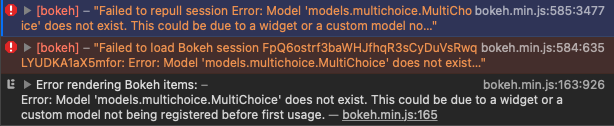
It seems the register models is not working as expected. But I tried a bunch of variations of the index.ts to no success.
I would appreciate any help!
