
☰Read-only archive⌕
Looking for help with Bokeh?

This is a read-only archive. Ask questions and join the conversation on GitHub.

Visit Community Support on GitHub →
Archived discussions · Captured October 28, 2026

Hovertool help - Custom tooltip

Community Supportcustomjshoverbokehjsbokeh
Zana
Zana

Hi,

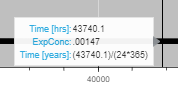
How do I display the time in years for the third hover information. I’ve tried several things but cant seem to figure it out. I want it to show years instead of hours so the user doesnt need to calculate it themselves. Where to I need to place the division of 24*365 in the tooltips formatter?
The code snippet is shown below and the result in the image below the code. Anyone know?

    tooltips_model = [
        ("Time [hrs]", "@x{(0.0)}"),
        ("ExpConc", "@ExpConc{(.00000)}"),
        ("Time [years]", "(@x{(0.0)})/(24*365)"),
    ]
image

⌁   Link to post
carolyn
carolyn

You can also use a CustomJSHover to do a calculated value in a HoverTool. (Note that as of this posting, there’s a small error in the documentation for this that I will be fixing-- use the dict key format for formatters shown in the example below, and NOT what the reference guide says today.)

Here’s a basic example, where given a number of days, the tooltip returns hours:

from bokeh.plotting import figure, show
from bokeh.models import HoverTool, CustomJSHover
import numpy as np

x = [i for i in range(0, 10)]
days = np.random.randint(0, high=10, size=10)

p = figure()
p.line(x=x, y=days)

days_to_hours = CustomJSHover(code="""
    var y = special_vars.data_y
    return "" + (y*24)
""")

p.add_tools(HoverTool(

tooltips=[
    ('days', '@y'),
    ('hours', '@y{custom}')
    ],
    formatters={'@y': days_to_hours}
))

show(p)
⌁   Link to post

End of archived discussion · Replies are disabled