☰Read-only archive⌕
Looking for help with Bokeh?

This is a read-only archive. Ask questions and join the conversation on GitHub.

Visit Community Support on GitHub →
Archived discussions · Captured October 28, 2026

How can the font size of a widget obect be changed?

Community Support
yvechang
yvechang

My objective: Change the font size of a RadioButtonGroup obect
My codes: I had tried to update the code of grzegorz.malinowski’s, but nothing changed.
Changed codes: styles.css

.missing_labels {
color: #83329F;
font-weight: bold !important;
font-size: 30px;
display: inline-block !important;
}

file structure:

myapp
|
+--main.py
+--Templates
   |
   +--index.html
   +--styles.css

Executing command: bokeh serve --show myapp
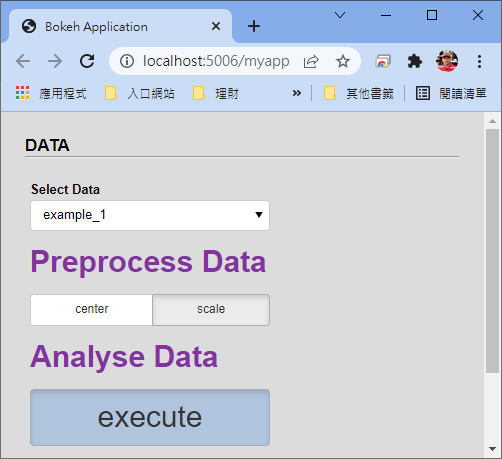
My problem: Why the font size and forecolor can not be changed?
image

⌁   Link to post
Bryan
Bryan

@yvechang The best way to diagnose why a CSS has not applied is to open your browser’s debugging tools and point the element inspector at the DOM elements you are having trouble with. That will show you what is and is not being applied, and might provide insight about why the CSS you are using does not hit the target. I can’t say much more without a Minimal Reproducible Example to actually run and inspect directly.

⌁   Link to post
yvechang
yvechang

My codes:
index.html

<!DOCTYPE html>
<html lang="en">
  <head>
    <meta charset="utf-8">
    {{ bokeh_css }}
    {{ bokeh_js }}
    <link rel="stylesheet" href="Templates\styles.css"/>
  </head>
  <body>

{% extends base %}
{% block contents %}

<div class='panel'>
    <p class='axs'>DATA</p><hr><br />
    {{ embed(roots.menu_dataset) }}
</div>

{% endblock %}
</body>
</html>

main.py

from bokeh.io import curdoc
from bokeh.models import Div, Paragraph, Select, Button, RadioButtonGroup, Column
from bokeh.plotting import figure

select_data = Select(title = 'Select Data', value = 'example_1', options = ['example_1', 'example_2'])
btng_norm = RadioButtonGroup(labels=['center', 'scale'], active=1)
btn_run = Button(label='execute', css_classes=['pad', 'btn_style'])

menu_dataset = Column(select_data, Div(text="""Preprocess Data""", css_classes=['missing_labels']), btng_norm, Div(text="""Analyse Data""", css_classes=['missing_labels']) ,btn_run, name='menu_dataset', width=250)

curdoc().add_root(menu_dataset)

styles.css

* {
    margin: 0;
    padding: 0;
    box-sizing: border-box;
}

p.axs {
    font-family: 'Arial';
    font-size: 17px;
    line-height: 20px;
    font-weight: bold;
    color: black;
}

.panel {
    background: #DCDCDC;
    padding: 1.5em;
}

label.bk {
    font-weight: bold;
}

.missing_labels {
	color: #83329F;
    font-weight: bold !important;
	font-size: 30px;
    display: inline-block !important;
}

.pad {
    padding-bottom: 80px !important;
}

.bk-root .btn_style .bk-btn-default {
    background-color: #B0C4DE !important;
    border-color: #adadad !important;
    box-shadow: inset 0 3px 5px rgba(0, 0, 0, 0.125) !important;
}

.bk-root .btn_style .bk-btn-default:hover {
    background-color: #ebebeb !important;
    border-color: #adadad !important;
}

.bk-root .btn_style .bk-btn:active {
    /*background-image: none;*/
    background-color: #2F329F !important;
	/*background-color: #f5f5f5 !important;*/
    /*box-shadow: inset 0 3px 5px rgba(0, 0, 0, 0.125);*/
}


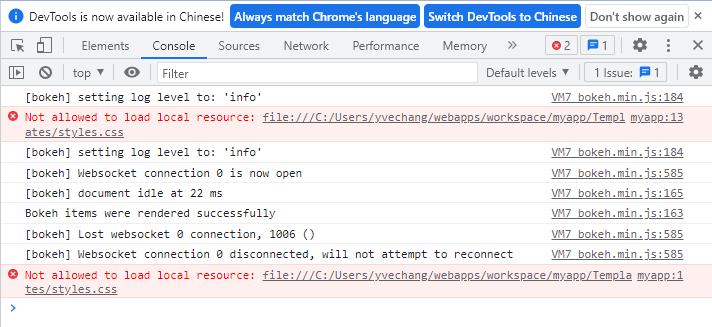
I don’t know how to solve the following error.

⌁   Link to post
yvechang
yvechang

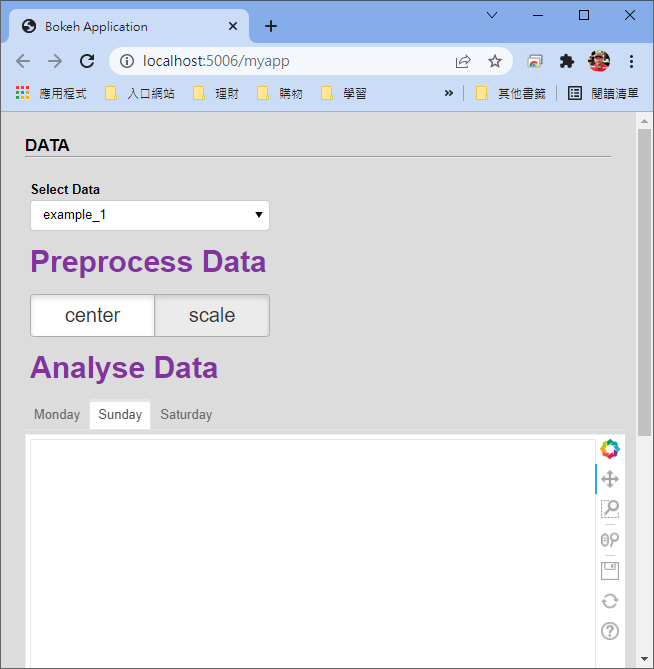
Hi Bryan, You did me a great favor. Thank you very much!
My edited file “index.html” is as follows. I used the Jinja formate to include styles.css, and it works!

<!DOCTYPE html>
<html lang="en">
  <head>
    <meta charset="utf-8">
    {{ bokeh_css }}
    {{ bokeh_js }}
        <style>
             {% include 'styles.css' %}
        </style>
  </head>
  <body>

{% extends base %}
{% block contents %}

<div class='panel'>
    <p class='axs'>DATA</p><hr><br />
    {{ embed(roots.menu_dataset) }}
</div>

{% endblock %}
</body>
</html>

styles.css

.missing_labels {
	color: #83329F !important;
    font-weight: bold !important;
	font-size: 30px !important;
    display: inline-block !important;
}

.pad {
    padding-bottom: 80px !important;
	font-size: 30px !important;
}

.bk-root .btn_style .bk-btn-default {
    background-color: #B0C4DE !important;
    border-color: #adadad !important;
    box-shadow: inset 0 3px 5px rgba(0, 0, 0, 0.125) !important;
	font-size: 30px !important;
}

image

⌁   Link to post
yvechang
yvechang

One more question asking for Bryan.

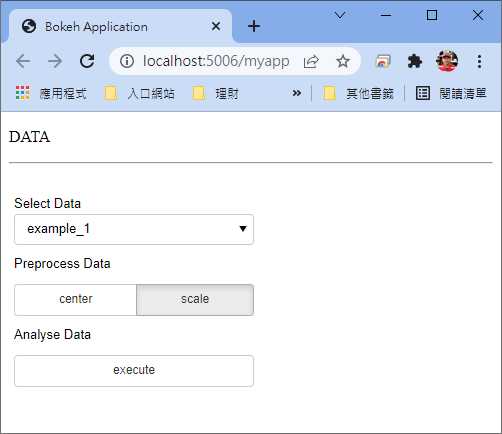
I also need to chang the fone size of Tabs’s title. However, the css_classes settings seems not effective for Tabs!
My folder structure is as same as the above. The changed files are as follows.
main.py

from bokeh.io import curdoc
from bokeh.models import Div, Paragraph, Select, Button, RadioButtonGroup, Column
from bokeh.models import Panel, Tabs
from bokeh.plotting import figure

select_data = Select(title = 'Select Data', value = 'example_1', options = ['example_1', 'example_2'])

btng_norm = RadioButtonGroup(labels=['center', 'scale'], css_classes=['btn_style'], active=1)

tab = []
for shiftId in range(3):
	shiftName = "Monday"
	if shiftId == 1:
		shiftName = "Sunday"
	elif shiftId == 2:
		shiftName = "Saturday "
	emptyFig = figure()
	panel = Panel(child=emptyFig, title=shiftName)
	tab.append(panel)
tabs = Tabs(tabs=tab, css_classes=['btn_style'])
tabs.active = 1

menu_dataset = Column(select_data, Div(text="""Preprocess Data""", css_classes=['missing_labels']), btng_norm, Div(text="""Analyse Data""", css_classes=['missing_labels']), tabs, name='menu_dataset', width=250)

curdoc().add_root(menu_dataset)

styles.css

.missing_labels {
	color: #83329F !important;
    font-weight: bold !important;
	font-size: 30px !important;
    display: inline-block !important;
}

.pad {
    padding-bottom: 80px !important;
	font-size: 30px !important;
}

.bk-root .btn_style .bk-btn-default {
    border-color: #adadad !important;
    box-shadow: inset 0 3px 5px rgba(0, 0, 0, 0.125) !important;
	font-size: 20px !important;
}

.bk-root .btn_style .bk-btn-default:hover {
    border-color: #adadad !important;
	font-size: 30px !important;
}

.bk-root .btn_style .bk-btn:active {
    background-color: #2F329F !important;
	font-size: 30px !important;
	/*background-color: #f5f5f5 !important;*/
    /*box-shadow: inset 0 3px 5px rgba(0, 0, 0, 0.125);*/
}
⌁   Link to post

End of archived discussion · Replies are disabled