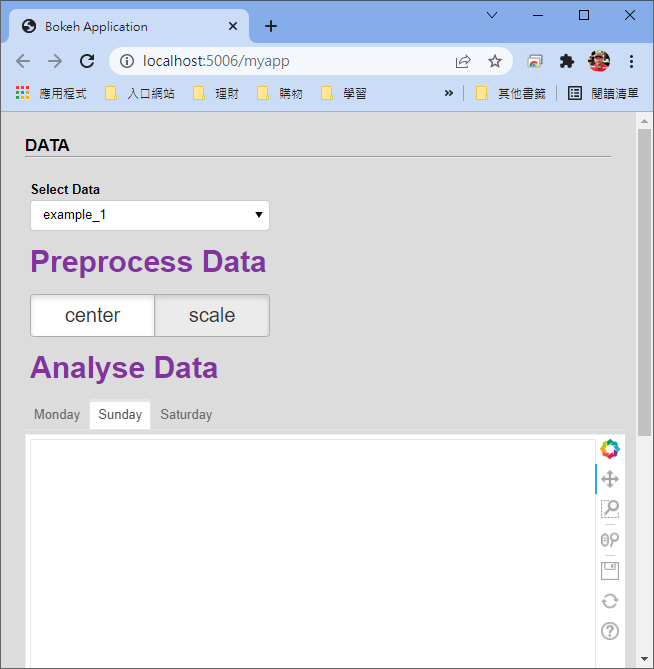
I had posted a similar question How can the font size of a widget obect be changed? which had been sloved. I also tried to change the title of Tabs using the same solution, but it seems not effective.
My folder structure is as same as the posted issue How can the font size of a widget obect be changed?.
myapp
|
+--main.py
+--Templates
   |
   +--index.html
   +--styles.css
main.py
from bokeh.io import curdoc
from bokeh.models import Div, Paragraph, Select, Button, RadioButtonGroup, Column
from bokeh.models import Panel, Tabs
from bokeh.plotting import figure

select_data = Select(title = 'Select Data', value = 'example_1', options = ['example_1', 'example_2'])

btng_norm = RadioButtonGroup(labels=['center', 'scale'], css_classes=['btn_style'], active=1)

tab = []
for shiftId in range(3):
	shiftName = "Monday"
	if shiftId == 1:
		shiftName = "Sunday"
	elif shiftId == 2:
		shiftName = "Saturday "
	emptyFig = figure()
	panel = Panel(child=emptyFig, title=shiftName)
	tab.append(panel)
tabs = Tabs(tabs=tab, css_classes=['btn_style'])
tabs.active = 1

menu_dataset = Column(select_data, Div(text="""Preprocess Data""", css_classes=['missing_labels']), btng_norm, Div(text="""Analyse Data""", css_classes=['missing_labels']), tabs, name='menu_dataset', width=250)

curdoc().add_root(menu_dataset)
styles.css
.missing_labels {
	color: #83329F !important;
    font-weight: bold !important;
	font-size: 30px !important;
    display: inline-block !important;
}

.pad {
    padding-bottom: 80px !important;
	font-size: 30px !important;
}

.bk-root .btn_style .bk-btn-default {
    border-color: #adadad !important;
    box-shadow: inset 0 3px 5px rgba(0, 0, 0, 0.125) !important;
	font-size: 20px !important;
}

.bk-root .btn_style .bk-btn-default:hover {
    border-color: #adadad !important;
	font-size: 30px !important;
}

.bk-root .btn_style .bk-btn:active {
    background-color: #2F329F !important;
	font-size: 30px !important;
	/*background-color: #f5f5f5 !important;*/
    /*box-shadow: inset 0 3px 5px rgba(0, 0, 0, 0.125);*/
}
index.html
<!DOCTYPE html>
<html lang="en">
  <head>
    <meta charset="utf-8">
    {{ bokeh_css }}
    {{ bokeh_js }}
        <style>
             {% include 'styles.css' %}
        </style>
  </head>
  <body>

{% extends base %}
{% block contents %}

<div class='panel'>
    <p class='axs'>DATA</p><hr><br />
    {{ embed(roots.menu_dataset) }}
</div>

{% endblock %}
</body>
</html>
The result page is as follows.