☰Read-only archive⌕
Looking for help with Bokeh?

This is a read-only archive. Ask questions and join the conversation on GitHub.

Visit Community Support on GitHub →
Archived discussions · Captured October 28, 2026

How to Download a DataTable as a .csv in a bokeh_server app

Community Support
Jordan_Bramble
Jordan_Bramble

Hi I have a bokeh server app. running in 0.11.1. One component of my app is a DataTable. I want to save the data in this table as a .csv, so that someone can click a button and download the .csv through their browser. Here is a snipped of what I have done so far.

def download():

export = pd.DataFrame(source6.data)

buffer = io.StringIO()

export.to_csv(buffer, index=False, encoding=‘utf-8’)

#save(vform(data_table))

controls = [store_name, inventory, min_year, max_year, min_month, max_month, button]

for control in controls[:-1]:

control.on_change(‘value’, update)

controls[-1].on_click(download)

the download function, converts the data souce tied to the dataTable to a dataframe. then writes it to the buffer. from their I have no idea how to download it in the browser.

I have a button defined in the app. When this button is clicked the download function is called. but of course that function is not complete. So I am hoping someone can help me download it.

I tried to use the bokeh method save(), but when running on the server, the save function is ignored.

Additionally, I have another issue where everytime I click a button the page is reloaded and a new session is created. This is a bug I believe, that has supposedly been fixed in a PR.

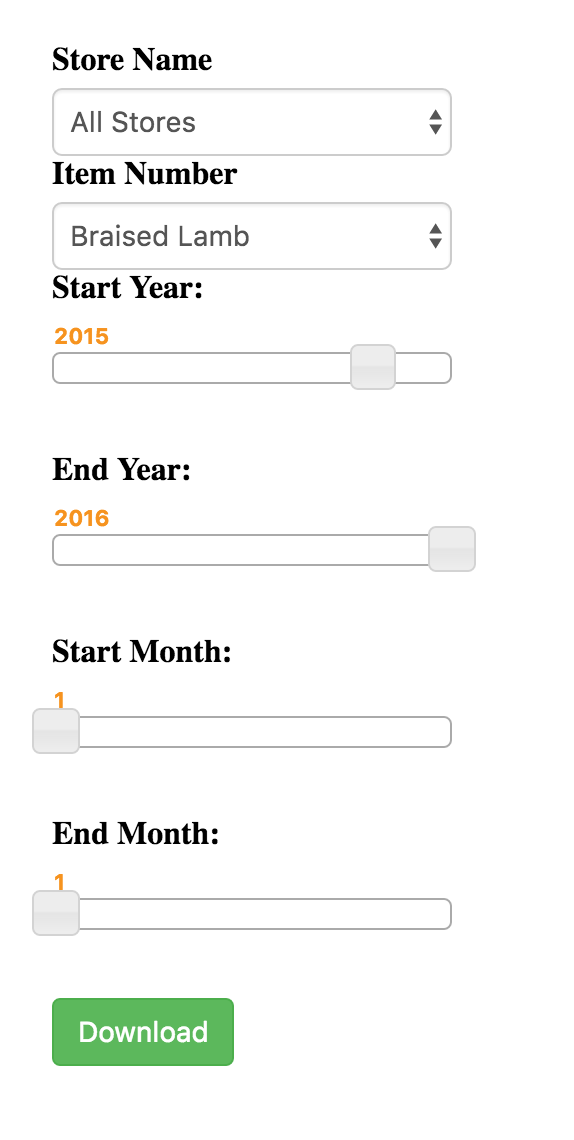
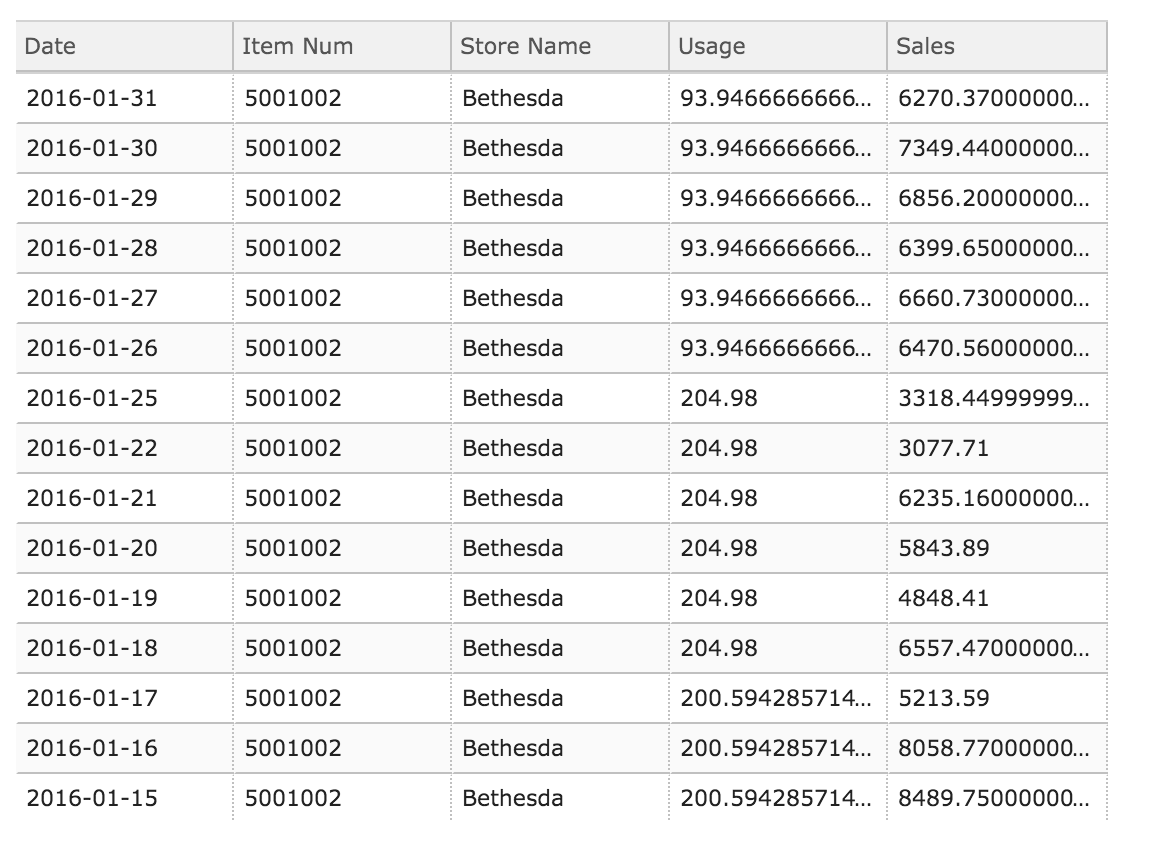
Thanks for the help. Attached are pictures of my app.

⌁   Link to post
Jordan_Bramble
Jordan_Bramble

Additionally, I wanted to say that I am aware the cherrypy and flask have helper methods for sending files. They will of course not work inside of a bokeh server. I dont quite see how to send a HTTPResponse object. I would also prefer not to rewrite my entire app in Flask or CherryPy in order to embed these dashboards just for the sake of using the send_file function.

···

On Monday, April 18, 2016 at 2:33:25 PM UTC-4, Jordan Bramble wrote:

Hi I have a bokeh server app. running in 0.11.1. One component of my app is a DataTable. I want to save the data in this table as a .csv, so that someone can click a button and download the .csv through their browser. Here is a snipped of what I have done so far.

def download():

export = pd.DataFrame(source6.data)

buffer = io.StringIO()

export.to_csv(buffer, index=False, encoding=‘utf-8’)

#save(vform(data_table))

controls = [store_name, inventory, min_year, max_year, min_month, max_month, button]

for control in controls[:-1]:

control.on_change(‘value’, update)

controls[-1].on_click(download)

the download function, converts the data souce tied to the dataTable to a dataframe. then writes it to the buffer. from their I have no idea how to download it in the browser.

I have a button defined in the app. When this button is clicked the download function is called. but of course that function is not complete. So I am hoping someone can help me download it.

I tried to use the bokeh method save(), but when running on the server, the save function is ignored.

Additionally, I have another issue where everytime I click a button the page is reloaded and a new session is created. This is a bug I believe, that has supposedly been fixed in a PR.

Thanks for the help. Attached are pictures of my app.

⌁   Link to post
Jordan_Bramble
Jordan_Bramble

Can anyone offer an example of this?

···

On Monday, April 18, 2016 at 2:33:25 PM UTC-4, Jordan Bramble wrote:

Hi I have a bokeh server app. running in 0.11.1. One component of my app is a DataTable. I want to save the data in this table as a .csv, so that someone can click a button and download the .csv through their browser. Here is a snipped of what I have done so far.

def download():

export = pd.DataFrame(source6.data)

buffer = io.StringIO()

export.to_csv(buffer, index=False, encoding=‘utf-8’)

#save(vform(data_table))

controls = [store_name, inventory, min_year, max_year, min_month, max_month, button]

for control in controls[:-1]:

control.on_change(‘value’, update)

controls[-1].on_click(download)

the download function, converts the data souce tied to the dataTable to a dataframe. then writes it to the buffer. from their I have no idea how to download it in the browser.

I have a button defined in the app. When this button is clicked the download function is called. but of course that function is not complete. So I am hoping someone can help me download it.

I tried to use the bokeh method save(), but when running on the server, the save function is ignored.

Additionally, I have another issue where everytime I click a button the page is reloaded and a new session is created. This is a bug I believe, that has supposedly been fixed in a PR.

Thanks for the help. Attached are pictures of my app.

⌁   Link to post
Bryan
Bryan

Hi Jordan,

The data table has a data source property, which is a ColumnDataSource. This is turn has a .data property, is just a python dict of named columns. I would imagine it should be straightforward to pass this dict to pandas to get a Dataframe which can then be saved or exported in nay of the ways Pandas supports. Is that the sort of guidance you are looking for?

Bryan

···

On Apr 19, 2016, at 2:15 PM, Jordan Bramble <jordanbramble@gmail.com> wrote:

Can anyone offer an example of this?

On Monday, April 18, 2016 at 2:33:25 PM UTC-4, Jordan Bramble wrote:
Hi I have a bokeh server app. running in 0.11.1. One component of my app is a DataTable. I want to save the data in this table as a .csv, so that someone can click a button and download the .csv through their browser. Here is a snipped of what I have done so far.

def download():
    export = pd.DataFrame(source6.data)
    buffer = io.StringIO()
    export.to_csv(buffer, index=False, encoding='utf-8')

    #save(vform(data_table))

controls = [store_name, inventory, min_year, max_year, min_month, max_month, button]
for control in controls[:-1]:
    control.on_change('value', update)
controls[-1].on_click(download)

the download function, converts the data souce tied to the dataTable to a dataframe. then writes it to the buffer. from their I have no idea how to download it in the browser.
I have a button defined in the app. When this button is clicked the download function is called. but of course that function is not complete. So I am hoping someone can help me download it.

I tried to use the bokeh method save(), but when running on the server, the save function is ignored.

Additionally, I have another issue where everytime I click a button the page is reloaded and a new session is created. This is a bug I believe, that has supposedly been fixed in a PR.

Thanks for the help. Attached are pictures of my app.

--
You received this message because you are subscribed to the Google Groups "Bokeh Discussion - Public" group.
To unsubscribe from this group and stop receiving emails from it, send an email to bokeh+unsubscribe@continuum.io.
To post to this group, send email to bokeh@continuum.io.
To view this discussion on the web visit https://groups.google.com/a/continuum.io/d/msgid/bokeh/ddc3bee8-afbd-474a-a5c1-5a52cf2a3f18%40continuum.io\.
For more options, visit https://groups.google.com/a/continuum.io/d/optout\.

⌁   Link to post
Jordan_Bramble
Jordan_Bramble

right. That part is quite simple. The difficult part is getting it to download in a web browser, instead of just save to the server at the call of df.to_csv()

···

On Tue, Apr 19, 2016 at 4:08 PM, Bryan Van de Ven bryanv@continuum.io wrote:

Hi Jordan,

The data table has a data source property, which is a ColumnDataSource. This is turn has a .data property, is just a python dict of named columns. I would imagine it should be straightforward to pass this dict to pandas to get a Dataframe which can then be saved or exported in nay of the ways Pandas supports. Is that the sort of guidance you are looking for?

Bryan

On Apr 19, 2016, at 2:15 PM, Jordan Bramble jordanbramble@gmail.com wrote:

Can anyone offer an example of this?

On Monday, April 18, 2016 at 2:33:25 PM UTC-4, Jordan Bramble wrote:

Hi I have a bokeh server app. running in 0.11.1. One component of my app is a DataTable. I want to save the data in this table as a .csv, so that someone can click a button and download the .csv through their browser. Here is a snipped of what I have done so far.

def download():

export = pd.DataFrame(source6.data)
buffer = io.StringIO()
export.to_csv(buffer, index=False, encoding='utf-8')
#save(vform(data_table))

controls = [store_name, inventory, min_year, max_year, min_month, max_month, button]

for control in controls[:-1]:

control.on_change('value', update)

controls[-1].on_click(download)

the download function, converts the data souce tied to the dataTable to a dataframe. then writes it to the buffer. from their I have no idea how to download it in the browser.

I have a button defined in the app. When this button is clicked the download function is called. but of course that function is not complete. So I am hoping someone can help me download it.

I tried to use the bokeh method save(), but when running on the server, the save function is ignored.

Additionally, I have another issue where everytime I click a button the page is reloaded and a new session is created. This is a bug I believe, that has supposedly been fixed in a PR.

Thanks for the help. Attached are pictures of my app.

–

You received this message because you are subscribed to the Google Groups “Bokeh Discussion - Public” group.

To unsubscribe from this group and stop receiving emails from it, send an email to bokeh+unsubscribe@continuum.io.

To post to this group, send email to bokeh@continuum.io.

To view this discussion on the web visit https://groups.google.com/a/continuum.io/d/msgid/bokeh/ddc3bee8-afbd-474a-a5c1-5a52cf2a3f18%40continuum.io.

For more options, visit https://groups.google.com/a/continuum.io/d/optout.

–

You received this message because you are subscribed to the Google Groups “Bokeh Discussion - Public” group.

To unsubscribe from this group and stop receiving emails from it, send an email to bokeh+unsubscribe@continuum.io.

To post to this group, send email to bokeh@continuum.io.

To view this discussion on the web visit https://groups.google.com/a/continuum.io/d/msgid/bokeh/678EFD14-1A46-460A-AB91-8CC78FE12EB5%40continuum.io.
For more options, visit https://groups.google.com/a/continuum.io/d/optout.

⌁   Link to post
Bryan
Bryan

Jordan,

Ah, I completely misunderstood your question. So, to do this will require some JavaScript. It's possible this could go in a CustomJS callback for a button, maybe? Here are some links that might prove useful:

  pandas - Download CSV from an iPython Notebook - Stack Overflow

  How to export JavaScript array info to csv (on client side)? - Stack Overflow

Thanks,

Bryan

···

On Apr 19, 2016, at 3:19 PM, Jordan Bramble <jordanbramble@gmail.com> wrote:

right. That part is quite simple. The difficult part is getting it to download in a web browser, instead of just save to the server at the call of df.to_csv()

On Tue, Apr 19, 2016 at 4:08 PM, Bryan Van de Ven <bryan@bokeh.org> wrote:
Hi Jordan,

The data table has a data source property, which is a ColumnDataSource. This is turn has a .data property, is just a python dict of named columns. I would imagine it should be straightforward to pass this dict to pandas to get a Dataframe which can then be saved or exported in nay of the ways Pandas supports. Is that the sort of guidance you are looking for?

Bryan

> On Apr 19, 2016, at 2:15 PM, Jordan Bramble <jordanbramble@gmail.com> wrote:
>
> Can anyone offer an example of this?
>
> On Monday, April 18, 2016 at 2:33:25 PM UTC-4, Jordan Bramble wrote:
> Hi I have a bokeh server app. running in 0.11.1. One component of my app is a DataTable. I want to save the data in this table as a .csv, so that someone can click a button and download the .csv through their browser. Here is a snipped of what I have done so far.
>
> def download():
> export = pd.DataFrame(source6.data)
> buffer = io.StringIO()
> export.to_csv(buffer, index=False, encoding='utf-8')
>
> #save(vform(data_table))
>
> controls = [store_name, inventory, min_year, max_year, min_month, max_month, button]
> for control in controls[:-1]:
> control.on_change('value', update)
> controls[-1].on_click(download)
>
>
> the download function, converts the data souce tied to the dataTable to a dataframe. then writes it to the buffer. from their I have no idea how to download it in the browser.
> I have a button defined in the app. When this button is clicked the download function is called. but of course that function is not complete. So I am hoping someone can help me download it.
>
> I tried to use the bokeh method save(), but when running on the server, the save function is ignored.
>
> Additionally, I have another issue where everytime I click a button the page is reloaded and a new session is created. This is a bug I believe, that has supposedly been fixed in a PR.
>
> Thanks for the help. Attached are pictures of my app.
>
>
>
>
> --
> You received this message because you are subscribed to the Google Groups "Bokeh Discussion - Public" group.
> To unsubscribe from this group and stop receiving emails from it, send an email to bokeh+unsubscribe@continuum.io.
> To post to this group, send email to bokeh@continuum.io.
> To view this discussion on the web visit https://groups.google.com/a/continuum.io/d/msgid/bokeh/ddc3bee8-afbd-474a-a5c1-5a52cf2a3f18%40continuum.io\.
> For more options, visit https://groups.google.com/a/continuum.io/d/optout\.

--
You received this message because you are subscribed to the Google Groups "Bokeh Discussion - Public" group.
To unsubscribe from this group and stop receiving emails from it, send an email to bokeh+unsubscribe@continuum.io.
To post to this group, send email to bokeh@continuum.io.
To view this discussion on the web visit https://groups.google.com/a/continuum.io/d/msgid/bokeh/678EFD14-1A46-460A-AB91-8CC78FE12EB5%40continuum.io\.
For more options, visit https://groups.google.com/a/continuum.io/d/optout\.

--
You received this message because you are subscribed to the Google Groups "Bokeh Discussion - Public" group.
To unsubscribe from this group and stop receiving emails from it, send an email to bokeh+unsubscribe@continuum.io.
To post to this group, send email to bokeh@continuum.io.
To view this discussion on the web visit https://groups.google.com/a/continuum.io/d/msgid/bokeh/CAB%3DGhauh0sJi0zzDgR3b02LjXfj1Q42-ebVw0x29NUTLY%3D1NUg%40mail.gmail.com\.
For more options, visit https://groups.google.com/a/continuum.io/d/optout\.

⌁   Link to post
Jordan_Bramble
Jordan_Bramble

many thanks to Bryan. Here is an adapted solution I created that will work. Note that button is a Button defined above in the app, and source6 is a ColumnDataSource tied to a data table.

js_download = “”"

var csv = source.get(‘data’);

var filetext = ‘itemnum,storename,date,usage,netsales\n’;

for (i=0; i < csv[‘date’].length; i++) {

var currRow = [csv[‘itemnum’][i].toString(),

csv[‘storename’][i].toString(),

csv[‘date’][i].toString(),

csv[‘usage’][i].toString(),

csv[‘netsales’][i].toString().concat(‘\n’)];

var joined = currRow.join();

filetext = filetext.concat(joined);

}

var filename = ‘results.csv’;

var blob = new Blob([filetext], { type: ‘text/csv;charset=utf-8;’ });

if (navigator.msSaveBlob) { // IE 10+

navigator.msSaveBlob(blob, filename);

} else {

var link = document.createElement(“a”);

if (link.download !== undefined) { // feature detection

// Browsers that support HTML5 download attribute

var url = URL.createObjectURL(blob);

link.setAttribute(“href”, url);

link.setAttribute(“download”, filename);

link.style.visibility = ‘hidden’;

document.body.appendChild(link);

link.click();

document.body.removeChild(link);

}

}“”"

button.callback = CustomJS(args=dict(source=source6), code=js_download)

···

On Tuesday, April 19, 2016 at 4:34:10 PM UTC-4, Bryan Van de ven wrote:

Jordan,

Ah, I completely misunderstood your question. So, to do this will require some JavaScript. It’s possible this could go in a CustomJS callback for a button, maybe? Here are some links that might prove useful:

    [http://stackoverflow.com/questions/31893930/download-csv-from-an-ipython-notebook](http://stackoverflow.com/questions/31893930/download-csv-from-an-ipython-notebook)


    [http://stackoverflow.com/questions/14964035/how-to-export-javascript-array-info-to-csv-on-client-side](http://stackoverflow.com/questions/14964035/how-to-export-javascript-array-info-to-csv-on-client-side)

Thanks,

Bryan

On Apr 19, 2016, at 3:19 PM, Jordan Bramble jordan...@gmail.com wrote:

right. That part is quite simple. The difficult part is getting it to download in a web browser, instead of just save to the server at the call of df.to_csv()

On Tue, Apr 19, 2016 at 4:08 PM, Bryan Van de Ven bry...@continuum.io wrote:

Hi Jordan,

The data table has a data source property, which is a ColumnDataSource. This is turn has a .data property, is just a python dict of named columns. I would imagine it should be straightforward to pass this dict to pandas to get a Dataframe which can then be saved or exported in nay of the ways Pandas supports. Is that the sort of guidance you are looking for?

Bryan

On Apr 19, 2016, at 2:15 PM, Jordan Bramble jordan...@gmail.com wrote:

Can anyone offer an example of this?

On Monday, April 18, 2016 at 2:33:25 PM UTC-4, Jordan Bramble wrote:

Hi I have a bokeh server app. running in 0.11.1. One component of my app is a DataTable. I want to save the data in this table as a .csv, so that someone can click a button and download the .csv through their browser. Here is a snipped of what I have done so far.

def download():

export = pd.DataFrame(source6.data)
buffer = io.StringIO()
export.to_csv(buffer, index=False, encoding='utf-8')
#save(vform(data_table))

controls = [store_name, inventory, min_year, max_year, min_month, max_month, button]

for control in controls[:-1]:

control.on_change('value', update)

controls[-1].on_click(download)

the download function, converts the data souce tied to the dataTable to a dataframe. then writes it to the buffer. from their I have no idea how to download it in the browser.

I have a button defined in the app. When this button is clicked the download function is called. but of course that function is not complete. So I am hoping someone can help me download it.

I tried to use the bokeh method save(), but when running on the server, the save function is ignored.

Additionally, I have another issue where everytime I click a button the page is reloaded and a new session is created. This is a bug I believe, that has supposedly been fixed in a PR.

Thanks for the help. Attached are pictures of my app.

–

You received this message because you are subscribed to the Google Groups “Bokeh Discussion - Public” group.

To unsubscribe from this group and stop receiving emails from it, send an email to bokeh+un...@continuum.io.

To post to this group, send email to bo...@continuum.io.

To view this discussion on the web visit https://groups.google.com/a/continuum.io/d/msgid/bokeh/ddc3bee8-afbd-474a-a5c1-5a52cf2a3f18%40continuum.io.

For more options, visit https://groups.google.com/a/continuum.io/d/optout.

–

You received this message because you are subscribed to the Google Groups “Bokeh Discussion - Public” group.

To unsubscribe from this group and stop receiving emails from it, send an email to bokeh+un...@continuum.io.

To post to this group, send email to bo...@continuum.io.

To view this discussion on the web visit https://groups.google.com/a/continuum.io/d/msgid/bokeh/678EFD14-1A46-460A-AB91-8CC78FE12EB5%40continuum.io.

For more options, visit https://groups.google.com/a/continuum.io/d/optout.

–
You received this message because you are subscribed to the Google Groups “Bokeh Discussion - Public” group.

To unsubscribe from this group and stop receiving emails from it, send an email to bokeh+un...@continuum.io.

To post to this group, send email to bo...@continuum.io.

To view this discussion on the web visit https://groups.google.com/a/continuum.io/d/msgid/bokeh/CAB%3DGhauh0sJi0zzDgR3b02LjXfj1Q42-ebVw0x29NUTLY%3D1NUg%40mail.gmail.com.

For more options, visit https://groups.google.com/a/continuum.io/d/optout.

⌁   Link to post
Bryan
Bryan

Jordan,

very cool! Would you be interested in contributing a Pull Request to add a new server example that shows off how to do this?

Thanks,

Bryan

···

On Apr 19, 2016, at 6:29 PM, Jordan Bramble <jordanbramble@gmail.com> wrote:

many thanks to Bryan. Here is an adapted solution I created that will work. Note that button is a Button defined above in the app, and source6 is a ColumnDataSource tied to a data table.

js_download = """
var csv = source.get('data');
var filetext = 'itemnum,storename,date,usage,netsales\\n';
for (i=0; i < csv['date'].length; i++) {
    var currRow = [csv['itemnum'][i].toString(),
                   csv['storename'][i].toString(),
                   csv['date'][i].toString(),
                   csv['usage'][i].toString(),
                   csv['netsales'][i].toString().concat('\\n')];

    var joined = currRow.join();
    filetext = filetext.concat(joined);
}

var filename = 'results.csv';
var blob = new Blob([filetext], { type: 'text/csv;charset=utf-8;' });
if (navigator.msSaveBlob) { // IE 10+
navigator.msSaveBlob(blob, filename);
} else {
var link = document.createElement("a");
if (link.download !== undefined) { // feature detection
    // Browsers that support HTML5 download attribute
    var url = URL.createObjectURL(blob);
    link.setAttribute("href", url);
    link.setAttribute("download", filename);
    link.style.visibility = 'hidden';
    document.body.appendChild(link);
    link.click();
    document.body.removeChild(link);
}
}"""

button.callback = CustomJS(args=dict(source=source6), code=js_download)

On Tuesday, April 19, 2016 at 4:34:10 PM UTC-4, Bryan Van de ven wrote:
Jordan,

Ah, I completely misunderstood your question. So, to do this will require some JavaScript. It's possible this could go in a CustomJS callback for a button, maybe? Here are some links that might prove useful:

        pandas - Download CSV from an iPython Notebook - Stack Overflow

        How to export JavaScript array info to csv (on client side)? - Stack Overflow

Thanks,

Bryan

> On Apr 19, 2016, at 3:19 PM, Jordan Bramble <jordan...@gmail.com> wrote:
>
> right. That part is quite simple. The difficult part is getting it to download in a web browser, instead of just save to the server at the call of df.to_csv()
>
> On Tue, Apr 19, 2016 at 4:08 PM, Bryan Van de Ven <bry...@continuum.io> wrote:
> Hi Jordan,
>
> The data table has a data source property, which is a ColumnDataSource. This is turn has a .data property, is just a python dict of named columns. I would imagine it should be straightforward to pass this dict to pandas to get a Dataframe which can then be saved or exported in nay of the ways Pandas supports. Is that the sort of guidance you are looking for?
>
> Bryan
>
> > On Apr 19, 2016, at 2:15 PM, Jordan Bramble <jordan...@gmail.com> wrote:
> >
> > Can anyone offer an example of this?
> >
> > On Monday, April 18, 2016 at 2:33:25 PM UTC-4, Jordan Bramble wrote:
> > Hi I have a bokeh server app. running in 0.11.1. One component of my app is a DataTable. I want to save the data in this table as a .csv, so that someone can click a button and download the .csv through their browser. Here is a snipped of what I have done so far.
> >
> > def download():
> > export = pd.DataFrame(source6.data)
> > buffer = io.StringIO()
> > export.to_csv(buffer, index=False, encoding='utf-8')
> >
> > #save(vform(data_table))
> >
> > controls = [store_name, inventory, min_year, max_year, min_month, max_month, button]
> > for control in controls[:-1]:
> > control.on_change('value', update)
> > controls[-1].on_click(download)
> >
> >
> > the download function, converts the data souce tied to the dataTable to a dataframe. then writes it to the buffer. from their I have no idea how to download it in the browser.
> > I have a button defined in the app. When this button is clicked the download function is called. but of course that function is not complete. So I am hoping someone can help me download it.
> >
> > I tried to use the bokeh method save(), but when running on the server, the save function is ignored.
> >
> > Additionally, I have another issue where everytime I click a button the page is reloaded and a new session is created. This is a bug I believe, that has supposedly been fixed in a PR.
> >
> > Thanks for the help. Attached are pictures of my app.
> >
> >
> >
> >
> > --
> > You received this message because you are subscribed to the Google Groups "Bokeh Discussion - Public" group.
> > To unsubscribe from this group and stop receiving emails from it, send an email to bokeh+un...@continuum.io.
> > To post to this group, send email to bo...@continuum.io.
> > To view this discussion on the web visit https://groups.google.com/a/continuum.io/d/msgid/bokeh/ddc3bee8-afbd-474a-a5c1-5a52cf2a3f18%40continuum.io\.
> > For more options, visit https://groups.google.com/a/continuum.io/d/optout\.
>
> --
> You received this message because you are subscribed to the Google Groups "Bokeh Discussion - Public" group.
> To unsubscribe from this group and stop receiving emails from it, send an email to bokeh+un...@continuum.io.
> To post to this group, send email to bo...@continuum.io.
> To view this discussion on the web visit https://groups.google.com/a/continuum.io/d/msgid/bokeh/678EFD14-1A46-460A-AB91-8CC78FE12EB5%40continuum.io\.
> For more options, visit https://groups.google.com/a/continuum.io/d/optout\.
>
>
> --
> You received this message because you are subscribed to the Google Groups "Bokeh Discussion - Public" group.
> To unsubscribe from this group and stop receiving emails from it, send an email to bokeh+un...@continuum.io.
> To post to this group, send email to bo...@continuum.io.
> To view this discussion on the web visit https://groups.google.com/a/continuum.io/d/msgid/bokeh/CAB%3DGhauh0sJi0zzDgR3b02LjXfj1Q42-ebVw0x29NUTLY%3D1NUg%40mail.gmail.com\.
> For more options, visit https://groups.google.com/a/continuum.io/d/optout\.

--
You received this message because you are subscribed to the Google Groups "Bokeh Discussion - Public" group.
To unsubscribe from this group and stop receiving emails from it, send an email to bokeh+unsubscribe@continuum.io.
To post to this group, send email to bokeh@continuum.io.
To view this discussion on the web visit https://groups.google.com/a/continuum.io/d/msgid/bokeh/34ca093b-eea7-4d03-b8b4-234e442914f3%40continuum.io\.
For more options, visit https://groups.google.com/a/continuum.io/d/optout\.

⌁   Link to post
Jordan_Bramble
Jordan_Bramble

Totally!

···

On Wed, Apr 20, 2016 at 12:44 PM, Bryan Van de Ven bryanv@continuum.io wrote:

Jordan,

very cool! Would you be interested in contributing a Pull Request to add a new server example that shows off how to do this?

Thanks,

Bryan

On Apr 19, 2016, at 6:29 PM, Jordan Bramble jordanbramble@gmail.com wrote:

many thanks to Bryan. Here is an adapted solution I created that will work. Note that button is a Button defined above in the app, and source6 is a ColumnDataSource tied to a data table.

js_download = “”"

var csv = source.get(‘data’);

var filetext = ‘itemnum,storename,date,usage,netsales\n’;

for (i=0; i < csv[‘date’].length; i++) {

var currRow = [csv['itemnum'][i].toString(),
               csv['storename'][i].toString(),
               csv['date'][i].toString(),
               csv['usage'][i].toString(),
               csv['netsales'][i].toString().concat('\\n')];
var joined = currRow.join();
filetext = filetext.concat(joined);

}

var filename = ‘results.csv’;

var blob = new Blob([filetext], { type: ‘text/csv;charset=utf-8;’ });

if (navigator.msSaveBlob) { // IE 10+

navigator.msSaveBlob(blob, filename);

} else {

var link = document.createElement(“a”);

if (link.download !== undefined) { // feature detection

// Browsers that support HTML5 download attribute
var url = URL.createObjectURL(blob);
link.setAttribute("href", url);
link.setAttribute("download", filename);
link.style.visibility = 'hidden';
document.body.appendChild(link);
link.click();
document.body.removeChild(link);

}

}“”"

button.callback = CustomJS(args=dict(source=source6), code=js_download)

On Tuesday, April 19, 2016 at 4:34:10 PM UTC-4, Bryan Van de ven wrote:

Jordan,

Ah, I completely misunderstood your question. So, to do this will require some JavaScript. It’s possible this could go in a CustomJS callback for a button, maybe? Here are some links that might prove useful:

    [http://stackoverflow.com/questions/31893930/download-csv-from-an-ipython-notebook](http://stackoverflow.com/questions/31893930/download-csv-from-an-ipython-notebook)
    [http://stackoverflow.com/questions/14964035/how-to-export-javascript-array-info-to-csv-on-client-side](http://stackoverflow.com/questions/14964035/how-to-export-javascript-array-info-to-csv-on-client-side)

Thanks,

Bryan

On Apr 19, 2016, at 3:19 PM, Jordan Bramble jordan...@gmail.com wrote:

right. That part is quite simple. The difficult part is getting it to download in a web browser, instead of just save to the server at the call of df.to_csv()

On Tue, Apr 19, 2016 at 4:08 PM, Bryan Van de Ven bry...@continuum.io wrote:

Hi Jordan,

The data table has a data source property, which is a ColumnDataSource. This is turn has a .data property, is just a python dict of named columns. I would imagine it should be straightforward to pass this dict to pandas to get a Dataframe which can then be saved or exported in nay of the ways Pandas supports. Is that the sort of guidance you are looking for?

Bryan

On Apr 19, 2016, at 2:15 PM, Jordan Bramble jordan...@gmail.com wrote:

Can anyone offer an example of this?

On Monday, April 18, 2016 at 2:33:25 PM UTC-4, Jordan Bramble wrote:

Hi I have a bokeh server app. running in 0.11.1. One component of my app is a DataTable. I want to save the data in this table as a .csv, so that someone can click a button and download the .csv through their browser. Here is a snipped of what I have done so far.

def download():

export = pd.DataFrame(source6.data)
buffer = io.StringIO()
export.to_csv(buffer, index=False, encoding='utf-8')
#save(vform(data_table))

controls = [store_name, inventory, min_year, max_year, min_month, max_month, button]

for control in controls[:-1]:

control.on_change('value', update)

controls[-1].on_click(download)

the download function, converts the data souce tied to the dataTable to a dataframe. then writes it to the buffer. from their I have no idea how to download it in the browser.

I have a button defined in the app. When this button is clicked the download function is called. but of course that function is not complete. So I am hoping someone can help me download it.

I tried to use the bokeh method save(), but when running on the server, the save function is ignored.

Additionally, I have another issue where everytime I click a button the page is reloaded and a new session is created. This is a bug I believe, that has supposedly been fixed in a PR.

Thanks for the help. Attached are pictures of my app.

–

You received this message because you are subscribed to the Google Groups “Bokeh Discussion - Public” group.

To unsubscribe from this group and stop receiving emails from it, send an email to bokeh+un...@continuum.io.

To post to this group, send email to bo...@continuum.io.

To view this discussion on the web visit https://groups.google.com/a/continuum.io/d/msgid/bokeh/ddc3bee8-afbd-474a-a5c1-5a52cf2a3f18%40continuum.io.

For more options, visit https://groups.google.com/a/continuum.io/d/optout.

–

You received this message because you are subscribed to the Google Groups “Bokeh Discussion - Public” group.

To unsubscribe from this group and stop receiving emails from it, send an email to bokeh+un...@continuum.io.

To post to this group, send email to bo...@continuum.io.

To view this discussion on the web visit https://groups.google.com/a/continuum.io/d/msgid/bokeh/678EFD14-1A46-460A-AB91-8CC78FE12EB5%40continuum.io.

For more options, visit https://groups.google.com/a/continuum.io/d/optout.

–

You received this message because you are subscribed to the Google Groups “Bokeh Discussion - Public” group.

To unsubscribe from this group and stop receiving emails from it, send an email to bokeh+un...@continuum.io.

To post to this group, send email to bo...@continuum.io.

To view this discussion on the web visit https://groups.google.com/a/continuum.io/d/msgid/bokeh/CAB%3DGhauh0sJi0zzDgR3b02LjXfj1Q42-ebVw0x29NUTLY%3D1NUg%40mail.gmail.com.

For more options, visit https://groups.google.com/a/continuum.io/d/optout.

–

You received this message because you are subscribed to the Google Groups “Bokeh Discussion - Public” group.

To unsubscribe from this group and stop receiving emails from it, send an email to bokeh+unsubscribe@continuum.io.

To post to this group, send email to bokeh@continuum.io.

To view this discussion on the web visit https://groups.google.com/a/continuum.io/d/msgid/bokeh/34ca093b-eea7-4d03-b8b4-234e442914f3%40continuum.io.

For more options, visit https://groups.google.com/a/continuum.io/d/optout.

–

You received this message because you are subscribed to the Google Groups “Bokeh Discussion - Public” group.

To unsubscribe from this group and stop receiving emails from it, send an email to bokeh+unsubscribe@continuum.io.

To post to this group, send email to bokeh@continuum.io.

To view this discussion on the web visit https://groups.google.com/a/continuum.io/d/msgid/bokeh/4A430B0D-16D2-41FF-8A83-68628C75A430%40continuum.io.
For more options, visit https://groups.google.com/a/continuum.io/d/optout.

⌁   Link to post
Bryan
Bryan

Probably a couple of ways. Offhand the simplest is probably to pass the Bokeh DataTable in to the CustomJS callback, then you could iterate over the table.columns property to get the title (or field) off each column in the order the table has them. I don’t have a ready-made example handy, however.

⌁   Link to post

End of archived discussion · Replies are disabled