☰Read-only archive⌕
Looking for help with Bokeh?

This is a read-only archive. Ask questions and join the conversation on GitHub.

Visit Community Support on GitHub →
Archived discussions · Captured October 28, 2026

How to embed bokeh widgets in webpage?

Community Support
Shubj
Shubj

Hello,

how can I embed Widgets in the code?? I am able to get figure on web page but for button ,select it is not working.

I have tried adding all the # Javascript files

https://cdn.bokeh.org/bokeh/release/bokeh-2.0.2.min.js
https://cdn.bokeh.org/bokeh/release/bokeh-widgets-2.0.2.min.js
https://cdn.bokeh.org/bokeh/release/bokeh-tables-2.0.2.min.js
https://cdn.bokeh.org/bokeh/release/bokeh-api- 2.0.2.min.js

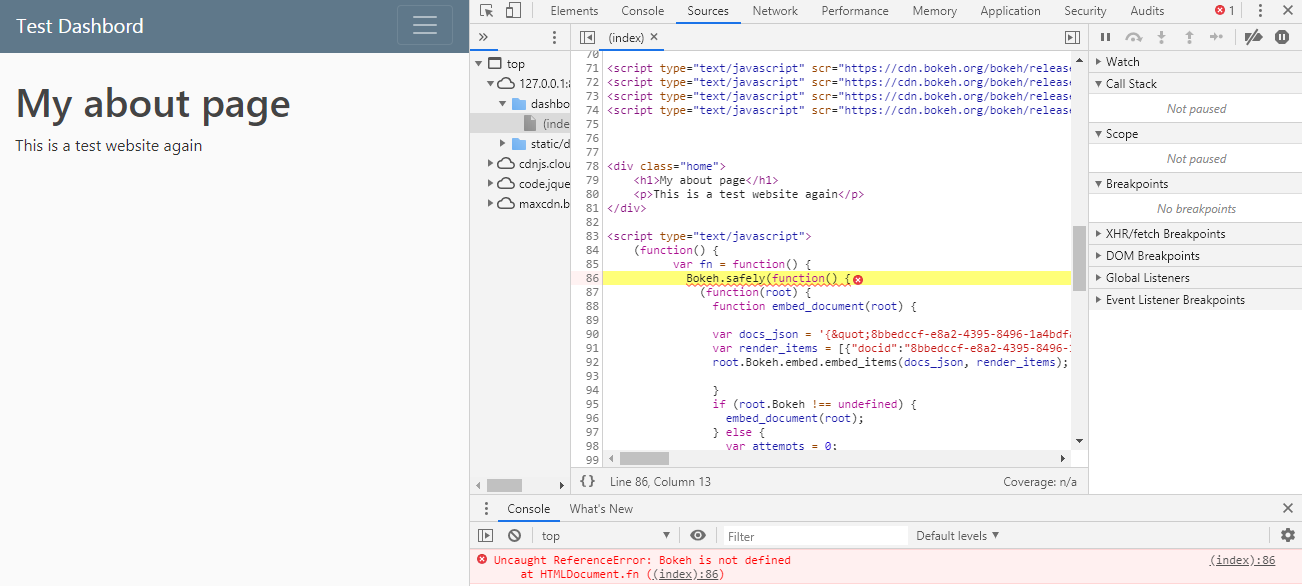
i am receiving following error.

Uncaught ReferenceError: Bokeh is not defined at HTMLDocument.fn

⌁   Link to post
Shubj
Shubj

Thanks for the reply.
View page Code:

from django.shortcuts import render
from django.http import HttpResponse

from bokeh.io import output_file, show
from bokeh.plotting import figure
from bokeh.embed import components
from bokeh.resources import CDN
from bokeh.models.widgets import Select
from bokeh.layouts import column, row,layout

def home(request):

	select = Select(title="Option:", value="foo", options=['Yes','no'])

	fruits = ['Apples', 'Pears', 'Nectarines', 'Plums', 'Grapes', 'Strawberries']
	counts = [5, 3, 4, 2, 4, 6]

	p = figure(x_range=fruits, plot_height=350, title="Fruit Counts",
           toolbar_location=None, tools="")

	p.vbar(x=fruits, top=counts, width=0.9)

	p.xgrid.grid_line_color = None
	p.y_range.start = 0


	lay_out = layout([select],[p])

	script, div = components(lay_out)
	cdn_js=CDN.js_files
	#cdn_css=CDN.css_files[0]


	return render(request,'demo_app/bokeh_cdn.html',{'title':'RPA','script': script, 'div':div,'cdn_js':cdn_js})

HTML Template:

{% extends "demo_app/base.html"%}

{%block content%}

<!--<script type="text/javascript" src={{cdn_js | safe}}></script>-->

<script type="text/javascript" scr="https://cdn.bokeh.org/bokeh/release/bokeh-2.0.2.min.js" ></script>
<script type="text/javascript" scr="https://cdn.bokeh.org/bokeh/release/bokeh-widgets-2.0.2.min.js" ></script>
<script type="text/javascript" scr="https://cdn.bokeh.org/bokeh/release/bokeh-tables-2.0.2.min.js" ></script>
<script type="text/javascript" scr="https://cdn.bokeh.org/bokeh/release/bokeh-api- 2.0.2.min.js" ></script>


<div class="home">
    <h1>My about page</h1>
    <p>This is a test website again</p>
</div>
{{script | safe}}
{{div | safe}}
{%endblock%}

⌁   Link to post
Shubj
Shubj

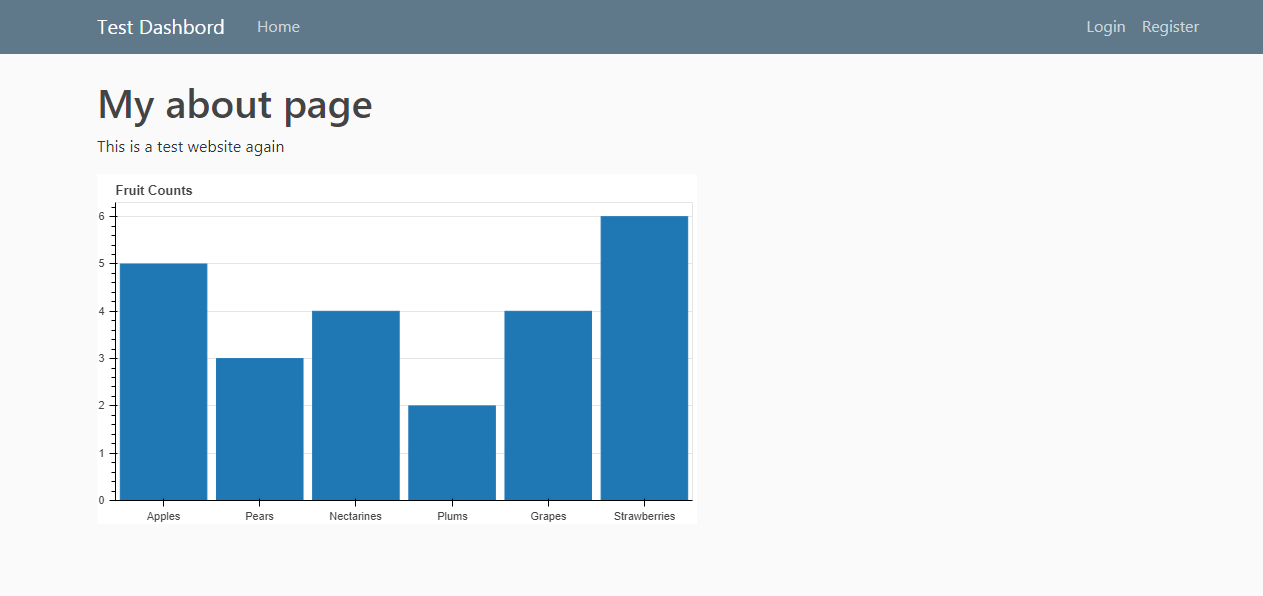
For graph only it is working:
View page Code:

from django.shortcuts import render
from django.http import HttpResponse

from bokeh.io import output_file, show
from bokeh.plotting import figure
from bokeh.embed import components
from bokeh.resources import CDN
from bokeh.models.widgets import Select
from bokeh.layouts import column, row,layout

def home(request):

	select = Select(title="Option:", value="foo", options=['Yes','no'])

	fruits = ['Apples', 'Pears', 'Nectarines', 'Plums', 'Grapes', 'Strawberries']
	counts = [5, 3, 4, 2, 4, 6]

	p = figure(x_range=fruits, plot_height=350, title="Fruit Counts",
           toolbar_location=None, tools="")

	p.vbar(x=fruits, top=counts, width=0.9)

	p.xgrid.grid_line_color = None
	p.y_range.start = 0


	lay_out = layout([p])

	script, div = components(lay_out)
	cdn_js=CDN.js_files[0]
	#cdn_css=CDN.css_files[0]


	return render(request,'demo_app/bokeh_cdn.html',{'title':'Test','script': script, 'div':div,'cdn_js':cdn_js})

HTML Code:

{%block content%}

<script type="text/javascript" src={{cdn_js | safe}}></script>

<div class="home">
    <h1>My about page</h1>
    <p>This is a test website again</p>
</div>
{{script | safe}}
{{div | safe}}
{%endblock%}

Output:

⌁   Link to post
p-himik
p-himik

You can just type Bokeh right at the prompt where you see the exceptions and hit Enter. But given your screenshot, it shouldn’t be defined.

Ah, I know what’s going on.
Take a really careful look at this line in your template, shortened for brevity and focus:

<script type="text/javascript" scr="..." ></script>

Do you see anything wrong with it?

⌁   Link to post
Shubj
Shubj

Hello,
Thanks for the help!!
I am generating Java script dynamically the Html code. It worked.
Html Code:

{% extends "demo_app/base.html"%}
{%block content%}
	{% for js in cdn_js%}
		<script type="text/javascript" src={{js | safe}}></script>
	{%endfor%}

<!--<script type="text/javascript" scr= "https://cdn.bokeh.org/bokeh/release/bokeh-2.0.2.min.js"></script>-->
										
<div class="home">


    <h1>My about page</h1>
    <p>This is a test website again</p>
</div>
{{script | safe}}
{{div | safe}}

{%endblock%}

⌁   Link to post
amitsandhel
amitsandhel

Hey

I know its a bit late but since your posting a chart in django I had previously written a little code to help people on how to embed it using json_item

Hope this helps

⌁   Link to post
Shubj
Shubj

Hello @p-himik,

I have successfully added the widgets to web page but it is not working,when I run the django server I receive the warning message on the terminal:

You are generating standalone HTML/JS output, but trying to use real Python
callbacks (i.e. with on_change or on_event). This combination cannot work.

Do I need to write Java script for it?
why on_change or on_event functions are not working as it is working on the bokeh sercer?

⌁   Link to post

End of archived discussion · Replies are disabled