Hi guys,
If I try to hide/show the sidebar, how do I handle it? can bokeh directly manipulate or modify .css file? thanks for any clue.
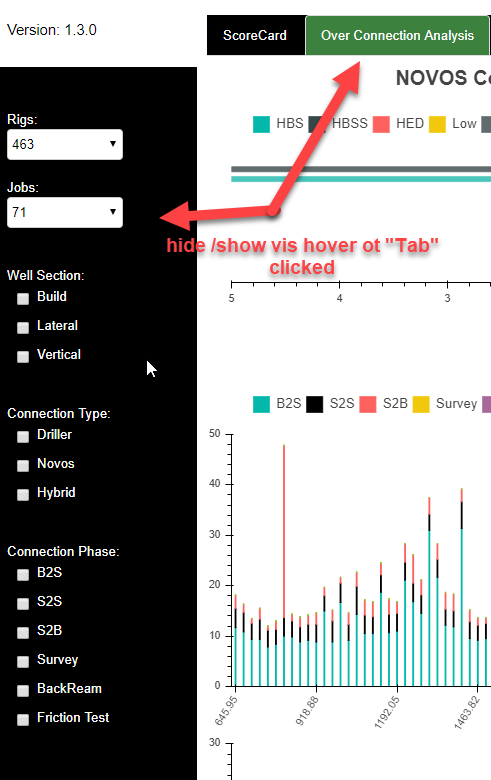
.py
…
uHelper.checkbox_group_1 = CheckboxGroup(labels=[""], \
active=, \
name = ‘’)
uHelper.checkbox_group_2 = CheckboxGroup(labels=[""], \
active=, \
name = ‘’)
uHelper.checkbox_group_3 = CheckboxGroup(labels=[""], \
active=, \
name = ‘’)
…
``
.html
…
.sidebarmenutoplayout {
background-color: white !important;
color: white;
}
.sidebarmenumiddlelayout:hover {
display: flex !important;
background-color: black !important;
color: white;
width: 200px !important;
height: 850px !important;
}
.sidebarmenumiddlelayout:focus {
display: flex !important;
background-color: black !important;
color: white;
width: 200px !important;
height: 850px !important;
}
.sidebarmenumiddlelayout:active {
display: flex !important;
background-color: black !important;
color: white;
width: 200px !important;
height: 850px !important;
}
.sidebarmenumiddlelayout {
display: none;
background-color: white !important;
color: white;
width: 200px !important;
height: 850px !important;
}
.menulayout:hover {
background-color: black !important;
display: block;
color: white;
text-align: initial;
width: 200px !important;
}
.menulayout:active {
background-color: black !important;
display: block;
color: white;
text-align: initial;
width: 200px !important;
}
.menulayout:focus {
background-color: black !important;
display: block;
color: white;
text-align: initial;
width: 200px !important;
}
.menulayout {
background-color: white !important;
display: block;
color: white;
text-align: initial;
width: 200px !important;
}
.sidebarlayout:hover {
text-align: left;
background-color: black;
width: 200px !important;
position: inherit !important;
}
.sidebarlayout:focus {
text-align: left;
background-color: black;
width: 200px !important;
position: inherit !important;
}
.sidebarlayout:active {
text-align: left;
background-color: black;
width: 200px !important;
position: inherit !important;
}
.sidebarlayout {
text-align: left;
background-color: white;
width: 200px !important;
position: inherit !important;
}
…
``
…
uHelper.menu_column_1_layout.css_classes = [“sidebarmenucombxlayout”]
uHelper.well_selection_layout = column(uHelper.m_well_selection, uHelper.checkbox_group_1)
uHelper.well_connection_layout = column(uHelper.m_well_connection, uHelper.checkbox_group_2)
uHelper.well_conn_phase_layout = column(uHelper.m_well_conn_phase, uHelper.checkbox_group_3)
uHelper.menu_column_2_layout = column(uHelper.well_selection_layout, uHelper.well_connection_layout, uHelper.well_conn_phase_layout)
uHelper.menu_column_2_layout.css_classes = [“sidebarmenucheckbxlayout”]
uHelper.menu_middle_layout = layout(column(uHelper.menu_column_1_layout, uHelper.menu_column_2_layout))
uHelper.menu_middle_layout.css_classes = [“sidebarmenumiddlelayout”]
uHelper.menu_top_layout = layout(column(uHelper.spacer_1, uHelper.version))
uHelper.menu_top_layout.css_classes = [“sidebarmenutoplayout”]
uHelper.menu_bottom_layout = layout(column(uHelper.spacer_2))
uHelper.menu_bottom_layout.css_classes = [“sidebarmenubottomlayout”]
…
``