How do I set the horizonal space between two Buttons with custom width in the same row?
The following code illustrates my problem:
from bokeh.models.widgets import Button
from bokeh.io import curdoc
from bokeh.layouts import row, column

btn1 = Button(label="A", width=280, height=10)
btn2 = Button(label="B", width=280, height=10)

btn3 = Button(label="C")
btn4 = Button(label="D")

curdoc().add_root(column(row(btn1, btn2),
                    row(btn3, btn4)))
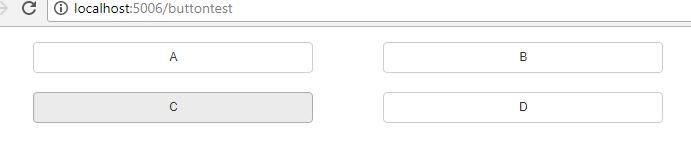
This code outputs the following page:
As you can see buttons C and D have a space between them, however buttons A and B do not.
How do I make room when setting the button width?
I tried to change the height of the buttons (suggested by this [past message](https://groups.google.com/a/continuum.io/forum/#!topic/bokeh/487aN2ahmZ8)) but nothing changed.
This correspondence (including any attachments) is for the intended recipient(s) only. It may contain confidential or privileged information or both. No confidentiality or privilege is waived or lost by any mis-transmission. If you receive this correspondence by mistake, please contact the sender immediately, delete this correspondence (and all attachments) and destroy any hard copies. You must not use, disclose, copy, distribute or rely on any part of this correspondence (including any attachments) if you are not the intended recipient(s).本メッセージに記載および添付されている情報(以下、総称して「本情報」といいます。)は、本来の受信者による使用のみを意図しています。誤送信等により本情報を取得された場合でも、本情報に係る秘密、または法律上の秘匿特権が失われるものではありません。本電子メールを受取られた方が、本来の受信者ではない場合には、本情報及びそのコピーすべてを削除・破棄し、本電子メールが誤って届いた旨を発信者宛てにご通知下さいますようお願いします。本情報の閲覧、発信または本情報に基づくいかなる行為も明確に禁止されていることをご了承ください。