
☰Read-only archive⌕
Looking for help with Bokeh?

This is a read-only archive. Ask questions and join the conversation on GitHub.

Visit Community Support on GitHub →
Archived discussions · Captured October 28, 2026

Image_url can resize PNG out of ratio but not SVG

Community Supportbokeh
Aziuth
Aziuth

I found a bug within image_url regarding how it resizes images.
When using a PNG image, it will work fine with any width and height you give it, displaying the picture like one would imagine.
However, when using an SVG file, it will always keep the ratio 1:1. When you have an SVG that contains a square, image_url will always display it as one, even if you set ‘w=1., h=2.’, which should produce a rectangle.

Code for an MRE:

from bokeh.plotting import figure, show
from bokeh.io import output_notebook 

output_notebook()

plot = figure(x_range=(0,100), y_range=(0,100))
plot.background_fill_color = "red"

plot.image_url(url=['test.png'], x=25, y=25, w=25, h=10)

plot.image_url(url=['test.svg'], x=75, y=75, w=25, h=10)

show(plot)

Results in:
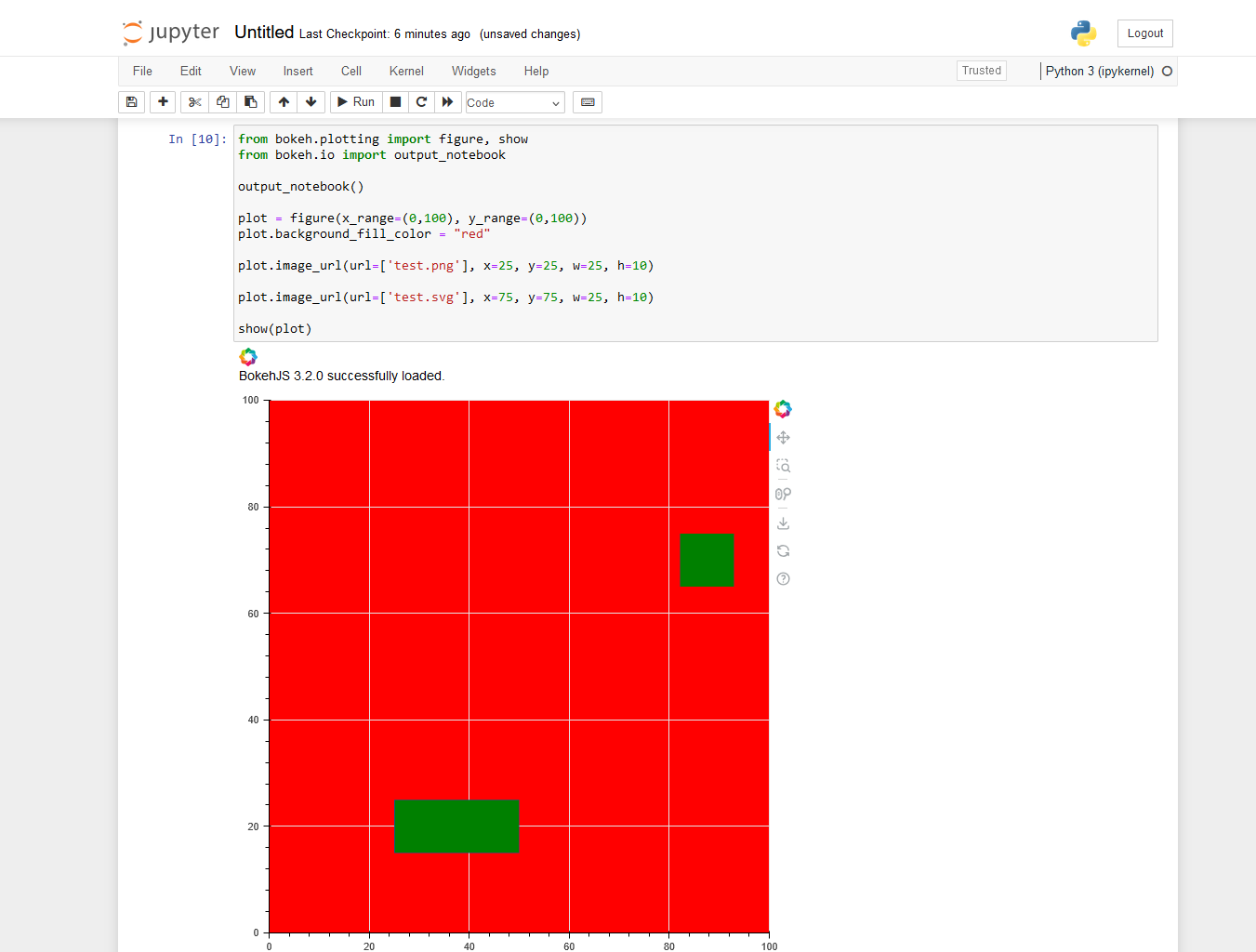
test.png and test.svg both contain a green square of dimensions 100x100 (or anything else that is square). The PNG file is the export of the SVG file. The viewing area of the SVG file is set to contain exactly the square.


⌁   Link to post
Aziuth
Aziuth

Also, something I noted is that an SVG is only rendered when the view is refreshed by executing code. It is, however, not re-rendered when the user zooms into the website, which then results in clearly visible pixels - exactly what one would want to avoid by using vector graphics.

I assume this is something that would be hard to fix?

⌁   Link to post
Bryan
Bryan

@Aziuth Please note to be an MRE, code has to be runnable, which not the case above, because it does have not working URLs.

image_url is an oddball glyph that different from almost every other glyph due to its external resource loading. It’s impossible to say whether a fix will be easy, or if its just an inherent limitation for SVGs that will need to be documented, without first investigating. In any case the right place for this is a GitHub Issue with full details.

⌁   Link to post
Bryan
Bryan

As it turns out, this is not in fact the case, and only certain square SVGs with specific properties elicit this behavior (which will just have to be documented, as it is out of our control to change).

⌁   Link to post
Aziuth
Aziuth

@Bryane I just read the Git and understand that this is a property within the SVG file and pretty much the desired behaviour.

Would not agree to “only certain square SVGs”, though. I started with a non-square picture of size 550x900. Had quite the debugging behind me because my canvas was almost of that size, and I tried to align circles with certain structures in the image and just couldn’t figure out why my coordinates are seemingly wrong, and why I did not had the problem when using the PNG export prior to that.

Knowing that this is in regard to a property in the file, I did a short look in how this is set in Inkscape. Turns out that this is not to be found in the Inkscape settings at all. The only way to do it there is to use the build-in XML editor and set the correct property manually. As such, the problem will not persist just in some small amount of SVGs but in every single one created in Inkscape, unless the creator knows exactly how to counter this manually.
And while I only took a look at Inkscape, I’d see it as possible that this is the same with other editors.
But I guess producing a warning message as suggested in the Git is a good solution from the side of Bokeh.

In any case, thank you for your time!

⌁   Link to post

End of archived discussion · Replies are disabled