
☰Read-only archive⌕
Looking for help with Bokeh?

This is a read-only archive. Ask questions and join the conversation on GitHub.

Visit Community Support on GitHub →
Archived discussions · Captured October 28, 2026

imported DataFrame (from excel) throws a value error

Community Support
Daniel_Krause
Daniel_Krause

Hi,

the following code was running under a previous version of bokeh (I think 0.11.something). With bokeh 0.12.2 it throws and error:

‘’’

Test case: An from Excel imported DataFrame throws an Error with bokeh 0.12.2.

‘’’

if name == ‘main’:

import pandas

from bokeh.io import output_server, show

from bokeh.charts import Line

import subprocess

import time

hdf_name = ‘test.xlsx’

excel_df = pandas.read_excel(io = hdf_name)

print(‘excel_df: \n{}’.format(excel_df))

args = [‘python’, ‘-m’, ‘bokeh’, ‘serve’]

p = subprocess.Popen(args)

time.sleep(1) # wait for the server to run

output_server(‘test’)

p1 = Line(excel_df, title=“DataFrame from Excel”)

show(p1)

Traceback (most recent call last):

File “C:\Users…\src\bokeh_tests\excel_io.py”, line 23, in

p1 = Line(excel_df, title=“DataFrame from Excel”)

File “C:\Python34\lib\site-packages\bokeh\charts\builders\line_builder.py”, line 88, in Line

return create_and_build(LineBuilder, data, **kws)

File “C:\Python34\lib\site-packages\bokeh\charts\builder.py”, line 68, in create_and_build

builder = builder_class(*data, **builder_kws)

File “C:\Python34\lib\site-packages\bokeh\charts\builder.py”, line 297, in init

attributes = self._setup_attrs(data, kws)

File “C:\Python34\lib\site-packages\bokeh\charts\builder.py”, line 329, in _setup_attrs

source = ColumnDataSource(data.df)

File “C:\Python34\lib\site-packages\bokeh\models\sources.py”, line 90, in init

self.add(data, name)

File “C:\Python34\lib\site-packages\bokeh\models\sources.py”, line 165, in add

self.column_names.append(name)

File “C:\Python34\lib\site-packages\bokeh\core\property_containers.py”, line 19, in wrapper

self._notify_owners(old)

File “C:\Python34\lib\site-packages\bokeh\core\property_containers.py”, line 44, in _notify_owners

prop._notify_mutated(owner, old, hint)

File “C:\Python34\lib\site-packages\bokeh\core\properties.py”, line 470, in _notify_mutated

value = self.descriptor.prepare_value(obj.class, self.name, value)

File “C:\Python34\lib\site-packages\bokeh\core\properties.py”, line 272, in prepare_value

raise e

File “C:\Python34\lib\site-packages\bokeh\core\properties.py”, line 265, in prepare_value

self.validate(value)

File “C:\Python34\lib\site-packages\bokeh\core\properties.py”, line 1062, in validate

raise ValueError(“expected an element of %s, got seq with invalid items %r” % (self, invalid))

ValueError: expected an element of List(String), got seq with invalid items [1]

2016-10-02 13:23:52,063 Starting Bokeh server version 0.12.2

2016-10-02 13:23:52,066 Starting Bokeh server on port 5006 with applications at paths [’/’]

I have a guess, that it might have something to do with the names of the columns. If I create the DataFrame manually like this:

d = {‘1’: [100,50,0],

‘2’: [0,50,100]}

df = pandas.DataFrame(data=d)

and use it to create the plot, the code is working.

Thanks

Daniel

⌁   Link to post
Daniel_Krause
Daniel_Krause

I forgot to attach the excel file…
It is attached now.

test.xlsx (5.6 KB)

···

2016-10-02 14:18 GMT+02:00 Daniel Krause m.daniel.krause@googlemail.com:

Hi,

the following code was running under a previous version of bokeh (I think 0.11.something). With bokeh 0.12.2 it throws and error:

‘’’

Test case: An from Excel imported DataFrame throws an Error with bokeh 0.12.2.

‘’’

if name == ‘main’:

import pandas

from bokeh.io import output_server, show

from bokeh.charts import Line

import subprocess

import time

hdf_name = ‘test.xlsx’

excel_df = pandas.read_excel(io = hdf_name)

print(‘excel_df: \n{}’.format(excel_df))

args = [‘python’, ‘-m’, ‘bokeh’, ‘serve’]

p = subprocess.Popen(args)

time.sleep(1) # wait for the server to run

output_server(‘test’)

p1 = Line(excel_df, title=“DataFrame from Excel”)

show(p1)

Traceback (most recent call last):

File “C:\Users.…\src\bokeh_tests\excel_io.py”, line 23, in

p1 = Line(excel_df, title=“DataFrame from Excel”)

File “C:\Python34\lib\site-packages\bokeh\charts\builders\line_builder.py”, line 88, in Line

return create_and_build(LineBuilder, data, **kws)

File “C:\Python34\lib\site-packages\bokeh\charts\builder.py”, line 68, in create_and_build

builder = builder_class(*data, **builder_kws)

File “C:\Python34\lib\site-packages\bokeh\charts\builder.py”, line 297, in init

attributes = self._setup_attrs(data, kws)

File “C:\Python34\lib\site-packages\bokeh\charts\builder.py”, line 329, in _setup_attrs

source = ColumnDataSource(data.df)

File “C:\Python34\lib\site-packages\bokeh\models\sources.py”, line 90, in init

self.add(data, name)

File “C:\Python34\lib\site-packages\bokeh\models\sources.py”, line 165, in add

self.column_names.append(name)

File “C:\Python34\lib\site-packages\bokeh\core\property_containers.py”, line 19, in wrapper

self._notify_owners(old)

File “C:\Python34\lib\site-packages\bokeh\core\property_containers.py”, line 44, in _notify_owners

prop._notify_mutated(owner, old, hint)

File “C:\Python34\lib\site-packages\bokeh\core\properties.py”, line 470, in _notify_mutated

value = self.descriptor.prepare_value(obj.class, self.name, value)

File “C:\Python34\lib\site-packages\bokeh\core\properties.py”, line 272, in prepare_value

raise e

File “C:\Python34\lib\site-packages\bokeh\core\properties.py”, line 265, in prepare_value

self.validate(value)

File “C:\Python34\lib\site-packages\bokeh\core\properties.py”, line 1062, in validate

raise ValueError(“expected an element of %s, got seq with invalid items %r” % (self, invalid))

ValueError: expected an element of List(String), got seq with invalid items [1]

2016-10-02 13:23:52,063 Starting Bokeh server version 0.12.2

2016-10-02 13:23:52,066 Starting Bokeh server on port 5006 with applications at paths [‘/’]

I have a guess, that it might have something to do with the names of the columns. If I create the DataFrame manually like this:

d = {‘1’: [100,50,0],

‘2’: [0,50,100]}

df = pandas.DataFrame(data=d)

and use it to create the plot, the code is working.

Thanks

Daniel
⌁   Link to post
Bryan
Bryan

Can you post df.head() or something? What are the column names and their types? I don’t have access to excel so it’s hard to say more without real examples.

Thanks,

Bryan

···

On Oct 2, 2016, at 07:18, ‘Daniel Krause’ via Bokeh Discussion - Public bokeh@continuum.io wrote:

Hi,

the following code was running under a previous version of bokeh (I think 0.11.something). With bokeh 0.12.2 it throws and error:

‘’’

Test case: An from Excel imported DataFrame throws an Error with bokeh 0.12.2.

‘’’

if name == ‘main’:

import pandas

from bokeh.io import output_server, show

from bokeh.charts import Line

import subprocess

import time

hdf_name = ‘test.xlsx’

excel_df = pandas.read_excel(io = hdf_name)

print(‘excel_df: \n{}’.format(excel_df))

args = [‘python’, ‘-m’, ‘bokeh’, ‘serve’]

p = subprocess.Popen(args)

time.sleep(1) # wait for the server to run

output_server(‘test’)

p1 = Line(excel_df, title=“DataFrame from Excel”)

show(p1)

Traceback (most recent call last):

File “C:\Users.…\src\bokeh_tests\excel_io.py”, line 23, in

p1 = Line(excel_df, title=“DataFrame from Excel”)

File “C:\Python34\lib\site-packages\bokeh\charts\builders\line_builder.py”, line 88, in Line

return create_and_build(LineBuilder, data, **kws)

File “C:\Python34\lib\site-packages\bokeh\charts\builder.py”, line 68, in create_and_build

builder = builder_class(*data, **builder_kws)

File “C:\Python34\lib\site-packages\bokeh\charts\builder.py”, line 297, in init

attributes = self._setup_attrs(data, kws)

File “C:\Python34\lib\site-packages\bokeh\charts\builder.py”, line 329, in _setup_attrs

source = ColumnDataSource(data.df)

File “C:\Python34\lib\site-packages\bokeh\models\sources.py”, line 90, in init

self.add(data, name)

File “C:\Python34\lib\site-packages\bokeh\models\sources.py”, line 165, in add

self.column_names.append(name)

File “C:\Python34\lib\site-packages\bokeh\core\property_containers.py”, line 19, in wrapper

self._notify_owners(old)

File “C:\Python34\lib\site-packages\bokeh\core\property_containers.py”, line 44, in _notify_owners

prop._notify_mutated(owner, old, hint)

File “C:\Python34\lib\site-packages\bokeh\core\properties.py”, line 470, in _notify_mutated

value = self.descriptor.prepare_value(obj.class, self.name, value)

File “C:\Python34\lib\site-packages\bokeh\core\properties.py”, line 272, in prepare_value

raise e

File “C:\Python34\lib\site-packages\bokeh\core\properties.py”, line 265, in prepare_value

self.validate(value)

File “C:\Python34\lib\site-packages\bokeh\core\properties.py”, line 1062, in validate

raise ValueError(“expected an element of %s, got seq with invalid items %r” % (self, invalid))

ValueError: expected an element of List(String), got seq with invalid items [1]

2016-10-02 13:23:52,063 Starting Bokeh server version 0.12.2

2016-10-02 13:23:52,066 Starting Bokeh server on port 5006 with applications at paths [‘/’]

I have a guess, that it might have something to do with the names of the columns. If I create the DataFrame manually like this:

d = {‘1’: [100,50,0],

‘2’: [0,50,100]}

df = pandas.DataFrame(data=d)

and use it to create the plot, the code is working.

Thanks

Daniel

–

You received this message because you are subscribed to the Google Groups “Bokeh Discussion - Public” group.

To unsubscribe from this group and stop receiving emails from it, send an email to bokeh+unsubscribe@continuum.io.

To post to this group, send email to bokeh@continuum.io.

To view this discussion on the web visit https://groups.google.com/a/continuum.io/d/msgid/bokeh/CAMiLiKg0piv4jyJWNCxzUzStotAiFdzMgYRwbk2RzPLmCY53mw%40mail.gmail.com.

For more options, visit https://groups.google.com/a/continuum.io/d/optout.

⌁   Link to post
Daniel_Krause
Daniel_Krause

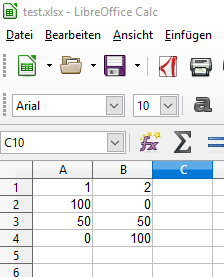
The complete dataframe with print():

1 2

0 100 0

1 50 50

2 0 100

The excel sheet looks like this:

Inline-Bild 1

Best regards

Daniel

···

2016-10-02 15:28 GMT+02:00 Bryan Van de Ven bryan@bokeh.org:

Can you post df.head() or something? What are the column names and their types? I don’t have access to excel so it’s hard to say more without real examples.

Thanks,

Bryan

On Oct 2, 2016, at 07:18, ‘Daniel Krause’ via Bokeh Discussion - Public bokeh@continuum.io wrote:

Hi,

the following code was running under a previous version of bokeh (I think 0.11.something). With bokeh 0.12.2 it throws and error:

‘’’

Test case: An from Excel imported DataFrame throws an Error with bokeh 0.12.2.

‘’’

if name == ‘main’:

import pandas

from bokeh.io import output_server, show

from bokeh.charts import Line

import subprocess

import time

hdf_name = ‘test.xlsx’

excel_df = pandas.read_excel(io = hdf_name)

print(‘excel_df: \n{}’.format(excel_df))

args = [‘python’, ‘-m’, ‘bokeh’, ‘serve’]

p = subprocess.Popen(args)

time.sleep(1) # wait for the server to run

output_server(‘test’)

p1 = Line(excel_df, title=“DataFrame from Excel”)

show(p1)

Traceback (most recent call last):

File “C:\Users.…\src\bokeh_tests\excel_io.py”, line 23, in

p1 = Line(excel_df, title=“DataFrame from Excel”)

File “C:\Python34\lib\site-packages\bokeh\charts\builders\line_builder.py”, line 88, in Line

return create_and_build(LineBuilder, data, **kws)

File “C:\Python34\lib\site-packages\bokeh\charts\builder.py”, line 68, in create_and_build

builder = builder_class(*data, **builder_kws)

File “C:\Python34\lib\site-packages\bokeh\charts\builder.py”, line 297, in init

attributes = self._setup_attrs(data, kws)

File “C:\Python34\lib\site-packages\bokeh\charts\builder.py”, line 329, in _setup_attrs

source = ColumnDataSource(data.df)

File “C:\Python34\lib\site-packages\bokeh\models\sources.py”, line 90, in init

self.add(data, name)

File “C:\Python34\lib\site-packages\bokeh\models\sources.py”, line 165, in add

self.column_names.append(name)

File “C:\Python34\lib\site-packages\bokeh\core\property_containers.py”, line 19, in wrapper

self._notify_owners(old)

File “C:\Python34\lib\site-packages\bokeh\core\property_containers.py”, line 44, in _notify_owners

prop._notify_mutated(owner, old, hint)

File “C:\Python34\lib\site-packages\bokeh\core\properties.py”, line 470, in _notify_mutated

value = self.descriptor.prepare_value(obj.class, self.name, value)

File “C:\Python34\lib\site-packages\bokeh\core\properties.py”, line 272, in prepare_value

raise e

File “C:\Python34\lib\site-packages\bokeh\core\properties.py”, line 265, in prepare_value

self.validate(value)

File “C:\Python34\lib\site-packages\bokeh\core\properties.py”, line 1062, in validate

raise ValueError(“expected an element of %s, got seq with invalid items %r” % (self, invalid))

ValueError: expected an element of List(String), got seq with invalid items [1]

2016-10-02 13:23:52,063 Starting Bokeh server version 0.12.2

2016-10-02 13:23:52,066 Starting Bokeh server on port 5006 with applications at paths [‘/’]

I have a guess, that it might have something to do with the names of the columns. If I create the DataFrame manually like this:

d = {‘1’: [100,50,0],

‘2’: [0,50,100]}

df = pandas.DataFrame(data=d)

and use it to create the plot, the code is working.

Thanks

Daniel

–

You received this message because you are subscribed to the Google Groups “Bokeh Discussion - Public” group.

To unsubscribe from this group and stop receiving emails from it, send an email to bokeh+unsubscribe@continuum.io.

To post to this group, send email to bokeh@continuum.io.

To view this discussion on the web visit https://groups.google.com/a/continuum.io/d/msgid/bokeh/CAMiLiKg0piv4jyJWNCxzUzStotAiFdzMgYRwbk2RzPLmCY53mw%40mail.gmail.com.

For more options, visit https://groups.google.com/a/continuum.io/d/optout.

–

You received this message because you are subscribed to the Google Groups “Bokeh Discussion - Public” group.

To unsubscribe from this group and stop receiving emails from it, send an email to bokeh+unsubscribe@continuum.io.

To post to this group, send email to bokeh@continuum.io.

To view this discussion on the web visit https://groups.google.com/a/continuum.io/d/msgid/bokeh/56233EEC-9960-4990-A21C-2FFDE95B41B1%40continuum.io.

For more options, visit https://groups.google.com/a/continuum.io/d/optout.

⌁   Link to post
Bryan
Bryan

What are the types of the column names? Are they actual integers? If so, that is the problem. Bokeh column data sources map string names to columns.

* It's possible that there is some pandas flag that will convert them to strings on creation

* It's possible that bokeh could could convert them (but it doesn't currently, open a feature request)

Thanks,

Bryan

···

On Oct 2, 2016, at 9:37 AM, 'Daniel Krause' via Bokeh Discussion - Public <bokeh@continuum.io> wrote:

The complete dataframe with print():

     1 2
0 100 0
1 50 50
2 0 100

The excel sheet looks like this:
<image.png>

Best regards
Daniel

2016-10-02 15:28 GMT+02:00 Bryan Van de Ven <bryan@bokeh.org>:
Can you post df.head() or something? What are the column names and their types? I don't have access to excel so it's hard to say more without real examples.

Thanks,

Bryan

On Oct 2, 2016, at 07:18, 'Daniel Krause' via Bokeh Discussion - Public <bokeh@continuum.io> wrote:

Hi,

the following code was running under a previous version of bokeh (I think 0.11.something). With bokeh 0.12.2 it throws and error:

'''
Test case: An from Excel imported DataFrame throws an Error with bokeh 0.12.2.
'''

if __name__ == '__main__':
    import pandas
    from bokeh.io import output_server, show
    from bokeh.charts import Line
    import subprocess
    import time
    
    hdf_name = 'test.xlsx'
    excel_df = pandas.read_excel(io = hdf_name)
    
    print('excel_df: \n{}'.format(excel_df))
    
    args = ['python', '-m', 'bokeh', 'serve']
    p = subprocess.Popen(args)
    
    time.sleep(1) # wait for the server to run
    output_server('test')

    p1 = Line(excel_df, title="DataFrame from Excel")
    show(p1)

Traceback (most recent call last):
  File "C:\Users\...\src\bokeh_tests\excel_io.py", line 23, in <module>
    p1 = Line(excel_df, title="DataFrame from Excel")
  File "C:\Python34\lib\site-packages\bokeh\charts\builders\line_builder.py", line 88, in Line
    return create_and_build(LineBuilder, data, **kws)
  File "C:\Python34\lib\site-packages\bokeh\charts\builder.py", line 68, in create_and_build
    builder = builder_class(*data, **builder_kws)
  File "C:\Python34\lib\site-packages\bokeh\charts\builder.py", line 297, in __init__
    attributes = self._setup_attrs(data, kws)
  File "C:\Python34\lib\site-packages\bokeh\charts\builder.py", line 329, in _setup_attrs
    source = ColumnDataSource(data.df)
  File "C:\Python34\lib\site-packages\bokeh\models\sources.py", line 90, in __init__
    self.add(data, name)
  File "C:\Python34\lib\site-packages\bokeh\models\sources.py", line 165, in add
    self.column_names.append(name)
  File "C:\Python34\lib\site-packages\bokeh\core\property_containers.py", line 19, in wrapper
    self._notify_owners(old)
  File "C:\Python34\lib\site-packages\bokeh\core\property_containers.py", line 44, in _notify_owners
    prop._notify_mutated(owner, old, hint)
  File "C:\Python34\lib\site-packages\bokeh\core\properties.py", line 470, in _notify_mutated
    value = self.descriptor.prepare_value(obj.__class__, self.name, value)
  File "C:\Python34\lib\site-packages\bokeh\core\properties.py", line 272, in prepare_value
    raise e
  File "C:\Python34\lib\site-packages\bokeh\core\properties.py", line 265, in prepare_value
    self.validate(value)
  File "C:\Python34\lib\site-packages\bokeh\core\properties.py", line 1062, in validate
    raise ValueError("expected an element of %s, got seq with invalid items %r" % (self, invalid))
ValueError: expected an element of List(String), got seq with invalid items [1]
2016-10-02 13:23:52,063 Starting Bokeh server version 0.12.2
2016-10-02 13:23:52,066 Starting Bokeh server on port 5006 with applications at paths ['/']

I have a guess, that it might have something to do with the names of the columns. If I create the DataFrame manually like this:

    d = {'1': [100,50,0],
        '2': [0,50,100]}
    df = pandas.DataFrame(data=d)

and use it to create the plot, the code is working.

Thanks
Daniel

--
You received this message because you are subscribed to the Google Groups "Bokeh Discussion - Public" group.
To unsubscribe from this group and stop receiving emails from it, send an email to bokeh+unsubscribe@continuum.io.
To post to this group, send email to bokeh@continuum.io.
To view this discussion on the web visit https://groups.google.com/a/continuum.io/d/msgid/bokeh/CAMiLiKg0piv4jyJWNCxzUzStotAiFdzMgYRwbk2RzPLmCY53mw%40mail.gmail.com\.
For more options, visit https://groups.google.com/a/continuum.io/d/optout\.

--
You received this message because you are subscribed to the Google Groups "Bokeh Discussion - Public" group.
To unsubscribe from this group and stop receiving emails from it, send an email to bokeh+unsubscribe@continuum.io.
To post to this group, send email to bokeh@continuum.io.
To view this discussion on the web visit https://groups.google.com/a/continuum.io/d/msgid/bokeh/56233EEC-9960-4990-A21C-2FFDE95B41B1%40continuum.io\.
For more options, visit https://groups.google.com/a/continuum.io/d/optout\.

--
You received this message because you are subscribed to the Google Groups "Bokeh Discussion - Public" group.
To unsubscribe from this group and stop receiving emails from it, send an email to bokeh+unsubscribe@continuum.io.
To post to this group, send email to bokeh@continuum.io.
To view this discussion on the web visit https://groups.google.com/a/continuum.io/d/msgid/bokeh/CAMiLiKh3e2yquz3N6J_2cktX2aJ3VdzxiGWr25qzX6BYVDD%3DFg%40mail.gmail.com\.
For more options, visit https://groups.google.com/a/continuum.io/d/optout\.

⌁   Link to post
will.kew
will.kew

Thats the issue - column headers are integers. Changing it to “1” and “2” in excel forces pandas to read as strings, and it works. Rename the column headers?

···

On Sunday, October 2, 2016 at 6:11:47 PM UTC+1, Bryan Van de ven wrote:

What are the types of the column names? Are they actual integers? If so, that is the problem. Bokeh column data sources map string names to columns.

  • It’s possible that there is some pandas flag that will convert them to strings on creation

  • It’s possible that bokeh could could convert them (but it doesn’t currently, open a feature request)

Thanks,

Bryan

On Oct 2, 2016, at 9:37 AM, ‘Daniel Krause’ via Bokeh Discussion - Public bo...@continuum.io wrote:

The complete dataframe with print():

 1    2

0 100 0

1 50 50

2 0 100

The excel sheet looks like this:

<image.png>

Best regards

Daniel

2016-10-02 15:28 GMT+02:00 Bryan Van de Ven bry...@continuum.io:

Can you post df.head() or something? What are the column names and their types? I don’t have access to excel so it’s hard to say more without real examples.

Thanks,

Bryan

On Oct 2, 2016, at 07:18, ‘Daniel Krause’ via Bokeh Discussion - Public bo...@continuum.io wrote:

Hi,

the following code was running under a previous version of bokeh (I think 0.11.something). With bokeh 0.12.2 it throws and error:

‘’’

Test case: An from Excel imported DataFrame throws an Error with bokeh 0.12.2.

‘’’

if name == ‘main’:

import pandas
from [bokeh.io](http://bokeh.io) import output_server, show
from bokeh.charts import Line
import subprocess
import time
hdf_name = 'test.xlsx'
excel_df = pandas.read_excel(io = hdf_name)
print('excel_df: \n{}'.format(excel_df))
args = ['python', '-m', 'bokeh', 'serve']
p = subprocess.Popen(args)

time.sleep(1) # wait for the server to run
output_server('test')
p1 = Line(excel_df, title="DataFrame from Excel")
show(p1)

Traceback (most recent call last):

File “C:\Users.…\src\bokeh_tests\excel_io.py”, line 23, in

p1 = Line(excel_df, title="DataFrame from Excel")

File “C:\Python34\lib\site-packages\bokeh\charts\builders\line_builder.py”, line 88, in Line

return create_and_build(LineBuilder, data, **kws)

File “C:\Python34\lib\site-packages\bokeh\charts\builder.py”, line 68, in create_and_build

builder = builder_class(*data, **builder_kws)

File “C:\Python34\lib\site-packages\bokeh\charts\builder.py”, line 297, in init

attributes = self._setup_attrs(data, kws)

File “C:\Python34\lib\site-packages\bokeh\charts\builder.py”, line 329, in _setup_attrs

source = ColumnDataSource(data.df)

File “C:\Python34\lib\site-packages\bokeh\models\sources.py”, line 90, in init

self.add(data, name)

File “C:\Python34\lib\site-packages\bokeh\models\sources.py”, line 165, in add

self.column_names.append(name)

File “C:\Python34\lib\site-packages\bokeh\core\property_containers.py”, line 19, in wrapper

self._notify_owners(old)

File “C:\Python34\lib\site-packages\bokeh\core\property_containers.py”, line 44, in _notify_owners

prop._notify_mutated(owner, old, hint)

File “C:\Python34\lib\site-packages\bokeh\core\properties.py”, line 470, in _notify_mutated

value = self.descriptor.prepare_value(obj.__class__, [self.name](http://self.name), value)

File “C:\Python34\lib\site-packages\bokeh\core\properties.py”, line 272, in prepare_value

raise e

File “C:\Python34\lib\site-packages\bokeh\core\properties.py”, line 265, in prepare_value

self.validate(value)

File “C:\Python34\lib\site-packages\bokeh\core\properties.py”, line 1062, in validate

raise ValueError("expected an element of %s, got seq with invalid items %r" % (self, invalid))

ValueError: expected an element of List(String), got seq with invalid items [1]

2016-10-02 13:23:52,063 Starting Bokeh server version 0.12.2

2016-10-02 13:23:52,066 Starting Bokeh server on port 5006 with applications at paths [‘/’]

I have a guess, that it might have something to do with the names of the columns. If I create the DataFrame manually like this:

d = {'1': [100,50,0],
    '2': [0,50,100]}
df = pandas.DataFrame(data=d)

and use it to create the plot, the code is working.

Thanks

Daniel

–
You received this message because you are subscribed to the Google Groups “Bokeh Discussion - Public” group.

To unsubscribe from this group and stop receiving emails from it, send an email to bokeh+un...@continuum.io.

To post to this group, send email to bo...@continuum.io.

To view this discussion on the web visit https://groups.google.com/a/continuum.io/d/msgid/bokeh/CAMiLiKg0piv4jyJWNCxzUzStotAiFdzMgYRwbk2RzPLmCY53mw%40mail.gmail.com.

For more options, visit https://groups.google.com/a/continuum.io/d/optout.

–
You received this message because you are subscribed to the Google Groups “Bokeh Discussion - Public” group.

To unsubscribe from this group and stop receiving emails from it, send an email to bokeh+un...@continuum.io.

To post to this group, send email to bo...@continuum.io.

To view this discussion on the web visit https://groups.google.com/a/continuum.io/d/msgid/bokeh/56233EEC-9960-4990-A21C-2FFDE95B41B1%40continuum.io.

For more options, visit https://groups.google.com/a/continuum.io/d/optout.

–
You received this message because you are subscribed to the Google Groups “Bokeh Discussion - Public” group.

To unsubscribe from this group and stop receiving emails from it, send an email to bokeh+un...@continuum.io.

To post to this group, send email to bo...@continuum.io.

To view this discussion on the web visit https://groups.google.com/a/continuum.io/d/msgid/bokeh/CAMiLiKh3e2yquz3N6J_2cktX2aJ3VdzxiGWr25qzX6BYVDD%3DFg%40mail.gmail.com.

For more options, visit https://groups.google.com/a/continuum.io/d/optout.

⌁   Link to post
Daniel_Krause
Daniel_Krause

Thanks for the input.

@Will: Yes, if one is creating the excel files, it is definitely an option to define the columns names as strings instead integers.

In my case I do not control the source of the excel files, so I have to deal with anything that is provided…

I changed the code and use now a try-except clause to catch the value error:

if name == ‘main’:

import pandas

from bokeh.io import output_server, show

from bokeh.charts import Line

import subprocess

import time

hdf_name = ‘test.xlsx’

excel_df = pandas.read_excel(io = hdf_name)

print(‘excel_df: \n{}’.format(excel_df))

args = [‘python’, ‘-m’, ‘bokeh’, ‘serve’]

p = subprocess.Popen(args)

time.sleep(1) # wait for the server to run

output_server(‘test’)

try:

p1 = Line(excel_df, title=“DataFrame from Excel”)

except ValueError as e: # raised if column values are e.g. integers

print(‘ValueError on column_values: \n{}’.format(excel_df.columns.values))

column_values = [str(i) for i in excel_df.columns.values] # make strings

excel_df = pandas.DataFrame(data = excel_df.values, columns = column_values)

print(‘Converted column_values to strings: \n{}’.format(excel_df.columns.values))

p1 = Line(excel_df, title=“DataFrame from Excel”)

show(p1)

Output:

excel_df:

1 2

0 100 0

1 50 50

2 0 100

column_values before ValueError:

[1 2]

column_values as strings:

[‘1’ ‘2’]

2016-10-04 18:50:43,656 Starting Bokeh server version 0.12.2

2016-10-04 18:50:43,664 Starting Bokeh server on port 5006 with applications at paths [‘/’]

2016-10-04 18:50:43,664 Starting Bokeh server with process id: 9260

2016-10-04 18:50:43,711 WebSocket connection opened

2016-10-04 18:50:43,712 ServerConnection created

2016-10-04 18:50:43,834 WebSocket connection closed: code=1000, reason=‘closed’

INFO:bokeh.client._connection:Connection closed by server

2016-10-04 18:50:44,092 200 GET /?bokeh-session-id=test (::1) 13.01ms

2016-10-04 18:50:44,770 WebSocket connection opened

2016-10-04 18:50:44,770 ServerConnection created

@Bryan:

I opened a feature request: https://github.com/bokeh/bokeh/issues/5285

Best regards

Daniel

···

2016-10-02 20:20 GMT+02:00 will.kew@gmail.com:

Thats the issue - column headers are integers. Changing it to “1” and “2” in excel forces pandas to read as strings, and it works. Rename the column headers?

On Sunday, October 2, 2016 at 6:11:47 PM UTC+1, Bryan Van de ven wrote:

What are the types of the column names? Are they actual integers? If so, that is the problem. Bokeh column data sources map string names to columns.

  • It’s possible that there is some pandas flag that will convert them to strings on creation

  • It’s possible that bokeh could could convert them (but it doesn’t currently, open a feature request)

Thanks,

Bryan

On Oct 2, 2016, at 9:37 AM, ‘Daniel Krause’ via Bokeh Discussion - Public bo...@continuum.io wrote:

The complete dataframe with print():

 1    2

0 100 0

1 50 50

2 0 100

The excel sheet looks like this:

<image.png>

Best regards

Daniel

2016-10-02 15:28 GMT+02:00 Bryan Van de Ven bry...@continuum.io:

Can you post df.head() or something? What are the column names and their types? I don’t have access to excel so it’s hard to say more without real examples.

Thanks,

Bryan

On Oct 2, 2016, at 07:18, ‘Daniel Krause’ via Bokeh Discussion - Public bo...@continuum.io wrote:

Hi,

the following code was running under a previous version of bokeh (I think 0.11.something). With bokeh 0.12.2 it throws and error:

‘’’

Test case: An from Excel imported DataFrame throws an Error with bokeh 0.12.2.

‘’’

if name == ‘main’:

import pandas
from [bokeh.io](http://bokeh.io) import output_server, show
from bokeh.charts import Line
import subprocess
import time
hdf_name = 'test.xlsx'
excel_df = pandas.read_excel(io = hdf_name)
print('excel_df: \n{}'.format(excel_df))
args = ['python', '-m', 'bokeh', 'serve']
p = subprocess.Popen(args)

time.sleep(1) # wait for the server to run
output_server('test')
p1 = Line(excel_df, title="DataFrame from Excel")
show(p1)

Traceback (most recent call last):

File “C:\Users.…\src\bokeh_tests\excel_io.py”, line 23, in

p1 = Line(excel_df, title="DataFrame from Excel")

File “C:\Python34\lib\site-packages\bokeh\charts\builders\line_builder.py”, line 88, in Line

return create_and_build(LineBuilder, data, **kws)

File “C:\Python34\lib\site-packages\bokeh\charts\builder.py”, line 68, in create_and_build

builder = builder_class(*data, **builder_kws)

File “C:\Python34\lib\site-packages\bokeh\charts\builder.py”, line 297, in init

attributes = self._setup_attrs(data, kws)

File “C:\Python34\lib\site-packages\bokeh\charts\builder.py”, line 329, in _setup_attrs

source = ColumnDataSource(data.df)

File “C:\Python34\lib\site-packages\bokeh\models\sources.py”, line 90, in init

self.add(data, name)

File “C:\Python34\lib\site-packages\bokeh\models\sources.py”, line 165, in add

self.column_names.append(name)

File “C:\Python34\lib\site-packages\bokeh\core\property_containers.py”, line 19, in wrapper

self._notify_owners(old)

File “C:\Python34\lib\site-packages\bokeh\core\property_containers.py”, line 44, in _notify_owners

prop._notify_mutated(owner, old, hint)

File “C:\Python34\lib\site-packages\bokeh\core\properties.py”, line 470, in _notify_mutated

value = self.descriptor.prepare_value(obj.__class__, [self.name](http://self.name), value)

File “C:\Python34\lib\site-packages\bokeh\core\properties.py”, line 272, in prepare_value

raise e

File “C:\Python34\lib\site-packages\bokeh\core\properties.py”, line 265, in prepare_value

self.validate(value)

File “C:\Python34\lib\site-packages\bokeh\core\properties.py”, line 1062, in validate

raise ValueError("expected an element of %s, got seq with invalid items %r" % (self, invalid))

ValueError: expected an element of List(String), got seq with invalid items [1]

2016-10-02 13:23:52,063 Starting Bokeh server version 0.12.2

2016-10-02 13:23:52,066 Starting Bokeh server on port 5006 with applications at paths [‘/’]

I have a guess, that it might have something to do with the names of the columns. If I create the DataFrame manually like this:

d = {'1': [100,50,0],
    '2': [0,50,100]}
df = pandas.DataFrame(data=d)

and use it to create the plot, the code is working.

Thanks

Daniel

–
You received this message because you are subscribed to the Google Groups “Bokeh Discussion - Public” group.

To unsubscribe from this group and stop receiving emails from it, send an email to bokeh+un...@continuum.io.

To post to this group, send email to bo...@continuum.io.

To view this discussion on the web visit https://groups.google.com/a/continuum.io/d/msgid/bokeh/CAMiLiKg0piv4jyJWNCxzUzStotAiFdzMgYRwbk2RzPLmCY53mw%40mail.gmail.com.

For more options, visit https://groups.google.com/a/continuum.io/d/optout.

–
You received this message because you are subscribed to the Google Groups “Bokeh Discussion - Public” group.

To unsubscribe from this group and stop receiving emails from it, send an email to bokeh+un...@continuum.io.

To post to this group, send email to bo...@continuum.io.

To view this discussion on the web visit https://groups.google.com/a/continuum.io/d/msgid/bokeh/56233EEC-9960-4990-A21C-2FFDE95B41B1%40continuum.io.

For more options, visit https://groups.google.com/a/continuum.io/d/optout.

–
You received this message because you are subscribed to the Google Groups “Bokeh Discussion - Public” group.

To unsubscribe from this group and stop receiving emails from it, send an email to bokeh+un...@continuum.io.

To post to this group, send email to bo...@continuum.io.

To view this discussion on the web visit https://groups.google.com/a/continuum.io/d/msgid/bokeh/CAMiLiKh3e2yquz3N6J_2cktX2aJ3VdzxiGWr25qzX6BYVDD%3DFg%40mail.gmail.com.

For more options, visit https://groups.google.com/a/continuum.io/d/optout.

–

You received this message because you are subscribed to the Google Groups “Bokeh Discussion - Public” group.

To unsubscribe from this group and stop receiving emails from it, send an email to bokeh+unsubscribe@continuum.io.

To post to this group, send email to bokeh@continuum.io.

To view this discussion on the web visit https://groups.google.com/a/continuum.io/d/msgid/bokeh/67de6046-1793-430e-a9db-d9e93528f7ea%40continuum.io.

For more options, visit https://groups.google.com/a/continuum.io/d/optout.

⌁   Link to post

End of archived discussion · Replies are disabled