
Is is possible to change the z-order of glyph so that the interactively-editing one can be moved to top? For example:
import bokeh.plotting as bpl
bpl.output_notebook()

import numpy as np

from bokeh.layouts import gridplot
from bokeh.plotting import figure, show
from bokeh.models import Select, ColorPicker
from bokeh.layouts import column
from bokeh.models import CustomJS

x = np.linspace(0, 4*np.pi, 100)
y = np.sin(x)

TOOLS = "pan,wheel_zoom,box_zoom,reset,save,box_select"

p1 = figure(title="Legend Example", tools=TOOLS)

g1 = p1.circle(x,   y, radius=1, legend_label="sin(x)").glyph
g2 = p1.circle(x, 2*y, radius=1, legend_label="2*sin(x)", color="orange").glyph

circle_colorpicker = ColorPicker(title="Circle Color", color="orange")
# need a js callback to move the modifying render to the top of glyph.renderers
circle_colorpicker.js_link("color", g1, "fill_color")

show(column(p1, circle_colorpicker))
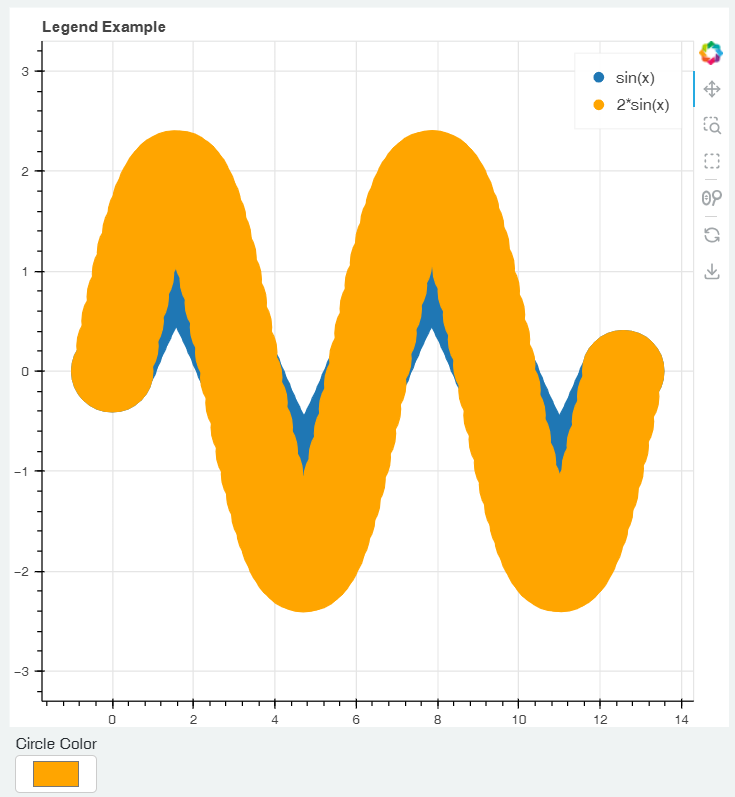
I wish the moment I set a color for sinx, it can move to top, instead of being covered by 2sinx

