

Hi bokeh community,
Here is my case: I created a DataTable to only show one number. And I use a select tool to control the value that is showing in the table. Below is the MRC.
import pandas as pd
import numpy as np
from bokeh.models import ColumnDataSource, TableColumn, DataTable,HTMLTemplateFormatter, Select, CustomJS
from bokeh.plotting import figure, output_notebook, show
from bokeh.layouts import row, column
output_notebook()

t = pd.DataFrame(np.array([[100,40,50]]),columns=['A','B','C'])

t_source = ColumnDataSource(t)

template1="""<div style="font-size: 36px; color: lightslategray; font-weight: bold; padding-top: 0px; border: 0px; line-height: 75px;"> <%= value %> </div>"""

cols1 = TableColumn(field='A', width=50, formatter=HTMLTemplateFormatter(template=template1), sortable=False, title=None)
data_table1 = DataTable(source=t_source, columns=[cols1], height = 150, width = 150, row_height=75, index_position=None)

#JS select dropdown box callback
stage_menu = ["A","B","C"]
select = Select(value = 'A', options=stage_menu, width=150)

code = '''
         //callbacks for data_table1
         cols1.field = select.value
         cols1.change.emit()
         data_table1.change.emit()
       '''
select_cb = CustomJS(args=dict(cols1=cols1,data_table1=data_table1,select=select),code=code)
select.js_on_change('value', select_cb)

show(column(select,data_table1))
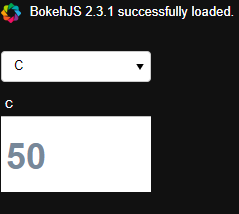
Is there a way to hide the table title? Like the ‘C’ showing in the screenshot. I tried different ways. even set title=‘’ which will make title text gone but still shows a white block when your mouse over it.
Thanks for your help!!!

