

Hi all,
I have an issue with MultiLines plotting at low resolution (think Microsoft Paint). It isn’t a constant issue, but is bothering nonetheless. The first two figures below are both created in the exact same way (they use the same function), the only difference is in the top figure (the fuzzy one) only the endpoints are provided (T1 and T2), whereas the bottom figure contains the interpolated points (100 points between T1 and T2). I don’t see why this difference would have an impact on the line resolution, so if anyone has some tips I’d really appreciate it.
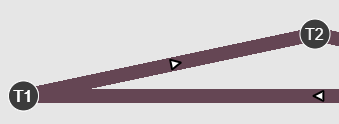

If needed I can provide more of the code, but here is the basic call that both figures use:
    p = figure(tools=TOOLS, plot_width=plot_width, plot_height=plot_height, x_range=x_range, y_range=y_range,
               toolbar_location=None, sizing_mode='scale_width', aspect_scale=1, css_classes=['schematic'],
               name='schematic')

    # schematic
    g1 = p.multi_line('x', 'y', source=source, line_color=mapper, line_width=line_width, alpha=line_alpha)

    selected1 = MultiLine(line_alpha=line_alpha, line_color=mapper, line_width=line_width)
    nonselected1 = MultiLine(line_alpha=line_alpha, line_color=mapper, line_width=line_width)

    g1.selection_glyph = selected1
    g1.nonselection_glyph = nonselected1

    p.background_fill_color = None
    p.border_fill_color = None
    p.outline_line_color = None

    p.axis.visible = False
    p.xgrid.grid_line_color = None
    p.ygrid.grid_line_color = None

