

☰Read-only archive⌕
Looking for help with Bokeh?

This is a read-only archive. Ask questions and join the conversation on GitHub.

Visit Community Support on GitHub →
Archived discussions · Captured October 28, 2026

Manually trigger hover tool with ColumnDataSource selected indices

Community Support
russellburdt
russellburdt

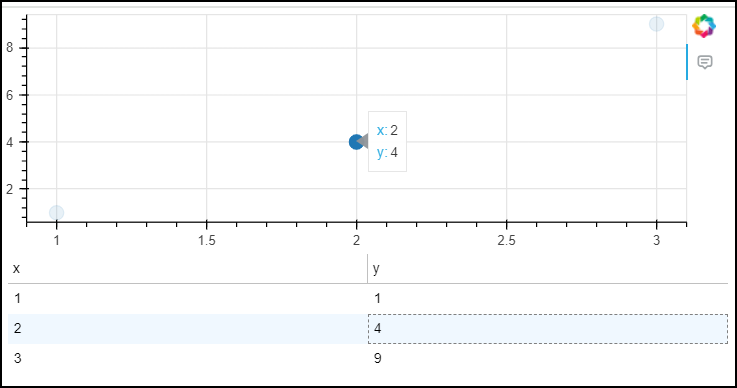
Is it possible to manually trigger a hover tool within bokeh? A minimal example is below. I’d like the application to show the tooltip (as if hovering over the data point with the mouse) when the corresponding row in the DataTable is selected. The use case is to display additional information in the tooltip that is not in the table. Thank you!

from bokeh.plotting import figure
from bokeh.models import ColumnDataSource, HoverTool, DataTable, TableColumn
from bokeh.layouts import column
from bokeh.io import curdoc

cds = ColumnDataSource(data={'x': [1,2,3], 'y': [1,4,9]})

hover = HoverTool()
hover.tooltips = [('x', '@x'), ('y', '@y')]

fig = figure(width=600, height=200, tools=[hover])
fig.scatter('x', 'y', marker='circle', size=12, source=cds)

cx = TableColumn(width=300, field='x')
cy = TableColumn(width=300, field='y')
table = DataTable(width=600, height=200, index_position=None, columns=[cx, cy], source=cds)

curdoc().add_root(column(fig, table))

The result would appear as in the screenshot, but would not require actually hovering over the data point with the mouse.

⌁   Link to post
Bryan
Bryan

There’s not any especially good way to trigger HoverTool tooltips programmatically at the present time. [1]. Ostensibly this could be accomplished with the recently added Tooltip support, since they are supposed to be attachable to arbitrary UI elements. But I am not aware of a good example of adding them to a plot. I’d suggest opening a GitHub development discussion specifically about that topic, as I can ping some other folks more involved in the development of this feature more easily there.


  1. I won’t say it’s impossible, since a CustomJS callback could in principle do much of what the HoverTool itself does, but all I can advise in that direction is to go study the HoverTool (TypeScript) source code for inspiration. ↩︎

⌁   Link to post
Bryan
Bryan

HI @russellburdt sure if you don’t need some of the features specific to tooltips (e.g. little arrow “anchors”, etc) then text renderers are definitely an options. I might suggest you also look at the text glyph, it recently had many of the features of labels added to it, for example:

Add support for background, border, padding, border radius and anchor to `Text` glyph by mattpap · Pull Request #12655 · bokeh/bokeh · GitHub

For historical reasons, Bokeh has an over-abundance of different, overlapping text renderers, and over time we hope to consolidate down to maybe just the text glyph (we’d like to get to a point where annotation is “something you do with standard glyphs” instead of “a set of different special objects”)

⌁   Link to post

End of archived discussion · Replies are disabled
