

☰Read-only archive⌕
Looking for help with Bokeh?

This is a read-only archive. Ask questions and join the conversation on GitHub.

Visit Community Support on GitHub →
Archived discussions · Captured October 28, 2026

Minimum Vbar Width for hovering over it

Community Support
Andrea_Ciufo
Andrea_Ciufo

I am creating a Vertical Bar based on my time records during the 2018.

I was creating a Vertical Bar

hover_2=HoverTool(tooltips=[(‘main activity’,’@main_activity’),(‘Count’,’@Count’),(‘Date’,’@Date{%F}’)], formatters={

‘Date’ : ‘datetime’})

plot=figure(title=‘Daily Hours’,tools=[hover_2,‘pan’,‘wheel_zoom’],plot_width=400, plot_height=400,x_range=(xrange), y_range=(yrange))

plot.vbar(x=“Date”, top=“Count”,source=source, width=1000000)

``

What I have discovered that in a time span of 365 days (1Y)

I can hover and get the required information only if the width is at least “1000000”

With Smaller Values I am not able to hover over the graph.

The first example is with a width value of 1.5.

1.5.PNG

The second example is with a width value of 1000000

10000Python.PNG

  1. Why this kind of behavior?
  2. How to know the minimal width?
⌁   Link to post
Bryan
Bryan

Hi,

Please see this SO answer:

  python - Bokeh: The widths of vertical bars doesn't change - Stack Overflow

Thanks,

Bryan

···

On Feb 20, 2019, at 07:42, Andrea Ciufo <andciufo@gmail.com> wrote:

I am creating a Vertical Bar based on my time records during the 2018.

I was creating a Vertical Bar
hover_2=HoverTool(tooltips=[('main activity','@main_activity'),('Count','@Count'),('Date','@Date{%F}')], formatters={
        'Date' : 'datetime'})
    plot=figure(title='Daily Hours',tools=[hover_2,'pan','wheel_zoom'],plot_width=400, plot_height=400,x_range=(xrange), y_range=(yrange))
    plot.vbar(x="Date", top="Count",source=source, width=1000000)

What I have discovered that in a time span of 365 days (1Y)
I can hover and get the required information only if the width is at least "1000000"

With Smaller Values I am not able to hover over the graph.
The first example is with a width value of 1.5.
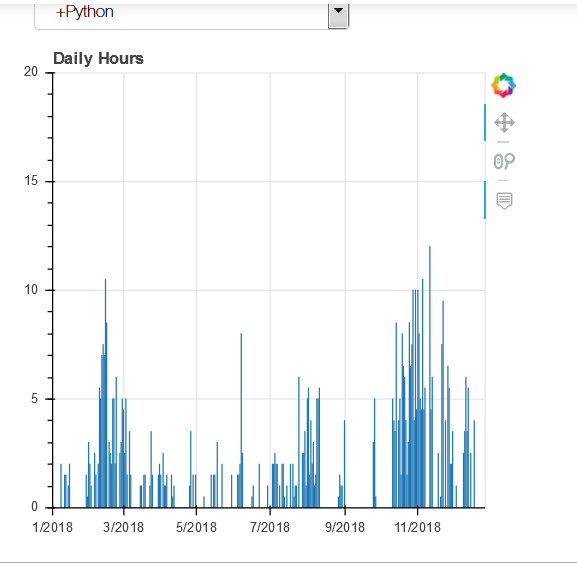
<1.5.PNG>

The second example is with a width value of 1000000
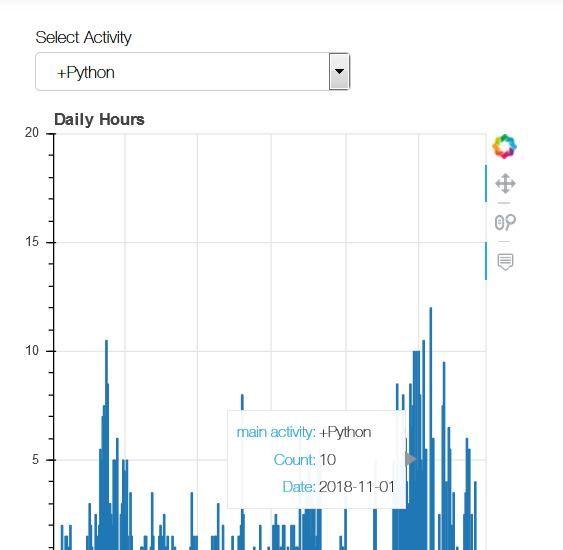
<10000Python.PNG>

  • Why this kind of behavior?
  • How to know the minimal width?

--
You received this message because you are subscribed to the Google Groups "Bokeh Discussion - Public" group.
To unsubscribe from this group and stop receiving emails from it, send an email to bokeh+unsubscribe@continuum.io.
To post to this group, send email to bokeh@continuum.io.
To view this discussion on the web visit https://groups.google.com/a/continuum.io/d/msgid/bokeh/e9590e50-daf8-4a49-82c9-945092f1a340%40continuum.io\.
For more options, visit https://groups.google.com/a/continuum.io/d/optout\.
<1.5.PNG><10000Python.PNG>

⌁   Link to post

End of archived discussion · Replies are disabled

