
☰Read-only archive⌕
Looking for help with Bokeh?

This is a read-only archive. Ask questions and join the conversation on GitHub.

Visit Community Support on GitHub →
Archived discussions · Captured October 28, 2026

Plot plotting on top of existing plot

Community Support
Armen_Alexanian
Armen_Alexanian

Hi,

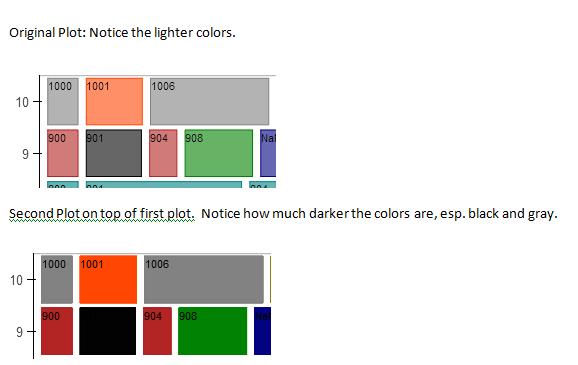
I’ve created a bokeh plot similar to the periodic table example. When I quit the IPython console and restart it and run the plot, it comes out fine; it prints the plot to an html page. But when I run it again without restarting Python, it seems to plot directly on top of the previous plot and the colors of the boxes become darker. In one instance I could see words on the plot that aren’t supposed to be there which were from the previous plot. I’ve tried explicitly deleting the html page beforehand but it doesn’t work. Is there a way to “clear the memory” so it starts over again rather than plotting on top of the original? I attached an image of the original and subsequent plots.

Thanks very much for your help!

Armen
⌁   Link to post
Damian_Avila
Damian_Avila

Hi Armen,

If you are in the IPython, you can do something like this:

In [7]: from bokeh.plotting import reset_output

In [8]: reset_output()

Then the next time you run the example, it will not take into account the previous attempt…

Cheers.

Damian

···

On Mon, Aug 4, 2014 at 7:49 PM, Armen Alexanian armenalexanian@gmail.com wrote:

Hi,

I’ve created a bokeh plot similar to the periodic table example. When I quit the IPython console and restart it and run the plot, it comes out fine; it prints the plot to an html page. But when I run it again without restarting Python, it seems to plot directly on top of the previous plot and the colors of the boxes become darker. In one instance I could see words on the plot that aren’t supposed to be there which were from the previous plot. I’ve tried explicitly deleting the html page beforehand but it doesn’t work. Is there a way to “clear the memory” so it starts over again rather than plotting on top of the original? I attached an image of the original and subsequent plots.

Thanks very much for your help!

Armen

–

You received this message because you are subscribed to the Google Groups “Bokeh Discussion - Public” group.

To unsubscribe from this group and stop receiving emails from it, send an email to bokeh+unsubscribe@continuum.io.

To post to this group, send email to bokeh@continuum.io.

To view this discussion on the web visit https://groups.google.com/a/continuum.io/d/msgid/bokeh/db835abc-63d3-4e48-9b4d-bbb2b4544d04%40continuum.io.

For more options, visit https://groups.google.com/a/continuum.io/d/optout.

⌁   Link to post
Armen_Alexanian
Armen_Alexanian

Thanks Damian! That works like a boss! :slight_smile:

···

On Mon, Aug 4, 2014 at 5:00 PM, Damian Avila damian.avila@continuum.io wrote:

Hi Armen,

If you are in the IPython, you can do something like this:

In [7]: from bokeh.plotting import reset_output

In [8]: reset_output()

Then the next time you run the example, it will not take into account the previous attempt…

Cheers.

Damian

–

You received this message because you are subscribed to the Google Groups “Bokeh Discussion - Public” group.

To unsubscribe from this group and stop receiving emails from it, send an email to bokeh+unsubscribe@continuum.io.

To post to this group, send email to bokeh@continuum.io.

To view this discussion on the web visit https://groups.google.com/a/continuum.io/d/msgid/bokeh/CAM9Ly3G919EAD5n1GDdyFNASptyRCm0kZX1qPKV_KePAxb7nmg%40mail.gmail.com.

For more options, visit https://groups.google.com/a/continuum.io/d/optout.

On Mon, Aug 4, 2014 at 7:49 PM, Armen Alexanian armenalexanian@gmail.com wrote:

Hi,

I’ve created a bokeh plot similar to the periodic table example. When I quit the IPython console and restart it and run the plot, it comes out fine; it prints the plot to an html page. But when I run it again without restarting Python, it seems to plot directly on top of the previous plot and the colors of the boxes become darker. In one instance I could see words on the plot that aren’t supposed to be there which were from the previous plot. I’ve tried explicitly deleting the html page beforehand but it doesn’t work. Is there a way to “clear the memory” so it starts over again rather than plotting on top of the original? I attached an image of the original and subsequent plots.

Thanks very much for your help!

Armen

–

You received this message because you are subscribed to the Google Groups “Bokeh Discussion - Public” group.

To unsubscribe from this group and stop receiving emails from it, send an email to bokeh+unsubscribe@continuum.io.

To post to this group, send email to bokeh@continuum.io.

To view this discussion on the web visit https://groups.google.com/a/continuum.io/d/msgid/bokeh/db835abc-63d3-4e48-9b4d-bbb2b4544d04%40continuum.io.

For more options, visit https://groups.google.com/a/continuum.io/d/optout.

⌁   Link to post

End of archived discussion · Replies are disabled
