☰Read-only archive⌕
Looking for help with Bokeh?

This is a read-only archive. Ask questions and join the conversation on GitHub.

Visit Community Support on GitHub →
Archived discussions · Captured October 28, 2026

Remove borders on plot/Gridplot in Jupyter ?

Community Support
fabien.benureau
fabien.benureau

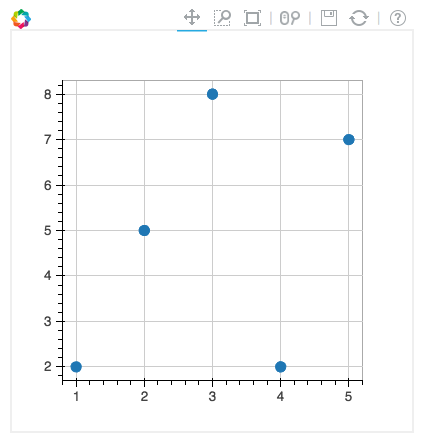
I am trying to make the light grey border surrounding bokeh plots disappear when rendering in jupyter notebooks, but having no luck. I would also like to make it disappear on Gridplots. Anyone has any ideas?

For instance, this code:

from bokeh.plotting import figure, output_notebook, show

output_notebook()

p = figure(plot_width=400, plot_height=400)

p.circle([1,2,3,4,5], [2,5,8,2,7], size=10)

show(p)

``

produce the border seen on the attached screenshot.
⌁   Link to post
Oscar_Delgado
Oscar_Delgado

Hello Fabien,

I am not completely sure if I understood your question, but if you want to change the way the jupyter notebook is displayed you should try customizing with CSS:

from IPython.core.display import HTML
css_file = ‘style.css’
HTML(open(css_file, “r”).read())

``

In your style sheet (style.css) you can add something like:

div.cell.code_cell {
border:none;
}

``

You will need to look for the exact selector you need but that is the idea.
Hope that helps.

Best!

⌁   Link to post
birdsarah_continuum
birdsarah_continuum

Fabien - I totally sympathize I have often wanted the same. I
don’t know a lot about Jupyter, but Oscar’s suggestion looks great

  • will have to try it out.
···

On 6/21/16 9:36 AM, Oscar Delgado
wrote:

Hello Fabien,

      I am not completely sure if I understood your question, but

if you want to change the way the jupyter notebook is
displayed you should try customizing with CSS:

from IPython.core. display
import HTML

              css_file = 'style.css'

              HTML(open(css_file, "r").read())

``

In your style sheet (style.css) you can add something like:

div.cell. code_cell
{

                border:none;

          }

``

      You will need to look for the exact selector you need but

that is the idea.

      Hope that helps.

Best!

–

  You received this message because you are subscribed to the Google

Groups “Bokeh Discussion - Public” group.

  To unsubscribe from this group and stop receiving emails from it,

send an email to bokeh+unsubscribe@continuum.io.

  To post to this group, send email to bokeh@continuum.io.

  To view this discussion on the web visit [](https://groups.google.com/a/continuum.io/d/msgid/bokeh/14c59b8d-8291-4c6a-b50d-ba80bd99c3a5%40continuum.io?utm_medium=email&utm_source=footer)      .

For more options, visit .

–
Sarah Bird
Developer, Bokeh

    [
      ![Continuum Analytics](http://docs.continuum.io/_static/img/ContinuumWordmark.png)
    ](http://continuum.io)

https://groups.google.com/a/continuum.io/d/msgid/bokeh/14c59b8d-8291-4c6a-b50d-ba80bd99c3a5%40continuum.io
https://groups.google.com/a/continuum.io/d/optout

⌁   Link to post
fabien.benureau
fabien.benureau

Hello Oscar, hello Sarah,

Thanks Oscar for your suggestion. I ended up upgrading to 0.12rc1, because I wanted to check out the new Arrow annotation, and I realized that in the process, the border disappeared (and the toolbar moved to the side). So, that’s very good.

Best,

Fabien

···

On Wednesday, June 22, 2016 at 2:20:29 AM UTC+2, Sarah Bird wrote:

  Fabien - I totally sympathize I have often wanted the same. I

don’t know a lot about Jupyter, but Oscar’s suggestion looks great

  • will have to try it out.
  On 6/21/16 9:36 AM, Oscar Delgado > wrote:

Hello Fabien,

      I am not completely sure if I understood your question, but

if you want to change the way the jupyter notebook is
displayed you should try customizing with CSS:

from IPython.core. display
import HTML

              css_file = 'style.css'

              HTML(open(css_file, "r").read())

``

In your style sheet (style.css) you can add something like:

div.cell. code_cell
{

                border:none;

          }

``

      You will need to look for the exact selector you need but

that is the idea.

      Hope that helps.

Best!

–

  You received this message because you are subscribed to the Google

Groups “Bokeh Discussion - Public” group.

  To unsubscribe from this group and stop receiving emails from it,

send an email to bokeh+un...@continuum.io.

  To post to this group, send email to bo...@continuum.io.

  To view this discussion on the web visit [](https://groups.google.com/a/continuum.io/d/msgid/bokeh/14c59b8d-8291-4c6a-b50d-ba80bd99c3a5%40continuum.io?utm_medium=email&utm_source=footer)[https://groups.google.com/a/continuum.io/d/msgid/bokeh/14c59b8d-8291-4c6a-b50d-ba80bd99c3a5%40continuum.io](https://groups.google.com/a/continuum.io/d/msgid/bokeh/14c59b8d-8291-4c6a-b50d-ba80bd99c3a5%40continuum.io).

  For more options, visit [https://groups.google.com/a/continuum.io/d/optout](https://groups.google.com/a/continuum.io/d/optout).

–
Sarah Bird
Developer, Bokeh

    [
      <img alt="Continuum Analytics" src="https://lh6.googleusercontent.com/proxy/VYgVjggTk1hCXSN9wFkffE3I6kxTvJ51tT4KvDXOuKbs1WyFG66k7kt2-vkDimbyxfWtP-d1paJmstMYhPPnDYSUF4rLPoYM2GM2QFM=w5000-h5000" height="30px" width="150px">
    ](http://continuum.io)
⌁   Link to post

End of archived discussion · Replies are disabled