☰Read-only archive⌕
Looking for help with Bokeh?

This is a read-only archive. Ask questions and join the conversation on GitHub.

Visit Community Support on GitHub →
Archived discussions · Captured October 28, 2026

Removing padding or margins from Bokeh Figures

Community Support
Elie_Desnos
Elie_Desnos

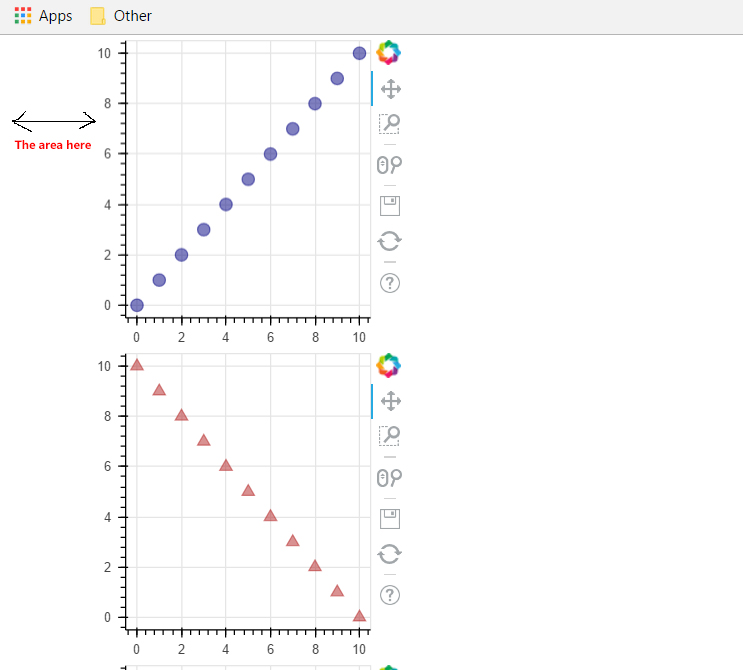
is it possible to get rid of the padding (or margin) on the sides of bokeh figures?

I’ve been looking at various figures and they all seem to have this blank area to their left. I also tried changing the borders for example:

s1.min_border_left = 0 or change it to s1.min_border_left = 40

but it doesn’t seem to do the job, it changes the border but somehow it seems that there is a padding that is fixed and not changable, an example of the area i’d like to get rid of:

so is it possible to get rid of that and just have the figure stick to the left side of the browser?

···
⌁   Link to post
Mateusz_Paprocki
Mateusz_Paprocki

Hi,

···

On Mon, Jan 23, 2017 at 2:34 PM, Elie Desnos eliemeinl@gmail.com wrote:

is it possible to get rid of the padding (or margin) on the sides of bokeh figures?

I’ve been looking at various figures and they all seem to have this blank area to their left. I also tried changing the borders for example:

s1.min_border_left = 0 or change it to s1.min_border_left = 40

but it doesn’t seem to do the job, it changes the border but somehow it seems that there is a padding that is fixed and not changable, an example of the area i’d like to get rid of:

so is it possible to get rid of that and just have the figure stick to the left side of the browser?

this margin isn’t a part of a figure, but just the styling of the generated HTML. This is configured in https://github.com/bokeh/bokeh/blob/master/bokeh/core/_templates/file.html#L35. You can change this, but make sure you leave width and height there, because responsive plots depend on having those set (unless you don’t need responsive plots). In https://github.com/bokeh/bokeh/blob/master/examples/plotting/file/css_classes.py you can see how to use a custom HTML template for bokeh plots.

Mateusz

–

You received this message because you are subscribed to the Google Groups “Bokeh Discussion - Public” group.

To unsubscribe from this group and stop receiving emails from it, send an email to bokeh+unsubscribe@continuum.io.

To post to this group, send email to bokeh@continuum.io.

To view this discussion on the web visit https://groups.google.com/a/continuum.io/d/msgid/bokeh/17279d1b-fe80-43c7-b721-529d3876fc54%40continuum.io.

For more options, visit https://groups.google.com/a/continuum.io/d/optout.

⌁   Link to post
Bryan
Bryan

As an aside, I first thought this was a matter of needing to set Plot.h_symmetry to be False. But it looks like this property is currently ignored. In any case the examples in the user guide demonstrate the min_border_left, etc. do function as desired:

  Appearance — Bokeh 3.3.2 Documentation

You can confirm this as well by shading your border with some fill color. That will show what part of the padding is no Bokeh's HTML canvas, vs what is HTML/CSS as Mateusz describes.

Thanks,

Bryan

···

On Jan 23, 2017, at 10:26 AM, Mateusz Paprocki <mateusz.paprocki@continuum.io> wrote:

Hi,

On Mon, Jan 23, 2017 at 2:34 PM, Elie Desnos <eliemeinl@gmail.com> wrote:

is it possible to get rid of the padding (or margin) on the sides of bokeh figures?

I've been looking at various figures and they all seem to have this blank area to their left. I also tried changing the borders for example:

s1.min_border_left = 0 or change it to s1.min_border_left = 40

but it doesn't seem to do the job, it changes the border but somehow it seems that there is a padding that is fixed and not changable, an example of the area i'd like to get rid of:

so is it possible to get rid of that and just have the figure stick to the left side of the browser?

this margin isn't a part of a figure, but just the styling of the generated HTML. This is configured in https://github.com/bokeh/bokeh/blob/master/bokeh/core/_templates/file.html#L35\. You can change this, but make sure you leave width and height there, because responsive plots depend on having those set (unless you don't need responsive plots). In https://github.com/bokeh/bokeh/blob/master/examples/plotting/file/css_classes.py you can see how to use a custom HTML template for bokeh plots.

Mateusz

--
You received this message because you are subscribed to the Google Groups "Bokeh Discussion - Public" group.
To unsubscribe from this group and stop receiving emails from it, send an email to bokeh+unsubscribe@continuum.io.
To post to this group, send email to bokeh@continuum.io.
To view this discussion on the web visit https://groups.google.com/a/continuum.io/d/msgid/bokeh/17279d1b-fe80-43c7-b721-529d3876fc54%40continuum.io\.
For more options, visit https://groups.google.com/a/continuum.io/d/optout\.

--
You received this message because you are subscribed to the Google Groups "Bokeh Discussion - Public" group.
To unsubscribe from this group and stop receiving emails from it, send an email to bokeh+unsubscribe@continuum.io.
To post to this group, send email to bokeh@continuum.io.
To view this discussion on the web visit https://groups.google.com/a/continuum.io/d/msgid/bokeh/CANFzp8gC2mD_%2BxRi1cG_R93LCHWstxnwj_27PaAfqhpDkrD7xg%40mail.gmail.com\.
For more options, visit https://groups.google.com/a/continuum.io/d/optout\.

⌁   Link to post

End of archived discussion · Replies are disabled