

☰Read-only archive⌕
Looking for help with Bokeh?

This is a read-only archive. Ask questions and join the conversation on GitHub.

Visit Community Support on GitHub →
Archived discussions · Captured October 28, 2026

Select a point on the Bokeh plot and export it to an ipynb

Community Supportcustomjs
Esmaeel_Sarvestani
Esmaeel_Sarvestani

Suppose that we have a dataset and we plot one column against the other. After looking into the plot we need to select one point and later use it in rest of the program, but not to use it in another plot.
Inspiring by one of the examples in Bokeh JavaScript Callbacks documents, I have this minimal example:

from random import random
from bokeh.layouts import row
from bokeh.models import ColumnDataSource, CustomJS
from bokeh.plotting import figure, output_file, show

x = [random() for x in range(50)]
y = [random() for y in range(50)]

s1 = ColumnDataSource(data=dict(x=x, y=y))
p = figure(width=400, height=400, tools="tap", title="Select Here")
p.circle('x', 'y', source=s1, alpha=0.6, size=10)

s2 = ColumnDataSource(data=dict(x=[], y=[]))

s1.selected.js_on_change('indices', CustomJS(args=dict(s1=s1, s2=s2), code="""
        const inds = cb_obj.indices;
        const d1 = s1.data;
        const d2 = s2.data;
        d2['x'] = []
        d2['y'] = []
        for (let i = 0; i < inds.length; i++) {
            d2['x'].push(d1['x'][inds[i]])
            d2['y'].push(d1['y'][inds[i]])
        }
        s2.change.emit();
    """)
)

show(p)

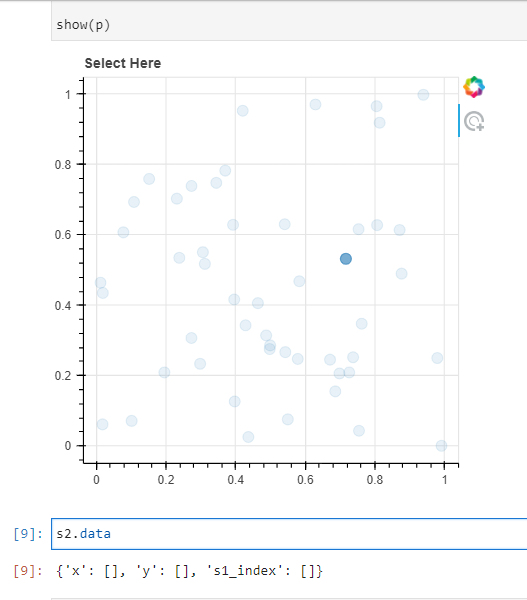
In this case, one can easily use the source s2 to plot the selected point, but I need the row in the dataset corresponding to the selected point to use it in the rest of program to compute further things.

⌁   Link to post
gmerritt123
gmerritt123

I may be misinterpreting what you’re asking for, but can you not just add another column to s2 that stores the index of s1?

from random import random
from bokeh.layouts import row
from bokeh.models import ColumnDataSource, CustomJS
from bokeh.plotting import figure, output_file, show

x = [random() for x in range(50)]
y = [random() for y in range(50)]

s1 = ColumnDataSource(data=dict(x=x, y=y))
p = figure(width=400, height=400, tools="tap", title="Select Here")
p.circle('x', 'y', source=s1, alpha=0.6, size=10)

s2 = ColumnDataSource(data=dict(x=[], y=[],s1_index=[]))

s1.selected.js_on_change('indices', CustomJS(args=dict(s1=s1, s2=s2), code="""
        const inds = cb_obj.indices;
        const d1 = s1.data;
        const d2 = s2.data;
        d2['x'] = []
        d2['y'] = []
        for (let i = 0; i < inds.length; i++) {
            d2['x'].push(d1['x'][inds[i]])
            d2['y'].push(d1['y'][inds[i]])
            d2['s1_index'].push(inds[i])
        }
        s2.change.emit();
    """)
)

show(p)
⌁   Link to post
Esmaeel_Sarvestani
Esmaeel_Sarvestani

Thanks for your answer, but this does not solve the problem. Suppose that I have this piece of code for visualization of the dataset in one jupyterlab cell and after plotting I select one point on the plots and in the next jupyterlab cell I want to use the selected point, but the s2 is always empty when I try to use it in the next cell.

⌁   Link to post
gmerritt123
gmerritt123

Ah. See this comment, and the thread in general then → Multiselect jupyter notebook update value? - #6 by gmerritt123

“my current understanding is that output_notebook() will embed standalone html/JS and no longer “talk” to the python variables (so in your case input_widget, as an instance of a python class, its value property never gets altered, but its javascript equivalent does)… i.e. there’s no interaction between the python in your notebook and the html embedded in it.”

⌁   Link to post
Bryan
Bryan

For bidirectional updates, that typically requires embedding a Boke server application. See e.g. this example:

bokeh/notebook_embed.ipynb at branch-3.1 · bokeh/bokeh · GitHub

If you need to update something outside of the callbacks inside the app function, you could upate the state on some mutable object outside the app, from a callback.

There also may be some newer approaches, but I am not too familiar with those, @Philipp_Rudiger may be able to comment.

⌁   Link to post

End of archived discussion · Replies are disabled

