The following code works to create an interactive heatmap (movable/zoomable).
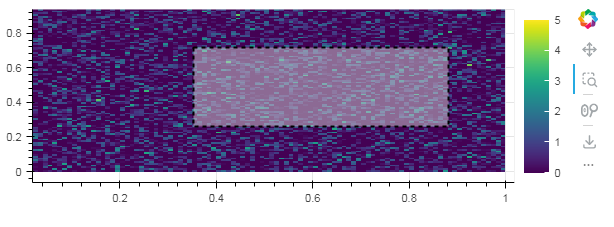
How to add the possibility of doing a selection rectangle (“Region Of Interest”, ROI), that will stay displayed?
If we use the icon “selection+magnification glass”, it works with a drag and drop, but after releasing the mouse, it automatically zooms in the selection.
Instead, I would like to keep the selection rectangle displayed, but not zoom in it : just keep the selection rectangle visible as a ROI (Region Of Interest) of the bigger image.
How to do that?
import numpy as np
import bokeh.models, bokeh.plotting, bokeh.embed, bokeh.models.callbacks, bokeh.models, bokeh.layouts
Z = np.random.randn(100, 100)
color_mapper = bokeh.models.LinearColorMapper(palette="Viridis256", low=0, high=5)
plot = bokeh.plotting.figure(x_range=(0, 1), y_range=(0, 1), height=200)
plot.image(image=[Z], color_mapper=color_mapper, dh=1.0, dw=1.0, x=0, y=0)
color_bar = bokeh.models.ColorBar(color_mapper=color_mapper)
plot.add_layout(color_bar, "right")
bokeh.plotting.show(plot)