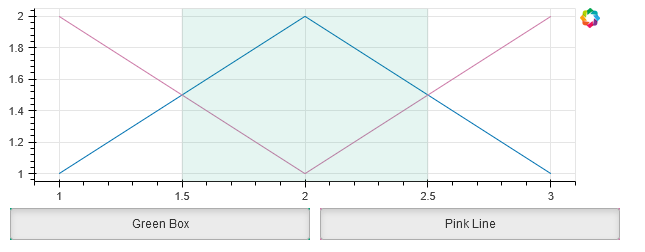
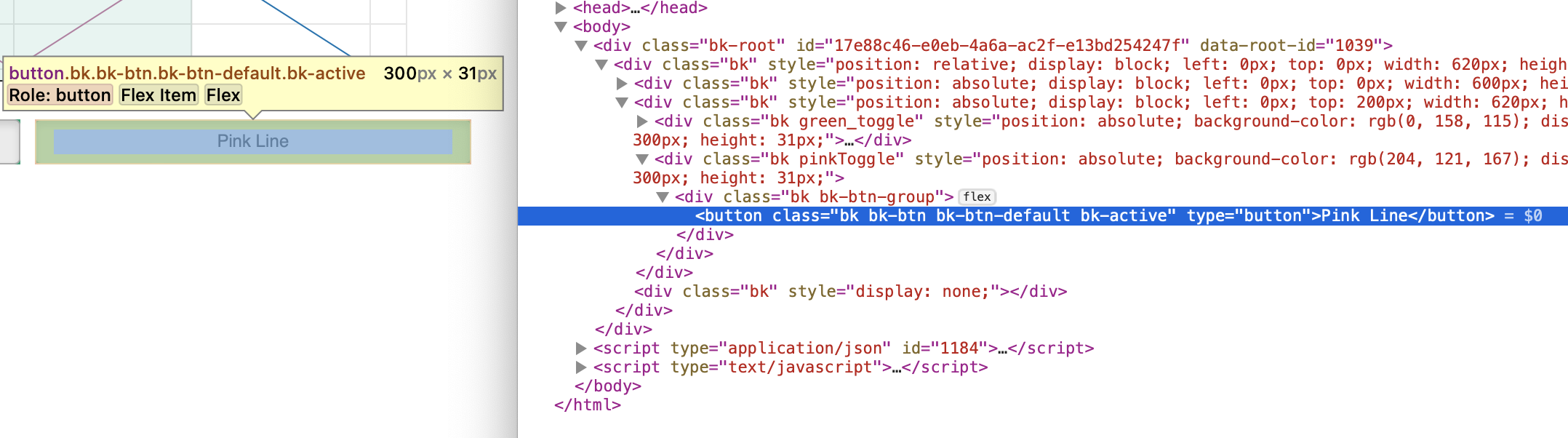
Right, so I am starting with above example, which uses file_html, then editing the output HTML to figure out how to set the color. Here is the current attempt:
<!DOCTYPE html>
<html lang="en">
  <head>
    <meta charset="utf-8">
    <title>Bokeh Plot</title>
    <script type="text/javascript" src="https://cdn.bokeh.org/bokeh/release/bokeh-2.4.3.min.js"></script>
    <script type="text/javascript" src="https://cdn.bokeh.org/bokeh/release/bokeh-widgets-2.4.3.min.js"></script>
    <script type="text/javascript">
        Bokeh.set_log_level("info");
    </script>

  <style>
      .pinkToggle {
        color: #CC79A7;
        background: #CC79A7;
        background-color: #CC79A7;
       };
  </style>

  </head>
  <body>
    <div class="bk-root" id="17e88c46-e0eb-4a6a-ac2f-e13bd254247f" data-root-id="1039"></div>

    <script type="application/json" id="1184">
      {"03a06f57-f341-494d-b519-929ec8dcea07":{"defs":[],"roots":{"references":[{"attributes":{"children":[{"id":"1033"},{"id":"1035"}]},"id":"1038","type":"Row"},{"attributes":{},"id":"1016","type":"BasicTicker"},{"attributes":{},"id":"1046","type":"BasicTickFormatter"},{"attributes":{"active":true,"background":"#009E73","css_classes":["green_toggle"],"icon":null,"js_property_callbacks":{"change:active":[{"id":"1034"}]},"label":"Green Box"},"id":"1033","type":"Toggle"},{"attributes":{"axis":{"id":"1015"},"coordinates":null,"dimension":1,"group":null,"ticker":null},"id":"1018","type":"Grid"},{"attributes":{},"id":"1047","type":"AllLabels"},{"attributes":{"line_alpha":0.2,"line_color":"#0072B2","x":{"field":"x"},"y":{"field":"y"}},"id":"1023","type":"Line"},{"attributes":{},"id":"1048","type":"UnionRenderers"},{"attributes":{},"id":"1049","type":"Selection"},{"attributes":{"below":[{"id":"1011"}],"center":[{"id":"1014"},{"id":"1018"},{"id":"1032"}],"height":200,"left":[{"id":"1015"}],"renderers":[{"id":"1024"},{"id":"1030"}],"title":{"id":"1040"},"toolbar":{"id":"1019"},"x_range":{"id":"1003"},"x_scale":{"id":"1007"},"y_range":{"id":"1005"},"y_scale":{"id":"1009"}},"id":"1002","subtype":"Figure","type":"Plot"},{"attributes":{"args":{"other":{"id":"1032"}},"code":"other.visible = this.active"},"id":"1034","type":"CustomJS"},{"attributes":{"line_alpha":0.1,"line_color":"#0072B2","x":{"field":"x"},"y":{"field":"y"}},"id":"1022","type":"Line"},{"attributes":{"coordinates":null,"fill_alpha":0.1,"fill_color":"#009E73","group":null,"left":1.5,"right":2.5},"id":"1032","type":"BoxAnnotation"},{"attributes":{},"id":"1050","type":"UnionRenderers"},{"attributes":{"children":[{"id":"1037"},{"id":"1038"}]},"id":"1039","type":"Column"},{"attributes":{"args":{"other":{"id":"1030"}},"code":"other.visible = this.active"},"id":"1036","type":"CustomJS"},{"attributes":{"coordinates":null,"data_source":{"id":"1020"},"glyph":{"id":"1021"},"group":null,"hover_glyph":null,"muted_glyph":{"id":"1023"},"nonselection_glyph":{"id":"1022"},"view":{"id":"1025"}},"id":"1024","type":"GlyphRenderer"},{"attributes":{},"id":"1051","type":"Selection"},{"attributes":{"source":{"id":"1020"}},"id":"1025","type":"CDSView"},{"attributes":{"children":[{"id":"1002"}]},"id":"1037","type":"Row"},{"attributes":{},"id":"1019","type":"Toolbar"},{"attributes":{},"id":"1007","type":"LinearScale"},{"attributes":{"active":true,"background":"#CC79A7","css_classes":["pinkToggle"],"icon":null,"js_property_callbacks":{"change:active":[{"id":"1036"}]},"label":"Pink Line"},"id":"1035","type":"Toggle"},{"attributes":{"data":{"x":[1,2,3],"y":[2,1,2]},"selected":{"id":"1051"},"selection_policy":{"id":"1050"}},"id":"1026","type":"ColumnDataSource"},{"attributes":{"data":{"x":[1,2,3],"y":[1,2,1]},"selected":{"id":"1049"},"selection_policy":{"id":"1048"}},"id":"1020","type":"ColumnDataSource"},{"attributes":{"coordinates":null,"data_source":{"id":"1026"},"glyph":{"id":"1027"},"group":null,"hover_glyph":null,"muted_glyph":{"id":"1029"},"nonselection_glyph":{"id":"1028"},"view":{"id":"1031"}},"id":"1030","type":"GlyphRenderer"},{"attributes":{"line_color":"#CC79A7","x":{"field":"x"},"y":{"field":"y"}},"id":"1027","type":"Line"},{"attributes":{},"id":"1005","type":"DataRange1d"},{"attributes":{"line_color":"#0072B2","x":{"field":"x"},"y":{"field":"y"}},"id":"1021","type":"Line"},{"attributes":{},"id":"1009","type":"LinearScale"},{"attributes":{"coordinates":null,"group":null},"id":"1040","type":"Title"},{"attributes":{"line_alpha":0.1,"line_color":"#CC79A7","x":{"field":"x"},"y":{"field":"y"}},"id":"1028","type":"Line"},{"attributes":{},"id":"1003","type":"DataRange1d"},{"attributes":{"coordinates":null,"formatter":{"id":"1046"},"group":null,"major_label_policy":{"id":"1047"},"ticker":{"id":"1012"}},"id":"1011","type":"LinearAxis"},{"attributes":{"coordinates":null,"formatter":{"id":"1043"},"group":null,"major_label_policy":{"id":"1044"},"ticker":{"id":"1016"}},"id":"1015","type":"LinearAxis"},{"attributes":{},"id":"1043","type":"BasicTickFormatter"},{"attributes":{"line_alpha":0.2,"line_color":"#CC79A7","x":{"field":"x"},"y":{"field":"y"}},"id":"1029","type":"Line"},{"attributes":{},"id":"1044","type":"AllLabels"},{"attributes":{},"id":"1012","type":"BasicTicker"},{"attributes":{"axis":{"id":"1011"},"coordinates":null,"group":null,"ticker":null},"id":"1014","type":"Grid"},{"attributes":{"source":{"id":"1026"}},"id":"1031","type":"CDSView"}],"root_ids":["1039"]},"title":"Bokeh Application","version":"2.4.3"}}
    </script>
    <script type="text/javascript">
      (function() {
        const fn = function() {
          Bokeh.safely(function() {
            (function(root) {
              function embed_document(root) {
              const docs_json = document.getElementById('1184').textContent;
              const render_items = [{"docid":"03a06f57-f341-494d-b519-929ec8dcea07","root_ids":["1039"],"roots":{"1039":"17e88c46-e0eb-4a6a-ac2f-e13bd254247f"}}];
              root.Bokeh.embed.embed_items(docs_json, render_items);
              }
              if (root.Bokeh !== undefined) {
                embed_document(root);
              } else {
                let attempts = 0;
                const timer = setInterval(function(root) {
                  if (root.Bokeh !== undefined) {
                    clearInterval(timer);
                    embed_document(root);
                  } else {
                    attempts++;
                    if (attempts > 100) {
                      clearInterval(timer);
                      console.log("Bokeh: ERROR: Unable to run BokehJS code because BokehJS library is missing");
                    }
                  }
                }, 10, root)
              }
            })(window);
          });
        };
        if (document.readyState != "loading") fn();
        else document.addEventListener("DOMContentLoaded", fn);
      })();
    </script>
  </body>
</html>