
☰Read-only archive⌕
Looking for help with Bokeh?

This is a read-only archive. Ask questions and join the conversation on GitHub.

Visit Community Support on GitHub →
Archived discussions · Captured October 28, 2026

Set size of background rectangle on title

Community Support
blast_from_the_fast
blast_from_the_fast

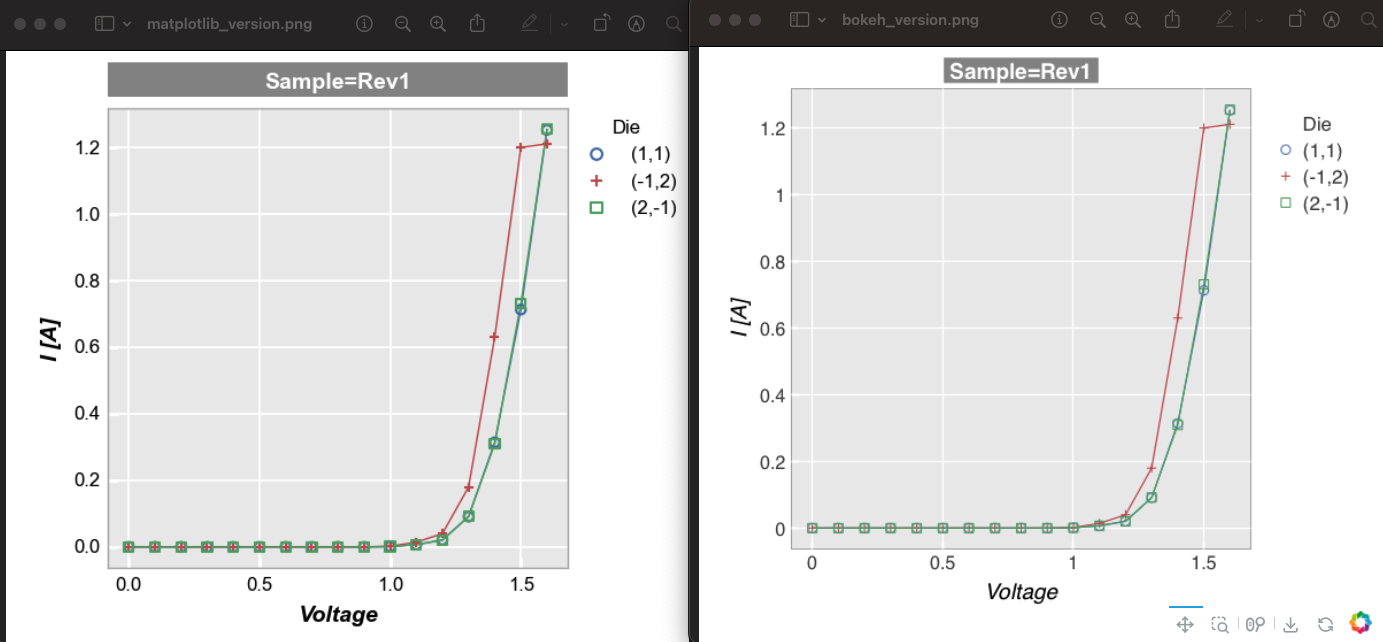
Is there any way to set the size of the background rectangle / fill for a title? I’m recreating a plot I originally made with matplotlib (left side of screenshot), but I cannot find an option to make the background fill in bokeh any wider than the text of the title (right side of screenshot). If there is no built-in option with the Title option, could this be achieved with a discrete rectangle positioned below the title text?

⌁   Link to post
Bryan
Bryan

Text properties only apply to the call to HTML canvas ctx.fillText which only applies to the bounding box of the text, so I am afraid there is not any way to duplicate this with title. You might look at adding a Div above the plot in a column and use that for a title instead.

⌁   Link to post
blast_from_the_fast
blast_from_the_fast

Thanks for the suggestion. I’m trying this but having trouble with alignment. Is there anyway to figure out the widths of various parts of the plot before rendering? For example, if I want the Div to align with the left side of the axes area, how can I find the width of the y-axis label and y-axis tick labels? Thanks!

⌁   Link to post
Bryan
Bryan

Those metrics are not available from Python, they are only computed in the browser, and even there not really available in stable APIs. I had assumed simply centering the text in the div above the plot might be sufficient. If that’s not the case, I don’t think there is any readily available solution at present. Please consider opening GitHub Issue to request new options for formatting titles.

⌁   Link to post

End of archived discussion · Replies are disabled
