☰Read-only archive⌕
Looking for help with Bokeh?

This is a read-only archive. Ask questions and join the conversation on GitHub.

Visit Community Support on GitHub →
Archived discussions · Captured October 28, 2026

Shaded area between two lines

Community Support
Bryan
Bryan

Hi Jeff,

Something like this probably ought to be built into Bokeh itself as a convenience (could you open a GitHub feature request issue?), but in the mean time you can see an example similar to your link here:

  https://github.com/bokeh/bokeh/blob/master/examples/plotting/file/bollinger.py

Thanks,

Bryan

···

On Dec 18, 2015, at 3:15 PM, jeff@hired.com wrote:

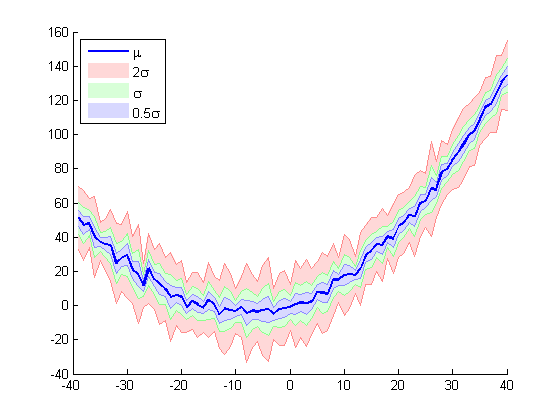
I was having trouble figuring out from reading the docs. Suppose I have two lines, and I want to shade the area between the two. Is there a function or attribute to do that?

It looks like maybe use Figure.patch (bokeh.plotting Interface — Bokeh 0.9.3 documentation) with line properties. The documentation is kind of lacking on how to do that though.

The intended result is something like this:
http://blogs.mathworks.com/images/pick/jiro/potw_shadederrorbar/potw_shadederrorbar_03.png

--
You received this message because you are subscribed to the Google Groups "Bokeh Discussion - Public" group.
To unsubscribe from this group and stop receiving emails from it, send an email to bokeh+unsubscribe@continuum.io.
To post to this group, send email to bokeh@continuum.io.
To view this discussion on the web visit https://groups.google.com/a/continuum.io/d/msgid/bokeh/eef903aa-3ab1-4e9a-b6e0-0db63bf6c0f7%40continuum.io\.
For more options, visit https://groups.google.com/a/continuum.io/d/optout\.

⌁   Link to post
DAVID_SAROFF_RIT_Stu

Is there a way to change scale when two graphs are linked, like the linked-panning example, but at a different effective magnification? For the example at page
http://bokeh.pydata.org/en/0.10.0/docs/quickstart.html

this modification doesn’t work:

magnification = 10
x_range=magnification * s1.x_range

···

On Tue, Dec 29, 2015 at 1:29 PM, Bryan Van de Ven bryan@bokeh.org wrote:

Hi Jeff,

Something like this probably ought to be built into Bokeh itself as a convenience (could you open a GitHub feature request issue?), but in the mean time you can see an example similar to your link here:

    [https://github.com/bokeh/bokeh/blob/master/examples/plotting/file/bollinger.py](https://github.com/bokeh/bokeh/blob/master/examples/plotting/file/bollinger.py)

Thanks,

Bryan

On Dec 18, 2015, at 3:15 PM, jeff@hired.com wrote:

I was having trouble figuring out from reading the docs. Suppose I have two lines, and I want to shade the area between the two. Is there a function or attribute to do that?

It looks like maybe use Figure.patch (http://bokeh.pydata.org/en/0.9.3/docs/reference/plotting.html#bokeh.plotting.Figure.patch) with line properties. The documentation is kind of lacking on how to do that though.

The intended result is something like this:

http://blogs.mathworks.com/images/pick/jiro/potw_shadederrorbar/potw_shadederrorbar_03.png

–

You received this message because you are subscribed to the Google Groups “Bokeh Discussion - Public” group.

To unsubscribe from this group and stop receiving emails from it, send an email to bokeh+unsubscribe@continuum.io.

To post to this group, send email to bokeh@continuum.io.

To view this discussion on the web visit https://groups.google.com/a/continuum.io/d/msgid/bokeh/eef903aa-3ab1-4e9a-b6e0-0db63bf6c0f7%40continuum.io.

For more options, visit https://groups.google.com/a/continuum.io/d/optout.

–

You received this message because you are subscribed to the Google Groups “Bokeh Discussion - Public” group.

To unsubscribe from this group and stop receiving emails from it, send an email to bokeh+unsubscribe@continuum.io.

To post to this group, send email to bokeh@continuum.io.

To view this discussion on the web visit https://groups.google.com/a/continuum.io/d/msgid/bokeh/CFD4DEF7-41A6-4C62-8C1A-873470345278%40continuum.io.

For more options, visit https://groups.google.com/a/continuum.io/d/optout.

–

David P. Saroff
Rochester Institute of Technology
54 Lomb Memorial Dr, Rochester, NY 14623
david.saroff@mail.rit.edu | (434) 227-6242

⌁   Link to post
Bryan
Bryan

David,

That is not built in to Bokeh, but it would be trivial to accomplish with a CustomJS callback on the range of one plot, that updates the range however you like, on the other plot. It would take one line of JavaScript or so. You can read more about this sort of thing (and see a similar example) here:

  Interaction — Bokeh 3.3.2 Documentation

Thanks

Bryan

···

On Dec 29, 2015, at 12:52 PM, DAVID SAROFF (RIT Student) <dps7802@rit.edu> wrote:

Is there a way to change scale when two graphs are linked, like the linked-panning example, but at a different effective magnification? For the example at page
Quickstart — Bokeh 0.10.0 documentation

this modification doesn't work:

magnification = 10
x_range=magnification * s1.x_range

On Tue, Dec 29, 2015 at 1:29 PM, Bryan Van de Ven <bryan@bokeh.org> wrote:

Hi Jeff,

Something like this probably ought to be built into Bokeh itself as a convenience (could you open a GitHub feature request issue?), but in the mean time you can see an example similar to your link here:

        https://github.com/bokeh/bokeh/blob/master/examples/plotting/file/bollinger.py

Thanks,

Bryan

> On Dec 18, 2015, at 3:15 PM, jeff@hired.com wrote:
>
> I was having trouble figuring out from reading the docs. Suppose I have two lines, and I want to shade the area between the two. Is there a function or attribute to do that?
>
> It looks like maybe use Figure.patch (bokeh.plotting Interface — Bokeh 0.9.3 documentation) with line properties. The documentation is kind of lacking on how to do that though.
>
> The intended result is something like this:
> http://blogs.mathworks.com/images/pick/jiro/potw_shadederrorbar/potw_shadederrorbar_03.png
>
> --
> You received this message because you are subscribed to the Google Groups "Bokeh Discussion - Public" group.
> To unsubscribe from this group and stop receiving emails from it, send an email to bokeh+unsubscribe@continuum.io.
> To post to this group, send email to bokeh@continuum.io.
> To view this discussion on the web visit https://groups.google.com/a/continuum.io/d/msgid/bokeh/eef903aa-3ab1-4e9a-b6e0-0db63bf6c0f7%40continuum.io\.
> For more options, visit https://groups.google.com/a/continuum.io/d/optout\.

--
You received this message because you are subscribed to the Google Groups "Bokeh Discussion - Public" group.
To unsubscribe from this group and stop receiving emails from it, send an email to bokeh+unsubscribe@continuum.io.
To post to this group, send email to bokeh@continuum.io.
To view this discussion on the web visit https://groups.google.com/a/continuum.io/d/msgid/bokeh/CFD4DEF7-41A6-4C62-8C1A-873470345278%40continuum.io\.
For more options, visit https://groups.google.com/a/continuum.io/d/optout\.

--
David P. Saroff
Rochester Institute of Technology
54 Lomb Memorial Dr, Rochester, NY 14623
david.saroff@mail.rit.edu | (434) 227-6242

--
You received this message because you are subscribed to the Google Groups "Bokeh Discussion - Public" group.
To unsubscribe from this group and stop receiving emails from it, send an email to bokeh+unsubscribe@continuum.io.
To post to this group, send email to bokeh@continuum.io.
To view this discussion on the web visit https://groups.google.com/a/continuum.io/d/msgid/bokeh/CABMftcSNzJTectP1Pu8Gh%3DgYhxBwQ0nsDLWuEAOYs9KB0mQSpw%40mail.gmail.com\.
For more options, visit https://groups.google.com/a/continuum.io/d/optout\.

⌁   Link to post
DAVID_SAROFF_RIT_Stu

Bryan,

The example is what I want for my data exploration, thanks!

Wheel zoom works nicely. Box zoom is a bit weird when the aspect ratio is not one.

···

On Tue, Dec 29, 2015 at 9:04 PM, Bryan Van de Ven bryan@bokeh.org wrote:

David,

That is not built in to Bokeh, but it would be trivial to accomplish with a CustomJS callback on the range of one plot, that updates the range however you like, on the other plot. It would take one line of JavaScript or so. You can read more about this sort of thing (and see a similar example) here:

    [http://bokeh.pydata.org/en/latest/docs/user_guide/interaction.html#customjs-for-range-update](http://bokeh.pydata.org/en/latest/docs/user_guide/interaction.html#customjs-for-range-update)

Thanks

Bryan

On Dec 29, 2015, at 12:52 PM, DAVID SAROFF (RIT Student) dps7802@rit.edu wrote:

Is there a way to change scale when two graphs are linked, like the linked-panning example, but at a different effective magnification? For the example at page

http://bokeh.pydata.org/en/0.10.0/docs/quickstart.html

this modification doesn’t work:

magnification = 10

x_range=magnification * s1.x_range

On Tue, Dec 29, 2015 at 1:29 PM, Bryan Van de Ven bryan@bokeh.org wrote:

Hi Jeff,

Something like this probably ought to be built into Bokeh itself as a convenience (could you open a GitHub feature request issue?), but in the mean time you can see an example similar to your link here:

    [https://github.com/bokeh/bokeh/blob/master/examples/plotting/file/bollinger.py](https://github.com/bokeh/bokeh/blob/master/examples/plotting/file/bollinger.py)

Thanks,

Bryan

On Dec 18, 2015, at 3:15 PM, jeff@hired.com wrote:

I was having trouble figuring out from reading the docs. Suppose I have two lines, and I want to shade the area between the two. Is there a function or attribute to do that?

It looks like maybe use Figure.patch (http://bokeh.pydata.org/en/0.9.3/docs/reference/plotting.html#bokeh.plotting.Figure.patch) with line properties. The documentation is kind of lacking on how to do that though.

The intended result is something like this:

http://blogs.mathworks.com/images/pick/jiro/potw_shadederrorbar/potw_shadederrorbar_03.png

–

You received this message because you are subscribed to the Google Groups “Bokeh Discussion - Public” group.

To unsubscribe from this group and stop receiving emails from it, send an email to bokeh+unsubscribe@continuum.io.

To post to this group, send email to bokeh@continuum.io.

To view this discussion on the web visit https://groups.google.com/a/continuum.io/d/msgid/bokeh/eef903aa-3ab1-4e9a-b6e0-0db63bf6c0f7%40continuum.io.

For more options, visit https://groups.google.com/a/continuum.io/d/optout.

–

You received this message because you are subscribed to the Google Groups “Bokeh Discussion - Public” group.

To unsubscribe from this group and stop receiving emails from it, send an email to bokeh+unsubscribe@continuum.io.

To post to this group, send email to bokeh@continuum.io.

To view this discussion on the web visit https://groups.google.com/a/continuum.io/d/msgid/bokeh/CFD4DEF7-41A6-4C62-8C1A-873470345278%40continuum.io.

For more options, visit https://groups.google.com/a/continuum.io/d/optout.

–

David P. Saroff

Rochester Institute of Technology

54 Lomb Memorial Dr, Rochester, NY 14623

david.saroff@mail.rit.edu | (434) 227-6242

–

You received this message because you are subscribed to the Google Groups “Bokeh Discussion - Public” group.

To unsubscribe from this group and stop receiving emails from it, send an email to bokeh+unsubscribe@continuum.io.

To post to this group, send email to bokeh@continuum.io.

To view this discussion on the web visit https://groups.google.com/a/continuum.io/d/msgid/bokeh/CABMftcSNzJTectP1Pu8Gh%3DgYhxBwQ0nsDLWuEAOYs9KB0mQSpw%40mail.gmail.com.

For more options, visit https://groups.google.com/a/continuum.io/d/optout.

–

You received this message because you are subscribed to the Google Groups “Bokeh Discussion - Public” group.

To unsubscribe from this group and stop receiving emails from it, send an email to bokeh+unsubscribe@continuum.io.

To post to this group, send email to bokeh@continuum.io.

To view this discussion on the web visit https://groups.google.com/a/continuum.io/d/msgid/bokeh/50B26E0C-808F-46FB-91E7-6FC9CD6A5C0E%40continuum.io.

For more options, visit https://groups.google.com/a/continuum.io/d/optout.

–

David P. Saroff
Rochester Institute of Technology
54 Lomb Memorial Dr, Rochester, NY 14623
david.saroff@mail.rit.edu | (434) 227-6242

⌁   Link to post
Bryan
Bryan

Georg,

Improving out on-canvas layout (to support more sub-componenets on canvas, fixed aspect ratios, etc.) is a high priority after 0.11

Thanks,

Bryan

···

On Dec 30, 2015, at 7:12 AM, DAVID SAROFF (RIT Student) <dps7802@rit.edu> wrote:

Bryan,

The example is what I want for my data exploration, thanks!

Wheel zoom works nicely. Box zoom is a bit weird when the aspect ratio is not one.

On Tue, Dec 29, 2015 at 9:04 PM, Bryan Van de Ven <bryan@bokeh.org> wrote:
David,

That is not built in to Bokeh, but it would be trivial to accomplish with a CustomJS callback on the range of one plot, that updates the range however you like, on the other plot. It would take one line of JavaScript or so. You can read more about this sort of thing (and see a similar example) here:

        Interaction — Bokeh 3.3.2 Documentation

Thanks

Bryan

> On Dec 29, 2015, at 12:52 PM, DAVID SAROFF (RIT Student) <dps7802@rit.edu> wrote:
>
> Is there a way to change scale when two graphs are linked, like the linked-panning example, but at a different effective magnification? For the example at page
> Quickstart — Bokeh 0.10.0 documentation
>
> this modification doesn't work:
>
> magnification = 10
> x_range=magnification * s1.x_range
>
> On Tue, Dec 29, 2015 at 1:29 PM, Bryan Van de Ven <bryan@bokeh.org> wrote:
>
> Hi Jeff,
>
> Something like this probably ought to be built into Bokeh itself as a convenience (could you open a GitHub feature request issue?), but in the mean time you can see an example similar to your link here:
>
> https://github.com/bokeh/bokeh/blob/master/examples/plotting/file/bollinger.py
>
> Thanks,
>
> Bryan
>
> > On Dec 18, 2015, at 3:15 PM, jeff@hired.com wrote:
> >
> > I was having trouble figuring out from reading the docs. Suppose I have two lines, and I want to shade the area between the two. Is there a function or attribute to do that?
> >
> > It looks like maybe use Figure.patch (bokeh.plotting Interface — Bokeh 0.9.3 documentation) with line properties. The documentation is kind of lacking on how to do that though.
> >
> > The intended result is something like this:
> > http://blogs.mathworks.com/images/pick/jiro/potw_shadederrorbar/potw_shadederrorbar_03.png
> >
> > --
> > You received this message because you are subscribed to the Google Groups "Bokeh Discussion - Public" group.
> > To unsubscribe from this group and stop receiving emails from it, send an email to bokeh+unsubscribe@continuum.io.
> > To post to this group, send email to bokeh@continuum.io.
> > To view this discussion on the web visit https://groups.google.com/a/continuum.io/d/msgid/bokeh/eef903aa-3ab1-4e9a-b6e0-0db63bf6c0f7%40continuum.io\.
> > For more options, visit https://groups.google.com/a/continuum.io/d/optout\.
>
> --
> You received this message because you are subscribed to the Google Groups "Bokeh Discussion - Public" group.
> To unsubscribe from this group and stop receiving emails from it, send an email to bokeh+unsubscribe@continuum.io.
> To post to this group, send email to bokeh@continuum.io.
> To view this discussion on the web visit https://groups.google.com/a/continuum.io/d/msgid/bokeh/CFD4DEF7-41A6-4C62-8C1A-873470345278%40continuum.io\.
> For more options, visit https://groups.google.com/a/continuum.io/d/optout\.
>
>
>
> --
> David P. Saroff
> Rochester Institute of Technology
> 54 Lomb Memorial Dr, Rochester, NY 14623
> david.saroff@mail.rit.edu | (434) 227-6242
>
>
> --
> You received this message because you are subscribed to the Google Groups "Bokeh Discussion - Public" group.
> To unsubscribe from this group and stop receiving emails from it, send an email to bokeh+unsubscribe@continuum.io.
> To post to this group, send email to bokeh@continuum.io.
> To view this discussion on the web visit https://groups.google.com/a/continuum.io/d/msgid/bokeh/CABMftcSNzJTectP1Pu8Gh%3DgYhxBwQ0nsDLWuEAOYs9KB0mQSpw%40mail.gmail.com\.
> For more options, visit https://groups.google.com/a/continuum.io/d/optout\.

--
You received this message because you are subscribed to the Google Groups "Bokeh Discussion - Public" group.
To unsubscribe from this group and stop receiving emails from it, send an email to bokeh+unsubscribe@continuum.io.
To post to this group, send email to bokeh@continuum.io.
To view this discussion on the web visit https://groups.google.com/a/continuum.io/d/msgid/bokeh/50B26E0C-808F-46FB-91E7-6FC9CD6A5C0E%40continuum.io\.
For more options, visit https://groups.google.com/a/continuum.io/d/optout\.

--
David P. Saroff
Rochester Institute of Technology
54 Lomb Memorial Dr, Rochester, NY 14623
david.saroff@mail.rit.edu | (434) 227-6242

--
You received this message because you are subscribed to the Google Groups "Bokeh Discussion - Public" group.
To unsubscribe from this group and stop receiving emails from it, send an email to bokeh+unsubscribe@continuum.io.
To post to this group, send email to bokeh@continuum.io.
To view this discussion on the web visit https://groups.google.com/a/continuum.io/d/msgid/bokeh/CABMftcSxmrf8bLD-rwSDd9FCxpQR4Kam%2B60U3Sh65y7RFhWSqg%40mail.gmail.com\.
For more options, visit https://groups.google.com/a/continuum.io/d/optout\.

⌁   Link to post

End of archived discussion · Replies are disabled