☰Read-only archive⌕
Looking for help with Bokeh?

This is a read-only archive. Ask questions and join the conversation on GitHub.

Visit Community Support on GitHub →
Archived discussions · Captured October 28, 2026

Simple Bokeh example with widgets

Community Support
Armen_Alexanian
Armen_Alexanian

Hi,

I’m new to Bokeh and Python, though I’ve made some great progress on a visualization I’m working on. I’ve tried the three Bokeh examples with widgets but can’t get any of them to work. I’m not sure if it’s because I’m using Windows or on my company network. Would someone please post a very simple example of a script which shows how to put a Select widget on a webpage without linking to any external data sets or requiring Bokeh server?

Thanks very much!

Armen

⌁   Link to post
Peter_Wang1
Peter_Wang1

Hi Armen,

Right now the widgets do require Bokeh server, because that is how the Javascript events in the web page trigger callbacks on the Python side. Is there some reason you can’t run bokeh-server?

-Peter

···

On Wed, Jul 30, 2014 at 4:16 PM, Armen Alexanian armenalexanian@gmail.com wrote:

Hi,

I’m new to Bokeh and Python, though I’ve made some great progress on a visualization I’m working on. I’ve tried the three Bokeh examples with widgets but can’t get any of them to work. I’m not sure if it’s because I’m using Windows or on my company network. Would someone please post a very simple example of a script which shows how to put a Select widget on a webpage without linking to any external data sets or requiring Bokeh server?

Thanks very much!

Armen

–

You received this message because you are subscribed to the Google Groups “Bokeh Discussion - Public” group.

To unsubscribe from this group and stop receiving emails from it, send an email to bokeh+unsubscribe@continuum.io.

To post to this group, send email to bokeh@continuum.io.

To view this discussion on the web visit https://groups.google.com/a/continuum.io/d/msgid/bokeh/6d6288ff-8acd-4160-af4c-d21f2c72d64b%40continuum.io.

For more options, visit https://groups.google.com/a/continuum.io/d/optout.

⌁   Link to post
Armen_Alexanian
Armen_Alexanian

Thanks Peter! I read somewhere that bokeh-server doesn’t work well with Windows; however, I can try to run it anyway. Are there instructions on the main site? I have a graph that’s working well and I’d like to be able to restrict the data based on the items in a Select box.

···

On Wednesday, July 30, 2014 1:16:41 PM UTC-7, Armen Alexanian wrote:

Hi,

I’m new to Bokeh and Python, though I’ve made some great progress on a visualization I’m working on. I’ve tried the three Bokeh examples with widgets but can’t get any of them to work. I’m not sure if it’s because I’m using Windows or on my company network. Would someone please post a very simple example of a script which shows how to put a Select widget on a webpage without linking to any external data sets or requiring Bokeh server?

Thanks very much!

Armen

⌁   Link to post
Peter_Wang1
Peter_Wang1

Oh, that's kind of not true. It *is* true that getting a redis binary on
Windows is kind of annoying, but you can run "bokeh-server --backend
memory" and it'll work fine.

-Peter

···

On Wed, Jul 30, 2014 at 4:27 PM, Armen Alexanian <armenalexanian@gmail.com> wrote:

Thanks Peter! I read somewhere that bokeh-server doesn't work well with
Windows; however, I can try to run it anyway. Are there instructions on
the main site?

⌁   Link to post
Bryan
Bryan

minor correction:

  --backend=memory

with the '=' This backwind is not persistent through server restarts. There is also:

  --backend=shelve

that you can try, which is persistent.

Bryan

···

On Jul 30, 2014, at 9:30 PM, Peter Wang <pwang@continuum.io> wrote:

On Wed, Jul 30, 2014 at 4:27 PM, Armen Alexanian <armenalexanian@gmail.com> wrote:
Thanks Peter! I read somewhere that bokeh-server doesn't work well with Windows; however, I can try to run it anyway. Are there instructions on the main site?

Oh, that's kind of not true. It *is* true that getting a redis binary on Windows is kind of annoying, but you can run "bokeh-server --backend memory" and it'll work fine.

-Peter

--
You received this message because you are subscribed to the Google Groups "Bokeh Discussion - Public" group.
To unsubscribe from this group and stop receiving emails from it, send an email to bokeh+unsubscribe@continuum.io.
To post to this group, send email to bokeh@continuum.io.
To view this discussion on the web visit https://groups.google.com/a/continuum.io/d/msgid/bokeh/CABGrp%2B_JNz0ZTqEyu7qcBJ%2BeW1ZJbPTcKd9rLjQ5bYq2RV44Rw%40mail.gmail.com\.
For more options, visit https://groups.google.com/a/continuum.io/d/optout\.

⌁   Link to post
Armen_Alexanian
Armen_Alexanian

Thanks so much Peter and Bryan! I’ve really enjoyed working with Bokeh and I’m excited to have started doing so before the 1.0 release.

···

On Wednesday, July 30, 2014 1:16:41 PM UTC-7, Armen Alexanian wrote:

Hi,

I’m new to Bokeh and Python, though I’ve made some great progress on a visualization I’m working on. I’ve tried the three Bokeh examples with widgets but can’t get any of them to work. I’m not sure if it’s because I’m using Windows or on my company network. Would someone please post a very simple example of a script which shows how to put a Select widget on a webpage without linking to any external data sets or requiring Bokeh server?

Thanks very much!

Armen

⌁   Link to post
Armen_Alexanian
Armen_Alexanian

Hi Bryan,

When I enter “bokeh-server --backend=memory” into Spyder or the IPython console, I get the error “can’t assign to operator”. Am I entering it in the right place?

Thanks,

Armen

···

On Wednesday, July 30, 2014 1:16:41 PM UTC-7, Armen Alexanian wrote:

Hi,

I’m new to Bokeh and Python, though I’ve made some great progress on a visualization I’m working on. I’ve tried the three Bokeh examples with widgets but can’t get any of them to work. I’m not sure if it’s because I’m using Windows or on my company network. Would someone please post a very simple example of a script which shows how to put a Select widget on a webpage without linking to any external data sets or requiring Bokeh server?

Thanks very much!

Armen

⌁   Link to post
Bryan
Bryan

Hi Armen,

bokeh-server is a separate application you need to run, not a function. You should execute it in your bash shell (if you are on linux or OSX) or in the cmd shell (if you are on windows). Let us know if you need more assistance!

Bryan

···

On Jul 30, 2014, at 11:37 PM, Armen Alexanian <armenalexanian@gmail.com> wrote:

Hi Bryan,

When I enter "bokeh-server --backend=memory" into Spyder or the IPython console, I get the error "can't assign to operator". Am I entering it in the right place?

Thanks,
Armen

On Wednesday, July 30, 2014 1:16:41 PM UTC-7, Armen Alexanian wrote:
Hi,

I'm new to Bokeh and Python, though I've made some great progress on a visualization I'm working on. I've tried the three Bokeh examples with widgets but can't get any of them to work. I'm not sure if it's because I'm using Windows or on my company network. Would someone please post a very simple example of a script which shows how to put a Select widget on a webpage without linking to any external data sets or requiring Bokeh server?

Thanks very much!
Armen

--
You received this message because you are subscribed to the Google Groups "Bokeh Discussion - Public" group.
To unsubscribe from this group and stop receiving emails from it, send an email to bokeh+unsubscribe@continuum.io.
To post to this group, send email to bokeh@continuum.io.
To view this discussion on the web visit https://groups.google.com/a/continuum.io/d/msgid/bokeh/4fa0176f-fb76-4dcc-8114-02127b2ec7ca%40continuum.io\.
For more options, visit https://groups.google.com/a/continuum.io/d/optout\.

⌁   Link to post
Damian_Avila
Damian_Avila

In the IPython console, you can probably do:

!bokeh-server --backend=memory

I mean prepend the ! execute on the shell…

···

On Wed, Jul 30, 2014 at 7:40 PM, Bryan Van de Ven bryan@bokeh.org wrote:

Hi Armen,

bokeh-server is a separate application you need to run, not a function. You should execute it in your bash shell (if you are on linux or OSX) or in the cmd shell (if you are on windows). Let us know if you need more assistance!

Bryan

On Jul 30, 2014, at 11:37 PM, Armen Alexanian armenalexanian@gmail.com wrote:

Hi Bryan,

When I enter “bokeh-server --backend=memory” into Spyder or the IPython console, I get the error “can’t assign to operator”. Am I entering it in the right place?

Thanks,

Armen

On Wednesday, July 30, 2014 1:16:41 PM UTC-7, Armen Alexanian wrote:

Hi,

I’m new to Bokeh and Python, though I’ve made some great progress on a visualization I’m working on. I’ve tried the three Bokeh examples with widgets but can’t get any of them to work. I’m not sure if it’s because I’m using Windows or on my company network. Would someone please post a very simple example of a script which shows how to put a Select widget on a webpage without linking to any external data sets or requiring Bokeh server?

Thanks very much!

Armen

–

You received this message because you are subscribed to the Google Groups “Bokeh Discussion - Public” group.

To unsubscribe from this group and stop receiving emails from it, send an email to bokeh+unsubscribe@continuum.io.

To post to this group, send email to bokeh@continuum.io.

To view this discussion on the web visit https://groups.google.com/a/continuum.io/d/msgid/bokeh/4fa0176f-fb76-4dcc-8114-02127b2ec7ca%40continuum.io.

For more options, visit https://groups.google.com/a/continuum.io/d/optout.

–

You received this message because you are subscribed to the Google Groups “Bokeh Discussion - Public” group.

To unsubscribe from this group and stop receiving emails from it, send an email to bokeh+unsubscribe@continuum.io.

To post to this group, send email to bokeh@continuum.io.

To view this discussion on the web visit https://groups.google.com/a/continuum.io/d/msgid/bokeh/96E5683F-24C2-419D-A6D3-D1C42B3D3BA6%40continuum.io.
For more options, visit https://groups.google.com/a/continuum.io/d/optout.

⌁   Link to post
Armen_Alexanian
Armen_Alexanian

Hi Bryan,

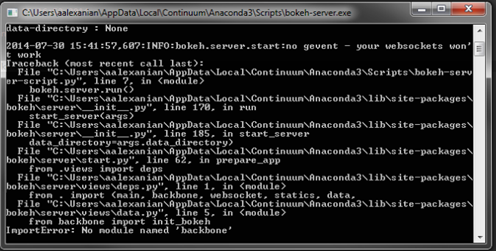
When I run it from the cmd line I get an error (image attached) saying “No module named ‘backbone’”. Do I need to be in a specific directory?

Thanks again,

Armen

···

On Wednesday, July 30, 2014 1:16:41 PM UTC-7, Armen Alexanian wrote:

Hi,

I’m new to Bokeh and Python, though I’ve made some great progress on a visualization I’m working on. I’ve tried the three Bokeh examples with widgets but can’t get any of them to work. I’m not sure if it’s because I’m using Windows or on my company network. Would someone please post a very simple example of a script which shows how to put a Select widget on a webpage without linking to any external data sets or requiring Bokeh server?

Thanks very much!

Armen

⌁   Link to post
Bryan
Bryan

Armen,

No yo hare doing everything right. This was a small problem affecting Python 3 in version 0.5. I think it should have been fixed in 0.5.1, however. What version are you running? you can check by executing:

import bokeh
bokeh.__version__

in the ipython or python terminal.

This is definitely fixed in master, so if nothing else we will get a dev build put up in the next day that you can install from binstar.

Bryan

···

On Jul 30, 2014, at 11:45 PM, Armen Alexanian <armenalexanian@gmail.com> wrote:

Hi Bryan,

When I run it from the cmd line I get an error (image attached) saying "No module named 'backbone'". Do I need to be in a specific directory?

Thanks again,
Armen

On Wednesday, July 30, 2014 1:16:41 PM UTC-7, Armen Alexanian wrote:
Hi,

I'm new to Bokeh and Python, though I've made some great progress on a visualization I'm working on. I've tried the three Bokeh examples with widgets but can't get any of them to work. I'm not sure if it's because I'm using Windows or on my company network. Would someone please post a very simple example of a script which shows how to put a Select widget on a webpage without linking to any external data sets or requiring Bokeh server?

Thanks very much!
Armen

--
You received this message because you are subscribed to the Google Groups "Bokeh Discussion - Public" group.
To unsubscribe from this group and stop receiving emails from it, send an email to bokeh+unsubscribe@continuum.io.
To post to this group, send email to bokeh@continuum.io.
To view this discussion on the web visit https://groups.google.com/a/continuum.io/d/msgid/bokeh/f757cea8-24ab-4ff3-b7aa-46a02854e0df%40continuum.io\.
For more options, visit https://groups.google.com/a/continuum.io/d/optout\.
<bokeh_error.PNG>

⌁   Link to post
Armen_Alexanian
Armen_Alexanian

Hi Damian,

That does seem to have the same effect as running from the cmd line. However, I get the same error as I did when running from the cmd line:

!bokeh-server --backend=memory

Bokeh Server Configuration

···

On Wed, Jul 30, 2014 at 3:44 PM, Damian Avila damian.avila@continuum.io wrote:

In the IPython console, you can probably do:

!bokeh-server --backend=memory

I mean prepend the ! execute on the shell…

–

You received this message because you are subscribed to the Google Groups “Bokeh Discussion - Public” group.

To unsubscribe from this group and stop receiving emails from it, send an email to bokeh+unsubscribe@continuum.io.

To post to this group, send email to bokeh@continuum.io.

To view this discussion on the web visit https://groups.google.com/a/continuum.io/d/msgid/bokeh/CAM9Ly3Gso_ZpCyEM42Nk_MPA8WjxqW6AyVqHRXodOMuVK8COkg%40mail.gmail.com.

For more options, visit https://groups.google.com/a/continuum.io/d/optout.

On Wed, Jul 30, 2014 at 7:40 PM, Bryan Van de Ven bryan@bokeh.org wrote:

Hi Armen,

bokeh-server is a separate application you need to run, not a function. You should execute it in your bash shell (if you are on linux or OSX) or in the cmd shell (if you are on windows). Let us know if you need more assistance!

Bryan

On Jul 30, 2014, at 11:37 PM, Armen Alexanian armenalexanian@gmail.com wrote:

Hi Bryan,

When I enter “bokeh-server --backend=memory” into Spyder or the IPython console, I get the error “can’t assign to operator”. Am I entering it in the right place?

Thanks,

Armen

On Wednesday, July 30, 2014 1:16:41 PM UTC-7, Armen Alexanian wrote:

Hi,

I’m new to Bokeh and Python, though I’ve made some great progress on a visualization I’m working on. I’ve tried the three Bokeh examples with widgets but can’t get any of them to work. I’m not sure if it’s because I’m using Windows or on my company network. Would someone please post a very simple example of a script which shows how to put a Select widget on a webpage without linking to any external data sets or requiring Bokeh server?

Thanks very much!

Armen

–

You received this message because you are subscribed to the Google Groups “Bokeh Discussion - Public” group.

To unsubscribe from this group and stop receiving emails from it, send an email to bokeh+unsubscribe@continuum.io.

To post to this group, send email to bokeh@continuum.io.

To view this discussion on the web visit https://groups.google.com/a/continuum.io/d/msgid/bokeh/4fa0176f-fb76-4dcc-8114-02127b2ec7ca%40continuum.io.

For more options, visit https://groups.google.com/a/continuum.io/d/optout.

–

You received this message because you are subscribed to the Google Groups “Bokeh Discussion - Public” group.

To unsubscribe from this group and stop receiving emails from it, send an email to bokeh+unsubscribe@continuum.io.

To post to this group, send email to bokeh@continuum.io.

To view this discussion on the web visit https://groups.google.com/a/continuum.io/d/msgid/bokeh/96E5683F-24C2-419D-A6D3-D1C42B3D3BA6%40continuum.io.
For more options, visit https://groups.google.com/a/continuum.io/d/optout.

⌁   Link to post
Bryan
Bryan

As a quick fix, you can also edit the file in question if you feel up to it. In the file

  C:\Users\aalexanian\AppData\Local\Continuum\Anaconda3\lib\site-packages\bokeh\server\views\data.py

on line 5, change
  
  from backbone import init_bokeh

to

  from .backbone import init_bokeh

But as I said I think this fix is in 0.5.1. Sorry for the trouble, we need to add some more stringent tests to make sure relative imports like that don't sneak in.

Bryan

···

On Jul 30, 2014, at 11:49 PM, Armen Alexanian <armenalexanian@gmail.com> wrote:

Hi Damian,

That does seem to have the same effect as running from the cmd line. However, I get the same error as I did when running from the cmd line:

!bokeh-server --backend=memory

Bokeh Server Configuration

listening : 127.0.0.1:5006
backend : memory
python options : debug:OFF, verbose:OFF, filter-logs:OFF, multi-user:OFF
js options : splitjs:OFF, debugjs:OFF
data-directory : None

2014-07-30 15:46:26,073:INFO:bokeh.server.start:no gevent - your websockets won't work
Traceback (most recent call last):
  File "C:\Users\aalexanian\AppData\Local\Continuum\Anaconda3\Scripts\bokeh-server-script.py", line 7, in <module>
    bokeh.server.run()
  File "C:\Users\aalexanian\AppData\Local\Continuum\Anaconda3\lib\site-packages\bokeh\server\__init__.py", line 170, in run
    start_server(args)
  File "C:\Users\aalexanian\AppData\Local\Continuum\Anaconda3\lib\site-packages\bokeh\server\__init__.py", line 185, in start_server
    data_directory=args.data_directory)
  File "C:\Users\aalexanian\AppData\Local\Continuum\Anaconda3\lib\site-packages\bokeh\server\start.py", line 62, in prepare_app
    from .views import deps
  File "C:\Users\aalexanian\AppData\Local\Continuum\Anaconda3\lib\site-packages\bokeh\server\views\deps.py", line 1, in <module>
    from . import (main, backbone, websocket, statics, data,
  File "C:\Users\aalexanian\AppData\Local\Continuum\Anaconda3\lib\site-packages\bokeh\server\views\data.py", line 5, in <module>
    from backbone import init_bokeh
ImportError: No module named 'backbone'

Thanks so much for your help!
Armen

On Wed, Jul 30, 2014 at 3:44 PM, Damian Avila <damian.avila@continuum.io> wrote:
In the IPython console, you can probably do:

!bokeh-server --backend=memory

I mean prepend the ! execute on the shell...

On Wed, Jul 30, 2014 at 7:40 PM, Bryan Van de Ven <bryan@bokeh.org> wrote:
Hi Armen,

bokeh-server is a separate application you need to run, not a function. You should execute it in your bash shell (if you are on linux or OSX) or in the cmd shell (if you are on windows). Let us know if you need more assistance!

Bryan

On Jul 30, 2014, at 11:37 PM, Armen Alexanian <armenalexanian@gmail.com> wrote:

> Hi Bryan,
>
> When I enter "bokeh-server --backend=memory" into Spyder or the IPython console, I get the error "can't assign to operator". Am I entering it in the right place?
>
> Thanks,
> Armen
>
> On Wednesday, July 30, 2014 1:16:41 PM UTC-7, Armen Alexanian wrote:
> Hi,
>
> I'm new to Bokeh and Python, though I've made some great progress on a visualization I'm working on. I've tried the three Bokeh examples with widgets but can't get any of them to work. I'm not sure if it's because I'm using Windows or on my company network. Would someone please post a very simple example of a script which shows how to put a Select widget on a webpage without linking to any external data sets or requiring Bokeh server?
>
> Thanks very much!
> Armen
>
> --
> You received this message because you are subscribed to the Google Groups "Bokeh Discussion - Public" group.
> To unsubscribe from this group and stop receiving emails from it, send an email to bokeh+unsubscribe@continuum.io.
> To post to this group, send email to bokeh@continuum.io.
> To view this discussion on the web visit https://groups.google.com/a/continuum.io/d/msgid/bokeh/4fa0176f-fb76-4dcc-8114-02127b2ec7ca%40continuum.io\.
> For more options, visit https://groups.google.com/a/continuum.io/d/optout\.

--
You received this message because you are subscribed to the Google Groups "Bokeh Discussion - Public" group.
To unsubscribe from this group and stop receiving emails from it, send an email to bokeh+unsubscribe@continuum.io.
To post to this group, send email to bokeh@continuum.io.
To view this discussion on the web visit https://groups.google.com/a/continuum.io/d/msgid/bokeh/96E5683F-24C2-419D-A6D3-D1C42B3D3BA6%40continuum.io\.
For more options, visit https://groups.google.com/a/continuum.io/d/optout\.

--
You received this message because you are subscribed to the Google Groups "Bokeh Discussion - Public" group.
To unsubscribe from this group and stop receiving emails from it, send an email to bokeh+unsubscribe@continuum.io.
To post to this group, send email to bokeh@continuum.io.
To view this discussion on the web visit https://groups.google.com/a/continuum.io/d/msgid/bokeh/CAM9Ly3Gso_ZpCyEM42Nk_MPA8WjxqW6AyVqHRXodOMuVK8COkg%40mail.gmail.com\.

For more options, visit https://groups.google.com/a/continuum.io/d/optout\.

--
You received this message because you are subscribed to the Google Groups "Bokeh Discussion - Public" group.
To unsubscribe from this group and stop receiving emails from it, send an email to bokeh+unsubscribe@continuum.io.
To post to this group, send email to bokeh@continuum.io.
To view this discussion on the web visit https://groups.google.com/a/continuum.io/d/msgid/bokeh/CALLGW%3DwMk52KEGSY81WbodkJsv59HWKGV%3D8n6LmGn08yx6k1dw%40mail.gmail.com\.
For more options, visit https://groups.google.com/a/continuum.io/d/optout\.

⌁   Link to post
Armen_Alexanian
Armen_Alexanian

Hi Brian,

It looks like I’m running 0.5.1.

In [26]: runfile(‘H:/Work Files/Python Programming/Scripts/Bokeh_Server.py’, wdir=‘H:/Work Files/Python Programming/Scripts’)

0.5.1

Thanks very much!

Armen

···

On Wednesday, July 30, 2014 1:16:41 PM UTC-7, Armen Alexanian wrote:

Hi,

I’m new to Bokeh and Python, though I’ve made some great progress on a visualization I’m working on. I’ve tried the three Bokeh examples with widgets but can’t get any of them to work. I’m not sure if it’s because I’m using Windows or on my company network. Would someone please post a very simple example of a script which shows how to put a Select widget on a webpage without linking to any external data sets or requiring Bokeh server?

Thanks very much!

Armen

⌁   Link to post
Bryan
Bryan

OK, I guess the fix was made after the 0.5.1 release. You can make the change described in my last message, or alternatively we will make a new dev build available soon.

Bryan

···

On Jul 30, 2014, at 11:53 PM, Armen Alexanian <armenalexanian@gmail.com> wrote:

Hi Brian,

It looks like I'm running 0.5.1.

In [26]: runfile('H:/Work Files/Python Programming/Scripts/Bokeh_Server.py', wdir='H:/Work Files/Python Programming/Scripts')
0.5.1

Thanks very much!
Armen

On Wednesday, July 30, 2014 1:16:41 PM UTC-7, Armen Alexanian wrote:
Hi,

I'm new to Bokeh and Python, though I've made some great progress on a visualization I'm working on. I've tried the three Bokeh examples with widgets but can't get any of them to work. I'm not sure if it's because I'm using Windows or on my company network. Would someone please post a very simple example of a script which shows how to put a Select widget on a webpage without linking to any external data sets or requiring Bokeh server?

Thanks very much!
Armen

--
You received this message because you are subscribed to the Google Groups "Bokeh Discussion - Public" group.
To unsubscribe from this group and stop receiving emails from it, send an email to bokeh+unsubscribe@continuum.io.
To post to this group, send email to bokeh@continuum.io.
To view this discussion on the web visit https://groups.google.com/a/continuum.io/d/msgid/bokeh/4f627734-f7ec-437f-b355-f354d965f552%40continuum.io\.
For more options, visit https://groups.google.com/a/continuum.io/d/optout\.

⌁   Link to post
Armen_Alexanian
Armen_Alexanian

Hi Brian,

I made the change and it worked! Now my bokeh-server is running. When I went to that url, I got this message:

The first time you want to use bokehplots.com, you need to do the following:

    import bokeh
cloud = bokeh.Cloud()
cloud.register("myusername", "mypassword")
# or
cloud.login("myusername", "mypassword")
cloud.browser_login()

Then when I ran this script:

import bokeh

cloud = bokeh.Cloud()

cloud.register(“armenalexanian”, “mypassword”)

cloud.browser_login()

I got the error message:

File “H:/Work Files/Python Programming/Scripts/Bokeh_Server.py”, line 15, in

cloud = bokeh.Cloud()

AttributeError: ‘module’ object has no attribute ‘Cloud’

Thanks!

Armen

···

On Wednesday, July 30, 2014 1:16:41 PM UTC-7, Armen Alexanian wrote:

Hi,

I’m new to Bokeh and Python, though I’ve made some great progress on a visualization I’m working on. I’ve tried the three Bokeh examples with widgets but can’t get any of them to work. I’m not sure if it’s because I’m using Windows or on my company network. Would someone please post a very simple example of a script which shows how to put a Select widget on a webpage without linking to any external data sets or requiring Bokeh server?

Thanks very much!

Armen

⌁   Link to post
Bryan
Bryan

Armen,

My sincere apologies, you are running into every thing that was scrubbed right after 0.5.1. :slight_smile: There was a point that we intended to run a hosted cloud plot service for our users. Unfortunately, we have not had the resources to back this aspect of the project seriously yet. However, you can run your own server locally (as you have) and then you don't need a cloud service! For instance, with the bokeh-server running, execute the following code:

    import numpy as np
    from bokeh.plotting import *
    
    N = 80
    x = np.linspace(0, 4*np.pi, N)
    y = np.sin(x)

    output_server("line")
    line(x,y, color="blue")
    show()

That should open up a we browser to your locally running server with the plot on it. You can also navigate to http://localhost:5006/bokeh/ to see a list of the documents you have stored on to your local server. We look forward to the day we can launch a hosted cloud service for Bokeh ourselves, perhaps later this year. But in the mean time you can run the bokeh server yourself.

Thanks,

Bryan

···

On Jul 31, 2014, at 12:07 AM, Armen Alexanian <armenalexanian@gmail.com> wrote:

Hi Brian,

I made the change and it worked! Now my bokeh-server is running. When I went to that url, I got this message:

The first time you want to use bokehplots.com, you need to do the following:
    import bokeh
    cloud = bokeh.Cloud()

    cloud.register("myusername", "mypassword")
    # or
    cloud.login("myusername", "mypassword")

    cloud.browser_login()

Then when I ran this script:

import bokeh
cloud = bokeh.Cloud()

cloud.register("armenalexanian", "mypassword")

cloud.browser_login()

I got the error message:

  File "H:/Work Files/Python Programming/Scripts/Bokeh_Server.py", line 15, in <module>
    cloud = bokeh.Cloud()

AttributeError: 'module' object has no attribute 'Cloud'

Thanks!
Armen

On Wednesday, July 30, 2014 1:16:41 PM UTC-7, Armen Alexanian wrote:
Hi,

I'm new to Bokeh and Python, though I've made some great progress on a visualization I'm working on. I've tried the three Bokeh examples with widgets but can't get any of them to work. I'm not sure if it's because I'm using Windows or on my company network. Would someone please post a very simple example of a script which shows how to put a Select widget on a webpage without linking to any external data sets or requiring Bokeh server?

Thanks very much!
Armen

--
You received this message because you are subscribed to the Google Groups "Bokeh Discussion - Public" group.
To unsubscribe from this group and stop receiving emails from it, send an email to bokeh+unsubscribe@continuum.io.
To post to this group, send email to bokeh@continuum.io.
To view this discussion on the web visit https://groups.google.com/a/continuum.io/d/msgid/bokeh/46b089e6-673c-4cde-8ad8-cbead09f9621%40continuum.io\.
For more options, visit https://groups.google.com/a/continuum.io/d/optout\.

⌁   Link to post
Armen_Alexanian
Armen_Alexanian

Hi Bryan,

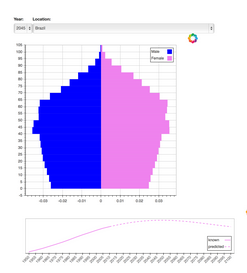
Thanks again for your help! That example worked great and I was able to see the line graph on my local bokeh-server at the url you specified. I then tried again using the population_server.py example and I got the following error:

File “parser.pyx”, line 332, in pandas.parser.TextReader.cinit (pandas\parser.c:3218)

File “parser.pyx”, line 559, in pandas.parser.TextReader._setup_parser_source (pandas\parser.c:5594)

OSError: File b’C:\Users\aalexanian/.bokeh\data\WPP2012_SA_DB03_POPULATION_QUINQUENNIAL.CSV’ does not exist

I’m almost there!

Thanks!

Armen

When I run the code for the first widgets example,

···

On Wednesday, July 30, 2014 1:16:41 PM UTC-7, Armen Alexanian wrote:

Hi,

I’m new to Bokeh and Python, though I’ve made some great progress on a visualization I’m working on. I’ve tried the three Bokeh examples with widgets but can’t get any of them to work. I’m not sure if it’s because I’m using Windows or on my company network. Would someone please post a very simple example of a script which shows how to put a Select widget on a webpage without linking to any external data sets or requiring Bokeh server?

Thanks very much!

Armen

⌁   Link to post
Damian_Avila
Damian_Avila

You need to download the bokeh.sampledata, just run this in a IPython console:

In [3]: import bokeh

In [4]: bokeh.sampledata.download()

And after that, you will be able to run it… I hope… :wink:

···

On Wed, Jul 30, 2014 at 9:13 PM, Armen Alexanian armenalexanian@gmail.com wrote:

Hi Bryan,

Thanks again for your help! That example worked great and I was able to see the line graph on my local bokeh-server at the url you specified. I then tried again using the population_server.py example and I got the following error:

File “parser.pyx”, line 332, in pandas.parser.TextReader.cinit (pandas\parser.c:3218)

File “parser.pyx”, line 559, in pandas.parser.TextReader._setup_parser_source (pandas\parser.c:5594)

OSError: File b’C:\Users\aalexanian/.bokeh\data\WPP2012_SA_DB03_POPULATION_QUINQUENNIAL.CSV’ does not exist

I’m almost there!

Thanks!

Armen

When I run the code for the first widgets example,

On Wednesday, July 30, 2014 1:16:41 PM UTC-7, Armen Alexanian wrote:

Hi,

I’m new to Bokeh and Python, though I’ve made some great progress on a visualization I’m working on. I’ve tried the three Bokeh examples with widgets but can’t get any of them to work. I’m not sure if it’s because I’m using Windows or on my company network. Would someone please post a very simple example of a script which shows how to put a Select widget on a webpage without linking to any external data sets or requiring Bokeh server?

Thanks very much!

Armen

–

You received this message because you are subscribed to the Google Groups “Bokeh Discussion - Public” group.

To unsubscribe from this group and stop receiving emails from it, send an email to bokeh+unsubscribe@continuum.io.

To post to this group, send email to bokeh@continuum.io.

To view this discussion on the web visit https://groups.google.com/a/continuum.io/d/msgid/bokeh/30347ae7-be53-44a0-a4ea-6907a73af745%40continuum.io.

For more options, visit https://groups.google.com/a/continuum.io/d/optout.

⌁   Link to post
Armen_Alexanian
Armen_Alexanian

Thanks Damian! I will try that tomorrow and let you know.

···

On Wed, Jul 30, 2014 at 9:13 PM, Armen Alexanian armenalexanian@gmail.com wrote:

Hi Bryan,

Thanks again for your help! That example worked great and I was able to see the line graph on my local bokeh-server at the url you specified. I then tried again using the population_server.py example and I got the following error:

File “parser.pyx”, line 332, in pandas.parser.TextReader.cinit (pandas\parser.c:3218)

File “parser.pyx”, line 559, in pandas.parser.TextReader._setup_parser_source (pandas\parser.c:5594)

OSError: File b’C:\Users\aalexanian/.bokeh\data\WPP2012_SA_DB03_POPULATION_QUINQUENNIAL.CSV’ does not exist

I’m almost there!

Thanks!

Armen

When I run the code for the first widgets example,

On Wednesday, July 30, 2014 1:16:41 PM UTC-7, Armen Alexanian wrote:

Hi,

I’m new to Bokeh and Python, though I’ve made some great progress on a visualization I’m working on. I’ve tried the three Bokeh examples with widgets but can’t get any of them to work. I’m not sure if it’s because I’m using Windows or on my company network. Would someone please post a very simple example of a script which shows how to put a Select widget on a webpage without linking to any external data sets or requiring Bokeh server?

Thanks very much!

Armen

–

You received this message because you are subscribed to the Google Groups “Bokeh Discussion - Public” group.

To unsubscribe from this group and stop receiving emails from it, send an email to bokeh+unsubscribe@continuum.io.

To post to this group, send email to bokeh@continuum.io.

To view this discussion on the web visit https://groups.google.com/a/continuum.io/d/msgid/bokeh/30347ae7-be53-44a0-a4ea-6907a73af745%40continuum.io.

For more options, visit https://groups.google.com/a/continuum.io/d/optout.

⌁   Link to post
Bryan
Bryan

Yes you are! There is some sample data that shipped separately because it is too large to check into the repo or include in the package. At a python prompt, execute:

import bokeh

bokeh.sampledata.download()

Thanks,

Bryan

···

On Jul 31, 2014, at 1:13, Armen Alexanian armenalexanian@gmail.com wrote:

Hi Bryan,

Thanks again for your help! That example worked great and I was able to see the line graph on my local bokeh-server at the url you specified. I then tried again using the population_server.py example and I got the following error:

File “parser.pyx”, line 332, in pandas.parser.TextReader.cinit (pandas\parser.c:3218)

File “parser.pyx”, line 559, in pandas.parser.TextReader._setup_parser_source (pandas\parser.c:5594)

OSError: File b’C:\Users\aalexanian/.bokeh\data\WPP2012_SA_DB03_POPULATION_QUINQUENNIAL.CSV’ does not exist

I’m almost there!

Thanks!

Armen

When I run the code for the first widgets example,

On Wednesday, July 30, 2014 1:16:41 PM UTC-7, Armen Alexanian wrote:

Hi,

I’m new to Bokeh and Python, though I’ve made some great progress on a visualization I’m working on. I’ve tried the three Bokeh examples with widgets but can’t get any of them to work. I’m not sure if it’s because I’m using Windows or on my company network. Would someone please post a very simple example of a script which shows how to put a Select widget on a webpage without linking to any external data sets or requiring Bokeh server?

Thanks very much!

Armen

–

You received this message because you are subscribed to the Google Groups “Bokeh Discussion - Public” group.

To unsubscribe from this group and stop receiving emails from it, send an email to bokeh+unsubscribe@continuum.io.

To post to this group, send email to bokeh@continuum.io.

To view this discussion on the web visit https://groups.google.com/a/continuum.io/d/msgid/bokeh/30347ae7-be53-44a0-a4ea-6907a73af745%40continuum.io.

For more options, visit https://groups.google.com/a/continuum.io/d/optout.

<population_server_py_graphic.PNG>

⌁   Link to post
Armen_Alexanian
Armen_Alexanian

Bryan and Damian,

Thanks very much again! The sample data downloaded perfectly. When I tried to rerun the script (while my bokeh-server is running), I get this strange error below “‘Plot’ object has no attribute ‘below’”. When I comment out that line, there’s another line which has “plot.left” and it gives me the same error for the “left”. When I looked at plot’s attributes by typing “plot.” in Spyder and it brings up a drop down list of the attributes, it’s correct that there aren’t below or left attributes.

File “H:/Work Files/Python Programming/Scripts/Widgets_Test.py”, line 60, in pyramid

plot.below.append(xaxis)

AttributeError: ‘Plot’ object has no attribute ‘below’

Thanks so much for your help! I really appreciate it.

Armen

···

On Wednesday, July 30, 2014 1:16:41 PM UTC-7, Armen Alexanian wrote:

Hi,

I’m new to Bokeh and Python, though I’ve made some great progress on a visualization I’m working on. I’ve tried the three Bokeh examples with widgets but can’t get any of them to work. I’m not sure if it’s because I’m using Windows or on my company network. Would someone please post a very simple example of a script which shows how to put a Select widget on a webpage without linking to any external data sets or requiring Bokeh server?

Thanks very much!

Armen

⌁   Link to post
Damian_Avila
Damian_Avila

OK, you hit a bug… I can reproduce it in 0.5.1, but it seems to be fixed on master, because it is working as expected.
We will probably have the 0.5.2 early next week, and the fix will be included. Sorry about this bug… we recently have a huge PR merged and still we have some little things to fix. Thanks for you report, btw, it is very useful…

···

On Thu, Jul 31, 2014 at 1:44 PM, Armen Alexanian armenalexanian@gmail.com wrote:

Bryan and Damian,

Thanks very much again! The sample data downloaded perfectly. When I tried to rerun the script (while my bokeh-server is running), I get this strange error below “‘Plot’ object has no attribute ‘below’”. When I comment out that line, there’s another line which has “plot.left” and it gives me the same error for the “left”. When I looked at plot’s attributes by typing “plot.” in Spyder and it brings up a drop down list of the attributes, it’s correct that there aren’t below or left attributes.

File “H:/Work Files/Python Programming/Scripts/Widgets_Test.py”, line 60, in pyramid

plot.below.append(xaxis)

AttributeError: ‘Plot’ object has no attribute ‘below’

Thanks so much for your help! I really appreciate it.

Armen

On Wednesday, July 30, 2014 1:16:41 PM UTC-7, Armen Alexanian wrote:

Hi,

I’m new to Bokeh and Python, though I’ve made some great progress on a visualization I’m working on. I’ve tried the three Bokeh examples with widgets but can’t get any of them to work. I’m not sure if it’s because I’m using Windows or on my company network. Would someone please post a very simple example of a script which shows how to put a Select widget on a webpage without linking to any external data sets or requiring Bokeh server?

Thanks very much!

Armen

–

You received this message because you are subscribed to the Google Groups “Bokeh Discussion - Public” group.

To unsubscribe from this group and stop receiving emails from it, send an email to bokeh+unsubscribe@continuum.io.

To post to this group, send email to bokeh@continuum.io.

To view this discussion on the web visit https://groups.google.com/a/continuum.io/d/msgid/bokeh/2e6319b8-04b1-425c-b685-ca39da79fff9%40continuum.io.

For more options, visit https://groups.google.com/a/continuum.io/d/optout.

⌁   Link to post
Armen_Alexanian
Armen_Alexanian

Hi Damian,

Thanks so much for looking into this! It’s really cool for me to be able to help you guys test the new software. When the new 0.5.2 comes out next week, is there a command I can use to update my Bokeh version?

By the way, I was a student last week at Continuum’s Python for Science class (which I highly recommend to anyone interested in Python), and Ben Zaitlen was one of our teachers and I found his article about Bokeh on his blog so he showed us a bunch of great examples and I started using it. It’s working great so far, helping me create a visual representation of the many buildings my employer owns and the various attributes of each unit. I started by using the periodic table graph example and modified it so that each unit is sized differently based on its square footage. The hover tool is awesome! I can hover over each unit and see the details. I’m looking forward to using the Select widget so users can have a drop-down menu of buildings, and a drop-down menu of attributes by which to color code the units and then the selected building will appear with the selected attributes. Some of the attributes chosen will result in different colored units and others will result in heat-map colored units with different shades of one color to denote that attribute’s concentration. I did a somewhat related visualization in CoffeeScript last year but the Bokeh tool is much simpler because it’s specifically made to create graphs and visualizations. (CoffeeScript is awesome though!)

Thanks again,

Armen

···

On Wednesday, July 30, 2014 1:16:41 PM UTC-7, Armen Alexanian wrote:

Hi,

I’m new to Bokeh and Python, though I’ve made some great progress on a visualization I’m working on. I’ve tried the three Bokeh examples with widgets but can’t get any of them to work. I’m not sure if it’s because I’m using Windows or on my company network. Would someone please post a very simple example of a script which shows how to put a Select widget on a webpage without linking to any external data sets or requiring Bokeh server?

Thanks very much!

Armen

⌁   Link to post
Damian_Avila
Damian_Avila

When we release the new version I suggest you to update it via conda or pip (I don’t know which system are you using now).

For conda:

conda update bokeh

For pip:

pip uninstall bokeh

to delete the old version, and then:

pip install bokeh

to install the new one…

Currently pip install bokeh -U is not working so I suggest you to do what I describe above.

It is really great you start using Bokeh and keep trying after each fail… you help us a lot. Thanks for your patient and I hope you enjoy Bokeh and all its features a lot!

Damian

···

On Thu, Jul 31, 2014 at 3:09 PM, Armen Alexanian armenalexanian@gmail.com wrote:

Hi Damian,

Thanks so much for looking into this! It’s really cool for me to be able to help you guys test the new software. When the new 0.5.2 comes out next week, is there a command I can use to update my Bokeh version?

By the way, I was a student last week at Continuum’s Python for Science class (which I highly recommend to anyone interested in Python), and Ben Zaitlen was one of our teachers and I found his article about Bokeh on his blog so he showed us a bunch of great examples and I started using it. It’s working great so far, helping me create a visual representation of the many buildings my employer owns and the various attributes of each unit. I started by using the periodic table graph example and modified it so that each unit is sized differently based on its square footage. The hover tool is awesome! I can hover over each unit and see the details. I’m looking forward to using the Select widget so users can have a drop-down menu of buildings, and a drop-down menu of attributes by which to color code the units and then the selected building will appear with the selected attributes. Some of the attributes chosen will result in different colored units and others will result in heat-map colored units with different shades of one color to denote that attribute’s concentration. I did a somewhat related visualization in CoffeeScript last year but the Bokeh tool is much simpler because it’s specifically made to create graphs and visualizations. (CoffeeScript is awesome though!)

Thanks again,

Armen

On Wednesday, July 30, 2014 1:16:41 PM UTC-7, Armen Alexanian wrote:

Hi,

I’m new to Bokeh and Python, though I’ve made some great progress on a visualization I’m working on. I’ve tried the three Bokeh examples with widgets but can’t get any of them to work. I’m not sure if it’s because I’m using Windows or on my company network. Would someone please post a very simple example of a script which shows how to put a Select widget on a webpage without linking to any external data sets or requiring Bokeh server?

Thanks very much!

Armen

–

You received this message because you are subscribed to the Google Groups “Bokeh Discussion - Public” group.

To unsubscribe from this group and stop receiving emails from it, send an email to bokeh+unsubscribe@continuum.io.

To post to this group, send email to bokeh@continuum.io.

To view this discussion on the web visit https://groups.google.com/a/continuum.io/d/msgid/bokeh/b763479f-21fe-449d-93aa-b70f139e9f5a%40continuum.io.

For more options, visit https://groups.google.com/a/continuum.io/d/optout.

⌁   Link to post
Armen_Alexanian
Armen_Alexanian

Thanks so much Damian! I’m looking forward to next week with the new version. I still have lots of work to do until then. :slight_smile:

Armen

···

On Wednesday, July 30, 2014 1:16:41 PM UTC-7, Armen Alexanian wrote:

Hi,

I’m new to Bokeh and Python, though I’ve made some great progress on a visualization I’m working on. I’ve tried the three Bokeh examples with widgets but can’t get any of them to work. I’m not sure if it’s because I’m using Windows or on my company network. Would someone please post a very simple example of a script which shows how to put a Select widget on a webpage without linking to any external data sets or requiring Bokeh server?

Thanks very much!

Armen

⌁   Link to post

End of archived discussion · Replies are disabled