☰Read-only archive⌕
Looking for help with Bokeh?

This is a read-only archive. Ask questions and join the conversation on GitHub.

Visit Community Support on GitHub →
Archived discussions · Captured October 28, 2026

The bokeh document is only updated after the callback has finished

Community Supportbokehjsserver
mpplotit
mpplotit

I need that immediately after clicking the button, the button is turned off in order to exclude the repeated pressing of the button and inform about the start of the process of querying the database. After that, a query to the database is performed, about 5 minutes. After receiving the data, the button turns on again.

In my application my_app.py, the button is turned off and on only after processing the on_button_clicked () callback, I need the document to be updated immediately after the user clicks the button, without waiting for the database to process the request. How to implement this?

my_app.py:

import time
from bokeh.io import curdoc
from bokeh.models.widgets import TextAreaInput,Button
from bokeh.layouts import column

def init_control_panel():
doc=curdoc()
button = Button(label=“Download information from DB”, button_type=“success”)
information = TextAreaInput(value=’’, rows=6, title=“Information from DB:”)
mypage=column(information,button)
def on_button_clicked():
button.disabled=True #I turn off the button so that the user does not click again and sees that the database request has been sent
time.sleep(2)#imitation of very long database query processing
information.value=information.value+‘blablabla\n’#
button.disabled=False#information received from the database
button.on_click(on_button_clicked)
doc.add_root(mypage)

init_control_panel()
⌁   Link to post
Xavier_Artusi
Xavier_Artusi

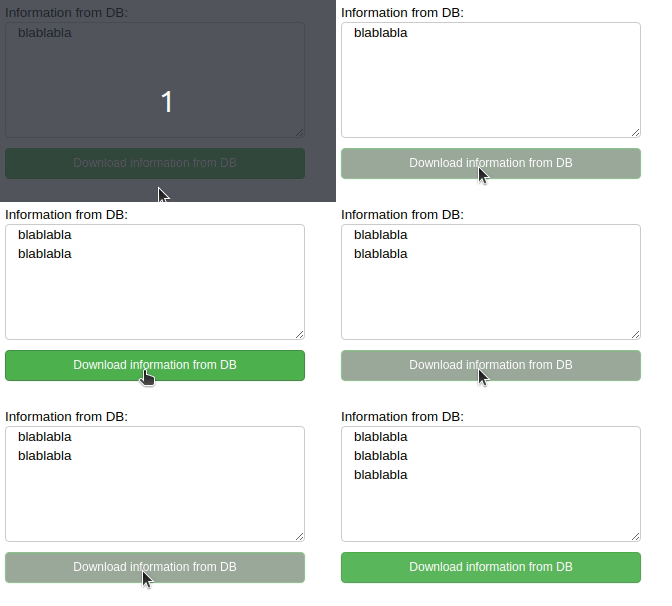
You should use add_next_tick_callback:

import time
from bokeh.io import curdoc
from bokeh.models.widgets import TextAreaInput,Button
from bokeh.layouts import column

doc=curdoc()
button = Button(label="Download information from DB", button_type="success")
information = TextAreaInput(value='', rows=6, title="Information from DB:")
mypage=column(information,button)


def on_button_clicked():
    curdoc().add_next_tick_callback(lambda : setattr(button, 'disabled', True))
     #I turn off the button so that the user does not click again and sees that the database request has been sent
    def process_request():
        time.sleep(2)
        information.value=information.value+'blablabla\n'
    curdoc().add_next_tick_callback(process_request)
    #imitation of very long database query processing
    curdoc().add_next_tick_callback(lambda : setattr(button, 'disabled', False))

button.on_click(on_button_clicked)
doc.add_root(mypage)

Peek 23-02-2020 11-33

⌁   Link to post
p-himik
p-himik

Alternatively, this should work as well:

def on_button_clicked():
    button.disabled = True
    
    def process_request():
        time.sleep(2)
        information.value = information.value+'blablabla\n'
        button.disabled = False

    curdoc().add_next_tick_callback(process_request)

In essence, if you need the queued document updates (i.e. changes to some of the models) be dispatched to the clients, you have to give the control back to the underlying Tornado loop. Scheduling the next piece of work with add_next_tick_callback does exactly that.

⌁   Link to post

End of archived discussion · Replies are disabled